
A Graphical Terminal Interface

Project description
NOTE: This version is OBSOLETE. Download the latest version from http://pypi.python.org/pypi/graphterm
GraphTerm is a browser-based graphical terminal interface, that aims to seamlessly blend the command line and graphical user interfaces. The goal is to provide a fully backwards-compatible terminal emulator for xterm, with additional graphical extensions that can be accessed as needed. GraphTerm builds upon two earlier browser-based terminal projects, XMLTerm, and AjaxTerm. (Another recent project along these lines is TermKit.)
A GraphTerm terminal window is just a web page served from the GraphTerm web server program. Multiple users can connect simultaneously to the web server to share terminal sessions. Multiple hosts can also connect to the server (on a different port), allowing a single user to access all of them via the browser. The GraphTerm server acts as a router, sending input from browser windows for different users to the appropriate terminal (“pseudo-tty”) sessions running on different hosts, and transmitting the terminal output back to the browser windows.
This flexible, networked implementation allows for several possible applications for GraphTerm, such as:
an enhanced terminal that combines the command line with basic GUI operations like navigating folders, file drag-and-drop, displaying images etc.
a web-based remote desktop that supports a simple GUI without the need for installing VNC or X-windows on the remote host
a detachable terminal multiplexer, sort of like GNU screen or tmux (but with only basic features)
a collaborative terminal that can be remotely accessed by multiple users simultaneously, to run programs, edit files etc.
a simple presentation tool for webcasting images as slideshows (and receiving live feedback)
a management console for a cluster of real or virtual hosts, (e.g., to create a virtual computer lab using cloud instances)
The interface is designed to be touch-friendly for use with tablets, relying upon command re-use to minimize the need for a keyboard. It preserves history for all commands, whether entered by typing, clicking, or tapping. It is also themable using CSS.
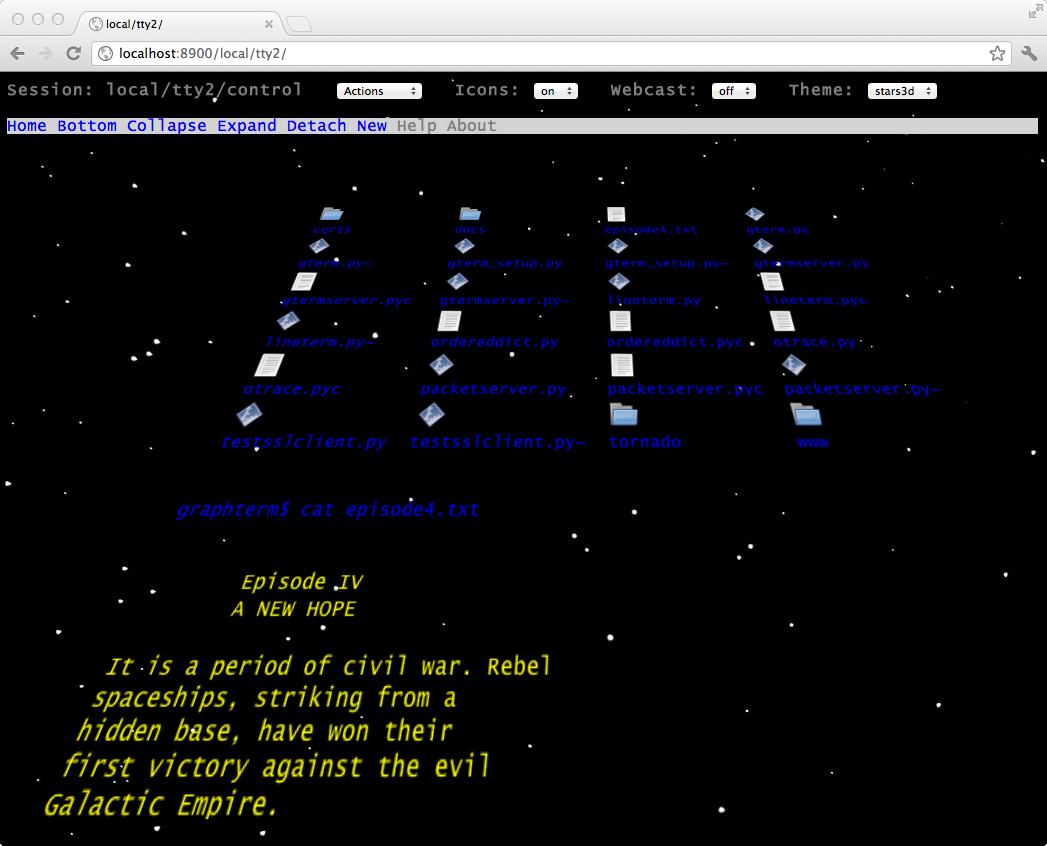
You can find more information on using GraphTerm in its project page. Images of GraphTerm in action can be found in screenshots and in this YouTube Video. Here is a sample screenshot illustrating graphical gls and cat command output using a 3D perspective theme (captured on OS X Lion, using Google Chrome).
NOTE: This version is OBSOLETE. Download the latest version from http://pypi.python.org/pypi/graphterm
Release history Release notifications | RSS feed


Download files
Download the file for your platform. If you're not sure which to choose, learn more about installing packages.
Source Distribution
Built Distribution
Filter files by name, interpreter, ABI, and platform.
If you're not sure about the file name format, learn more about wheel file names.
Copy a direct link to the current filters
File details
Details for the file graphterm-0.35.0.tar.gz.
File metadata
- Download URL: graphterm-0.35.0.tar.gz
- Upload date:
- Size: 1.4 MB
- Tags: Source
- Uploaded using Trusted Publishing? No
File hashes
| Algorithm | Hash digest | |
|---|---|---|
| SHA256 |
5870f658fc5e9c03eaf149407327a0d6301fe0493dcbf64c46718e45ef9d62f7
|
|
| MD5 |
e2d562543b6f67500d4ad8e544012916
|
|
| BLAKE2b-256 |
e4815290fdc991d574ef3fa82bc6bc4e062a1fe64d4816d96e887082c1320b56
|
File details
Details for the file graphterm-0.35.0-py2.7.egg.
File metadata
- Download URL: graphterm-0.35.0-py2.7.egg
- Upload date:
- Size: 2.1 MB
- Tags: Egg
- Uploaded using Trusted Publishing? No
File hashes
| Algorithm | Hash digest | |
|---|---|---|
| SHA256 |
1161a491031e36b5d2a1e478add4f3c5062c009ca0e2898bd604e176c297b453
|
|
| MD5 |
0924507ec8c8498f1f7d32c5b5b49b8a
|
|
| BLAKE2b-256 |
b4c7f7fc4ba55d2e6467f11229bc4a9049e07ff15337bb3386f7b6475582642d
|






