
A toolkit for fine-tuning, inferencing, and evaluating GreenBitAI's LLMs.


Project description
Green-Bit-LLM
This Python package uses the Bitorch Engine for efficient operations on GreenBitAI's Low-bit Language Models (LLMs). It enables high-performance inference on both cloud-based and consumer-level GPUs, and supports full-parameter fine-tuning directly using quantized LLMs. Additionally, you can use our provided evaluation tools to validate the model's performance on mainstream benchmark datasets.
News
- [2025/5]
- Qwen-3 and Deepseek support.
- [2024/10]
- Langchain integration, model server support.
- [2024/04]
- We have launched over 200 low-bit LLMs in GreenBitAI's Hugging Face Model Repo. Our release includes highly precise 2.2/2.5/3-bit models across the LLM family, featuring LLaMA 2/3, 01-Yi, Qwen, Mistral, Phi-3 and more.
- We released Bitorch Engine for low-bit quantized neural network operations. Our release support full parameter fine-tuning and parameter efficiency fine-tuning (PEFT), even under extremely constrained GPU resource conditions.
LLMs
We have released over 260 highly efficient 2-4 bit models across the modern LLM family, featuring Deepseek, LLaMA, Qwen, Mistral, Phi, and more. Explore all available models in our Hugging Face repository. green-bit-llm is also fully compatible with all 4-bit models in the AutoGPTQ series.
Installation
This package depends on Bitorch Engine and a first experimental binary release for Linux with CUDA 12.1 is ready. We recommend to create a conda environment to manage the installed CUDA version and other packages.
Conda
We recommend using Miniconda for a lightweight installation. Please download the installer from the official Miniconda website and follow the setup instructions.
After Conda successfully installed, do the following steps:
- Create Environment for Python 3.10 and activate it:
conda create -y --name bitorch-engine python=3.10
conda activate bitorch-engine
- Install target CUDA version:
conda install -y -c "nvidia/label/cuda-12.1.0" cuda-toolkit
- Install bitorch engine:
Inference ONLY
pip install \
"https://packages.greenbit.ai/whl/cu121/bitorch-engine/bitorch_engine-0.2.6-cp310-cp310-linux_x86_64.whl"
Training REQUIRED
Install our customized torch that allows gradients on INT tensors and install it with pip (this URL is for CUDA 12.1 and Python 3.10 - you can find other versions here) together with bitorch engine:
pip install \
  "https://packages.greenbit.ai/whl/cu121/torch/torch-2.5.1-cp310-cp310-linux_x86_64.whl" \
  "https://packages.greenbit.ai/whl/cu121/bitorch-engine/bitorch_engine-0.2.6-cp310-cp310-linux_x86_64.whl"
- Install green-bit-llm:
via pypi
pip install green-bit-llm
or from source
git clone https://github.com/GreenBitAI/green-bit-llm.git
cd green-bit-llm
pip install -r requirements.txt
- Install Flash Attention (
flash-attn) according to their official instructions.
pip install flash-attn --no-build-isolation
Examples
Simple Generation
Run the simple generation script as follows:
CUDA_VISIBLE_DEVICES=0 python -m green_bit_llm.inference.sim_gen --model GreenBitAI/Qwen-3-1.7B-layer-mix-bpw-4.0 --max-tokens 1024 --use-flash-attention-2
FastAPI Model Server
A high-performance HTTP API for text generation with GreenBitAI's low-bit models.
Quick Start
- Run:
CUDA_VISIBLE_DEVICES=0 python -m green_bit_llm.serve.api.v1.fastapi_server --model GreenBitAI/Qwen-3-1.7B-layer-mix-bpw-4.0 --host 127.0.0.1 --port 11668
- Use:
# Chat
curl http://localhost:11668/v1/GreenBitAI-Qwen-3-17B-layer-mix-bpw-40/chat/completions -H "Content-Type: application/json" \
  -d '{"model": "default_model", "messages": [{"role": "user", "content": "Hello!"}]}'

# Chat stream
curl http://localhost:11668/v1/GreenBitAI-Qwen-3-17B-layer-mix-bpw-40/chat/completions -H "Content-Type: application/json"  \
  -d '{"model": "default_model", "messages": [{"role": "user", "content": "Hello!"}], "stream": "True"}'
Full-parameter fine-tuning
Full parameter fine-tuning of the LLaMA-3 8B model using a single GTX 3090 GPU with 24GB of graphics memory:
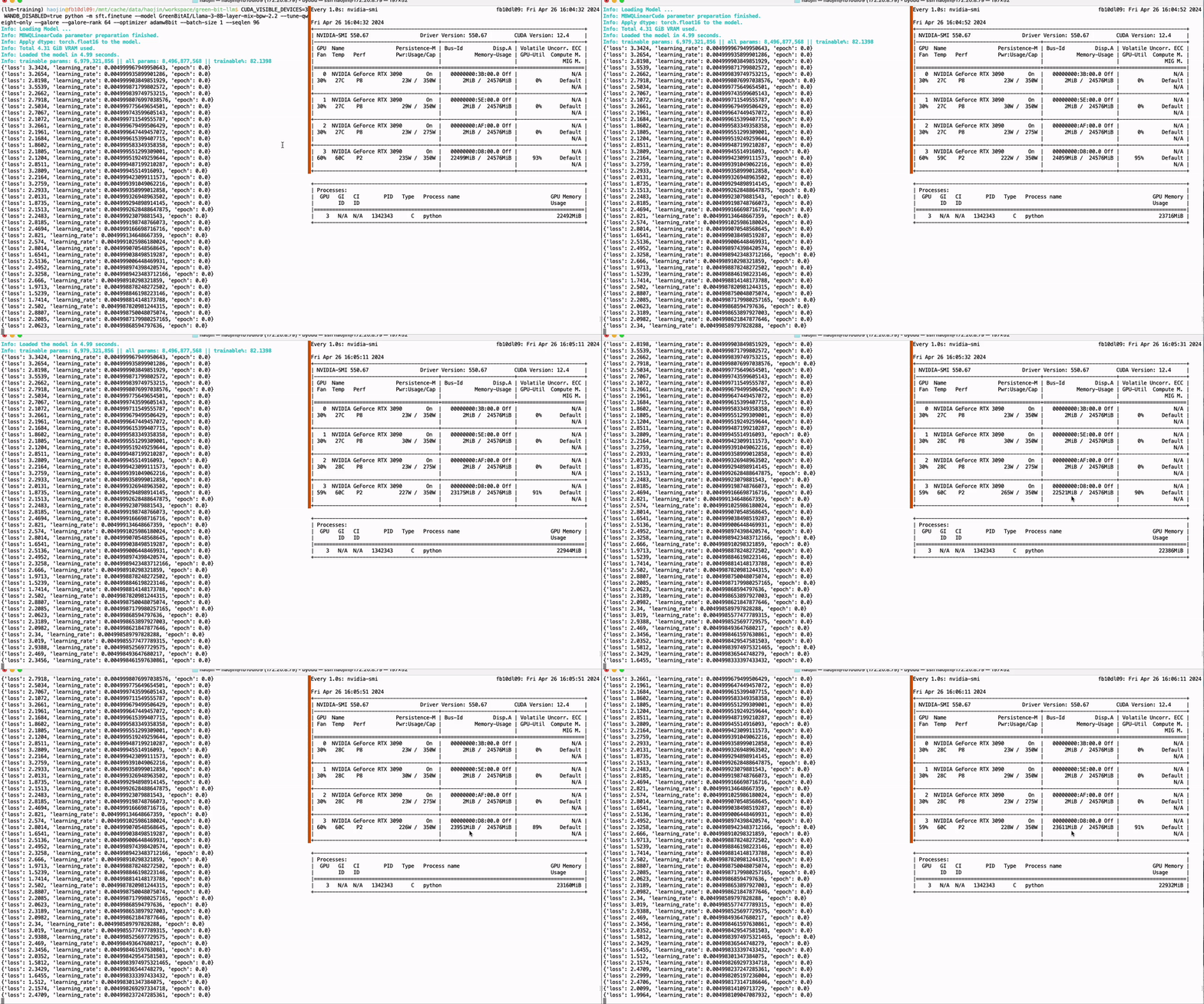
Run the script as follows to fine-tune the quantized weights of the model on the target dataset. The '--tune-qweight-only' parameter determines whether to fine-tune only the quantized weights or all weights, including non-quantized ones.
CUDA_VISIBLE_DEVICES=0 python -m green_bit_llm.sft.finetune --model GreenBitAI/Qwen-1.5-1.8B-layer-mix-bpw-3.0 --dataset tatsu-lab/alpaca --optimizer DiodeMix --tune-qweight-only

# AutoGPTQ model Q-SFT
CUDA_VISIBLE_DEVICES=0 python -m green_bit_llm.sft.finetune --model astronomer/Llama-3-8B-Instruct-GPTQ-4-Bit --dataset tatsu-lab/alpaca --tune-qweight-only --batch-size 1
Parameter efficient fine-tuning
PEFT of the 01-Yi 34B model using a single GTX 3090 GPU with 24GB of graphics memory:
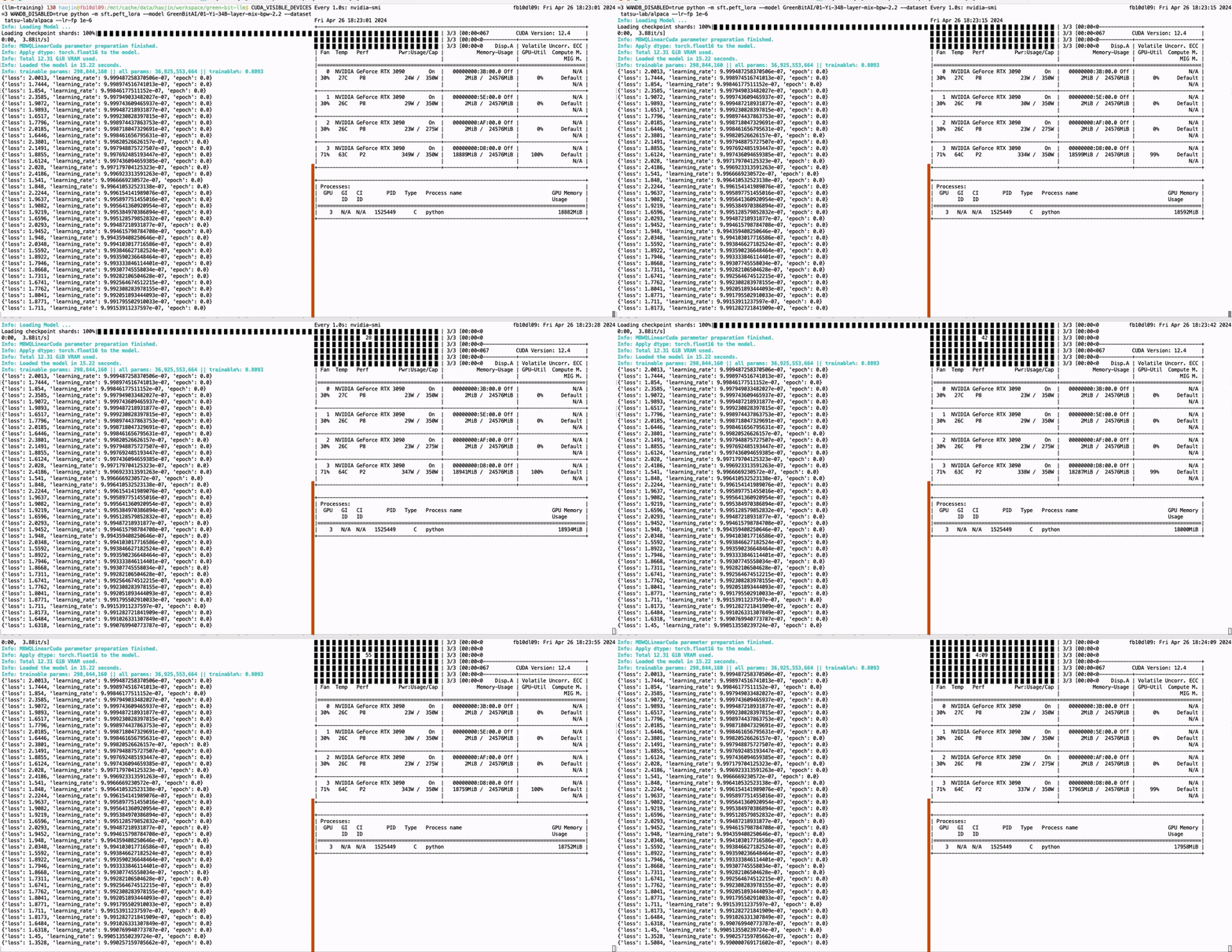
CUDA_VISIBLE_DEVICES=0 python -m green_bit_llm.sft.peft_lora --model GreenBitAI/Qwen-1.5-1.8B-layer-mix-bpw-3.0 --dataset tatsu-lab/alpaca --lr-fp 1e-6

# AutoGPTQ model with Lora
CUDA_VISIBLE_DEVICES=0 python -m green_bit_llm.sft.peft_lora --model astronomer/Llama-3-8B-Instruct-GPTQ-4-Bit --dataset tatsu-lab/alpaca --lr-fp 1e-6
Further Usage
Please see the description of the Inference, sft and evaluation package for details.
License
We release our codes under the Apache 2.0 License. Additionally, three packages are also partly based on third-party open-source codes. For detailed information, please refer to the description pages of the sub-projects.


Download files
Download the file for your platform. If you're not sure which to choose, learn more about installing packages.
Source Distribution
Built Distribution
Filter files by name, interpreter, ABI, and platform.
If you're not sure about the file name format, learn more about wheel file names.
Copy a direct link to the current filters
File details
Details for the file green_bit_llm-0.2.5.tar.gz.
File metadata
- Download URL: green_bit_llm-0.2.5.tar.gz
- Upload date:
- Size: 84.9 kB
- Tags: Source
- Uploaded using Trusted Publishing? No
- Uploaded via: twine/5.1.1 CPython/3.9.20
File hashes
| Algorithm | Hash digest | |
|---|---|---|
| SHA256 |
4a67beb9c868bdbc45e6980c097fbc25c101c164541ca3e682763482aa864c26
|
|
| MD5 |
d164d3f14ec9bdf6e539f1ec5b0bc236
|
|
| BLAKE2b-256 |
8447d889b685542339b4c8b57dea423d5aae30de9a4139f26718b7d5f0b6d0dd
|
File details
Details for the file green_bit_llm-0.2.5-py3-none-any.whl.
File metadata
- Download URL: green_bit_llm-0.2.5-py3-none-any.whl
- Upload date:
- Size: 103.8 kB
- Tags: Python 3
- Uploaded using Trusted Publishing? No
- Uploaded via: twine/5.1.1 CPython/3.9.20
File hashes
| Algorithm | Hash digest | |
|---|---|---|
| SHA256 |
515ab8b813fc488cc09c446ff07b8946a16212bbe18740ee3de4064c8746f1af
|
|
| MD5 |
959b8809bb4554dcee60d00dcbece9b6
|
|
| BLAKE2b-256 |
85bec25cf950fd3545b07850969f90b7a08a05a02f84caa05f2215def7fc4952
|






