
gvc (Git Visual Compare)
The ease of a visual diff viewer, the power of a command-line diffing tool.

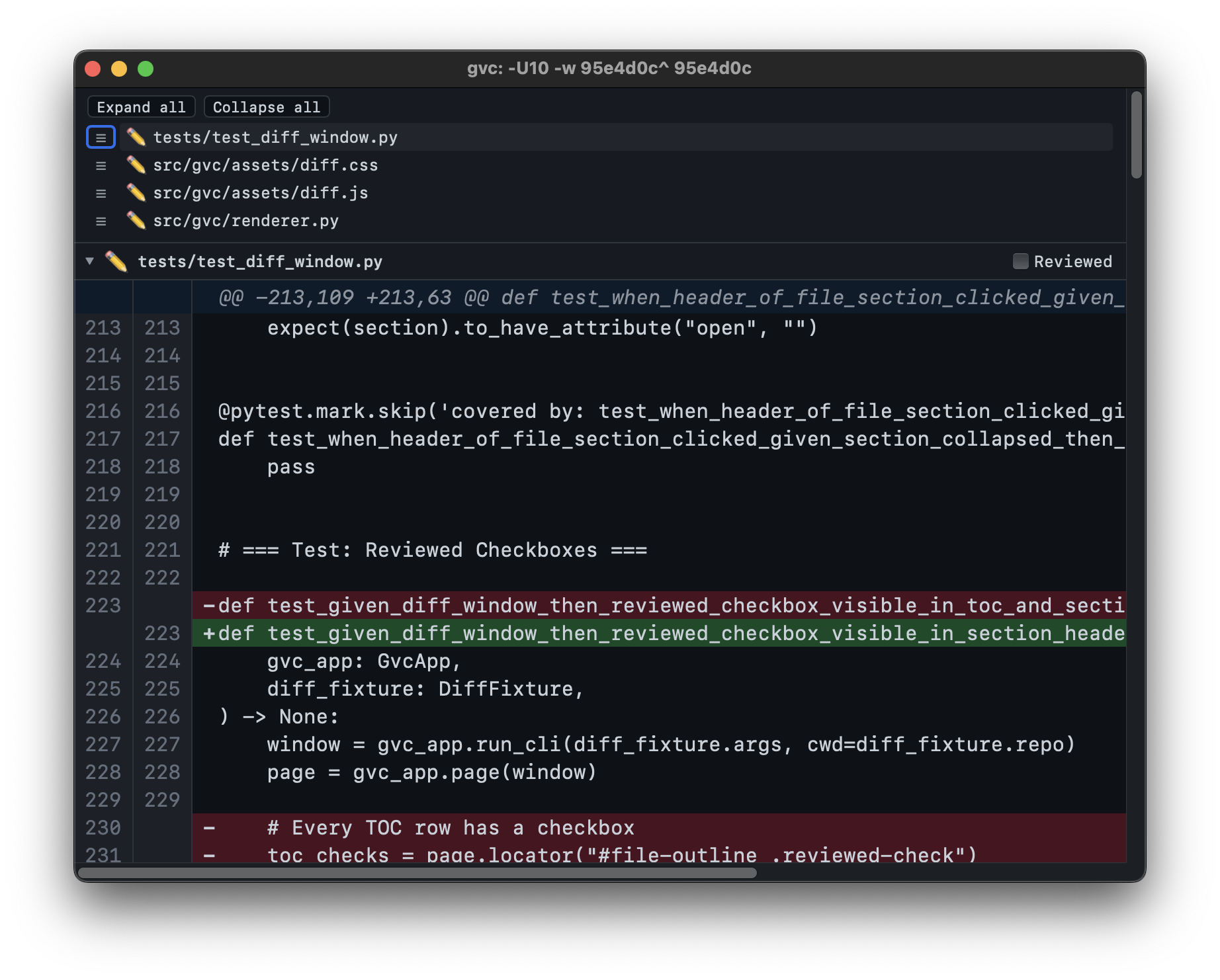
gvc is a lightweight macOS GUI for viewing git diff output. Run gvc where you'd normally run git diff - it opens a native window displaying a formatted, scrollable, searchable diff. It was built as a modern replacement for GitX's --diff mode, which served gvc's author faithfully for over a decade but lacked dark mode, find, and active maintenance.
Why Another Diff Tool?
Most visual diff tools fall into one of two camps: GUI diff apps limited to looking at a single commit at a time or advanced TUI diff tools supporting commit ranges, per-file filtering, etc that are nevertheless trapped inside a small terminal window. gvc fills the gap - it's a CLI-driven GUI. You type a CLI diff command - with as many bells and whistles as you want - and a full GUI window appears.
- Full
git diffpassthrough - anything you can pass togit diff, you can pass togvc. - Lightweight - not a heavy Electron app, not a TUI. Uses a platform-native WebView (WKWebView) to display diffs.
- Free and open source - no subscriptions, no accounts.
Features
- Light and dark mode
- Find (Cmd+F)
- Adjustable font size (Cmd+Plus / Cmd+Minus)
- File outline to jump to any file
- Collapsible file sections with expand/collapse all
Installation
Requires Python 3.14+ and a working git installation.
# Install pipx first
python3 -m pip install pipx

# Install gvc
pipx install gvc
After installation, gvc is available as a command in your shell.
Usage
gvc takes the same arguments as git diff:
gvc                              # Working tree changes (unstaged)
gvc --cached                     # Staged changes
gvc HEAD~1 HEAD                  # Compare two commits
gvc abc123 def456                # Compare any two refs
gvc HEAD~3 HEAD -- src/foo.py    # Limit to specific files
gvc -w HEAD~1 HEAD               # Ignore whitespace
gvc -U20 HEAD~1 HEAD             # 20 lines of context
Each invocation opens a new window. The CLI returns immediately - your terminal is not blocked.
Keyboard Shortcuts
| Shortcut | Action |
|---|---|
| Cmd+F | Open find bar |
| Cmd+G | Find next |
| Shift+Cmd+G | Find previous |
| Cmd+Plus | Increase font size |
| Cmd+Minus | Decrease font size |
| Cmd+W | Close window |
| Cmd+Q | Quit application |
Release Notes
See RELEASE_NOTES.md
1 maintainer

Metadata
1 maintainer
Release files for gvc 1.3.0
For a detailed explanation of source distributions (sdists) and built distributions (wheels), please see the package formats documentation.
Source distribution (sdist)
| File | Size | Uploaded | |
|---|---|---|---|
| gvc-1.3.0.tar.gz | 773.9 kB | Details |
Built distribution (wheel)
| File | Interpreter | ABI | Platform | Reset |
|---|---|---|---|---|
| gvc-1.3.0-py3-none-any.whl | Python 3 | none | any | Details |
Total release size: 1.6 MB
Release files / gvc-1.3.0.tar.gz
| Download URL | gvc-1.3.0.tar.gz |
|---|---|
| Size | 773.9 kB |
| Tags | Source |
|
SHA-256 checksum How to use checksums |
1c8b2f934823d6d819658755aded8d3b9d1adc983db864e05c2037413189c913
|
|
BLAKE2b-256 checksum How to use checksums |
1d1c4cd61c11321c855f81644236ace76f2d31c03c5c79e02d4b00ce23ca3456
|
| Upload date | |
|
Uploaded using Trusted Publishing? What is trusted publishing? |
No |
| Uploaded via |
poetry/2.4.0 CPython/3.14.2 Darwin/24.6.0
|
Release files / gvc-1.3.0-py3-none-any.whl
| Download URL | gvc-1.3.0-py3-none-any.whl |
|---|---|
| Size | 776.3 kB |
| Tags | Python 3 |
|
SHA-256 checksum How to use checksums |
11736a0731b4ebd8c9ada3e906f3d8f429ab49c69ccd9721bbb8ee04d81843a9
|
|
BLAKE2b-256 checksum How to use checksums |
f13152dd962b73eb07260f55d7b8727b46043e70cb47dc2888d4a6be026075be
|
| Upload date | |
|
Uploaded using Trusted Publishing? What is trusted publishing? |
No |
| Uploaded via |
poetry/2.4.0 CPython/3.14.2 Darwin/24.6.0
|














