
Git Visual Compare — a GUI diff viewer driven from the command line

Project description
gvc (Git Visual Compare)
The ease of a visual diff viewer, the power of a command-line diffing tool.
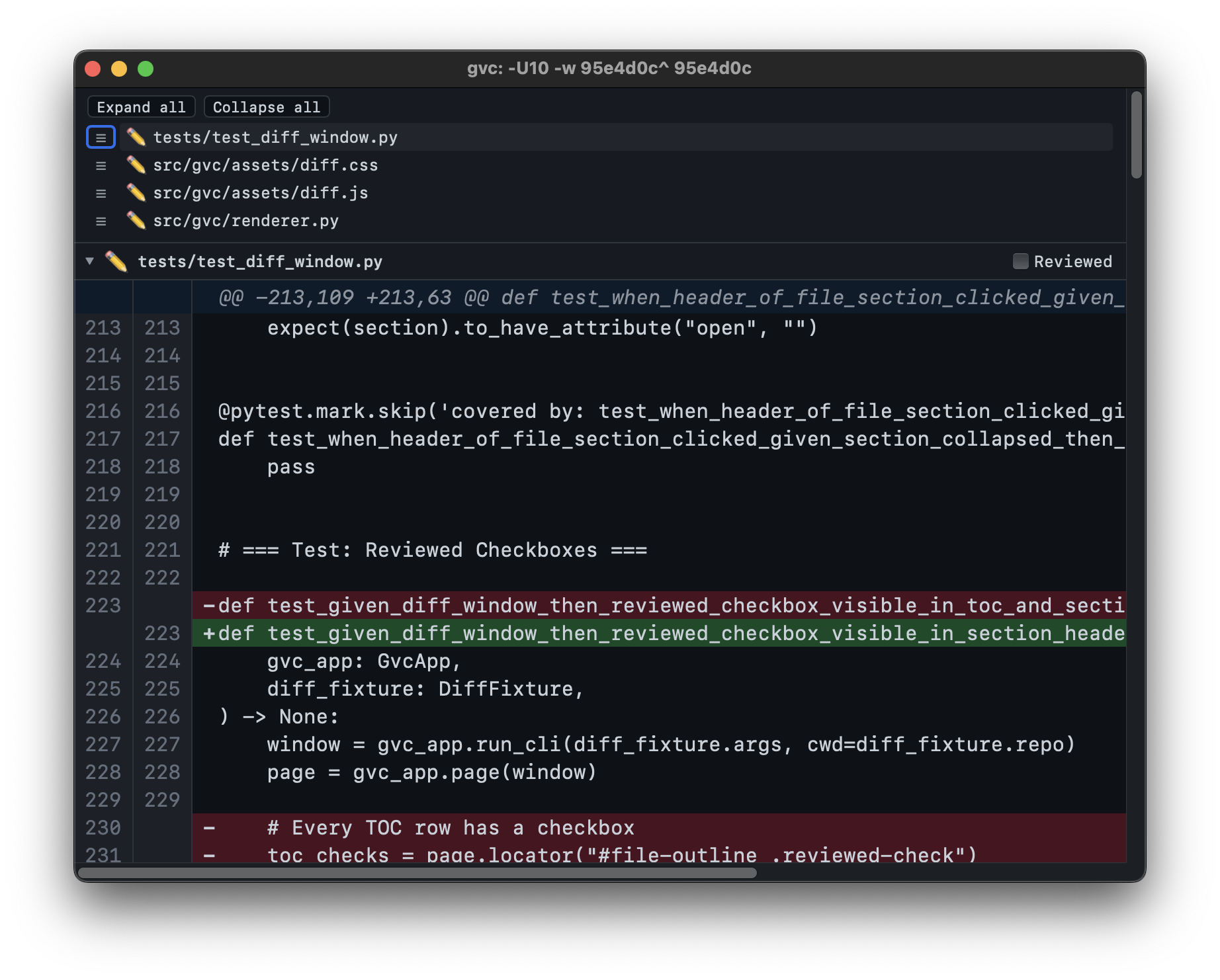
gvc is a lightweight macOS GUI for viewing git diff output. Run gvc where you'd normally run git diff - it opens a native window displaying a formatted, scrollable, searchable diff. It was built as a modern replacement for GitX's --diff mode, which served gvc's author faithfully for over a decade but lacked dark mode, find, and active maintenance.
Why Another Diff Tool?
Most visual diff tools fall into one of two camps: GUI diff apps limited to looking at a single commit at a time or advanced TUI diff tools supporting commit ranges, per-file filtering, etc that are nevertheless trapped inside a small terminal window. gvc fills the gap - it's a CLI-driven GUI. You type a CLI diff command - with as many bells and whistles as you want - and a full GUI window appears.
- Full
git diffpassthrough - anything you can pass togit diff, you can pass togvc. - Lightweight - not a heavy Electron app, not a TUI. Uses a platform-native WebView (WKWebView) to display diffs.
- Free and open source - no subscriptions, no accounts.
Features
- Light and dark mode
- Find (Cmd+F)
- Adjustable font size (Cmd+Plus / Cmd+Minus)
- File outline to jump to any file
- Collapsible file sections with expand/collapse all
Installation
Requires Python 3.14+ and a working git installation.
# Install pipx first
python3 -m pip install pipx

# Install gvc
pipx install gvc
After installation, gvc is available as a command in your shell.
Usage
gvc takes the same arguments as git diff:
gvc                              # Working tree changes (unstaged)
gvc --cached                     # Staged changes
gvc HEAD~1 HEAD                  # Compare two commits
gvc abc123 def456                # Compare any two refs
gvc HEAD~3 HEAD -- src/foo.py    # Limit to specific files
gvc -w HEAD~1 HEAD               # Ignore whitespace
gvc -U20 HEAD~1 HEAD             # 20 lines of context
Each invocation opens a new window. The CLI returns immediately - your terminal is not blocked.
Keyboard Shortcuts
| Shortcut | Action |
|---|---|
| Cmd+F | Open find bar |
| Cmd+G | Find next |
| Shift+Cmd+G | Find previous |
| Cmd+Plus | Increase font size |
| Cmd+Minus | Decrease font size |
| Cmd+W | Close window |
| Cmd+Q | Quit application |
Release Notes
See RELEASE_NOTES.md


Download files
Download the file for your platform. If you're not sure which to choose, learn more about installing packages.
Source Distribution
Built Distribution
Filter files by name, interpreter, ABI, and platform.
If you're not sure about the file name format, learn more about wheel file names.
Copy a direct link to the current filters
File details
Details for the file gvc-1.3.0.tar.gz.
File metadata
- Download URL: gvc-1.3.0.tar.gz
- Upload date:
- Size: 773.9 kB
- Tags: Source
- Uploaded using Trusted Publishing? No
- Uploaded via: poetry/2.4.0 CPython/3.14.2 Darwin/24.6.0
File hashes
| Algorithm | Hash digest | |
|---|---|---|
| SHA256 |
1c8b2f934823d6d819658755aded8d3b9d1adc983db864e05c2037413189c913
|
|
| MD5 |
fac4292c9565e9598a11817c2222de29
|
|
| BLAKE2b-256 |
1d1c4cd61c11321c855f81644236ace76f2d31c03c5c79e02d4b00ce23ca3456
|
File details
Details for the file gvc-1.3.0-py3-none-any.whl.
File metadata
- Download URL: gvc-1.3.0-py3-none-any.whl
- Upload date:
- Size: 776.3 kB
- Tags: Python 3
- Uploaded using Trusted Publishing? No
- Uploaded via: poetry/2.4.0 CPython/3.14.2 Darwin/24.6.0
File hashes
| Algorithm | Hash digest | |
|---|---|---|
| SHA256 |
11736a0731b4ebd8c9ada3e906f3d8f429ab49c69ccd9721bbb8ee04d81843a9
|
|
| MD5 |
88f2ef0342076cedc60b548d4f4d79a6
|
|
| BLAKE2b-256 |
f13152dd962b73eb07260f55d7b8727b46043e70cb47dc2888d4a6be026075be
|






