
gwtm_api
A Python wrapper for the Gravitational Wave Treasure Map.
To interact with the API, register an account. Once verified you will receive an API_TOKEN shown on your profile page.
Using pip:
python -m venv gwtm_env
source gwtm_env/bin/activate   # Windows: gwtm_env\Scripts\activate
pip install gwtm_api
Using conda:
conda create -n gwtm_api python=3.11
conda activate gwtm_api
pip install gwtm_api
Note: This package requires Python < 3.12 due to upstream dependencies (
ligo.skymap,healpy). Use Python 3.10 or 3.11.
Full API documentation and parameter reference is available at https://treasuremap.space/docs.
Configuration
Call configure() once at the start of your script. All subsequent API calls use the client created here — no need to pass credentials to every method.
import gwtm_api

gwtm_api.configure(api_token='YOUR_API_TOKEN')
To point at a different server (e.g. a development instance), pass base_url:
gwtm_api.configure(api_token='YOUR_API_TOKEN', base_url='https://dev.treasuremap.space')
Passing api_token directly to any method also works and is provided for backwards compatibility with older code. Note that doing so permanently updates the configured token — subsequent calls without an explicit api_token will reuse it:
# Legacy style — still works
pointings = gwtm_api.Pointing.get(api_token='YOUR_API_TOKEN', graceid='GW190814')
You can also set credentials via environment variables and call configure() with no arguments:
export GWTM_API_TOKEN=YOUR_API_TOKEN
export GWTM_BASE_URL=https://treasuremap.space/api/v1  # optional, this is the default
gwtm_api.configure()
Pointings
GET
import gwtm_api

gwtm_api.configure(api_token='YOUR_API_TOKEN')

pointings = gwtm_api.Pointing.get(
    graceid='GW190814',
    instruments=['ZTF'],
)
Filters can be combined freely — by instrument, status, time range, band, depth, and spectral regime. All list parameters accept Python lists directly.
POST
Submit a single pointing or a batch:
import datetime
import gwtm_api

gwtm_api.configure(api_token='YOUR_API_TOKEN')

# Single pointing
p = gwtm_api.Pointing(
    ra=15.0,
    dec=-24.0,
    instrumentid=10,
    time=datetime.datetime.now(),
    status='completed',
    depth=18.5,
    depth_unit='ab_mag',
    pos_angle=50,
    band='r'
)
p.post(graceid='GRACEID')

# Batch
batch = [
    gwtm_api.Pointing(...),
    gwtm_api.Pointing(...)
]
gwtm_api.Pointing.batch_post(pointings=batch, graceid='GRACEID')
Request DOI
Request a Digital Object Identifier (DOI) for one or more pointings:
import gwtm_api

gwtm_api.configure(api_token='YOUR_API_TOKEN')

# By graceid — mints a DOI for all your pointings on the event
doi_url = gwtm_api.Pointing.request_doi(graceid='GW190814')

# Or for specific pointing IDs
doi_url = gwtm_api.Pointing.request_doi(
    ids=[123, 456],
    creators=[{'name': 'Jane Smith', 'affiliation': 'MIT'}],
)
print(doi_url)
Alerts
Retrieve alert metadata for a GW event:
import gwtm_api

gwtm_api.configure(api_token='YOUR_API_TOKEN')

# Most recent alert for an event
alert = gwtm_api.Alert.get(graceid='GW190814')
print(alert.distance, alert.prob_bns, alert.area_90)

# All alerts for an event (there may be multiple updates)
alerts = gwtm_api.Alert.get_all(graceid='GW190814')
Skymap contours
Fetch the 50%/90% credible region contours as GeoJSON polygon coordinates:
contours = gwtm_api.Alert.fetch_contours(graceid='GW190814', cache=True)
Skymap FITS
Download the HEALPix probability map as a numpy array (via healpy):
skymap = gwtm_api.Alert.fetch_skymap(graceid='GW190814', cache=True)
Pass cache=True to any of the above to avoid re-downloading on repeated calls.
Candidates
GET
import gwtm_api

gwtm_api.configure(api_token='YOUR_API_TOKEN')

candidates = gwtm_api.Candidate.get(graceid='GW190814')
POST
import datetime
import gwtm_api

gwtm_api.configure(api_token='YOUR_API_TOKEN')

# Single candidate
candidate = gwtm_api.Candidate(
    ra=15.0,
    dec=-24.0,
    discovery_date=datetime.datetime.now(),
    discovery_magnitude=18,
    magnitude_bandpass='r',
    magnitude_unit='ab_mag',
    associated_galaxy='some galaxy name',
    associated_galaxy_redshift=0.3
)
candidate.post(graceid='GRACEID')

# Batch
batch = [
    gwtm_api.Candidate(...),
    gwtm_api.Candidate(...)
]
gwtm_api.Candidate.batch_post(candidates=batch, graceid='GRACEID')
PUT
import gwtm_api

gwtm_api.configure(api_token='YOUR_API_TOKEN')

candidate = gwtm_api.Candidate.get(id=CANDIDATE_ID)[0]
candidate.put(payload={
    'tns_name': 'AT2017gfo',
    'tns_url': 'https://www.wis-tns.org/object/2017gfo',
    'associated_galaxy': 'NGC 4993',
    'associated_galaxy_redshift': 0.009727
})
DELETE
import gwtm_api

gwtm_api.configure(api_token='YOUR_API_TOKEN')

candidate = gwtm_api.Candidate.get(id=CANDIDATE_ID)[0]
candidate.delete()

# Batch delete
gwtm_api.Candidate.batch_delete(ids=[id1, id2, ...])
Instruments
import gwtm_api

gwtm_api.configure(api_token='YOUR_API_TOKEN')

instruments = gwtm_api.Instrument.get(names=['ZTF'])
Pass include_footprint=True to receive polygon data for the instrument footprint, and project it onto the sky at any pointing:
ztf = gwtm_api.Instrument.get(names=['ZTF'], include_footprint=True)[0]
projected = ztf.project(ra, dec, pos_angle)
Event Tools
For a given GW event, you can use the event_tools library to perform analytics with the data on the Treasure Map.
Visualizing coverage
import gwtm_api

gwtm_api.configure(api_token='YOUR_API_TOKEN')

gwtm_api.event_tools.plot_coverage(graceid='GW190814')
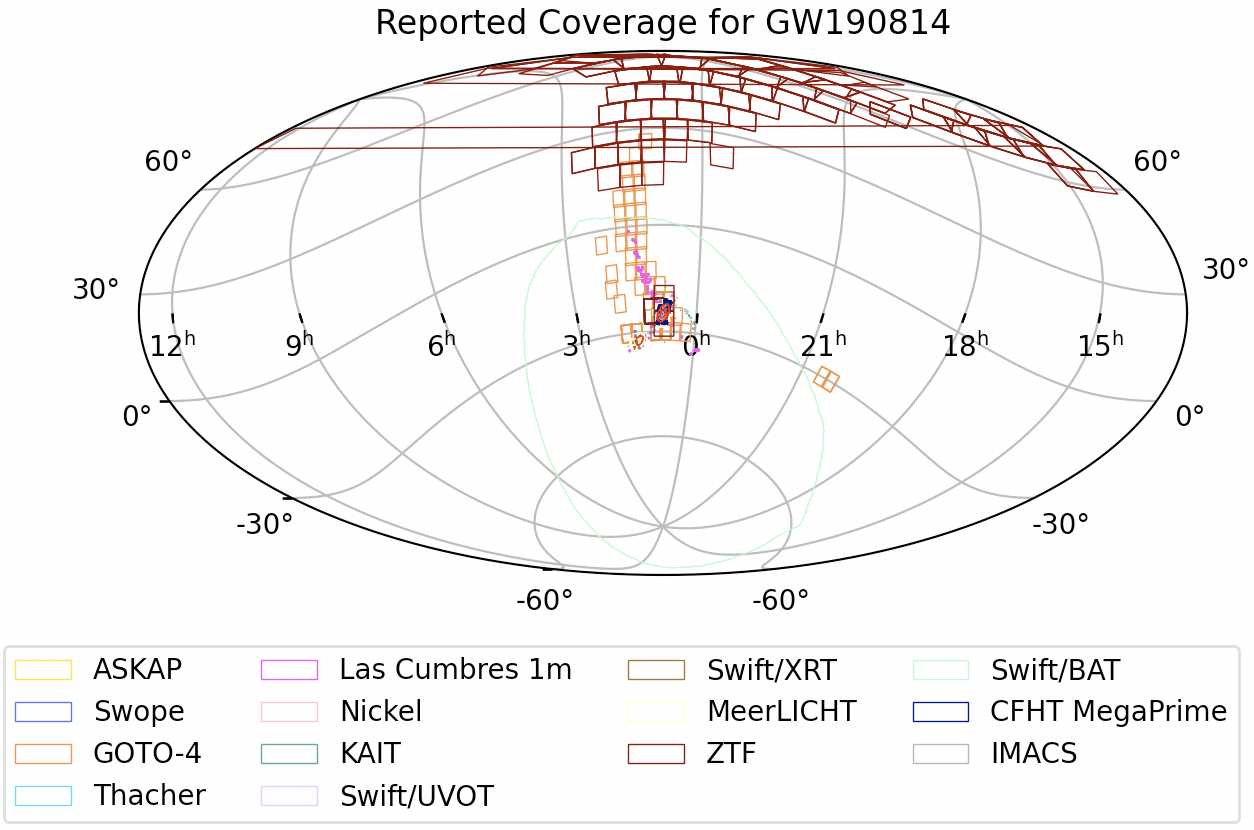
Pass in your own pointings and enable caching to avoid repeated API calls:
pointings = gwtm_api.Pointing.get(
    graceid='GW190814',
    instruments=['ZTF'],
    status='completed',
)
gwtm_api.event_tools.plot_coverage(
    graceid='GW190814',
    pointings=pointings,
    cache=True
)
Coverage calculation
Returns total probability and total area (deg²) covered by the pointings:
total_prob, total_area = gwtm_api.event_tools.calculate_coverage(
    graceid='GW190814',
    pointings=pointings,
    cache=True
)
Renormalize skymap
Sets overlapping skymap pixel probability to zero for observed regions and renormalises. Returns an NDArray compatible with healpy:
renormalized_skymap = gwtm_api.event_tools.renormalize_skymap(
    graceid='GW190814',
    pointings=pointings,
    cache=True
)
Renormalized skymap contours
Compute 50%/90% credible region contours on the renormalized skymap (i.e. with observed regions zeroed out). Returns a GeoJSON string:
contours_json = gwtm_api.event_tools.renormed_skymap_contours(
    graceid='GW190814',
    pointings=pointings,
    cache=True
)
Candidate coverage
Find which instrument pointings overlap with a candidate's position:
my_candidate = gwtm_api.Candidate.get(graceid='GW190814')[0]
covering_pointings = gwtm_api.event_tools.candidate_coverage(candidate=my_candidate)
For contributors
The package has a simple two-layer architecture:
src/gwtm_api/{pointing,alert,instrument,candidate}.py— hand-written, user-facing classes with a stable, friendly interfacesrc/gwtm_api/event_tools.py— analytics functions (coverage, skymap renormalization, contours)src/gwtm_api/core/_client_factory.py— thin httpx transport layer; configured once viagwtm_api.configure()
Setup after cloning
pip install -e '.[dev]'
When the server API changes
Update the relevant wrapper methods in src/gwtm_api/, bump the version in pyproject.toml, and create a GitHub Release — publishing to PyPI happens automatically.
1 maintainer

Metadata
1 maintainer
Release files for gwtm-api 0.2.0
For a detailed explanation of source distributions (sdists) and built distributions (wheels), please see the package formats documentation.
Source distribution (sdist)
| File | Size | Uploaded | |
|---|---|---|---|
| gwtm_api-0.2.0.tar.gz | 24.8 kB | Details |
Built distribution (wheel)
| File | Interpreter | ABI | Platform | Reset |
|---|---|---|---|---|
| gwtm_api-0.2.0-py2.py3-none-any.whl | Python 3, Python 2 | none | any | Details |
Total release size: 46.7 kB
Release files / gwtm_api-0.2.0.tar.gz
| Download URL | gwtm_api-0.2.0.tar.gz |
|---|---|
| Size | 24.8 kB |
| Tags | Source |
|
SHA-256 checksum How to use checksums |
ed261a694153f97e91b479a13b5120e0852371b971baf23c9d42e8f62ea48b12
|
|
BLAKE2b-256 checksum How to use checksums |
3e1fe2b748e7ce9dd4ebc4826d994cef0c22d88b1869d8a337fd402c768a51ad
|
| Upload date | |
|
Uploaded using Trusted Publishing? What is trusted publishing? |
No |
| Uploaded via |
twine/6.2.0 CPython/3.9.25
|
Release files / gwtm_api-0.2.0-py2.py3-none-any.whl
| Download URL | gwtm_api-0.2.0-py2.py3-none-any.whl |
|---|---|
| Size | 21.9 kB |
| Tags | Python 2 Python 3 |
|
SHA-256 checksum How to use checksums |
4b9924a9f9c154db188802e066eba36f80b6e678ca8792efa4c1f3aa26d66d81
|
|
BLAKE2b-256 checksum How to use checksums |
a7c984dc77554d71f708494ab49202c77bd9f9b08e62ba6a0c8d0ca9a2406570
|
| Upload date | |
|
Uploaded using Trusted Publishing? What is trusted publishing? |
No |
| Uploaded via |
twine/6.2.0 CPython/3.9.25
|














