
A python API wrapper for the Gravitational Wave Treasure Map

Project description
gwtm_api
A python wrapper for the Gravitational Wave Treasure Map.
In order to interact with the web API, you will need to register an account with the GWTM. Once verified you will recieve an API_TOKEN to pass into all api endpoints.
conda create -n gwtm_api python=3.11
conda activate gwtm_api
python -m pip install gwtm_api
Pointings:
Full api documentation with detailed examples can be found at GWTM API Documentation.
GET
import gwtm_api

pointings = gwtm_api.Pointing.get(graceid="GW190814", instruments=["ZTF"], api_token=API_TOKEN)
POST
Submit single, or list of gwtm_api.Pointing objects.
import gwtm_api

#submit single
p = gwtm_api.Pointing(
    ra=15,
    dec=-24,
    instrumentid = 10,
    time = datetime.datetime.now(),
    status = 'completed',
    depth = 18.5,
    depth_unit = 'ab_mag',
    pos_angle=50,
    band = 'r'
)
p.post(graceid="GRACEID", api_token=API_TOKEN)

#submit list
batch = [
  gwtm_api.Pointing(...),
  gwtm_api.Pointing(...)
]
gwtm_api.Pointing.batch_post(pointings=batch, graceid="GRACEID", api_token=API_TOKEN)
Candidates
Get and Post Event Candidates through the API:
GET
import gwtm_api
from datetime import datetime

candidates = gwtm_api.Candidate.get(graceid="GW190814", api_token=API_TOKEN)
POST
Submit single, or list of gwtm_api.Candidate objects.
import gwtm_api

#submit single
candidate = gwtm_api.Candidate(
    ra=15,
    dec=-24,
    discovery_date=datetime.datetime.now(),
    discovery_magnitude = 18,
    magnitude_bandpass = "r",
    magnitude_unit = "ab_mag",
    associated_galaxy = "some galaxy name",
    associated_galaxy_redshift = 0.3
)
candidate.post(graceid="GRACEID", api_token=API_TOKEN)

#submit list
batch = [
  gwtm_api.Candidate(...),
  gwtm_api.Candidate(...)
]
gwtm_api.Pointing.batch_post(candidates=batch, graceid="GRACEID", api_token=API_TOKEN)
PUT
Update a GWTM candidate record
import gwtm_api
candidate = gwtm_api.Candidate.get(api_token=API_TOKEN, id=CANDIDATE_ID)
my_candidate = candidate[0]
update_payload = {
    "tns_name": "AT2017gfo",
    "tns_url": "https://www.wis-tns.org/object/2017gfo"
    "associated_galaxy": "NGC 4993"
    "associated_galaxy_redshift": 0.009727
}
my_candidate.put(api_token=API_TOKEN, payload=update_payload)

#or similarly
candidate = gwtm_api.Candidate(id=CANDIDATE_ID, api_token=API_TOKEN) #this will envoke the GET endpoint if it has an id and api token
candidate.tns_name = "AT2017gfo"
candidate.tns_url = "https://www.wis-tns.org/object/2017gfo"
candidate.associated_galaxy = "NGC 4993"
candidate.associated_galaxy_redshift = 0.009727
candidate.put(api_token=API_TOKEN)
Delete
candidate = gwtm_api.Candidate(id=21, api_token=API_TOKEN)
candidate.delete(api_token=API_TOKEN)

#or batch delete with a list of ids
gwtm_api.Candidate.batch_delete(api_token=API_TOKEN, ids=[id1, id2....], verbose=True)
Instruments
Query for instrument information that have been submitted to the Treasure Map
import gwtm_api

instruments = gwtm_api.Instrument.get(name="ZTF", api_token=API_TOKEN)
You can pass the parameter include_footprint=True into the get request, and receive the polygon information for the instrument footprint.
We've included basic polygon manipulation functionality with this footprint class as well. When combined with the pointing information you can project the footprint on the sky, and simulate reported coverage yourself.
import gwtm_api

ztf = gwtm_api.Instrument.get(name="ZTF", include_footprint=True, api_token=API_TOKEN)[0]
ztf.project(ra, dec, pos_angle)
Event Tools
For a given GW event, you can utlize the the event_tools library to perform some analytics of a GW event with the data supported on the Treasure Map.
Visualizing coverage
import gwtm_api

gwtm_api.event_tools.plot_coverage(graceid="GW190814", api_token=API_TOKEN)
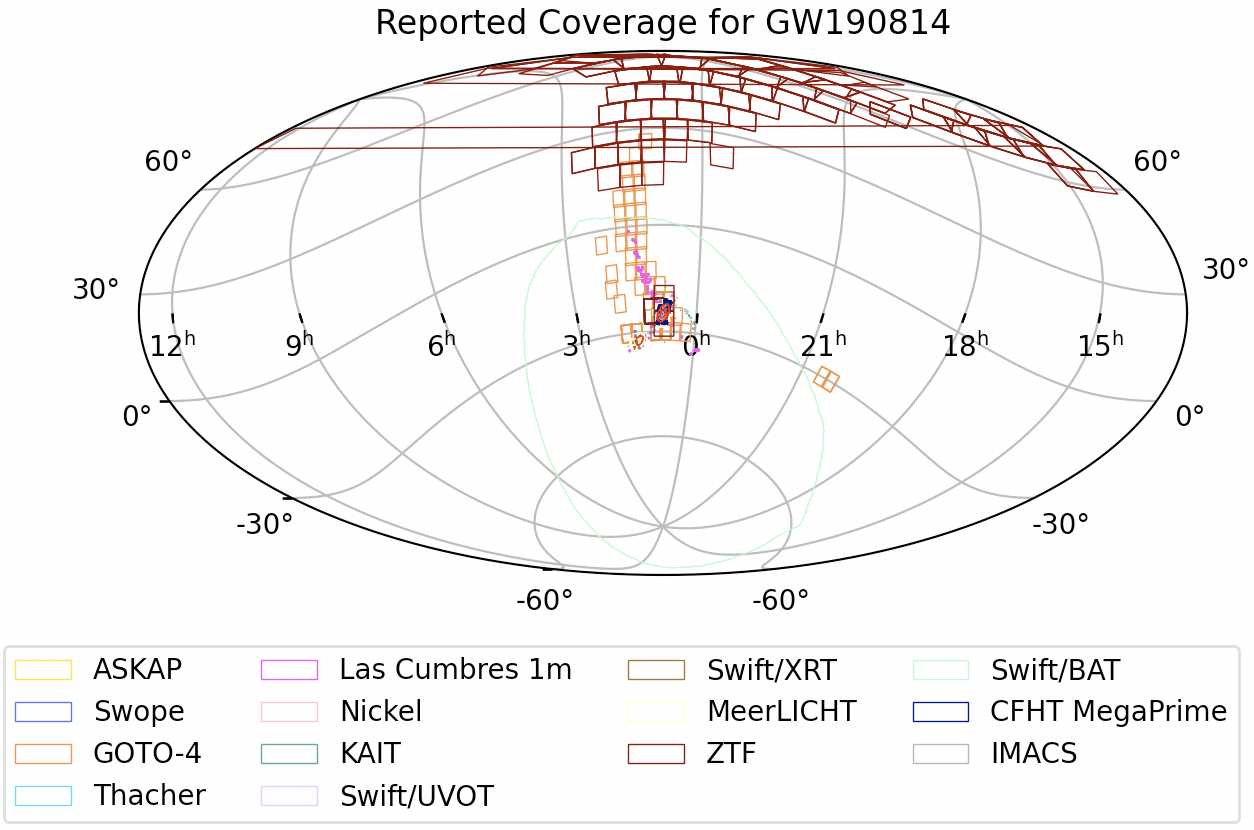
The plot_coverage function allows you to pass in your own list of pointings, along with caching the queried results so you don't have to hit the API for large queries every time.
pointings = gwtm_api.Pointing.get(graceid = "GW190814", instrument="ZTF", api_token=API_TOKEN, status='completed')
gwtm_api.event_tools.plot_coverage(
    graceid="GW190814",
    api_token=API_TOKEN,
    pointings=pointings,
    cache=True
)
Coverage Calculation
Calculate the total probability covered for a given GW Event. You can pass in a list of pointings for the event, or it will default to all pointings for the event. Returns the total probability and total area (deg^2) covered by the list of pointings
total_prob, total_area = gwtm_api.event_tools.calculate_coverage(
    graceid="GW190814",
    api_token=API_TOKEN,
    pointings=pointings,
    cache=True
)
Renormalize Skymap
Renormalize an event's skymap based on a list of pointings (or the entire GW event's completed pointings). It takes the list of pointings and sets the overlapping skymap pixel probability to zero, then renormalizes the skymap. Returns an NDArray that can be imported into healpy
renormalized_skymap = gwtm_api.event_tools.renormalize_skymap(
    graceid="GW190814",
    api_token=API_TOKEN,
    pointings=pointings,
    cache=True
)
Candidate Coerage
For a given candidate, find which instruments have pointing footprints that overlap with the candidate's position. The user can potentially constrain which instruments have observed a candidate pre/post post discovery. User's can pass in a list of pointings, or it will default to all pointings for the candidate's associated graceid. The function also accepts a distance_thresh (in degrees) to limit the calculation to only the pointings centered within the threshold distance from the candidate.
my_candidate = gwtm_api.Candidate.get(...)
pointings_list = gwtm_api.event_tools.candidate_coverage(
    api_token=API_TOKEN,
    candidate=my_candidate
)


Download files
Download the file for your platform. If you're not sure which to choose, learn more about installing packages.
Source Distribution
Built Distributions
Filter files by name, interpreter, ABI, and platform.
If you're not sure about the file name format, learn more about wheel file names.
Copy a direct link to the current filters
File details
Details for the file gwtm_api-0.1.5.tar.gz.
File metadata
- Download URL: gwtm_api-0.1.5.tar.gz
- Upload date:
- Size: 20.2 kB
- Tags: Source
- Uploaded using Trusted Publishing? No
- Uploaded via: twine/6.1.0 CPython/3.11.12
File hashes
| Algorithm | Hash digest | |
|---|---|---|
| SHA256 |
0754ff66366828624c11d190912f4c58c5f32cafcd81e3b9b45778b728b545ff
|
|
| MD5 |
638e33c1a5701b54190620d2acdeb421
|
|
| BLAKE2b-256 |
115ff830ba7dc2e6c3699a39a687ebdea9e698267589ecb5eb32aa5d9d8440ce
|
File details
Details for the file gwtm_api-0.1.5-py3-none-any.whl.
File metadata
- Download URL: gwtm_api-0.1.5-py3-none-any.whl
- Upload date:
- Size: 21.3 kB
- Tags: Python 3
- Uploaded using Trusted Publishing? No
- Uploaded via: twine/6.1.0 CPython/3.11.12
File hashes
| Algorithm | Hash digest | |
|---|---|---|
| SHA256 |
4bb367de5bd19720a913c1657e6522e3c5cae1c106546b6762055e6401e22c1a
|
|
| MD5 |
edea6177c6341b2e175df185361fda29
|
|
| BLAKE2b-256 |
3381bdf6404d4d53516fae9a378cc74882c27dcc2d466102c22543bc3dd55122
|
File details
Details for the file gwtm_api-0.1.5-py2.py3-none-any.whl.
File metadata
- Download URL: gwtm_api-0.1.5-py2.py3-none-any.whl
- Upload date:
- Size: 21.3 kB
- Tags: Python 2, Python 3
- Uploaded using Trusted Publishing? No
- Uploaded via: twine/6.1.0 CPython/3.11.11
File hashes
| Algorithm | Hash digest | |
|---|---|---|
| SHA256 |
346fe3d1e00cbd9ab44c5ee56d49211b2a26332a1cbedfdfae401adb35a19c7f
|
|
| MD5 |
34bc03dd0f0fb34e776a3084cfac4172
|
|
| BLAKE2b-256 |
4e8d3d46fcffe0a9bee52a4eb694bcb477506d0e9f1951251f9c60435aed429c
|






