
A gymnasium environment for Human-in-the-Loop Reinforcement Learning


Project description
gym-hil
A collection of gymnasium environments for Human-In-the-Loop (HIL) reinforcement learning, compatible with Hugging Face's LeRobot codebase.
Overview
The gym-hil package provides environments designed for human-in-the-loop reinforcement learning. The list of environments are integrated with external devices like gamepads and keyboards, making it easy to collect demonstrations and perform interventions during learning.
Currently available environments:
- Franka Panda Robot: A robotic manipulation environment for Franka Panda robot based on MuJoCo
What is Human-In-the-Loop (HIL) RL?
Human-in-the-Loop (HIL) Reinforcement Learning keeps a human inside the control loop while the agent is training. During every rollout, the policy proposes an action, but the human may instantly override it for as many consecutive steps as needed; the robot then executes the human's command instead of the policy's choice. This approach improves sample efficiency and promotes safer exploration, as corrective actions pull the system out of unrecoverable or dangerous states and guide it toward high-value behaviors.

Demo Video
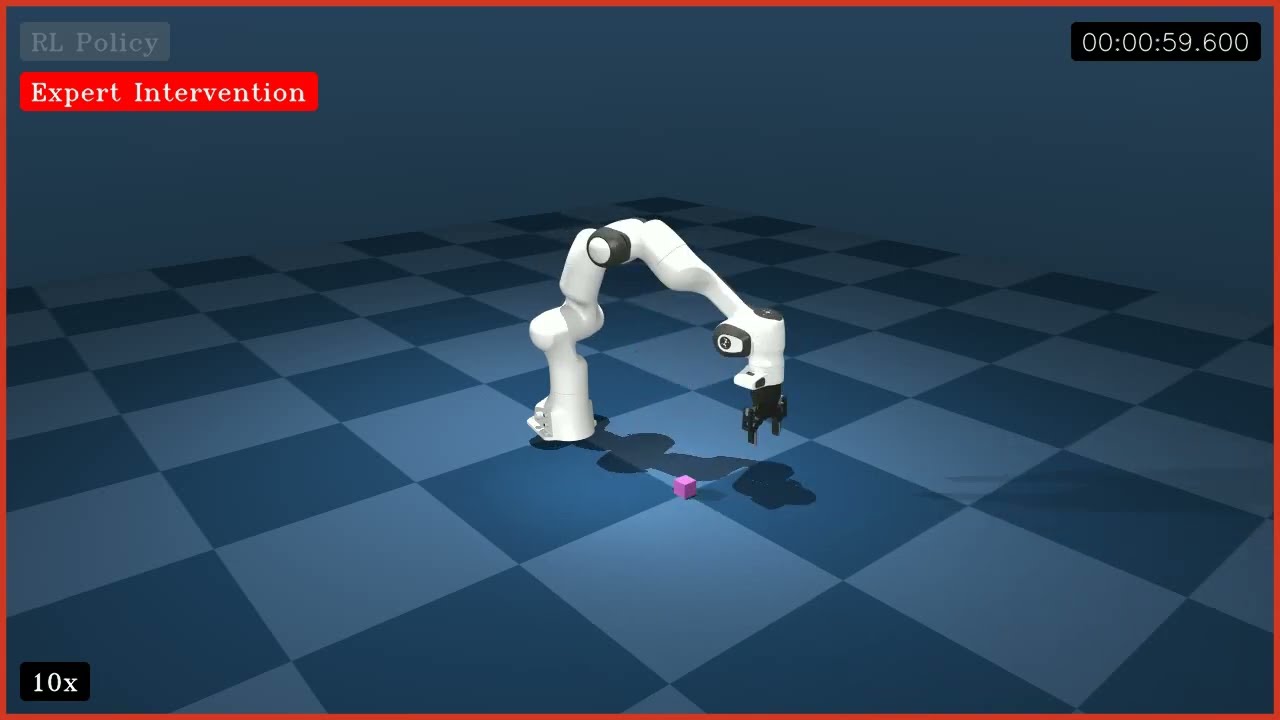
Click the image to watch a demo of gym-hil in action!
We use HIL-SERL from LeRobot to train this policy. The policy was trained for 10 minutes with human in the loop. After only 10 minutes of training, the policy successfully performs the task.
Installation
Create a virtual environment with Python 3.10 and activate it, e.g. with miniconda:
conda create -y -n gym_hil python=3.10 && conda activate gym_hil
Install gym-hil from PyPI:
pip install gym-hil
or from source:
git clone https://github.com/HuggingFace/gym-hil.git && cd gym-hil
pip install -e .
Franka Environment Quick Start
import time
import imageio
import gymnasium as gym
import numpy as np

import gym_hil

# Use the Franka environment
env = gym.make("gym_hil/PandaPickCubeBase-v0", render_mode="human", image_obs=True)
action_spec = env.action_space

obs, info = env.reset()
frames = []

for i in range(200):
    obs, rew, done, truncated, info = env.step(env.action_space.sample())
    # info contains the key "is_intervention" (boolean) indicating if a human intervention occurred
    # If info["is_intervention"] is True, then info["action_intervention"] contains the action that was executed
    images = obs["pixels"]
    frames.append(np.concatenate((images["front"], images["wrist"]), axis=0))

    if done:
        obs, info = env.reset()

env.close()
imageio.mimsave("franka_render_test.mp4", frames, fps=20)
Available Environments
Franka Panda Robot Environments
- PandaPickCubeBase-v0: The core environment with the Franka arm and a cube to pick up.
- PandaPickCubeGamepad-v0: Includes gamepad control for teleoperation.
- PandaPickCubeKeyboard-v0: Includes keyboard control for teleoperation.
Teleoperation
For Franka environments, you can use the gamepad or keyboard to control the robot:
python examples/test_teleoperation.py
To run the teleoperation with keyboard you can use the option --use-keyboard.
Human-in-the-Loop Wrappers
The hil_wrappers.py module provides wrappers for human-in-the-loop interaction:
- EEActionWrapper: Transforms actions to end-effector space for intuitive control
- InputsControlWrapper: Adds gamepad or keyboard control for teleoperation
- GripperPenaltyWrapper: Optional wrapper to add penalties for excessive gripper actions
These wrappers make it easy to build environments for human demonstrations and interactive learning.
Controller Configuration
You can customize gamepad button and axis mappings by providing a controller configuration file.
python examples/test_teleoperation.py --controller-config path/to/controller_config.json
If no path is specified, the default configuration file bundled with the package (controller_config.json) will be used.
You can also pass the configuration path when creating an environment in your code:
env = gym.make(
    "gym_hil/PandaPickCubeGamepad-v0",
    controller_config_path="path/to/controller_config.json",
    # other parameters...
)
To add a new controller, run the script, copy the controller name from the console, add it to the JSON config, and rerun the script.
The default controls are:
- Left analog stick: Move in X-Y plane
- Right analog stick (vertical): Move in Z axis
- RB button: Toggle intervention mode
- LT button: Close gripper
- RT button: Open gripper
- Y/Triangle button: End episode with SUCCESS
- A/Cross button: End episode with FAILURE
- X/Square button: Rerecord episode
The configuration file is a JSON file with the following structure:
{
  "default": {
    "axes": {
      "left_x": 0,
      "left_y": 1,
      "right_x": 2,
      "right_y": 3
    },
    "buttons": {
      "a": 1,
      "b": 2,
      "x": 0,
      "y": 3,
      "lb": 4,
      "rb": 5,
      "lt": 6,
      "rt": 7
    },
    "axis_inversion": {
      "left_x": false,
      "left_y": true,
      "right_x": false,
      "right_y": true
    }
  },
  "Xbox 360 Controller": {
    ...
  }
}
LeRobot Compatibility
All environments in gym-hil are designed to work seamlessly with Hugging Face's LeRobot codebase for human-in-the-loop reinforcement learning. This makes it easy to:
- Collect human demonstrations
- Train agents with human feedback
- Perform interactive learning with human intervention
Contribute
# install pre-commit hooks
pre-commit install

# apply style and linter checks on staged files
pre-commit
Acknowledgment
The Franka environment in gym-hil is adapted from franka-sim initially built by Kevin Zakka.
Version History
- v0: Original version
Release history Release notifications | RSS feed


Download files
Download the file for your platform. If you're not sure which to choose, learn more about installing packages.
Source Distribution
Built Distribution
Filter files by name, interpreter, ABI, and platform.
If you're not sure about the file name format, learn more about wheel file names.
Copy a direct link to the current filters
File details
Details for the file gym_hil-0.1.10.tar.gz.
File metadata
- Download URL: gym_hil-0.1.10.tar.gz
- Upload date:
- Size: 5.7 MB
- Tags: Source
- Uploaded using Trusted Publishing? No
- Uploaded via: poetry/2.1.3 CPython/3.10.16 Darwin/23.5.0
File hashes
| Algorithm | Hash digest | |
|---|---|---|
| SHA256 |
c33b9de8aceb8717925ba9e4e62c96f311daeb56e4b7ad0eb96fca13b87f0fff
|
|
| MD5 |
a8fb1b6067293e10d9350ce64642d147
|
|
| BLAKE2b-256 |
7d94e6b23f01449e1289e11666e3ad7bac0f73bcfbe02f1bec4caf6d33220def
|
File details
Details for the file gym_hil-0.1.10-py3-none-any.whl.
File metadata
- Download URL: gym_hil-0.1.10-py3-none-any.whl
- Upload date:
- Size: 5.8 MB
- Tags: Python 3
- Uploaded using Trusted Publishing? No
- Uploaded via: poetry/2.1.3 CPython/3.10.16 Darwin/23.5.0
File hashes
| Algorithm | Hash digest | |
|---|---|---|
| SHA256 |
084929fa8a8dbdf393f4ec215de9795cc88f79406e59fdd1dedcad6845869768
|
|
| MD5 |
9df1d0894f0c4694b5243cfd50f24c51
|
|
| BLAKE2b-256 |
bc331baee4fae8d99342d26860748543f81db49927b9a8eee6d9179ae4cc8a0b
|






