
Gym environment for racing, drift, and safety
Verified details
These details have been verified by PyPIProject links
GitHub Statistics
Maintainers

Project description




Gym-Khana
This repository contains a custom gym environment for training Deep Reinforcement Learning policies to race and drift on 1/10 scale or full-size Ackermann vehicles. SB3 and wandb integration included. Based on the f1tenth_gym simulator built by UPenn. For detailed information see the documentation
Table of Contents
Installation
Quickstart
Gym-Khana is available as a PyPI package with only the gym environment, or as a full repository with additional functionality.
Install the gym environment from PyPI with:
pip install gymkhana
Alternatively, to use all features, or for development (training, controllers, analysis, etc.), clone the full repo and install dependencies using poetry:
git clone --recurse-submodules https://github.com/TeoIlie/Gym-Khana.git
cd Gym-Khana
poetry install --all-groups
source $(poetry env info -p)/bin/activate # or instead of sourcing, prefix commands with `poetry run`
Then you're off to the races! 🏎️
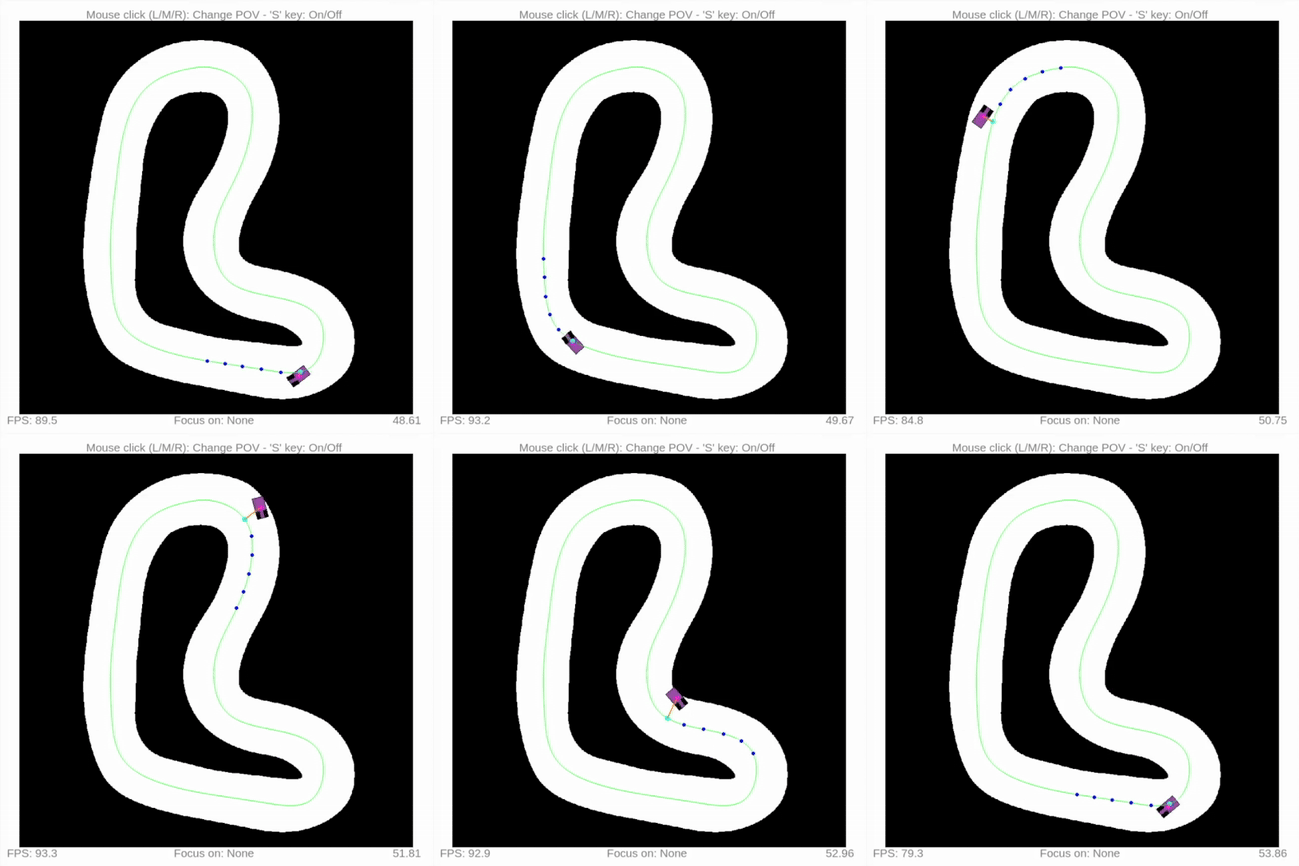
You can run a quick waypoint follow example:
cd examples
python3 waypoint_follow.py
Or a simple centerline follow example:
cd examples
python3 controller_example.py
Additional Dependencies
MPC controllers require dependencies that cannot be installed via pip alone. For the reference MPC implementation see the ForzaETH race_stack
acados (build from source) — see the official installation docs and Python interface docs:
# acados (build from source) - ~/software is only an example install directory
git clone https://github.com/acados/acados.git --recurse-submodules ~/software/acados
cd ~/software/acados && mkdir build && cd build
cmake -DACADOS_WITH_QPOASES=ON ..
make install -j$(nproc)

# Environment variables (add to shell profile)
export ACADOS_SOURCE_DIR=~/software/acados
export LD_LIBRARY_PATH=$LD_LIBRARY_PATH:~/software/acados/lib
Next, install the acados_template inside your virtual environment, with editable mode. For example, open a shell inside the virtual env with poetry shell and then run the following command:
# Python interface
pip install -e ~/software/acados/interfaces/acados_template
Training
The main racing training script is at train/ppo_race.py. The recovery training script is at train/ppo_recover.py. Both include functionality for:
- Train (
--m t): Train a new model with parallel environments usingSubprocVecEnvandtrain/configparams - Evaluate (
--m e): Evaluate a trained model with visualization - Download (
--m d): Fetch a model from wandb and evaluate it - Continue (
--m c): Continue training an existing model from a checkpoint - Transfer (
--m f): Transfer a pretrained model to a new task, preserving network weights but resetting optimizer, LR schedule, and optionally resettinglog_stdfor fresh exploration, and resetting critic network for fresh value approximation. Useful for transferring learned dynamics knowledge (e.g. racing to recovery).
For example, train a racing model with:
python3 train/ppo_race.py --m t
Detailed usage guidelines are at the top of the training script files.
Wandb
By default, all training models are synced to wandb, with training data for runs saved to /wandb folder.
To login to your account, use wandb login. To create an account, visit https://wandb.ai
ONNX Policy Conversion
To use policies in other packages, such as a ROS2 package for sim-to-real transfer, we provide support for converting an SB3 model to ONNX type. Use train/export_onnx.py for conversion:
python3 train/export_onnx.py --path <SB3 model path>
Run the policy with ONNX using OnnxPolicyRunner defined in gymkhana/inference/onnx_runner.py. For example for a racing policy:
python3 train/ppo_race.py --m x --path <ONNX model path>
Configuration
Default Gym/RL configurations
Default configurations are stored in /train/config/env_config.py, with parameters coming from train/config/rl_config.yaml and train/config/gym_config.yaml. This exposes all necessary Gym env and RL params for training, as well as default functions for getting Gym configs of RL training and testing environments:
/train/config/env_config.py::get_drift_test_config()/train/config/env_config.py::get_drift_train_config()/train/config/env_config.py::get_recovery_test_config()/train/config/env_config.py::get_recovery_train_config()
Callback and Curriculum Learning (CL) configuration
Default SB3 callbacks used during training are WandbCallback, CheckpointCallback, and EvalCallback. A custom CurriculumLearningCallback is also available, which gradually expands the recovery state initialization ranges as the agent's success rate improves.
CL is configured in /train/config/gym_config.yaml under the curriculum heading by setting enabled: true. Parameters such as n_stages, success_threshold, and per-state ranges (v_range, beta_range, etc.) can be tuned there.
Note that CL is only supported for recovery training, with the environment training_mode set to "recover". Recovery training is accessed through the training script train/ppo_recover.py.
Debugging configuration
gym.make() configurations:
- Run with
render_modeset tohumanto visualize the process - Set
"render_track_lines": True(it isFalseby default) to render the centerline in green and the raceline in red - Rendering track arc-length points s in Frenet coordinates at discrete intervals:
- First,
"render_arc_length_annotations": True(it isFalseby default) to render points along the centerline in orange - Optionally, also set
"arc_length_annotation_interval"to modify the point spacing (2.0metres by default)
- First,
- Set
"render_lookahead_curvatures": True(it isFalseby default) to visualize lookahead curvature sampling points ahead of the vehicle in yellow. Optional parameters: - Set
"debug_frenet_projection" = Trueto visualize the Frenet coordinates are correct - Set
"record_obs_min_max"toTrue/Falseto record min/max observation values during training, and tweak normalization bounds if necessary, defined inutils.py::calculate_norm_bounds
Control debug panel
Set show_ctr_debug: True in gymkhana/envs/rendering/rendering.yaml to enable a real-time control debug panel below the map (PyQt6 renderer only). The panel shows:
- Actual vehicle state: current steering angle (
delta) and longitudinal velocity (v_x) in white - Control commands: raw steering and throttle commands with their bounds, colour-coded to match their bars (steering in blue, throttle in green)
- Two zero-centered horizontal bar gauges: each bar spans the command's full range with the fill extending from zero toward the current value, making the sign and magnitude of each command instantly visible
The panel tracks the currently followed agent (switched via mouse click), defaulting to the ego agent in map view. It is disabled by default to avoid overhead during training.
Observation debug overlay
Set show_obs_debug: True in gymkhana/envs/rendering/rendering.yaml to overlay all observation values on top of the map in the top-left corner (PyQt6 renderer only). The overlay displays:
- Feature names and values: each observation feature as a key-value pair (e.g.,
linear_vel_x: 2.3451) - Array summaries: large arrays like LiDAR scans show count, min, max, and mean; small arrays (e.g., lookahead curvatures) show all values
- Normalization indicator: shows
[norm: on]when observation normalization is active; values are always displayed in raw physical units regardless of normalization
Works with all observation types (OriginalObservation, FeaturesObservation, VectorObservation). For multi-agent environments, the overlay shows the followed agent's observations. Disabled by default to avoid overhead during training.
gym.make() Options
- Set
training_modeto define the training goal. This modifies the reset, initialization, track, and reward settings:"race"(default) is used bytrain/ppo_race.pyfor training racing policies"recover"is used bytrain/ppo_recover.pyto train policies for stabilizing an out-of-control vehicle
- Set
modeltostdfor drifting model with PAC2002 tire model - Use
control_input["accl", "steering_angle"]for best RL drift training - Use parameter dictionary
paramsasGKEnv.f1tenth_std_vehicle_params()orGKEnv.f1tenth_std_drift_bias_params()for drift parameters on 1/10 scale F1TENTH car - Lookahead curvature/width observations can be configured with spacing and number parameters, and when
render_lookahead_curvatures": Truethese will be reflectedlookahead_n_points- Number of lookahead points (default: 10)lookahead_ds- Spacing between points in meters (default: 0.3m)sparse_width_obs-Falsepasses all lookahead point width values as observation,Trueonly passes 1st and last.Trueis useful when track width varies very little (default:False)
- Set
normalize_obstoTrue/Falsefor normalizing the observation space. Only specific observation types can be normalized - Set
normalize_acttoTrue/Falsefor normalizing the action space. Supported for all action types - Set
predictive_collisiontoTrueto use TTC collision checking andFalsefor Frenet-based collision checking. Note that this also modifies the reward function. - Set
wall_deflectiontoFalseto treat track edges as boundaries, andTrueto treat them as walls that cause a collision and halt the vehicle - Reward configuration options:
progress_gain: set amount of gain by which to multiply forward progress reward. Must be >= 1out_of_bounds_penalty: penalty for driving off the track boundarynegative_vel_penalty: penalty for driving backwardmax_episode_steps: the maximum number of episode steps
- Set
track_directionto define in which direction to drive around the track:normal(default): drive around the track in the direction of the waypoints stored in the centerline and raceline files (Note this may be CW or CCW depending on the track map)reverse: drive around in the opposite direction (For ex, CW instead of CCW)random: randomly drive in the 'regular' or 'reverse' direction at each reset with a 50% chance, to learn left and right cornering equally when training a policy with RL
env.reset() Options
-
Poses and States can be used to initialize vehicles at specific configurations. Note:
- Only one of
posesorstatescan be used per reset call (not both) - All [x, y, yaw] values are in Cartesian coordinates
- To use Frenet coordinates, convert first using
frenet_to_cartesian()ingymkhana/envs/track/track.py
- Only one of
-
Poses: Reset agents at a specific pose
# Single agent
poses = np.array([[x, y, yaw]])
env.reset(options={"poses": poses})

# Multiple agents
poses = np.array([[x1, y1, yaw1],
                  [x2, y2, yaw2]])
env.reset(options={"poses": poses})
-
States: Reset agents to a full 7-d state (only for
model='std')# Single agent: [x, y, delta, v, yaw, yaw_rate, slip_angle] states = np.array([[x, y, delta, v, yaw, yaw_rate, slip_angle]]) env.reset(options={"states": states}) # Front & rear angular wheel velocities are automatically initialized to form the full 9-d state for STD model type
Customization
Custom Maps
Custom maps can be created using the git submodule https://github.com/TeoIlie/F1TENTH_Racetracks stored in folder /maps. Once updated, pull the update submodule with git pull --recurse-submodules
Tire Parameters
- Parameters for the 1/10 scale f1tenth car to be used with the
STDmodel are defined ingymkhana/envs/gymkhana_env.pyasf1tenth_std_vehicle_params. They are created as a mix of existing f1tenth params and tire parameters adjusted from the fullscale car. - In future I may measure these parameters from real data for more accurate fitting
- To maintain a history of parameter choices, and how they compare with the correct behaviour on the fullscale car, tests script
tests/model_validation/test_f1tenth_std_params.pycreates comparison figures along with parameter YAML file dump ordered by date created inside folderfigures/tire_params
Development
Formatting/Linting
Run formatting and auto-fixes manually with ruff check --fix . && ruff format . Fixes also are applied before commits due to .pre-commit-config.yaml file, with pre-commit dependency.
Documentation
- Documentation is supported through ReadTheDocs Sphinx template at https://gym-khana.readthedocs.io
- Tagged versions are available via the version selector in the docs (bottom-left flyout)
- To update documentation modify
/docsfolder files and test locally, a rebuild will be triggered on push to default branch
cd docs
make clean && make html && firefox _build/html/index.html
Versioning
This project follows Semantic Versioning: MAJOR.MINOR.PATCH
- MAJOR: Breaking changes (incompatible API/config changes)
- MINOR: New features (backward-compatible)
- PATCH: Bug fixes (backward-compatible)
To release a new version:
- Move items from
[Unreleased]to a new version section inCHANGELOG.md - Update
versioninpyproject.tomland__version__ingymkhana/__init__.py - Create and push a matching annotated git tag:
git tag -a v1.2.0 -m "description of release"
git push origin v1.2.0
Pushing the tag automatically publishes to TestPyPI and PyPI via the publish.yml GitHub Actions workflow.
Known Issues
-
Library support issues on Windows. You must use Python 3.8 as of 10-2021
-
On MacOS Big Sur and above, when rendering is turned on, you might encounter the error:
ImportError: Can't find framework /System/Library/Frameworks/OpenGL.framework.
You can fix the error by installing a newer version of pyglet:
pip3 install pyglet==1.5.11
And you might see an error similar to
gym 0.17.3 requires pyglet<=1.5.0,>=1.4.0, but you'll have pyglet 1.5.11 which is incompatible.
which could be ignored. The environment should still work without error.
Project details
Verified details
These details have been verified by PyPIProject links
GitHub Statistics
Maintainers
Release history Release notifications | RSS feed


Download files
Download the file for your platform. If you're not sure which to choose, learn more about installing packages.
Source Distribution
Built Distribution
Filter files by name, interpreter, ABI, and platform.
If you're not sure about the file name format, learn more about wheel file names.
Copy a direct link to the current filters
File details
Details for the file gymkhana-1.2.0.tar.gz.
File metadata
- Download URL: gymkhana-1.2.0.tar.gz
- Upload date:
- Size: 100.2 kB
- Tags: Source
- Uploaded using Trusted Publishing? Yes
- Uploaded via: twine/6.1.0 CPython/3.13.12
File hashes
| Algorithm | Hash digest | |
|---|---|---|
| SHA256 |
ef8dcdce00eb61f1ee20505de3f086b446d8e122898d9c7ed4377b3902bc8459
|
|
| MD5 |
df236b3882f54834366349454a0dfc57
|
|
| BLAKE2b-256 |
66b9a827e780ca78144a82aaa3f64f99a18382031aa4ef3eed5abc898bb0208c
|
Provenance
The following attestation bundles were made for gymkhana-1.2.0.tar.gz:
Publisher:
publish.yml on TeoIlie/Gym-Khana
-
Statement:
-
Statement type:
https://in-toto.io/Statement/v1 -
Predicate type:
https://docs.pypi.org/attestations/publish/v1 -
Subject name:
gymkhana-1.2.0.tar.gz -
Subject digest:
ef8dcdce00eb61f1ee20505de3f086b446d8e122898d9c7ed4377b3902bc8459 - Sigstore transparency entry: 1280378551
- Sigstore integration time:
-
Permalink:
TeoIlie/Gym-Khana@84129cef5ccedd8a3c1636489b3f6573119c18b8 -
Branch / Tag:
refs/tags/v1.2.0 - Owner: https://github.com/TeoIlie
-
Access:
public
-
Token Issuer:
https://token.actions.githubusercontent.com -
Runner Environment:
github-hosted -
Publication workflow:
publish.yml@84129cef5ccedd8a3c1636489b3f6573119c18b8 -
Trigger Event:
push
-
Statement type:
File details
Details for the file gymkhana-1.2.0-py3-none-any.whl.
File metadata
- Download URL: gymkhana-1.2.0-py3-none-any.whl
- Upload date:
- Size: 115.4 kB
- Tags: Python 3
- Uploaded using Trusted Publishing? Yes
- Uploaded via: twine/6.1.0 CPython/3.13.12
File hashes
| Algorithm | Hash digest | |
|---|---|---|
| SHA256 |
48c715c6bb16b15b605981be30888f043950e7e62f556b7f284745cb994d3fe8
|
|
| MD5 |
93902db5fe3e3539dcb54717ee291e32
|
|
| BLAKE2b-256 |
ef4829d54481a9ed62fcc8b373ce69de910d8c1a690093c89ab6852bf39131b7
|
Provenance
The following attestation bundles were made for gymkhana-1.2.0-py3-none-any.whl:
Publisher:
publish.yml on TeoIlie/Gym-Khana
-
Statement:
-
Statement type:
https://in-toto.io/Statement/v1 -
Predicate type:
https://docs.pypi.org/attestations/publish/v1 -
Subject name:
gymkhana-1.2.0-py3-none-any.whl -
Subject digest:
48c715c6bb16b15b605981be30888f043950e7e62f556b7f284745cb994d3fe8 - Sigstore transparency entry: 1280378558
- Sigstore integration time:
-
Permalink:
TeoIlie/Gym-Khana@84129cef5ccedd8a3c1636489b3f6573119c18b8 -
Branch / Tag:
refs/tags/v1.2.0 - Owner: https://github.com/TeoIlie
-
Access:
public
-
Token Issuer:
https://token.actions.githubusercontent.com -
Runner Environment:
github-hosted -
Publication workflow:
publish.yml@84129cef5ccedd8a3c1636489b3f6573119c18b8 -
Trigger Event:
push
-
Statement type:






