
H1 Asset Fetcher



A terminal tool for bug bounty hunters that fetches, downloads, and decompiles mobile app assets from bug bounty programs.
It pulls in-scope Android, iOS, and Executable assets from HackerOne, Bugcrowd, Intigriti, YesWeHack, and Immunefi, bulk-downloads the APKs, and decompiles them for review — all from one guided, interactive prompt.
Install
pipx install h1-asset-fetcher # or: pip install h1-asset-fetcher
This gives you the h1-asset-fetcher command. The APK download and decompile steps also need apkeep and jadx, which the bundled installer fetches for you:
git clone https://github.com/0xbartita/h1-asset-fetcher.git
cd h1-asset-fetcher && ./install.sh
Usage
Just run it with no arguments — it walks you through the whole pipeline, one question at a time, inline in your terminal:
h1-asset-fetcher
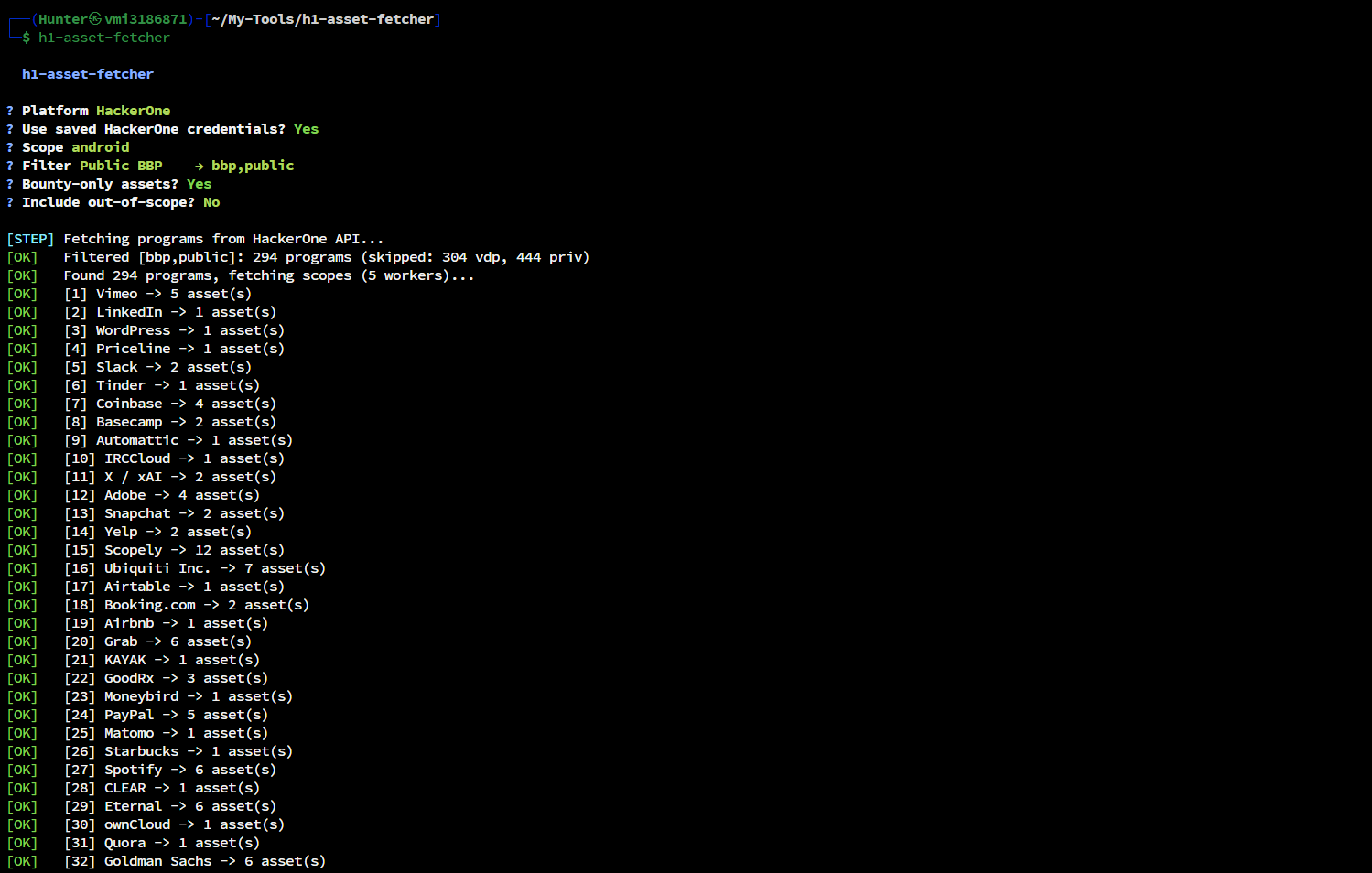
It guides you through, in order:
- Platform — HackerOne, Bugcrowd, Intigriti, YesWeHack, or Immunefi
- Credentials — token (and username where needed); reused on later runs
- Scope & filters —
android/ios/exe/all, program filter, bounty-only, out-of-scope - Fetch — pulls in-scope assets to
output/<scope>/ - Download — pick which assets to grab; APKs fetched via apkeep (apk-pure → huawei → f-droid)
- Decompile — optionally run jadx on the downloaded APKs
Press Enter to accept each default, or Esc / Ctrl-C to quit.
  h1-asset-fetcher

? Platform   (↑↓)
❯ HackerOne
  Bugcrowd
  Intigriti
  YesWeHack
  Immunefi

? HackerOne username ›  0xbartita
? HackerOne token    ›  ••••••••••
? Scope                 android
? Filter                Private BBP → bbp,private
? Bounty-only assets?   (Y/n)
? Include out-of-scope? (Y/n)

✔ 87 assets from 42 programs
✔ Saved output to output/android/

? Download APKs now?    Yes
? Select assets to download   (space toggles, ↵ confirms)
❯ ◉ com.acme.app        APK   Acme Corp
  ◯ com.globex.app      APK   Globex
The wizard remembers your credentials and last platform/scope/filter, so the next run just asks "Use saved credentials? (Y/n)" — press Enter to reuse. To wipe saved settings: h1-asset-fetcher --forget.
License
MIT
1 maintainer

Metadata
1 maintainer
Release files for h1-asset-fetcher 1.2.0
For a detailed explanation of source distributions (sdists) and built distributions (wheels), please see the package formats documentation.
Source distribution (sdist)
| File | Size | Uploaded | |
|---|---|---|---|
| h1_asset_fetcher-1.2.0.tar.gz | 66.4 kB | Details |
Built distribution (wheel)
| File | Interpreter | ABI | Platform | Reset |
|---|---|---|---|---|
| h1_asset_fetcher-1.2.0-py3-none-any.whl | Python 3 | none | any | Details |
Total release size: 132.6 kB
Release files / h1_asset_fetcher-1.2.0.tar.gz
| Download URL | h1_asset_fetcher-1.2.0.tar.gz |
|---|---|
| Size | 66.4 kB |
| Tags | Source |
|
SHA-256 checksum How to use checksums |
a0b46fbc8c994cc8870881fcaf6565f705c4df9cec1d85e46e22445b9412d596
|
|
BLAKE2b-256 checksum How to use checksums |
7880adbf136bc1fb498bc73c442595489f482d91e9237b337d5b09cb0fcbaf71
|
| Upload date | |
|
Uploaded using Trusted Publishing? What is trusted publishing? |
Yes |
| Uploaded via |
twine/6.1.0 CPython/3.13.12
|
Provenance
Provenance describes where a file came from. On PyPI, provenance is shared via attestations, which provide a verifiable record of the build or publishing details. View details, limitations and caveats.


PyPI Publish Attestation
PyPI verified that this artifact, at this checksum, originated from the publisher listed below.
Signed by GitHub Actions, verified by PyPI on Jun 24, 2026.
Transparency logRelease files / h1_asset_fetcher-1.2.0-py3-none-any.whl
| Download URL | h1_asset_fetcher-1.2.0-py3-none-any.whl |
|---|---|
| Size | 66.2 kB |
| Tags | Python 3 |
|
SHA-256 checksum How to use checksums |
58c4ef032d9d8b9948ff966ada81e45d98db708a60f7a0fab894e54cc4b8d3e9
|
|
BLAKE2b-256 checksum How to use checksums |
561b452e3271ab52dff067b98ae2378f2f0769ed2dcefa65c2e00ced3e3aae5b
|
| Upload date | |
|
Uploaded using Trusted Publishing? What is trusted publishing? |
Yes |
| Uploaded via |
twine/6.1.0 CPython/3.13.12
|
Provenance
Provenance describes where a file came from. On PyPI, provenance is shared via attestations, which provide a verifiable record of the build or publishing details. View details, limitations and caveats.
PyPI Publish Attestation
PyPI verified that this artifact, at this checksum, originated from the publisher listed below.
Signed by GitHub Actions, verified by PyPI on Jun 24, 2026.
Transparency log













