
Fetch, download, and decompile mobile/exe assets from bug bounty programs
Verified details
These details have been verified by PyPIProject links
GitHub Statistics
Maintainers

Project description
H1 Asset Fetcher



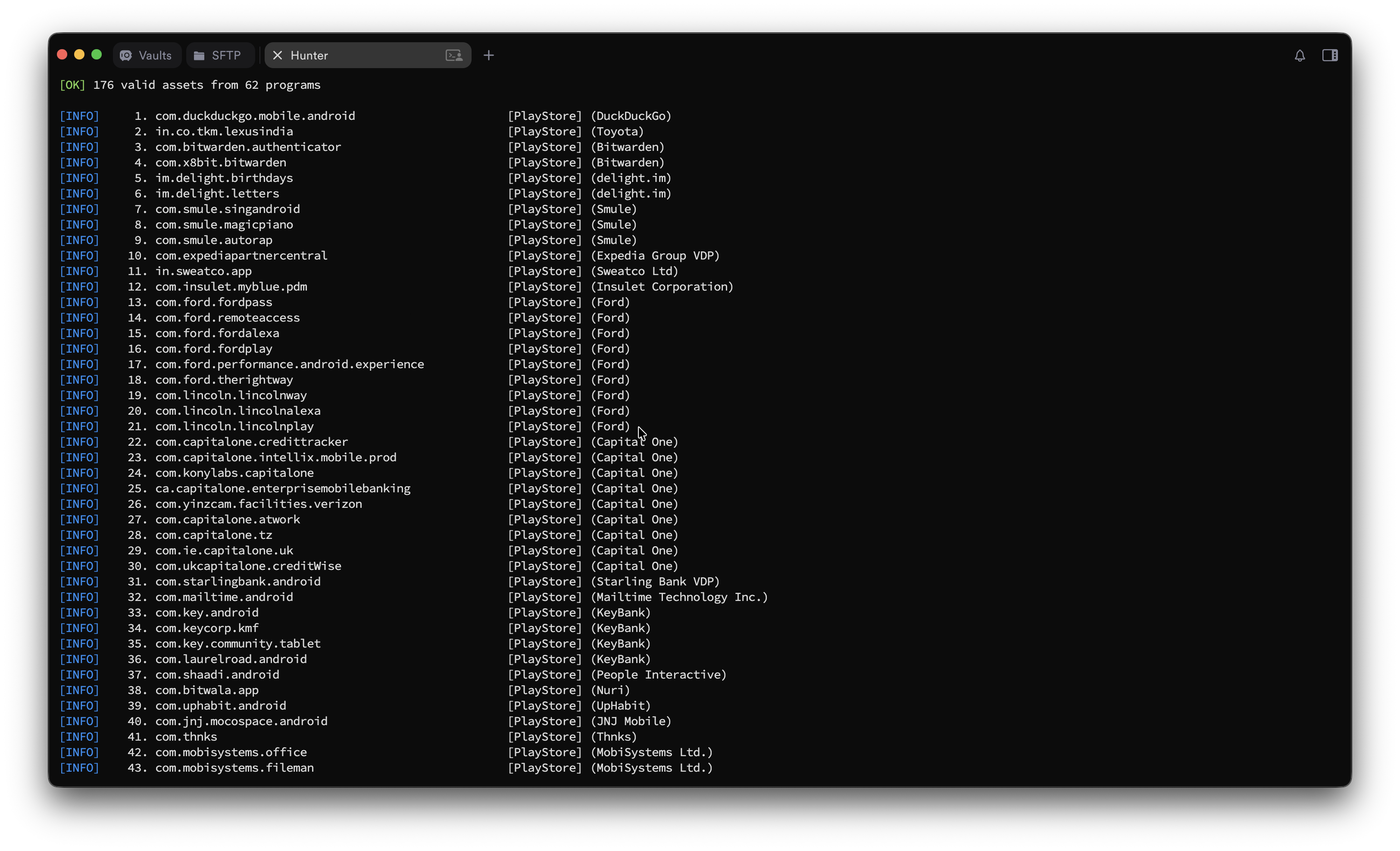
Automated toolkit for fetching, downloading, and decompiling mobile app assets from HackerOne bug bounty programs. Supports Android, iOS, and Executable scopes.
Built for bug bounty hunters who want to audit mobile apps at scale.
Features
- Interactive wizard — run
h1-asset-fetcherwith no arguments for a guided prompt flow (platform → fetch → download), inline in your terminal - Fetch Android (Play Store / APK), iOS (App Store / TestFlight / IPA), and Executable assets
- Multi-platform: HackerOne plus Bugcrowd, Intigriti, YesWeHack, Immunefi (
--platform) - Filter by program type: private BBP, public BBP, VDP, or all — plus per-asset in-scope / bounty-eligible filtering
- Organized output:
output/<scope>/packages.txt,packages.tsv,store_links.txt,packages.json - Bulk APK download via apkeep
- Batch decompilation with jadx
- One-command setup with
install.sh
Installation
Quick install (pipx)
One command — installs the tool in an isolated environment and puts the h1-asset-fetcher command on your PATH:
pipx install git+https://github.com/0xbartita/h1-asset-fetcher.git
h1-asset-fetcher        # launches the interactive wizard
Plain pip works too: pip install git+https://github.com/0xbartita/h1-asset-fetcher.git. No pipx? python3 -m pip install --user pipx && pipx ensurepath, then restart your shell.
This installs the fetcher + interactive wizard. APK download and decompile additionally need
apkeep,jadx(and optionallyapktool) — run./install.shto grab those, or install them manually (see Manual).
Automatic (everything, including apkeep / jadx / apktool)
./install.sh
Installs: Python deps, apkeep, jadx, apktool.
Manual
pip install -r requirements.txt

# Required
# - apkeep: https://github.com/EFForg/apkeep/releases
# - jadx:   https://github.com/skylot/jadx/releases

# Optional
# - apktool:  https://apktool.org/
Install the h1-asset-fetcher command
pip install .            # or: pipx install .   → puts `h1-asset-fetcher` on your PATH
h1-asset-fetcher --help
The legacy python3 h1-asset-fetcher.py ... still works (it's a thin shim over the package), and python3 -m h1_asset_fetcher ... is equivalent.
Quick Start
git clone https://github.com/0xbartita/h1-asset-fetcher.git
cd h1-asset-fetcher
./install.sh

# Fetch Android assets from your private BBPs
python3 h1-asset-fetcher.py -u <h1_username> -t <api_token> --scope android

# Fetch iOS assets
python3 h1-asset-fetcher.py -u <username> -t <token> --scope ios

# Fetch everything
python3 h1-asset-fetcher.py -u <username> -t <token> --scope all --filter all
Get your API token at hackerone.com/settings/api_token/edit
Interactive wizard
The easiest way to use the tool — run the command with no arguments and it walks you through the whole pipeline, one question at a time, inline in your terminal (no full-screen takeover):
h1-asset-fetcher # or: python3 -m h1_asset_fetcher
It guides you through, in order:
- Platform — HackerOne, Bugcrowd, Intigriti, YesWeHack, or Immunefi
- Credentials — token (and username where needed) for that platform; reused on later runs
- Scope & filters —
android/ios/exe/all, program filter, bounty-only, out-of-scope - Fetch — pulls in-scope assets and saves them to
output/<scope>/ - Download — pick which assets to grab; APKs are fetched via apkeep (apk-pure → huawei → f-droid)
- Decompile — optionally run jadx on the downloaded APKs
Each step has a sensible default — press Enter to accept it, or Esc/Ctrl-C to quit.
  h1-asset-fetcher

? Platform   (↑↓)
❯ HackerOne
  Bugcrowd
  Intigriti
  YesWeHack
  Immunefi

? HackerOne username ›  0xbartita
? HackerOne token    ›  ••••••••••
? Scope                 android
? Filter                Private BBP → bbp,private
? Bounty-only assets?   (Y/n)
? Include out-of-scope? (Y/n)

✔ 87 assets from 42 programs
✔ Saved output to output/android/

? Download APKs now?    Yes
? Select assets to download   (space toggles, ↵ confirms)
❯ ◉ com.acme.app        APK   Acme Corp
  ◯ com.globex.app      APK   Globex
Remembered settings
The wizard saves what you enter so you don't retype it. After the first run it remembers your credentials per platform plus your last platform / scope / filter, and on the next launch it offers:
? Use saved HackerOne credentials? (Y/n)
Just press Enter to reuse them, or n to re-enter and overwrite. To wipe everything (e.g. to switch accounts):
h1-asset-fetcher --forget
Settings live in ~/.config/h1-asset-fetcher/config.json, written owner-only
(chmod 600). The token is stored in plaintext (same as the aws/gh CLIs) —
protected only by file permissions, so rotate it if the machine is shared.
Explicit -t/-u flags and env vars always override the saved values.
Usage
h1-asset-fetcher.py — HackerOne Asset Fetcher
python3 h1-asset-fetcher.py -u <username> -t <token> --scope <scope> [options]
| Flag | Description |
|---|---|
-u, --username |
HackerOne API username (or H1_USERNAME env var) |
-t, --token |
HackerOne API token (or H1_API_TOKEN env var) |
-s, --scope |
Required. android, ios, exe, or all |
-f, --filter |
Comma-separated filter: -f bbp,private -f vdp,public -f bbp -f all (default: bbp,private) |
--platform |
Source platform: h1 (default), bugcrowd, intigriti, yeswehack, immunefi |
-b, --bounty-only |
Keep only assets individually eligible for bounty (per-asset eligible_for_bounty), not just paid programs |
--oos |
Also list out-of-scope assets (eligible_for_submission=false) into oos_packages.txt |
--columns |
Columns for packages.tsv: t=target a=asset_type c=category h=handle p=program u=store_url (default: t,a,h,u) |
--delimiter |
Column delimiter for packages.tsv (default: tab) |
-o, --output |
Output directory (default: output/) |
--programs-file |
Reuse cached programs_cache.json |
--forget |
Delete saved credentials/preferences (~/.config/h1-asset-fetcher/config.json) and exit |
Per-asset scoping: HackerOne marks each asset individually, so a paid program can still contain out-of-scope or non-bounty assets. The fetcher reads eligible_for_submission / eligible_for_bounty per asset — out-of-scope assets are excluded from packages.txt (and listed in oos_packages.txt with --oos), and -b keeps only bounty-eligible ones.
Output:
output/
  android/
    packages.txt       # In-scope package names, one per line (feeds the downloader)
    packages.tsv       # Annotated columns: target, asset_type, handle, store_url
    packages.json      # Full details incl. per-asset eligibility + in_scope flag
    store_links.txt    # Play Store / App Store links
    oos_packages.txt   # Out-of-scope identifiers (with --oos)
    summary.json       # Scan metadata
  ios/
    ...
  programs_cache.json  # Reusable cache
Other platforms (--platform)
Beyond HackerOne, the same mobile/exe pipeline can pull scope from other platforms — assets are normalized so the download/decompile steps still work:
| Platform | Auth (via -t or env var) |
Where to get it |
|---|---|---|
bugcrowd |
_bugcrowd_session cookie · BUGCROWD_TOKEN |
browser dev-tools cookie after logging in to bugcrowd.com |
intigriti |
researcher API token · INTIGRITI_TOKEN |
app.intigriti.com → personal access tokens |
yeswehack |
JWT · YESWEHACK_TOKEN (or -u email + YESWEHACK_PASSWORD) |
api.yeswehack.com |
immunefi |
none (public) | — (mostly web3; few mobile apps) |
python3 h1-asset-fetcher.py --platform bugcrowd -t "$BUGCROWD_TOKEN" --scope android
python3 h1-asset-fetcher.py --platform immunefi --scope all
Downloaders — h1_asset_fetcher.download.*
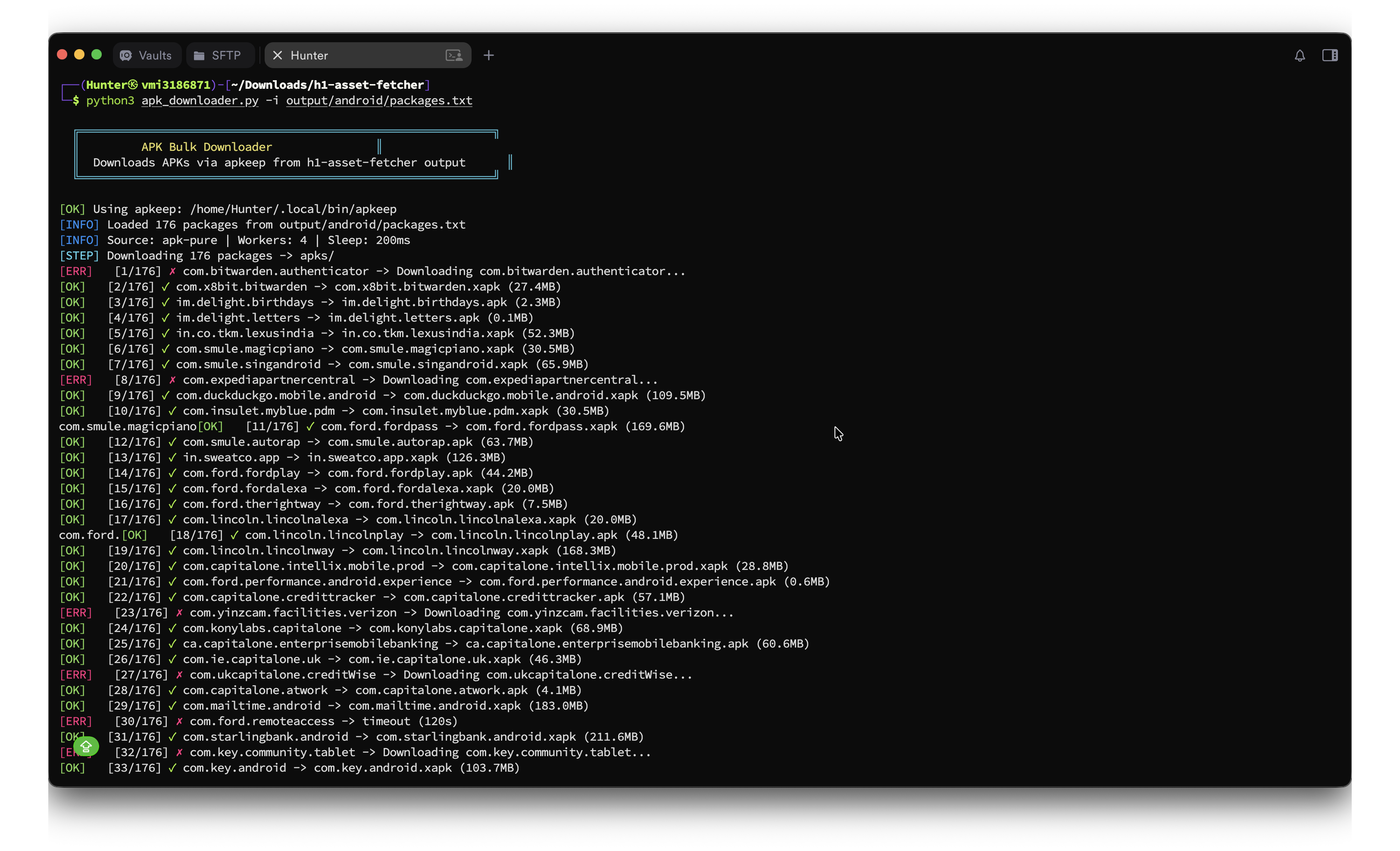
Bulk APK downloader using apkeep:
python3 -m h1_asset_fetcher.download.apkeep -i output/android/packages.txt -o apks/ -w 4
python3 -m h1_asset_fetcher.download.apkeep -i output/android/packages.txt -o apks/ --source apk-pure

# --source all: try apk-pure → huawei-app-gallery → f-droid in turn per package
# (first hit wins). Recovers some packages apk-pure doesn't carry.
python3 -m h1_asset_fetcher.download.apkeep -i output/android/packages.txt -o apks/ --source all
--source options: apk-pure (default), all, huawei-app-gallery, f-droid, google-play. Note google-play needs a Google account email + AAS token, so it's not part of all. The interactive wizard uses --source all automatically.
Google Play (--source google-play)
Needs a Google account email + AAS token (--gplay-email/--gplay-token, or APKEEP_GPLAY_EMAIL/APKEEP_GPLAY_TOKEN) — see apkeep's Google Play guide to obtain one. After a normal run, the no-auth failures saved to apks/failed_packages.txt can be retried via Google Play. Requires apkeep ≥ 1.0.0.
Decompile — h1_asset_fetcher/decompile/
# jadx (thorough)
APKS_DIR=apks OUT_DIR=decompiled bash h1_asset_fetcher/decompile/jadx.sh

Workflow
1. Fetch      h1-asset-fetcher -u user -t token --scope android
2. Download   python3 -m h1_asset_fetcher.download.apkeep -i output/android/packages.txt -o apks/
3. Decompile  APKS_DIR=apks OUT_DIR=decompiled bash h1_asset_fetcher/decompile/jadx.sh
4. Audit      your scanner / manual review
Project layout
h1_asset_fetcher/
  cli.py              # argparse entry; no args → interactive wizard, flags → headless
  tui/                # the interactive questionary wizard
  core/               # platform-agnostic: identifiers, output, config
  platforms/          # one folder per platform (plugin registry)
    hackerone/ bugcrowd/ intigriti/ yeswehack/ immunefi/
  download/           # apkeep
  decompile/          # jadx.sh
Adding a platform = one new folder under platforms/ with a Platform subclass; the CLI picks it up automatically.
License
Author
0xbartita
Project details
Verified details
These details have been verified by PyPIProject links
GitHub Statistics
Maintainers


Download files
Download the file for your platform. If you're not sure which to choose, learn more about installing packages.
Source Distribution
Built Distribution
Filter files by name, interpreter, ABI, and platform.
If you're not sure about the file name format, learn more about wheel file names.
Copy a direct link to the current filters
File details
Details for the file h1_asset_fetcher-1.1.0.tar.gz.
File metadata
- Download URL: h1_asset_fetcher-1.1.0.tar.gz
- Upload date:
- Size: 61.4 kB
- Tags: Source
- Uploaded using Trusted Publishing? Yes
- Uploaded via: twine/6.1.0 CPython/3.13.12
File hashes
| Algorithm | Hash digest | |
|---|---|---|
| SHA256 |
339182dac7fa9b2972f6ecec0fa1a9b507802ff93fac17e6b2c10c964e12173b
|
|
| MD5 |
f4260013b4f8bedd30726d804e40c89c
|
|
| BLAKE2b-256 |
a6994d187e1756462843470dfb38642145e2fcfda01c32f5961f07dcb5ea3e6c
|
Provenance
The following attestation bundles were made for h1_asset_fetcher-1.1.0.tar.gz:
Publisher:
publish.yml on 0xbartita/h1-asset-fetcher
-
Statement:
-
Statement type:
https://in-toto.io/Statement/v1 -
Predicate type:
https://docs.pypi.org/attestations/publish/v1 -
Subject name:
h1_asset_fetcher-1.1.0.tar.gz -
Subject digest:
339182dac7fa9b2972f6ecec0fa1a9b507802ff93fac17e6b2c10c964e12173b - Sigstore transparency entry: 1859449848
- Sigstore integration time:
-
Permalink:
0xbartita/h1-asset-fetcher@bbde132fa5d8e10501e38af878821975b697ea8e -
Branch / Tag:
refs/heads/master - Owner: https://github.com/0xbartita
-
Access:
public
-
Token Issuer:
https://token.actions.githubusercontent.com -
Runner Environment:
github-hosted -
Publication workflow:
publish.yml@bbde132fa5d8e10501e38af878821975b697ea8e -
Trigger Event:
workflow_dispatch
-
Statement type:
File details
Details for the file h1_asset_fetcher-1.1.0-py3-none-any.whl.
File metadata
- Download URL: h1_asset_fetcher-1.1.0-py3-none-any.whl
- Upload date:
- Size: 62.0 kB
- Tags: Python 3
- Uploaded using Trusted Publishing? Yes
- Uploaded via: twine/6.1.0 CPython/3.13.12
File hashes
| Algorithm | Hash digest | |
|---|---|---|
| SHA256 |
d9c066b16b6fecd5783bc2165e85806d96807f58451da648574636700ba41635
|
|
| MD5 |
728aeb9d535ec6291300cbe5bd3a0e36
|
|
| BLAKE2b-256 |
1649dadd17fac31ed04f639dc6dff32c1bbaf46d9fa3414692cdc19b7ff25400
|
Provenance
The following attestation bundles were made for h1_asset_fetcher-1.1.0-py3-none-any.whl:
Publisher:
publish.yml on 0xbartita/h1-asset-fetcher
-
Statement:
-
Statement type:
https://in-toto.io/Statement/v1 -
Predicate type:
https://docs.pypi.org/attestations/publish/v1 -
Subject name:
h1_asset_fetcher-1.1.0-py3-none-any.whl -
Subject digest:
d9c066b16b6fecd5783bc2165e85806d96807f58451da648574636700ba41635 - Sigstore transparency entry: 1859449905
- Sigstore integration time:
-
Permalink:
0xbartita/h1-asset-fetcher@bbde132fa5d8e10501e38af878821975b697ea8e -
Branch / Tag:
refs/heads/master - Owner: https://github.com/0xbartita
-
Access:
public
-
Token Issuer:
https://token.actions.githubusercontent.com -
Runner Environment:
github-hosted -
Publication workflow:
publish.yml@bbde132fa5d8e10501e38af878821975b697ea8e -
Trigger Event:
workflow_dispatch
-
Statement type:






