
Remote Frame Buffer

Project description
pdum.rfb — Remote Frame Buffer


Render a framebuffer in Python, view and interact with it in the browser.
pdum.rfb streams a server-rendered framebuffer to a browser over a WebSocket and
sends pointer/keyboard/resize events back. It targets scientific and interactive
visualization across the whole cadence range — from sparse, on-demand scenes
(render only when state changes) to high-frame-rate interactive streaming
(low-latency H.264/WebCodecs). You own the loop and pick the cadence; the library
never imposes a fixed game-engine tick. It is not a generic VNC clone.
Coming from
jupyter_rfb? Same idea — render in Python, view in the browser, events flow back, same renderview event vocabulary — so it slots underrendercanvas/pygfx/fastplotlib. What's different:
- Not tied to Jupyter. Frames travel over a plain WebSocket, not ipywidgets/kernel comms — the same server drives a standalone web page, a desktop webview, or a headless box, no notebook required.
- High frame rates. Alongside the per-frame image path (every frame a keyframe, à la
jupyter_rfb), a low-latency H.264/WebCodecs path with per-client backpressure and keyframe policy streams continuous, interactive framerates — not just occasional redraws.- Zero-copy on the GPU. When you render on CUDA, frames can go straight to NVENC (CUDA NV12 → H.264) with no host round-trip — see GPU zero-copy.
The repo ships two halves:
- a Python server — this package,
habemus-papadum-rfb(import pdum.rfb), Python 3.12+, UV-managed; - a browser client —
@habemus-papadum/rfb-widgets, a TypeScript package whose decoding runs entirely in a Web Worker (it owns the WebSocket, the decoder, and a transferredOffscreenCanvas).
A sibling native package, habemus-papadum-nvenc (import pdum.nvenc, under
packages/nvenc/), provides an optional PyAV-free GPU H.264
encoder.
📖 Full documentation: https://habemus-papadum.github.io/pdum_rfb/
Try it
No checkout, no build — uv runs it straight from PyPI:
# interactive demo — opens a browser tab; pick a scene, encoder, and quality
uvx --python 3.14 --from 'habemus-papadum-rfb[demo]' pdum-rfb demo

# which encode paths light up on your machine?
uvx --python 3.14 --from 'habemus-papadum-rfb[doctor]' pdum-rfb doctor
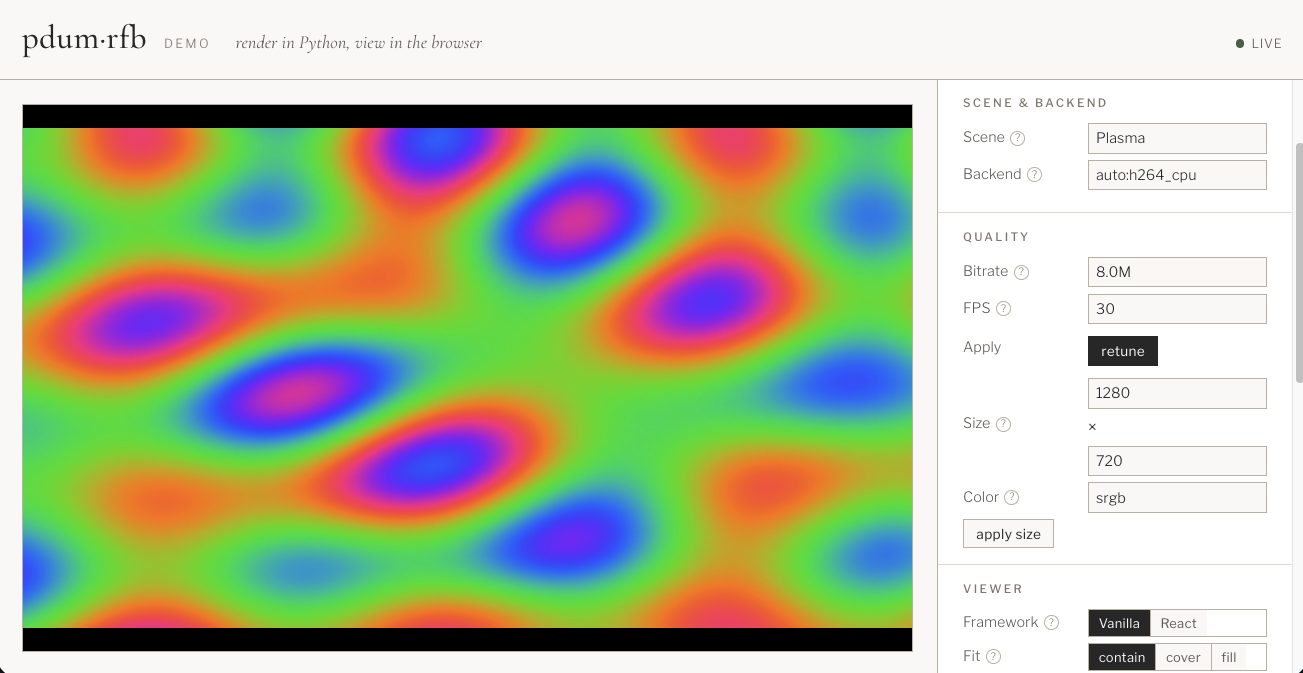
One command works on macOS and Linux — the platform's hardware encoder (Apple
VideoToolbox / NVIDIA NVENC) installs automatically, everything else falls back to the CPU
paths. --python 3.14 just pins the interpreter uv runs with — it downloads it if needed.
How it works
The public API is push: you own your loop and publish frames into a shared
Display; the library fans each frame out to every connected viewer and lets you
drain input from all of them in one place.
import asyncio
import pdum.rfb as rfb

async def main():
    display = await rfb.serve(1280, 720, port=8765)   # WS server starts in the background
    state = initial_state()
    try:
        while running(state):
            for ev in display.poll_events():          # input from every viewer
                state = update(state, ev)
            display.publish(render(state))            # sync, latest-wins, fans out to all viewers
            await asyncio.sleep(1 / 30)               # or on-demand — you own the cadence
    finally:
        await display.aclose()

asyncio.run(main())
import { RemoteFramebufferView } from "@habemus-papadum/rfb-widgets";
const view = new RemoteFramebufferView(document.getElementById("stage")!, {
  url: "ws://localhost:8765",
});
// later: view.dispose();
Each connecting browser negotiates the best shared transport: an image path (JPEG/PNG/WebP, every frame a keyframe; dependency-light) or an H.264 path (Annex B for the browser's WebCodecs decoder). For GPU-rendered scenes, three hardware NVENC routes are available — see the Installation guide.
Installation
pip install habemus-papadum-rfb              # image path (numpy, pillow, websockets)
pip install 'habemus-papadum-rfb[h264]'      # + CPU/software H.264 (PyAV/libx264)
pip install 'habemus-papadum-rfb[gpu-nvenc-sdk]'   # + GPU H.264 (NVIDIA, Linux) — fastest
pip install 'habemus-papadum-rfb[anywidget]'       # + Jupyter/marimo notebook widget
import pdum.rfb works without any extra. Not sure what your machine supports?
pip install 'habemus-papadum-rfb[cli]' then pdum-rfb doctor. The full matrix
(CPU vs the three GPU routes, platform limits) is in the
Installation guide.
Developing
The repo is a uv workspace (root habemus-papadum-rfb + packages/*) with the
browser client as a self-contained pnpm project under widgets/. The layout,
the uv/pnpm conventions, and the CI are documented in
Repository & Development.
Prerequisites
Install these yourself first — setup.sh detects them and tells you how to
install any that are missing, but it never installs them for you:
- uv —
curl -LsSf https://astral.sh/uv/install.sh | sh - Node.js 20+ and pnpm (for the browser client / e2e). The repo pins the tested
LTS in
.nvmrc(Node 22, which CI uses) —nvm use/fnm usepicks it up.corepack enable(ships with Node) ornpm i -g pnpmprovides pnpm. Optional if you only work on the Python side.setup.shrefuses to set up the browser client on Node < 20.
Bootstrap (all platforms)
git clone https://github.com/habemus-papadum/pdum_rfb.git
cd pdum_rfb
./scripts/setup.sh        # idempotent — rerun after pulling dependency changes
One command sets up everything, the same way on macOS / Linux / Linux+GPU:
- Python —
uv sync --frozen(the committeduv.lockis authoritative). On a Linux box with an NVIDIA GPU and a CUDA toolkit it auto-adds the native NVENC SDK encoder — see Per-platform notes for theRFB_GPUknob. - Browser client —
pnpm install --frozen-lockfileplus the Playwright Chromium download used by the e2e suite (skipped, with a hint, if Node/pnpm are absent). - pre-commit hooks.
Per-platform notes
-
Linux without a GPU (and CI's default) — the bootstrap above is everything. The
devgroup already includes PyAV, so the image and CPU-H.264 paths and all their tests work. GPU tests detect no device and skip. -
Linux with an NVIDIA GPU —
setup.shdetects the GPU + CUDA toolkit and builds the PyAV-free NVENC SDK encoder (pdum.nvenc) as an editable install automatically. Override with theRFB_GPUenv var:RFB_GPU=auto ./scripts/setup.sh # default: build it iff Linux + GPU + CUDA toolkit present RFB_GPU=force ./scripts/setup.sh # build even if the CUDA major ≠ 13 (then swap CuPy yourself) RFB_GPU=0 ./scripts/setup.sh # CPU paths only
CuPy (
cupy-cuda13x) comes with the GPU dev setup (thegpu-devgroup), not thegpu-nvenc-sdkextra; on a CUDA-12 toolkit useRFB_GPU=forceand swap tocupy-cuda12x. To confirm what lit up:uv run --group gpu-dev pdum-rfb doctor # which encode paths are available
For the PyAV-18 zero-copy route specifically,
./scripts/install-gpu.shbuilds a CUDA-enabled PyAV. See the GPU zero-copy guide. -
macOS — the image and CPU-H.264 paths work (PyAV publishes arm64 wheels). The NVENC/GPU paths are NVIDIA/Linux-only and are simply unavailable; everything else, including the full headless test suite for the CPU paths, runs normally.
Common commands
uv run pytest                          # Python tests
uv run ruff check . && uv run ruff format .
uv run pdum-rfb demo                    # interactive web demo (add --dev for live-reload)
uv run mkdocs serve                    # docs at http://localhost:8000

pnpm -C widgets typecheck              # browser client: types
pnpm -C widgets test                   #                 Vitest unit tests
pnpm -C widgets e2e                    #                 Playwright e2e (boots the Python server)
pnpm -C widgets dev                    #                 demo at http://localhost:5173
Releasing
Maintainers only. Releasing publishes to PyPI/npm, pushes tags, and creates public GitHub releases. Version numbers are human-managed — don't hand-edit them.
Releasing is a single CI workflow — release (.github/workflows/release.yml), a
workflow_dispatch a maintainer runs from the GitHub Actions UI (or gh workflow run release.yml -f bump=minor). There is no local release script. In one run it:
- requires the commit's CI (
ci.yml: Linux tests + widgets) to be green — waiting out an in-progress run;skip_ci_checkoverrides; - computes the version =
bump(last vX.Y.Z tag, bump)— the size (patch/minor/major) is decided at release, against the last real release (tag-as-truth), not guessed ahead; - writes it across every version file in lockstep (
pyproject.toml,src/pdum/rfb/__init__.py,packages/*/pyproject.toml, allwidgetspackage.jsons), commits, tagsvX.Y.Z, and builds the wheel matrix from that tag; - publishes all packages —
habemus-papadum-rfb+ native-nvenc/-vtencto PyPI and@habemus-papadum/rfb-widgets+ the framework wrappers to npm (with provenance); - cuts a GitHub Release (which redeploys the docs) and returns
mainto theX.Y.Z+devworking marker.
Between releases the working tree carries an X.Y.Z+dev marker (last release + a WIP flag).
dry_run computes the version and shows the diff without committing or publishing. Publishing
uses repository secrets (PYPI_API_TOKEN, NPM_TOKEN) — see
Repository & Development.
scripts/publish.sh (reading a git-ignored .env) remains a token-based manual break-glass
fallback for out-of-band publishing.
License
MIT License — see LICENSE for details.


Download files
Download the file for your platform. If you're not sure which to choose, learn more about installing packages.
Source Distribution
Built Distribution
Filter files by name, interpreter, ABI, and platform.
If you're not sure about the file name format, learn more about wheel file names.
Copy a direct link to the current filters
File details
Details for the file habemus_papadum_rfb-0.3.0.tar.gz.
File metadata
- Download URL: habemus_papadum_rfb-0.3.0.tar.gz
- Upload date:
- Size: 921.3 kB
- Tags: Source
- Uploaded using Trusted Publishing? No
- Uploaded via: twine/6.1.0 CPython/3.13.12
File hashes
| Algorithm | Hash digest | |
|---|---|---|
| SHA256 |
cdef41ecafb426cb5ade44c298859087ce2c9693f2ba0cd9da98c9f6a24cf64d
|
|
| MD5 |
4282587dee0824839f85681e109e09b7
|
|
| BLAKE2b-256 |
90d851a8953ce6de7ba02968c9b80aa9ba8f48d50e19e138ecffa546d83e6ac6
|
File details
Details for the file habemus_papadum_rfb-0.3.0-py3-none-any.whl.
File metadata
- Download URL: habemus_papadum_rfb-0.3.0-py3-none-any.whl
- Upload date:
- Size: 274.7 kB
- Tags: Python 3
- Uploaded using Trusted Publishing? No
- Uploaded via: twine/6.1.0 CPython/3.13.12
File hashes
| Algorithm | Hash digest | |
|---|---|---|
| SHA256 |
85c74b9e8a7f97dbfc076494d67e0e0d718bbeb9b84f652b1b753e44edfe8c1f
|
|
| MD5 |
677ccc7922dbdf120f3b7dc708ac2fad
|
|
| BLAKE2b-256 |
83faa01a7ea175295519fc384f310898dc49b6c3c2ab3006349e2b2e4224d7c6
|






