
HackerTray


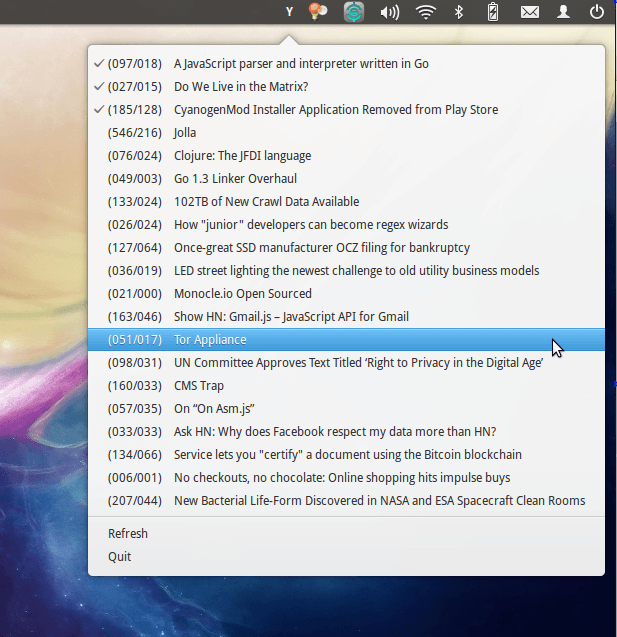
HackerTray is a simple Hacker News Linux application that lets you view top HN stories in your System Tray. It uses appindicator where available, but provides a Gtk StatusIcon fallback in case AppIndicator is not available.
The inspiration for this came from Hacker Bar, which is Mac-only.
Screenshot
Installation
HackerTray is distributed as a python package. Do the following to install:
sudo pip install hackertray
OR
sudo easy_install hackertray
OR
#Download Source and cd to it
sudo python setup.py install
After that, you can run hackertray from anywhere and it will run. You can
now add it to your OS dependent session autostart method. In Ubuntu, you can
access it via:
- System > Preferences > Sessions (OR)
- System > Preferences > Startup Applications
depending on your Ubuntu Version. Or put it in ~/.config/openbox/autostart
if you are running OpenBox. Here is how the
configuration should look like in Ubuntu and its derivatives.
Upgrade
The latest stable version is
You can check which version you have installed with hackertray --version.
To upgrade, run pip install -U hackertray. In some cases (Ubuntu), you might
need to clear the pip cache before upgrading:
sudo rm -rf /tmp/pip-build-root/hackertray
HackerTray will automatically check the latest version on startup, and inform you if there is an update available.
Options
HackerTray accepts its various options via the command line. Run hackertray -h to see all options. Currently the following switches are supported:
-c: Enables comments support. Clicking on links will also open the comments page on HN. Can be switched off via the UI, but the setting is not remembered.--chrome PROFILE-PATH: Specifying a profile path to a chrome directory will make HackerTray read the Chrome History file to mark links as read. Links are checked once every 5 minutes, which is when the History file is copied (to override the lock in case Chrome is open), searched using sqlite and deleted. This feature is still experimental.--firefox PROFILE-PATH: Specify path to a firefox profile directory. HackerTray will read your firefox history from this profile, and use it to mark links as read. Passautoas PROFILE-PATH to automatically read the default profile and use that.--reverse(or-r). Switches the order for the elements in the menu, so Quit is at top. Use this if your system bar is at the bottom of the screen.
Note that the --chrome and --firefox options are independent, and can be used together. However, they cannot be specified multiple times (so reading from 2 chrome profiles is not possible).
Google Chrome Profile Path
Where your Profile is stored depends on which version of chrome you are using:
- [Chrome Stable]
~/.config/google-chrome/Default - [Chrome Beta]
~/.config/google-chrome-beta/Default - [Chrome Dev]
~/.config/google-chrome-unstable/Default - [Chromium]
~/.config/chromium/Default
Replace Default with Profile 1, Profile 2 or so on if you use multiple profiles on Chrome. Note that the --chrome option accepts a PROFILE-PATH, not the History file itself. Also note that sometimes ~ might not be set, so you might need to use the complete path (such as /home/nemo/.config/google-chrome/Default/).
Firefox Profile Path
The default firefox profile path is ~/.mozilla/firefox/*.default, where * denotes a random 8 digit string. You can also read ~/.mozilla/firefox/profiles.ini to get a list of profiles. Alternatively, just pass auto and HackerTray will pick the default profile automatically.
Features
- Minimalist Approach to HN
- Opens links in your default browser
- Remembers which links you opened, even if you opened them outside of HackerTray
- Shows Points/Comment count in a simple format
- Reads your Google Chrome/Firefox History file to determine which links you've already read (even if you may not have opened them via HackerTray)
Troubleshooting
If the app indicator fails to show in Ubuntu versions, consider installing python-appindicator with
sudo apt-get install python-appindicator
Note that appindicator is no longer supported in non-Ubuntu distros, because it only works on Python2.
Development
To develop on hackertray, or to test out experimental versions, do the following:
- Clone the project
- Run
(sudo) python setup.py developin the hackertray root directory - Run
hackertraywith the required command line options from anywhere.
Analytics
On every launch, a request is made to https://pypi.python.org/pypi/hackertray/json to check the latest version.
No more tracking. All data every collected for this project has been deleted. You can see the wiki for what all was collected earlier (Version < 4.0.0).
Credits
- Mark Rickert for Hacker Bar (No longer active)
- Giridaran Manivannan for troubleshooting instructions.
- @cheeaun for the Unofficial Hacker News API
Licence
Licenced under the MIT Licence. See the LICENSE file for complete license text.
1 maintainer

Metadata
1 maintainer
Release files for hackertray 5.0.0
For a detailed explanation of source distributions (sdists) and built distributions (wheels), please see the package formats documentation.
Source distribution (sdist)
| File | Size | Uploaded | |
|---|---|---|---|
| hackertray-5.0.0.tar.gz | 13.5 kB | Details |
Built distribution (wheel)
| File | Interpreter | ABI | Platform | Reset |
|---|---|---|---|---|
| hackertray-5.0.0-py3-none-any.whl | Python 3 | none | any | Details |
Total release size: 26.4 kB
Release files / hackertray-5.0.0.tar.gz
| Download URL | hackertray-5.0.0.tar.gz |
|---|---|
| Size | 13.5 kB |
| Tags | Source |
|
SHA-256 checksum How to use checksums |
f22b5e863d1bb4e0b88a73257d6e480bc6c3d63b5c92f600b1940dc13e7ccbda
|
|
BLAKE2b-256 checksum How to use checksums |
35cdbe92e9c4445adba5e331966dead75f99f3fa063a88161b322f3d90ae6d5c
|
| Upload date | |
|
Uploaded using Trusted Publishing? What is trusted publishing? |
Yes |
| Uploaded via |
twine/6.1.0 CPython/3.13.7
|
Provenance
Provenance describes where a file came from. On PyPI, provenance is shared via attestations, which provide a verifiable record of the build or publishing details. View details, limitations and caveats.


PyPI Publish Attestation
PyPI verified that this artifact, at this checksum, originated from the publisher listed below.
Signed by GitHub Actions, verified by PyPI on Mar 30, 2026.
Transparency logRelease files / hackertray-5.0.0-py3-none-any.whl
| Download URL | hackertray-5.0.0-py3-none-any.whl |
|---|---|
| Size | 12.9 kB |
| Tags | Python 3 |
|
SHA-256 checksum How to use checksums |
ad4739a0c99ce2cb30bb688efb891660ffe399c34ce6f8acfd524b0b8267dda9
|
|
BLAKE2b-256 checksum How to use checksums |
7603e658c9d40126feb90ff7c35a422e63d5a4bf70318e26baf47f4dd12b3ef2
|
| Upload date | |
|
Uploaded using Trusted Publishing? What is trusted publishing? |
Yes |
| Uploaded via |
twine/6.1.0 CPython/3.13.7
|
Provenance
Provenance describes where a file came from. On PyPI, provenance is shared via attestations, which provide a verifiable record of the build or publishing details. View details, limitations and caveats.
PyPI Publish Attestation
PyPI verified that this artifact, at this checksum, originated from the publisher listed below.
Signed by GitHub Actions, verified by PyPI on Mar 30, 2026.
Transparency log













