
Hacker News app that sits in your System Tray

Project description
HackerTray


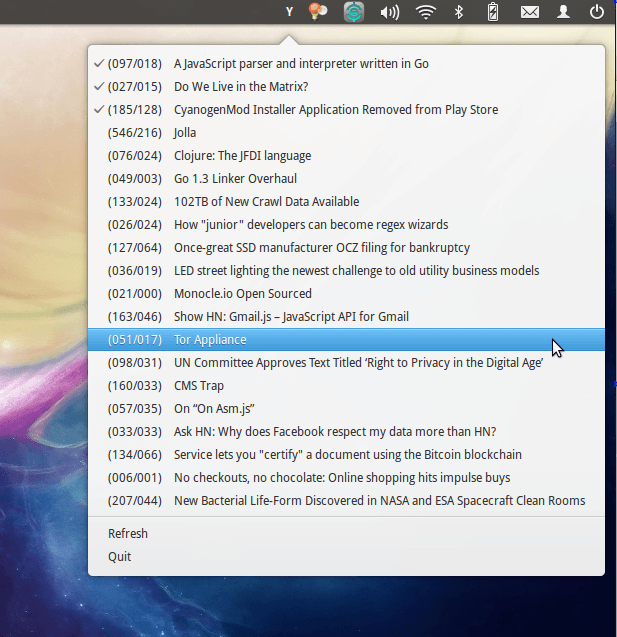
HackerTray is a simple Hacker News Linux application that lets you view top HN stories in your System Tray. It uses appindicator where available, but provides a Gtk StatusIcon fallback in case AppIndicator is not available.
The inspiration for this came from Hacker Bar, which is Mac-only.
Screenshot
Installation
HackerTray is distributed as a python package. Do the following to install:
sudo pip install hackertray
OR
sudo easy_install hackertray
OR
#Download Source and cd to it
sudo python setup.py install
After that, you can run hackertray from anywhere and it will run. You can
now add it to your OS dependent session autostart method. In Ubuntu, you can
access it via:
- System > Preferences > Sessions (OR)
- System > Preferences > Startup Applications
depending on your Ubuntu Version. Or put it in ~/.config/openbox/autostart
if you are running OpenBox. Here is how the
configuration should look like in Ubuntu and its derivatives.
Upgrade
The latest stable version is
You can check which version you have installed with hackertray --version.
To upgrade, run pip install -U hackertray. In some cases (Ubuntu), you might
need to clear the pip cache before upgrading:
sudo rm -rf /tmp/pip-build-root/hackertray
HackerTray will automatically check the latest version on startup, and inform you if there is an update available.
Options
HackerTray accepts its various options via the command line. Run hackertray -h to see all options. Currently the following switches are supported:
-c: Enables comments support. Clicking on links will also open the comments page on HN. Can be switched off via the UI, but the setting is not remembered.--chrome PROFILE-PATH: Specifying a profile path to a chrome directory will make HackerTray read the Chrome History file to mark links as read. Links are checked once every 5 minutes, which is when the History file is copied (to override the lock in case Chrome is open), searched using sqlite and deleted. This feature is still experimental.--firefox PROFILE-PATH: Specify path to a firefox profile directory. HackerTray will read your firefox history from this profile, and use it to mark links as read. Passautoas PROFILE-PATH to automatically read the default profile and use that.--reverse(or-r). Switches the order for the elements in the menu, so Quit is at top. Use this if your system bar is at the bottom of the screen.
Note that the --chrome and --firefox options are independent, and can be used together. However, they cannot be specified multiple times (so reading from 2 chrome profiles is not possible).
Google Chrome Profile Path
Where your Profile is stored depends on which version of chrome you are using:
- [Chrome Stable]
~/.config/google-chrome/Default - [Chrome Beta]
~/.config/google-chrome-beta/Default - [Chrome Dev]
~/.config/google-chrome-unstable/Default - [Chromium]
~/.config/chromium/Default
Replace Default with Profile 1, Profile 2 or so on if you use multiple profiles on Chrome. Note that the --chrome option accepts a PROFILE-PATH, not the History file itself. Also note that sometimes ~ might not be set, so you might need to use the complete path (such as /home/nemo/.config/google-chrome/Default/).
Firefox Profile Path
The default firefox profile path is ~/.mozilla/firefox/*.default, where * denotes a random 8 digit string. You can also read ~/.mozilla/firefox/profiles.ini to get a list of profiles. Alternatively, just pass auto and HackerTray will pick the default profile automatically.
Features
- Minimalist Approach to HN
- Opens links in your default browser
- Remembers which links you opened, even if you opened them outside of HackerTray
- Shows Points/Comment count in a simple format
- Reads your Google Chrome/Firefox History file to determine which links you've already read (even if you may not have opened them via HackerTray)
Troubleshooting
If the app indicator fails to show in Ubuntu versions, consider installing python-appindicator with
sudo apt-get install python-appindicator
Note that appindicator is no longer supported in non-Ubuntu distros, because it only works on Python2.
Development
To develop on hackertray, or to test out experimental versions, do the following:
- Clone the project
- Run
(sudo) python setup.py developin the hackertray root directory - Run
hackertraywith the required command line options from anywhere.
Analytics
On every launch, a request is made to https://pypi.python.org/pypi/hackertray/json to check the latest version.
No more tracking. All data every collected for this project has been deleted. You can see the wiki for what all was collected earlier (Version < 4.0.0).
Credits
- Mark Rickert for Hacker Bar (No longer active)
- Giridaran Manivannan for troubleshooting instructions.
- @cheeaun for the Unofficial Hacker News API
Licence
Licenced under the MIT Licence. See the LICENSE file for complete license text.
Release history Release notifications | RSS feed


Download files
Download the file for your platform. If you're not sure which to choose, learn more about installing packages.
Source Distribution
Built Distribution
Filter files by name, interpreter, ABI, and platform.
If you're not sure about the file name format, learn more about wheel file names.
Copy a direct link to the current filters
File details
Details for the file hackertray-5.0.0.tar.gz.
File metadata
- Download URL: hackertray-5.0.0.tar.gz
- Upload date:
- Size: 13.5 kB
- Tags: Source
- Uploaded using Trusted Publishing? Yes
- Uploaded via: twine/6.1.0 CPython/3.13.7
File hashes
| Algorithm | Hash digest | |
|---|---|---|
| SHA256 |
f22b5e863d1bb4e0b88a73257d6e480bc6c3d63b5c92f600b1940dc13e7ccbda
|
|
| MD5 |
d38bf534e0c7b724a8d1102702e62f4c
|
|
| BLAKE2b-256 |
35cdbe92e9c4445adba5e331966dead75f99f3fa063a88161b322f3d90ae6d5c
|
Provenance
The following attestation bundles were made for hackertray-5.0.0.tar.gz:
Publisher:
release.yml on captn3m0/hackertray
-
Statement:
-
Statement type:
https://in-toto.io/Statement/v1 -
Predicate type:
https://docs.pypi.org/attestations/publish/v1 -
Subject name:
hackertray-5.0.0.tar.gz -
Subject digest:
f22b5e863d1bb4e0b88a73257d6e480bc6c3d63b5c92f600b1940dc13e7ccbda - Sigstore transparency entry: 1201233018
- Sigstore integration time:
-
Permalink:
captn3m0/hackertray@c02725f1ec5cdb4a0639768c51f86579ba43393f -
Branch / Tag:
refs/tags/5.0.0 - Owner: https://github.com/captn3m0
-
Access:
public
-
Token Issuer:
https://token.actions.githubusercontent.com -
Runner Environment:
github-hosted -
Publication workflow:
release.yml@c02725f1ec5cdb4a0639768c51f86579ba43393f -
Trigger Event:
push
-
Statement type:
File details
Details for the file hackertray-5.0.0-py3-none-any.whl.
File metadata
- Download URL: hackertray-5.0.0-py3-none-any.whl
- Upload date:
- Size: 12.9 kB
- Tags: Python 3
- Uploaded using Trusted Publishing? Yes
- Uploaded via: twine/6.1.0 CPython/3.13.7
File hashes
| Algorithm | Hash digest | |
|---|---|---|
| SHA256 |
ad4739a0c99ce2cb30bb688efb891660ffe399c34ce6f8acfd524b0b8267dda9
|
|
| MD5 |
a1e2a8c813f6ae1492087af7428bc314
|
|
| BLAKE2b-256 |
7603e658c9d40126feb90ff7c35a422e63d5a4bf70318e26baf47f4dd12b3ef2
|
Provenance
The following attestation bundles were made for hackertray-5.0.0-py3-none-any.whl:
Publisher:
release.yml on captn3m0/hackertray
-
Statement:
-
Statement type:
https://in-toto.io/Statement/v1 -
Predicate type:
https://docs.pypi.org/attestations/publish/v1 -
Subject name:
hackertray-5.0.0-py3-none-any.whl -
Subject digest:
ad4739a0c99ce2cb30bb688efb891660ffe399c34ce6f8acfd524b0b8267dda9 - Sigstore transparency entry: 1201233024
- Sigstore integration time:
-
Permalink:
captn3m0/hackertray@c02725f1ec5cdb4a0639768c51f86579ba43393f -
Branch / Tag:
refs/tags/5.0.0 - Owner: https://github.com/captn3m0
-
Access:
public
-
Token Issuer:
https://token.actions.githubusercontent.com -
Runner Environment:
github-hosted -
Publication workflow:
release.yml@c02725f1ec5cdb4a0639768c51f86579ba43393f -
Trigger Event:
push
-
Statement type:






