
HAF
支持多种测试的高可用测试框架



安装
使用 pip 直接安装
tsbxmw@ps# pip install haf --upgrade
使用 git 下载源码安装
   tsbxmw@ps# git clone https://github.com/tsbxmw/haf
   tsbxmw@ps# cd haf
   tsbxmw@ps# python setup.py install
如何运行例子
1,使用 init 命令 或者 git 获取源码例子
python -m haf init
或者
git clone https://github.com/tsbxmw/haf-sample
2, 例子提供了 api 和 web-ui 的测试用例
运行 api 用例
python -m haf run -c=config.json
运行 web ui 测试用例
python -m haf run -c=config-web.json
3, 可以在 data 文件夹下找到 index.html,作为默认的 html 报告
使用 `chrome` 或者其他浏览器打开即可。
其他内容
| 快速开始 | 例子 | pypi 主页 | 文档主页 |
|---|---|---|---|
| 开始 | haf-sample | pypi | doc |
插件
| id | 插件名称 | 插件版本 | github 主页 |
|---|---|---|---|
| 1 | haf api server |  |
haf webserver |
| 2 | haf sql publish |  |
haf sqlpublish |
如何运行自定义的用例
可以本地运行所以的用例
所有的进程在本地模式下都是在本机存在的
--bus-server(-bs)参数不适用时便是本地模式
修改 testcases 中的 config.json 文件,用来运行自己的用例
- 修改
log_path和report_path和case_path3 个字段为自己默认的地址,分别为 日志路径、报告路径、用例路径。 - 可以删除
config->run->sql_publish字段,如果不需要将数据上传到数据库。
    {
      "config":{
        "name": "test",
        "debug" : false,
        "bus_server_port": 8801,
        "run": {
          "sql_publish": {
            "id": 1,
            "sql_name": "upload",
            "publish": true,
            "host": "192.168.0.200",
            "port": 3306,
            "username": "root",
            "password": "root",
            "database": "haf_publish",
            "protocol": "mysql"
          },
          "log": {
            "log_path": "./data"
          },
          "bus": {
            "only": false,
            "host": "",
            "port": "",
            "auth_key": ""
          },
          "report": {
            "report_path": "./data/report.html",
            "report_template": "base",
            "report_export_path": "email"
          },
          "case": [
            {
              "case_path": "./testcases/test.xlsx"
            },
            {
              "case_path": "./testcases/test2.json"
            },
            {
              "case_path": "./testcases/test1.xlsx"
            },
            {
              "case_path": "./testcases/test3.yml"
            }
          ],
          "runner":{
            "only": false,
            "count": 4
          },
          "loader": {
            "only": false
          },
          "recorder": {
            "only": false
          },
          "web_server": {
            "host": "",
            "port": "",
            "run": true
          }
        }
      }
    }
可以使用 testcases 中提供的默认例子创建新的用例
- 创建
xlsx/py/json/yaml格式的用例 - 也可以使用
haf-sample中的例子
运行
使用 config 配置运行 测试
python -m haf run -c=./testcases/config.json
使用 参数 运行测试
python -m haf run -case=./testcases/test.xlsx,./testcases/test2.json -ld=./data -rh=true -rod=./data/report.html
测试报告
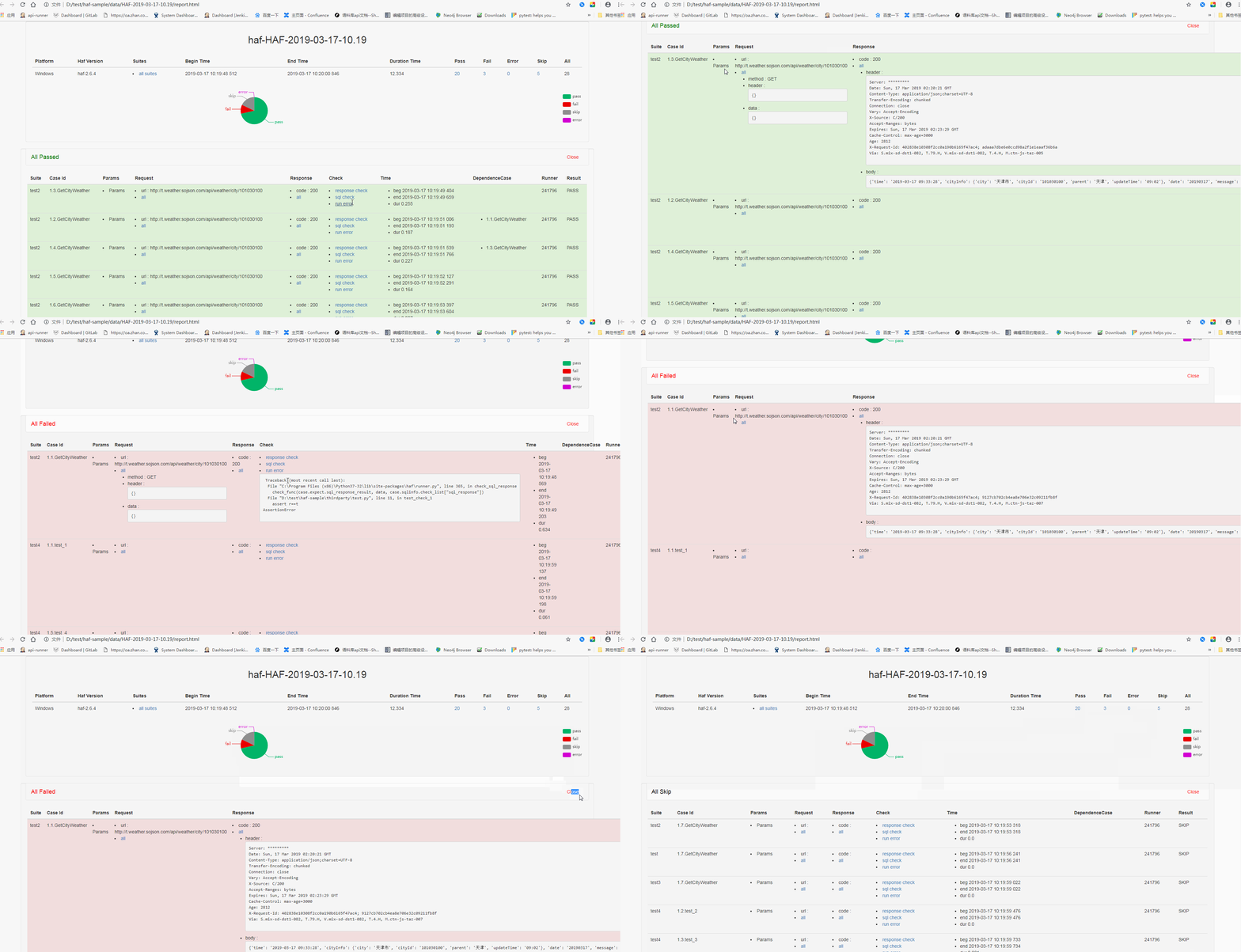
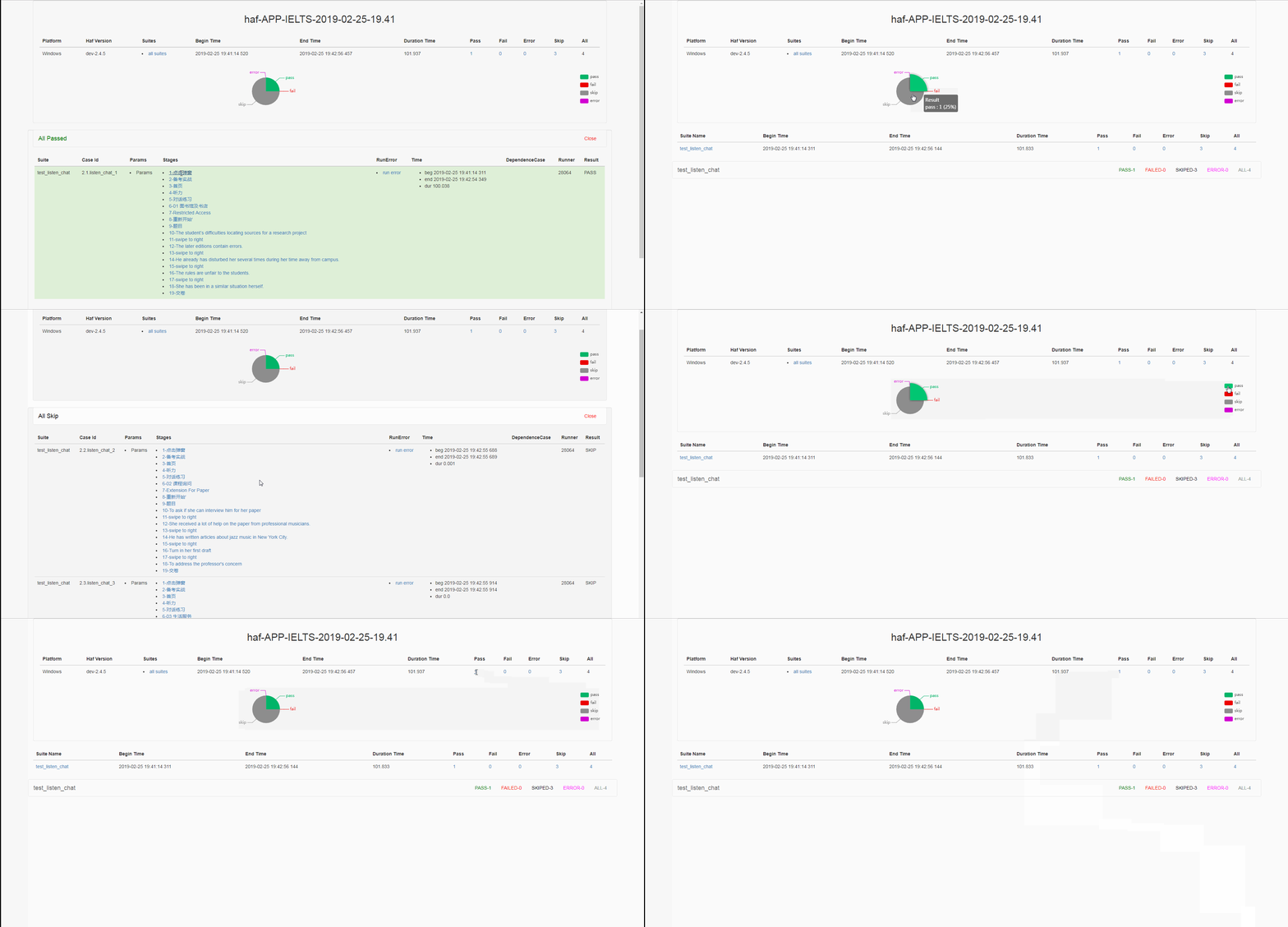
如何运行 app-ui 测试用例
- 更改
config.json中的report字段,增加report_template子字段, 使用base_app为模板
    "run": {
        "type": "app"  # change type to app

        "report": {
            "report_template": "base_app",  # change report_template to base_app
            "report_path": "./data/report.html"
        }
    }
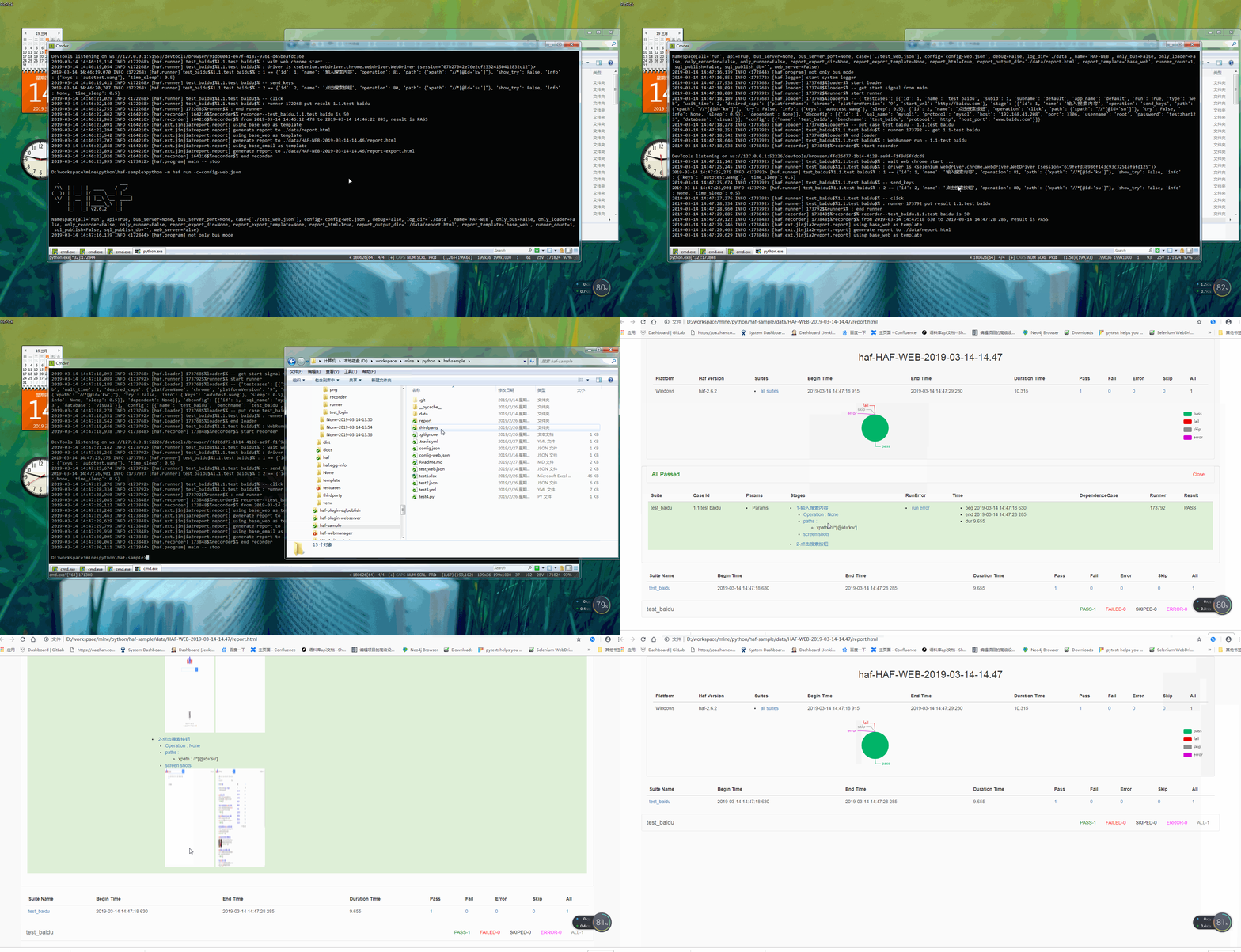
运行 web-ui 测试用例
- 更改
config.json中的report字段,增加report_template子字段, 使用base_web为模板
    "run": {
        "type": "web"  # change type to web

        "report": {
            "report_template": "base_web",  # change report_template to base_web
            "report_path": "./data/report.html"
        }
    }
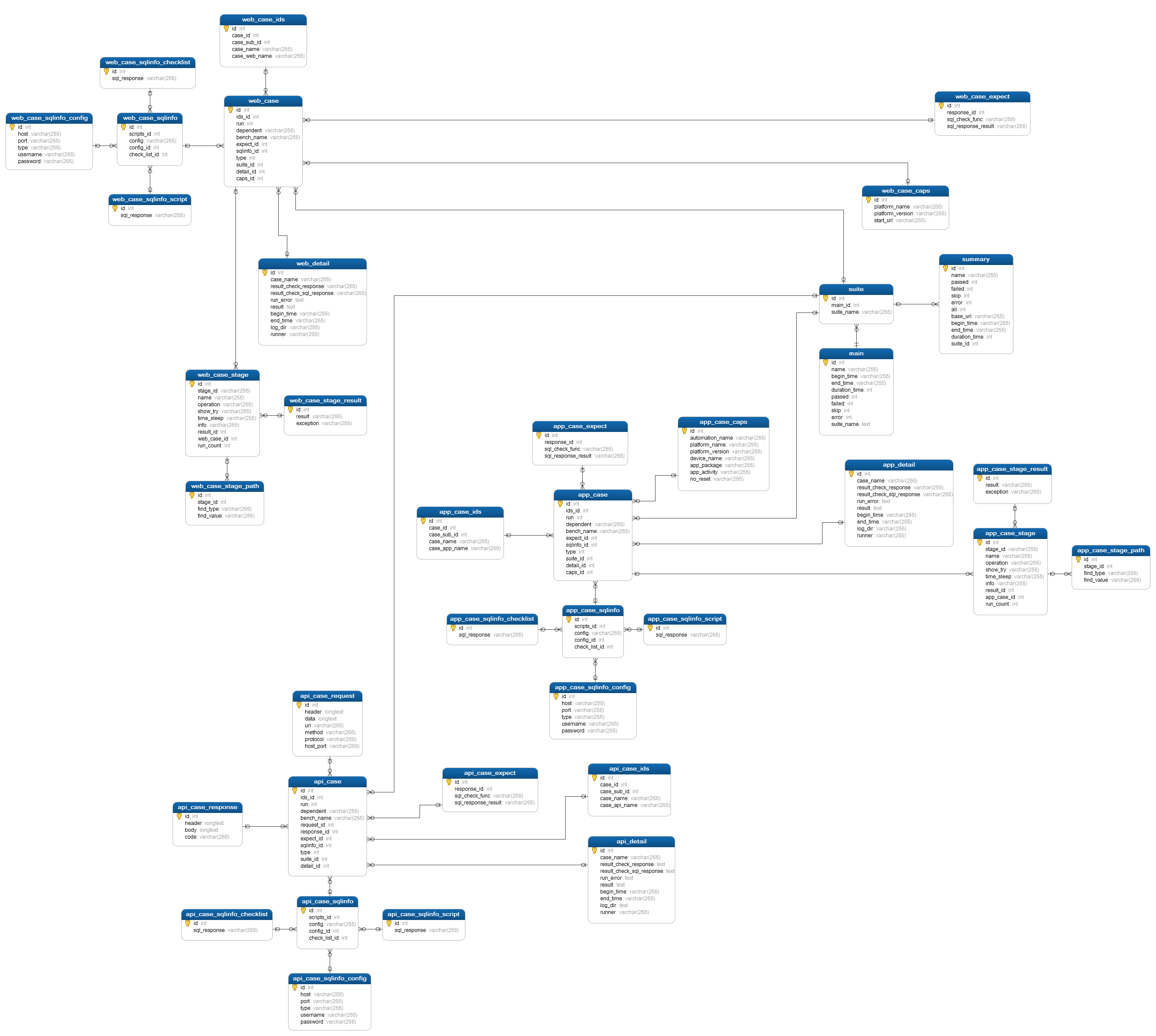
haf 例子
其他的命令行参数
- 使用多个 runner 增加运行速度,
runner-count
python -m haf run -rc=4
- 启动 web-server,提供可视化过程,
web-server
python -m haf run -ws=true
- 只启动
loader/runner/bus/recorder中的某个
    # only loader
    python -m haf run -ol=true
    # only bus
    python -m haf run -ob=true
    # only runner
    python -m haf run -or=true
    # only recorder
    python -m haf run -ore=true
- 使用自定义的报告模板
    "report": {
        "report_template": "base_app"
    }
- 使用插件将数据发送到 数据库
    "sql_publish": {
        "id": 1,
        "sql_name": "upload",
        "publish": true,
        "host": "192.168.0.200",
        "port": 3306,
        "username": "root",
        "password": "root",
        "database": "haf_publish",
        "protocol": "mysql"
    }
其他支持
tsbx# pip install hafweb -U
python -m hafweb -ss=root:root@localhost:3306@haf_publish -p=8081
-
默认页面
http://localhost:8081/
-
index page
http://localhost:8081/index
-
today page
http://localhost:8081/today
-
others support looking at hafweb project
web api server suport
- get loader infos
http://localhost:8888/loader
- get runner infos
http://localhost:8888/runner
- get result infos
http://localhost:8888/result
- get report infos
    http://localhost:8888/report
    http://localhost:8888/report-app
FrameWork
Design
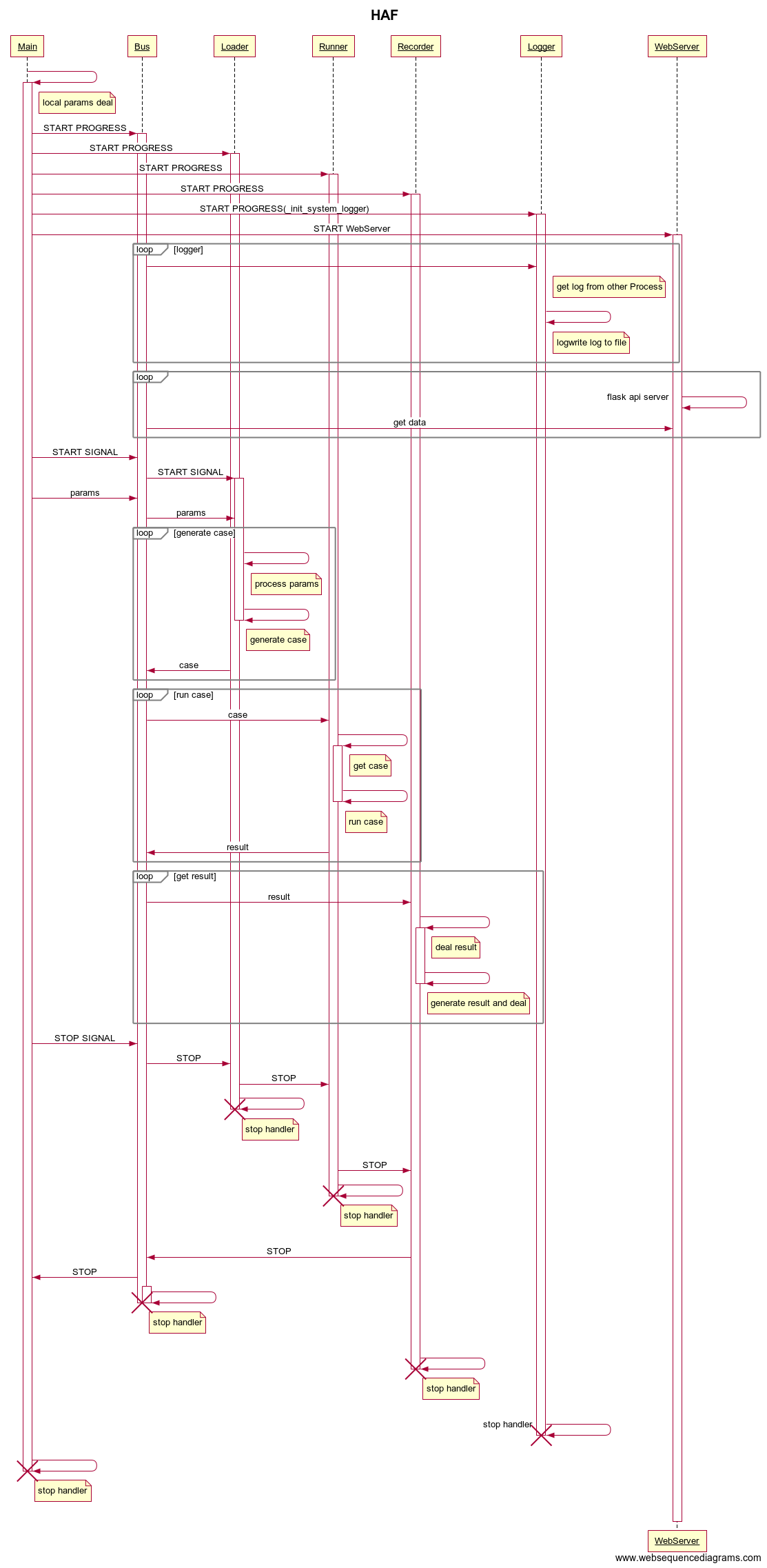
Doc
Release Note
new features
-
now support app-ui/web-ui cases and generate report
-
support mysql result publish
-
based on local test runners
-
support xlsx,json,yml,py cases
-
report generate with html-template
-
multi-processes on different machines
-
multi-runners
-
web-server support restful api based on flask
-
only mode : loader/runner/recorder/webserver/bus/logger support
1 maintainer

Metadata
1 maintainer
Release files for haf 2.9.7
For a detailed explanation of source distributions (sdists) and built distributions (wheels), please see the package formats documentation.
Built distribution (wheel)
| File | Interpreter | ABI | Platform | Reset |
|---|---|---|---|---|
| haf-2.9.7-py2.py3-none-any.whl | Python 3, Python 2 | none | any | Details |
Release files / haf-2.9.7-py2.py3-none-any.whl
| Download URL | haf-2.9.7-py2.py3-none-any.whl |
|---|---|
| Size | 542.6 kB |
| Tags | Python 2 Python 3 |
|
SHA-256 checksum How to use checksums |
6fd2c049c20cebfe525cfdafcd2f922685bf1eec0274ee08d121acf029e3fd3e
|
|
BLAKE2b-256 checksum How to use checksums |
b8a3c48bafda19786fbbd4bd5c149aff4ca767b41c805dffc7ed0a484a89b400
|
| Upload date | |
|
Uploaded using Trusted Publishing? What is trusted publishing? |
No |
| Uploaded via |
twine/3.1.1 pkginfo/1.4.2 requests/2.22.0 setuptools/44.0.0 requests-toolbelt/0.9.1 tqdm/4.26.0 CPython/3.7.0
|














