
Haiqu SDK: Quantum Performance Middleware for Python
Haiqu is a middleware platform that bridges the gap between quantum hardware and practical applications. Haiqu SDK gives you programmatic access to the full Haiqu cloud stack: error mitigation, circuit compression, hardware integration, and experiment tracking - so you can run quantum circuits that actually work on today's noisy hardware.

📖 Full documentation: docs.haiqu.ai
What You Can Do with Haiqu
- Error Shield: automatic noise reduction preserves circuit fidelity without manual calibration
- Circuit Compression: run circuits that would otherwise exceed hardware qubit and gate limits
- Data Loading: linear-depth quantum data loading at practical scale
- Hardware Integration: connect to major quantum processors and cloud platforms through a single API
- Experiment Tracking: monitor job history, circuit measurements, and results across runs
For example, using Haiqu SDK for a utility-scale Floquet dynamics simulation of the kicked Ising model on 103 qubits reduces quantum processor runtime from ~3.1 hours to ~1 minute, and lowers the estimated quantum cloud bill from ~$17,856 to ~$34, while preserving accuracy close to the ideal result.
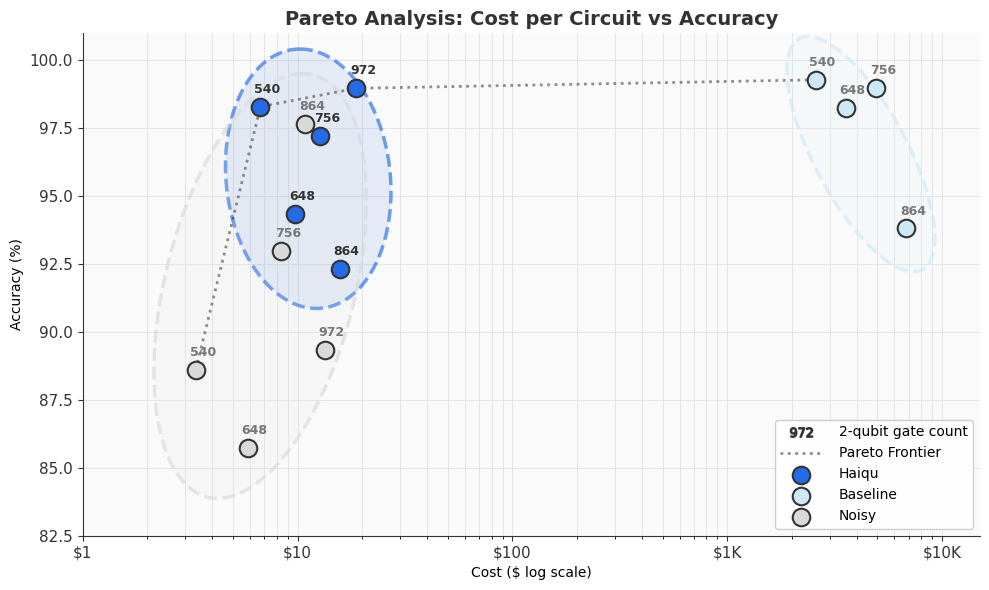
See the kicked_ising.ipynb notebook for the full experiment, as well as other SDK Application notebooks in the sdk-examples repository for more cases of practical advantage.
Want to see this in action? Book a demo to get access to this example and more.
Research results
Haiqu's technology is backed by peer-reviewed research:
- Matrix Product States for shallow quantum circuit synthesis
- Hamiltonian simulation via sub-block partitioning and state reconstruction
- Rivet transpiler: caching and reuse for iterative quantum workloads
- Fluid dynamics simulation without increasing circuit complexity
- Large Hamiltonian evolution across multiple quantum processors
See also the Haiqu Blog for more exciting research from us.
Installation
This repository contains the source code for the Haiqu SDK Python package. For users, It is recommended to install it from PyPI via pip install haiqu-sdk rather than to build from source. Refer to Haiqu SDK Docs / Local Installation guide for more details.
Prerequisites
- Python 3.11+ or Conda
Step 1: Set up a Python environment (recommended)
Creating a virtual environment is optional, but highly recommended to avoid system-wide install and update of package dependencies.
Venv (available by default with Python)
python -m venv haiqu-env
source haiqu-env/bin/activate
Note: on Windows systems, instead of the shell command on the last line above, run .\haiqu-env\Scripts\activate.bat to activate the environment.
Conda
conda create -y --name haiqu-sdk python=3.13
conda activate haiqu-sdk
Virtualenv
virtualenv haiqu-env --python ">=3.11"
source haiqu-env/bin/activate
Step 2: Install the SDK
The latest version is available from PyPI
pip install haiqu-sdk
Getting Access
To use the Haiqu SDK you need an API key.
Request access here → haiqu.ai
After sign-up, your API key and access instructions will be delivered by email.
Once you have a key, authenticate in your code:
from haiqu.sdk import haiqu

# Login with your API key
haiqu.login(api_access_key="ENTER_YOUR_API_KEY_HERE")  # or set the HAIQU_API_KEY env variable

# Initialize your first experiment
haiqu.init("My First Quantum Experiment")
On success you will see:
Success: Welcome to the Quantum World, you@example.com!
You're all set. Refer to the Getting Started section to learn what you can do with Haiqu SDK.
Getting Started
The fastest way to get started is through the SDK tutorial notebooks in the sdk-examples repository. They act as a tutorial for basic Haiqu SDK feature with ready-to-run notebooks. Clone it and open the notebooks in your environment to get started:
git clone https://github.com/haiqu-ai/sdk-examples.git
cd sdk-examples
Also see the Core Features section of the Haiqu SDK docs for guides, as well as the full Haiqu SDK Reference.
AI-Assisted Development (MCP)
Haiqu exposes MCP (Model Context Protocol) servers so you can use AI assistants like Claude or Cursor to execute circuits, query results, and browse documentation directly from your editor.
See MCP.md for configuration instructions for VS Code + Claude Code and Cursor.
Feedback and Support
- Documentation: docs.haiqu.ai
- Email: info@haiqu.ai
- Issues and feature requests: open an issue in this repository or visit feedback.haiqu.ai
1 maintainer

Metadata
1 maintainer
Release files for haiqu-sdk 1.8.0
For a detailed explanation of source distributions (sdists) and built distributions (wheels), please see the package formats documentation.
Source distribution (sdist)
| File | Size | Uploaded | Provenance | Actions |
|---|---|---|---|---|
| haiqu_sdk-1.8.0.tar.gz | 248.0 kB | Without provenance | Details for haiqu_sdk-1.8.0.tar.gz |
Built distribution (wheel)
| File | Interpreter | ABI | Platform | Actions Reset |
|---|---|---|---|---|
| haiqu_sdk-1.8.0-py3-none-any.whl | Python 3 | none | any | Details for haiqu_sdk-1.8.0-py3-none-any.whl |
Total release size: 510.3 kB
Release files / haiqu_sdk-1.8.0.tar.gz
| Download URL | haiqu_sdk-1.8.0.tar.gz |
|---|---|
| Size | 248.0 kB |
| Tags | Source |
|
SHA-256 checksum How to use checksums |
b3d2d4a81c195635310c653647ab906696804035c86849ba55ceab5f15107af1
|
|
BLAKE2b-256 checksum How to use checksums |
6ab15544a54ce4be5f62e24649e73e910799928c5eae2f618c3bcad3fbb83cdd
|
| Upload date | |
|
Uploaded using Trusted Publishing? What is trusted publishing? |
No |
| Uploaded via |
twine/7.0.0 CPython/3.13.13
|
Release files / haiqu_sdk-1.8.0-py3-none-any.whl
| Download URL | haiqu_sdk-1.8.0-py3-none-any.whl |
|---|---|
| Size | 262.3 kB |
| Tags | Python 3 |
|
SHA-256 checksum How to use checksums |
9231f7f27d885df9f6a1d57bd44fdd1b2307c8f98bb416e2cd60dee40d0cf64a
|
|
BLAKE2b-256 checksum How to use checksums |
2a4f3e754d77d0ba9a5c88aa9c50da130ae370cd623ade41fe2f3bc721518b48
|
| Upload date | |
|
Uploaded using Trusted Publishing? What is trusted publishing? |
No |
| Uploaded via |
twine/7.0.0 CPython/3.13.13
|
Security for haiqu-sdk 1.8.0
Provenance
Provenance describes where a file came from. On PyPI, provenance is shared via attestations, which provide a verifiable record of the build or publishing details. View details, limitations and caveats.
No provenance found
None of the files in this release were uploaded with provenance metadata.
A note on package security
PyPI is a repository for distributing packages, not a service for auditing them. While third-party security researchers and our staff do their best to detect and remove malicious packages, PyPI cannot guarantee the quality, security or suitability of any given package.
To learn more about protecting yourself from malicious actors, visit our package security documentation.














