
Harvest codebases into portable JSON + chunks for RAG and tooling

Project description
harvest-code
Harvest codebases into portable JSON + chunks for RAG, tooling, and analysis.


Quick Start
pip install harvest-code
harvest serve  # Watches current dir, auto-creates harvest, serves at http://localhost:8787
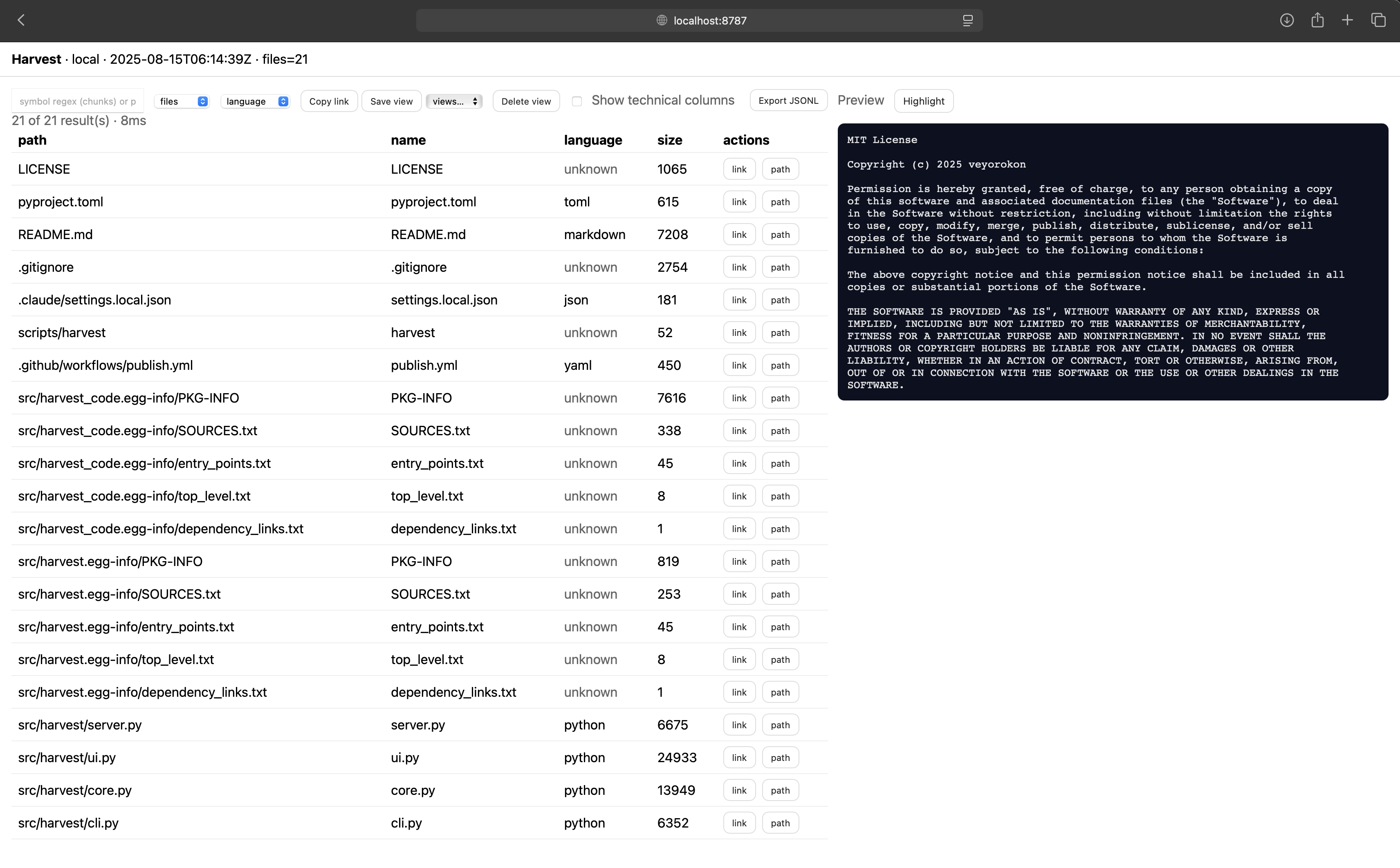
Interactive web interface with search, filtering, syntax highlighting, and progressive loading
Key Features
- 🔍 Zero-dependency codebase harvesting from local directories or GitHub URLs
- 📊 Smart chunking by functions, classes, exports with content-agnostic IDs
- 🌐 Interactive Web UI with search, filtering, syntax highlighting, and deep linking
- 🚀 Progressive loading - handles 50k+ files with infinite scroll pagination
- 📝 Schema v1.2 with stable chunk identifiers for incremental updates
- 🎯 Intelligent defaults - automatically skips binaries, caches, build artifacts, and lockfiles
- ⚡ Fast filtering - by language, visibility, file patterns, and symbols
- 💾 Saved views - bookmark and share specific filtered states
Use Cases
- RAG/AI Systems: Feed structured code context to LLMs with precise chunk boundaries
- Documentation: Auto-generate API references from exported symbols and functions
- Code Analysis: Extract dependencies, exports, and architectural patterns
- Legacy Migration: Understand large codebases through progressive exploration
- Code Search: Find functions, classes, and patterns across entire repositories
Installation
pip install harvest-code
Requirements: Python 3.9+ (no dependencies)
Harvest file naming & location
- Canonical extension:
.harvest.json - Default location:
./codebase.harvest.json(in current directory) - The harvester and watcher automatically ignore any
*.harvest.jsonfiles to prevent recursive harvesting - Legacy filenames (
.hvst.json,.har.json,.harvest-code.json) are still supported but the canonical name is recommended
Tip: choose whether to commit the index:
# .gitignore (optional - exclude harvest files from git)
.harvest/

# OR commit them for reproducible runs
git add .harvest/codebase.harvest.json
Core Commands
Harvest Local Directory
# Basic harvesting
harvest reap .  # Creates ./codebase.harvest.json
harvest reap /path/to/project  # Creates /path/to/project/codebase.harvest.json

# Custom output path
harvest reap . -o my-custom-harvest.json

# Control what's included
harvest reap . --include data          # Only file contents, no chunks
harvest reap . --include metadata data  # Metadata + data, no chunks
harvest reap . --exclude chunks        # Everything except chunks
harvest reap . --include chunks         # Only chunks (for analysis)

# With size limits
harvest reap . --max-files 1000 --max-bytes 512000

# Include everything (override smart defaults)
harvest reap . --no-default-excludes -o full-harvest.json
Harvest from GitHub
harvest reap https://github.com/user/repo -o repo.harvest.json
harvest reap https://github.com/user/repo/tree/main/src -o src-only.harvest.json
Query & Filter
# Find all public Python functions
harvest query output.json --entity chunks --language python --public true

# Search specific paths with custom fields
harvest query output.json --path-glob "src/**" --fields path,symbol,kind,start_line

# Find exports and components
harvest query output.json --entity files --export-named "MyComponent"
harvest query output.json --entity chunks --kind export_default --language typescript
Interactive Web Interface
harvest serve                    # Watch + serve current directory (default)
harvest serve /path/to/project    # Watch + serve specific directory
harvest serve --no-watch          # Serve without watching for changes
harvest serve --port 8080         # Use custom port
Web UI Features:
- Search & Filter: Real-time filtering by language, path, symbols
- Syntax Highlighting: Code highlighting enabled by default with dropdown toggle (Highlight/Plain)
- Auto-refresh: Seamless updates when files change in watch mode
- Progressive Loading: Infinite scroll for large datasets
- Deep Linking: Share URLs to specific files and line ranges
- Saved Views: Bookmark filtered states for quick access
- Mobile Responsive: Works on desktop, tablet, and mobile
Live Updates (auto-refresh, zero deps)
harvest serve now includes watching by default - no need for separate terminals!
# Single command for watch + serve (recommended)
harvest serve

# Or run them separately if needed
harvest watch .                   # Terminal 1: Watch only
harvest serve --no-watch          # Terminal 2: Serve only
The UI polls /api/meta every 3 seconds and automatically refreshes when files change:
- Updates the file list and metadata instantly
- Refreshes the content preview without manual clicking
- Maintains your scroll position and selection
- Shows progress in browser console (
[harvest]logs) for debugging
All API endpoints send Cache-Control: no-store headers to prevent stale data, and the UI includes version parameters for cache busting.
New endpoint:
GET /api/harvest # returns the current JSON, uncached, with ETag
Watch Flags:
--debounce-ms 800- Coalesce bursts of file events (milliseconds)--poll 1.0- Filesystem snapshot cadence (seconds)--only-ext py,ts,js- Include only specific extensions--skip-ext log,tmp- Exclude specific extensions
The watcher uses portable polling that works on all platforms and performs incremental re-harvesting when files change.
Output Control
You can control what's included in the harvest output:
--include metadata data- Just files and metadata (faster, smaller)--include data- Just file contents (minimal output)--exclude chunks- Skip chunk generation (useful for simple file archiving)--include chunks- Just chunks (for code analysis without full content)
Common use cases:
# Fast file inventory without content
harvest reap . --include metadata

# Full content without chunking overhead
harvest reap . --exclude chunks

# Just chunks for LLM context
harvest reap . --include chunks --format jsonl
Output Schema
harvest-code produces JSON with three main sections:
{
  "metadata": {
    "schema": "harvest/v1.2",
    "source": {"type": "local", "root": "/path/to/code"},
    "counts": {"total_files": 150, "total_bytes": 524288},
    "created_at": "2025-08-15T12:00:00Z"
  },
  "data": [
    {
      "path": "src/utils.py",
      "language": "python",
      "size": 1024,
      "exports": null,
      "py_symbols": {"functions": ["helper"], "classes": ["Util"]},
      "content": "def helper():\n    pass\n\nclass Util:\n    pass"
    }
  ],
  "chunks": [
    {
      "id": "abc123...",
      "file_path": "src/utils.py",
      "language": "python",
      "kind": "function",
      "symbol": "helper",
      "start_line": 1,
      "end_line": 2,
      "public": true
    }
  ]
}
Advanced Usage
Custom Exclusions
# Skip additional file types
harvest reap . --skip-ext .log,.tmp --skip-folder cache,temp

# Include only specific languages
harvest reap . --only-ext .py,.js,.ts
Incremental Updates
# Reuse unchanged files for faster re-harvesting
harvest reap . --prev previous-harvest.json -o updated.json
Large Codebases
The web UI automatically handles large datasets with:
- Pagination: Loads 50 items at a time by default
- Infinite Scroll: Seamlessly loads more results
- Cursor-based Navigation: Efficient browsing of 10k+ items
- Smart Filtering: Client-side filtering for responsive UX
Default Exclusions
harvest-code intelligently skips common non-source files:
File Extensions: .log, .tmp, .db, .sqlite, .mp4, .jpg, .png, .zip, .exe, .pyc, .min.js, .woff, .pb, .tflite, etc.
Directories: node_modules, .git, dist, build, __pycache__, .pytest_cache, .mypy_cache, .vscode, .idea, .next, Pods, DerivedData, etc.
Lockfiles: yarn.lock, package-lock.json, poetry.lock, Cargo.lock, go.sum, etc.
Use --no-default-excludes to include everything.
Language Support
Chunking & Symbol Extraction:
- Python: Functions, classes, exports via AST parsing
- JavaScript/TypeScript: Functions, classes, React components, ES6/CommonJS exports
- JSON/YAML/TOML: Single file chunks with metadata
Syntax Highlighting: Python, JavaScript, TypeScript, JSON, YAML, TOML, Markdown, Shell, Go, Rust
API Integration
The web server exposes REST endpoints for programmatic access:
curl http://localhost:8787/api/search?entity=chunks&language=python&limit=10
curl http://localhost:8787/api/meta  # Get harvest metadata
Examples
RAG Pipeline Integration
import json

# Load harvest data
with open('codebase.json') as f:
    harvest = json.load(f)

# Extract public API functions for LLM context
api_functions = [
    chunk for chunk in harvest['chunks']
    if chunk['public'] and chunk['kind'] in ['function', 'export_named']
]
Documentation Generation
# Extract all exported React components
harvest query react-app.json --entity chunks --kind export_default --language typescript --fields symbol,file_path > components.txt
Migration Analysis
# Find all Python classes for refactoring
harvest query legacy-app.json --entity chunks --kind class --language python --min-lines 10
Contributing
We welcome contributions! Please see our Contributing Guidelines for details.
Development Setup:
git clone https://github.com/veyorokon/code-harvest.git
cd code-harvest
pip install -e .
harvest reap . -o self-harvest.json  # Harvest itself!
License
MIT License - see LICENSE file for details.
Links
Release history Release notifications | RSS feed


Download files
Download the file for your platform. If you're not sure which to choose, learn more about installing packages.
Source Distribution
Built Distribution
Filter files by name, interpreter, ABI, and platform.
If you're not sure about the file name format, learn more about wheel file names.
Copy a direct link to the current filters
File details
Details for the file harvest_code-1.5.0.tar.gz.
File metadata
- Download URL: harvest_code-1.5.0.tar.gz
- Upload date:
- Size: 34.6 kB
- Tags: Source
- Uploaded using Trusted Publishing? No
- Uploaded via: twine/6.1.0 CPython/3.11.13
File hashes
| Algorithm | Hash digest | |
|---|---|---|
| SHA256 |
f5d151397026fa1cc3201165afcc56aaf67f0ffef84b4811940dd88a48e9f716
|
|
| MD5 |
af1d4a6a77d1f04525913e58e604e40b
|
|
| BLAKE2b-256 |
c0ccc9fc7fc81a65ea930417c39bdf206949299f0b7c3a44af6a8334257dac6a
|
File details
Details for the file harvest_code-1.5.0-py3-none-any.whl.
File metadata
- Download URL: harvest_code-1.5.0-py3-none-any.whl
- Upload date:
- Size: 32.9 kB
- Tags: Python 3
- Uploaded using Trusted Publishing? No
- Uploaded via: twine/6.1.0 CPython/3.11.13
File hashes
| Algorithm | Hash digest | |
|---|---|---|
| SHA256 |
8c3819e2efc75228f498bd8a4bfc6b6b360143972df00356a8d8b29490bf4f41
|
|
| MD5 |
2033b354d4e56feedf0066ffc458cbab
|
|
| BLAKE2b-256 |
2e9d8adbd7d79470db0251f692b101f524b2b36ca7816b7fd1ef455a48c15f68
|






