
Harvest codebases into portable JSON + chunks for RAG and tooling

Project description
harvest-code
Extract codebases into portable JSON for RAG, tooling, and analysis.


Quick Start
pip install harvest-code
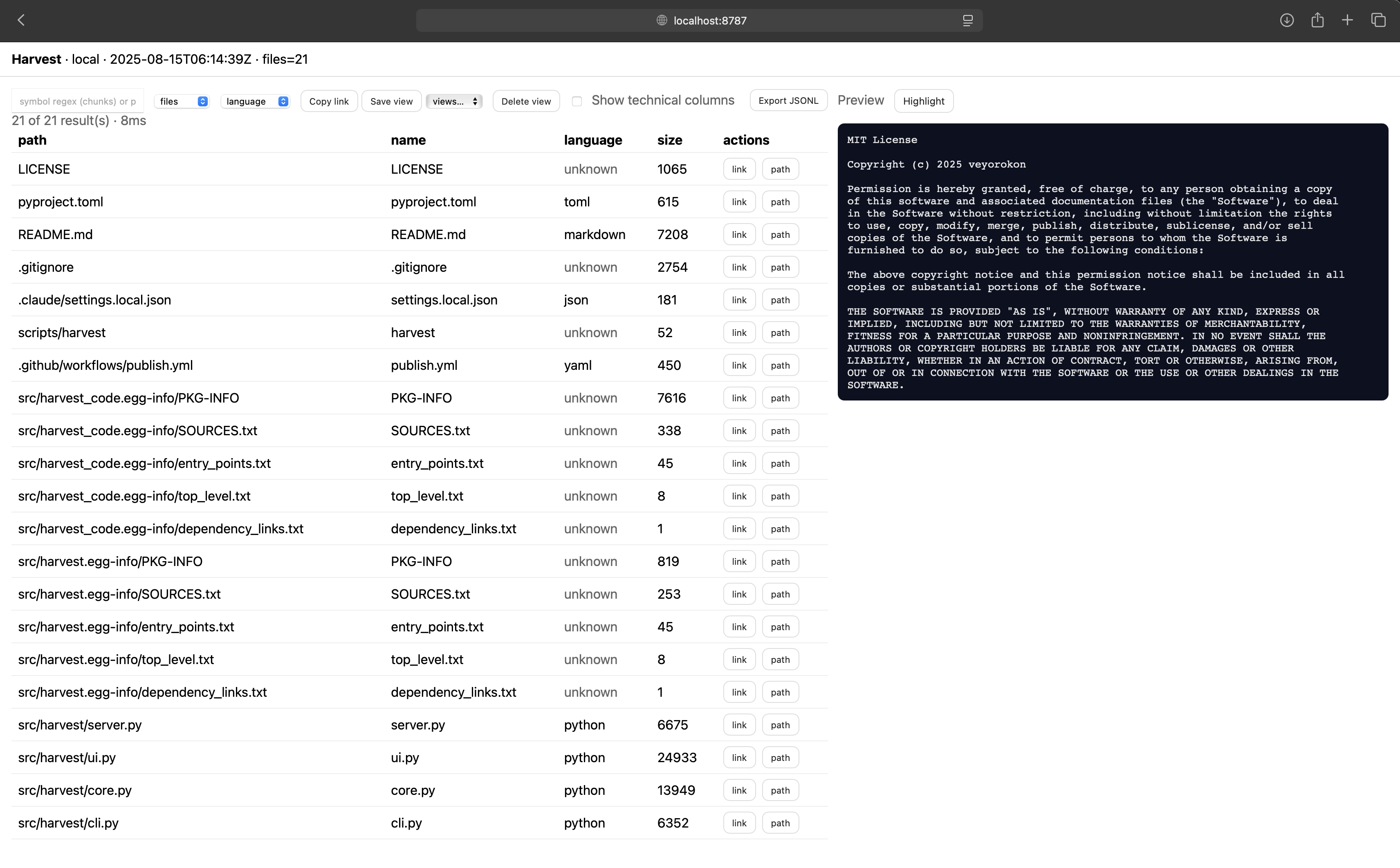
harvest serve  # Watch + serve current directory at http://localhost:8787
Features
- 🔍 Zero dependencies - Pure Python, no external packages required
- 📊 Smart chunking - Extracts functions, classes, exports with stable IDs
- 🌐 Interactive UI - Web interface with search, filtering, and syntax highlighting
- 🎯 Intelligent filtering - Automatically skips build artifacts, binaries, and test files
- ⚡ Live updates - Auto-refreshes when files change (watch mode)
- 🚀 Scales - Handles 50k+ files with progressive loading
Commands
harvest reap - Extract codebase to JSON
# Basic usage - output named after directory
harvest reap .                    # → ./current-dir-name.harvest.json
harvest reap /path/to/project     # → ./project.harvest.json

# Custom output
harvest reap . -o analysis.json

# Control what's included
harvest reap . --include metadata       # File inventory only
harvest reap . --include data          # File contents only
harvest reap . --exclude chunks        # Skip code parsing
harvest reap . --format jsonl          # Line-delimited JSON

# Override filters
harvest reap . --no-default-excludes   # Include hidden files, tests, etc.
harvest serve - Interactive web UI
# Watch + serve (default)
harvest serve                    # Current directory on port 8787
harvest serve /path/to/project   # Specific directory
harvest serve --port 8080        # Custom port

# Control options
harvest serve --no-watch         # Disable auto-refresh
harvest serve --only-ext py,ts   # Watch specific file types
Web UI Features:
- Real-time search and filtering
- Syntax highlighting with toggle
- Auto-refresh on file changes
- Infinite scroll for large codebases
- Deep linking to specific files/lines
harvest query - Search harvest data
# Find specific code elements
harvest query data.json --entity chunks --language python --public true
harvest query data.json --entity files --export-named "MyComponent"
harvest query data.json --path-glob "src/**" --fields path,symbol,kind
harvest watch - Monitor directory changes
# Continuous harvesting
harvest watch .                        # → ./<dirname>.harvest.json
harvest watch /path/to/src -o out.json # Custom output
harvest watch . --only-ext py,js,ts    # Specific extensions
harvest sow - Generate artifacts
# Create React barrel exports
harvest sow data.json --react src/index.ts
Output Structure
harvest generates JSON with three sections:
{
  "metadata": {
    "schema": "harvest/v1.2",
    "source": {"type": "local", "root": "/path/to/code"},
    "counts": {"total_files": 150, "total_bytes": 524288}
  },
  "data": [
    {
      "path": "src/utils.py",
      "language": "python",
      "content": "def helper():\n    pass",
      "exports": null,
      "py_symbols": {"functions": ["helper"]}
    }
  ],
  "chunks": [
    {
      "id": "abc123...",
      "file_path": "src/utils.py",
      "kind": "function",
      "symbol": "helper",
      "start_line": 1,
      "end_line": 2,
      "public": true
    }
  ]
}
Output Sections
- metadata - File inventory, counts, timestamps
- data - File contents and language metadata
- chunks - Parsed symbols (functions, classes, exports)
Control output with --include and --exclude:
harvest reap . --include metadata       # Inventory only (fast)
harvest reap . --exclude chunks         # Skip parsing (smaller)
harvest reap . --include chunks         # Symbols only (for analysis)
File Handling
Smart Filtering
harvest uses a three-tier filtering system:
Completely Skipped:
- Hidden files and directories (
.git/,.env) - Test directories (
tests/,__tests__/) - Build artifacts (
dist/,build/,node_modules/) - Binaries and media (
.exe,.mp3,.db) - Logs and temp files (
.log,.tmp)
Path-Only (no content):
- Images (
.jpg,.png,.svg) - Fonts (
.ttf,.woff) - Documents (
.pdf,.doc)
Fully Processed:
- Source code (
.py,.js,.ts, etc.) - Config files (
.json,.yaml,.toml) - Documentation (
.md,.txt)
Override with --no-default-excludes to include everything.
Language Support
Full parsing (chunks + symbols):
- Python - Functions, classes via AST
- JavaScript/TypeScript - Functions, classes, React components, ES6/CommonJS exports
- JSON/YAML/TOML - Single file chunks
Syntax highlighting in web UI: Python, JavaScript, TypeScript, JSON, YAML, TOML, Markdown, Shell, Go, Rust
API Endpoints
The web server exposes REST APIs:
# Search chunks
curl http://localhost:8787/api/search?entity=chunks&language=python

# Get metadata
curl http://localhost:8787/api/meta

# Download full harvest
curl http://localhost:8787/api/harvest
Use Cases
RAG/LLM Context
import json

with open('project.harvest.json') as f:
    harvest = json.load(f)

# Extract public functions for context
api_functions = [
    chunk for chunk in harvest['chunks']
    if chunk['public'] and chunk['kind'] == 'function'
]
Code Analysis
# Find all React components
harvest query app.json --entity chunks --kind export_default --language typescript

# Find large classes
harvest query app.json --entity chunks --kind class --min-lines 100
Documentation Generation
# Extract all exports
harvest query app.json --entity files --has-default-export --fields path,exports
File Naming
- Output files use pattern:
<directory-name>.harvest.json - Created in current working directory (where command is run)
- Use
-oflag for custom names/paths - All
*.harvest.jsonfiles are automatically ignored to prevent recursion
Development
git clone https://github.com/veyorokon/code-harvest.git
cd code-harvest
pip install -e .
harvest reap . -o self.harvest.json
Links
License
MIT - see LICENSE file
Release history Release notifications | RSS feed


Download files
Download the file for your platform. If you're not sure which to choose, learn more about installing packages.
Source Distribution
Built Distribution
Filter files by name, interpreter, ABI, and platform.
If you're not sure about the file name format, learn more about wheel file names.
Copy a direct link to the current filters
File details
Details for the file harvest_code-1.6.0.tar.gz.
File metadata
- Download URL: harvest_code-1.6.0.tar.gz
- Upload date:
- Size: 32.8 kB
- Tags: Source
- Uploaded using Trusted Publishing? No
- Uploaded via: twine/6.1.0 CPython/3.11.13
File hashes
| Algorithm | Hash digest | |
|---|---|---|
| SHA256 |
edee88606bb3aea41178365d2df3193501b46a760cb9eaa7a4f20d9ae9372880
|
|
| MD5 |
182dd2146c4493edbc30677365c91378
|
|
| BLAKE2b-256 |
f009d1412fcc62aeaba68306d26d1d0ec048d3051369f5a8778208036822a4aa
|
File details
Details for the file harvest_code-1.6.0-py3-none-any.whl.
File metadata
- Download URL: harvest_code-1.6.0-py3-none-any.whl
- Upload date:
- Size: 32.9 kB
- Tags: Python 3
- Uploaded using Trusted Publishing? No
- Uploaded via: twine/6.1.0 CPython/3.11.13
File hashes
| Algorithm | Hash digest | |
|---|---|---|
| SHA256 |
9cf0030ad2b5b788c4bcc37cc028b091e2bce636670ef32187badaedca958771
|
|
| MD5 |
7b97dd3dd0814f47e3a074b720a8c7f7
|
|
| BLAKE2b-256 |
39b2dd6fb0a92a94596817bc7ad2ce4277daf34afc790fc717fcb19d0f4b7d1e
|






