
Home Assistant Model Context Protocol (MCP) server

Project description
Hass-MCP
A Model Context Protocol (MCP) server for Home Assistant integration with Claude and other LLMs.
Overview
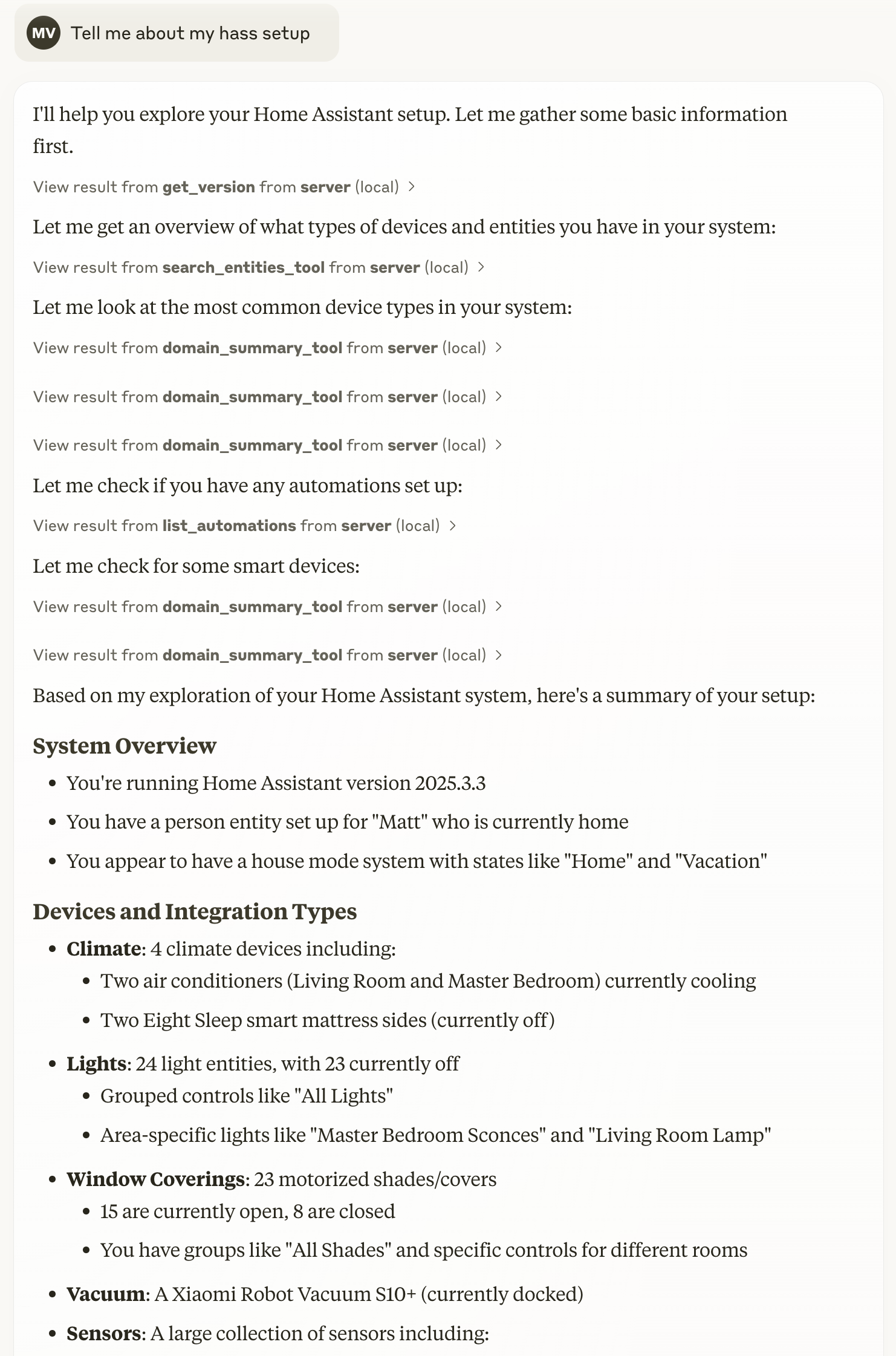
Hass-MCP enables AI assistants like Claude to interact directly with your Home Assistant instance, allowing them to:
- Query the state of devices and sensors
- Control lights, switches, and other entities
- Get summaries of your smart home
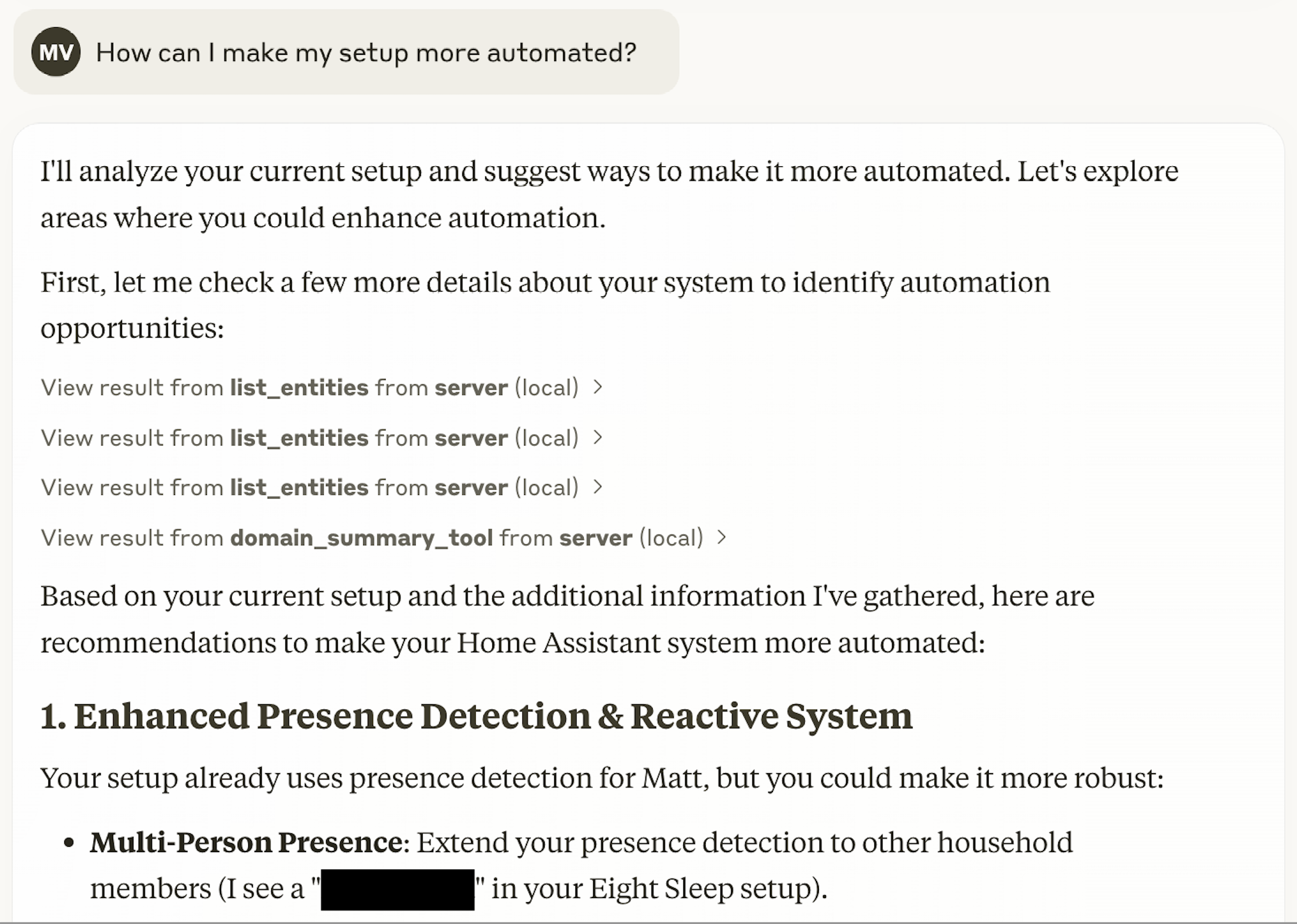
- Troubleshoot automations and entities
- Search for specific entities
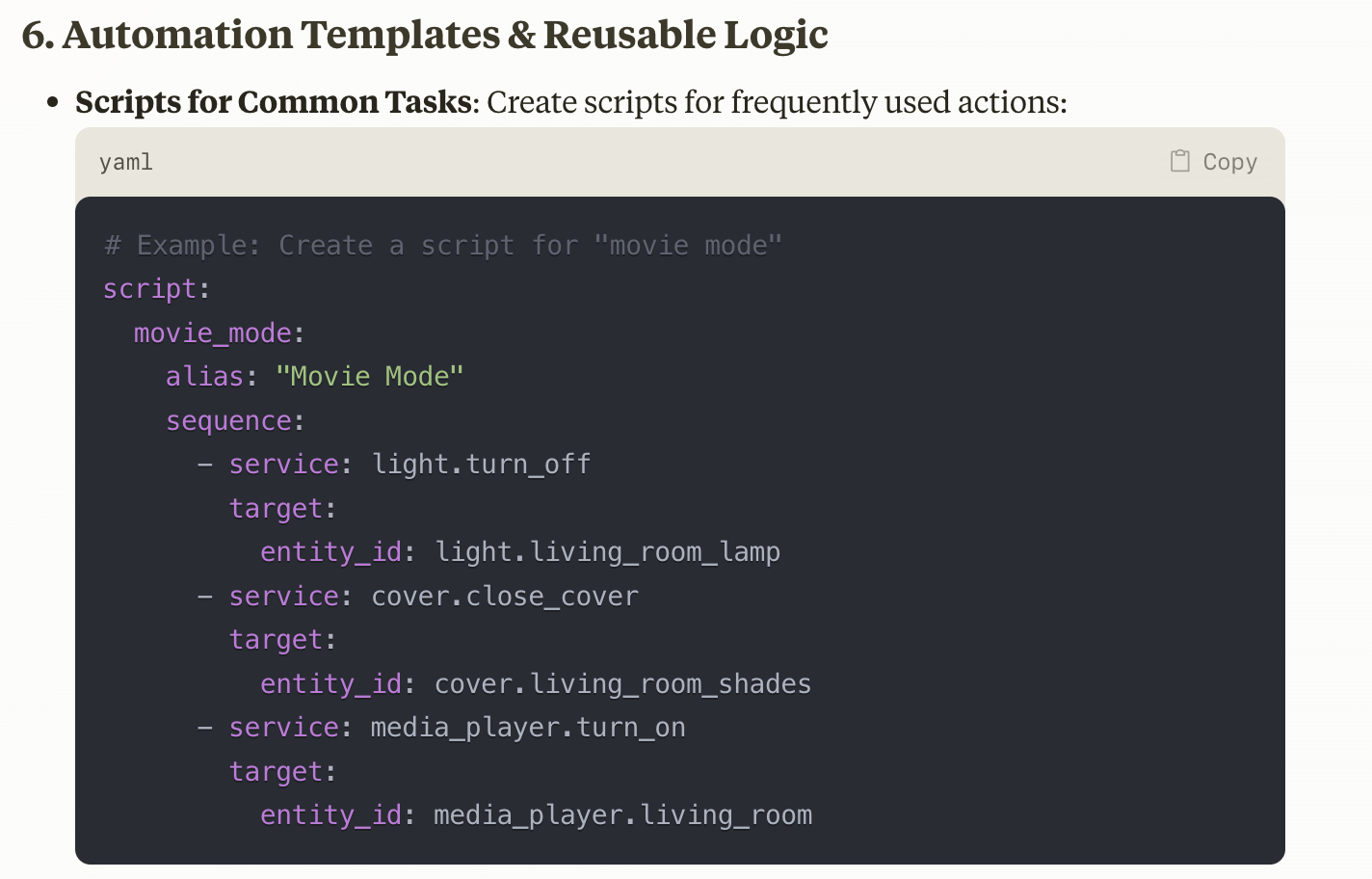
- Create guided conversations for common tasks
Screenshots
Features
- Entity Management: Get states, control devices, and search for entities
- Domain Summaries: Get high-level information about entity types
- Automation Support: List and control automations
- Guided Conversations: Use prompts for common tasks like creating automations
- Smart Search: Find entities by name, type, or state
- Token Efficiency: Lean JSON responses to minimize token usage
Installation
Prerequisites
- Home Assistant instance with Long-Lived Access Token
- One of the following:
- Docker (recommended)
- Python 3.13+ and uv
Setting Up With Claude Desktop
Docker Installation (Recommended)
-
Pull the Docker image:
docker pull voska/hass-mcp:latest
-
Add the MCP server to Claude Desktop:
a. Open Claude Desktop and go to Settings b. Navigate to Developer > Edit Config c. Add the following configuration to your
claude_desktop_config.jsonfile:{ "mcpServers": { "hass-mcp": { "command": "docker", "args": [ "run", "-i", "--rm", "-e", "HA_URL", "-e", "HA_TOKEN", "voska/hass-mcp" ], "env": { "HA_URL": "http://homeassistant.local:8123", "HA_TOKEN": "YOUR_LONG_LIVED_TOKEN" } } } }
d. Replace
YOUR_LONG_LIVED_TOKENwith your actual Home Assistant long-lived access token e. Update theHA_URL:- If running Home Assistant on the same machine: use
http://host.docker.internal:8123(Docker Desktop on Mac/Windows) - If running Home Assistant on another machine: use the actual IP or hostname
f. Save the file and restart Claude Desktop
- If running Home Assistant on the same machine: use
-
The "Hass-MCP" tool should now appear in your Claude Desktop tools menu
Note: If you're running Home Assistant in Docker on the same machine, you may need to add
--network hostto the Docker args for the container to access Home Assistant. Alternatively, use the IP address of your machine instead ofhost.docker.internal.
uv/uvx
-
Install uv on your system.
-
Add the MCP server to Claude Desktop:
a. Open Claude Desktop and go to Settings b. Navigate to Developer > Edit Config c. Add the following configuration to your
claude_desktop_config.jsonfile:{ "mcpServers": { "hass-mcp": { "command": "uvx", "args": ["hass-mcp"], "env": { "HA_URL": "http://homeassistant.local:8123", "HA_TOKEN": "YOUR_LONG_LIVED_TOKEN" } } } }
d. Replace
YOUR_LONG_LIVED_TOKENwith your actual Home Assistant long-lived access token e. Update theHA_URL:- If running Home Assistant on the same machine: use
http://host.docker.internal:8123(Docker Desktop on Mac/Windows) - If running Home Assistant on another machine: use the actual IP or hostname
f. Save the file and restart Claude Desktop
- If running Home Assistant on the same machine: use
-
The "Hass-MCP" tool should now appear in your Claude Desktop tools menu
Other MCP Clients
Cursor
- Go to Cursor Settings > MCP > Add New MCP Server
- Fill in the form:
- Name:
Hass-MCP - Type:
command - Command:
docker run -i --rm -e HA_URL=http://homeassistant.local:8123 -e HA_TOKEN=YOUR_LONG_LIVED_TOKEN voska/hass-mcp - Replace
YOUR_LONG_LIVED_TOKENwith your actual Home Assistant token - Update the HA_URL to match your Home Assistant instance address
- Name:
- Click "Add" to save
Claude Code (CLI)
To use with Claude Code CLI, you can add the MCP server directly using the mcp add command:
Using Docker (recommended):
claude mcp add hass-mcp -e HA_URL=http://homeassistant.local:8123 -e HA_TOKEN=YOUR_LONG_LIVED_TOKEN -- docker run -i --rm -e HA_URL -e HA_TOKEN voska/hass-mcp
Replace YOUR_LONG_LIVED_TOKEN with your actual Home Assistant token and update the HA_URL to match your Home Assistant instance address.
HTTP Transport (Streamable)
For deployments that can't use stdio — running behind an MCP gateway, hosting on Smithery, sharing one server across multiple clients, or connecting from network-based tools like LibreChat or OpenWebUI — Hass-MCP supports the MCP streamable HTTP transport. The server runs in stateless mode (no Mcp-Session-Id, JSON responses), suitable for horizontally-scaled hosts.
[!CAUTION] HTTP mode exposes full Home Assistant control over the network. Anyone who can reach the port can call any tool — turn off lights, unlock doors, trigger automations, restart HA. The MCP spec does not yet ship a built-in auth layer in this server. Until it does, you must put it behind one of:
- A reverse proxy (nginx, Caddy, Traefik) doing basic-auth or bearer-token validation
- A VPN or zero-trust network (Tailscale, WireGuard, Cloudflare Access)
- Localhost binding only (the default — change
--hostonly if you know what you're doing)Do not expose
:8000to the open internet without auth.
Running locally
Using uvx:
HA_URL=http://homeassistant.local:8123 \
HA_TOKEN=YOUR_LONG_LIVED_TOKEN \
uvx hass-mcp --http --port 8000
The server binds 127.0.0.1 by default. Override with --host 0.0.0.0 only when you've also configured auth in front of it.
Running in Docker
docker run --rm -p 8000:8000 \
  -e HA_URL=http://homeassistant.local:8123 \
  -e HA_TOKEN=YOUR_LONG_LIVED_TOKEN \
  voska/hass-mcp:latest --http --host 0.0.0.0 --port 8000
--host 0.0.0.0 is required inside Docker so the port is reachable through the bridge. Bind the publish (-p) to 127.0.0.1:8000:8000 if you only want it reachable from the host, or put a reverse proxy in front.
Endpoint
The MCP endpoint is at /mcp. Point your client at http://<host>:<port>/mcp.
Smithery / PaaS
The server honors the PORT environment variable (Smithery's convention) in addition to MCP_PORT. Smithery deployment requires --http mode and reads PORT automatically.
Usage Examples
Here are some examples of prompts you can use with Claude once Hass-MCP is set up:
- "What's the current state of my living room lights?"
- "Turn off all the lights in the kitchen"
- "List all my sensors that contain temperature data"
- "Give me a summary of my climate entities"
- "Create an automation that turns on the lights at sunset"
- "Help me troubleshoot why my bedroom motion sensor automation isn't working"
- "Search for entities related to my living room"
Available Tools
Hass-MCP provides several tools for interacting with Home Assistant:
get_version: Get the Home Assistant versionget_entity: Get the state of a specific entity with optional field filteringentity_action: Perform actions on entities (turn on, off, toggle)list_entities: Get a list of entities with optional domain filtering and searchsearch_entities_tool: Search for entities matching a querydomain_summary_tool: Get a summary of a domain's entitieslist_automations: Get a list of all automationscall_service_tool: Call any Home Assistant servicerestart_ha: Restart Home Assistantget_history: Get the state history of an entityget_error_log: Get the Home Assistant error log
Prompts for Guided Conversations
Hass-MCP includes several prompts for guided conversations:
create_automation: Guide for creating Home Assistant automations based on trigger typedebug_automation: Troubleshooting help for automations that aren't workingtroubleshoot_entity: Diagnose issues with entitiesroutine_optimizer: Analyze usage patterns and suggest optimized routines based on actual behaviorautomation_health_check: Review all automations, find conflicts, redundancies, or improvement opportunitiesentity_naming_consistency: Audit entity names and suggest standardization improvementsdashboard_layout_generator: Create optimized dashboards based on user preferences and usage patterns
Available Resources
Hass-MCP provides the following resource endpoints:
hass://entities/{entity_id}: Get the state of a specific entityhass://entities/{entity_id}/detailed: Get detailed information about an entity with all attributeshass://entities: List all Home Assistant entities grouped by domainhass://entities/domain/{domain}: Get a list of entities for a specific domainhass://search/{query}/{limit}: Search for entities matching a query with custom result limit
Development
Running Tests
uv run pytest tests/
License


Download files
Download the file for your platform. If you're not sure which to choose, learn more about installing packages.
Source Distribution
Built Distribution
Filter files by name, interpreter, ABI, and platform.
If you're not sure about the file name format, learn more about wheel file names.
Copy a direct link to the current filters
File details
Details for the file hass_mcp-0.3.0.tar.gz.
File metadata
- Download URL: hass_mcp-0.3.0.tar.gz
- Upload date:
- Size: 69.0 kB
- Tags: Source
- Uploaded using Trusted Publishing? Yes
- Uploaded via: twine/6.1.0 CPython/3.13.12
File hashes
| Algorithm | Hash digest | |
|---|---|---|
| SHA256 |
80c3b537c3d0ecdd70e40e7915b6de8257689eca8bf6b48bf78336692a1ee3a0
|
|
| MD5 |
0457e2a640d4072654cbd3db0221dedd
|
|
| BLAKE2b-256 |
b630103b57a298983466c1b2b0f47daeb2380d812ce48b3c3d622fdebf33554e
|
Provenance
The following attestation bundles were made for hass_mcp-0.3.0.tar.gz:
Publisher:
release.yml on voska/hass-mcp
-
Statement:
-
Statement type:
https://in-toto.io/Statement/v1 -
Predicate type:
https://docs.pypi.org/attestations/publish/v1 -
Subject name:
hass_mcp-0.3.0.tar.gz -
Subject digest:
80c3b537c3d0ecdd70e40e7915b6de8257689eca8bf6b48bf78336692a1ee3a0 - Sigstore transparency entry: 1561829045
- Sigstore integration time:
-
Permalink:
voska/hass-mcp@6a75e40c70d0ac3ed16d83ff4f9f3acd80714f29 -
Branch / Tag:
refs/tags/v0.3.0 - Owner: https://github.com/voska
-
Access:
public
-
Token Issuer:
https://token.actions.githubusercontent.com -
Runner Environment:
github-hosted -
Publication workflow:
release.yml@6a75e40c70d0ac3ed16d83ff4f9f3acd80714f29 -
Trigger Event:
push
-
Statement type:
File details
Details for the file hass_mcp-0.3.0-py3-none-any.whl.
File metadata
- Download URL: hass_mcp-0.3.0-py3-none-any.whl
- Upload date:
- Size: 25.8 kB
- Tags: Python 3
- Uploaded using Trusted Publishing? Yes
- Uploaded via: twine/6.1.0 CPython/3.13.12
File hashes
| Algorithm | Hash digest | |
|---|---|---|
| SHA256 |
0eee207b048e819089a969a2f5385baef52530eac71d3fbfbeed3d628ff3031d
|
|
| MD5 |
b6c96f30a44422f383330d118ce5eb50
|
|
| BLAKE2b-256 |
bdbafc236e99533c41207fa89d4dfacf335765b3e8c346c77c25695cab8e6571
|
Provenance
The following attestation bundles were made for hass_mcp-0.3.0-py3-none-any.whl:
Publisher:
release.yml on voska/hass-mcp
-
Statement:
-
Statement type:
https://in-toto.io/Statement/v1 -
Predicate type:
https://docs.pypi.org/attestations/publish/v1 -
Subject name:
hass_mcp-0.3.0-py3-none-any.whl -
Subject digest:
0eee207b048e819089a969a2f5385baef52530eac71d3fbfbeed3d628ff3031d - Sigstore transparency entry: 1561829167
- Sigstore integration time:
-
Permalink:
voska/hass-mcp@6a75e40c70d0ac3ed16d83ff4f9f3acd80714f29 -
Branch / Tag:
refs/tags/v0.3.0 - Owner: https://github.com/voska
-
Access:
public
-
Token Issuer:
https://token.actions.githubusercontent.com -
Runner Environment:
github-hosted -
Publication workflow:
release.yml@6a75e40c70d0ac3ed16d83ff4f9f3acd80714f29 -
Trigger Event:
push
-
Statement type:






