

Data in safe waters.
A self-hosted data platform built on DuckDB. Plain SQL transforms, Python ingest, one warehouse file.
Quick Start · Features · Why havn? · Docs · Contributing



License notice: havn is source-available under the Business Source License 1.1. You can read, run, modify, and use it for any internal or commercial purpose -- including in production at your company or at client sites. The one restriction is that you may not offer havn to third parties as a competing hosted or managed service. Each release automatically converts to Apache 2.0 four years after its release date (the current release converts on 2030-04-05). See the License FAQ below for details.
havn (Danish and Norwegian for harbour) is a self-hosted data platform, a Nordic alternative to Databricks and Snowflake for teams whose data fits on one machine.
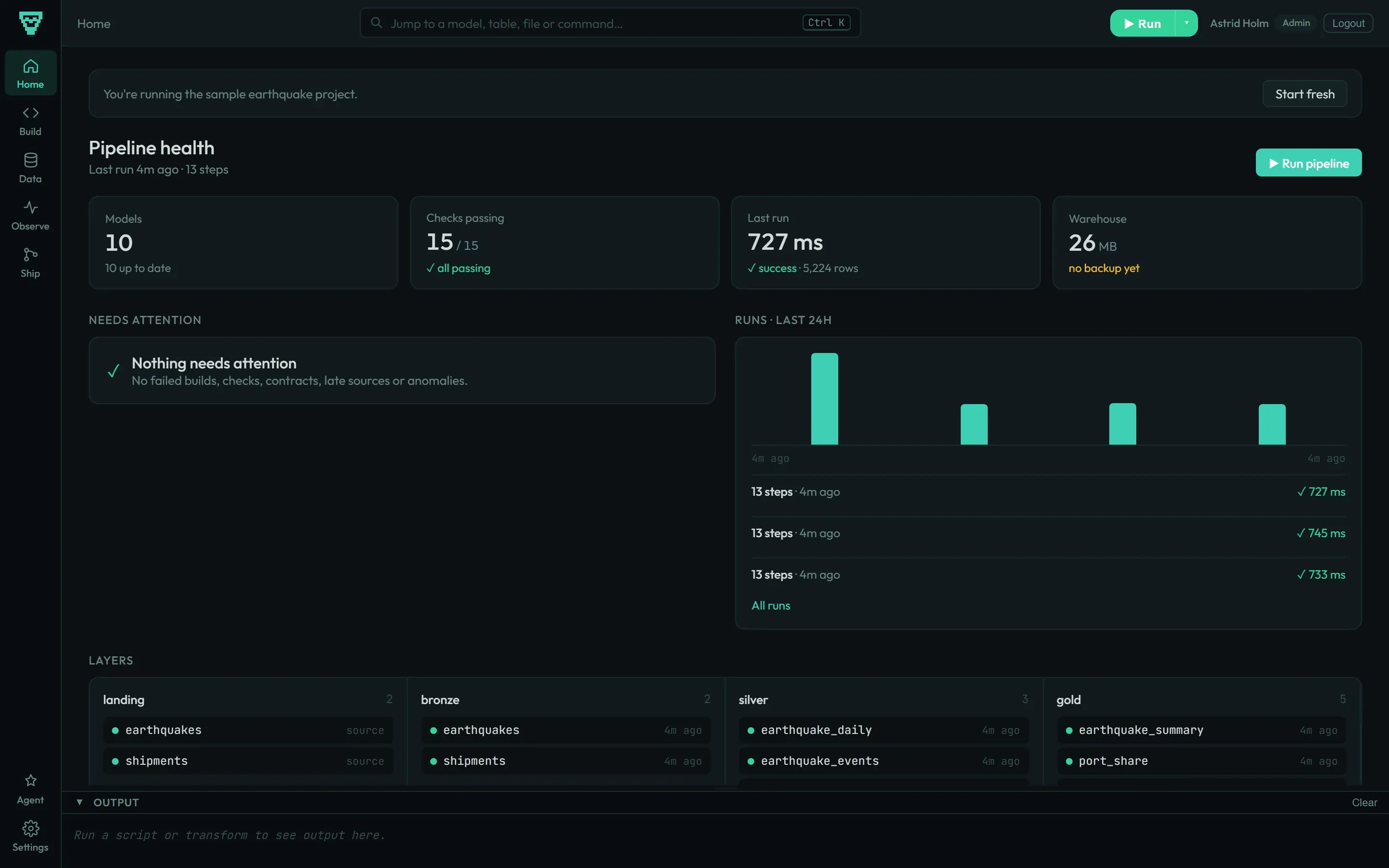
The whole warehouse is a single DuckDB file. Transforms are plain SQL files with a one-line @config header; ingest and export are Python scripts. A web UI covers editing, querying, runs, checks and deploys, and every part also works from the CLI.
pip install havn && havn init my-project && cd my-project && havn jobs run full-refresh && havn serve
Why havn?
The usual choice is between a stack of cloud services (a warehouse, dbt, an orchestrator, an ingest tool, a catalog) and a folder of CSV exports. havn sits in between: one package you install with pip, running on a machine you control.
- It runs where you put it. A laptop, a server or your own cloud account. Data does not leave it.
- SQL stays SQL. Dependencies come from the
FROMandJOINclauses. There is no templating language to learn or debug. - Starting takes a minute.
havn initcreates a project with a working sample pipeline. - The parts are already connected. Connectors, the scheduler, checks, deploys and the web UI share one project and one warehouse.
- Assistants can work on it. Models are plain files with simple conventions, and
havn mcpgives an AI agent structured access to the project.
Features
SQL Transform Engine
Write plain SQL with a @config directive at the top. havn parses your FROM/JOIN references to build the DAG automatically (no @depends_on needed unless you want to override), runs models in topological order, and uses content-hash change detection so only what actually changed gets rebuilt.
@config materialized=table, schema=gold

SELECT
    c.customer_id,
    c.name,
    COUNT(o.order_id) AS order_count,
    SUM(o.amount)     AS lifetime_value
FROM silver.customers c
LEFT JOIN silver.orders o ON c.customer_id = o.customer_id
GROUP BY 1, 2
havn picks up silver.customers and silver.orders as upstream models from the SQL itself. Add @depends_on only when you reference a dependency through a function or string that the parser can't see. Other directives: @description, @assert <expr> for data-quality assertions, @col <name>: <doc> for column-level docs.
Web UI
Full-featured browser interface with Monaco code editor, interactive SQL runner, DAG visualization, data table browser, chart builder, and pipeline monitoring. Dark and light themes included.
havn serve          # http://localhost:3000
havn serve --auth   # with role-based access control
14 Data Connectors
Connect to Postgres, MySQL, BigQuery, Snowflake, Redshift, Databricks, Stripe, HubSpot, Shopify, Google Sheets, CSV, S3/GCS, REST APIs, and webhooks - from the CLI or the web UI.
havn connect postgres --host localhost --database mydb --user admin
havn connect stripe --api-key sk_live_xxx
havn connect csv --path /data/customers.csv
Notebooks
Interactive .dpnb notebooks with code cells, markdown, and inline results. Use them for exploration, or wire them into your pipeline as ingest/export steps.
Jobs and Scheduling
A job is a YAML file in orchestration/ that names what to run. havn works out the order and the upstream steps it needs, retries on failure and runs it on a cron schedule.
# orchestration/full-refresh.yml
name: full-refresh
targets:
  - gold.*
  - export/earthquake_report.py
resolve: upstream
retry: 1
schedules:
  - "0 6 * * *"
Environments and Deploys
Each environment has its own warehouse file. havn deploy prod --plan shows what a deploy would rebuild; a deploy snapshots the target first and rolls back if a model fails.
havn env use dev
havn deploy prod --plan
havn deploy prod
Git Integration & CI
Track changes with havn diff, create snapshots with havn snapshot, and generate GitHub Actions workflows with havn ci generate that post data diff comments on PRs.
havn diff                          # what would change?
havn diff --against main           # changes vs a branch
havn snapshot create before-deploy # save state
havn ci generate                   # create GitHub Actions workflow
AI-Native Design
Every project scaffolded with havn init includes context files for AI coding assistants, and havn mcp starts an MCP server they can use to read models, run queries and build.
havn context # generate project summary, paste into any AI chat
| Tool | Config file | Auto-included |
|---|---|---|
| Claude Code | CLAUDE.md |
Yes |
| Cursor | .cursorrules |
Yes |
| GitHub Copilot | .github/copilot-instructions.md |
Yes |
| Any LLM | havn context |
Yes |
Quick Start
Install
From PyPI:
pip install havn
The wheel ships the built web UI, so that is everything you need. Node and npm are only for working on havn itself.
With Docker, from a project directory:
docker run -v "$(pwd)":/project -p 3000:3000 ghcr.io/chraltro/havn
From source (for development):
git clone https://github.com/chraltro/havn.git
cd havn
pip install -e ".[dev]"
cd frontend && npm install && npm run build && cd ..
havn init my-project && cd my-project && havn jobs run full-refresh && havn serve
Adding Python libraries
Your ingest/export scripts and notebook cells run inside havn's own Python environment. DuckDB reads CSV, JSON, and Parquet natively, so you usually need nothing extra, but to use a library such as pandas, install it where havn lives:
uv tool install havn --with pandas   # if you installed havn with uv
pipx inject havn pandas              # if you installed havn with pipx
pip install pandas                   # if havn is in a regular venv
If a script or notebook hits ModuleNotFoundError, havn prints the exact
command for your install method.
Create a project
havn init my-project
cd my-project
This scaffolds a complete project with a sample pipeline that fetches earthquake data from the USGS API, transforms it through bronze/silver/gold layers, and exports a report.
Run the pipeline
havn jobs run full-refresh
Explore your data
havn serve                              # open web UI at localhost:3000
havn query "SELECT * FROM gold.earthquake_summary"
havn tables                             # list all tables
Architecture
my-project/
├── ingest/              Python scripts + notebooks that load raw data
│   └── earthquakes.dpnb
├── transform/
│   ├── bronze/          Light cleanup (type casting, dedup)
│   ├── silver/          Business logic (joins, aggregations)
│   └── gold/            Consumption-ready tables
├── export/              Python scripts that push data out
├── notebooks/           Interactive .dpnb notebooks
├── project.yml          Pipelines, connections, schedules
├── .env                 Secrets (never committed)
└── warehouse.duckdb     Your entire database, one file
Data flows through four schemas:
landing/  →  bronze/  →  silver/  →  gold/
 (raw)      (cleaned)   (modeled)   (ready)
The warehouse is a single DuckDB file. Copy it, back it up, version it - it's just a file.
All Commands
| Command | Description |
|---|---|
havn init <name> |
Scaffold a new project |
havn jobs run <name> |
Run a full pipeline (ingest → transform → export) |
havn transform |
Build SQL models in dependency order |
havn run <script> |
Run a single ingest/export script or notebook |
havn query "<sql>" |
Run ad-hoc SQL queries |
havn tables |
List warehouse tables and views |
havn serve |
Start the web UI |
havn diff |
Preview what would change before running transforms |
havn lint |
Lint SQL files with SQLFluff |
havn history |
Show pipeline run log |
havn status |
Project health: git info, warehouse stats, last run |
havn validate |
Check project structure, config, and DAG for errors |
havn snapshot create |
Save a named snapshot of project + data state |
havn backup |
Back up the warehouse database |
havn connect <type> |
Set up a data connector |
havn watch |
Watch files and auto-rebuild on change |
havn schedule |
Start the cron scheduler |
havn checkpoint |
Smart git commit with auto-generated messages |
havn metrics |
List and query semantic-layer metrics (metrics/*.yml) |
havn mcp |
Start the MCP stdio server for AI agents |
havn context |
Generate project summary for AI assistants |
havn ci generate |
Generate GitHub Actions workflow |
havn secrets list/set/delete |
Manage .env secrets |
havn users create/list/delete |
Manage platform users and roles |
Comparison
| havn | dbt + Airflow | Databricks | Snowflake | |
|---|---|---|---|---|
| Self-hosted | Yes | Partial | No | No |
| Setup time | 1 min | Hours | Hours | Hours |
| Monthly cost | $0 | $100s+ | $1000s+ | $1000s+ |
| SQL dialect | Plain SQL | Jinja SQL | Spark SQL | Snowflake SQL |
| Ingest built-in | Yes | No (need Airbyte etc.) | Yes | Yes |
| Web UI | Yes | Separate (Airflow UI) | Yes | Yes |
| Single-file database | Yes | No | No | No |
| AI-native | Yes | No | Partial | No |
| Data stays on your machine | Yes | Depends | No | No |
| Type checking + column lineage | Offline, no login | Needs dbt login |
Cloud only | Cloud only |
| Unit tests without a warehouse | Yes | Experimental, needs upstreams | No | No |
The type checking is a bind pass: havn validate hands each model to DuckDB's binder against a shadow catalog, so a missing table, an unknown column or a type mismatch is caught before anything runs. It does not execute the query, so value conversions are not caught - a VARCHAR column that happens to hold 'n/a' still fails its CAST when the model builds.
havn is made for data that fits on a single machine, which covers most teams. It is not trying to replace Snowflake at 10 TB.
For the feature-by-feature version of that answer - what works today, what works with caveats, and what isn't built yet - see What havn Supports.
Documentation
- CLAUDE.md - Full technical reference (architecture, conventions, development workflow)
- CONTRIBUTING.md - How to contribute
- Model docs are auto-generated from your warehouse schema and
@description/@coldirectives, and are browsable in the web UI (havn serve) havn context- Generate a project summary to paste into any AI assistant
Contributing
Contributions are welcome. See CONTRIBUTING.md for how to set up and what to expect.
# Development setup
git clone https://github.com/chraltro/havn.git
cd havn
pip install -e ".[dev]"
cd frontend && npm install && npm run build && cd ..
pytest tests/
License
havn is licensed under the Business Source License 1.1. Each release automatically converts to the Apache License 2.0 four years after its release date -- the current release converts on 2030-04-05.
BSL 1.1 is a source-available license created by MariaDB and used by projects like HashiCorp Terraform/Vault, Sentry, and CockroachDB. It keeps the full source public while protecting against commercial resale as a competing hosted service.
FAQ
- Can I use havn at my company for free? Yes. Install it, run it, use it in production. There are no restrictions on internal use -- no user tiers, no seat counts, no "contact sales".
- Can I modify havn for my own needs? Yes. Fork it, change it, run your modified version internally. The only thing you can't do is sell the modified version as a hosted service.
- Can my consultancy deploy havn at client sites? Yes. Deploying and configuring havn for a client is a service, not hosting. The restriction is on offering havn itself as an ongoing hosted product.
- What exactly is forbidden? Taking havn and offering it to third parties as a paid hosted or managed service that competes with the licensor's commercial offerings.
- When does it become fully open source? Each release converts to Apache 2.0 four years after its release date. The current release converts on 2030-04-05.
- Can I contribute? Yes -- see CONTRIBUTING.md. Contributions will require a Contributor License Agreement so they can be included in both the BSL core and any future commercial distribution.
1 maintainer

Metadata
1 maintainer
Release files for havn 0.2.31
For a detailed explanation of source distributions (sdists) and built distributions (wheels), please see the package formats documentation.
Source distribution (sdist)
| File | Size | Uploaded | |
|---|---|---|---|
| havn-0.2.31.tar.gz | 13.7 MB | Details |
Built distribution (wheel)
| File | Interpreter | ABI | Platform | Reset |
|---|---|---|---|---|
| havn-0.2.31-py3-none-any.whl | Python 3 | none | any | Details |
Total release size: 27.5 MB
Release files / havn-0.2.31.tar.gz
| Download URL | havn-0.2.31.tar.gz |
|---|---|
| Size | 13.7 MB |
| Tags | Source |
|
SHA-256 checksum How to use checksums |
5300e3b8aec5d038d3d81ae53d503d65f03003d5c7ac716f1e5efe2d9d9f61bb
|
|
BLAKE2b-256 checksum How to use checksums |
3b01ac42762ebdd56d8d891a7eaef97f3d5e2776a2f48643b9a46795186c1217
|
| Upload date | |
|
Uploaded using Trusted Publishing? What is trusted publishing? |
Yes |
| Uploaded via |
twine/7.0.0 CPython/3.13.14
|
Provenance
Provenance describes where a file came from. On PyPI, provenance is shared via attestations, which provide a verifiable record of the build or publishing details. View details, limitations and caveats.


PyPI Publish Attestation
PyPI verified that this artifact, at this checksum, originated from the publisher listed below.
Signed by GitHub Actions, verified by PyPI on Oct 9, 2026.
Transparency logRelease files / havn-0.2.31-py3-none-any.whl
| Download URL | havn-0.2.31-py3-none-any.whl |
|---|---|
| Size | 13.8 MB |
| Tags | Python 3 |
|
SHA-256 checksum How to use checksums |
020bcf1a06fecc1f2e455d246a2b55019d5af4a1c61f8290563bf4c271b5fa3b
|
|
BLAKE2b-256 checksum How to use checksums |
01a24996dc01bfb344e4b4f3150d97a9ae9aea3af1ccb73fb07f1d2868cb0b7c
|
| Upload date | |
|
Uploaded using Trusted Publishing? What is trusted publishing? |
Yes |
| Uploaded via |
twine/7.0.0 CPython/3.13.14
|
Provenance
Provenance describes where a file came from. On PyPI, provenance is shared via attestations, which provide a verifiable record of the build or publishing details. View details, limitations and caveats.
PyPI Publish Attestation
PyPI verified that this artifact, at this checksum, originated from the publisher listed below.
Signed by GitHub Actions, verified by PyPI on Oct 9, 2026.
Transparency log













