



Recover files from Synology Hyper Backup (.hbk) archives without any Synology software.
Point it at a backup on a local disk, an external drive, or a network mount, browse it as a tree, and pull out what you want. Works headless on Linux and macOS, including Apple silicon, where Synology's own Hyper Backup Explorer is awkward or unavailable.
Website: hbkit.dev
brew install YordiLorenzo/tap/hbkit     # macOS / Linux, pulls in liblz4 for you

hbk /Volumes/Backup doctor              # can this archive be recovered?
hbk /Volumes/Backup doctor -p secret    # encrypted? add a password
hbk-tui /Volumes/Backup                 # browse and select interactively
hbk /Volumes/Backup get "/Photos/*" ~/restore

Real output on a small test archive that hbkit's own tests build, not a backup from a NAS.
Other ways to install
pip install hbkit          # any platform; also needs liblz4 (see below)
pipx install hbkit         # same, kept in its own environment
Arch users can build from packaging/aur/PKGBUILD; a nixpkgs
derivation lives in packaging/nix/package.nix.
liblz4 is a runtime requirement — chunks are raw LZ4 blocks, loaded with dlopen, so a
missing library only shows up when you extract something. The Homebrew formula installs it
for you. Otherwise: brew install lz4, sudo apt install liblz4-1, or
sudo pacman -S lz4. Set HBK_LZ4 if yours lives somewhere unusual.
Restore without a NAS
The step-by-step guide is on the site: Restore a Hyper Backup without a Synology NAS. If Hyper Backup says the backup is corrupted, start with what you can still recover.
hbkit never writes to the archive. If it is your only copy, copy the whole .hbk folder
to another disk first and run hbkit on the copy.
Got your files back? Tell us in Discussions. To hear about new versions, watch the repo's releases or follow Announcements.
Why
Hyper Backup Explorer is a GUI, has no command line, ships x86-only on Linux, and gets unhappy with large archives. If your NAS died and the backup is all you have, you want something you can point at a drive, script, and trust.
hbkit reads the format directly. Every chunk it returns has been checked against the
archive's own MD5 and CRC32, so it cannot silently hand you corrupt data — the worst
case is a loud failure naming the file.
The TUI
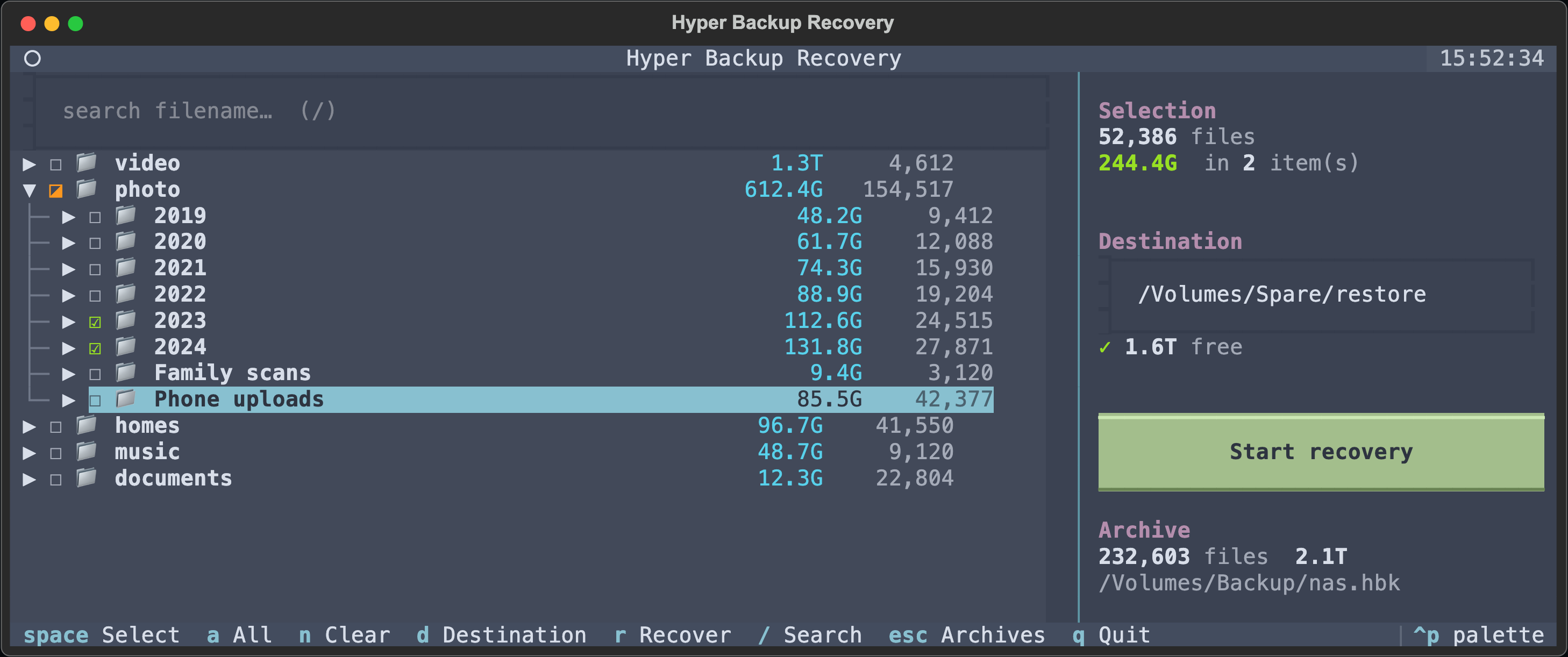
space tick · a all · n clear · / search · d destination · r recover ·
ctrl+q quit (plain q types into whichever field has focus, so quit is ctrl+q).
During a restore it shows live throughput, ETA, a rolling list of recently completed files, and a log of any failures.
Folders show subtree size and file count. Ticking a folder takes its whole subtree; the destination panel warns before you start if the selection will not fit. Recovery shows a live progress bar, throughput, ETA and a failure log.
Commands
hbk <archive> doctor                            # probe an archive, prove it's readable
hbk <archive> info                              # task name, codec, shares, versions
hbk <archive> versions [--porcelain]            # backup versions, start times, status
hbk <archive> list [pattern|glob]               # search the file index
hbk <archive> get <glob> <dest> [-j N]          # extract, preserving tree and mtimes
hbk <archive> get <glob> <dest> --strict        # ...re-verifying checksums on resume
hbk <archive> verify <glob> [-j N]              # integrity-check, write nothing
hbk <archive> tui                               # same as hbk-tui

hbk mount <remote:bucket> <dir> [--for browse|restore]   # mount object storage
hbk warm <dir>                                  # pre-cache directory listings
hbk unmount <dir>
hbk remotes                                     # list configured rclone remotes
For encrypted archives pass -p/--password, set HBK_PASSWORD, or let it prompt. The TUI
shows a password field when it detects encryption.
<archive> is a .hbk directory, or any drive or folder containing one — it will find it.
Globs match the full archive path, which begins with a slash and the share name
("/Photos/*", not "Photos/*"). list takes either plain text (case-insensitive
substring) or, if it contains *, ? or [, the same glob get would use.
Backup versions
Hyper Backup keeps many versions of the same data. list, get, verify, info,
doctor and tui read the newest complete version unless told otherwise:
| option | reads |
|---|---|
| (none) | the newest complete version |
--version N |
exactly version N (the numbers versions prints) |
--version @2026-10-15 |
the newest complete version that started by the end of that day |
--version '@2026-10-15 03:30' |
… that started no later than 03:30:59 that day |
--before '2026-10-15 23:59' |
the same as --version '@2026-10-15 23:59' |
--allow-incomplete |
also accept a version whose backup did not finish |
Dates are in the local time of the machine running hbk (set TZ to change it); a bare
date runs to local midnight (also on daylight-saving days), a minute to :59, a time with
seconds is exact. A clock time that does not exist on a spring-forward night is read as
the hour after; one that occurs twice in autumn means its first occurrence. A version
counts as complete only if Hyper Backup recorded its status
as Complete, which it also does for a "partially completed" backup, at least one that
skipped a missing source folder; an unfinished or failed one is refused unless you pass --allow-incomplete, which
on its own reads the newest version whether or not it finished. If no version is
complete, commands exit with code 4 rather than showing an empty archive.
Every share is read from the same version, so the default and --version N for the
newest complete N give identical results; a share that was not part of that version is
absent rather than silently taken from an older one. Archives without
Config/version_info.db fall back to the newest database of each share. If the file is
there but cannot be read (damaged, an unknown layout, caught mid-write, or with no
versions in it), hbkit cannot tell finished versions from unfinished ones, so it refuses
(code 2) unless you pass
--allow-incomplete, which then reads the newest file list of each share and says that
completion was not checked. Whenever there is a choice, the version being read is
printed on stderr.
hbk "$HBK_DIR" versions                         # human-readable, marks the default
hbk "$HBK_DIR" versions --porcelain             # id<TAB>ISO time<TAB>unix time<TAB>status
hbk "$HBK_DIR" list "/db_staging/firebird/*" --version @2026-10-15
hbk "$HBK_DIR" get  "/db_staging/firebird/*.gbk" "$TMP" --version @2026-10-15 -j 8
--porcelain prints one line per version, oldest first, for example
12 2026-10-15T03:00:04+02:00 1792026004 Complete. versions needs no password: the
version list is stored unencrypted. Each version gets its own index in the cache, so
switching between them only builds each index once. A rebuilt index replaces the stale
one for the same archive and version.
Exit codes
Scripts can rely on these:
| code | meaning |
|---|---|
| 0 | success |
| 1 | one or more files failed to extract or verify — a checksum mismatch or an unreadable chunk; the failures are listed on stdout |
| 2 | usage error (including a malformed --version), the archive is missing, unreadable or of an unsupported layout, or an unexpected internal error |
| 3 | the archive is encrypted and no password was given, or it is wrong |
| 4 | the requested version does not exist, is not complete, or no version matches the date |
| 5 | the glob (get, verify) or pattern (list) matched no file |
| 6 | the destination does not have enough free space (get) |
| 130 | interrupted (Ctrl-C) |
| 141 | get, verify or another command that acts rather than only prints stopped because its output pipe closed (… | head) before it finished; the outcome is unknown. list, versions and info exit 0 then; a pipe that closes after a command finished keeps that command's code (Linux and macOS; on Windows a closed pipe is a non-zero I/O error for every command) |
doctor has its own simple contract: 0 when the archive is recoverable, 1 otherwise, with
the reason in its report. Any argument or option a command would ignore — a second
--version, --strict outside get, a stray word after the destination (an unquoted
path with a space) — is refused with code 2 rather than silently dropped. --version
on its own prints hbkit's version; followed by anything it selects a backup version. To
search for a name that starts with -, end the options with --:
hbk <archive> list -- -draft.
Start with doctor. It reports the layout it found and then proves the archive is
readable by rebuilding a random sample of real files with full checksum verification:
              archive : /Volumes/Backup/nas_1.hbk
                 task : Daily Backup
          source host : nas
         source model : DS...
          chunk codec : lz4
  virtual_file record : 56 B
   chunk_index record : 29 B (v3)
  bucket index record : 32 B (md5+crc32)
               shares : Photos, Documents

  PASS  virtual_file layout known  (56 B)
  PASS  chunk_index layout known  (29 B)
  PASS  bucket layout known  (32 B)
  PASS  rebuilt 9 sampled files, all chunks verified  (9 ok, 0 failed)

  VERDICT: recoverable. Sampled files rebuilt byte-exact and checksum-verified.
Behaviour worth knowing
- Resumable. Correctly-sized files are skipped, so re-running a big job is cheap. A
file recorded as restored from a different backup version is extracted again even if
its size matches, so restoring another version into the same directory is safe. A file
whose record does not name its source — restored by hbkit before 0.5 — is extracted
again once too, since nothing says which version it came from. (A file with no record
at all, e.g. copied in by hand, is still judged by size alone;
--strictrefuses it.) - Crash-safe. Files are written to
.partand atomically renamed, so an interrupted run never leaves a truncated file that a later resume would trust. - Layout preserved. Output goes to
<dest>/<share>/<original path>with original mtimes. - Read-only. Nothing is ever written to the archive.
- Sidecars skipped.
@eaDir,@SynoEAStreamand@SynoResourceare Synology metadata — thumbnails and xattr streams, not your data. In one real archive they were half of all entries but under 1% of the bytes. - Index cached per archive and version in
~/.cache/hbkit(override withHBK_CACHE), rebuilt automatically when the archive changes. Browsing 1.1M files is instant after the first open; building it takes ~10s locally, ~48s over a network mount.
Network mounts (rclone / S3 / R2)
You can point hbkit at a bucket mounted with rclone instead of copying the archive down
first. Opening an archive no longer measures every index shard — shards are a fixed 8 MiB
except the last, so offsets are computed: one directory listing and a single stat per index
family, and file_chunk<N>.index families open only if a file references them. On a 3 TB
archive that removed roughly 2,600 network round-trips from startup.
Setting up the mount
hbkit can drive rclone for you. It stores no credentials and talks to no cloud API —
rclone config still owns all of that — it just picks flags that are easy to get wrong.
rclone config                                   # add an s3 remote; for R2 pick "Cloudflare"
hbk remotes                                     # what's configured
hbk mount r2:mybucket ~/mnt/backup --for browse # mount + pre-warm
hbk ~/mnt/backup/target.hbk doctor
hbk unmount ~/mnt/backup
--for browse (default) uses range requests; --for restore uses whole-file fetching as
read-ahead with the cache capped at 50G (--cache-size 10G to change it). --no-warm
skips pre-warming, --dry-run just prints the rclone command.
Measured on a 3 TB archive in Cloudflare R2:
| before tuning | with hbk mount |
|
|---|---|---|
| cold mount + directory pre-warm | ~12 min | 16 s |
| opening the archive | 9 min 21 s | 1.8 s |
| extracting a 10 KB file | 584 s | 11 s |
Three things get you there, and you can apply them by hand if you'd rather not use
hbk mount:
--no-modtime— the big one. Without it rclone issues a HEAD per object just to fill in modification times for a listing: ~0.27 s per entry, so the 2,021-shardchunk_indexdirectory took 546.8 s. With it, 4.07 s — 134× faster. hbkit never uses the modtimes of an archive's internal files (restored mtimes come from the archive's own metadata), so this costs nothing.--dir-cache-time 72h— the first listing of a large shard directory is the expensive one; cache it and every later open is instant.- pre-warming —
hbk mountwalks the index directories once up front, so the wait happens visibly at mount time instead of looking like a hang on your first command. Run it separately withhbk warm ~/mnt/backup.
Choosing --vfs-cache-mode — it depends on what you're doing
hbk mount --for picks this for you, but if you mount by hand: rclone's full mode
downloads whole files while off issues range requests.
| What you're doing | Mode | Why |
|---|---|---|
| First index build | full |
Reads one share database end to end (356 MB on a 1.1M-file archive). Sequential — what whole-file fetching is good at. One time; cached in ~/.cache/hbkit after. |
Browsing, list, the TUI tree |
either | Served from the local index, no network at all. |
| Pulling out a few files | off |
hbkit reads a 32-byte index record and a ~5 KB chunk at a time. In full mode each pulls a whole file: a measured 10 KB extraction fetched ~82 MB and took ten minutes. |
| Bulk restoring a folder | full |
You touch most of each ~50 MB bucket anyway, so whole-file fetching becomes read-ahead. Cap it with --vfs-cache-max-size, or it will fill your disk. |
Expectations and tuning
Profiled against a 3 TB archive in R2 (150 MB, 18,104 chunks):
| phase | share of wall time |
|---|---|
| reading chunk data | 53% |
| reading bucket indexes | 20% |
| chunk_index lookups | 15% |
| LZ4 + MD5 + CRC32 | 0.7% |
Two things follow. Verification is free over a network — never turn it off to go faster,
it buys nothing. And throughput is bound by round-trips, so concurrency is the only knob
that matters: measured 4.0 MB/s at -j 1, 8.5 at -j 8, 9.5 at -j 16, then flat.
Use -j 16 on a network mount; the default of 8 is tuned for local disks.
Things that were measured and did not help, so you needn't try them: enlarging the read buffers (latency-bound, no effect), and reading only the 32 bytes needed from a bucket index instead of caching the whole 200 KB file (18% slower — a file's chunks cluster in one bucket, so the whole-index read amortises). Read amplification is 0.82×: compression and dedup mean hbkit fetches less than it delivers.
Even configured well, a mounted bucket is dramatically slower than local storage — the access pattern is thousands of small scattered reads, and each one crosses the network. If you can, copy the archive to a local disk first. Start with one small folder and watch the throughput before committing to a large restore.
Performance
Use -j to set worker processes (default 8). Threads do not help — extraction is
GIL-bound in Python, measured flat at ~32 MB/s from 1 to 12 threads — so hbkit fans out
to real processes.
Throughput is bounded by the source device, not by hbkit. On a USB spinning disk with a
92 MB/s sequential ceiling, a cold parallel run reached 58 MB/s while the disk itself sat
at 49 MB/s; scattered reads across tens of thousands of bucket files never reach sequential
speed. Work is ordered by locality so each worker sweeps the pool in one direction rather
than several heads chasing several regions.
Media does not compress — measured ratio 1.004 on video. The space saving in a Hyper Backup archive comes from cross-file dedup, not per-file compression, so expect bytes-off-disk to roughly equal bytes-delivered.
Scope and limits
Read this before trusting it with the only copy of anything.
- Encrypted archives are supported (password only). A wrong password is rejected instantly, before any data is read, by deriving the public key and comparing it to the one stored in the archive. Older RSA-wrapped archives and key-file unlock are not implemented — only the X25519/Argon2 scheme.
- The index cache stores decrypted filenames. Browsing an encrypted archive requires
the password because the directory tree itself is ciphertext, so
~/.cache/hbkitwill contain plaintext names (not file contents). Delete it if that matters to you. - Proven against a limited set of archives. A 3 TB DSM 7 / Hyper Backup 4.1.2
archive (unencrypted, LZ4, single version, single pool) and a small encrypted one from
the same DSM version, both verified byte-exact, plus a 7-version encrypted archive from
Hyper Backup 4.2.2 reported in #4.
In #6, a user restored 465,000 files
(754 GB) from a backup on a NAS hit by C3RB3R ransomware: it had locked only small
files that hbkit doesn't read.
Version selection was checked byte-exact on a small two-version encrypted Hyper Backup
4.2.2 archive (each version's copy of a changed file, by number and by date), and on
synthetic archives; the version list comes from
Config/version_info.db, whose layout is checked before use. Older record layouts (16-bytechunk_index, 28-byte bucket records) and zlib chunks are implemented from disassembly but have not met a real archive of that kind.doctorexists precisely so you can find out in seconds rather than mid-restore. - Unknown layouts are refused, not guessed. A wrong guess would mean silently wrong bytes, which is the one thing a recovery tool must never do.
- Whole-file dedup (
off_virtual_file = -1, files living inPool/file_pool) is not decoded. One file in 501,278 in the reference archive. - Synology C2 is not tested. Use Hyper Backup Explorer for a backup kept in C2.
- Windows: tested on synthetic archives only. On every push, CI restores plain and
encrypted test archives byte-exact on Windows, with an
lz4.dllbuilt byvcpkg install lz4:x64-windowsandHBK_LZ4set to its full path. No archive from a real NAS has been restored on Windows yet. Linux and macOS are verified on real archives.
The format
FORMAT.md is a full specification of the on-disk format, written so you can
implement a reader in any language. Every claim is tagged verified / from disassembly /
inferred / unknown, and there is an explicit list of what is still undecoded.
As far as we can tell no public description of this format existed before it — searching
the container magic 70 53 A8 6E returns nothing on the open web or in file-signature
databases. If the tool is useless to you, the spec may not be.
It was derived two ways and cross-checked: empirically, by anchoring on a file whose bytes
could be recognised and then rebuilding progressively larger files until a 674 MB video
reproduced exactly across 82,313 chunks; and by reading exported C++ symbols in Synology's
own HyperBackupExplorer binary, which ships with full symbols and gives exact field
offsets. Where the two disagreed, the empirical result won.
Prior art
- TeamDman/teamy-hyper-backup-explorer — independent Rust implementation (MPL-2.0). Its constants agree with what we derived separately.
- Callido Restore: a separate macOS app (MIT) that restores
.hbkarchives, started 2026-10-30. We have not reviewed its code. - mistersandman/hyperbackup_decrypt — 2016 Python 2 script, and the only public reference for the encrypted variant.
Development
git clone https://github.com/YordiLorenzo/hbkit && cd hbkit
python3 -m venv .venv && ./.venv/bin/pip install -e ".[dev]"
HBK_TEST_ARCHIVE=/path/to/backup ./.venv/bin/python -m pytest tests -v
The test suite needs a real archive — correctness is checked against the archive's own checksums and against file-format markers, so a pass means the bytes are genuinely right, not merely the right length. Tests skip cleanly when no archive is available.
Contributions especially welcome for: encrypted archives, the legacy record layouts, and
Pool/file_pool. If you have an archive doctor cannot read, an issue with its output
is genuinely useful.
License
MIT — see LICENSE.
Not affiliated with or endorsed by Synology. "Synology" and "Hyper Backup" are trademarks of Synology Inc., used here only to describe what this software reads.
1 maintainer

Metadata
1 maintainer
Release files for hbkit 0.5.3
For a detailed explanation of source distributions (sdists) and built distributions (wheels), please see the package formats documentation.
Source distribution (sdist)
| File | Size | Uploaded | Provenance | Actions |
|---|---|---|---|---|
| hbkit-0.5.3.tar.gz | 85.0 kB | Without provenance | Details for hbkit-0.5.3.tar.gz |
Built distribution (wheel)
| File | Interpreter | ABI | Platform | Actions Reset |
|---|---|---|---|---|
| hbkit-0.5.3-py3-none-any.whl | Python 3 | none | any | Details for hbkit-0.5.3-py3-none-any.whl |
Total release size: 145.7 kB
Release files / hbkit-0.5.3.tar.gz
| Download URL | hbkit-0.5.3.tar.gz |
|---|---|
| Size | 85.0 kB |
| Tags | Source |
|
SHA-256 checksum How to use checksums |
aa0f1b59728404820d025794ec039d081b2f7bd7c50250acf62a327c02b31cac
|
|
BLAKE2b-256 checksum How to use checksums |
23d2dd785268a07f90387d65446e3a047a68414c53a405aced927d45babd5017
|
| Upload date | |
|
Uploaded using Trusted Publishing? What is trusted publishing? |
No |
| Uploaded via |
twine/7.0.0 CPython/3.10.18
|
Release files / hbkit-0.5.3-py3-none-any.whl
| Download URL | hbkit-0.5.3-py3-none-any.whl |
|---|---|
| Size | 60.6 kB |
| Tags | Python 3 |
|
SHA-256 checksum How to use checksums |
99503ba9ce0a922e1823185dbf822074afade6e9d0a5f354d1a81a373675ed45
|
|
BLAKE2b-256 checksum How to use checksums |
eb0780ab7e27a75ab6515d09f7fa7bf1650cd6ee859dad0a8101194d03be781b
|
| Upload date | |
|
Uploaded using Trusted Publishing? What is trusted publishing? |
No |
| Uploaded via |
twine/7.0.0 CPython/3.10.18
|
Security for hbkit 0.5.3
Provenance
Provenance describes where a file came from. On PyPI, provenance is shared via attestations, which provide a verifiable record of the build or publishing details. View details, limitations and caveats.
No provenance found
None of the files in this release were uploaded with provenance metadata.
A note on package security
PyPI is a repository for distributing packages, not a service for auditing them. While third-party security researchers and our staff do their best to detect and remove malicious packages, PyPI cannot guarantee the quality, security or suitability of any given package.
To learn more about protecting yourself from malicious actors, visit our package security documentation.














