
HDrive EtherCAT Python SDK
Control Henschel Robotics HDrive servo motors over EtherCAT from Python. No PLC required.
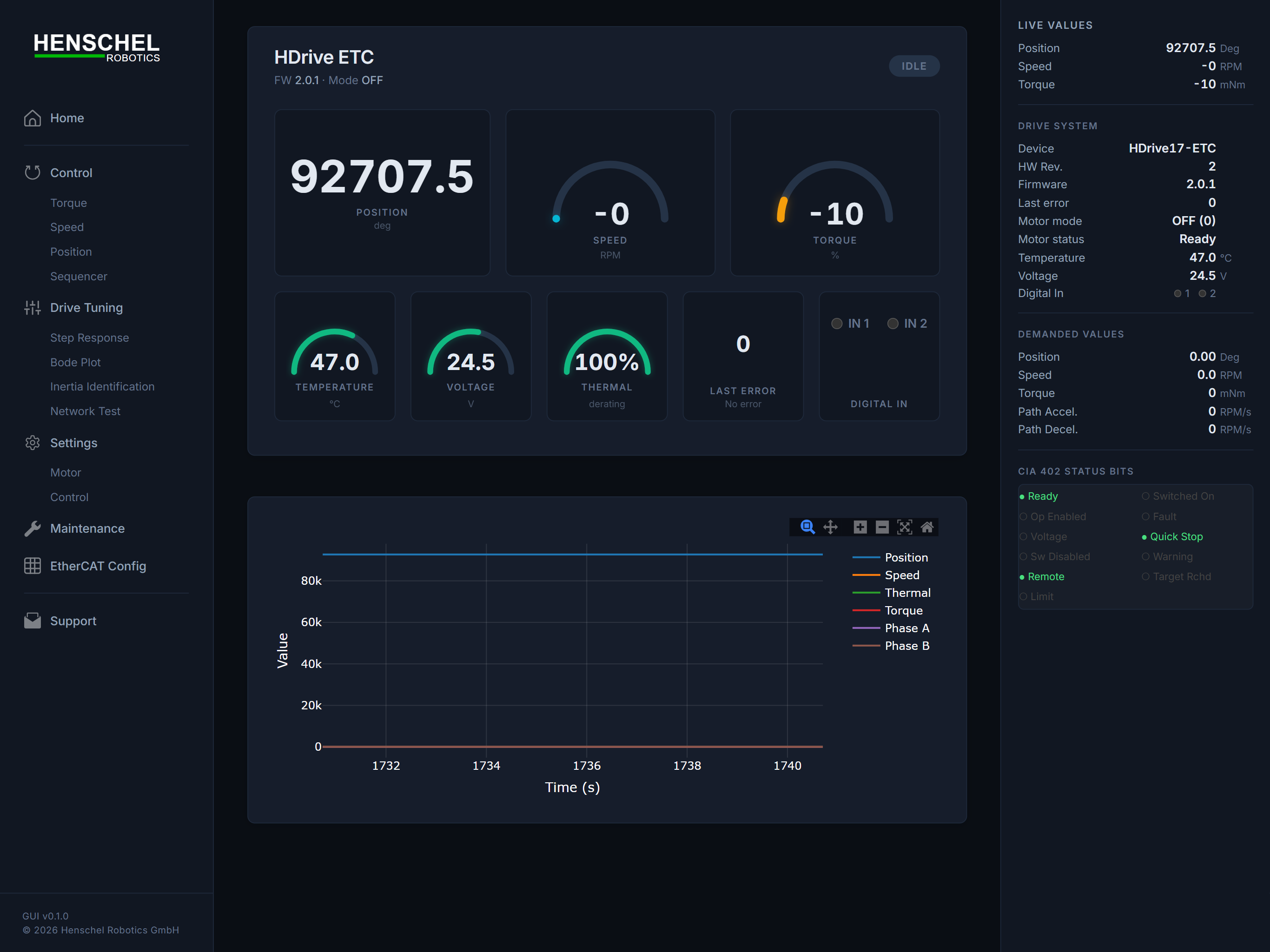
Web Interface
The SDK includes a full-featured browser-based GUI for motor control, monitoring, and testing.
pip install hdrive-etc
sudo hdrive-web
Then open http://localhost:8081 in your browser.
The web GUI provides:
- Real-time telemetry — live position, velocity, torque, temperature, and supply voltage
- Motor control — switch modes (torque / velocity / position), set targets, enable / disable
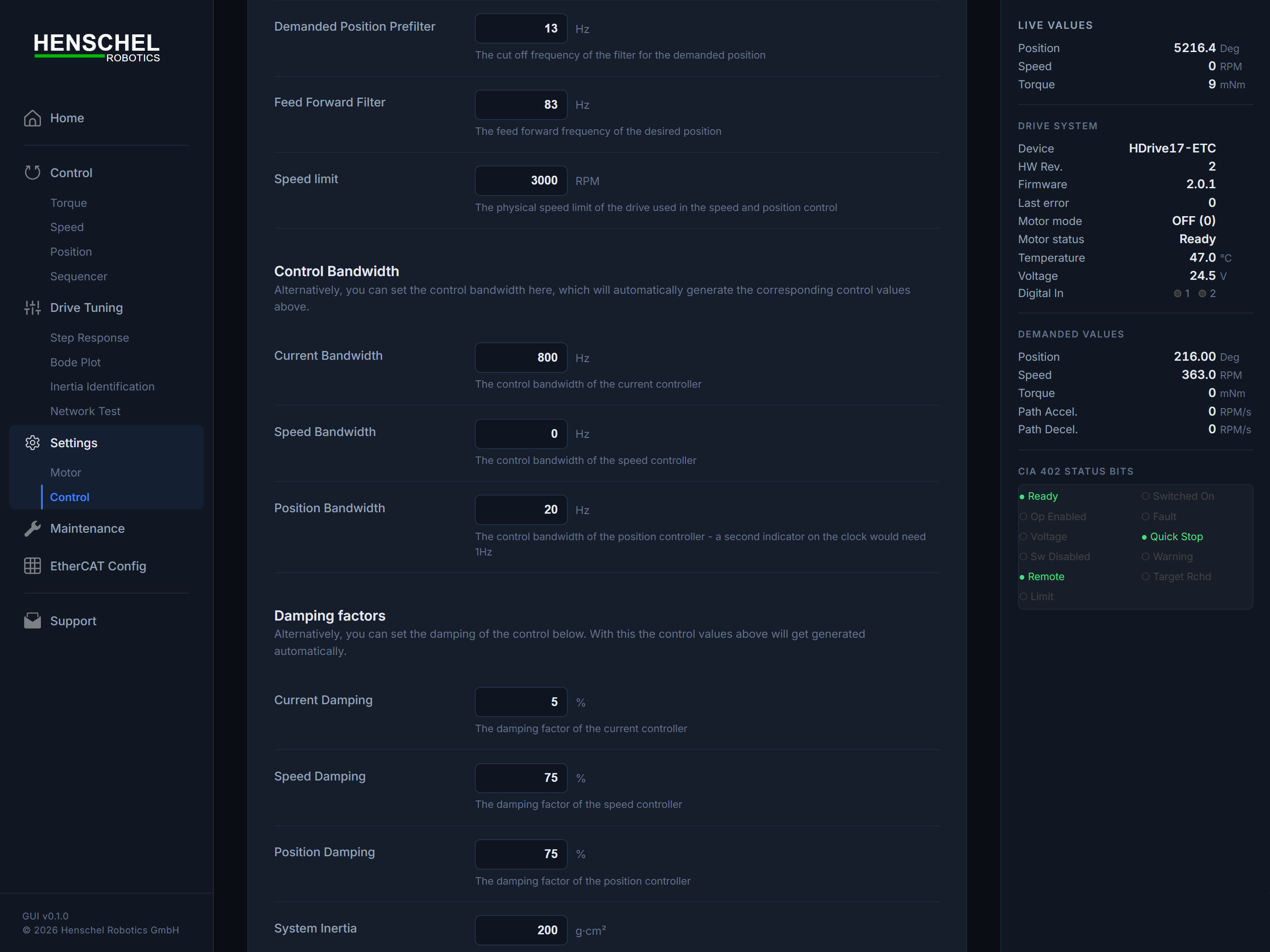
- Parameter tuning — adjust control bandwidth, damping, and inertia
- SDO browser — read and write any drive object
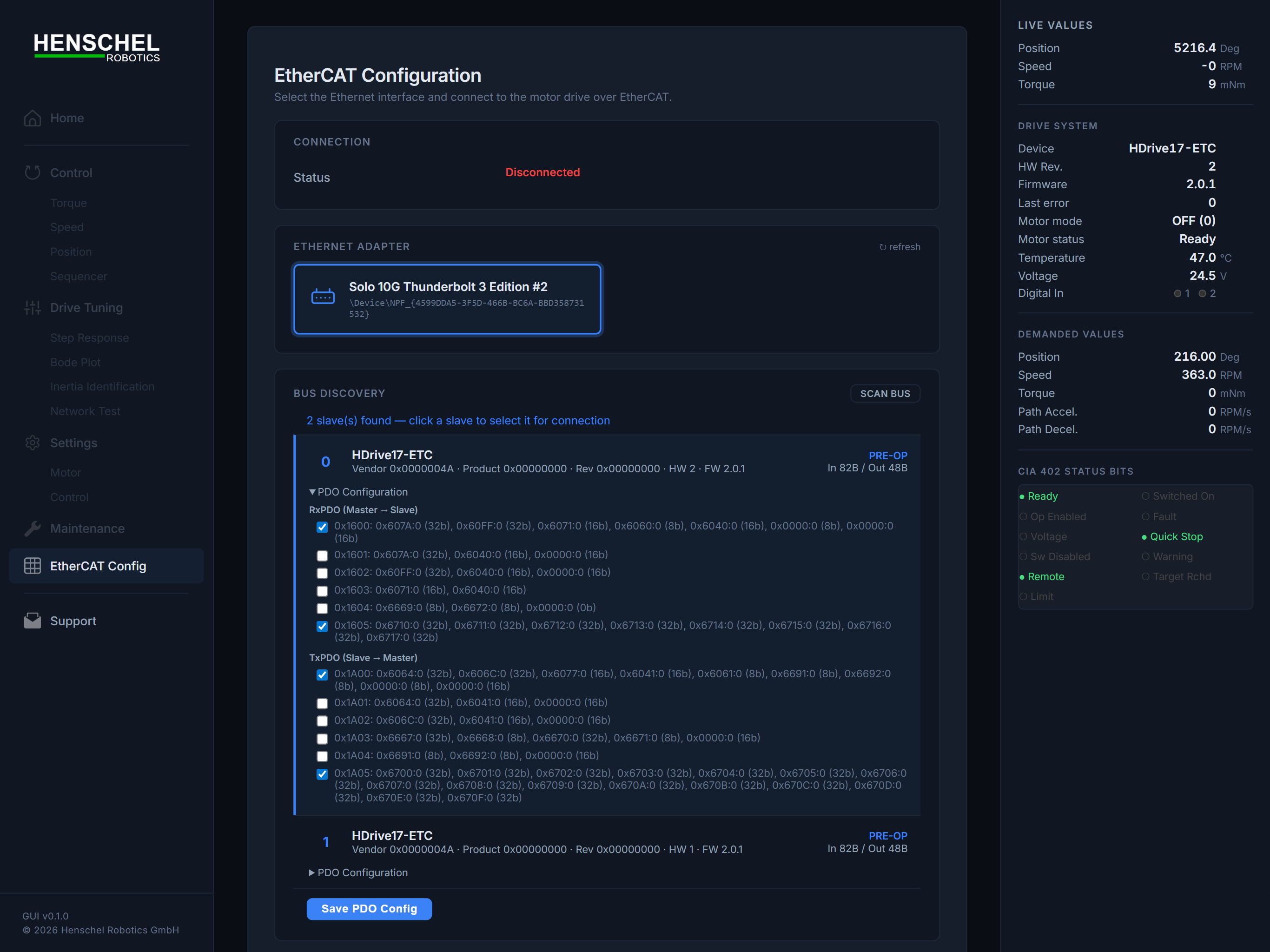
- Bus discovery — scan the EtherCAT bus and configure PDO mapping
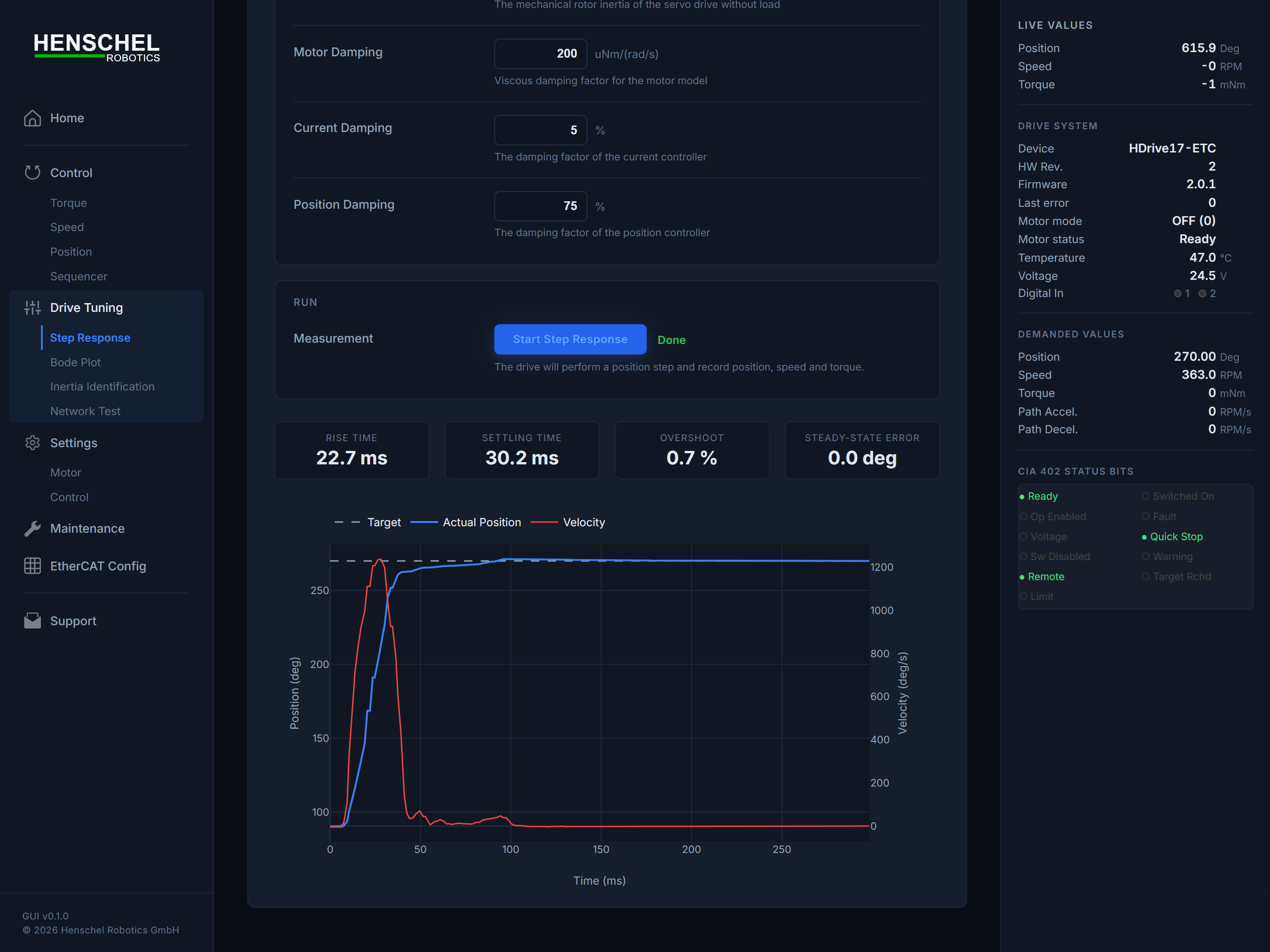
- Built-in tests — step response, Bode plot (frequency response), inertia identification, and network latency
- Calibration — trigger encoder calibration from the browser
| Control | Step Response | EtherCAT Config |
|---|---|---|
 |
 |
 |
Full guide with all screenshots:
docs/web-interface.md
sudo hdrive-web --adapter "\Device\NPF_{...}" --slave 0 --port 8081
sudo hdrive-web --list-adapters
Raspberry Pi / Linux: The web GUI saves its configuration (adapter, slave, PDO mapping) to
ethercat_config.json. When installed via pip, the default file is inside the package directory. Copy it to your working directory for easy editing:cp $(python3 -c "import hdrive_etc, os; print(os.path.join(os.path.dirname(hdrive_etc.__file__), '..', 'ethercat_config.json'))") . hdrive-web --pdo-config ./ethercat_config.json
Features
- Simple API —
motor.set_torque(200)and you're done - Web interface — built-in browser GUI for control, tuning, and testing
- Real-time EtherCAT — 5 ms processdata cycle via PySOEM
- CiA 402 state machine — automatic enable/disable transitions
- Thread-safe — send commands from any thread
- Context manager — automatic connect/disconnect with
withstatement - SDO read/write — read and write drive configuration objects
- Auto-recovery — background thread monitors slave health
Installation
pip install hdrive-etc
Or install from source:
git clone https://github.com/henschel-robotics/python-hdrive-etc.git
cd python-hdrive-etc
pip install .
For development (editable install):
pip install -e ".[dev]"
Quickstart
1. Configure the bus (one-time setup)
Start the web interface and use it to select your adapter, scan the bus, configure PDO assignments, and save:
sudo hdrive-web # Linux / Raspberry Pi
Open http://localhost:8081, go to the EtherCAT Config tab, click Scan Bus, then Save PDO Config. This writes ethercat_config.json with your adapter and PDO mapping.
2. Use the motor in your script
from hdrive_etc import HDriveETC, Mode
import time

# slave_index = position of the HDrive on the bus (check "Scan Bus" in the web GUI)
with HDriveETC(slave_index=0, pdo_config_path="ethercat_config.json") as motor:
    motor.set_mode(Mode.TORQUE)
    motor.set_torque(200)  # 200 mNm

    time.sleep(1)
    print(f"Position: {motor.get_position()}")
    print(f"Velocity: {motor.get_velocity():.1f} RPM")

    motor.stop()

# Motor is automatically stopped and disconnected when leaving the 'with' block
API Reference
Connect
from hdrive_etc import HDriveETC

# Recommended: use ethercat_config.json from the web interface
with HDriveETC(slave_index=0, pdo_config_path="ethercat_config.json") as motor:
    motor.set_torque(200)

# Motor is stopped and connection is closed automatically.

# Alternative: specify adapter directly (slave_index is always required)
with HDriveETC(adapter=r"\Device\NPF_{...}", slave_index=0) as motor:
    motor.set_torque(200)
Torque Control
from hdrive_etc import Mode

# Set torque in milli-Newton-metres
motor.set_mode(Mode.TORQUE)
motor.set_torque(200)   # 200 mNm
Velocity Control
# Set velocity
motor.set_mode(Mode.VELOCITY)
motor.set_velocity(300)
Position Control
# Set target position in encoder increments
motor.set_mode(Mode.POSITION)
motor.set_position(10000)
Stop
# Stop the motor (sets mode to 0)
motor.stop()
Read / Write SDO Objects
# Read a drive object (e.g. modes of operation display)
value = motor.read_sdo(0x6061, 0x00, 'b')
print(f"Current mode: {value}")

# Write a drive object
motor.write_sdo(0x6640, 0x01, 100)  # Set torque bandwidth
Telemetry
# Get motor status snapshot
status = motor.get_status()
print(f"Position: {status['position']}")
print(f"Velocity: {status['velocity']}")
print(f"Torque:   {status['torque']}")

# Individual readings
pos = motor.get_position()        # encoder increments
vel = motor.get_velocity()        # RPM
torque = motor.get_torque()       # actual torque
state = motor.get_state_name()    # CiA 402 state name

# Communication health
stats = motor.get_comm_stats()
print(f"Success rate: {stats['success_rate']:.1f}%")
print(f"Cycle time:   {stats['cycle_time_actual_ms']:.2f} ms")
Error Handling
# Read error code from drive
error_code = motor.get_error_code()
print(motor.get_error_message(error_code))

# Clear error
motor.clear_error()
Control Tuning
# Configure control parameters
motor.configure_control_parameters(
    rotor_inertia=1000,
    damping=500,
    torque_bw=100,
    velocity_bw=200,
    position_bw=300,
)
Control Modes
| Constant | Value | Description |
|---|---|---|
Mode.TORQUE |
4 | Cyclic synchronous torque (CST) |
Mode.VELOCITY |
-3 | Cyclic synchronous velocity / stepper |
Mode.POSITION |
8 | Cyclic synchronous position (CSP) |
Mode.PROFILE_POSITION |
1 | Profile position mode |
Mode.PROFILE_VELOCITY |
3 | Profile velocity mode |
Mode.CALIBRATION |
-99 | Manufacturer calibration mode |
Mode.STOP |
0 | Motor disabled |
CiA 402 States
The motor automatically transitions through these states on connect:
| State | Description |
|---|---|
not_ready |
Drive is initializing |
switch_on_disabled |
Drive is disabled |
ready_to_switch_on |
Drive is ready |
switched_on |
Drive is powered |
operation_enabled |
Drive accepts motion commands |
fault |
Drive is in fault state |
Examples
See the examples/ folder:
basic_control.py— Connect, apply torque, print telemetryvelocity_mode.py— Constant speed control with direction reversaltorque_mode.py— Torque ramp up/downposition_mode.py— Move to a sequence of positionsread_sdo.py— Read configuration objects via SDO
Requirements
- Python 3.8+
- PySOEM >= 1.1.0
- Npcap or WinPcap (Windows only)
- Important: During Npcap installation, check "Install Npcap in WinPcap API-compatible Mode"
- EtherCAT-compatible network adapter
- HDrive servo motor with EtherCAT interface
- For USB-to-Ethernet adapters, use one based on the ASIX AX88772 chipset (recommended for reliable real-time EtherCAT communication) e.g. TU2-ET100
License
MIT — see LICENSE for details.
Third-party notice: This package depends on PySOEM (MIT), which wraps SOEM (GPLv3 / Commercial). Users are responsible for complying with SOEM's license terms. For commercial use of SOEM, contact RT-Labs (sales@rt-labs.com).
Support
1 maintainer

Metadata
1 maintainer
Release files for hdrive-etc 0.2.2
For a detailed explanation of source distributions (sdists) and built distributions (wheels), please see the package formats documentation.
Source distribution (sdist)
| File | Size | Uploaded | |
|---|---|---|---|
| hdrive_etc-0.2.2.tar.gz | 1.4 MB | Details |
Built distribution (wheel)
| File | Interpreter | ABI | Platform | Reset |
|---|---|---|---|---|
| hdrive_etc-0.2.2-py3-none-any.whl | Python 3 | none | any | Details |
Total release size: 2.8 MB
Release files / hdrive_etc-0.2.2.tar.gz
| Download URL | hdrive_etc-0.2.2.tar.gz |
|---|---|
| Size | 1.4 MB |
| Tags | Source |
|
SHA-256 checksum How to use checksums |
a4e3b5f7cb579df6aa56294238fe91ccd2916e590595be7323f9759cd1a24e7b
|
|
BLAKE2b-256 checksum How to use checksums |
de2aba30ac5f0c4d1982f626d934057ebc8b0d75c8025f6310d70150881549df
|
| Upload date | |
|
Uploaded using Trusted Publishing? What is trusted publishing? |
No |
| Uploaded via |
twine/6.2.0 CPython/3.11.8
|
Release files / hdrive_etc-0.2.2-py3-none-any.whl
| Download URL | hdrive_etc-0.2.2-py3-none-any.whl |
|---|---|
| Size | 1.4 MB |
| Tags | Python 3 |
|
SHA-256 checksum How to use checksums |
d7498d96827a1b0c89a752c269b6632108cbc788eee6df2bef7251e7f2646700
|
|
BLAKE2b-256 checksum How to use checksums |
2b41ea0a999e1edf6116703f3c784c530d3500a90e28755bb4ddc21ca5349cca
|
| Upload date | |
|
Uploaded using Trusted Publishing? What is trusted publishing? |
No |
| Uploaded via |
twine/6.2.0 CPython/3.11.8
|














