
      ██╗  ██╗███████╗██╗███╗   ███╗██████╗  █████╗ ██╗     ██╗
      ██║  ██║██╔════╝██║████╗ ████║██╔══██╗██╔══██╗██║     ██║
      ███████║█████╗  ██║██╔████╔██║██║  ██║███████║██║     ██║
      ██╔══██║██╔══╝  ██║██║╚██╔╝██║██║  ██║██╔══██║██║     ██║
      ██║  ██║███████╗██║██║ ╚═╝ ██║██████╔╝██║  ██║███████╗███████╗
      ╚═╝  ╚═╝╚══════╝╚═╝╚═╝     ╚═╝╚═════╝ ╚═╝  ╚═╝╚══════╝╚══════╝
Interactive terminal-based port, process, file, and resource inspector for Linux
heimdall is a high-performance, curses-based Terminal User Interface (TUI) designed to give you instant visibility and control over your Linux system — all from a single, interactive view.
✨ Features
- 🔍 Live port listing using
ss - ⚡ Shows CPU% / MEM% usage per process
- 🧠 Maps PORT → PID → PROGRAM
- ⛔ Firewall toggle for selected port (temporarily block/unblock traffic)
- 📂 Displays all open files of the selected process (
/proc/<pid>/fd) - 🧾 Deep inspection via
witr --port - 🖥️ Fully interactive terminal UI (curses)
- 🔌 Plugin System: Embed existing TUI tools (e.g., btop) directly into new tabs. Btop example plugin included.
- ⚡ Real-time refresh
- 🛑 Stop a process or systemd service directly from the UI (with confirmation)
- 📝 Warnings annotation (e.g., suspicious working directory is flagged but explained)
- 🛠️ Action Center (Modal) — quick operational panel for ports & processes (see below)
- 💥 Kill Connections operation: list and kill established connections for a port.
- 🚫 Block IP operation: block a source IP for a port via iptables.
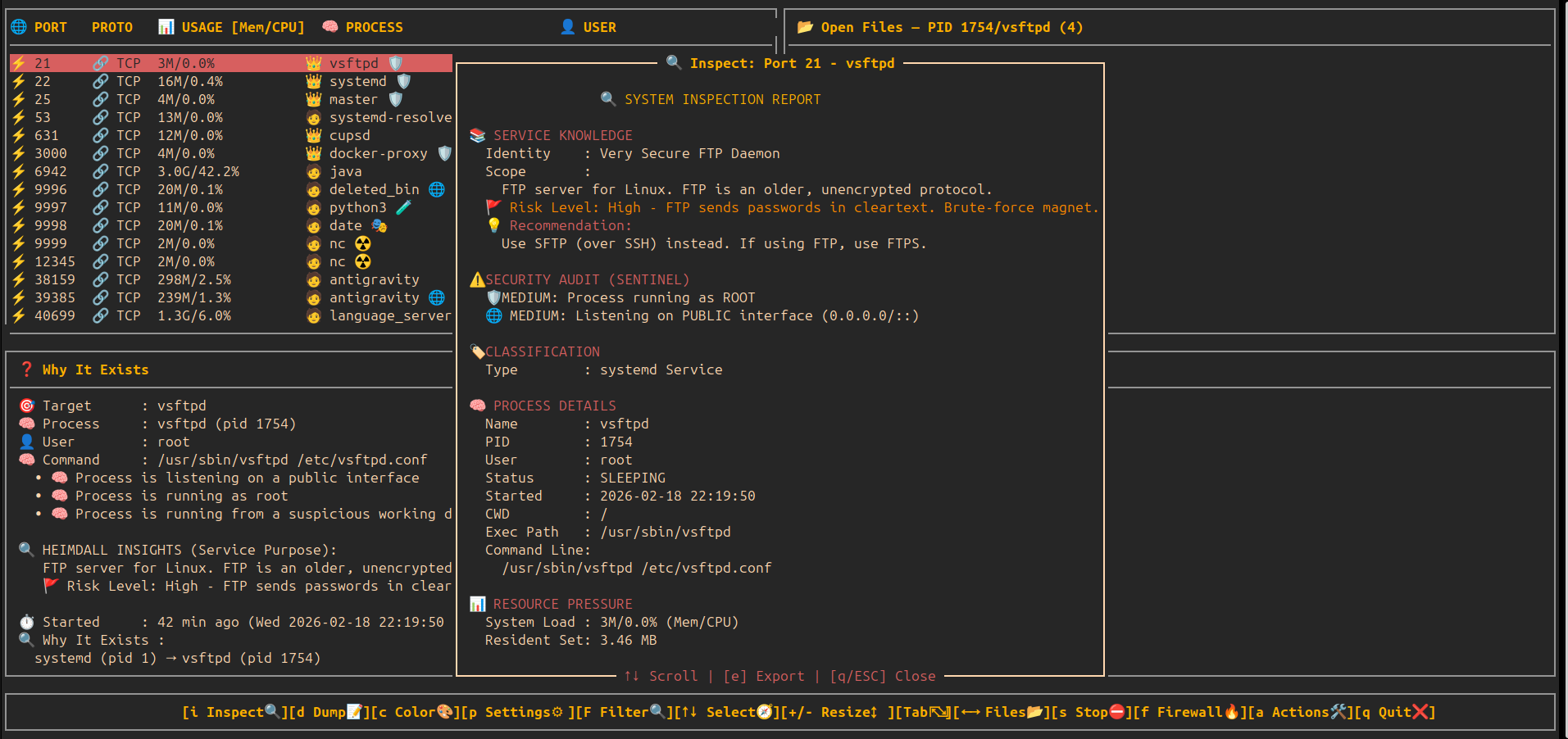
- 🔍 Deep Inspect / Info (i): Real-time ancestry tracking, resource pressure, and security audit.
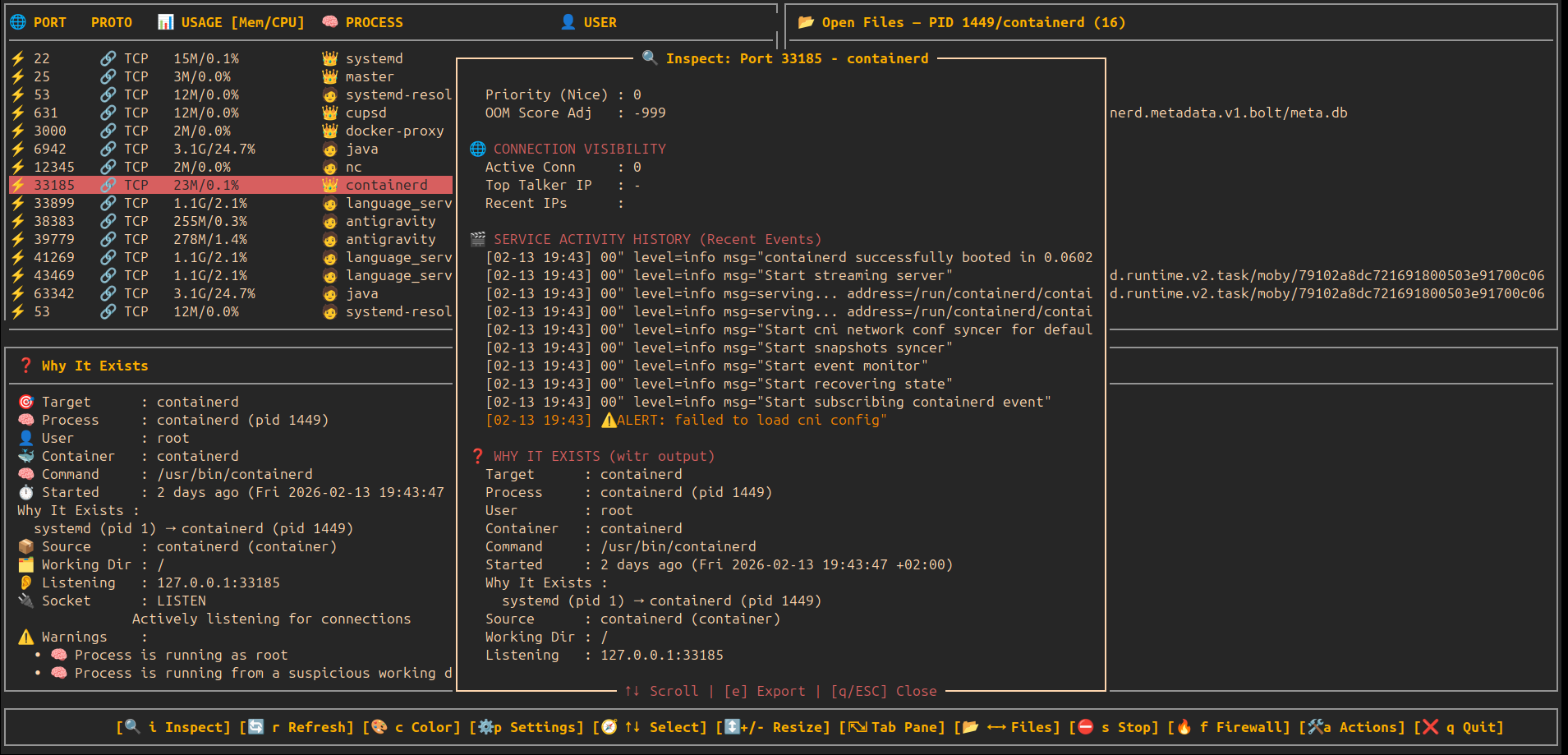
- 🎬 Service Activity History: Extract historical logins, IP events, and session logs from system journals.
- 📡 Live Auto-Scan: Periodic background refresh of the port list (adjustable speed).
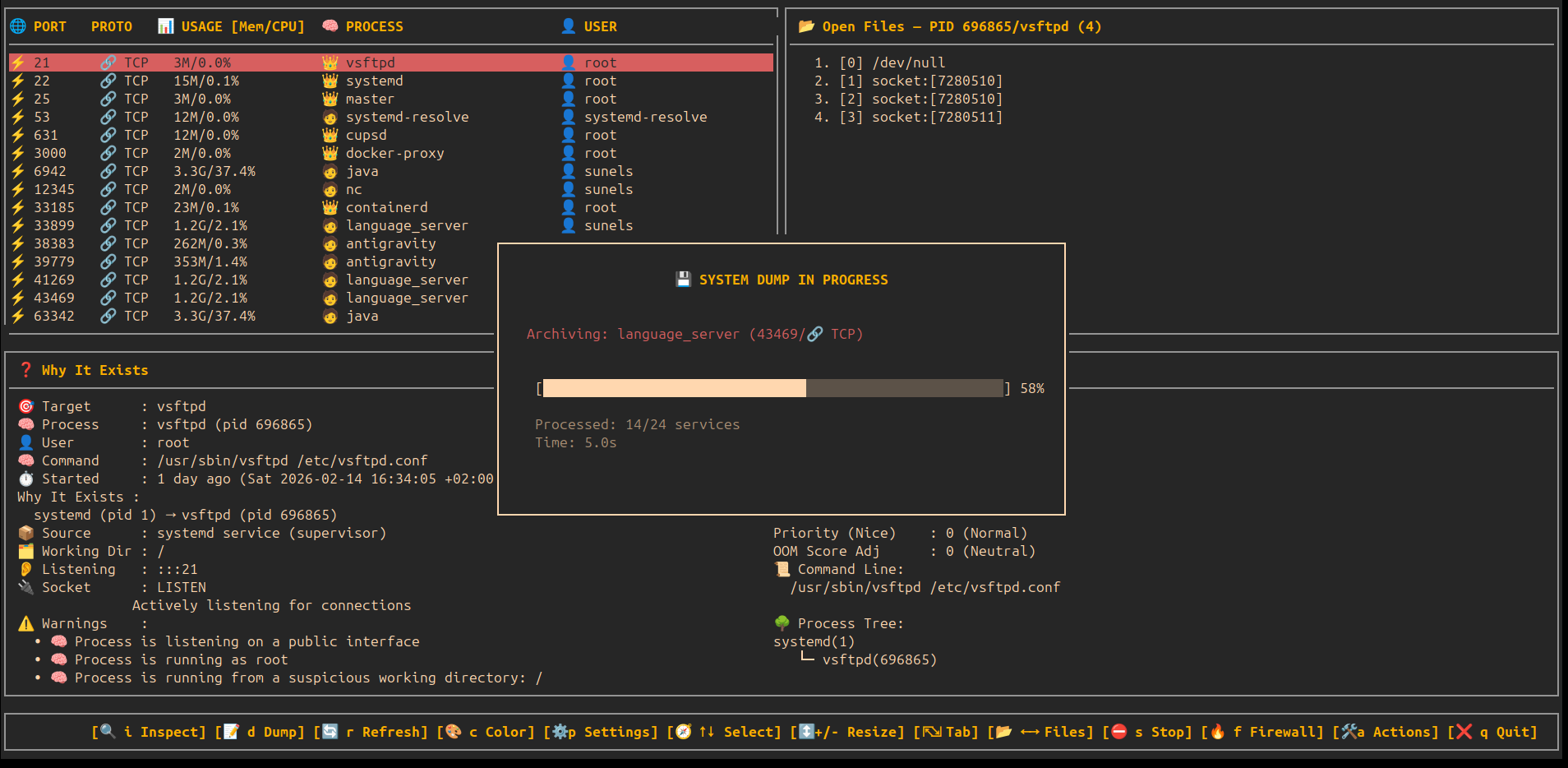
- 📸 Full System Dump (d): Comprehensive text report of all active services, including logs, process trees, and resource limits.
- 📦 Local Package Intelligence: Automatic fallback to local package managers (dpkg/rpm) for rich service details when other sources fail.
- 🛡️ Heimdall Sentinel (Security Audit):
- 🚩 Risk Level: Flags known high-risk services (e.g., FTP, Telnet) based on a built-in vulnerability database.
- ☢️ Behavioral Analysis: Real-time alerts for Backdoors, Masquerading, Script Listeners, and other anomalies.
- 🔄 Auto Service Updates: Background synchronization of
services.jsonfrom GitHub. - ⚙️ Settings Console (p): Configuration modal for updates and system preferences.
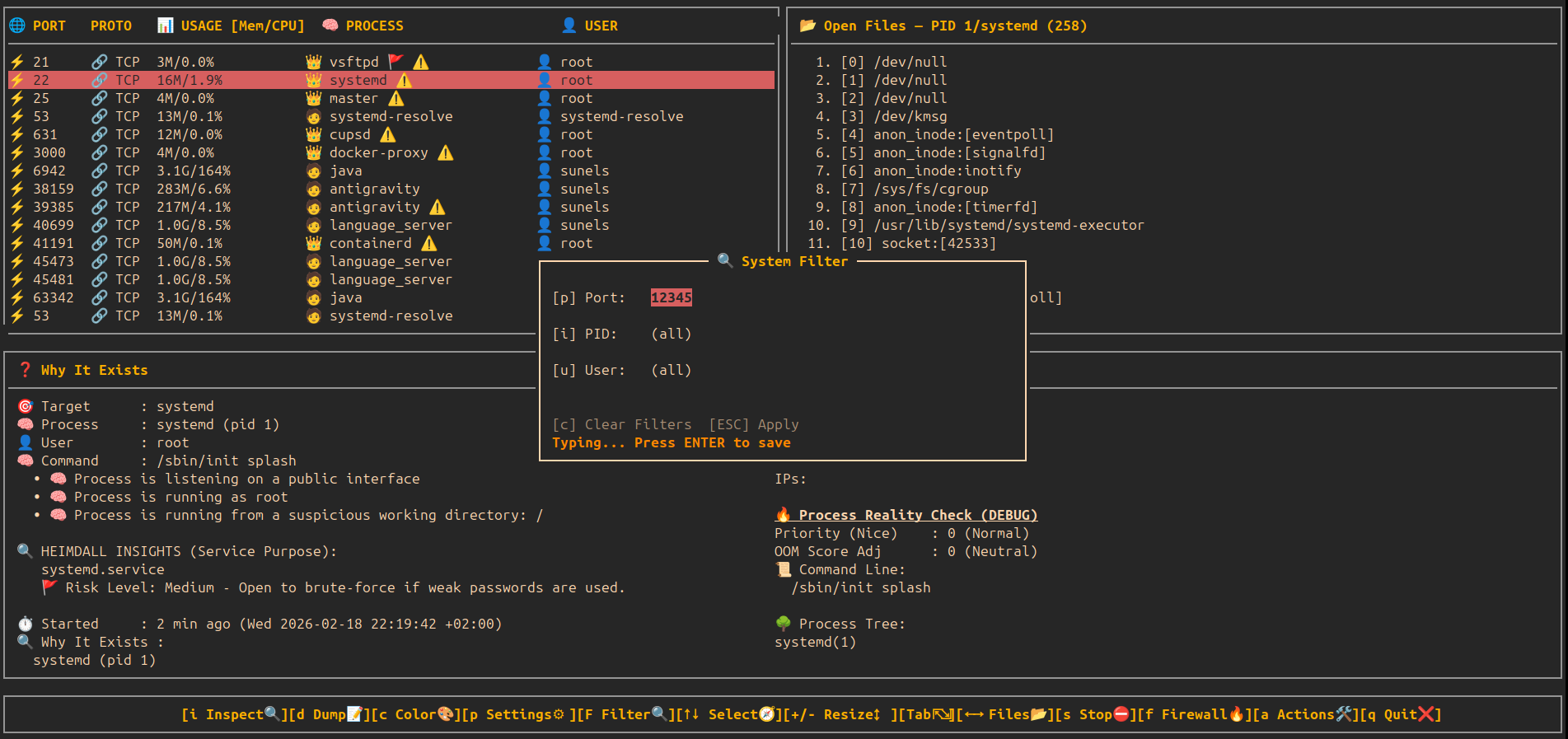
- 🔍 Interactive System Filter (F): Real-time filtering by Port, PID, or User directly from the TUI.
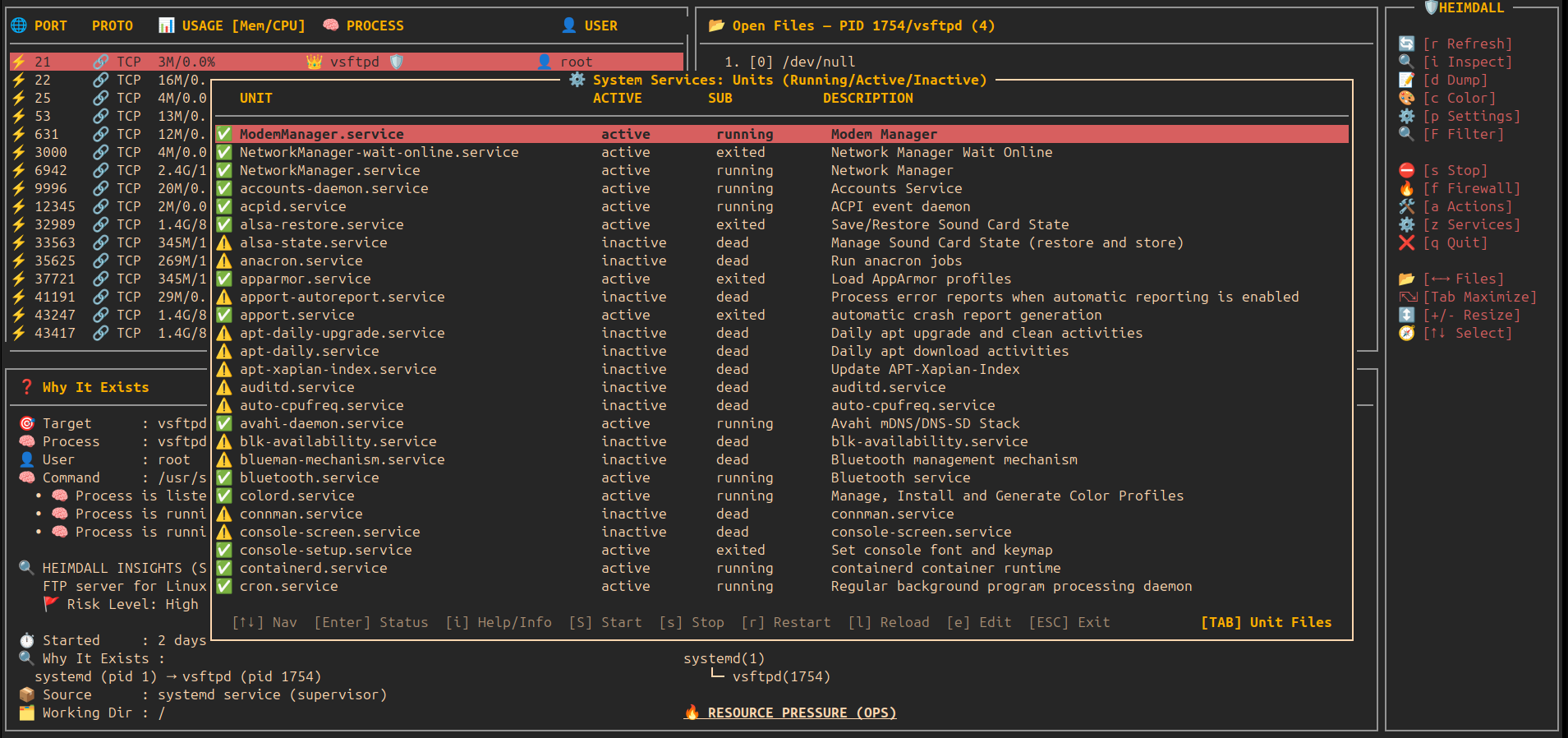
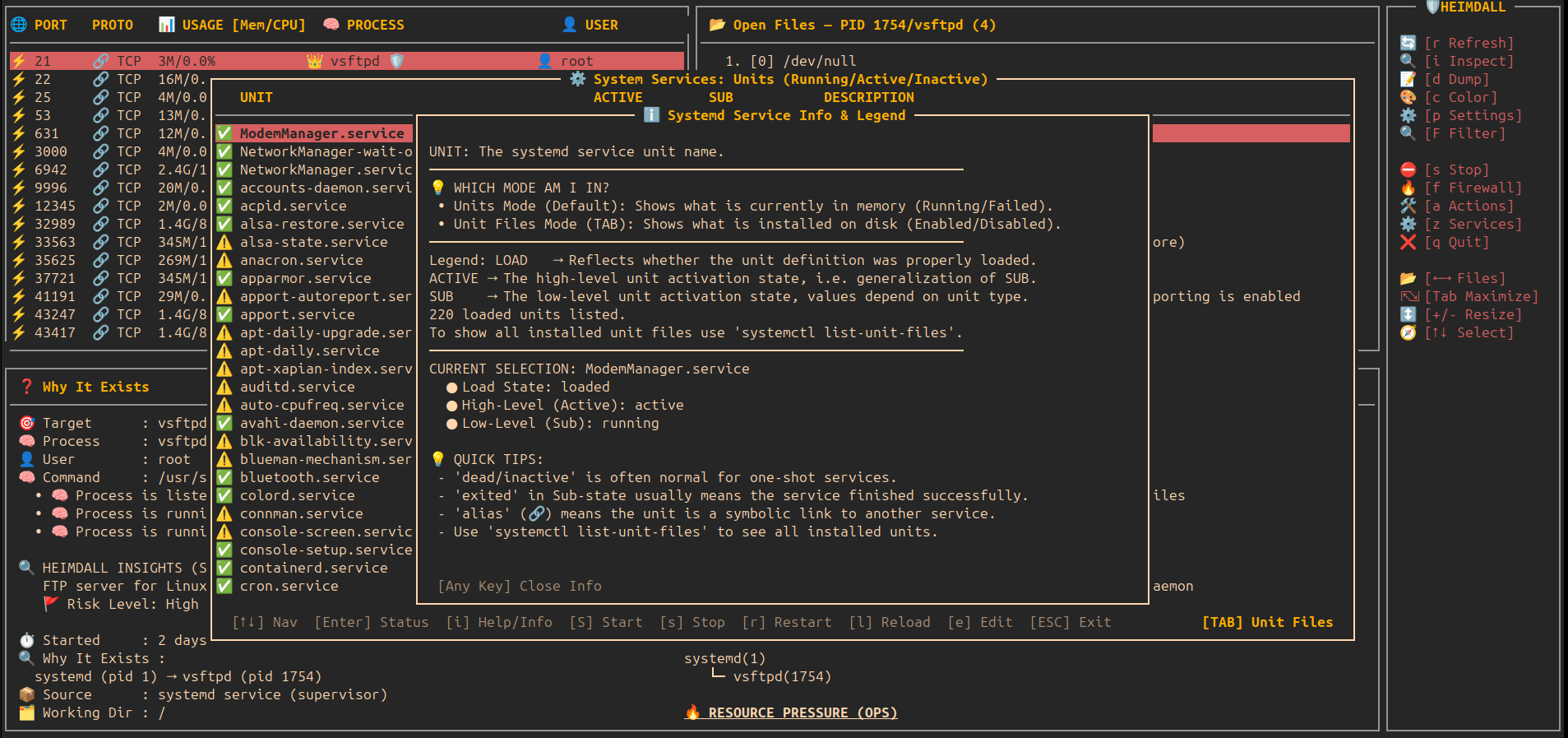
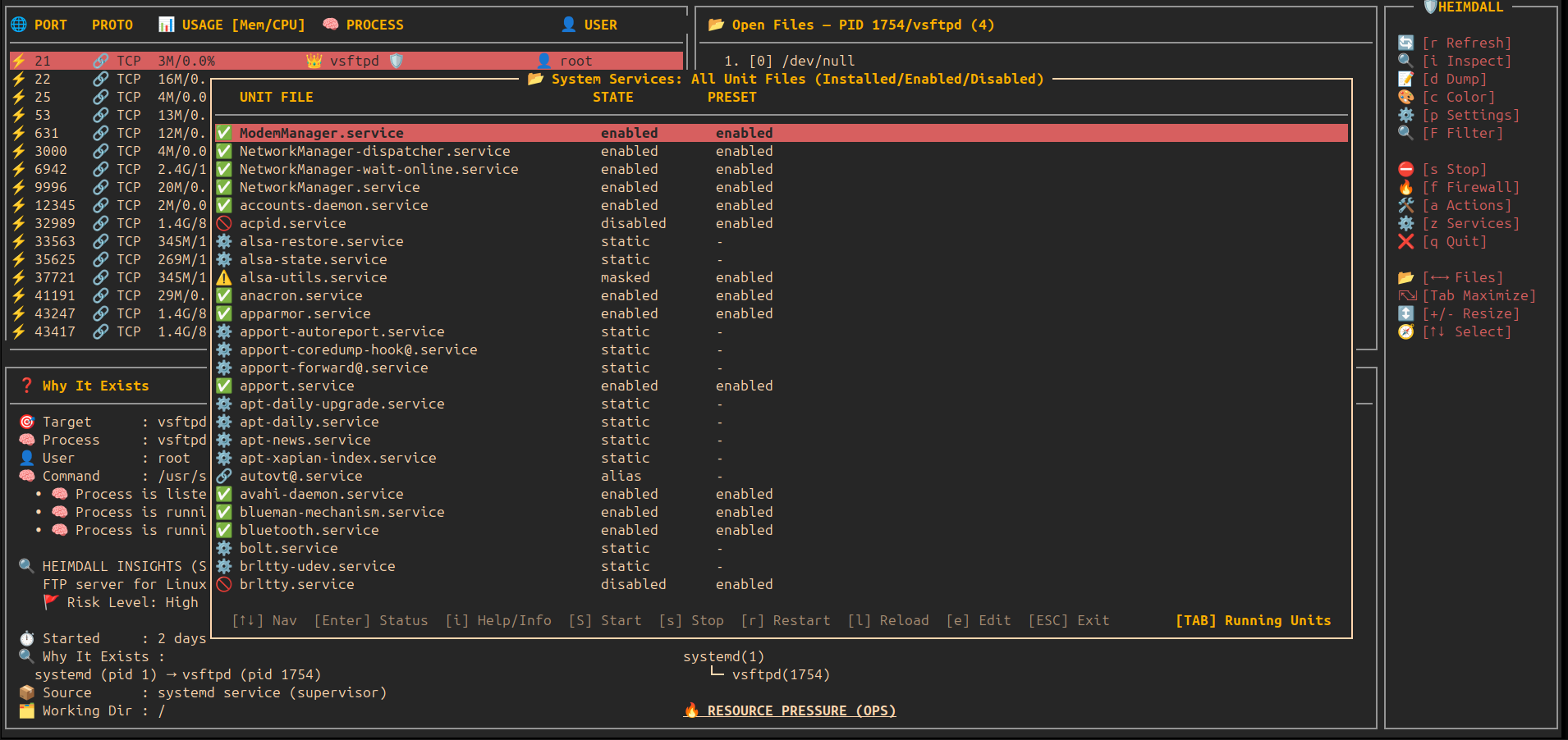
- ⚙️ System Services Manager (z): Integrated systemd service management.
- 🔄 Units vs Files (TAB): Toggle between active/running units and all installed unit files on disk.
- 🛠️ Full Actions: Start, stop, restart, reload, and edit unit files directly.
- ℹ️ Intelligence (i): Explain systemd terminology and clarify
alias/staticstates.
- 🌳 Precision Kill Tree: Nuclear termination for script loops that protects your terminal.
- 🛡️ Daemon Mode (Background): Non-interactive monitoring with automatic suspicious-outbound detection and mitigation.
- 🛡️ Active TUI Protection: Proactive security enforcement in the TUI when the daemon is inactive (auto-suspends suspicious processes).
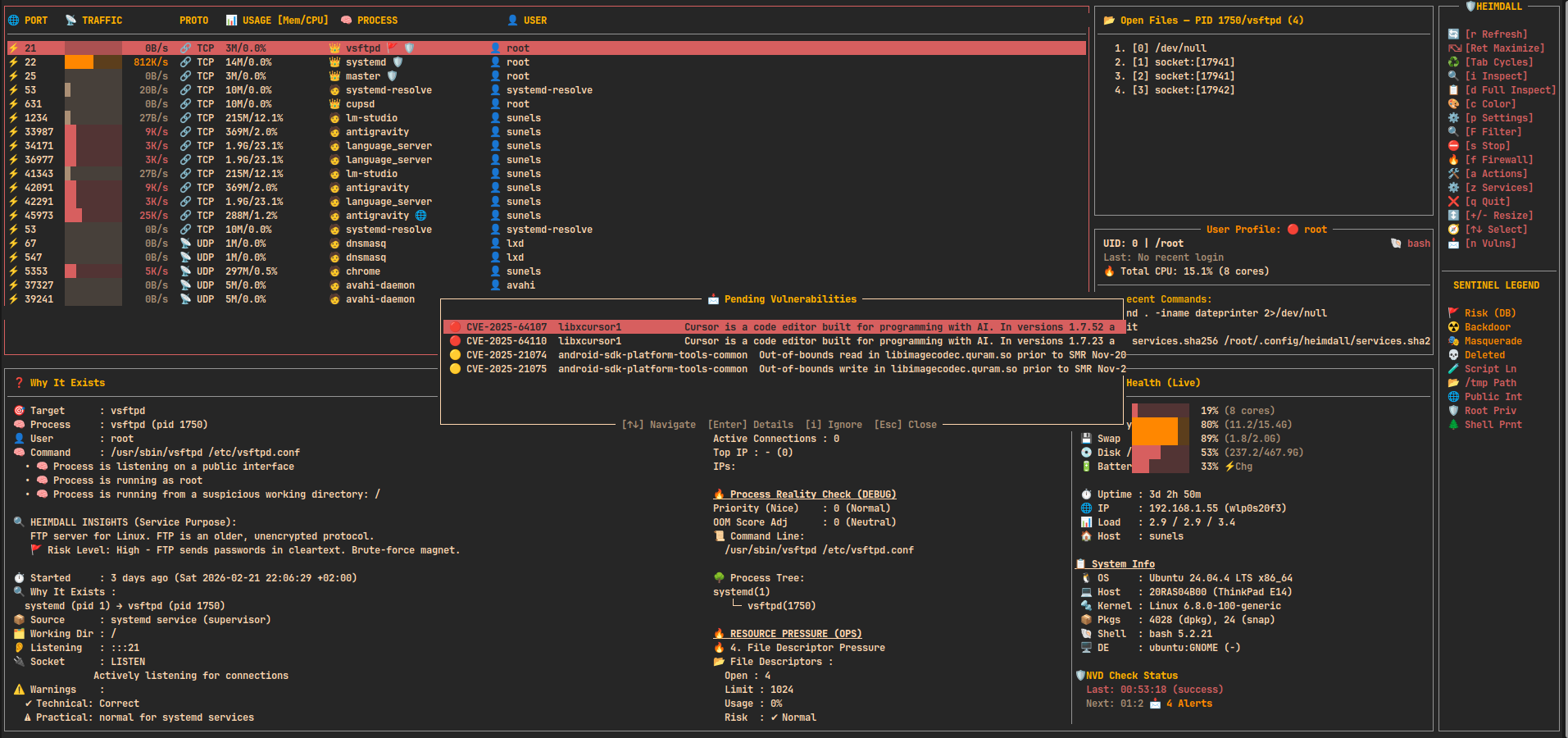
- 📩 Background Vulnerability Scanner (v): Polls the NVD API for HIGH/CRITICAL CVEs matching installed packages. Press
norvto view pending alerts,ito ignore,oto open in browser. - 🔓 Deep Vulnerability Audit: Injected into both the
Inspect (i)modal and theFull System Dump (d), showing exactly which CVEs affect each running process. - 🏷️ Smart Runtime Classification: Detects the underlying technology stack (Java/Spring Boot, Node.js/Electron, Python, Go, Rust, PHP, etc.) and execution mode (Native, Containerized, Interpreted).
- 🛡️ Guardian Mode (g) (v1.5.0): Real-time autonomous threat response.
- 🤖 Auto-Mitigation: Automatically kill high-risk processes and perform tree strikes.
- 📧 SMTP Alerts: Instant email notifications with threat metadata and ancestry logs.
- 🎨 Pulsing Borders: Visual TUI animation signifying active state.
- ⚙️ Custom Configuration: Fine-tune mitigation strategies via a dedicated settings sub-modal.
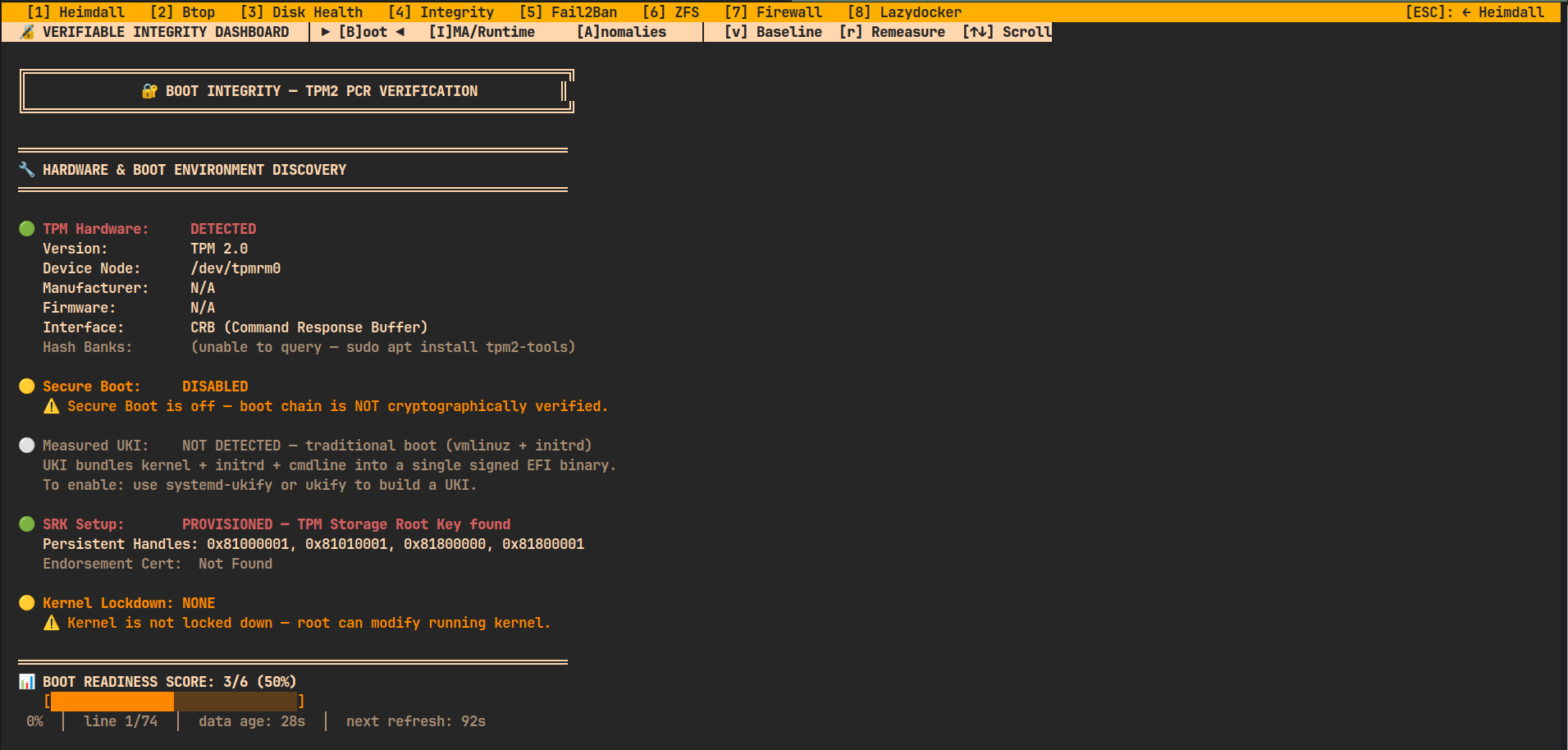
- 🔏 Verifiable Integrity Dashboard (4) (v1.9.0): Hardware & Runtime Trust.
- 🔑 Measured Boot: PCR-based validation of current boot stage vs trusted baseline.
- 🔩 TPM Discovery: Deep audit of TPM2 chips, firmware, and hash banks.
- 🕵️ IMA Monitoring: Tracking Integrity Measurement Architecture events in the kernel.
- 🏔️ Distro-Agnostic Intelligence: Smart package manager discovery for
apt,dnf,zypper,pacman, andapk.
- 🖥️ System Health Panel: Live CPU/RAM/Swap/Disk/Battery bars + OS/Kernel/Host/DE info in the detail view. Now including TPM & ZFS health monitoring.
- ⚖️ Process Priority (Renice): Detailed modal to change CPU priority with real-time feedback.
- ☠️ OOM Score Adjustment: Control which processes Linux sacrifices during RAM shortage.
- ⏸️ Tree-Aware Pause/Continue: Freezes both the process and its script loop parent.
- 🐞 Internal Debug Logging: Trace complex process behaviors in
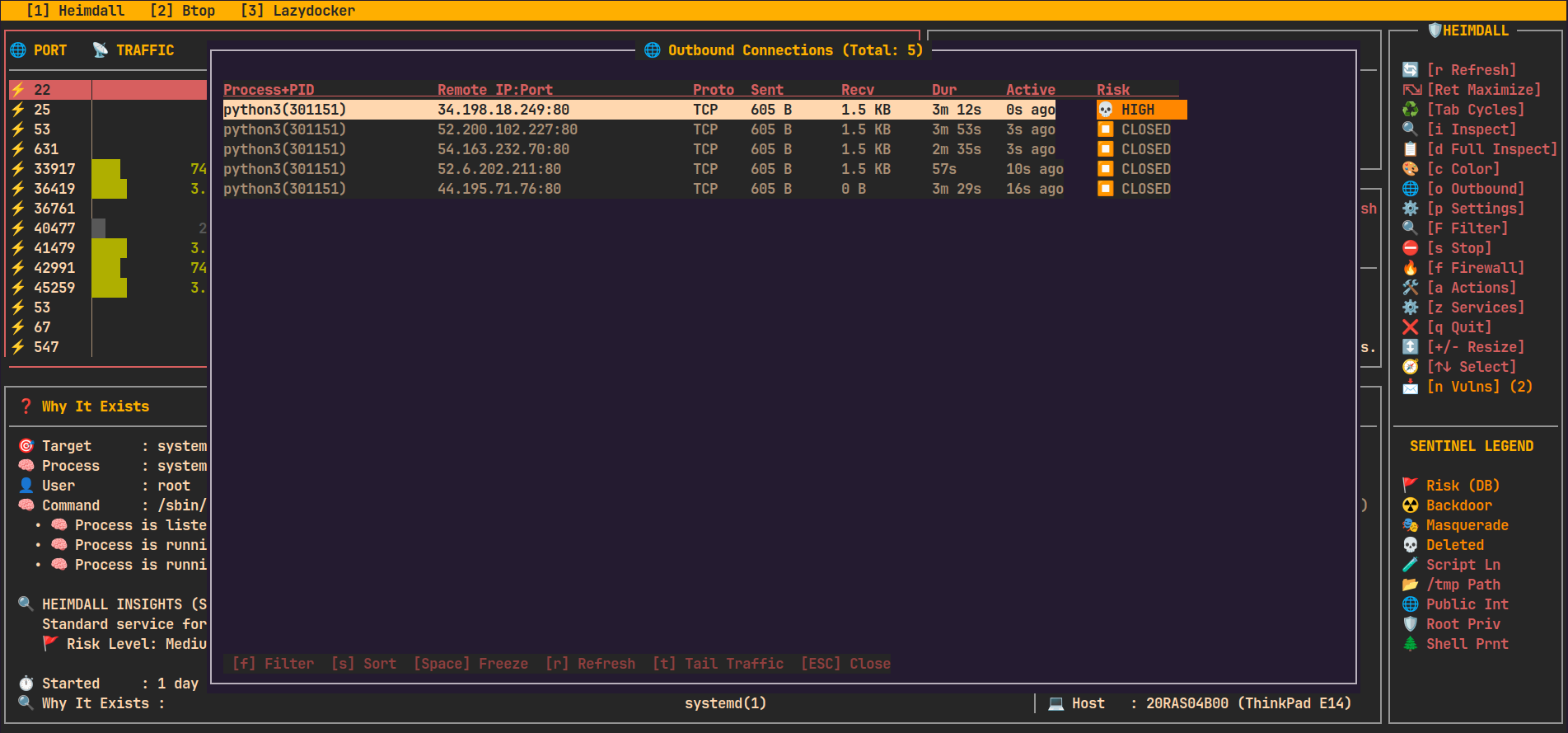
~/.config/heimdall/debug.log. - 🌐 Outbound Connections Modal (o) (v1.0.8): High-density interactive monitor for external traffic.
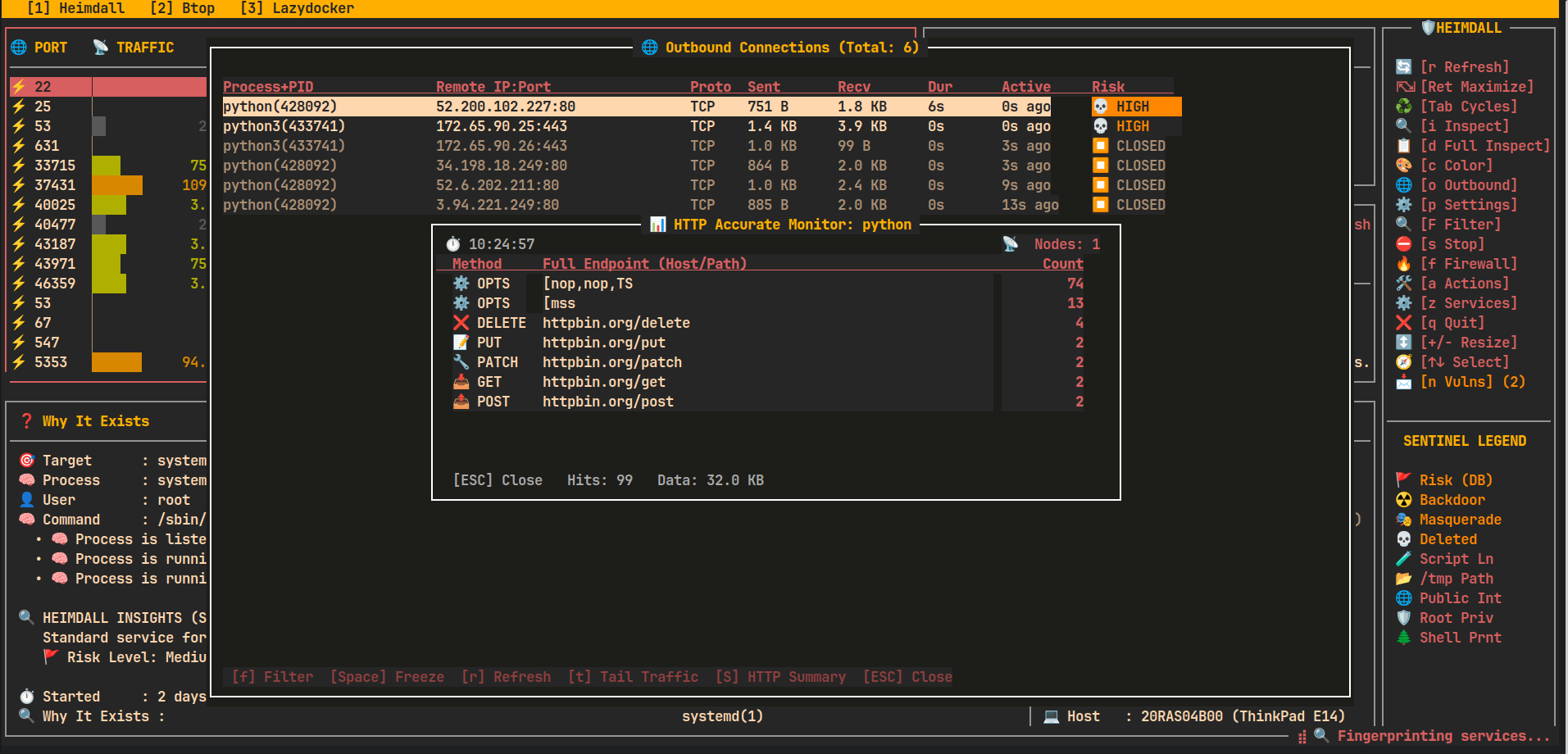
- 📊 HTTP Accurate Monitor (S) (v1.0.8): Real-time per-process HTTP endpoint tracker (Method/Host/Path).
- 🕵️ Zero-Loss Traffic Tail (t): Re-architected with OS-level file buffering for terminal-grade performance and no packet loss.
- ⏸️ Freeze View (Space): Instantly lock the live list for stable analysis.
- 📊 Real-time Stats: Sent/Received bytes, duration, last activity, and protocol (TCP/UDP).
- 🛡️ Intelligent Risk Scoring: Integrated Sentinel engine flags suspicious outbound destinations.
- 🔍 Interactive Filtering (f): Search by process, remote IP, port, or risk level.
- 👻 Ghost Persistence: Captures short-lived REST/API bursts for 20s as
[CLOSED]. - 📋 Data Export (e): Save connection snapshots to JSON.
- 🛡️ Advanced Vulnerability Intelligence (NVD v2):
- 🔍 High-Confidence Fingerprinting: Multi-layer detection (Process Command Line + Package Manager + Binary Probing) to identify service versions with 95%+ accuracy.
- 📊 Risk-Prioritized Alerts: New findings are automatically scored using CVSS metrics and filtered to exclude noise.
- 💾 Persistent Local Cache: Uses
~/.cache/heimdall/to store NVD results for 24h, preventing API rate limits. - 📡 Threat Enrichment: Injects CISA KEV (Known Exploited) and EPSS risk data into every CVE.
- 🌍 Process Environment Variables (e): View all
ENVvariables for any running process. - ⇄ Standard Stream Redirections (u): Track where
stdin,stdout, andstderrare pointing. - 📜 User History Tail (t) (v1.3.3): Instantly tail a process owner's
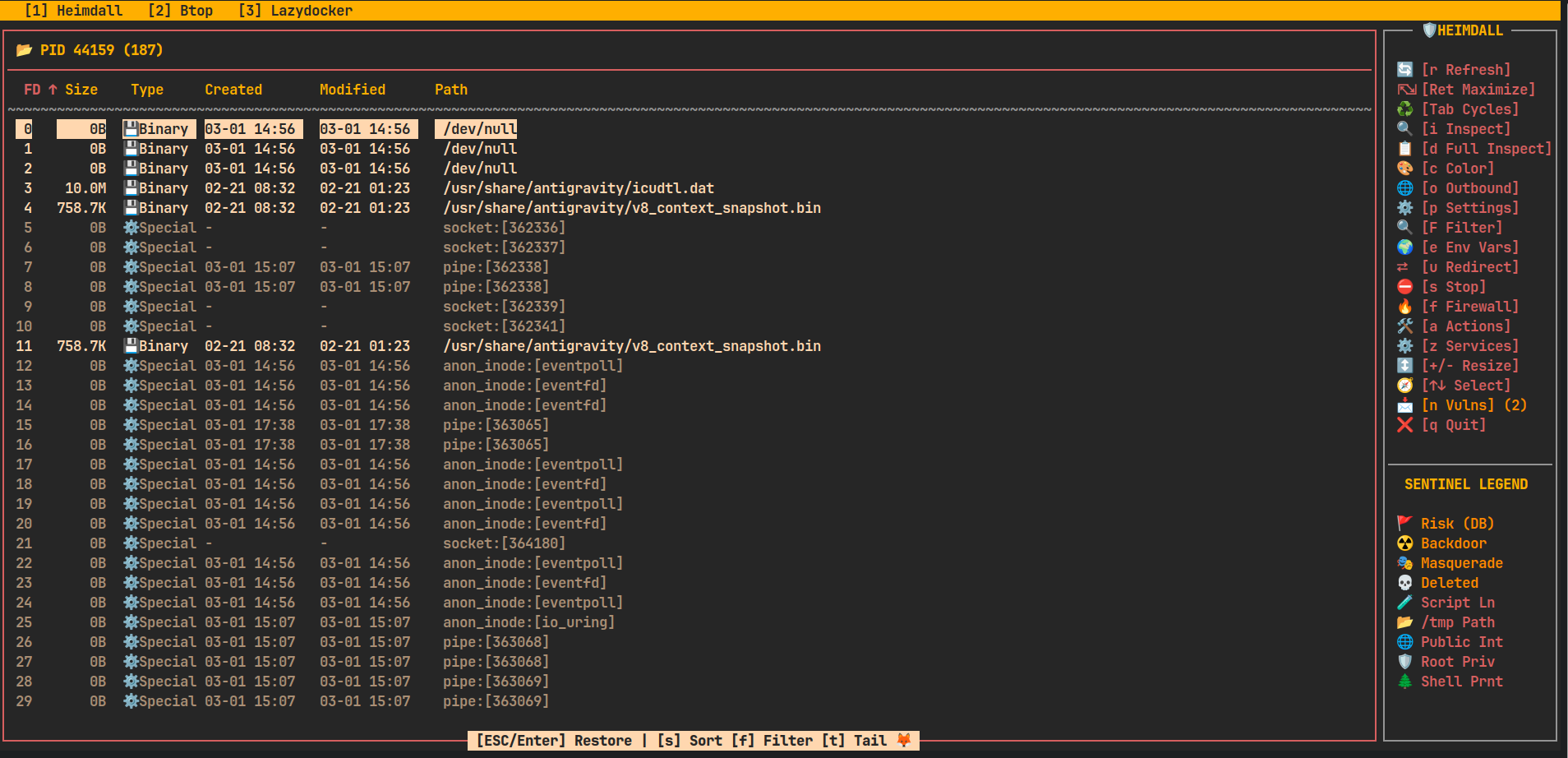
.bash_historydirectly from the User pane. - 📂 Enhanced Open Files (v1.0.9): High-density file list with dynamic columns and type icons.
- 🧩 Modal UX: monospace, standard curses box(), 2-space padding, reverse+bold highlights.
🛡️ Vulnerability Intelligence Architecture
               [ HEIMDALL SECURITY ARCHITECTURE ]

    +-------------------+       +-----------------------+
    |  Version Detector | <---> |  High-Confidence CPEs  |
    +---------+---------+       +-----------+-----------+
              |                             |
    +---------v---------+       +-----------v-----------+
    | Local NVD Cache   | <---> | NVD API v2 (Asynchronous)|
    +---------+---------+       +-----------+-----------+
              |                             |
    +---------v-----------------------------v-----------+
    |        TUI Risk Highlighting & Detail Panel        |
    +---------------------------------------------------+
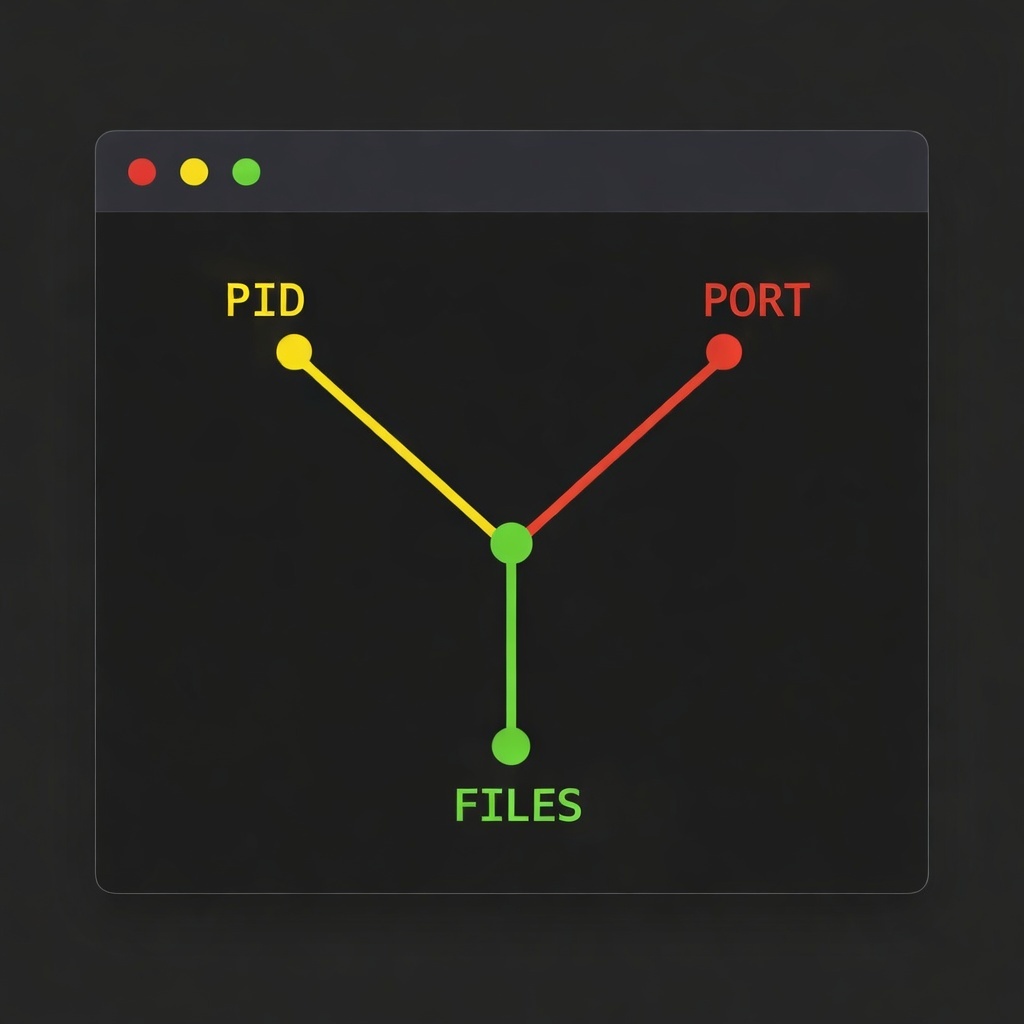
It enables you to seamlessly navigate the full relationship between:
Open ports → owning processes → CPU & memory usage → firewall rules → files in use
This eliminates the need to jump between multiple tools such as ss, netstat, lsof, top, or firewall utilities.
🚀 Installation & Quick Start
Choose the installation method that fits your workflow.
🐧 Option 1: Standalone Binary (Universal Linux)
Works on ANY distro (SteamOS, Bazzite, Fedora, Arch, etc.). No Python required.
Best for Steam Deck and Atomic/Immutable distros.
- Download the
heimdall_standalonebinary from Releases. - Make it executable and move to your path:
chmod +x heimdall_standalone
sudo mv heimdall_standalone /usr/local/bin/heimdall
🐧 Option 2: Debian / Ubuntu (.deb)
Native system integration for Linux Mint, Ubuntu, Pop!_OS, Debian.
Download the .deb package from Releases:
sudo apt install ./heimdall_1.10.0-1_all.deb
🎩 Option 3: Fedora / RHEL / CentOS / Bazzite (.rpm)
Native RPM support for Fedora, RHEL, AlmaLinux, Bazzite.
# Download the .rpm from Releases
sudo dnf install ./heimdall-1.10.0-1.noarch.rpm
🏔️ Option 4: Arch Linux / SteamOS / CachyOS
Native Arch-based integration for Arch, CachyOS, Manjaro, SteamOS.
# Build and install using the provided PKGBUILD
makepkg -si
🐍 Option 5: Python / Pip
For any distro with Python 3.6+.
pip3 install heimdall-linux
# Usage: heimdall
🛠️ Option 6: Development (Source)
For contributors.
Clone the repo and prepare the environment:
git clone https://github.com/sunels/heimdall.git
cd heimdall

# Install dependencies (psutil, etc.) in editable mode
pip3 install -e .

# Run directly using the wrapper script:
sudo python3 run.py
🔄 Update
Update the source code:
git pull origin main
Quick Testing in Docker
To quickly test Heimdall in an isolated environment without affecting your host system, use this one-liner Docker command (Alpine-based, lightweight):
docker run --rm -it \
  --privileged \
  --pid=host \
  --network=host \
  -v /proc:/host/proc:ro \
  -v /sys:/host/sys:ro \
  -v ~/.config/heimdall:/root/.config/heimdall \
  python:3.12-alpine sh -c "
    apk add --no-cache git sudo ncurses libcap iptables iproute2 procps net-tools curl \
    && curl -L -o /usr/local/bin/witr https://github.com/pranshuparmar/witr/releases/latest/download/witr-linux-amd64 \
    && chmod +x /usr/local/bin/witr \
    && echo 'witr binary installed to /usr/local/bin (standalone executable)' \
    && pip install --no-cache-dir heimdall-linux \
    && echo '' \
    && echo 'Container ready. witr is installed → Deep Inspection will work.' \
    && echo 'Guardian Mode: press g. Exit: q or Ctrl+C.' \
    && sudo heimdall
  "
Core Navigation
heimdall
├─ 🌐 Ports              View all open ports and their states
├─ ⚡ Usage (CPU/Mem)    Real-time resource consumption per process
├─ 🧠 Processes          Process inspection and ownership mapping
├─ ⛔ Firewall Toggle    Enable/disable firewall rules interactively
└─ 📂 Open Files         Files and sockets used by each process
🧠 What Makes It Special?
Unlike classic tools that show only one layer (ss, netstat, lsof),
heimdall connects everything together:
🔌 Port → ⚡ CPU/MEM Usage → 🧠 Process / Service → ⛔ Firewall Control → 📂 All open files
📸 Screenshots
🔌 Plugin System — Native TUI & Command Viewers
Heimdall's plugin system adds extra tabs for integrated tooling. Plugins live in heimdall/plugins/ and come in two flavours:
| Mode | Tools | How it works |
|---|---|---|
| Fullscreen Native | btop, lazydocker |
Curses is suspended; tool runs at 100% native quality (colors, mouse, scrollbars) |
| Command Viewer | zfs, smartctl, fail2ban, firewall |
Shell command output displayed in a scrollable Heimdall pane with auto-refresh |
Built-in Plugins
| Tab | Tool | Refresh | Description |
|---|---|---|---|
| Btop | btop |
live | System resource monitor — full colors, mouse, all shortcuts |
| Lazydocker | lazydocker |
live | Docker/container manager — full native experience |
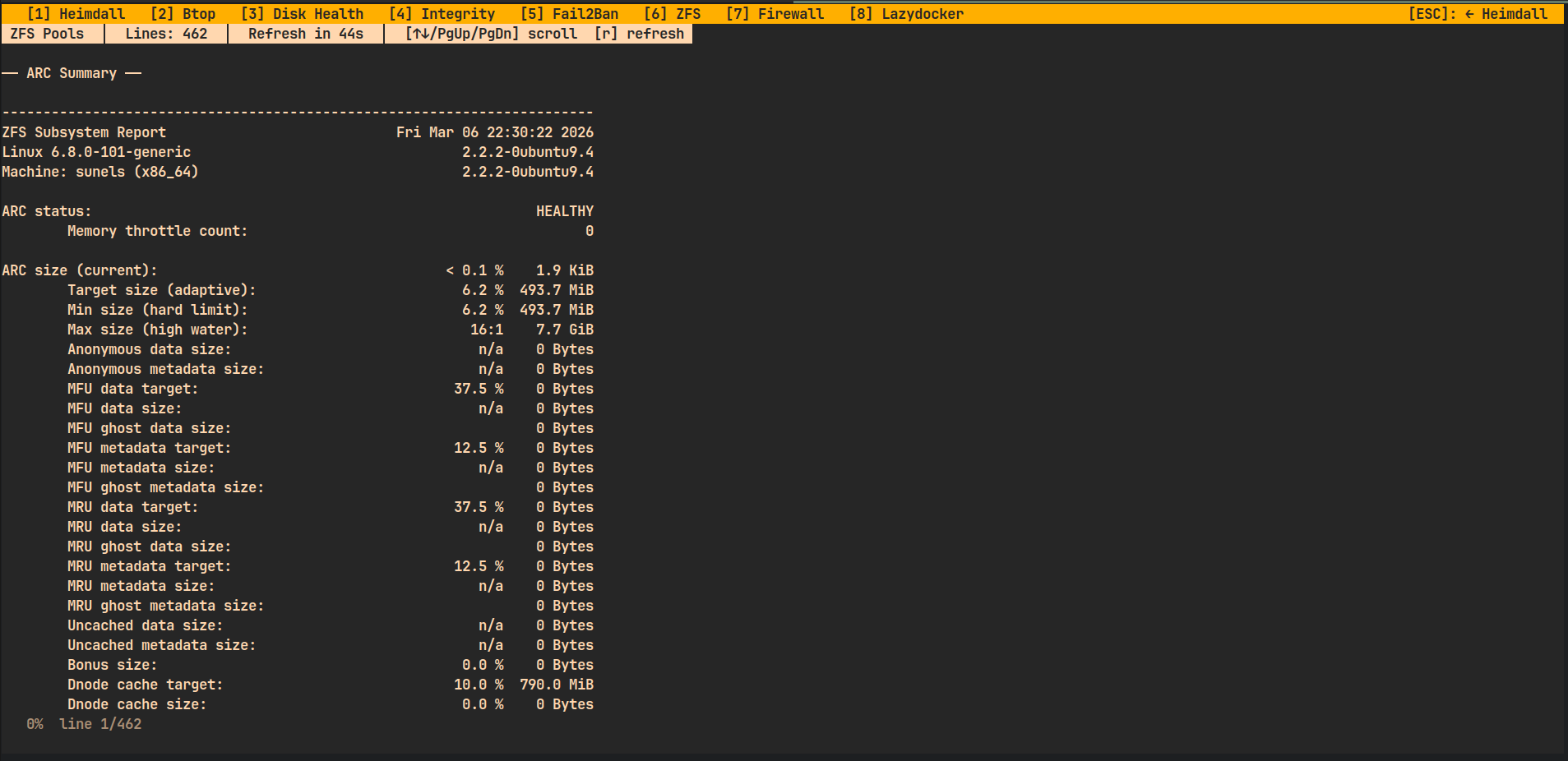
| ZFS Pools | zpool |
60 s | ZFS pool status + ARC summary |
| SMART Health | smartctl |
5 min | SMART disk attributes for all drives |
| Fail2Ban | fail2ban-client |
60 s | Banned IPs and jail status |
| Firewall Rules | iptables / nft |
60 s | Active iptables + nftables rules |
Plugins that require a tool not installed on the system are automatically skipped at startup — they won't appear as tabs. Fallback messages are shown if a tool is missing at runtime.
Navigation inside plugins
- Fullscreen plugins (
btop,lazydocker): use the tool's own keyboard shortcuts. Pressqto exit and return to Heimdall automatically. - Command viewer plugins (
ZFS,SMART,Fail2Ban,Firewall): use↑↓ / PgUp / PgDn / Home / Endto scroll. Pressrto force-refresh. PressESCto return to Heimdall.
Writing a new Command Viewer plugin
Create heimdall/plugins/myplugin.py:
from heimdall.plugins._command_viewer import CommandViewerPlugin

class Plugin(CommandViewerPlugin):
    name             = "My Tool"
    description      = "One-line description"
    tabTitle         = "My Tab"
    tool_command     = "mytool"      # set to None to skip availability check
    refresh_interval = 60
    shell_command    = "mytool --status 2>/dev/null || echo 'not installed'"
That's it — Heimdall will discover and load it automatically on next launch.
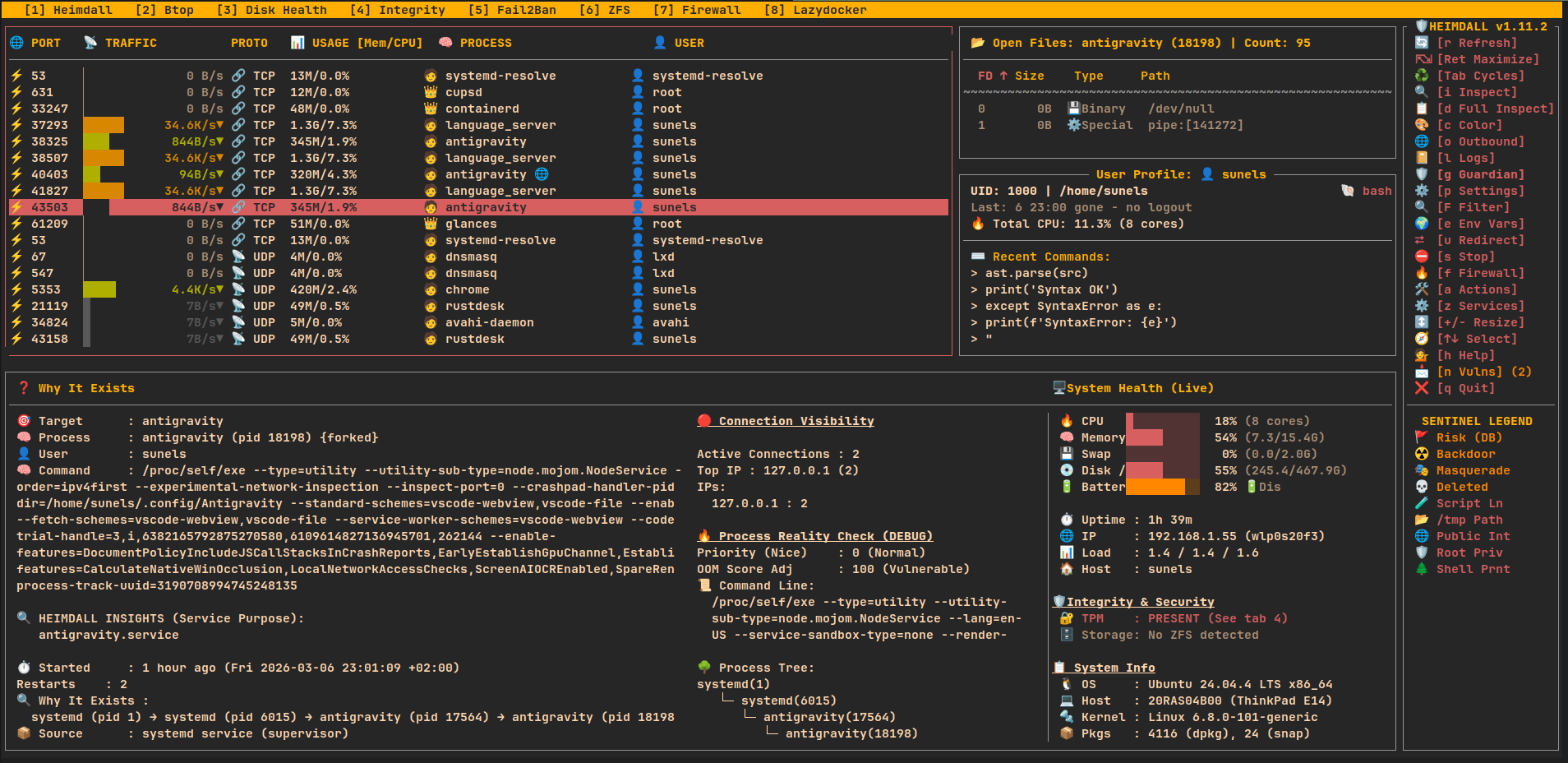
🔍 Main View — Ports, Processes & Open Files
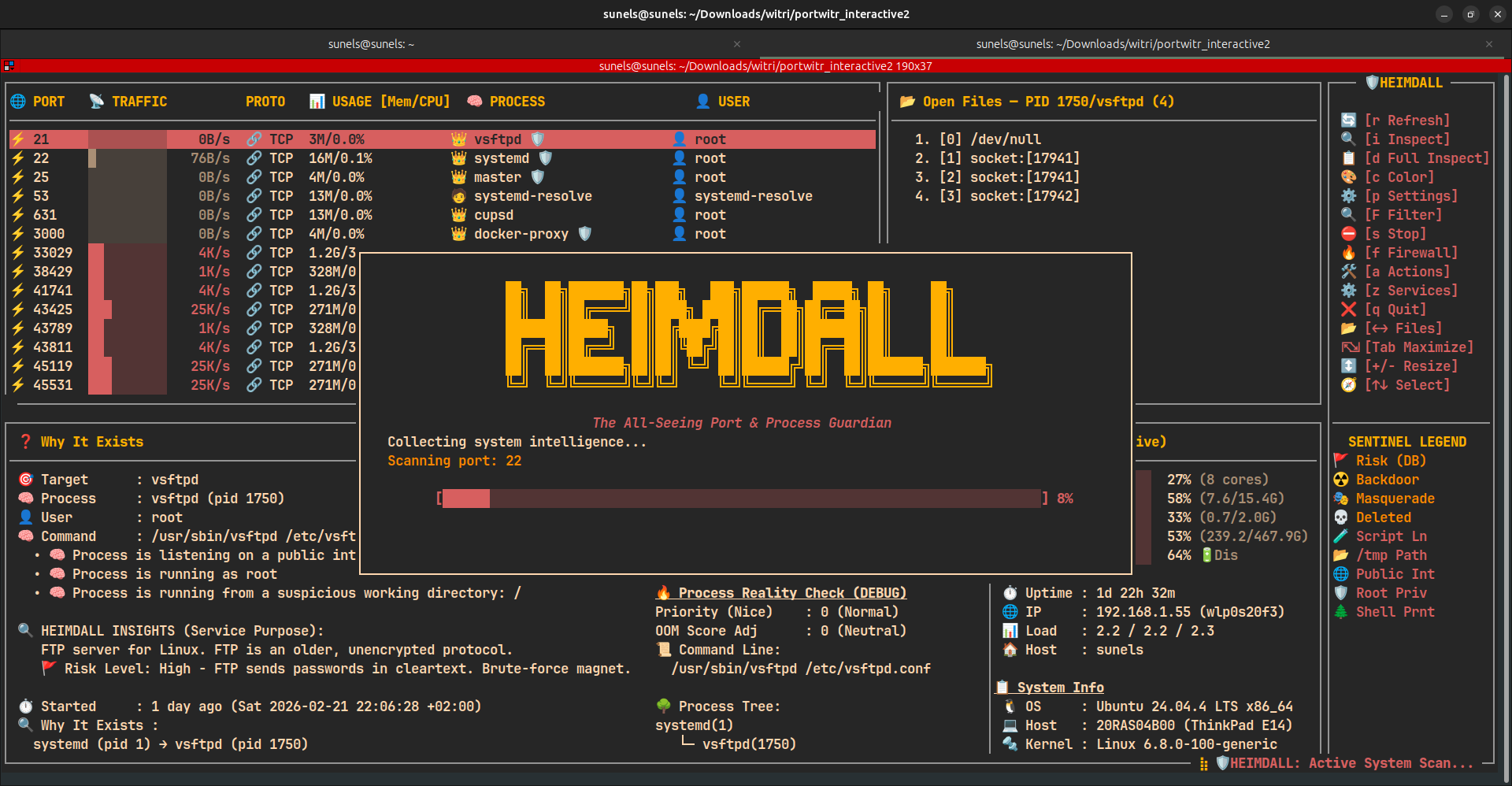
🧾 Detail View — Deep Port & Process Inspection
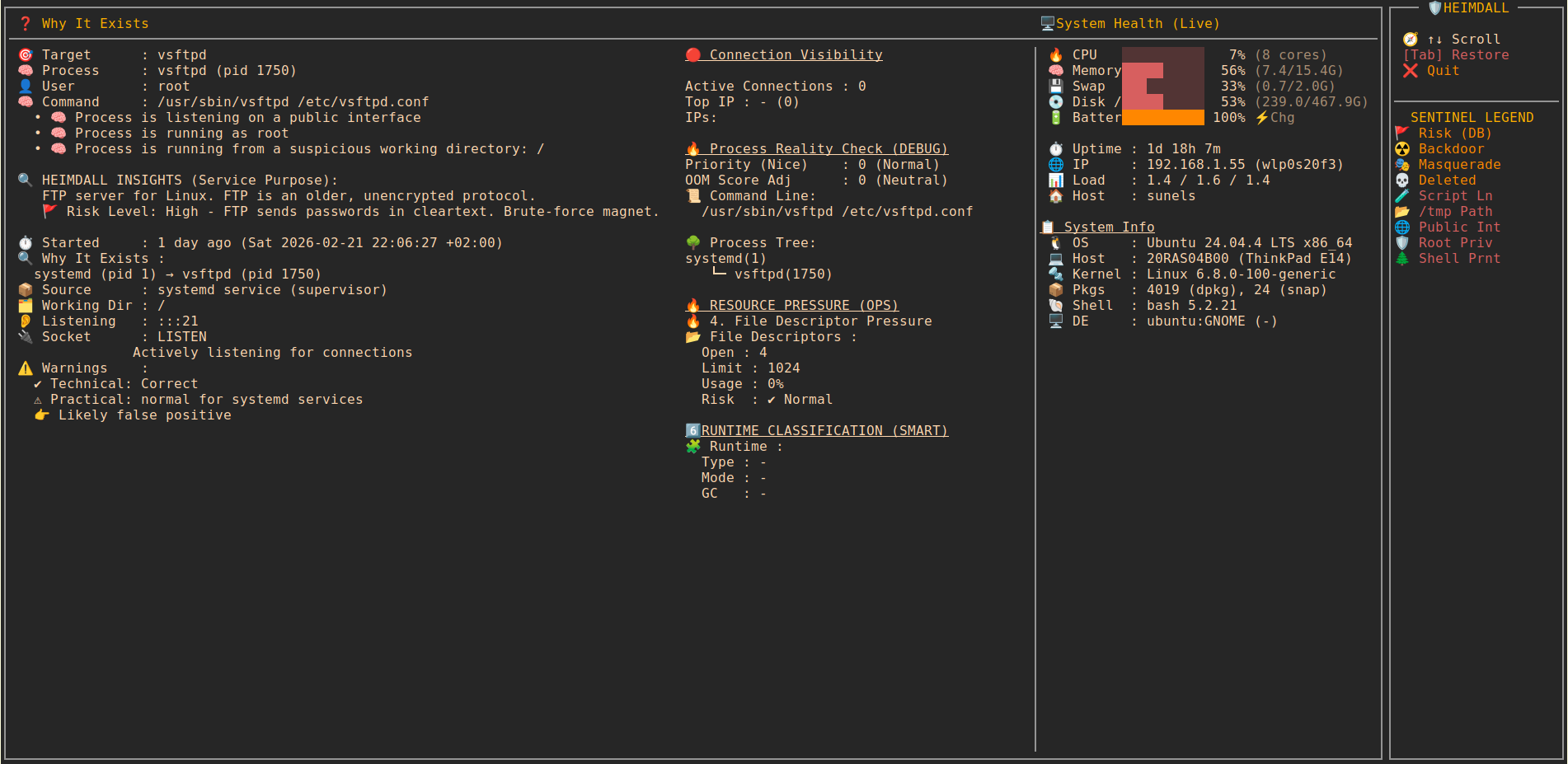
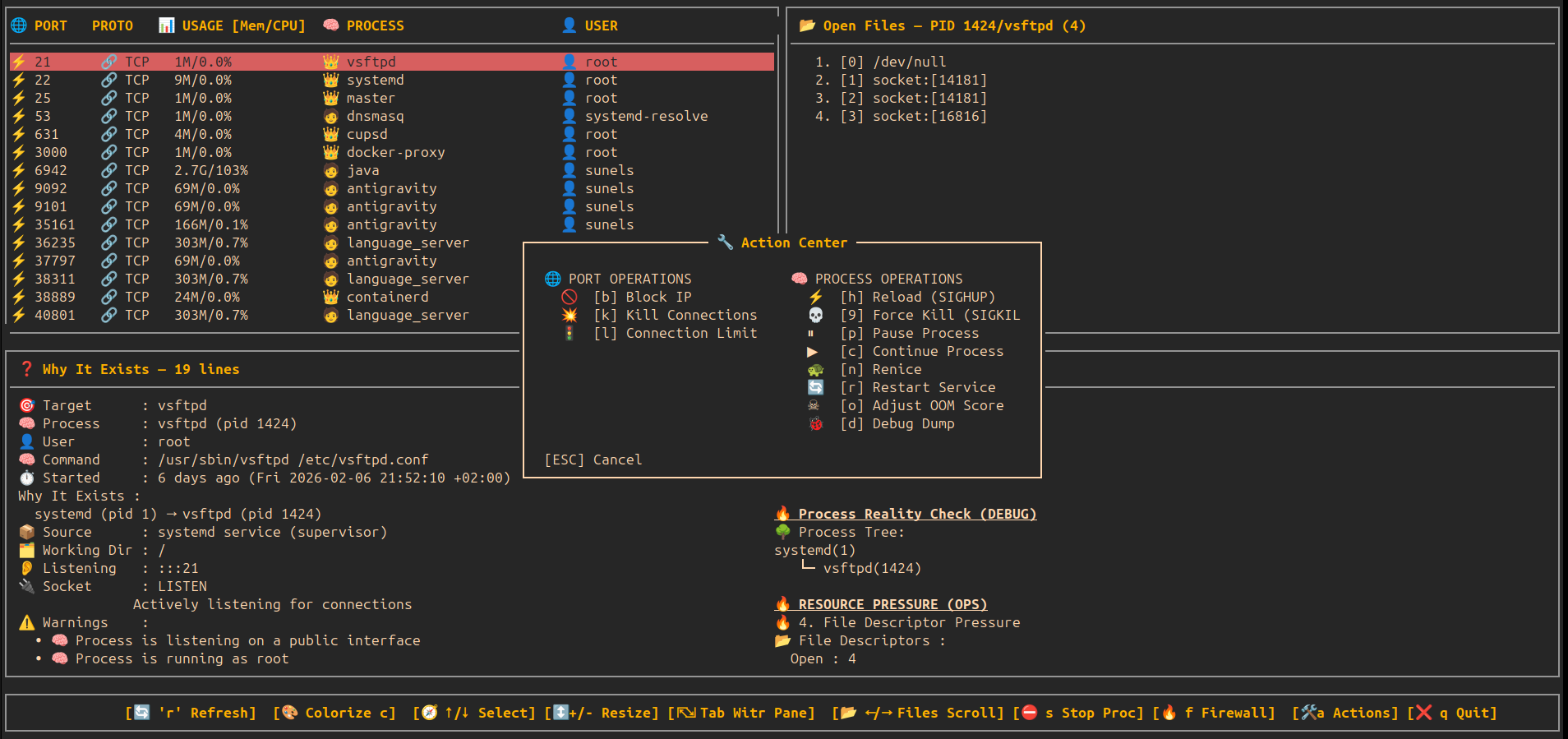
🧾 Detail View — Actions Center (Modal)
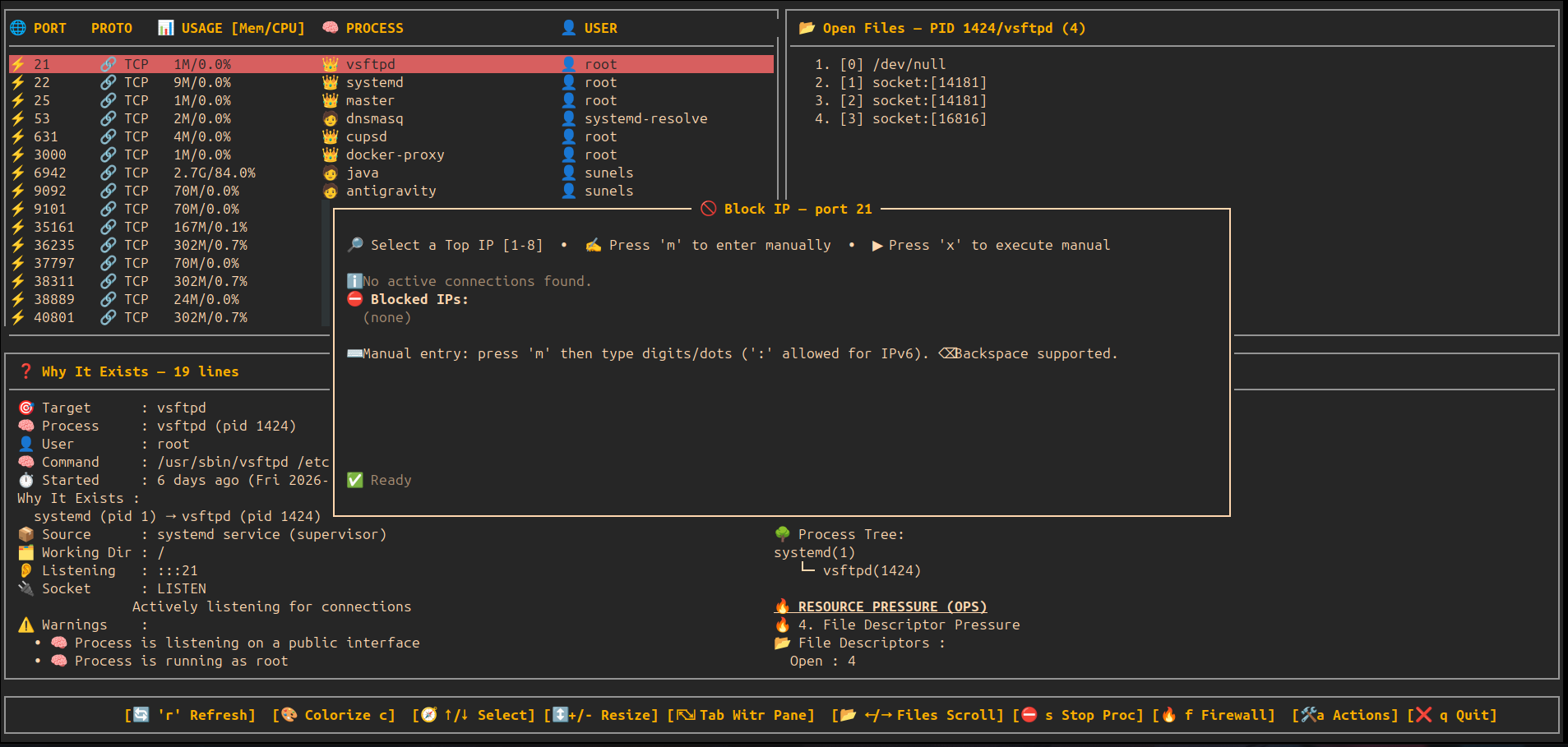
🧾 Detail View — Block IP Modal
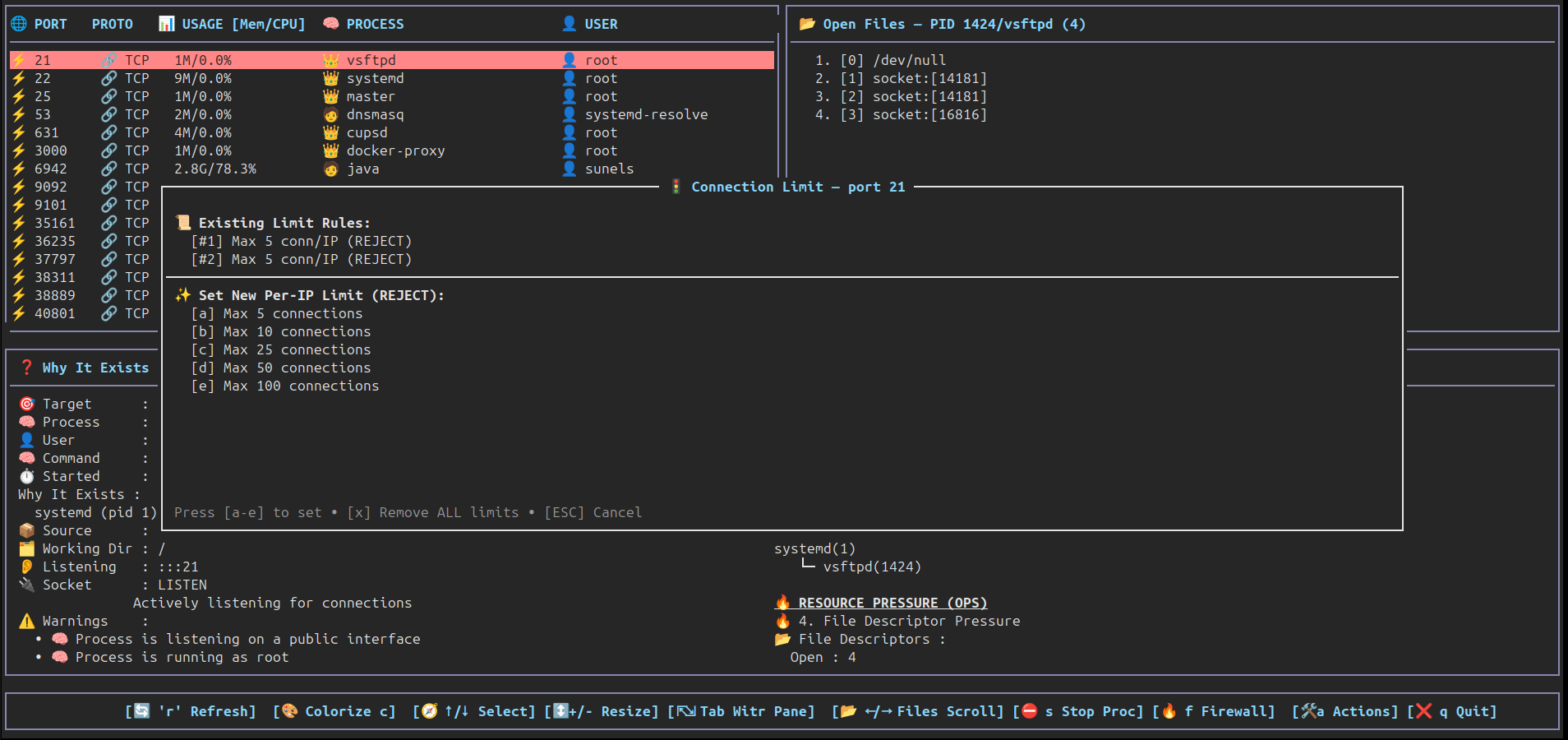
🧾 Detail View — Connection Limit Modal
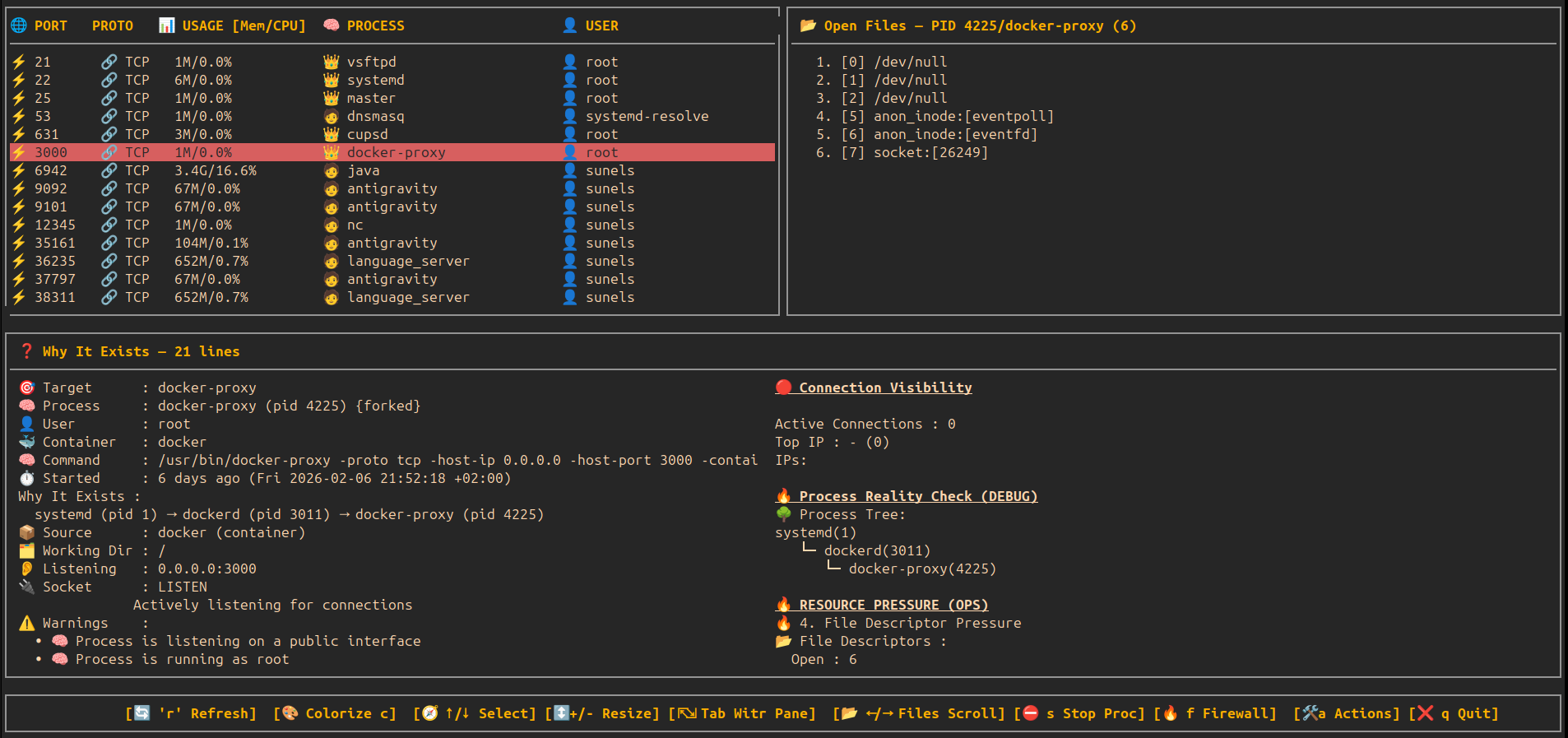
🧾 Color Palette — Happy eyes edition
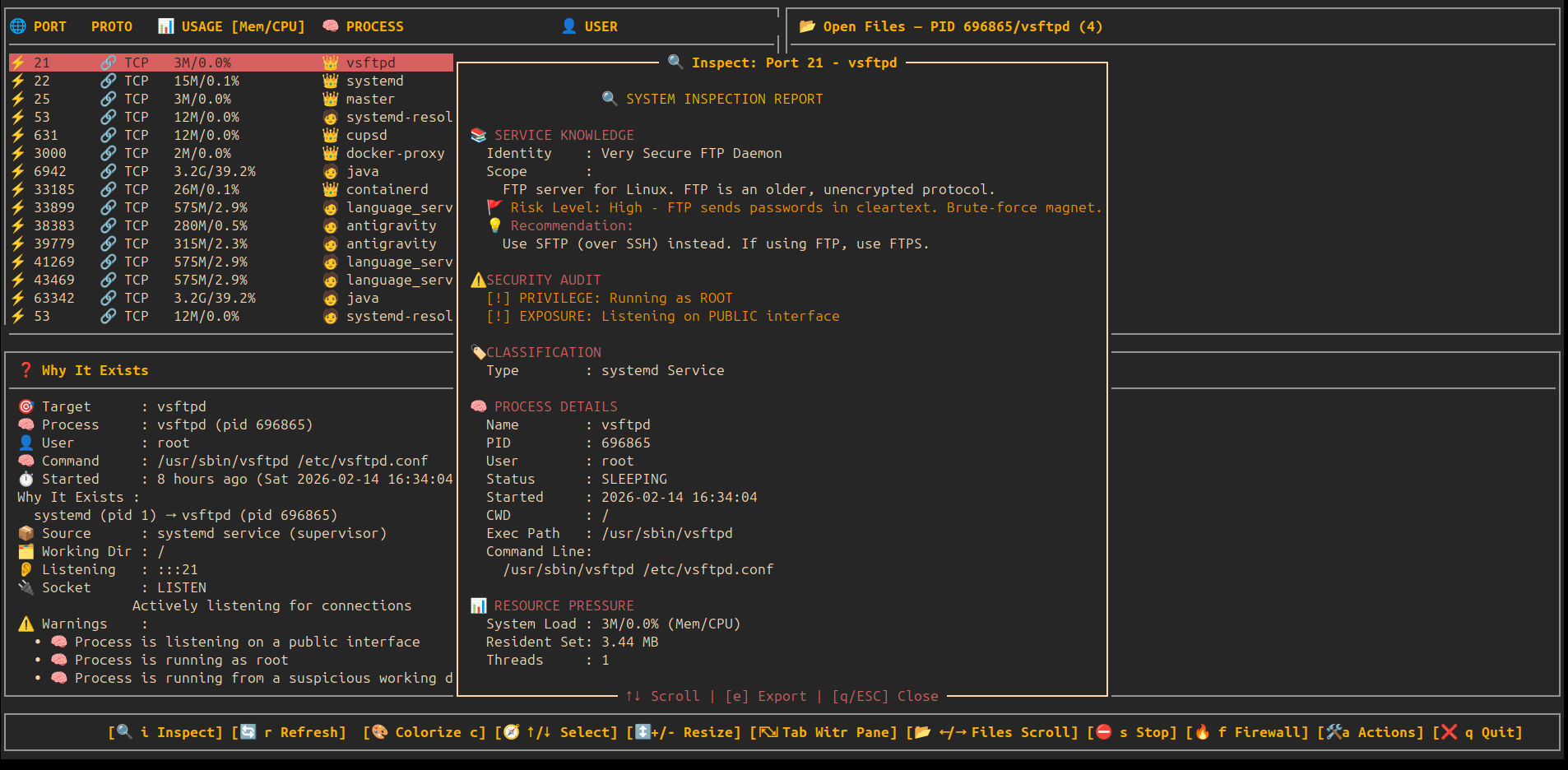
🔍 Deep Inspection — Static Service Analysis & Risk Audit
🔍 Deep Activity History — Historical Log Intelligence
💾 Full System Dump — Visual Progress & Archive
🔍 Interactive System Filter — Real-time TUI Filtering
🛡️ Heimdall Sentinel — Behavioral Security Intelligence
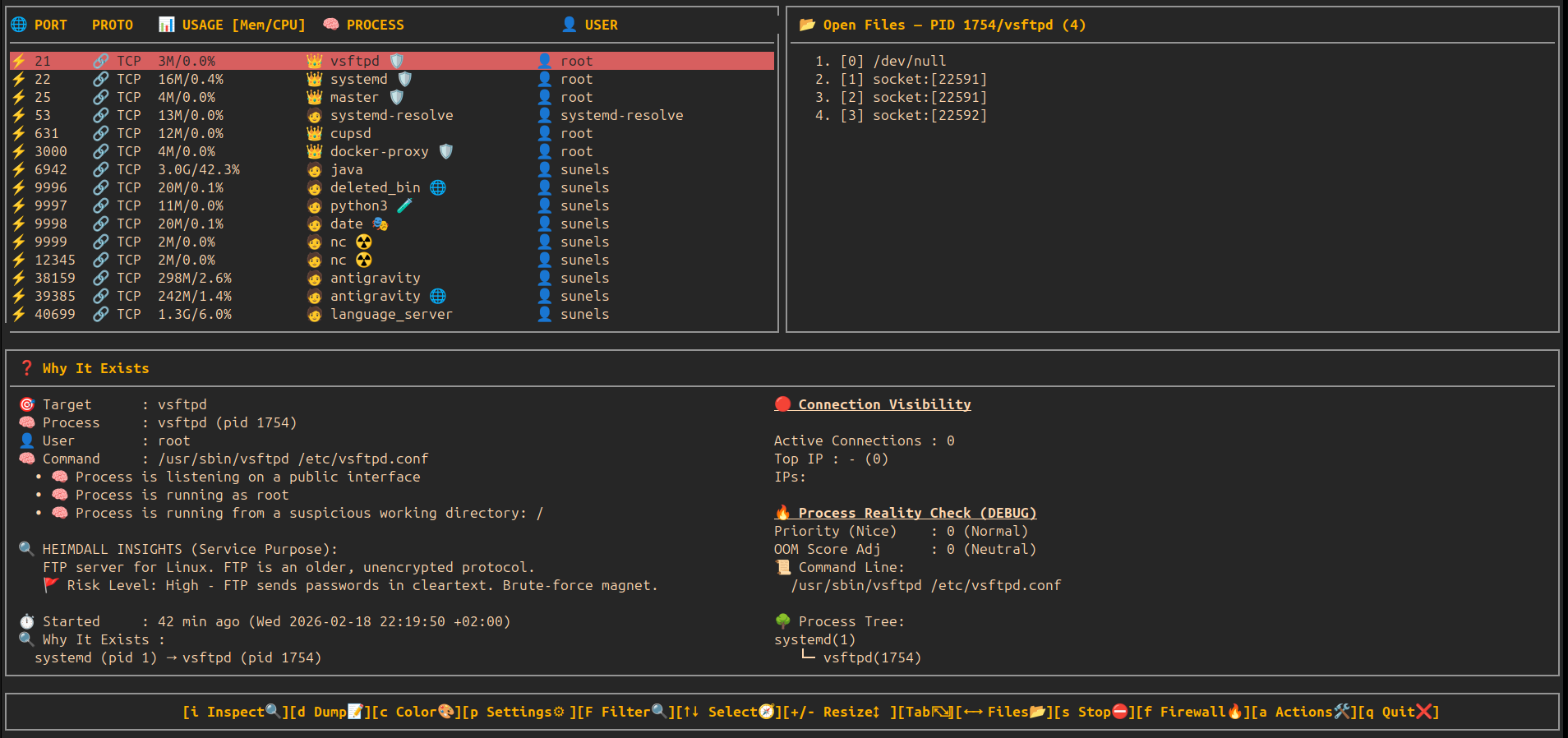
🛡️ Sentinel Deep Audit — Intelligent Risk Scoring
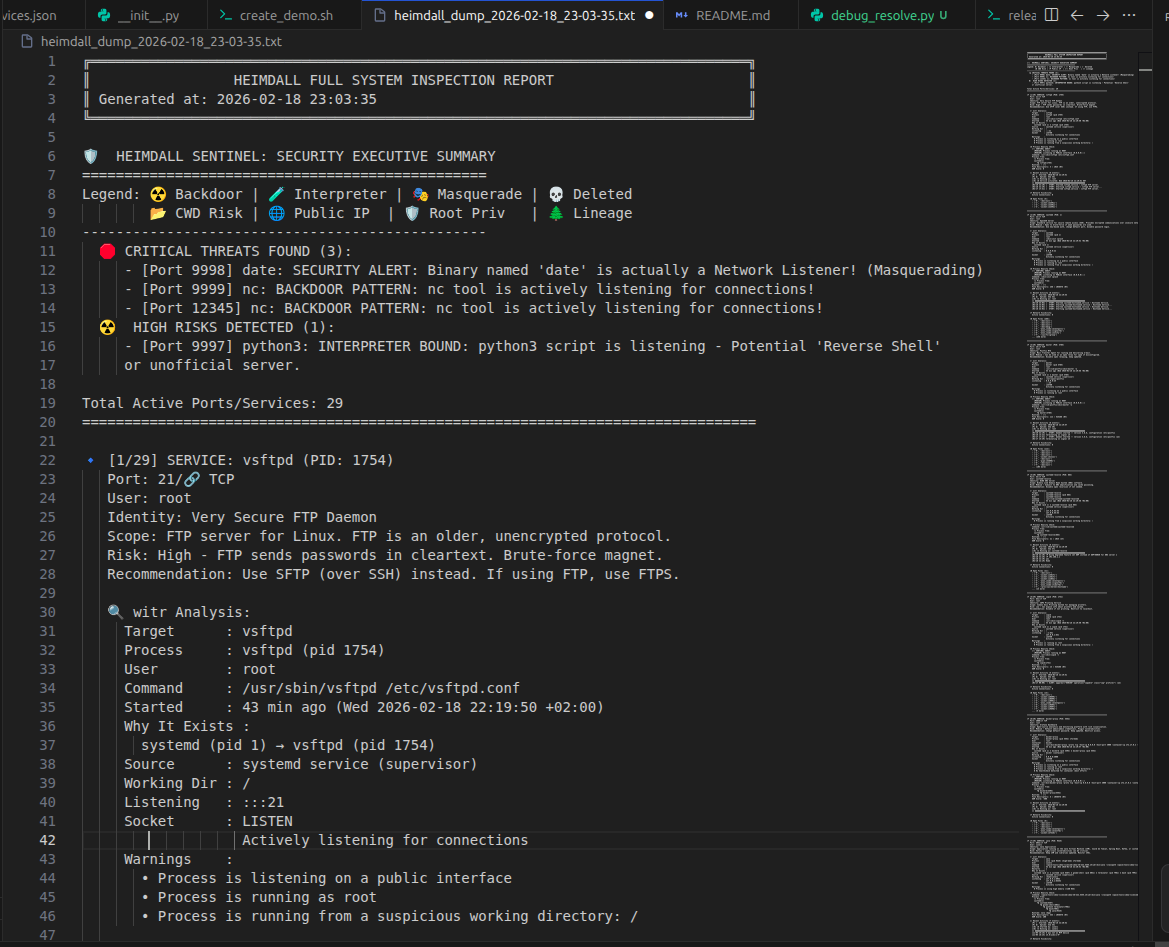
🛡️ Sentinel Report — Security Executive Summary
⚙️ System Services Manager (z) — View & Control Units (Active)
⚙️ System Services Manager — Info & Help (i)
📂 System Services Manager — All Unit Files (TAB)
🔏 Verifiable Integrity Dashboard (TPM2 + Measured Boot)
Inspired by Amutable's (Lennart Poettering & Christian Brauner) verifiable integrity vision, Heimdall provides cryptographic verification of your system's boot and runtime state.
Key Components
- Boot Integrity Verification: Audits TPM2 PCR banks (0-7) to verify Secure Boot, Kernel, and Bootloader state against a trusted baseline.
- Hardware Audit: Deep discovery of TPM2 manufacturer, firmware version, and supported cryptographic banks (SHA1/SHA256).
- Measured UKI Detection: Automatically identifies if the system is running a "Measured Unified Kernel Image" for modern, high-security boot chains.
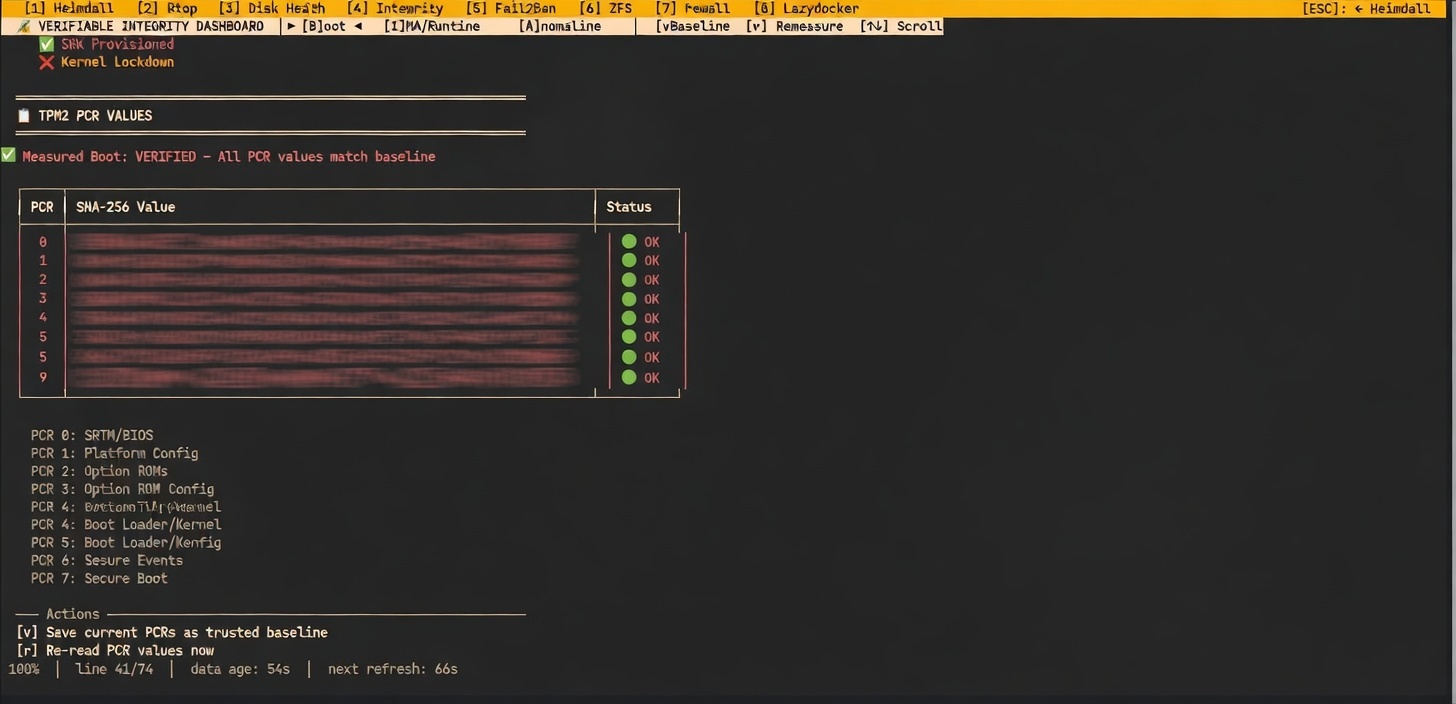
🖥️ System Health & Storage Integrity
Heimdall now integrates TPM presence and ZFS pool health directly into the main System Health dashboard, providing a "single pane of glass" for core system reliability.
📩 Vulnerability Scanner — Integrated NVD Security Feed (n)
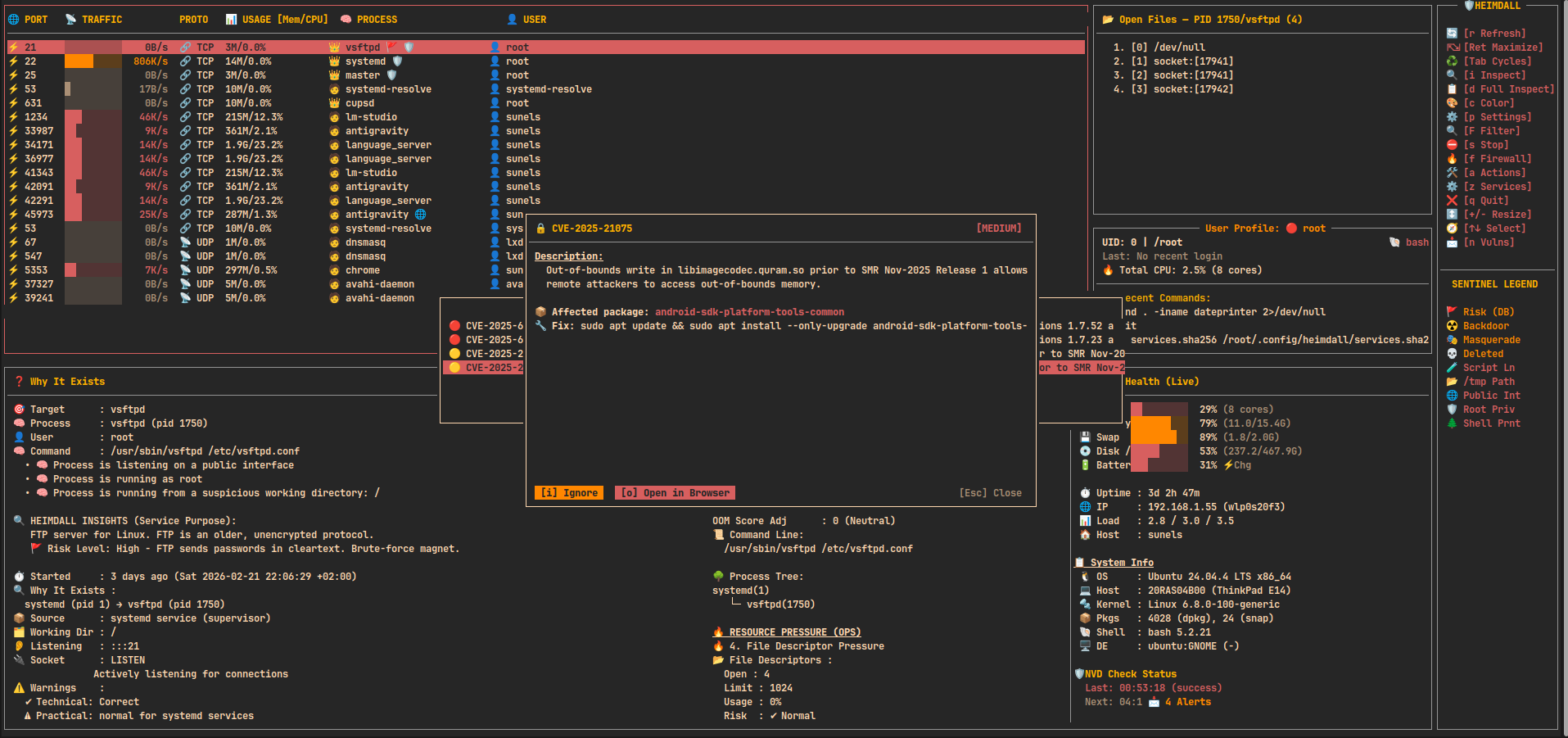
🔓 Deep Inspect — Unified Security & Smart Runtime Audit (i)
🌐 Outbound Connections Modal — Real-time External Traffic (o)
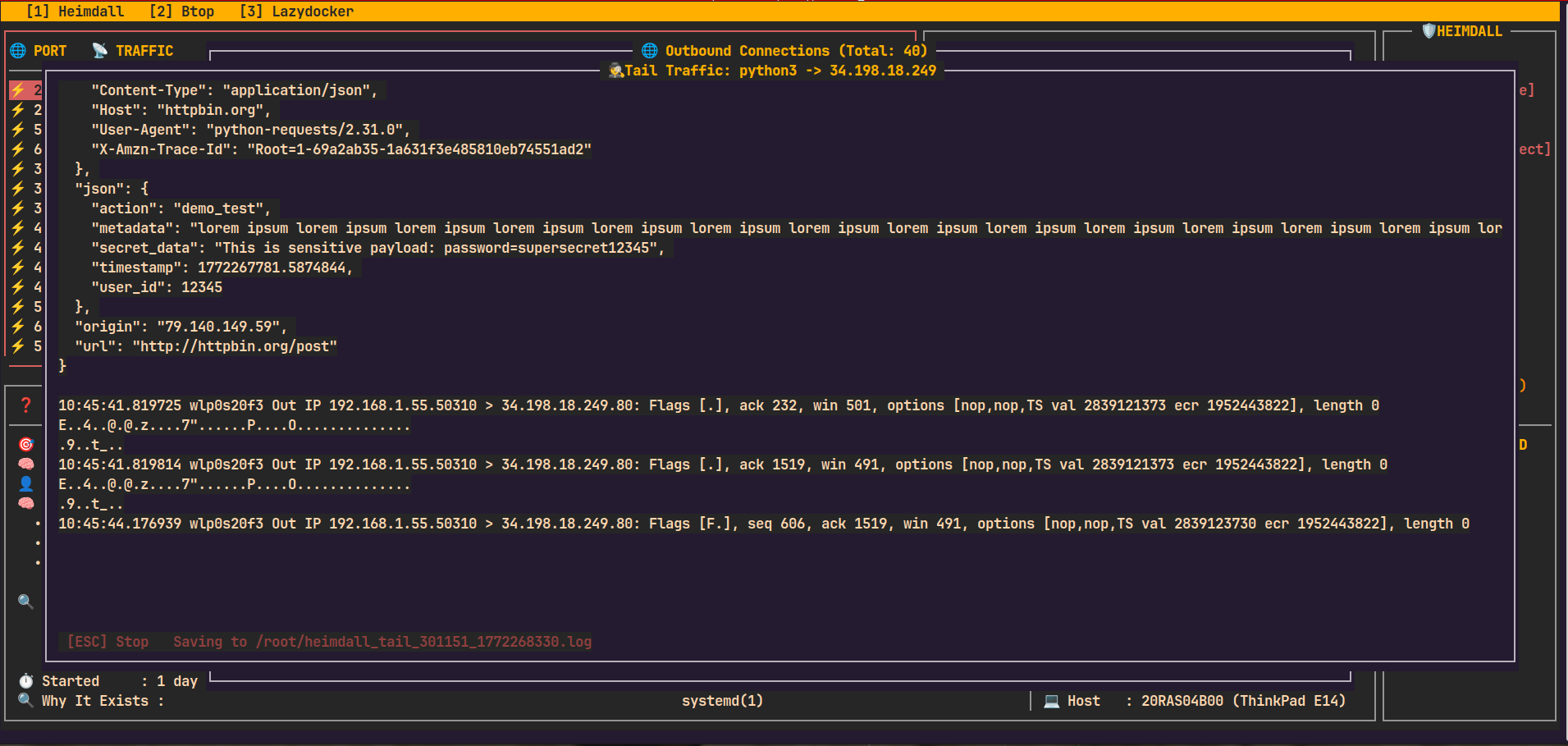
🕵️ Live Traffic Tail — Real-time Packet Capture (t)
📊 HTTP Accurate Monitor — Per-Process HTTP Inspector (S)
📂 Open Files — Detailed Path, Size & Type Analysis
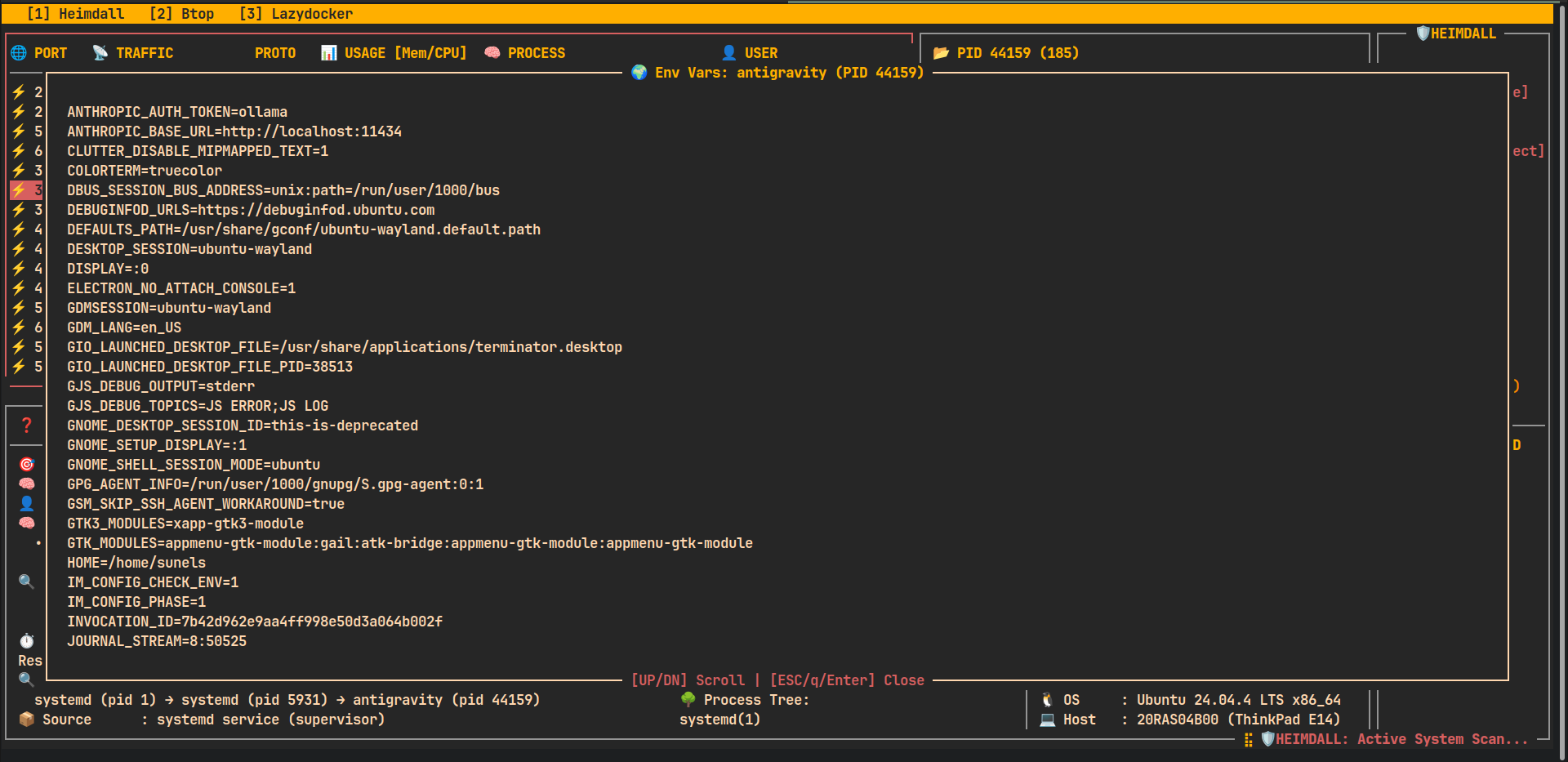
🌍 Process Environment Variables — Deep Runtime Context (e)
⇄ Process Redirections — Tracking stdin/stdout/stderr & Live Tail (u)
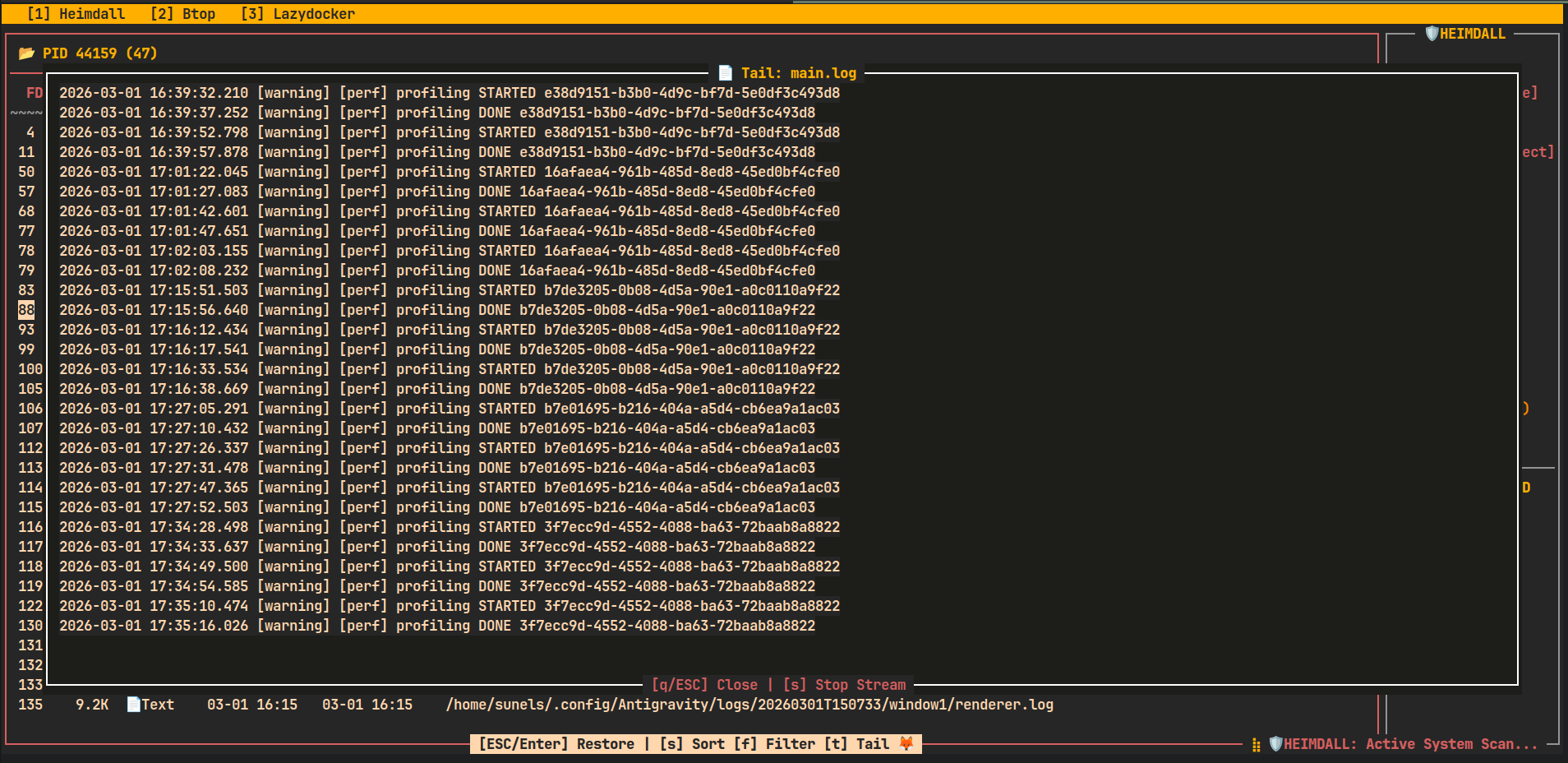
🎮 Key Bindings
🖥️ Main View
| Key | Action |
|---|---|
| ↑ / ↓ | Move selection |
| + / - | Resize table height |
| → / ← | Scroll open files |
| r | Refresh port list |
| Tab/Enter | Tab ile panel gezin, Enter ile maximize et. |
| s | Stop selected process / service |
| f | Toggle firewall for selected port |
| a | Actions (open Action Center modal) |
| i | Inspect / Deep Information modal |
| e | Process Environment Variables modal |
| u | Process Redirections & Stream Tail modal |
| F | Filter (Port, PID, User modal) |
| z | System Services Manager modal (TAB to switch view, 'i' for info) |
| o | Outbound Connections Modal (Space: Freeze, t: Tail, f: Tail Files, S: HTTP Summary) |
| d | Full System Dump (Reports all services/units to file) |
| p | Settings (Auto-update, etc.) |
| l / j | Log Explorer Modal (l tuşu log explorer modalını açar. Tab ile farklı log kategorileri arasında geçiş yapın.) |
| q | Quit |
📜 Detail View (witr output)
| Key | Action |
|---|---|
| ↑ / ↓ | Scroll |
| Tab | Back to main view |
| q | Quit |
🧠 How It Works
- Port discovery
ss -lntuHp
- Process resolution
- Extracts PID & program name from socket metadata
- CPU/Mem usage
- Uses
ps -p <pid> -o pcpu=,pmem=for human-readable metrics
- Uses
- Open file inspection
- Reads
/proc/<pid>/fd
- Reads
- Deep context
- Calls
witr --port <port>and annotates warnings
- Calls
- Control
- Optional process / service stop via
systemctlorkill - Temporary firewall block/unblock via F key
- Optional process / service stop via
🧪 Requirements
- 🐧 Linux only
- 🐍 Python 3.6+
- Required system tools:
ss(iproute2)systemctl/procfilesystemwitr(mandatory)psiptables/ufw(for firewall toggle)
- 🔐
sudoaccess required for:witr- stopping processes/services
- firewall rule management
- full
/procvisibility
🧩 Optional Dependencies for Advanced Features
Heimdall gracefully falls back if these are missing (read-only or partial functionality):
-
TPM2 support (Verifiable Integrity Dashboard - Measured Boot & TPM Discovery):
tpm2-pytss(Python library for TPM2 access):pip install tpm2-pytss- System package:
tpm2-tools(for tpm2_pcrread etc., but Heimdall uses direct sysfs where possible)
-
IMA appraisal/enhanced monitoring (IMA events + file integrity checks):
ima-evm-utils(evmctl for extended attributes): Install via distro package manager (e.g.,apt install ima-evm-utils)- Kernel must have IMA enabled (CONFIG_INTEGRITY=y, most modern distros have it)
-
Other:
python3-dbusordbus-pythonfor deeper systemd integration (optional)
Note: Core features work without these. For full TPM/IMA power, install the above.
🛡️ Multi-layered Protection with Heimdall
Heimdall provides a comprehensive security stack that adapts to your needs, whether you're using the interactive TUI or running it as a background service.
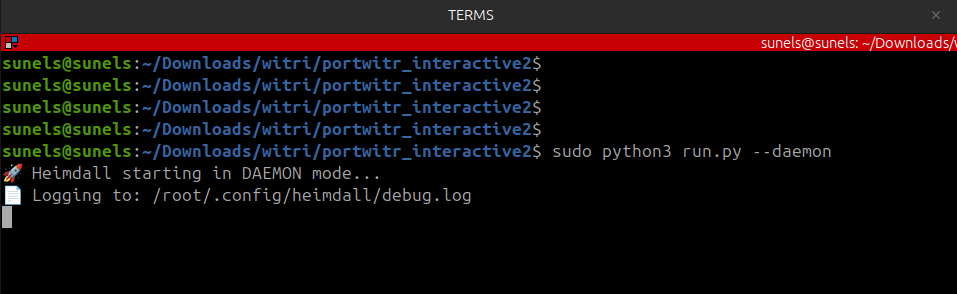
1. Daemon Mode (Background Monitor)
The most non-intrusive layer. It monitors the system 24/7 as a background service.
- Goal: Silent background monitoring.
- Action: Detects suspicious outbound connections from processes flagged by the Sentinel engine.
- Intervention: Sends system notifications and wall broadcasts. It suspends (
SIGSTOP) the process and waits for manual approval before it can connect.
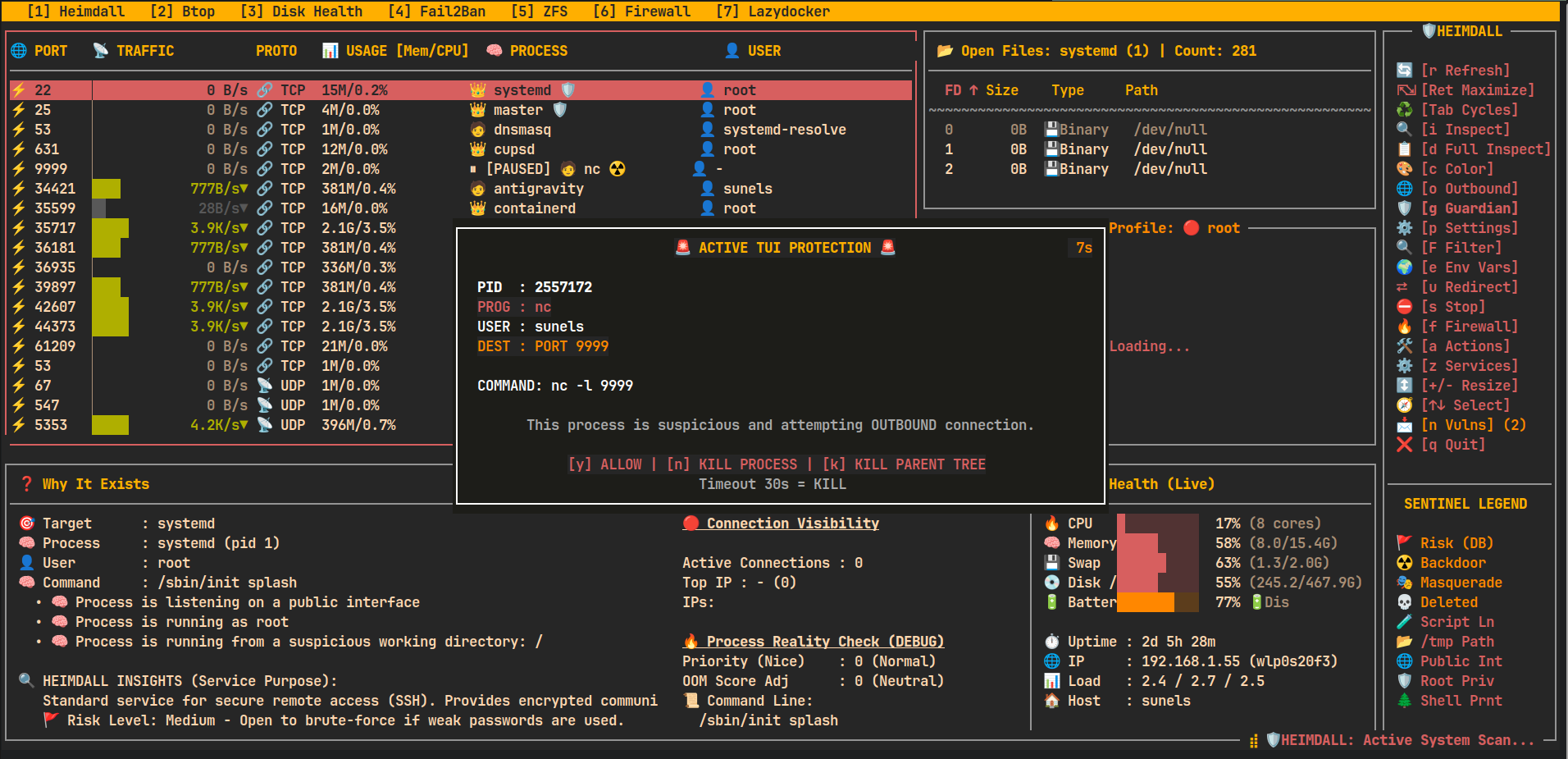
2. Active TUI Protection (Interactive Sentry)
When the Daemon is not running, the Heimdall TUI itself becomes a proactive guard during active sessions.
- Goal: Immediate manual oversight.
- Action: Automatically suspends suspicious processes detected during a scan.
- UI: A high-priority modal appears, allowing you to Allow, Kill, or Kill Parent Tree.
3. Guardian Mode (Autonomous Interceptor)
The most powerful layer, designed for zero-latency autonomous mitigation. Guardian Mode is the "Nuclear" option—it assumes you want high-risk threats neutralized immediately.
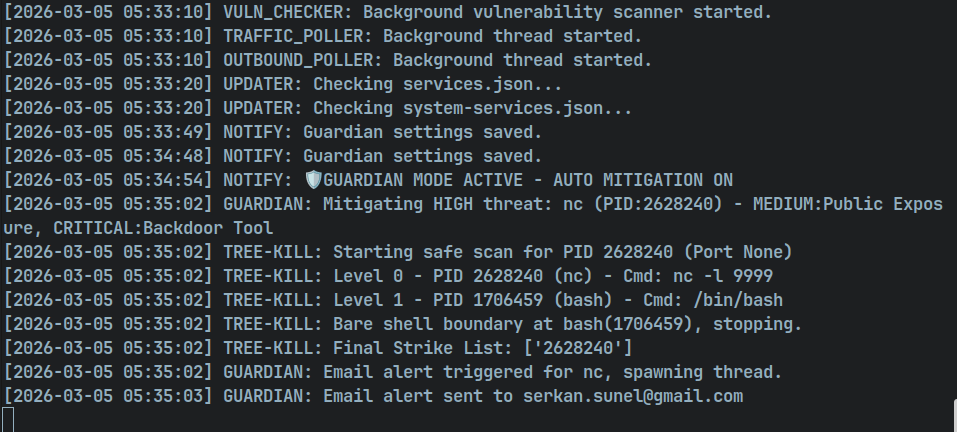
- 🤖 Auto-Mitigation: Instantly executes Tree Strikes (Precision Kill) on high-risk threats without waiting for confirmation.
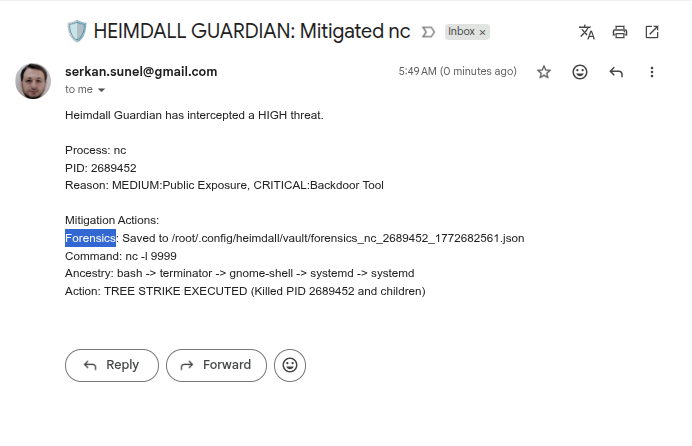
- 📧 Forensic Email Alerts: Sends real-time SMTP notifications containing the threat reason, command line, and full process ancestry.
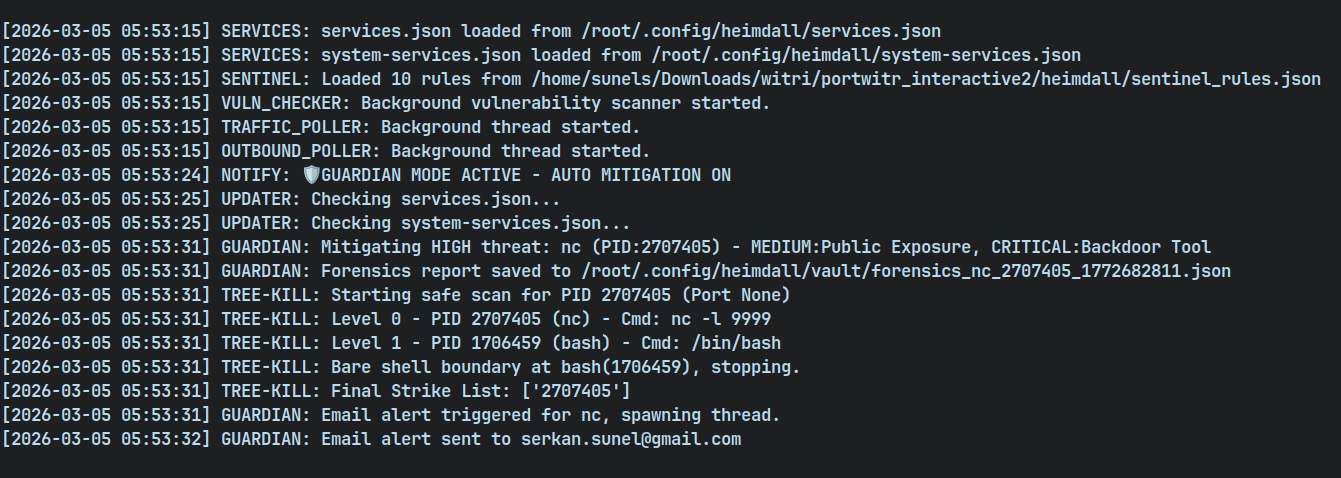
- 📂 Forensic Vault: One of Heimdall's most advanced features. Before a process is terminated, Guardian performs a sub-second deep-scan and saves a Forensics JSON Report to
~/.config/heimdall/vault/.- Captured Data: Environment Variables, Open File Descriptors, Network Connections, and deep Process Ancestry.
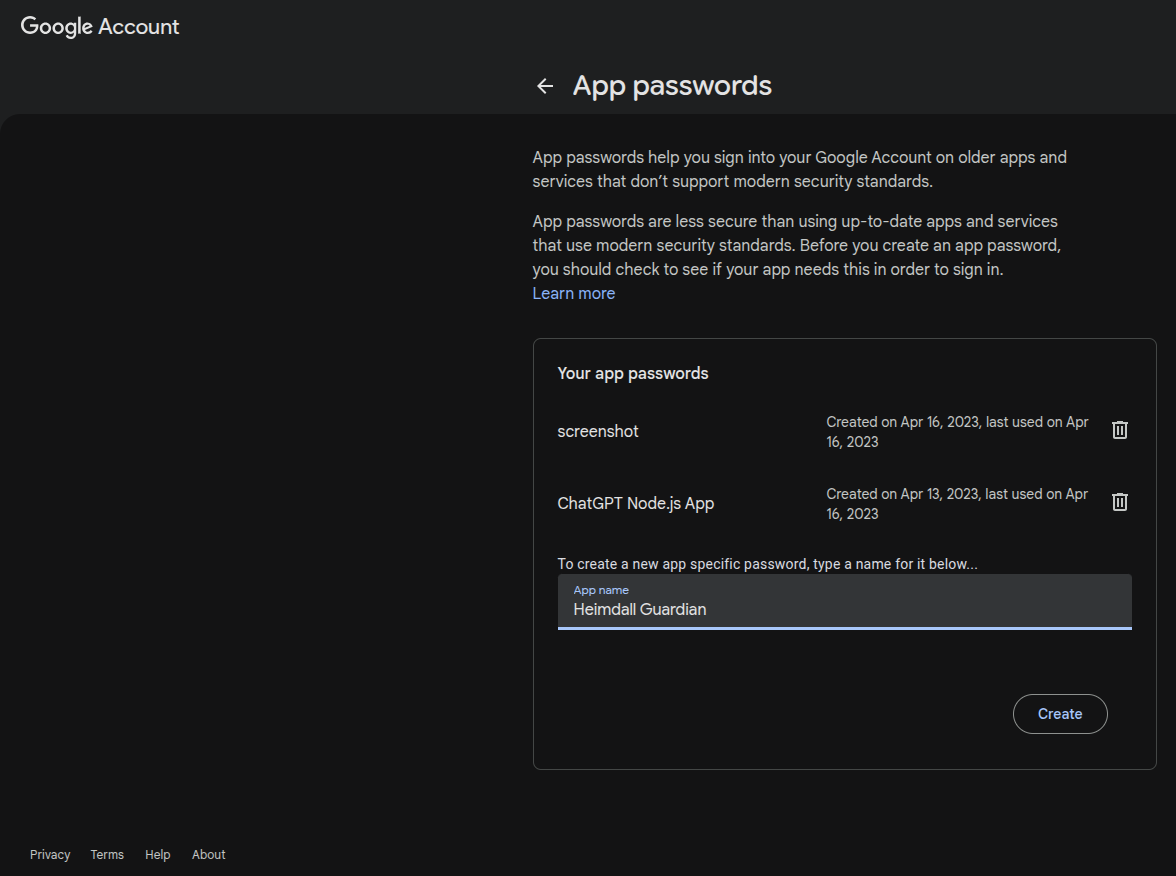
- SMTP Security: Built-in support for Gmail App Passwords with Base64 Obfuscation and owner-only filesystem permissions (600) for secure credential storage.
Workflow & Logs
Guardian creates a clear audit trail in the Heimdall Journal.
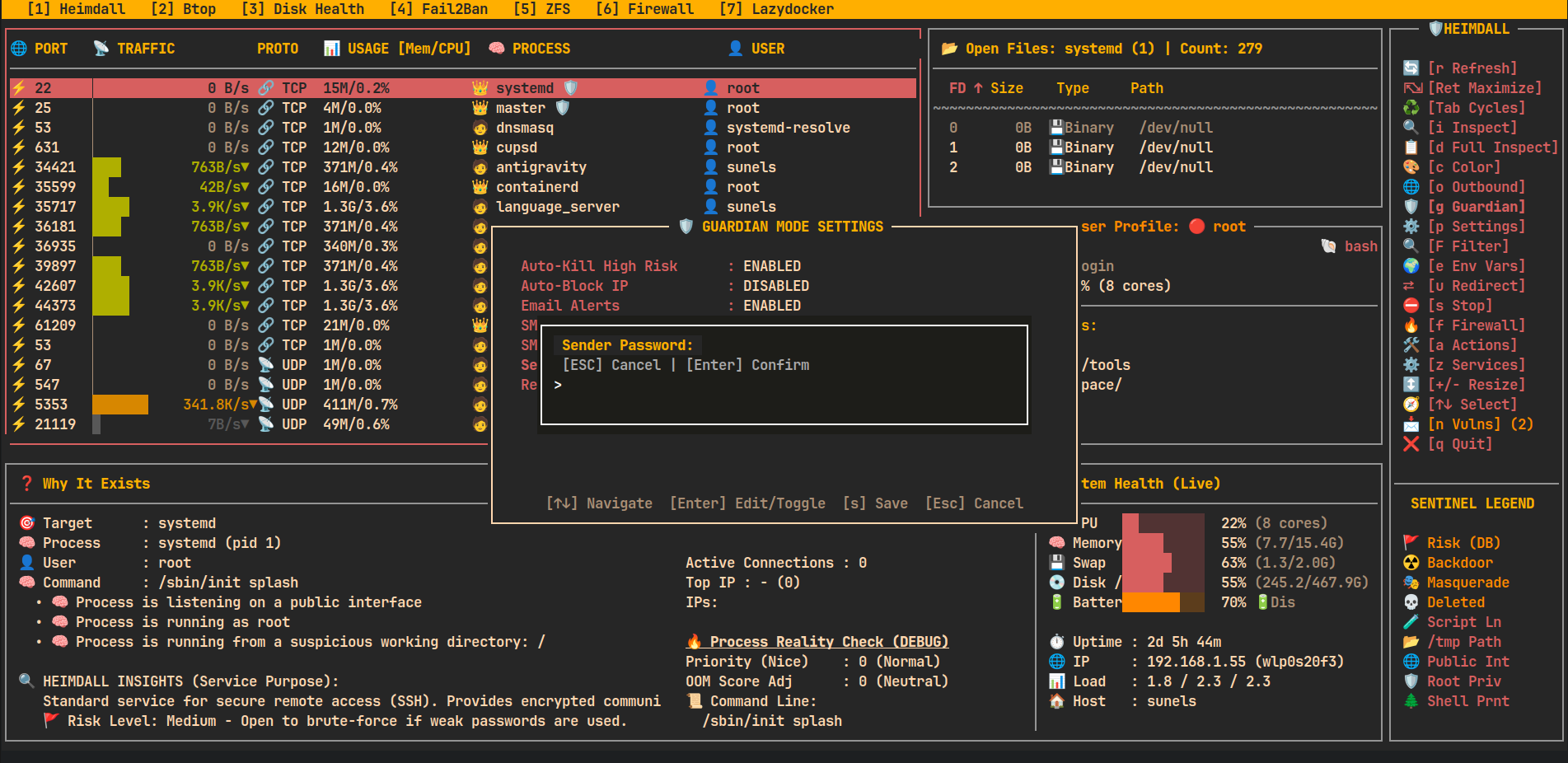
Real-time Email Notifications
Deep Forensic Evidence (JSON Vault)
Secure Configuration
Easily configure SMTP settings and auto-kill behavior via the dedicated Guardian Modal (g -> Settings).
🚀 Usage
Launch the interactive dashboard:
heimdall
🔍 Startup Filters
You can restrict the view to specific targets using command-line arguments:
# Filter by Port
heimdall --port 80

# Filter by PID
heimdall --pid 1234

# Filter by User
heimdall --user root

# Combine filters (e.g. root processes on port 443)
heimdall --port 443 --user root
🛠 Action Center (Interactive Operations)
Press a from the main screen to open the Action Center modal — a compact two-column modal grouping common operational actions for ports and processes.
UI / behavior highlights
- Monospace rendering inside curses; bordered window uses curses box().
- Padding: 2 spaces internal; text kept away from borders.
- Highlighting: reverse + bold for flash feedback (150–200ms) when a key is pressed.
- Single-key control: press the shown single-letter key (e.g.,
b) — no Enter or mouse required. - ESC closes the topmost modal; each modal closes independently. When the modal stack is empty the main screen is redrawn (same effect as pressing
r). - All actions run inside the same curses process and provide immediate feedback.
Action Center layout (icons mirror the UI)
- Left column — 🌐 PORT OPERATIONS
- 🚫 [b] Block IP
- 💥 [k] Kill Connections
- 🚦 [l] Connection Limit (planned)
- Right column — 🧠 PROCESS OPERATIONS
- ⚡ [h] Reload (SIGHUP)
- 💀 [9] Force Kill (SIGKILL)
- 🌳 [t] Force Kill Tree (Nuclear Kill)
- ⏸ [p] Pause Process (Tree-Aware)
- ▶ [c] Continue Process (Tree-Aware)
- 🔄 [r] Restart Service
- ⚖️ [n] Renice (Priority)
- ☠ [o] Adjust OOM Score
- 🐞 [d] Debug Dump
🚫 Block IP — details
Invoked from Action Center via [b]:
- Two ways to choose an IP:
- Select from "Top connections" list (single-key 1..8). Selection flashes briefly and executes immediately.
- Manual entry: press
mto start manual input, type the IP (digits,.for IPv4,:and hex for IPv6 allowed), Backspace supported, pressxto execute.
- Validation:
- Uses Python's
ipaddressmodule for final validation before applying rules. - Textual length limits applied (reasonble max for IPv4/IPv6) to reject obviously invalid submissions.
- Uses Python's
- Execution:
- Blocks via iptables (sudo) using a DROP rule limited to the selected port.
- The UI updates a local cache of blocked IPs and shows that list inside the modal under "⛔ Blocked IPs".
- After a successful block the application requests a full refresh (same behavior as pressing
r) so the main view reflects changes immediately.
- Safety notes:
- Blocking requires sudo and iptables — ensure appropriate privileges.
- Actions are immediate and affect live traffic; use with care.
💥 Kill Connections — details
Invoked from Action Center via [k]:
- Lists all active ESTABLISHED connections for the selected port (up to 9 connections shown for single-key selection)
- Each connection shows: protocol (TCP/UDP), local address:port, and remote address:port
- Selection:
- Press a number key (1-9) to select and kill the corresponding connection
- Selected connection flashes briefly before termination
- Press ESC to cancel without killing any connection
- Execution:
- Primary method: Uses
sudo ss -Kto forcefully terminate the TCP connection - Fallback method: If
ss -Kfails, attempts to useconntrack -Dto drop the connection from the connection tracking table - After successful termination, the UI automatically refreshes to reflect changes
- Primary method: Uses
- Use cases:
- Terminate suspicious or unwanted connections
- Free up connection slots when debugging connection limits
- Quickly disconnect specific clients without affecting other connections
- Safety notes:
- Requires sudo privileges for
ss -Korconntrackcommands - Connection termination is immediate and forceful (similar to TCP RST)
- Use with caution in production environments
- If connection count exceeds 9, only the first 9 are shown (consider using Block IP for bulk operations)
- Requires sudo privileges for
🚦 Connection Limit — details
Invoked from Action Center via [l]:
- Purpose: Limit concurrent TCP connections per IP to mitigate DoS attacks or ensure fair resource usage.
- View Rules: Lists existing iptables
connlimitrules for the selected port. - Add Limit: Quickly add predefined per-IP limits (5, 10, 25, 50, 100) using shortcut keys
[a-e].- Uses
iptableswithconnlimitmodule. - Action is
REJECTwithtcp-reset(polite refusal).
- Uses
- Remove Limit: Press
[x]to remove all existing limit rules for the port. - Safety:
- Limits are enforced immediately via
sudo iptables. - Non-persistent (cleared on reboot unless saved manually).
- Limits are enforced immediately via
🔍 Interactive System Filter — details
Invoked from Main View via [F]:
- Dynamic Filtering: Instantly narrow down the live list without restarting the application.
- Supported Fields:
[p] Port: Filter by specific listener port (e.g.,80,443).[i] PID: Filter by specific Process ID.[u] User: Filter by process owner (e.g.,root,www-data).
- Interactive Input:
- Press the field key (p, i, or u) to start typing.
- Real-time buffer: See what you are typing before applying.
- Press ENTER to save the value to the filter set.
- Press ESC while typing to cancel the current field edit.
- Apply & Clear:
- Press ESC (when not typing) to apply filters and return to the main view.
- Press
[c]to clear all active filters instantly.
- Status Indicator: When filters are active, a "🔍 Filter: ..." status line appears above the help bar in the main view. -## 📜 User Intelligence & history Tail (v1.3.3)
This release significantly expands user-level diagnostics with deep command history tracking and real-time history tailing.
✨ New Features (v1.3.3)
- User History Tail (
t): Press 't' while the User Profile pane is active to instantly tail the owner's.bash_history. - Deep History Buffer: Command history capture increased to 1000 lines for a more comprehensive "Allah ne verdiyse" view.
- Improved Header: The "Open Files" pane now explicitly shows the program name and PID for better navigation.
- Expanded User Pane: Increased default height and improved layout for better command visibility.
- Optimized Layout: Adjusted startup layout to give 3 additional lines to the main process table, reducing the initial detail pane height.
- Context-Aware Tail: The 't' shortcut now intelligently handles different panes (Open Files, User Profile, or Main Table) even when maximized.
🔧 Bug Fixes
- Tail Selection Crash: Fixed a
NameError: pathin the file selection modal that caused Heimdall to crash when choosing a file to tail. - Inspection Export Fix: Resolved a bug where exporting data in the System Inspection modal provided no visual feedback and fixed the auto-closing behavior.
- Outbound Export Fix: Resolved a bug where exporting data in the Outbound Connections modal provided no visual feedback and fixed conflicting shortcuts (Filter vs File Tail).
- Binary Detection: Improved heuristic handling in the file selection list to correctly identify and iconize binary files.
🛡️ Heimdall Sentinel — details
Heimdall Sentinel is a behavioral heuristic engine that goes beyond simple process listing. It analyzes process metadata, command-line arguments, working directories, and process lineage to detect anomalies that traditional tools miss.
Key Behavioral Detections:
- ☢️ Backdoor Patterns: Detects Netcat (
nc),socat, and other tools when they are used as active network listeners (e.g.,nc -l). - 🧪 Interpreter Bound: Flags scripting languages (
python,bash,node,perl) that are listening on ports without a known development context (Potential Reverse Shells). - 🎭 Masquerading: Identifies malicious processes that use innocent names (like
ls,ps, ordate) but are actually network services. - 💀 Integrity Alerts: Flags processes running from executables that have been deleted from the disk (a common malware persistence technique).
- 🌲 Lineage Analysis: Detects suspicious process trees, such as network listeners spawned directly from a user shell instead of a proper system supervisor like
systemd. - 📂 Path & Privilege: Alerts on processes running from world-writable directories (
/tmp) or possessing unnecessary root privileges.
Sentinel Intelligence Locations:
- Main View: Visual icons (
☢️,💀,🧪) appear next to process names for instant triage. - Deep Inspection (i): Shows a prioritized list of security findings with human-readable explanations.
- Daemon Mode: Monitors all outbound connections in real-time and suspends any process flagged by Sentinel until approved.
- Full System Dump (d): Includes a Security Executive Summary at the top of the report, grouping all critical threats for quick review.
UI / Implementation notes
- Modal sizing is responsive to terminal size and has been widened to reduce text wrapping compared to earlier versions.
- Feedback messages are shown using a short non-blocking centered message overlay (no need to press an extra key to continue).
- The "Block IP" modal uses emoji/iconography to make options clearer and more visible in the TUI.
⚠️ Safety Notes (expanded)
- Destructive actions (stop, kill, firewall changes) require explicit keys; confirmation dialogs are used for stop operations.
- Blocking via iptables is immediate—this tool does not create persistent firewall rules across reboots.
- Non-root usage limits visibility; some operations require sudo.
🛡️ Risk & Security Indicators
Heimdall now proactively flags potential security issues directly in the main view using the Sentinel Heuristic Engine:
| Icon | Level | Meaning | Description |
|---|---|---|---|
| 🚩 | DB | High Risk Service | Known risky service (e.g., FTP, Telnet, Redis) from building-in database. |
| ☢️ | CRIT | Backdoor Pattern | nc, socat or similar tools actively waiting for inbound connections. |
| 🎭 | CRIT | Masquerading | Binary named like a common tool (ls, ps, date) but acting as a network listener. |
| 💀 | CRIT | Deleted Binary | The process is running from a deleted executable (Common malware behavior). |
| 🧪 | HIGH | Script Listener | An interpreter (python, bash, node) is listening without a known dev context. |
| 📂 | HIGH | Suspicious CWD | Process is working from world-writable directories like /tmp or /dev/shm. |
| 🌐 | MED | Public Exposure | Service is listening on 0.0.0.0 or :: (Public) instead of localhost. |
| 🛡️ | MED | Root Privilege | Process belongs to the root user (Surface area risk). |
| 🌲 | MED | Shell Lineage | Process was spawned from a shell/terminal instead of a proper system service. |
Example: 👑 nc ☢️ means a Netcat process is running as root and has been flagged as a potential Backdoor.
🧩 Design Philosophy
- ❌ No reinvention of system tools
- ✅ Built on native Linux introspection
- 🔍 Read-only by default (except explicit stop/firewall actions)
- 🎯 Optimized for:
- “Port already in use” debugging
- Security inspection
- DevOps / SRE diagnostics
- Understanding legacy systems
📁 Project Structure
heimdall/
├── heimdall/            # 📦 Core Python Package
│   ├── __init__.py      # Main application logic & UI
│   ├── __main__.py      # Entry point (python -m heimdall)
│   ├── services.json    # Default service definitions database
│   └── services.sha256  # Integrity verification hash
├── screenshots/         # 📸 README screenshots & logo
├── run.py               # 🚀 Development wrapper script (run without installing)
├── release.sh           # 🤖 Automated build & release script
├── setup.py             # Python package configuration (pip/build)
├── MANIFEST.in          # Package file inclusion rules
├── debian/              # Debian packaging configuration
└── README.md
🛣️ Roadmap (Ideas)
- 🔎 Port search & filters
- 📤 JSON export
- 🧪 Parser unit tests
- 🍎 Partial macOS support
🚀 Release Management (For Maintainers)
Heimdall includes an automated release.sh script to manage versioning, builds, and publishing to PyPI, Debian, and GitHub.
📦 Prerequisites
# Install build and twine
pip install --upgrade build twine
🔑 Set Credentials
Before releasing, set your PyPI token:
export TWINE_USERNAME=__token__
export TWINE_PASSWORD=pypi-YOUR_TOKEN_HERE
🚢 Perform Release
The script automatically bumps versions in all metadata files, builds Wheel/Sdist/Deb, and uploads to PyPI.
# Bump patch (0.9.4 -> 0.9.5) and release to PyPI
./release.sh patch

# Bump minor (0.9.4 -> 1.0.0)
./release.sh minor

# Release to TestPyPI for verification
./release.sh patch --test
📄 License
MIT License
👤 Author
Serkan Sunel
🔌 heimdall
See the whole picture — not just the port.
🛠 Performance / Startup caching
- The TUI now eagerly preloads heavy data (witr output, connection lists, open-files and per-PID usage) for all discovered ports during the splash/startup phase. This means:
- First launch may take a little longer (splash progress shows updates), but subsequent scrolling is instant because data is read from in-memory caches.
- The UI operates on a read-only "snapshot" taken at startup — no heavy system commands are executed while you scroll. If you need fresh data, press
rto refresh (re-takes the snapshot).
- You can tune caching TTL constants in the source (USAGE_TTL, FILES_TTL, PARSE_TTL, WITR_TTL, CONN_TTL) to balance freshness vs. UI responsiveness.
📩 Background Vulnerability Scanner
Heimdall now includes a background thread that periodically checks your installed system packages for known vulnerabilities (CVEs) using the NVD (National Vulnerability Database) API.
🔍 How it Works
- Detection: Vulnerability scan starts automatically at startup. It adheres strictly to your configured interval and respects the last successful scan time stored in
~/.heimdall/config.yamlto avoid redundant API calls on restarts. - Rate Limit Protection: Built-in exponential backoff handles NVD API rate limits (429 errors) gracefully, pausing and retrying as needed.
- Matching: It compares these CVEs against the list of locally installed packages (via
dpkgorrpm). - Alerting: If a match is found, a blinking 📩 icon with the total count appears in the TUI bottom bar.
- Warnings: If no API Key is set or rate limits are reached, a warning and "Last NVD Check" status is displayed in the System Health / Detail Inspect section.
- Management: Press
vto open the Vulnerability List. From there, you can view deep details, open the official NVD link in your browser, or Ignore the CVE if it doesn't apply to your environment.
⚙️ Persistence & Config
- Ignored CVEs: When you ignore a CVE, it is persistently saved to
~/.heimdall/config.yaml. These will not be shown again in future scans. - NVD API Key: By default, the scanner uses the public NVD API, which is rate-limited. If you have an NVD API key, you can add it to your
~/.config/heimdall/config.json:{ "nvd_api_key": "your-api-key-here" }
(Coming soon: Configure directly from the Settings modal)
1 maintainer

Metadata
1 maintainer
Release files for heimdall-linux 1.11.2
For a detailed explanation of source distributions (sdists) and built distributions (wheels), please see the package formats documentation.
Source distribution (sdist)
| File | Size | Uploaded | |
|---|---|---|---|
| heimdall_linux-1.11.2.tar.gz | 178.6 kB | Details |
Built distribution (wheel)
| File | Interpreter | ABI | Platform | Reset |
|---|---|---|---|---|
| heimdall_linux-1.11.2-py3-none-any.whl | Python 3 | none | any | Details |
Total release size: 307.0 kB
Release files / heimdall_linux-1.11.2.tar.gz
| Download URL | heimdall_linux-1.11.2.tar.gz |
|---|---|
| Size | 178.6 kB |
| Tags | Source |
|
SHA-256 checksum How to use checksums |
d2a48085062b7a9b067be0930a7271af63fb1b69565e8f35ea69ca504b7e0e61
|
|
BLAKE2b-256 checksum How to use checksums |
1fbfaaa8e95a90d5e773bad81d3e5501aa7e41d6a333ebdb2adf1298af726e53
|
| Upload date | |
|
Uploaded using Trusted Publishing? What is trusted publishing? |
No |
| Uploaded via |
twine/6.2.0 CPython/3.12.3
|
Release files / heimdall_linux-1.11.2-py3-none-any.whl
| Download URL | heimdall_linux-1.11.2-py3-none-any.whl |
|---|---|
| Size | 128.4 kB |
| Tags | Python 3 |
|
SHA-256 checksum How to use checksums |
a5b28722112cfcf41e74f2f2c9ddc2d4c442028ba031dc9ad155b0a6551db4b8
|
|
BLAKE2b-256 checksum How to use checksums |
d191cbc497efaeeb8f9393b9923ec977490a50cd2666dfa790fce36878325083
|
| Upload date | |
|
Uploaded using Trusted Publishing? What is trusted publishing? |
No |
| Uploaded via |
twine/6.2.0 CPython/3.12.3
|














