
Stability-first operations CLI for long-lived agent workspaces.
Verified details
These details have been verified by PyPIProject links
GitHub Statistics
Maintainers

Project description

Helm
Stop long-running coding agents from losing context, making unsafe edits, and becoming impossible to audit.
Helm is a local operations layer for AI agent workspaces: profiles before commands, checkpoints before risky work, durable task history after the chat is gone.
Current release: v0.8.0






Quickstart · Why Helm · What Helm Adds · Workflows · Docs · Landing Page
Quickstart
Install from PyPI:
python -m pip install helm-agent-ops
helm --help
Or use the workspace bootstrap installer:
curl -fsSL https://raw.githubusercontent.com/JDeun/Helm/main/install.sh | bash
helm doctor --path ~/.helm/workspace
helm profile --path ~/.helm/workspace run inspect_local --task-name "first Helm inspection" -- git status --short
helm status --path ~/.helm/workspace --brief
helm dashboard --path ~/.helm/workspace
The installer installs Helm and creates ~/.helm/workspace. If helm is not found afterward, use the PATH line printed by the installer.
Need a different workspace?
curl -fsSL https://raw.githubusercontent.com/JDeun/Helm/main/install.sh | bash -s -- \
  --workspace ~/work/helm
Why Helm
Helm is for developers who already use coding agents for real work and need the session to leave behind something more durable than chat history.
Use Helm when you want to:
- run agent-adjacent commands under explicit risk profiles
- block destructive or out-of-profile commands before they execute
- create visible recovery points before broad edits
- keep task and command history in local files
- rehydrate future runs from workspace state instead of memory alone
- review what happened after a long session ends
Helm is not another agent runtime. It is the operating layer around the one you already run.
Use it when an OpenClaw/Hermes-style workspace, or a similar self-hosted agent service, has moved past demos and needs repeated work to stay:
- bounded by explicit execution profiles
- recoverable through checkpoints
- inspectable through task and command logs
- resumable from files instead of chat history
- governed by skill contracts and local policy
If the agent only runs one-off demos, Helm is probably unnecessary.
Three-Minute Demo
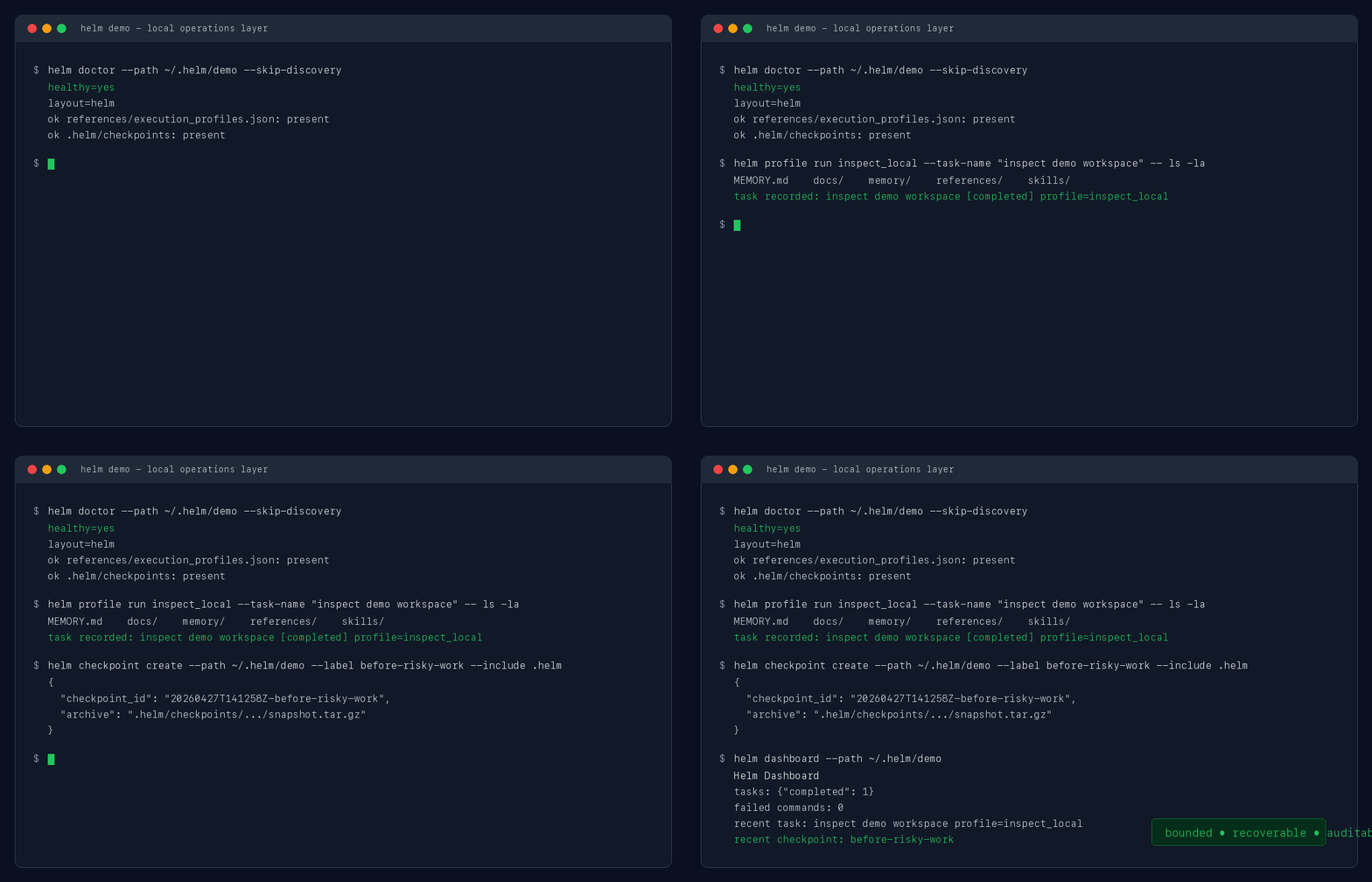
helm profile --path ~/.helm/workspace run inspect_local \
  --task-name "inspect current repository" \
  -- git status --short

helm checkpoint create --path ~/.helm/workspace \
  --label before-risky-work \
  --include ~/.helm/workspace

helm report --path ~/.helm/workspace --format markdown
helm dashboard --path ~/.helm/workspace
This leaves a task ledger, command log, checkpoint record, and dashboard summary on disk.
How Helm Fits
| Category | Better for | Helm adds |
|---|---|---|
| Agent frameworks | prompts, planners, tool loops, agent graphs | profiles, guard decisions, checkpoints, task ledgers |
| Observability tools | hosted traces, service metrics, telemetry correlation | pre-execution policy and local recovery state |
| Eval tools | scoring model output or task success | operational history around repeated human-agent work |
| Shell wrappers | command convenience | workspace state, memory capture, reports, and recovery discipline |
What Helm Adds
Core ideas:
- Profile: declares the allowed blast radius before a command runs, such as inspect-only, workspace edit, or risky edit.
- Guardrail: checks command shape against local policy before execution, blocking dangerous or out-of-profile actions.
- Checkpoint: preserves a visible recovery point before work that may need rollback.
- Audit trail: records what ran, under which profile, with what guard decision, and what task it belonged to.
- File-backed memory: keeps reusable context in files so later runs resume from durable state instead of chat history.
- Context retrieval: ranks notes, memory, ontology, tasks, commands, and checkpoints through one inspectable query surface.
- Privacy boundary: scans and tokenizes private text before it crosses tool, API, report, or remote handoff boundaries.
| Repeated-agent problem | Helm adds |
|---|---|
| The agent forgets prior work | Context hydration from notes, memory, tasks, commands, and checkpoints |
| Risky edits happen too fast | Profiles, command guard, and checkpoint discipline |
| Runs are hard to explain later | Task ledger, command log, status, dashboard, and reports |
| Private context may leak into tools | helm privacy scan/tokenize/restore with local vault and audit events |
| Retrieval feels like a black box | helm context --explain-ranking with field, recency, graph, adapter, and source scores |
| Skill rules live in prompts | SKILL.md guidance plus contract.json execution policy |
| Model fallback is ad hoc | File-backed health checks and fallback selection |
| Operational state is scattered | Workspace layout, adopted sources, and SQLite query index |
Helm is runtime-agnostic, but it is built first for persistent workspaces with state, memory, profiles, checkpoints, and task history.

Workflows
Inspect the workspace.
helm doctor --path ~/.helm/workspace
helm status --path ~/.helm/workspace --brief
helm dashboard --path ~/.helm/workspace
Run under a declared profile.
helm profile --path ~/.helm/workspace run inspect_local \
  --task-name "inspect repository state" \
  -- git status --short
Adopt existing systems as context sources.
helm survey --path ~/.helm/workspace
helm onboard --path ~/.helm/workspace --use-detected --dry-run
helm onboard --path ~/.helm/workspace --use-detected
Check rollback and recent state.
helm checkpoint-recommend --path ~/.helm/workspace
helm checkpoint list --path ~/.helm/workspace
helm report --path ~/.helm/workspace --format markdown
Query durable context with inspectable ranking.
helm context --path ~/.helm/workspace --mode decisions --explain-ranking --json
helm context --path ~/.helm/workspace --mode timeline --since 2026-05-01
helm context --path ~/.helm/workspace --mode entity --entity project_helm
helm context --path ~/.helm/workspace --mode reflect-candidates
Run a privacy boundary preflight.
helm privacy --path ~/.helm/workspace scan --text "Contact alice@example.com" --json
helm privacy --path ~/.helm/workspace tokenize --scope task-123 --text "Contact alice@example.com"
Review stale negative claims in skill instructions.
helm skill-lifecycle negative-claims --path ~/.helm/workspace --persist
helm skill-lifecycle revalidation-due --path ~/.helm/workspace
helm skill-lifecycle revalidate-claim --path ~/.helm/workspace \
  --skill old-skill \
  --claim-id sha256:abc123 \
  --status resolved \
  --note "command now exists"
Probe model health.
helm health --path ~/.helm/workspace state --json
helm health --path ~/.helm/workspace select --json
Try the demo workspace.
helm doctor --path examples/demo-workspace
helm dashboard --path examples/demo-workspace
Workspace Model
Keep Helm in a dedicated workspace. Treat existing systems as read-only context sources first.
- Helm state lives under
.helm/ - profiles, notes, policies, and skill rules stay as explicit files
- OpenClaw, Hermes, and notes vaults can be adopted instead of overwritten
- JSONL remains the append-only source of truth; SQLite is a query index
Docs
Start here:
docs/three-minute-demo.mddocs/first-run.mddocs/onboarding.mddocs/demos.mddocs/integrations/openclaw.mddocs/integrations/existing-agent-workspace.md
Core concepts:
docs/execution-profiles.mddocs/memory-operations-policy.mddocs/ops-memory-query.mddocs/privacy-boundary.mddocs/task-finalization.mddocs/adaptive-harness.mddocs/skill-quality-and-policy.md
Positioning:
docs/opensource-product-definition.mddocs/opensource-module-split.mddocs/helm-dogfooding-reference.mddocs/public-launch-checklist.mddocs/comparisons/agent-frameworks.mddocs/comparisons/observability-tools.mddocs/comparisons/eval-tools.md
Release details:
CHANGELOG.mdCONTRIBUTING.mdSECURITY.mddocs/releases/0.8.0.mddocs/releases/0.7.3.mddocs/releases/0.7.2.mddocs/releases/0.7.1.mddocs/releases/0.7.0.mddocs/releases/0.6.7.mddocs/releases/0.6.6.md
Status
Helm v0.8.0 adds privacy boundary tokenization, explainable context ranking, and a safer negative-claim revalidation workflow for skill lifecycle maintenance. See docs/releases/0.8.0.md.
Helm does not include private memory, personal agent overlays, credentials, or private task history.
License
MIT
Project details
Verified details
These details have been verified by PyPIProject links
GitHub Statistics
Maintainers
Release history Release notifications | RSS feed


Download files
Download the file for your platform. If you're not sure which to choose, learn more about installing packages.
Source Distribution
Built Distribution
Filter files by name, interpreter, ABI, and platform.
If you're not sure about the file name format, learn more about wheel file names.
Copy a direct link to the current filters
File details
Details for the file helm_agent_ops-0.8.0.tar.gz.
File metadata
- Download URL: helm_agent_ops-0.8.0.tar.gz
- Upload date:
- Size: 184.6 kB
- Tags: Source
- Uploaded using Trusted Publishing? Yes
- Uploaded via: twine/6.1.0 CPython/3.13.12
File hashes
| Algorithm | Hash digest | |
|---|---|---|
| SHA256 |
81571917d7c5d2c754ee9ff15b0c55702a70a50f2a2e7f5cb3d92c929f3b2e4d
|
|
| MD5 |
87dd744830d95117b26d20f4010f0f9e
|
|
| BLAKE2b-256 |
1c6d29bda65d1617027fabf64eb3b3a90c93581a6dcc389562259909fc17d562
|
Provenance
The following attestation bundles were made for helm_agent_ops-0.8.0.tar.gz:
Publisher:
publish.yml on JDeun/Helm
-
Statement:
-
Statement type:
https://in-toto.io/Statement/v1 -
Predicate type:
https://docs.pypi.org/attestations/publish/v1 -
Subject name:
helm_agent_ops-0.8.0.tar.gz -
Subject digest:
81571917d7c5d2c754ee9ff15b0c55702a70a50f2a2e7f5cb3d92c929f3b2e4d - Sigstore transparency entry: 1473775367
- Sigstore integration time:
-
Permalink:
JDeun/Helm@b053430eb768a1fec7b3f60cd8c117884d9c6b1a -
Branch / Tag:
refs/tags/v0.8.0 - Owner: https://github.com/JDeun
-
Access:
public
-
Token Issuer:
https://token.actions.githubusercontent.com -
Runner Environment:
github-hosted -
Publication workflow:
publish.yml@b053430eb768a1fec7b3f60cd8c117884d9c6b1a -
Trigger Event:
release
-
Statement type:
File details
Details for the file helm_agent_ops-0.8.0-py3-none-any.whl.
File metadata
- Download URL: helm_agent_ops-0.8.0-py3-none-any.whl
- Upload date:
- Size: 163.0 kB
- Tags: Python 3
- Uploaded using Trusted Publishing? Yes
- Uploaded via: twine/6.1.0 CPython/3.13.12
File hashes
| Algorithm | Hash digest | |
|---|---|---|
| SHA256 |
9350dfadb9825760095bd7756788a3ed307248c2176748f36907878e996566e1
|
|
| MD5 |
2795e7637b6ef820b87740befa5bc892
|
|
| BLAKE2b-256 |
cb2d40cd661942e380c601abf176cdbde5e51ec8b887a023b59e004197df7ecd
|
Provenance
The following attestation bundles were made for helm_agent_ops-0.8.0-py3-none-any.whl:
Publisher:
publish.yml on JDeun/Helm
-
Statement:
-
Statement type:
https://in-toto.io/Statement/v1 -
Predicate type:
https://docs.pypi.org/attestations/publish/v1 -
Subject name:
helm_agent_ops-0.8.0-py3-none-any.whl -
Subject digest:
9350dfadb9825760095bd7756788a3ed307248c2176748f36907878e996566e1 - Sigstore transparency entry: 1473775453
- Sigstore integration time:
-
Permalink:
JDeun/Helm@b053430eb768a1fec7b3f60cd8c117884d9c6b1a -
Branch / Tag:
refs/tags/v0.8.0 - Owner: https://github.com/JDeun
-
Access:
public
-
Token Issuer:
https://token.actions.githubusercontent.com -
Runner Environment:
github-hosted -
Publication workflow:
publish.yml@b053430eb768a1fec7b3f60cd8c117884d9c6b1a -
Trigger Event:
release
-
Statement type:






