
Connect your Mac to the internet and turn it into a programmable runtime. Modal, for Macs.

Project description




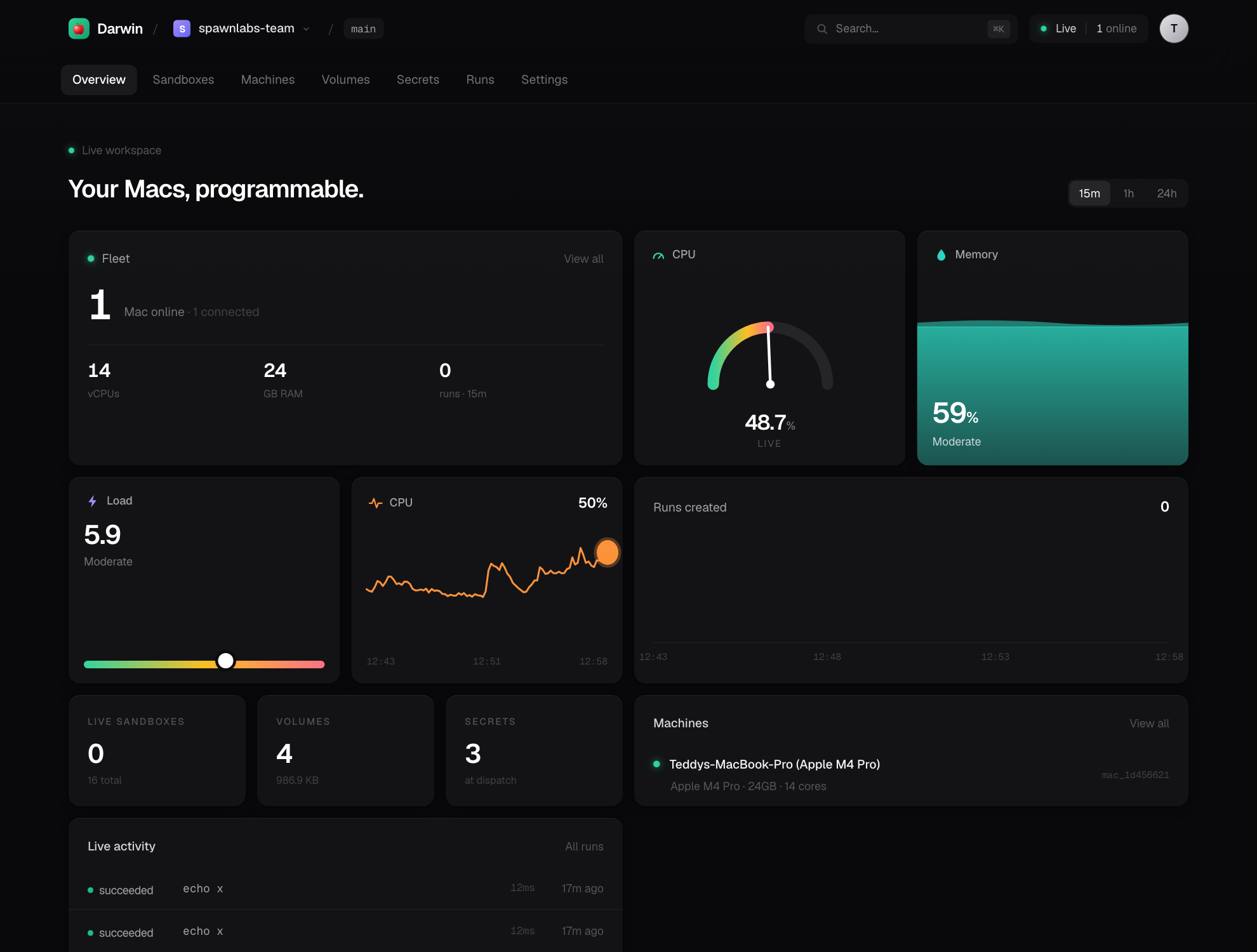
Herds makes any Mac you own into a runtime that agents, SDKs, CLIs, cron jobs, and applications can execute against from anywhere. Install the daemon, sign in, and your Mac becomes an API.
import herds

mac = herds.mac()
result = mac.run("xcodebuild -scheme MyApp build")
print(result.stdout)
Nobody cares about SSH. Nobody cares about Tailscale. Nobody cares about machine management. They just have a Mac.
The mental model
It's not "rent Macs." It's not "manage servers." It's not "a CI system."
Every Mac becomes an API.
The developer surface intentionally echoes Modal, so the mental model transfers
directly — App, Image, Volume, Sandbox — except the runtime is your
Mac, and Apple's licensing makes that something Modal/AWS structurally can't
offer as dense rented cloud. Your Mac, already licensed, is the cloud.
Architecture
Three small pieces. Your Mac never opens an inbound port; the daemon dials home over a persistent WebSocket (the same NAT-traversal pattern as GitHub Actions runners, Tailscale, and Cloudflare Tunnel), and commands are pushed back down that socket.
┌─────────────┐   REST: start a job    ┌──────────────┐   WS (agent dials home)  ┌─────────────┐
│  Python SDK │ ───────────────────►   │ Control Plane│ ◄──────────────────────  │ Mac Daemon  │
│   + CLI     │ ◄═══ WS: stream logs ══ │  (FastAPI)   │  ═══ exec / stdout ════► │ (executor)  │
└─────────────┘                        └──────────────┘                          └─────────────┘
   herds.mac().run()                    sqlite + fan-out                            your real Mac
The control plane is deliberately tiny — it remembers who owns what and job status. Volumes, sandboxes, images, and caches never leave the Mac. The Mac is the cloud.
Quickstart
Three commands — from nothing to a Mac you can drive from anywhere:
pip install herds      # 1 · install        (or: uv tool install herds)
herds auth             # 2 · sign in        — opens your browser, syncs a token back
herds host             # 3 · go live        — your Mac is now an API
✓ Herds host is live (background · pid 64265)
  Dashboard   https://you.herds.run          ← permanent, branded link · zero setup
  Host token  herds_sk_…                     ← use it to add more Macs / agents

  It keeps running after you close this terminal.
    status  herds host status   ·   stop  herds host stop
→ opening your dashboard, already signed in …
That's it. Your Mac is online at a permanent, branded link — no Cloudflare,
no Tailscale, no port forwarding. herds auth opens your browser to approve and
syncs the token back; the dashboard opens already signed in. (No account?
herds host still works with a temporary tunnel.)
herds host returns your prompt and keeps serving after you close the
terminal — check on it with herds host status, tail it with herds host logs,
and stop it with herds host stop. Use --foreground to stay attached instead
(that's what the herds install LaunchAgent uses). The Mac you host from
joins its own fleet as a node, so herds.mac() can target it like any other.
Requirements
| Python | 3.9 – 3.14. Every release is tested on all six. |
| The Mac you host | macOS (Apple Silicon or Intel) — this is the runtime. |
| The machine you drive from | Anything that runs Python. The SDK is a thin HTTP/WebSocket client, so your CI, your Linux box, or another Mac all work. |
The SDK deliberately holds the floor at 3.9 so it drops into older CI images and
system Pythons without a version bump. One caveat: the optional MCP server
(pip install 'herds[mcp]', herds mcp) needs 3.10+, because upstream mcp
does — everything else in herds runs on 3.9.
Add more Macs — one line each:
curl -fsSL herds.run/install | sh -s -- you.herds.run hx_…   # a fresh Mac: installs + joins
herds connect you.herds.run hx_…                             # already has herds? just connect
Drive it — from Python, the CLI, or the web dashboard:
import herds

mac = herds.mac()                              # the idlest Mac in your fleet
print(mac.run("xcodebuild -version").stdout)   # real Xcode, real macOS
url = mac.expose(3000)                          # any local port → a public URL
Prefer the web? Sign up at herds.run and manage everything from the dashboard. New here? Full walkthrough at herds.run/setup.
Drive it from Python
import herds

mac = herds.mac()
print(mac.run("sw_vers").stdout)
print(mac.run("xcodebuild -version").stdout)
Give an agent a real Mac
This is the point. Hand an AI agent the Herds skill + a token + your URL, and it can run anything on your Mac — from anywhere, over the public link:
herds skill --install # installs SKILL.md so Claude Code can drive your Mac
import herds

# hand the agent just a URL + token — no SSH, no setup:
mac = herds.mac(url="https://you.relay.herds.run", token="hx_…")
mac.run("uname -msr")                    # → Darwin 25.2.0 arm64
mac.run("xcodebuild -scheme App test")   # real Xcode, real macOS

# or set it once for the whole process:
herds.configure(url="https://you.relay.herds.run", token="hx_…")
# (env works too: HERDS_CONTROL_PLANE, HERDS_API_KEY)
Commands and live log streams tunnel through the relay — control plane → your Mac → back — so the agent needs no SSH, no VPN, and no inbound ports.
Or skip the SDK entirely — plug the Mac into any MCP client:
pip install 'herds[mcp]'   # needs Python 3.10+ (upstream `mcp` does)
herds mcp        # serves run / read_file / write_file / list_dir / screenshot / notify
// Claude Desktop / Code / Cursor — mcpServers:
"herds": { "command": "herds", "args": ["mcp"],
  "env": { "HERDS_CONTROL_PLANE": "https://you.relay.herds.run", "HERDS_API_KEY": "hx_…" } }
Don't hand an agent your full token — mint a scoped, revocable one:
herds token new my-agent --scope run    # can run commands, can't mint keys or read secrets
herds token ls                          # read | run | admin
herds token revoke herds_sk_…           # kill it anytime, without locking yourself out
Run an agent on your Mac — keyless
The other direction: run a real coding agent (Claude Code, Codex, or your own)
on a Mac and stream its output back — with no model API key on the Mac.
Herds pairs with proxyagent: the real key
stays on your proxy, and the Mac only ever holds a scoped, revocable token — best
of all a Herds Secret, so it's injected at run time and never written to disk.
herds agent "fix the failing tests" --proxy https://proxy.you.com --secret proxyagent
herds agent "upgrade deps" --all                       # every online Mac, in parallel
herds agent "build the app" --sandbox -m mac-studio    # in an isolated sandbox
herds agent "summarise today's PRs" --harness codex    # Codex instead of Claude Code
import herds
mac = herds.mac()

mac.agent("fix the failing tests", proxy=PROXY, secret="proxyagent")    # keyless, streamed
mac.sandbox().agent("run the suite", proxy=PROXY, token="pa_…")         # isolated
herds.fleet().agent("upgrade deps", proxy=PROXY, secret="proxyagent")   # → {mac: Result}
Every model call the agent makes routes through your proxy — authenticated,
scoped, and logged — and the real key never leaves it. The Mac just needs
proxyagent and the agent CLI installed (pip install proxyagent ·
npm i -g @anthropic-ai/claude-code).
Keep the agent alive — drive it turn by turn
herds agent above is one-shot. A Session is the other thing: a resident
process you start once and feed turn after turn, streaming its output the
whole time. Run a long-lived agent (or any stdin-driven driver) on a live
sandbox and keep prompting it — state persists between turns, and because the
session is addressed through the control plane, any worker can send the next
turn (cross-worker input is free).
import json, herds
mac = herds.mac()

# a long-lived agent in stream-json mode — it stays alive across prompts:
s = mac.session(
    "claude --print --input-format stream-json --output-format stream-json --verbose",
    env={"ANTHROPIC_BASE_URL": PROXY, "ANTHROPIC_API_KEY": TOKEN},   # keyless: no real key on the Mac
)

def turn(text):
    s.send(json.dumps({"type": "user",
        "message": {"role": "user", "content": text}}) + "\n")

turn("clone the repo and run the tests")
for stream, text in s.stream():        # JSON events stream back as it drives
    print(text, end="")
turn("now fix the failing ones")        # SAME live session — it kept its state
s.close()                               # EOF → the agent finishes and exits
This is the exact shape Modal runs a persistent agent driver in: one resident
process, one stdin turn per prompt, JSON events streamed from stdout, model calls
routed through a proxy. Point the session's command at your own driver script
and it drops straight in. mac.session(cmd) and sandbox.session(cmd) return a
Session with send(text) · stream() · close(). Idle sessions are reaped
automatically (see Bounding a Mac).
Browse the web — on a real Mac, real residential IP
A Sandbox is a whole Mac shell, so browser automation needs no special API: the agent (or your script) installs Playwright, drives Chromium, and reads the screenshots back — full, dynamic, free-reign control.
shots = herds.Volume.from_name("shots")
with herds.Sandbox.create(volumes={"out": shots}) as sbx:
    sbx.exec("pip install playwright && playwright install chromium", check=True)
    sbx.put("scrape.py")                          # your Playwright script → writes ./out/*.png
    sbx.exec("python scrape.py", check=True)      # runs ON the Mac
shots.get("home.png", "./home.png")               # pull a screenshot back out
Because the browser runs on the Mac, its traffic exits the Mac's own
connection — a real residential IP, real consumer hardware, a real browser
fingerprint. And each Sandbox has its own HOME/profile, so you can run many
isolated browser sessions in parallel on one Mac (separate cookies/logins) —
all sharing that one residential IP. To watch or drive the browser from off the
Mac (a live view, or an external Playwright over CDP), open a
raw tunnel to its DevTools port.
The SDK
Run commands
mac = herds.mac()

# blocking, returns a Result(exit_code, stdout, stderr, duration_ms)
r = mac.run("swift build", check=True)

# stream output live to your terminal
mac.run("npm test", stream=True)

# iterate output yourself
for stream, line in mac.stream("xcodebuild build"):
    handle(line)

# fan out across inputs, in parallel (Modal-style .map):
results = mac.map("pytest {}", ["tests/unit", "tests/integration", "tests/e2e"])
results = mac.map(lambda v: f"swift build -c {v}", ["debug", "release"])

# spread across EVERY connected Mac (more Macs → more throughput):
herds.fleet().map("pytest {}", ALL_TEST_DIRS)

# smart routing — the IDLEST online Mac with a capability (tag or chip):
herds.mac(tag="xcode-26").run("xcodebuild …")
herds.machines(tag="m4-max")          # filter the fleet by label/chip
One Mac handles many concurrent commands — verified at 10 parallel runs — so a fleet of agents can share it.
Images — environment recipes resolved on the Mac
mac.run("xcodebuild build", image=herds.Image.xcode("26"))   # selects DEVELOPER_DIR
mac.run("node --version",   image=herds.Image.node("22"))     # pins via mise
mac.run("python script.py", image=herds.Image.python("3.13"))
On a Mac an Image isn't a container — it's a recipe that selects the right Xcode
(DEVELOPER_DIR, never clobbering concurrent jobs) or runtime (mise). If a
toolchain isn't installed, the command still runs against the host and Herds
tells you what it would have pinned.
Provisioning that actually runs. run_commands(...) executes on the Mac
before your command and is cached by a content hash — the first run
installs, every repeat is a no-op:
img = herds.Image.macos().run_commands(
    "pip install playwright", "playwright install chromium",
)
mac.run("python scrape.py", image=img)   # installs once; cached thereafter
Volumes — persistent directories on the Mac
vol = herds.Volume.from_name("ios-builds")
# Reachable as ./builds (relative to the working dir) and via the env var.
mac.run("xcodebuild archive -archivePath $HERDS_VOLUME_IOS_BUILDS/App.xcarchive",
        volumes={"builds": vol})

# Push an entire local codebase onto the Mac (tarred + extracted, junk pruned) —
# the way you'd ship a repo to a long-running agent. Like `modal volume put`:
herds.Volume.from_name("repo").put("./my-project")        # dir → volume root
herds.Volume.from_name("data").put("model.bin", "weights/")  # one file
mac.run("python3 app/main.py", volumes={"app": herds.Volume.from_name("repo")})
Read files back out of a volume, list it, or delete from it — no mount needed:
data = herds.Volume.from_name("data").get("weights/model.bin")    # → bytes
herds.Volume.from_name("shots").get("home.png", "./home.png")     # → save locally
herds.Volume.from_name("repo").listdir("src")                     # → [{name,dir,size,mtime_ms}]
herds.Volume.from_name("tmp").remove("scratch")                   # delete (recursive)
…or from the CLI: herds volume put repo ./my-project --url https://you.relay.herds.run --token hx_…
On a bare Mac there's no container, so a volume is mounted under the working
directory at the mount name and exposed as an absolute path through
$HERDS_VOLUME_<NAME> — both unambiguous. (Absolute /workspace-style mounts
arrive with the Tart VM backend.)
Sandboxes — isolated, persistent workspaces
with herds.Sandbox.create(image="xcode:26") as sbx:
    sbx.put("./my-project")                       # push your local codebase in
    sbx.exec("xcodebuild -scheme App build", check=True)
sbx.put() (and mac.push("./dir", "volume")) tar a local directory and extract it
on the Mac — the same one-liner whether you target a sandbox or a volume.
Each sandbox is its own directory tree with redirected HOME/TMPDIR and
toolchain caches, its own process session (so timeouts kill the whole tree), and
an optional sandbox-exec write-fence. Files persist between exec calls.
Snapshot a provisioned sandbox into a reusable base (Modal's
snapshot_filesystem) so the next one starts pre-populated:
with herds.Sandbox.create() as sbx:
    sbx.exec("pip install playwright && playwright install chromium", check=True)
    base = sbx.snapshot_filesystem("browser-env")     # tar workspace+home → named base

fresh = herds.Sandbox.create(image=base)              # starts already provisioned
Expose a server — a sandbox becomes a URL
sbx.spawn("python -m http.server 8000", keep_alive=True)
url = sbx.expose(8000)            # → https://you.relay.herds.run/p/<sbx>/8000/
Run a web app or API inside a sandbox and get a hittable public link. Requests
tunnel through the agent WebSocket — control plane → daemon → the sandbox's
localhost:port — so it works behind NAT with no inbound ports. With a wildcard
domain you get named subdomains (https://myapi--teddy.herds.run).
Raw tunnels — any port as a live byte stream
expose() is buffered HTTP request/response. When you need a persistent,
bidirectional connection — a websocket, a database port, or Chrome DevTools
(CDP) — open a raw tunnel instead. Bytes flow both ways, untouched:
with sbx.tunnel(9222) as t:        # raw pipe to localhost:9222 in the sandbox
    t.send(b"…"); data = t.recv()

url = sbx.tunnel_url(9222)          # or hand the ws:// URL to a CDP/websocket client
This is what lets you attach an external Playwright to a Chromium running on
the Mac, or stream a live browser view — control plane → daemon → the sandbox's
localhost:port, over the same NAT-friendly socket, no inbound ports. (An agent
running inside the sandbox never needs this — it drives Chromium over its own
localhost.)
Mac-native control — the stuff only a real Mac can do
mac.screenshot("home.png")           # capture the screen (needs Screen Recording perm)
mac.write("/tmp/config.json", data)  # write a file on the Mac
text = mac.read_text("~/notes.md")   # read one back
mac.ls("~/Projects")                 # → [{name, dir, size, mtime_ms}]
mac.copy("hello"); mac.clipboard()   # the Mac's clipboard
mac.notify("build done")             # a notification banner
mac.ui.type("hello"); mac.ui.key("return")        # keyboard control
mac.ui.hotkey("cmd", "s")            # chords (needs Accessibility perm)
Real macOS GUI + system control — native app testing, screenshots, automation —
the things a Linux sandbox can't do. screenshot/ui.* need Screen Recording /
Accessibility granted to whatever runs herds host (System Settings → Privacy).
Apps & functions — run real Python on your Mac
app = herds.App("builds")

@app.function(image=herds.Image.python("3.13"))
def inspect(target: str) -> dict:
    import platform
    return {"target": target, "ran_on": platform.node()}

@app.local_entrypoint()
def main():
    print(inspect.remote("release"))   # ships source, runs on the Mac
Bounding a Mac
A Mac isn't partitioned like a rented container, so Herds bounds it instead: a cap on concurrent sandboxes with a small waiting queue, idle-session reaping, and garbage-collection of stale sandbox trees so disk never silently fills. All configurable, with safe defaults:
| env | default | what it does |
|---|---|---|
HERDS_MAX_LIVE_SANDBOXES |
8 |
max concurrent sandboxes/sessions before new work queues |
HERDS_ADMISSION_QUEUE_MAX |
32 |
queue depth once the cap is hit (past it, work is rejected, not piled up) |
HERDS_SESSION_IDLE_TIMEOUT_MS |
30 min |
a resident session with no input this long is reaped |
HERDS_SANDBOX_TTL_MS |
24 h |
a sandbox tree untouched this long (no live process) is garbage-collected |
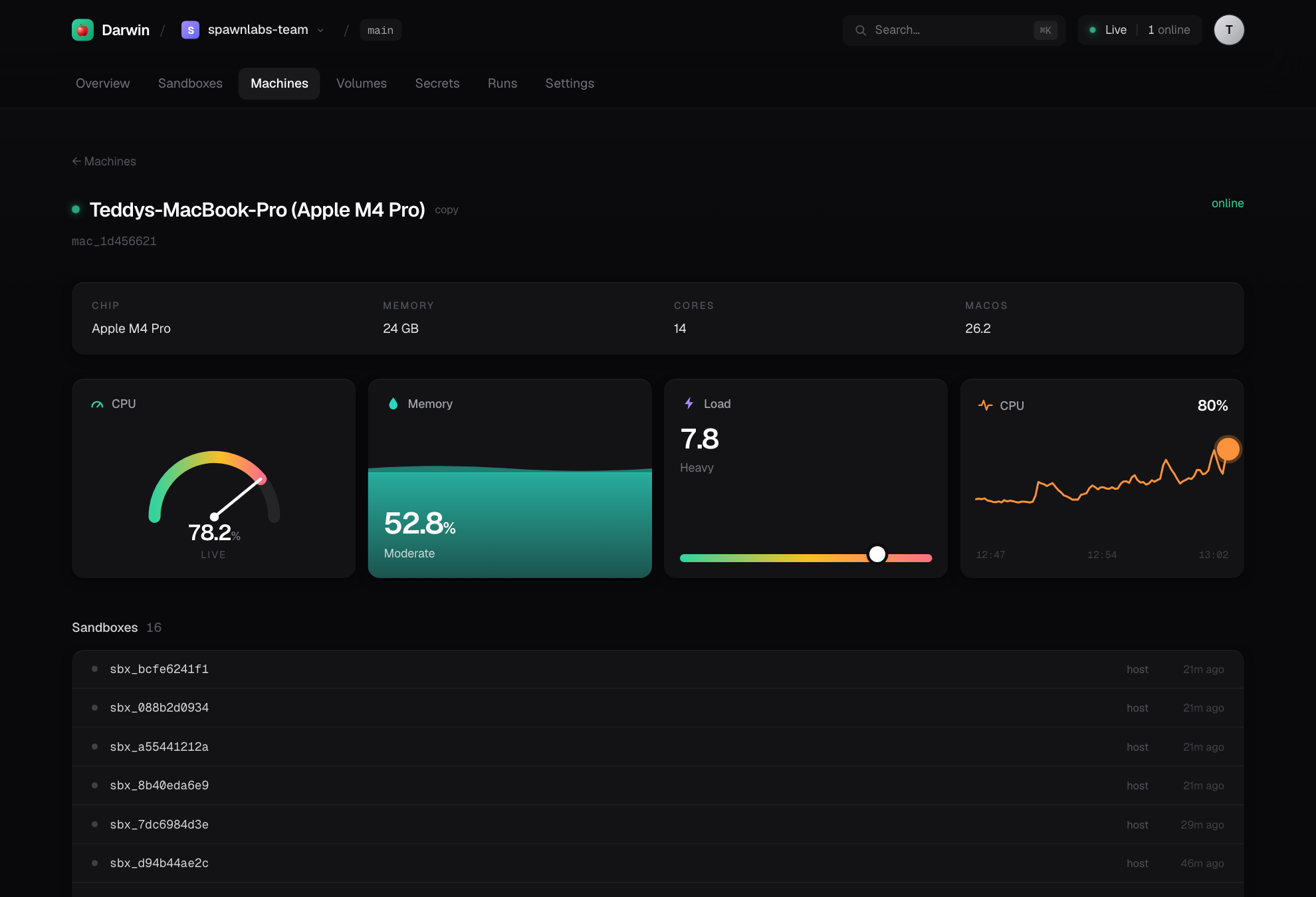
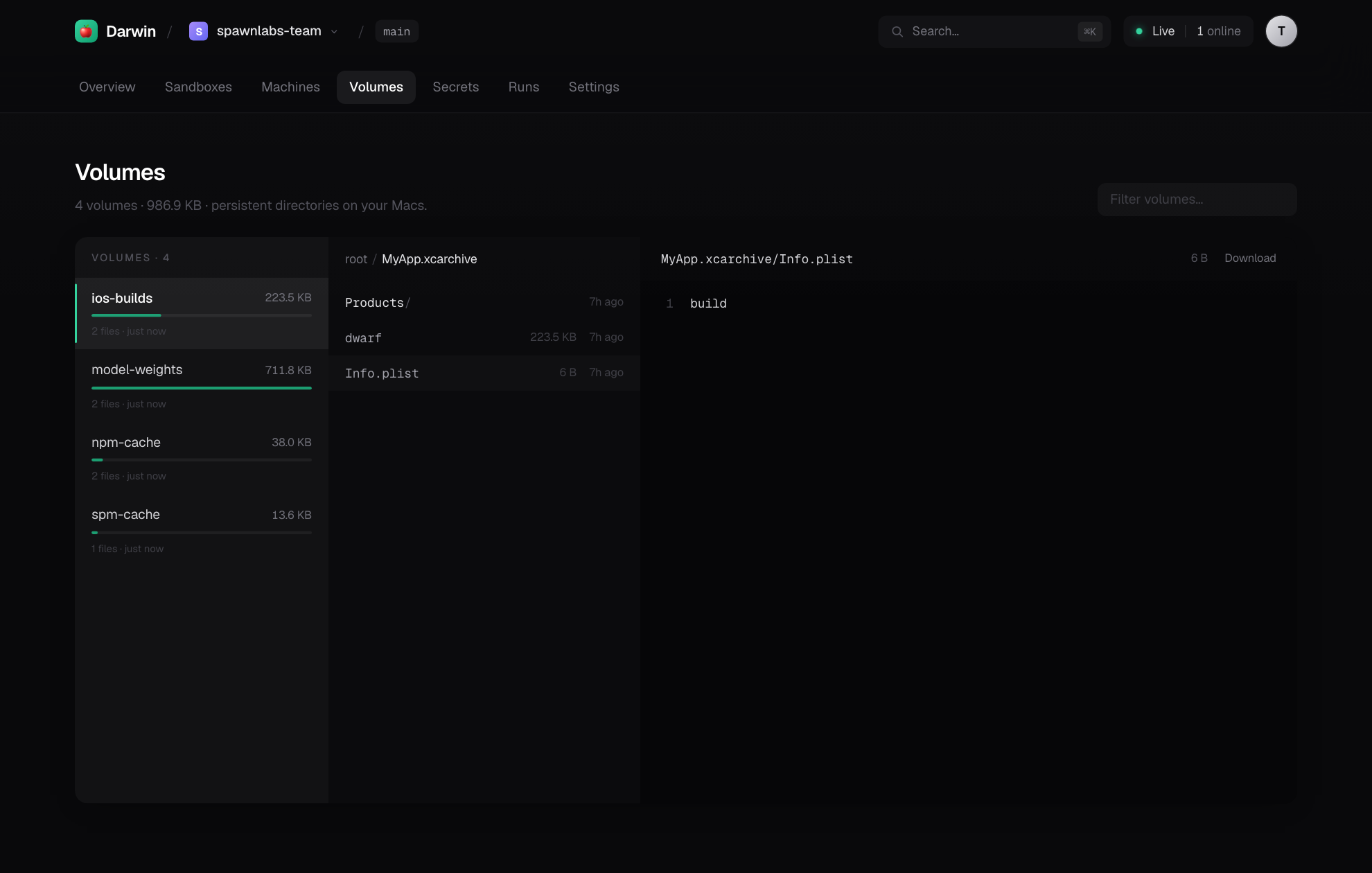
The dashboard
herds host serves a full web dashboard — bundled into the package as a static
build, served by the control plane (no Node.js at runtime). Live metrics, a
sandbox explorer with exposed ports, a deep file browser for volumes, secrets,
run history — all polling the same API the SDK and CLI use.
 |
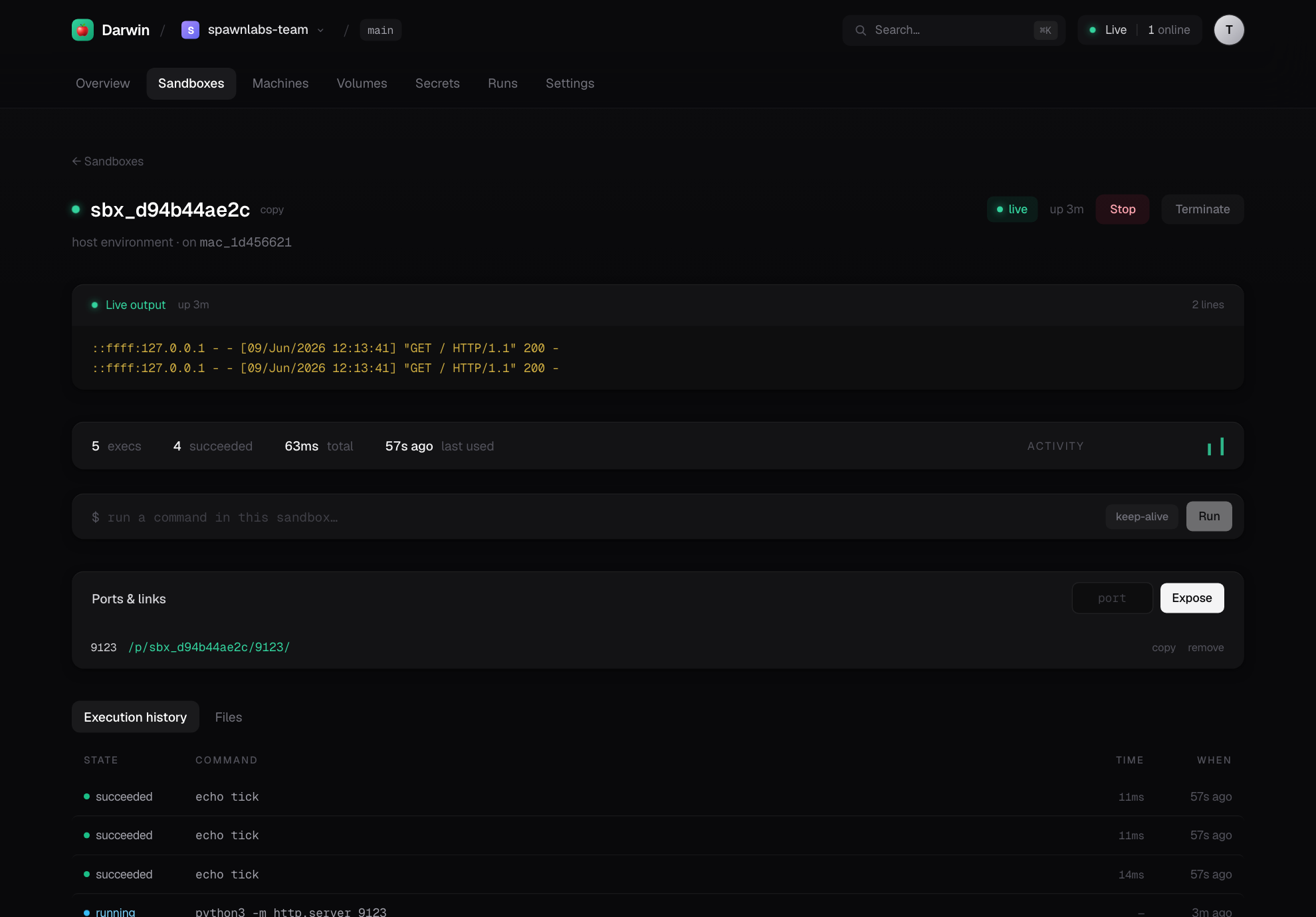 |
| Per-Mac live gauges | Sandboxes — activity + exposed ports |
 |
|
| Volumes — a real file explorer |
The CLI
herds auth               sign in (free) — get a stable, branded link
herds host               self-host: control plane + dashboard + public link
                         (runs in the background; the Mac joins its own fleet)
herds host status|stop|logs  manage the background host  ·  --foreground to attach
herds skill [--install]  print/install the agent skill (SKILL.md) for Claude Code
herds mcp                MCP server — expose this Mac as tools for ANY agent
herds doctor             check macOS permissions for driving real apps
herds open               open your live dashboard in the browser
herds token new|ls|revoke   scoped, revocable tokens (read|run|admin) for agents/CI
herds schedule add|ls|rm    recurring cron jobs that run on your Mac
herds connect <link> <token>   join another Mac to a host
herds serve              run a bare control plane locally
herds machines           list your connected Macs
herds tag <id> <tags…>   label a Mac for routing  ·  herds tags  ·  herds untag <id> <tag>
herds run -- <cmd>       run a command on a Mac (streams output)
herds shell -c <cmd>     one-off command (SSH-equivalent)
herds logs               recent jobs
herds status             local configuration
herds volume ls|create|rm
herds image ls           toolchain images available on this Mac
herds install            launchd LaunchAgent — stay online on login
herds uninstall
Isolation, honestly
The MVP isolates with per-sandbox directories, a clean allowlisted environment,
process-group teardown, and (when available) a sandbox-exec write-fence. This
is the right model for trusted code — the user owns the Mac and runs their own
builds — and it starts instantly.
The documented next tier is Tart VMs (Apple's Virtualization.framework, OCI
images, near-instant APFS copy-on-write clones) for true OS-level isolation, and
Apple's native container for Linux jobs on macOS 26. The Image/Volume/
Sandbox API is drawn so those become a backend swap, not an API change. See
DESIGN.md and ROADMAP.md.
Apple licensing — the moat
Apple's macOS SLA limits virtualization to 2 VMs per physical Mac and forbids "service bureau / time-sharing." The BYO-Mac model sidesteps this: the Mac and its macOS license belong to you, so Herds runs as personal/dev use on hardware you own — which is exactly what the license permits and what makes "Modal for Macs" both accurate and hard to copy as a rented-fleet cloud.
Build from source
git clone https://github.com/teddyoweh/herds
cd herds
uv venv && uv pip install -e ".[dev]"
uv run pytest                      # backend tests
./scripts/build_release.sh         # build the dashboard + wheel (with UI bundled)
The dashboard lives in web/ (Next.js, static-exported). scripts/build_release.sh
exports it and bundles it into the wheel, so pip install ships the whole UI.
Status
Live today, end-to-end:
pip install herds— on PyPI, dashboard bundled in.herds auth+herds host— a free account and a permanent, branded link (you.relay.herds.run) over our hosted relay — no Cloudflare/Tailscale needed.- Agents over the relay — a remote agent with a token runs
mac.run()and streams logs from anywhere; HTTP and WebSocket tunnel through the relay. - The platform — sign up at herds.run (email + password) → manage your Macs from the web dashboard.
- Connect Macs, run/stream commands, mount volumes, drive sandboxes, expose ports as URLs, run remote Python.
- Resident sessions — feed a live process turn-by-turn (long-lived agents,
the way spawn drives a Modal driver) — plus raw port tunnels
(CDP/websockets), image provisioning (cached
run_commands), filesystem snapshots, a full volume read API (get/listdir/remove), and per-Mac admission control + idle/GC reaping.
See ROADMAP.md for what's next (Tart VM backend, per-token scopes,
code-shipping for functions).
License
Apache-2.0
Release history Release notifications | RSS feed


Download files
Download the file for your platform. If you're not sure which to choose, learn more about installing packages.
Source Distribution
Built Distribution
Filter files by name, interpreter, ABI, and platform.
If you're not sure about the file name format, learn more about wheel file names.
Copy a direct link to the current filters
File details
Details for the file herds-0.2.3.tar.gz.
File metadata
- Download URL: herds-0.2.3.tar.gz
- Upload date:
- Size: 603.3 kB
- Tags: Source
- Uploaded using Trusted Publishing? No
- Uploaded via: uv/0.9.13 {"installer":{"name":"uv","version":"0.9.13"},"python":null,"implementation":{"name":null,"version":null},"distro":{"name":"macOS","version":null,"id":null,"libc":null},"system":{"name":null,"release":null},"cpu":null,"openssl_version":null,"setuptools_version":null,"rustc_version":null,"ci":null}
File hashes
| Algorithm | Hash digest | |
|---|---|---|
| SHA256 |
e9407d809af17b9966cdf0c6bca29ae0a665a5dbe663ec317625d3618724a530
|
|
| MD5 |
dfa22897de32fddfaa041aa956d3d880
|
|
| BLAKE2b-256 |
de71080276452324338a8df5af049e85fbd24650160249c22f7af88e632cfc6b
|
File details
Details for the file herds-0.2.3-py3-none-any.whl.
File metadata
- Download URL: herds-0.2.3-py3-none-any.whl
- Upload date:
- Size: 777.6 kB
- Tags: Python 3
- Uploaded using Trusted Publishing? No
- Uploaded via: uv/0.9.13 {"installer":{"name":"uv","version":"0.9.13"},"python":null,"implementation":{"name":null,"version":null},"distro":{"name":"macOS","version":null,"id":null,"libc":null},"system":{"name":null,"release":null},"cpu":null,"openssl_version":null,"setuptools_version":null,"rustc_version":null,"ci":null}
File hashes
| Algorithm | Hash digest | |
|---|---|---|
| SHA256 |
68a0e34f83d210c42536b4a213337187174d27b9aebc00e53a013be743c4fc07
|
|
| MD5 |
c4f6d4c987c7ea6646b50ec672cbaca3
|
|
| BLAKE2b-256 |
a860e769af9791c24fbcf64abfe68ed4fe19ebc8d477eefef16e0f21874a2e4f
|






