

hexiel
An open-source AI coding agent for your terminal and browser — a guardian angel for your codebase.
Runs on local models (Ollama, even on a mini-PC iGPU) or any big cloud model.
A free, self-hostable alternative to Claude Code and opencode.
🌐 Website: hexiel.tech · designed by JKagiDesigns LLC
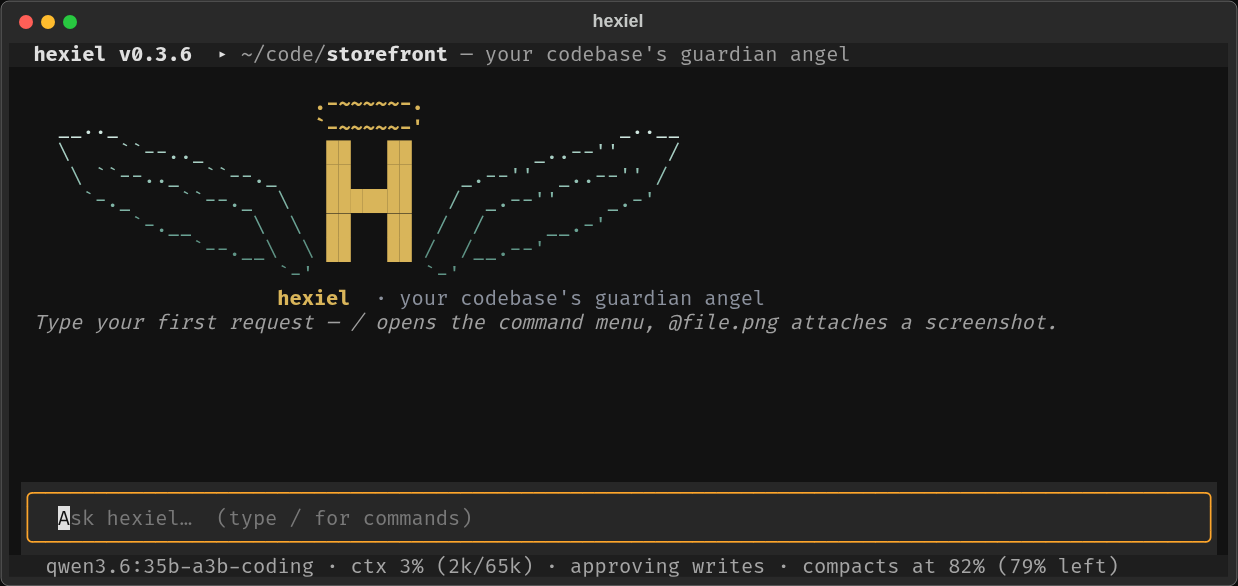
Why hexiel
- Built for modest hardware. Everything that doesn't need a model (searching,
mapping the project, waiting on tests, distilling web pages, batching work in a
pythonscript) runs locally in Python. The prompt is kept lean: on an Intel iGPU mini-PC runningqwen3.6:35b-a3b-coding, each request's prompt processing dropped from 46.5 s to 23.7 s in v0.2.6. - Any model, local or cloud. Ollama (local or Cloud), Anthropic, OpenAI, Gemini, xAI, OpenRouter, DeepSeek, or any OpenAI-compatible server (vLLM, LM Studio, TGI). Switch per session or permanently, from the UI.
- Terminal and browser. A full-screen TUI, a browser UI, one-shot headless runs, and an OpenAI-compatible API — one agent core behind all of them.
- Brings your ecosystem. Your existing Claude Code skills (
~/.claude/skills) and OpenWebUI tool/pipe/filter plugins work as-is. - Remembers and keeps track. File-based memory (
MEMORY.md), atodo.mdthat survives crashes, auto-compaction at a Claude-Code-sized context window. - Fixes itself. Crashes become incident files;
/healreproduces, fixes, tests and proposes a merge request — you approve it. - Free to use, can't be resold. GPLv3 + Commons Clause.
Quickstart
The quickest way, from PyPI:
pipx install 'hexiel[serve]'          # or: pip install 'hexiel[serve]'
hexiel --doctor                       # preflight checks with copy-paste fixes
cd ~/code/your-project && hexiel
Or from source (to hack on it):
git clone https://gitlab.com/jkagidesigns1/public/applications/hexiel.git
cd hexiel
python -m venv .venv
.venv/bin/pip install -e '.[serve]'     # Windows: .venv\Scripts\pip install -e ".[serve]"
.venv/bin/hexiel --doctor               # preflight checks with copy-paste fixes
.venv/bin/hexiel                        # start the TUI
Then put it on your PATH so it runs from any project:
ln -s "$PWD/.venv/bin/hexiel" ~/.local/bin/hexiel
cd ~/code/your-project && hexiel
hexiel always treats the directory you launch it from as the project: it
detects that tree's toolchain, reads its skills and keeps its state
(.hexiel/ — todo, memory, incidents, web cache) right there. The header shows
the hexiel version and the project you're in; hexiel -c resumes the last
conversation of this project.
Windows: works out of the box — the agent shells through PowerShell (pwsh,
winget install Microsoft.PowerShell), and bash falls back to it when no
WSL/git-bash is on PATH.
Ways to run it
hexiel                    # full-screen terminal UI
hexiel --serve            # browser UI at http://127.0.0.1:8777
hexiel -p "explain this repo in one paragraph"   # one-shot, headless
hexiel -c                 # resume this project's last conversation
hexiel -m sonnet          # pick a model profile for this run
Using it
 |
 |
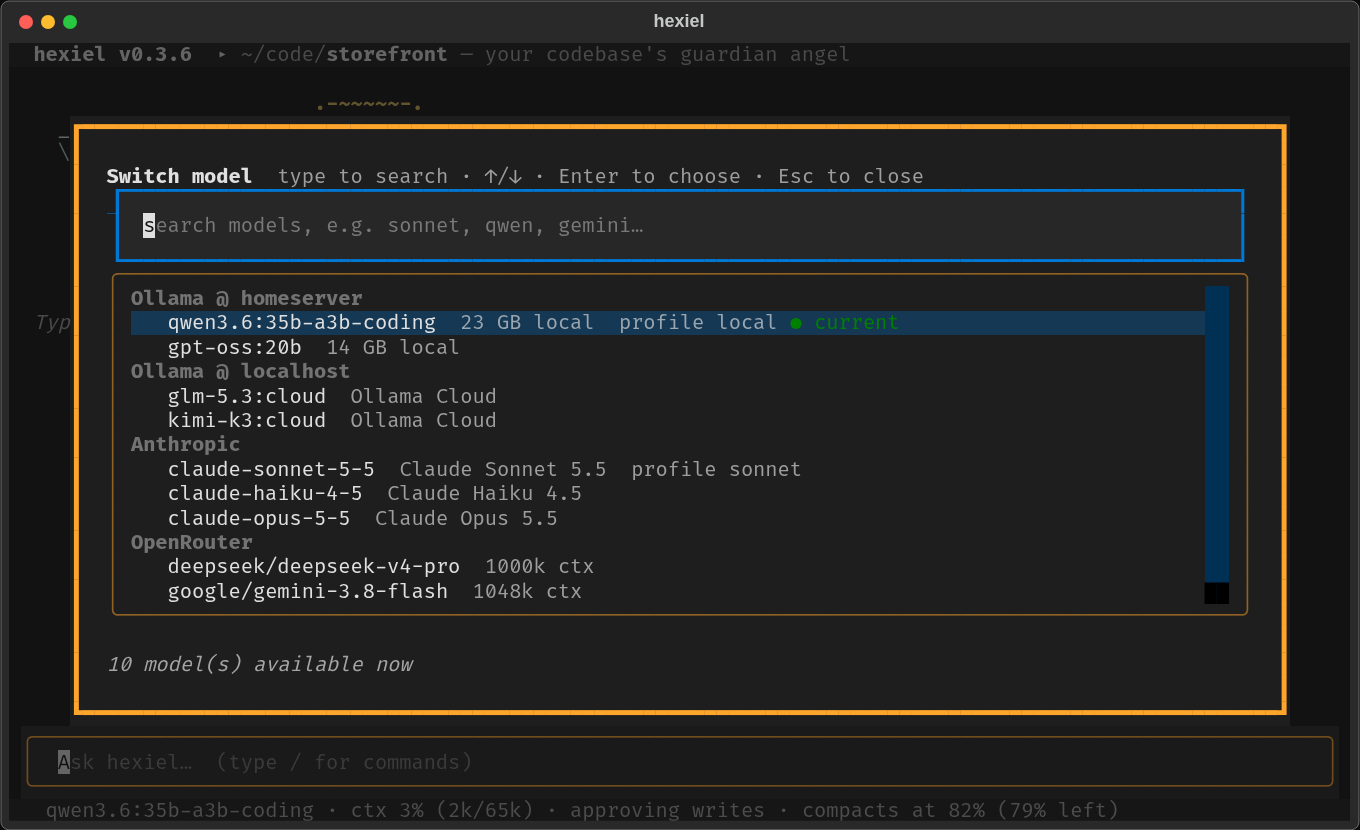
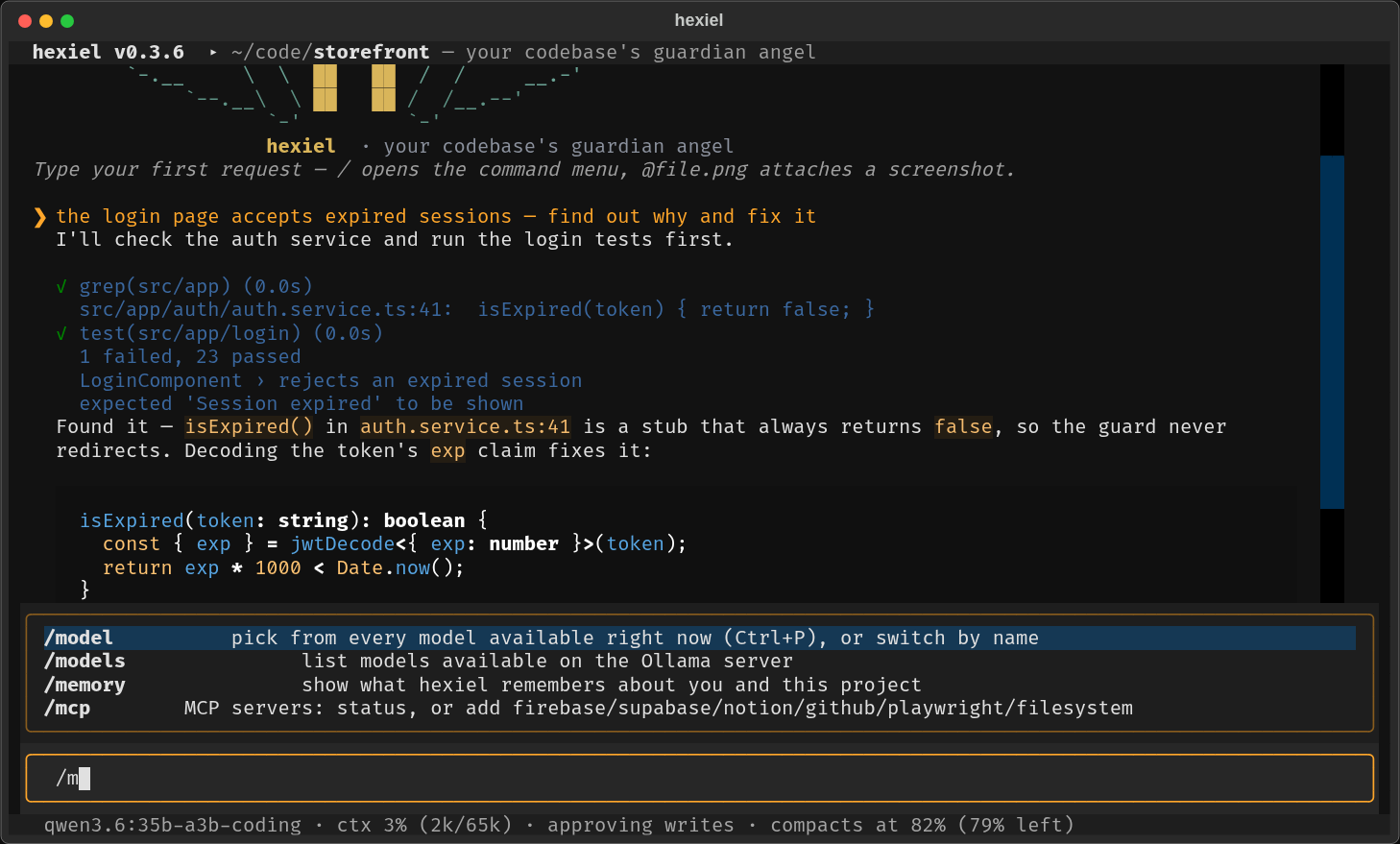
Ctrl+P / /model lists every model you can use right now — local Ollama, Ollama Cloud, Claude, OpenRouter… — queried live each time, never stale. |
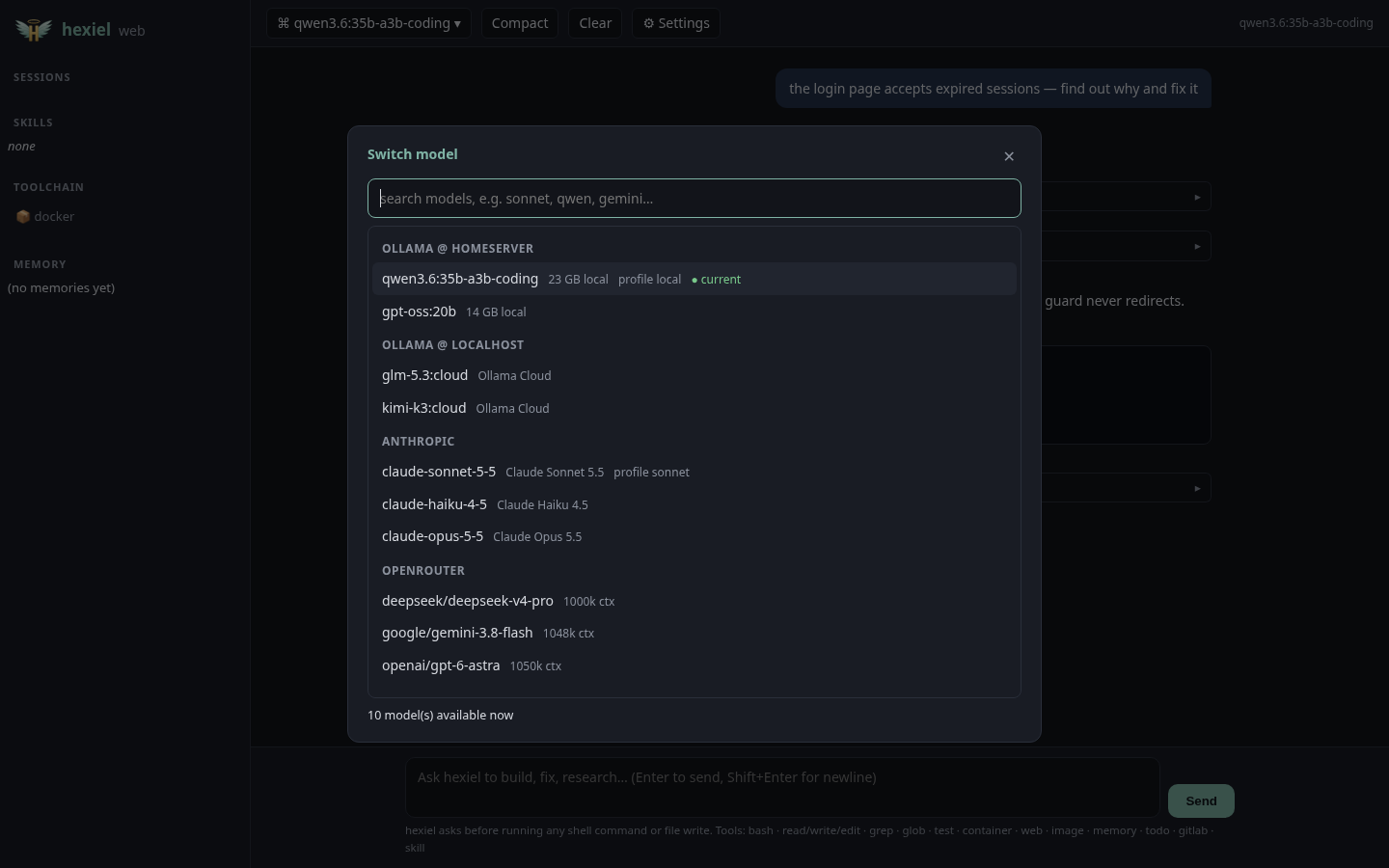
The same live picker in the browser UI. |
 |
 |
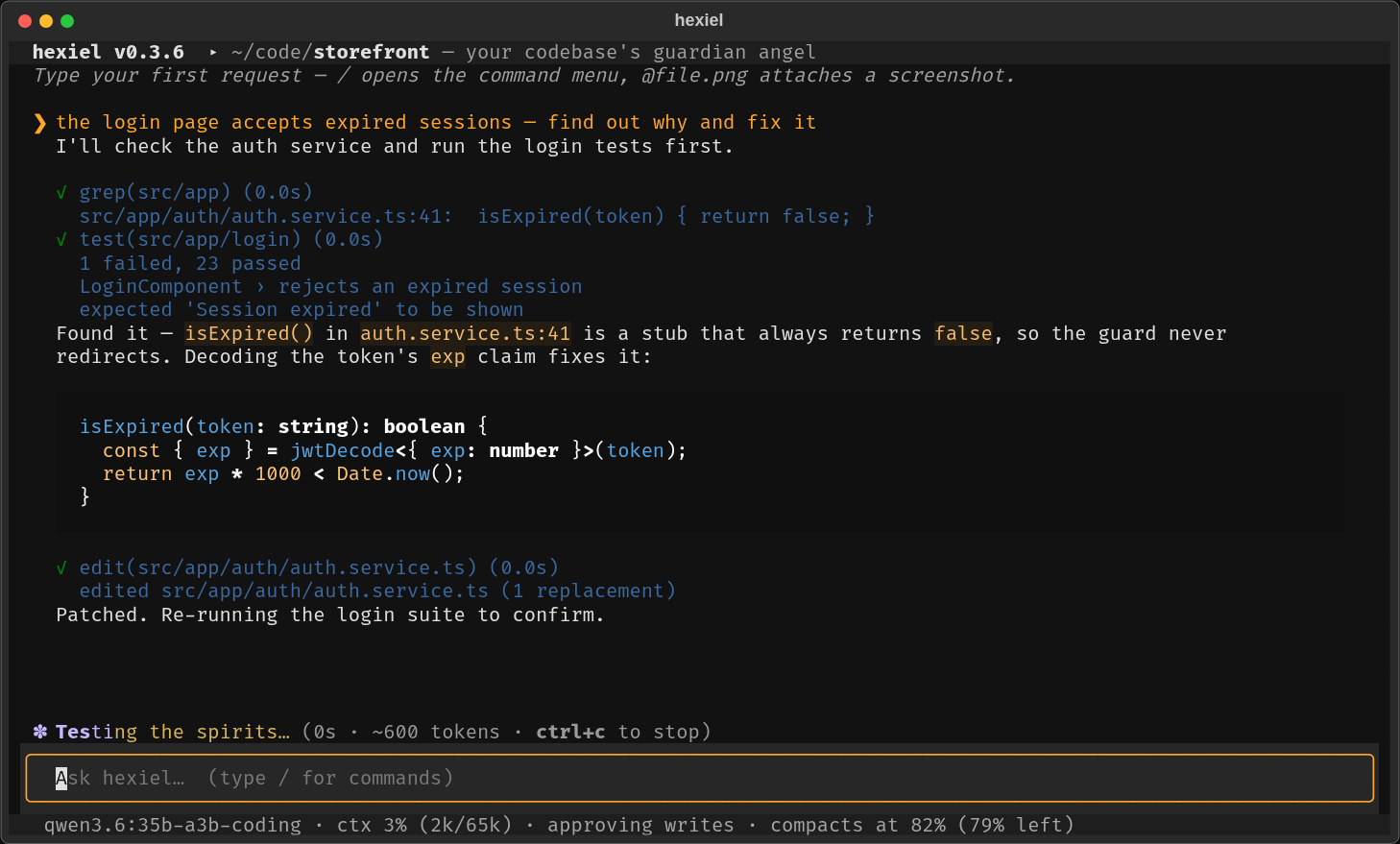
Type / for the command menu — every command and skill with what it does; ↑/↓, Tab to complete, Enter to run. /model lists your profiles. |
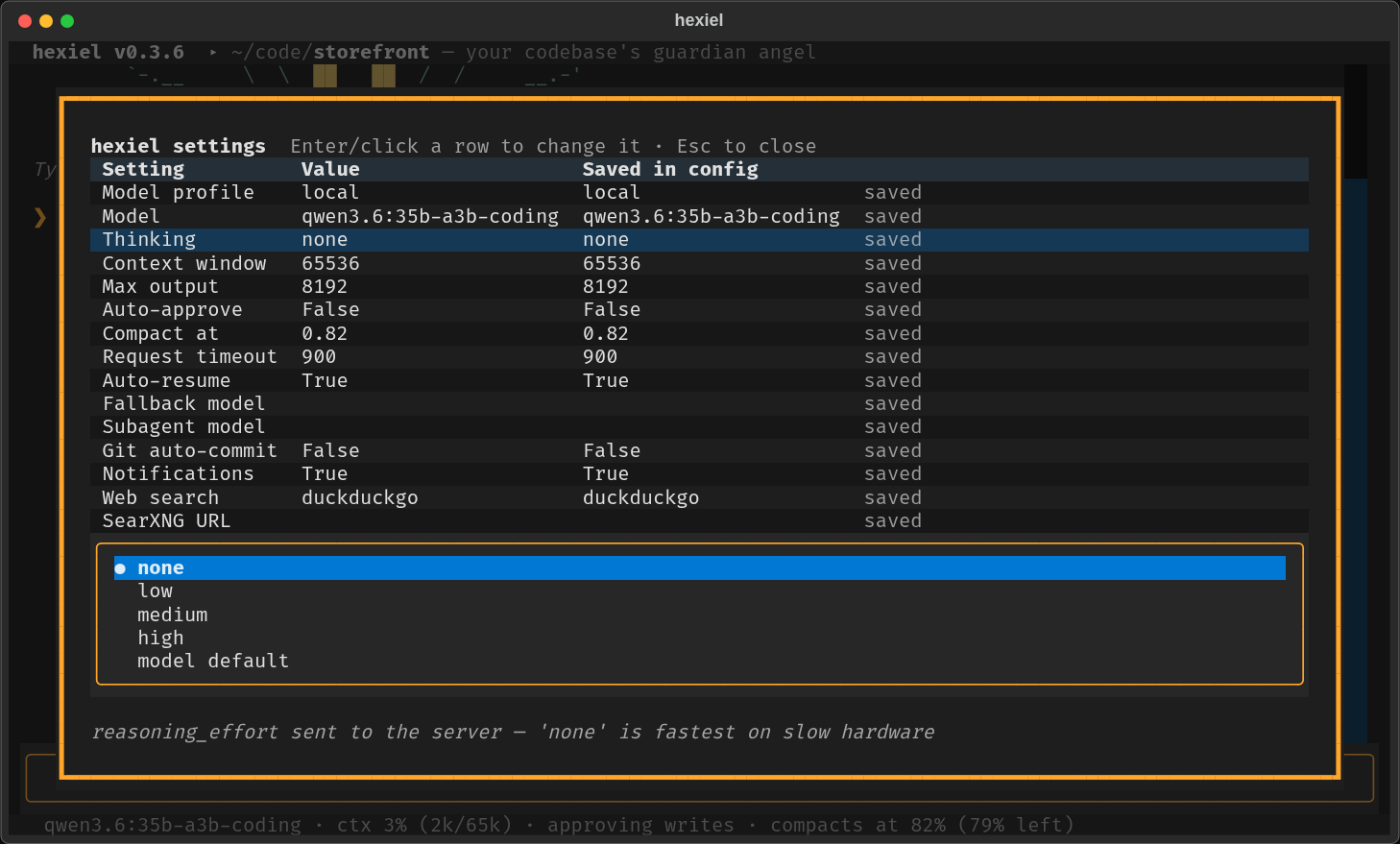
/config shows every setting in a table. Pick a row, pick a value, then choose this session or save permanently (one line of config.toml changes; comments are kept). |
- Screenshots: type an image path in your message (
why does @shot.png look broken?,~/Pictures/error.jpg) and it's attached for vision models. - Activity line: while hexiel works, the bottom-left shows what it's doing —
thinking, writing, running your tests — with elapsed time and tokens.
Ctrl+Cstops a turn. - Approvals: edits and commands ask first (
y/always /n);/autogoes hands-free. - Updates: hexiel checks for new releases in the background.
/update(or the web UI's update button) installs it and restarts, resuming your conversation. It refuses to update a checkout with uncommitted changes.
Control, safety and flow
Model picker (Ctrl+P / /model) |
Every model reachable right now — local Ollama, Ollama Cloud, Anthropic, OpenAI, OpenRouter… queried live each time, searchable |
| Auto-resume | Hit a rate or usage limit? hexiel counts down to the reset and continues the same turn; with fallback_profile it switches to e.g. your local model instead |
| Permission rules | Claude Code syntax — Bash(git status:*), Read(./.env), Edit(src/**), WebFetch(domain:…); deny > ask > allow; reads .claude/settings.json. "Always" answers are scoped to that kind of call |
Plan mode (/plan) |
Investigate and propose a plan; nothing is changed until you turn it off |
Undo (/undo) |
Reverts the files hexiel changed in its last turn, turn by turn |
| Hooks | Claude Code compatible (PreToolUse, PostToolUse, UserPromptSubmit, Stop, SessionStart); exit 2 blocks |
| Custom commands | Markdown prompts in .hexiel/commands/ or .claude/commands/ become /name (with $ARGUMENTS) |
Subagents (task tool) |
Searches and research run in a helper's own context; only the answer comes back — optionally on a cheaper/local subagent_profile |
| Instant checks | Every write/edit is syntax-checked locally (Python, JSON, TOML, shell, JS) in the same step |
| Also | /usage (tokens in/cached/out), desktop notifications when you're needed, opt-in git auto_commit, Claude prompt caching, a guard that stops runaway model output |
For analysts, researchers and small businesses
No code needed — just ask:
| Ask | What hexiel does (locally, cheaply) |
|---|---|
| "Which region beat its target? sales.csv vs targets.xlsx" | Reads a compact schema card of each file (not the file), answers with SQL (DuckDB) across CSV / Excel / Parquet / JSON — only the aggregated result reaches the model |
| "Keep a list of my customers and invoices" | Creates and updates a local SQLite database (.hexiel/data.db) — no setup |
| "Add an 'actual' column to Q3 in budget.xlsx" | Edits Excel cells, ranges and sheets, keeping your formatting |
| "Chart revenue by month" | An interactive HTML chart you can open in any browser |
| "Every Monday at 8am, summarise last week's sales and flag anything odd" | A scheduled job that runs even when hexiel is closed (systemd/cron, launchd, Windows Task Scheduler); results land in /inbox with a desktop notification |
| "What do these papers say about irrigation? Cite pages." | Indexes your PDFs / Word / Markdown once, then answers from the best passages with [file p.N] citations — keyword + (optional, local) semantic search, never whole documents in the prompt |
| "Research the state of IndexNow adoption" | Deep research: plans sub-questions, then searches and reads many pages in parallel in Python and hands the model one cited evidence pack |
| "Connect my Firebase project" | /mcp add firebase — also supabase, notion, github, playwright (browser automation), filesystem |
Data and scheduling tools load only when needed (automatically when a project contains data files, or on request), so coding sessions don't pay for them in every prompt.
Browser UI
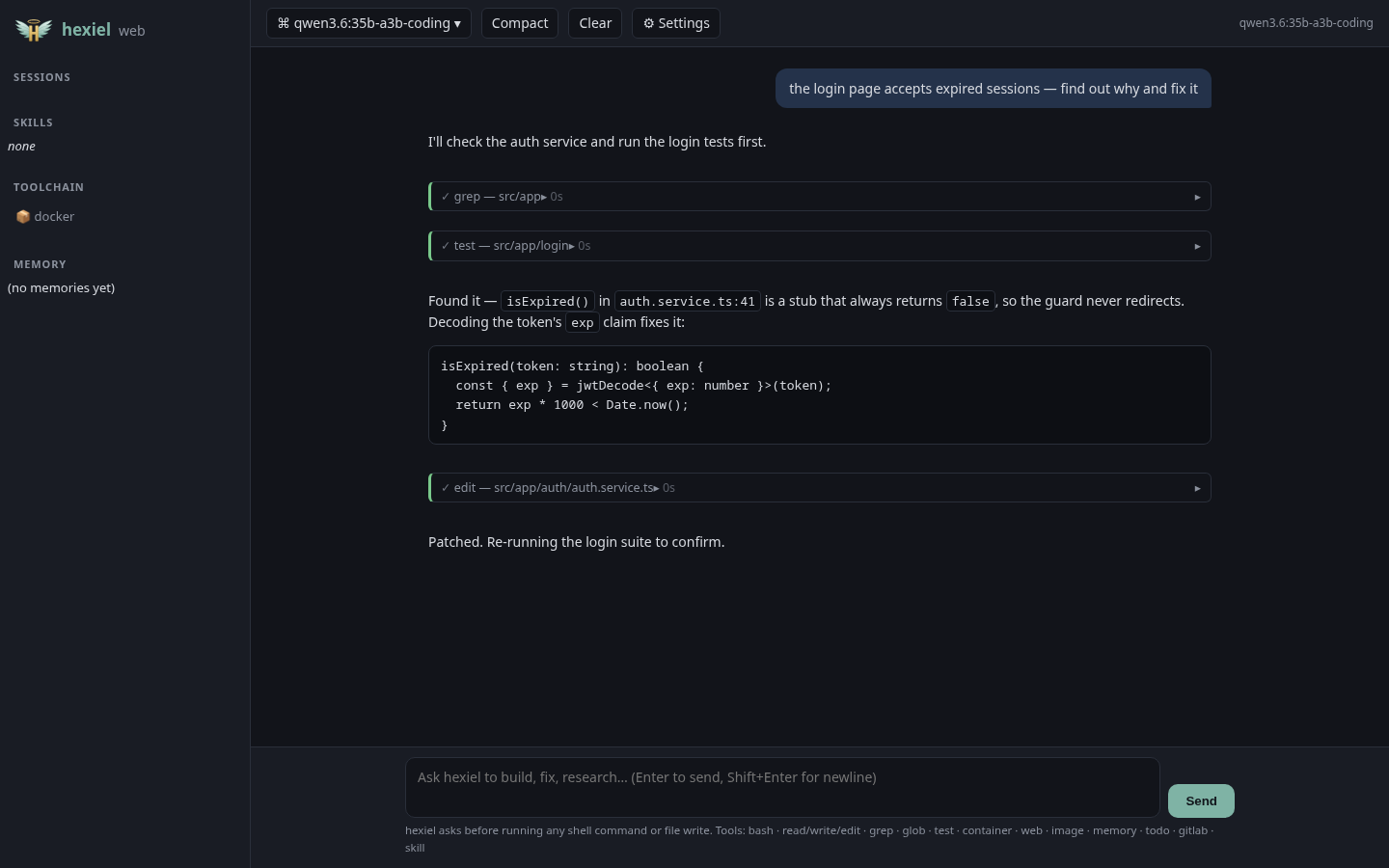
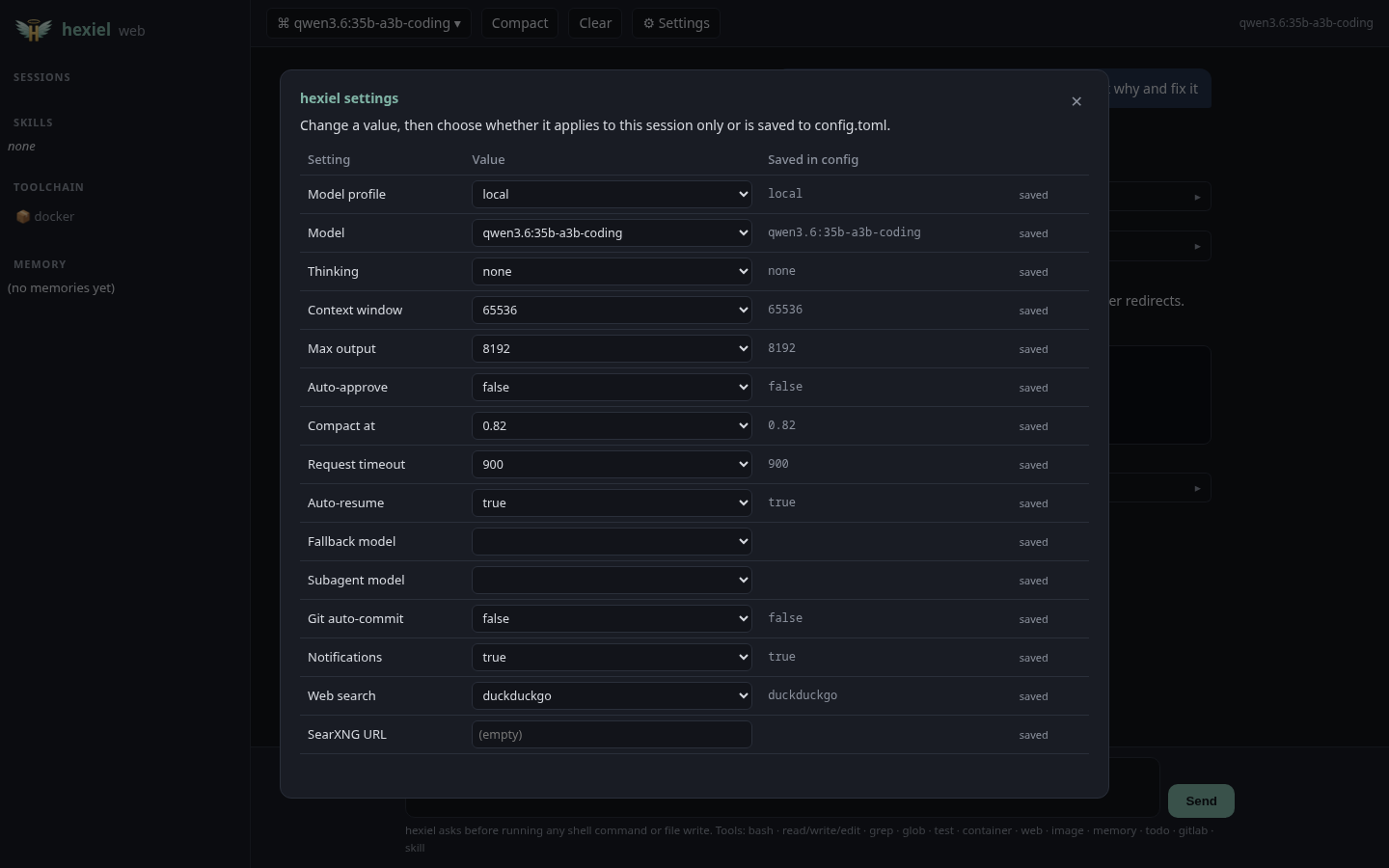
hexiel --serve runs the same agent in a browser (with the same / command menu and live model picker): streamed markdown, tool-call
cards, approval dialogs, model picker, ⚙ settings, context gauge, todo, memory
and sessions. Local-only by default; --host 0.0.0.0 prints a loud warning
(anyone who can reach the port can run commands on your machine).
 |
 |
Pasting text and images
The prompt is multi-line (Enter sends; Shift+Enter, Ctrl+J or Alt+Enter add a newline) and pasted text is
sanitized (control characters, escape sequences and invisible/bidi characters are dropped). Pastes over
~1,500 characters or 15 lines collapse to a [Pasted text #1 +240 lines] tag in the prompt and expand when you send.
Copy an image and press Ctrl+V (or Alt+V) in the terminal UI, or just paste in the browser, to attach it.
Terminal clipboard images need wl-clipboard or xclip (Linux) or pngpaste (macOS); the browser works everywhere.
Pasted images are saved under .hexiel/pastes/ in the project (add it to .gitignore).
Hexiel Remote (optional, paid)
Drive the hexiel on your own machine from any browser or phone, and run cloud-triggered automations (schedules and webhooks) on it. $8/month after a 14-day trial — see https://remote.hexiel.tech. The agent itself stays free; this client is open source and the subscription is enforced by the relay.
hexiel remote login          # email + password -> revocable device token (stored 0600)
hexiel --serve --remote      # connects OUT to the relay; nothing is opened locally
Only the web UI's own pages and API cross the tunnel (never /v1). The relay can see tunneled traffic (TLS, not end-to-end encrypted).
Models
Fastest start: /model add <preset> in the terminal UI — presets for Claude
(sonnet, opus, haiku), OpenAI (gpt), Gemini (gemini), xAI (grok),
DeepSeek, Kimi, GLM, Mistral, Groq, Together, Fireworks, OpenRouter, Azure,
Bedrock, and local Ollama / LM Studio / vLLM / llama.cpp. hexiel --presets
lists them; docs/MODELS.md has copy-paste config for each,
including provider quirks hexiel handles for you.
Profiles live in ~/.config/hexiel/config.toml (written on first run). Switch
with /model NAME, hexiel -m NAME, or the settings table.
default = "local"

[models.local]                      # Ollama on this machine or a home server
provider = "openai"
base_url = "http://localhost:11434/v1"
model = "qwen3.6:35b-a3b-coding"    # coding + screenshots + tool calling in one model
context_window = 65536              # match the server's OLLAMA_CONTEXT_LENGTH
extra_body = { reasoning_effort = "none" }   # skip slow "thinking" on modest hardware

[models.sonnet]
provider = "anthropic"
model = "claude-sonnet-5-5"
api_key_env = "ANTHROPIC_API_KEY"
Picking a local model: on low-end hardware, prefer mixture-of-experts
models with ~3B active parameters (they run several times faster than dense
models of the same size) that have vision + tool-calling. qwen3.6:35b-a3b-coding
passed all of hexiel's checks (tool calls, screenshots, a compiled Java task) on
an Intel iGPU at ~12 tokens/s. Hybrid "thinking" models should run with
reasoning_effort = "none"; otherwise one step can take minutes.
What hexiel does
Tools
bash · python (batch many steps into one local script) · read · write ·
edit · glob · grep · list · map (cached project tree) · file_info ·
powershell · test (your detected runner) · container (docker/podman +
compose) · view_image / image_edit · web_search / web_fetch (no API key
needed) · memory · todo · gitlab_mr · skill — plus any MCP server's tools and any OpenWebUI plugin in plugins/.
Context discipline
- Auto-compaction, Claude-Code style: at 82% of the context window, older history is summarized (task, recent work, decisions, errors, next steps) and the conversation continues. Real provider usage numbers drive it.
- Local-first token economy: tool output is budgeted and distilled in Python before the model sees it.
| Work | Where it runs |
|---|---|
| Toolchain discovery, project map, file indexing | local (Python) |
| Multi-step reads/searches/parsing | one python script instead of many model round-trips |
| Long command output | head + tail kept, middle elided |
| Waiting for tests / containers / builds | local; only the verdict + failures reach the model |
| Duplicate tool calls in a turn | answered from cache |
| Web pages | distilled to text; full text parked on disk for follow-up reads |
| Old tool output and images in long sessions | dropped locally before any summarization call |
| Skills | one-line index; full instructions load only when used |
| Reasoning, planning, writing code | the model — spend tokens there, nowhere else |
Project instructions, todo and memory — maintained automatically
- Project instructions:
AGENTS.md/CLAUDE.md/HEXIEL.md(any letter case) at the project root are loaded into every session; a roottodo.mdis pointed out so the model reads it when you say "continue". - todo.md: multi-step work is tracked in
<project>/.hexiel/todo.md(- [ ]queued, one- [~]in progress,- [x]done). When a request takes three or more tool calls and the model hasn't planned it itself, hexiel logs it as a task, refreshes the where we left off line after every step and ticks it off when the turn completes — in Python, at zero token cost. If hexiel or your laptop dies mid-task,hexiel -cresumes from an accurate checkpoint. - Memory:
~/.local/share/hexiel/memory/(global) and<project>/.hexiel/memory/(project), markdown notes indexed byMEMORY.md. The model saves what it learns; and every auto-compaction also extracts durable facts (build/test commands, conventions, your preferences) intoauto-facts.md— deduplicated, no extra model call. - Skills are
SKILL.mdfolders from~/.local/share/hexiel/skills/, the project, and~/.claude/skills/— Claude Code skills work unchanged.
Self-healing — fix hexiel, then share the fix with everyone
Crashes and provider errors are recorded to .hexiel/incidents/. Run /heal
(or /heal <what went wrong> for a bug you noticed) and hexiel:
- makes an isolated copy of its own source at the version you're running
(a git worktree — or, for
pipinstalls, a clone of the release tag) under~/.local/share/hexiel/heal/. Your project and your install are untouched; - reproduces the bug, fixes the root cause and adds a test, running the suite there;
- opens a lazygit-style review: changed files on the left with checkboxes,
a colour diff on the right (
spaceinclude/exclude,aall/none); - you choose:
- Send to hexiel (and keep) — commits only the files you ticked and opens a
merge request to the official repo (via a fork if you're not a maintainer), so
every hexiel user gets the fix once it's reviewed. Needs a free GitLab account
(
/setup-gitlab <token>). - Keep just for me — applies the ticked files to your hexiel.
- Discard, or decide later with
/heal review.
- Send to hexiel (and keep) — commits only the files you ticked and opens a
merge request to the official repo (via a fork if you're not a maintainer), so
every hexiel user gets the fix once it's reviewed. Needs a free GitLab account
(
MCP servers
hexiel runs Model Context Protocol servers —
local (stdio) and remote (streamable HTTP). It reads Claude Code's .mcp.json
from your project (and ~/.config/hexiel/mcp.json), so existing setups just work:
{ "mcpServers": {
    "files":  { "command": "npx", "args": ["-y", "@modelcontextprotocol/server-filesystem", "."] },
    "remote": { "type": "http", "url": "https://example.com/mcp",
                "headers": { "Authorization": "Bearer ${MY_TOKEN}" } } } }
or in config.toml, with an optional allowlist to keep prompts small on modest hardware:
[mcp.servers.files]
command = "npx"
args = ["-y", "@modelcontextprotocol/server-filesystem", "."]
tools = ["read_file", "list_directory"]     # expose only these
Tools appear as mcp__<server>__<tool>; read-only tools skip the approval prompt.
/mcp shows each server's status, tool count and schema-token cost.
GitLab merge requests for your own projects (/ship, gitlab_mr)
- Owner flow: turn uncommitted work into a merge request (branch → commit → push → MR), approving each step.
- Contributor flow: hexiel forks the repo, pushes to your fork and opens an MR upstream — attributed to you.
- Auth via
HEXIEL_GITLAB_TOKEN/GITLAB_TOKENor/setup-gitlab <token>. gitlab.com and self-hosted.
OpenWebUI compatibility
- Use hexiel from OpenWebUI (or any OpenAI client): point a connection at
http://127.0.0.1:8777/v1/chat/completions. Read-only tools stay available; write tools are disabled over the API. - Use OpenWebUI plugins in hexiel: drop
Tools/Pipe/Filterplugin files intoplugins/— methods become tools,Valvesare honored.
Contributing
Fork → branch → merge request; the maintainer reviews and approves. hexiel can
do the whole flow for you (/ship). See CONTRIBUTING.md.
.venv/bin/pytest                    # 117 tests: tools, providers, compaction, TUI, MCP,
                                    # self-heal, settings, updater, web UI, plugins
.venv/bin/python scripts/screenshots.py   # regenerate these screenshots
License
GPLv3 with the Commons Clause: free to use, study, fork and contribute — not free to sell as a product or service.
1 maintainer

Metadata
1 maintainer
Release files for hexiel 0.3.12
For a detailed explanation of source distributions (sdists) and built distributions (wheels), please see the package formats documentation.
Source distribution (sdist)
| File | Size | Uploaded | Provenance | |
|---|---|---|---|---|
| hexiel-0.3.12.tar.gz | 208.7 kB | Without provenance | Details |
Built distribution (wheel)
| File | Interpreter | ABI | Platform | Reset |
|---|---|---|---|---|
| hexiel-0.3.12-py3-none-any.whl | Python 3 | none | any | Details |
Total release size: 395.9 kB
Release files / hexiel-0.3.12.tar.gz
| Download URL | hexiel-0.3.12.tar.gz |
|---|---|
| Size | 208.7 kB |
| Tags | Source |
|
SHA-256 checksum How to use checksums |
c75401748ff36dfacfd5498902eee3825c72eaa005d02d7fe4b86d0f04b79bd4
|
|
BLAKE2b-256 checksum How to use checksums |
202850ad0b28c5a52189ceb98ab4e98381f9f332cf1dfbdaed56d7375495996c
|
| Upload date | |
|
Uploaded using Trusted Publishing? What is trusted publishing? |
Yes |
| Uploaded via |
twine/7.0.0 CPython/3.12.15
|
Release files / hexiel-0.3.12-py3-none-any.whl
| Download URL | hexiel-0.3.12-py3-none-any.whl |
|---|---|
| Size | 187.1 kB |
| Tags | Python 3 |
|
SHA-256 checksum How to use checksums |
561a56994e5950fd6973c418881fe7b0a93da8b4b92917a06480693876f1c527
|
|
BLAKE2b-256 checksum How to use checksums |
2b5909a2821033e17f1beaa891e3f5afbb275eed8bea7b92306fff5535c2a19d
|
| Upload date | |
|
Uploaded using Trusted Publishing? What is trusted publishing? |
Yes |
| Uploaded via |
twine/7.0.0 CPython/3.12.15
|
Security for hexiel 0.3.12
Provenance
Provenance describes where a file came from. On PyPI, provenance is shared via attestations, which provide a verifiable record of the build or publishing details. View details, limitations and caveats.
No provenance found
None of the files in this release were uploaded with provenance metadata.
A note on package security
PyPI is a repository for distributing packages, not a service for auditing them. While third-party security researchers and our staff do their best to detect and remove malicious packages, PyPI cannot guarantee the quality, security or suitability of any given package.
To learn more about protecting yourself from malicious actors, visit our package security documentation.














