
A CLI to estimate inference memory requirements for Hugging Face models, written in Python.
Verified details
These details have been verified by PyPIProject links
GitHub Statistics
Maintainers

Project description
[!WARNING]
hf-memis still experimental and therefore subject to major changes across releases, so please keep in mind that breaking changes may occur until v1.0.0.
hf-mem is a CLI to estimate inference memory requirements for Hugging Face models, written in Python. hf-mem is lightweight, only depends on httpx, as it pulls the Safetensors and / or GGUF metadata via HTTP Range requests. It's recommended to run with uv for a better experience.
hf-mem lets you estimate the inference requirements to run any model from the Hugging Face Hub, including Transformers, Diffusers and Sentence Transformers models, or really any model as long as it contains any of Safetensors or GGUF weights.
Read more information about hf-mem in this short-form post, but note it's not up-to-date as it was written in January 2026.
Usage
CLI (Recommended)
Transformers
uvx hf-mem --model-id MiniMaxAI/MiniMax-M2

Diffusers
uvx hf-mem --model-id Qwen/Qwen-Image

Sentence Transformers
uvx hf-mem --model-id google/embeddinggemma-300m

Python
You can also run it programmatically with Python as:
from hf_mem import run

result = run(model_id="MiniMaxAI/MiniMax-M2", experimental=True)
print(result)
# Result(model_id='MiniMaxAI/MiniMax-M2', revision='main', filename=None, memory=230121630720, kv_cache=24964497408, total_memory=255086128128, details=False)
If you're already inside an async application, use arun(...) instead:
from hf_mem import arun

result = await arun(model_id="MiniMaxAI/MiniMax-M2", experimental=True)
print(result)
# Result(model_id='MiniMaxAI/MiniMax-M2', revision='main', filename=None, memory=230121630720, kv_cache=24964497408, total_memory=255086128128, details=False)
Experimental
By enabling the --experimental flag, you can enable the KV Cache memory estimation for LLMs (...ForCausalLM) and VLMs (...ForConditionalGeneration), even including a custom --max-model-len (defaults to the config.json default), --batch-size (defaults to 1), and the --kv-cache-dtype (defaults to auto which means it uses the default data type set in config.json under torch_dtype or dtype, or rather from quantization_config when applicable).
uvx hf-mem --model-id MiniMaxAI/MiniMax-M2 --experimental

GGUF
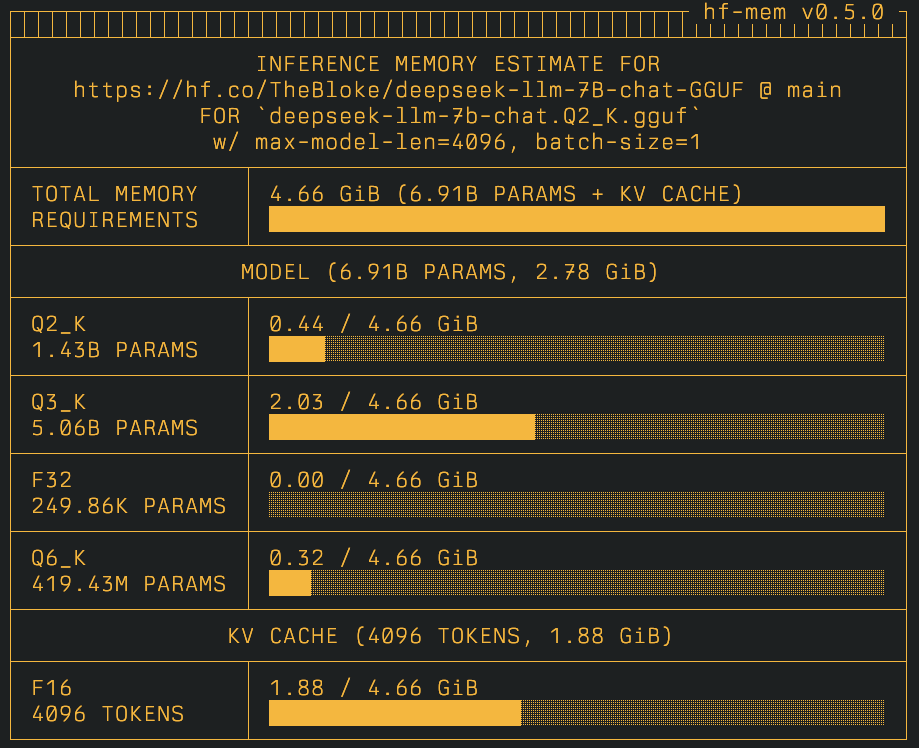
If the repository contains GGUF model weights, those will be listed by default (only if there are no Safetensors weights, otherwise the GGUFs will be ignored) and the memory will be estimated for each one of those; whereas if a specific file is provided, then the memory estimation will be targeted for that given file instead.
uvx hf-mem --model-id TheBloke/deepseek-llm-7B-chat-GGUF --experimental

Or if you want to only get the estimation on a given file:
uvx hf-mem --model-id TheBloke/deepseek-llm-7B-chat-GGUF --gguf-file deepseek-llm-7b-chat.Q2_K.gguf --experimental
(Optional) Agent Skills
Optionally, you can add hf-mem as an agent skill, which allows the underlying coding agent to discover and use it when provided as a SKILL.md, e.g., .claude/skills/hf-mem/SKILL.md.
More information can be found at Anthropic Agent Skills and how to use them.
References
Technical
Visual
Project details
Verified details
These details have been verified by PyPIProject links
GitHub Statistics
Maintainers
Release history Release notifications | RSS feed


Download files
Download the file for your platform. If you're not sure which to choose, learn more about installing packages.
Source Distribution
Built Distribution
Filter files by name, interpreter, ABI, and platform.
If you're not sure about the file name format, learn more about wheel file names.
Copy a direct link to the current filters
File details
Details for the file hf_mem-0.5.2.tar.gz.
File metadata
- Download URL: hf_mem-0.5.2.tar.gz
- Upload date:
- Size: 23.7 kB
- Tags: Source
- Uploaded using Trusted Publishing? Yes
- Uploaded via: uv/0.11.2 {"installer":{"name":"uv","version":"0.11.2","subcommand":["publish"]},"python":null,"implementation":{"name":null,"version":null},"distro":{"name":"Ubuntu","version":"24.04","id":"noble","libc":null},"system":{"name":null,"release":null},"cpu":null,"openssl_version":null,"setuptools_version":null,"rustc_version":null,"ci":true}
File hashes
| Algorithm | Hash digest | |
|---|---|---|
| SHA256 |
c48588388fa740a0e2084458e43c94ad557881c2b6440c9ddbbe5f603c933bc6
|
|
| MD5 |
7819a96b9672dca058d6e0d818ca2b66
|
|
| BLAKE2b-256 |
f56745dd8c5727a2f91dc12d6ef8898c33e65b264e474d75c879b3f07fcc9e7d
|
File details
Details for the file hf_mem-0.5.2-py3-none-any.whl.
File metadata
- Download URL: hf_mem-0.5.2-py3-none-any.whl
- Upload date:
- Size: 31.2 kB
- Tags: Python 3
- Uploaded using Trusted Publishing? Yes
- Uploaded via: uv/0.11.2 {"installer":{"name":"uv","version":"0.11.2","subcommand":["publish"]},"python":null,"implementation":{"name":null,"version":null},"distro":{"name":"Ubuntu","version":"24.04","id":"noble","libc":null},"system":{"name":null,"release":null},"cpu":null,"openssl_version":null,"setuptools_version":null,"rustc_version":null,"ci":true}
File hashes
| Algorithm | Hash digest | |
|---|---|---|
| SHA256 |
dca25ac69d92e948cc513bb0377b0239f932b4a3b6f2b3131005b45a485fe52f
|
|
| MD5 |
5b57d825b401a17deaaba91d5fc3aedd
|
|
| BLAKE2b-256 |
d2fb1d43b3d53c49021b256ff970a4a35e2d7659f3a816ba59e58c2e1bd0c98c
|






