
Visualize HuggingFace Byte-Pair Encoding (BPE) Tokenizer encoding process

Project description
Hugging Face Byte-Pair Encoding tokenizer visualizer library
The library can help you visualize how the encoding process happens in the Byte-Pair Encoding tokenizer algorithm when you pass on your text content for tokenization.
Byte-Pair Encoding (BPE) was initially developed as an algorithm to compress texts, and then used by OpenAI for tokenization when pre-training the GPT model. It’s used by a lot of Transformer models, including GPT, GPT-2, RoBERTa, BART, and DeBERTa.
Byte-Pair Encoding tokenization
BPE training starts by computing the unique set of words used in the corpus (after the normalization and pre-tokenization steps are completed), then building the vocabulary by taking all the symbols used to write those words.
More about the algorithm here
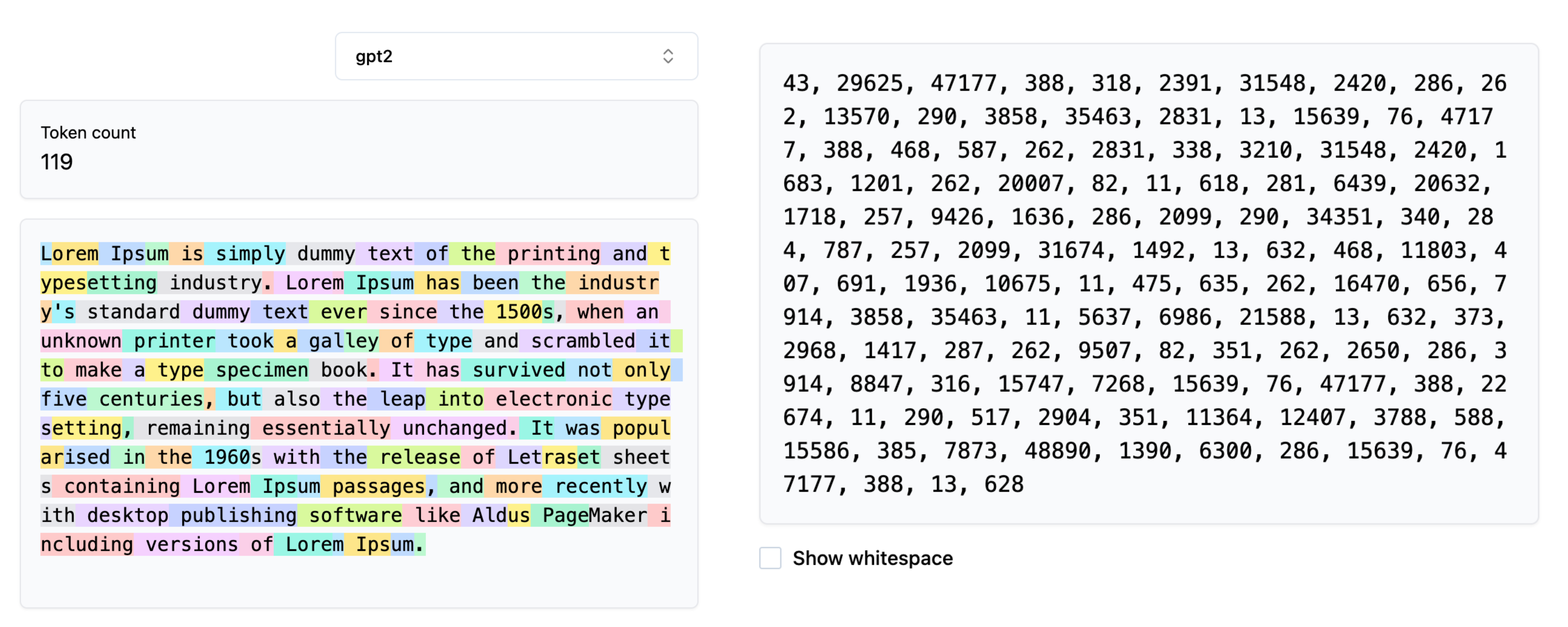
Visualizing the Tokenization process
During the tokenization process the input content is compressed into the encoded IDs based on the trained BPE-Tokenizer. During the training process the token-pairs are merged into new token ID based on their frequency of existence in the training corpus.
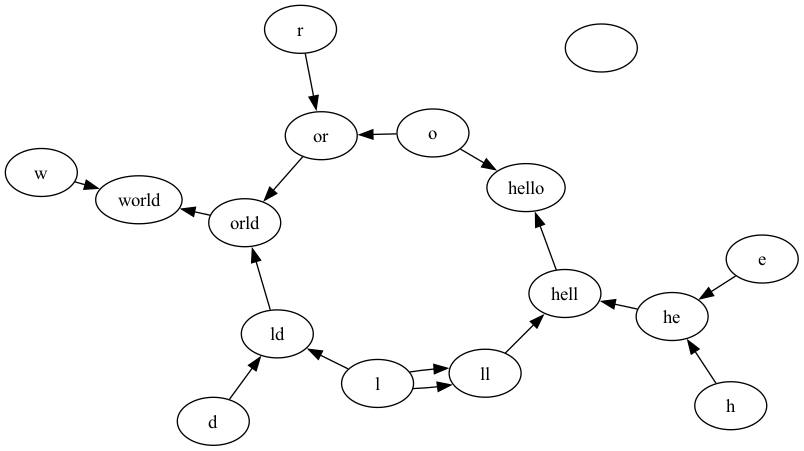
This library helps in visualizing how the merging process looks like for a given string to be encoded. It generates a graph where the nodes are tokens / characters and if a pair of characters are merged, the nodes are connected via directed edges.
Installing the Library
pip install hf-tokenizer-visualizer
Using the Library
- Save your visualization in a
PNGor aPDFfile.
from hf_tokenizer_visualizer import HfBPETokenizerVisualizer

visualizer = HfBPETokenizerVisualizer(
    pretrained_model_name="gpt2",
    save_visualization=True,
    file_type="png",
    file_name="bpe_tokenization_visualization_2",
    enable_debug=False,
)

visualizer.visualize_encoding('hello world')
Note: The file is saved in your current working directory. Note: You can choose between
pngand
- Get the raw encoding
from hf_tokenizer_visualizer import HfBPETokenizerVisualizer

visualizer = HfBPETokenizerVisualizer(
    pretrained_model_name="gpt2",
    save_visualization=True,
    file_type="png",
    file_name="bpe_tokenization_visualization_2",
    enable_debug=False,
)

visualizer.encode('hello world')
Output: [31373, 995]
Output Graph generated


Download files
Download the file for your platform. If you're not sure which to choose, learn more about installing packages.
Source Distribution
Built Distribution
Filter files by name, interpreter, ABI, and platform.
If you're not sure about the file name format, learn more about wheel file names.
Copy a direct link to the current filters
File details
Details for the file hf_tokenizer_visualizer-0.0.6.tar.gz.
File metadata
- Download URL: hf_tokenizer_visualizer-0.0.6.tar.gz
- Upload date:
- Size: 3.7 kB
- Tags: Source
- Uploaded using Trusted Publishing? No
- Uploaded via: twine/6.2.0 CPython/3.13.1
File hashes
| Algorithm | Hash digest | |
|---|---|---|
| SHA256 |
0aaa031b2990d9ba8133f7bc3c2e7c7db3f821e741e46aa0856bd54c7098b3ff
|
|
| MD5 |
0a9c9e773f8f36cac659914b8e710c85
|
|
| BLAKE2b-256 |
94233aca7f405e4de0547a02ad24d8f65ac51c2a2c6aa39faaca36174ec7c60c
|
File details
Details for the file hf_tokenizer_visualizer-0.0.6-py3-none-any.whl.
File metadata
- Download URL: hf_tokenizer_visualizer-0.0.6-py3-none-any.whl
- Upload date:
- Size: 5.2 kB
- Tags: Python 3
- Uploaded using Trusted Publishing? No
- Uploaded via: twine/6.2.0 CPython/3.13.1
File hashes
| Algorithm | Hash digest | |
|---|---|---|
| SHA256 |
50555cfc603d5e5fd21d426aad3a96979a4927e47b8ee3dda20d0c301fdb9c39
|
|
| MD5 |
f3602b03bbf11508b42b23dfc0af9ed4
|
|
| BLAKE2b-256 |
7122f5b532811c7a5179987eb3cf96a73590dd73fc0d3c4a4306570d18a65566
|






