
Introduction
dinit_graph parses dinit (https://github.com/davmac314/dinit) service
files and generates a dependency graph in hiearch YAML format
(https://github.com/asherikov/hiearch). Service files are collected from a set
of input directories.
Installation
pipx install dinit-graph
Usage
There are two kinds of output:
- Service dependency graph.
- Dependency graph style which specifies visualization parameters.
Both files have to be passed to hiearch for diagram generation.
Command line interface
usage: dinit_graph [-h] [-d DIRECTORIES [DIRECTORIES ...]] [-s [SERVICES ...]] [-o OUTPUT] [-S STYLE]

Parse dinit service files and generate a dependency graph in hiearch YAML format.

options:
  -h, --help            show this help message and exit
  -d DIRECTORIES [DIRECTORIES ...], --directories DIRECTORIES [DIRECTORIES ...]
                        Directories to traverse for dinit service files
  -s [SERVICES ...], --services [SERVICES ...]
                        Optional list of service names to visualize (if not provided, all services are visualized)
  -o OUTPUT, --output OUTPUT
                        Output file (default: stdout)
  -S STYLE, --style STYLE
                        Output hiearch style to the given input file
Examples
- Generate style file:
dinit-graph -S graph_style.yaml
- Parse services in the given directory and print graph to standard output:
dinit-graph -d /path/to/service/directory
- Perform both operations simultaneously:
dinit-graph -S graph_style.yaml -d /path/to/service/directory
- Generate a complete example with sample services:
# Generate the style file
dinit-graph -S graph_style.yaml

# Generate the graph from sample services
dinit-graph -d /path/to/service/directory -o graph.yaml

# Generate the SVG using hiearch (assuming it's installed)
hiearch graph.yaml graph_style.yaml
Example output
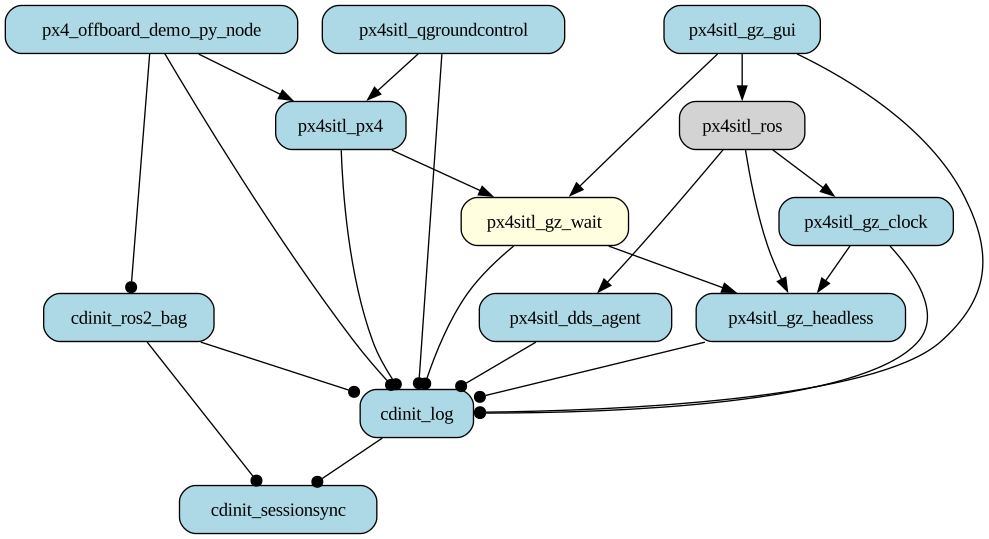
Different colors and arrow styles represent different service types and their dependencies.
1 maintainer

Metadata
1 maintainer
Release files for hiearch-dinit 0.1.1
For a detailed explanation of source distributions (sdists) and built distributions (wheels), please see the package formats documentation.
Source distribution (sdist)
| File | Size | Uploaded | |
|---|---|---|---|
| hiearch_dinit-0.1.1.tar.gz | 10.6 kB | Details |
Built distribution (wheel)
| File | Interpreter | ABI | Platform | Reset |
|---|---|---|---|---|
| hiearch_dinit-0.1.1-py3-none-any.whl | Python 3 | none | any | Details |
Total release size: 22.5 kB
Release files / hiearch_dinit-0.1.1.tar.gz
| Download URL | hiearch_dinit-0.1.1.tar.gz |
|---|---|
| Size | 10.6 kB |
| Tags | Source |
|
SHA-256 checksum How to use checksums |
097e197fa26af74bbd235412870d3214b7ff327da1b11b9c27acf627245d9717
|
|
BLAKE2b-256 checksum How to use checksums |
3d1757d4a3eb8215876ec87b4e101e3f33d4282ffb14086a605fbe56ecc01acf
|
| Upload date | |
|
Uploaded using Trusted Publishing? What is trusted publishing? |
No |
| Uploaded via |
twine/6.2.0 CPython/3.12.3
|
Release files / hiearch_dinit-0.1.1-py3-none-any.whl
| Download URL | hiearch_dinit-0.1.1-py3-none-any.whl |
|---|---|
| Size | 11.9 kB |
| Tags | Python 3 |
|
SHA-256 checksum How to use checksums |
23f542e81e3d41a3448f45e6e893673713cf6583dd9f3b9550a0d8af238793bd
|
|
BLAKE2b-256 checksum How to use checksums |
1ed43a8f70aeba252368f51d434c7a6dd14dba60650de19fc5df57a86014a4d3
|
| Upload date | |
|
Uploaded using Trusted Publishing? What is trusted publishing? |
No |
| Uploaded via |
twine/6.2.0 CPython/3.12.3
|













