
Parse dinit service files and generate a dependency graph in hiearch YAML format

Project description
Introduction
dinit_graph parses dinit (https://github.com/davmac314/dinit) service
files and generates a dependency graph in hiearch YAML format
(https://github.com/asherikov/hiearch). Service files are collected from a set
of input directories.
Installation
pipx install dinit-graph
Usage
There are two kinds of output:
- Service dependency graph.
- Dependency graph style which specifies visualization parameters.
Both files have to be passed to hiearch for diagram generation.
Command line interface
usage: dinit_graph [-h] [-d DIRECTORIES [DIRECTORIES ...]] [-s [SERVICES ...]] [-o OUTPUT] [-S STYLE]

Parse dinit service files and generate a dependency graph in hiearch YAML format.

options:
  -h, --help            show this help message and exit
  -d DIRECTORIES [DIRECTORIES ...], --directories DIRECTORIES [DIRECTORIES ...]
                        Directories to traverse for dinit service files
  -s [SERVICES ...], --services [SERVICES ...]
                        Optional list of service names to visualize (if not provided, all services are visualized)
  -o OUTPUT, --output OUTPUT
                        Output file (default: stdout)
  -S STYLE, --style STYLE
                        Output hiearch style to the given input file
Examples
- Generate style file:
dinit-graph -S graph_style.yaml
- Parse services in the given directory and print graph to standard output:
dinit-graph -d /path/to/service/directory
- Perform both operations simultaneously:
dinit-graph -S graph_style.yaml -d /path/to/service/directory
- Generate a complete example with sample services:
# Generate the style file
dinit-graph -S graph_style.yaml

# Generate the graph from sample services
dinit-graph -d /path/to/service/directory -o graph.yaml

# Generate the SVG using hiearch (assuming it's installed)
hiearch graph.yaml graph_style.yaml
Example output
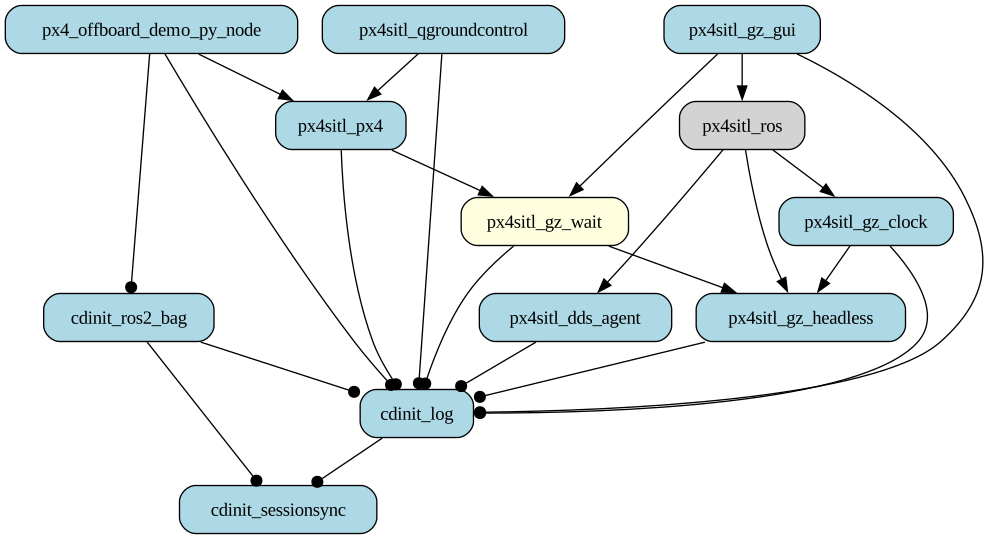
Different colors and arrow styles represent different service types and their dependencies.
Release history Release notifications | RSS feed

Download files
Download the file for your platform. If you're not sure which to choose, learn more about installing packages.
Source Distribution
Built Distribution
Filter files by name, interpreter, ABI, and platform.
If you're not sure about the file name format, learn more about wheel file names.
Copy a direct link to the current filters
File details
Details for the file hiearch_dinit-0.1.1.tar.gz.
File metadata
- Download URL: hiearch_dinit-0.1.1.tar.gz
- Upload date:
- Size: 10.6 kB
- Tags: Source
- Uploaded using Trusted Publishing? No
- Uploaded via: twine/6.2.0 CPython/3.12.3
File hashes
| Algorithm | Hash digest | |
|---|---|---|
| SHA256 |
097e197fa26af74bbd235412870d3214b7ff327da1b11b9c27acf627245d9717
|
|
| MD5 |
0c392c8fc892e59dde6ffb789e84e723
|
|
| BLAKE2b-256 |
3d1757d4a3eb8215876ec87b4e101e3f33d4282ffb14086a605fbe56ecc01acf
|
File details
Details for the file hiearch_dinit-0.1.1-py3-none-any.whl.
File metadata
- Download URL: hiearch_dinit-0.1.1-py3-none-any.whl
- Upload date:
- Size: 11.9 kB
- Tags: Python 3
- Uploaded using Trusted Publishing? No
- Uploaded via: twine/6.2.0 CPython/3.12.3
File hashes
| Algorithm | Hash digest | |
|---|---|---|
| SHA256 |
23f542e81e3d41a3448f45e6e893673713cf6583dd9f3b9550a0d8af238793bd
|
|
| MD5 |
c4917d377d487d6b3f21546c1f4373d3
|
|
| BLAKE2b-256 |
1ed43a8f70aeba252368f51d434c7a6dd14dba60650de19fc5df57a86014a4d3
|






