
HilbertSFC





Ultra-fast 2D & 3D Hilbert space-filling curve encode/decode kernels for Python.


2D Hilbert curves (nbits 1..5) and 3D Hilbert curves (nbits 1..4, animated).
New in v0.3.0: PyTorch API + GPU-accelerated kernels with Triton!
New in v0.4.0: Morton/z-order curves
This library is performance-first and implemented entirely in Python. It provides fast Hilbert encode/decode kernels for both CPU and GPU, with convenient high-level APIs for NumPy and PyTorch, low-level kernel accessors and clean integration with torch.compile for fusion with surrounding code. For completeness, it also includes Morton/z-order curve kernels.
The hot kernels are JIT-compiled with Numba (CPU) and Triton (GPU) and tuned for:
- Branchless, fully unrolled inner loops
- Small, L1-cache-friendly lookup tables (LUTs)
- Reduced dependency chains for better ILP and MLP (e.g. state-independent lookups)
- Multi-threading for batch processing
- SIMD via LLVM vector intrinsics (CPU)
- Reduced register pressure (GPU)
Performance
CPU - Numba
HilbertSFC is orders of magnitude faster than existing Python implementations. It also outperforms the Fast Hilbert Rust crate by a factor of ~8x. In fact, HilbertSFC takes only ~6 CPU cycles per point for 2D encode/decode of 32-bit coordinates.
2D Points - Random, nbits=32, size=5,000,000
| Implementation | ns/pt (enc) | ns/pt (dec) | Mpts/s (enc) | Mpts/s (dec) |
|---|---|---|---|---|
| hilbertsfc (multi-threaded) | 0.41 | 0.48 | 2410.39 | 2084.98 |
| hilbertsfc (Python) | 1.38 | 1.59 | 726.68 | 629.52 |
| fast_hilbert (Rust) | 12.24 | 12.03 | 81.67 | 83.11 |
| hilbert_2d (Rust) | 121.23 | 101.34 | 8.25 | 9.87 |
| hilbert-bytes (Python) | 2997.51 | 2642.86 | 0.334 | 0.378 |
| numpy-hilbert-curve (Python) | 7606.88 | 5075.58 | 0.131 | 0.197 |
| hilbertcurve (Python) | 14355.76 | 10411.20 | 0.0697 | 0.0961 |
System info: Intel Core Ultra 7 258v, Ubuntu 24.04.4, Python 3.12.12, Numba 0.63.1
Additional benchmarks and details are available in the benchmark-cpu.md.
For a deep dive into how the HilbertSFC kernels are derived and why the implementation maps well to modern CPUs (FSM/LUT formulation, dependency chains, ILP/MLP, unrolling, constant folding, vectorization, gathers), see the performance deep dive notebook.
GPU (CUDA/ROCm) - Torch/Triton
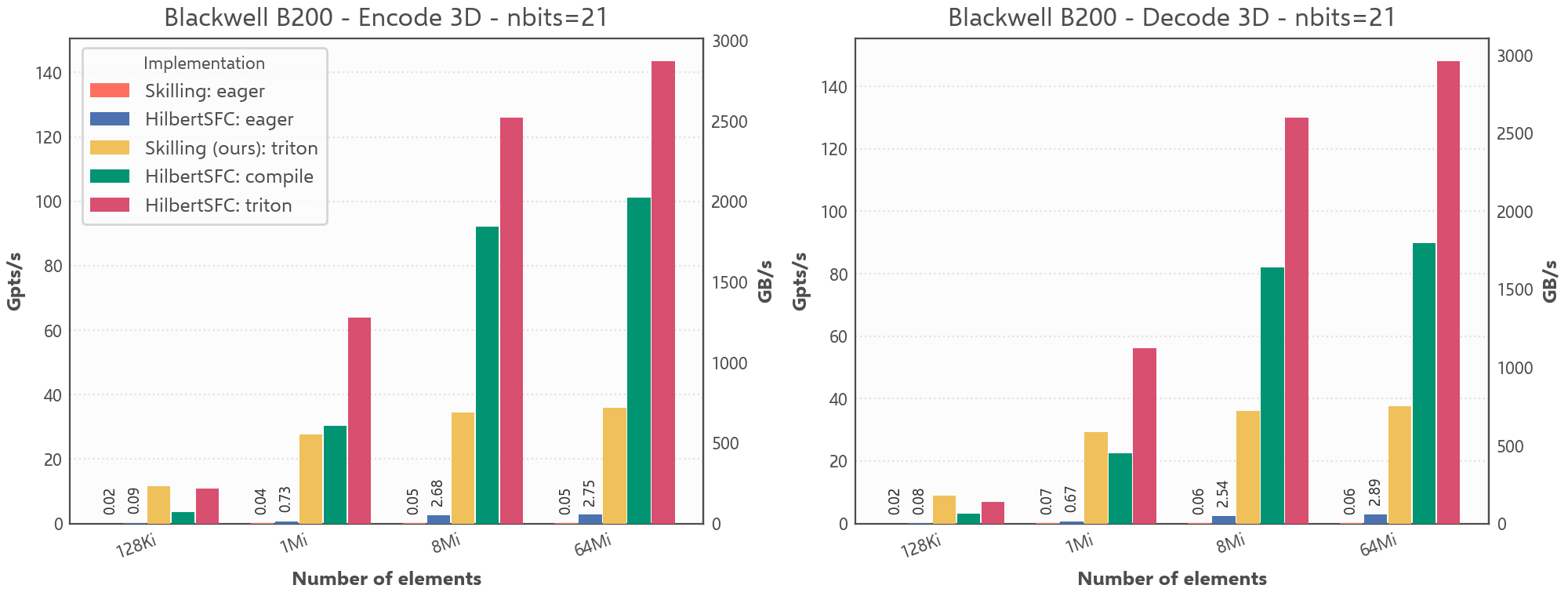
HilbertSFC achieves very high throughput on modern GPUs, reaching up to ~143 billion points per second for 3D encode of 32-bit coordinates (nbits=21) on an NVIDIA Blackwell B200. At size=64Mi, compared to an eager PyTorch implementation of the Skilling algorithm, it is roughly 3100× faster for 3D encode and 2300× faster for 3D decode.
2D and 3D Points - Random, nbits=32 (2D), nbits=21 (3D), size=64Mi (2^26), throughput in Mpts/s
| Implementation | Mode | 2D enc | 2D dec | 3D enc | 3D dec |
|---|---|---|---|---|---|
| HilbertSFC | triton | 225234 | 238367 | 143405 | 147926 |
| HilbertSFC | eager | 5668 | 5324 | 2745 | 2886 |
| Skilling (Pointcept) | eager | 37.9 | 48.4 | 46.4 | 63.1 |
System info: NVIDIA Blackwell B200, Ubuntu 24.04.4, Python 3.12.3, PyTorch 2.11.0, CUDA 13.0, Triton 3.6.0
Throughput comparison for 3D Hilbert encode/decode on B200 (`nbits=21`).
See benchmark-gpu.md for more details and additional GPU benchmarks.
Get started
Installation
Install the base package from PyPI:
pip install hilbertsfc
For PyTorch support, and CUDA or ROCm options, see the installation guide.
Minimal examples
Python scalars
Encode and decode a 2D coordinate:
from hilbertsfc import hilbert_decode_2d, hilbert_encode_2d

index = hilbert_encode_2d(17, 23, nbits=10)  # 534
x, y = hilbert_decode_2d(index, nbits=10)    # (17, 23)
PyTorch tensors
Encode and decode a batch of PyTorch tensors on CPU or GPU (requires hilbertsfc[torch]):
import torch
from hilbertsfc.torch import hilbert_decode_2d, hilbert_encode_2d

device = "cuda" if torch.cuda.is_available() else "cpu"
nbits = 10
xs = torch.randint(0, 2**nbits, (4096,), dtype=torch.int32, device=device)
ys = torch.randint(0, 2**nbits, (4096,), dtype=torch.int32, device=device)

indices = hilbert_encode_2d(xs, ys, nbits=nbits)
xs2, ys2 = hilbert_decode_2d(indices, nbits=nbits)  # Recover xs and ys
For more examples, including NumPy arrays, 3D curves, and Morton/z-order, continue with the Quick start.
Learn more
1 maintainer

Metadata
1 maintainer
Release files for hilbertsfc 0.5.1
For a detailed explanation of source distributions (sdists) and built distributions (wheels), please see the package formats documentation.
Source distribution (sdist)
| File | Size | Uploaded | |
|---|---|---|---|
| hilbertsfc-0.5.1.tar.gz | 356.2 kB | Details |
Built distribution (wheel)
| File | Interpreter | ABI | Platform | Reset |
|---|---|---|---|---|
| hilbertsfc-0.5.1-py3-none-any.whl | Python 3 | none | any | Details |
Total release size: 753.1 kB
Release files / hilbertsfc-0.5.1.tar.gz
| Download URL | hilbertsfc-0.5.1.tar.gz |
|---|---|
| Size | 356.2 kB |
| Tags | Source |
|
SHA-256 checksum How to use checksums |
fea86ade4750747ceab3ccd3ae2214fc30e5a3bc1fc82b16f1b5840ef3895fca
|
|
BLAKE2b-256 checksum How to use checksums |
0800e8bfb00dbff645da98526c850de8ed017a2933b95e35fb3277ae11c7b187
|
| Upload date | |
|
Uploaded using Trusted Publishing? What is trusted publishing? |
Yes |
| Uploaded via |
uv/0.12.15 {"installer":{"name":"uv","version":"0.12.15","subcommand":["publish"]},"python":null,"implementation":{"name":null,"version":null},"distro":{"name":"Ubuntu","version":"24.04","id":"noble","libc":null},"system":{"name":null,"release":null},"cpu":null,"openssl_version":null,"setuptools_version":null,"rustc_version":null,"ci":true}
|
Release files / hilbertsfc-0.5.1-py3-none-any.whl
| Download URL | hilbertsfc-0.5.1-py3-none-any.whl |
|---|---|
| Size | 396.9 kB |
| Tags | Python 3 |
|
SHA-256 checksum How to use checksums |
212cedf2811565fb44f77635a110194f2966af6e8b911e681aaef3b954ff40a6
|
|
BLAKE2b-256 checksum How to use checksums |
e0c7243b92e0f0a8297771e45e08c0522d0711bcbaff6ebf829f454da98d0acb
|
| Upload date | |
|
Uploaded using Trusted Publishing? What is trusted publishing? |
Yes |
| Uploaded via |
uv/0.12.15 {"installer":{"name":"uv","version":"0.12.15","subcommand":["publish"]},"python":null,"implementation":{"name":null,"version":null},"distro":{"name":"Ubuntu","version":"24.04","id":"noble","libc":null},"system":{"name":null,"release":null},"cpu":null,"openssl_version":null,"setuptools_version":null,"rustc_version":null,"ci":true}
|














