

hlock
Your agent harness
made portable.
Pin your harness, models, MCP servers, skills, and config in
a harness.lock, version it, and rehydrate it anywhere.







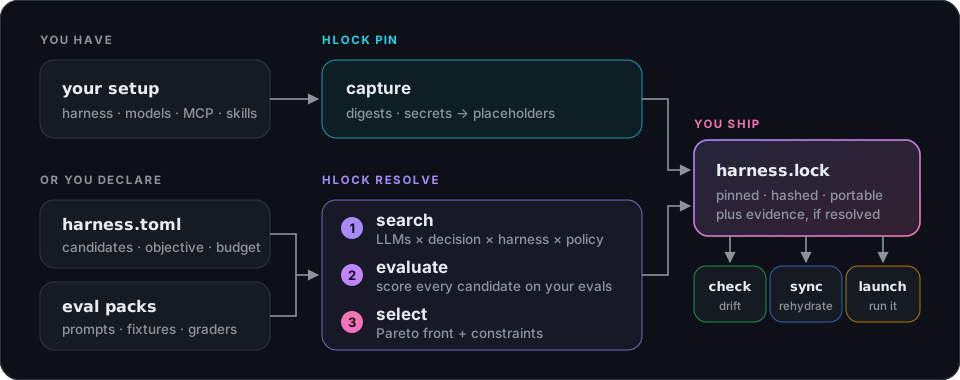
Your agent is more than a model. It's a harness, MCP servers, skills, and config,
hand-tuned on one machine. hlock is the missing harness packaging layer:
harness.lock tracks all of its dependencies, so you can commit it to git and restore
it anywhere. When you're ready, it measures your stack against your own tasks and finds a
better one.
| You know this from package managers | In hlock |
|---|---|
🔒 uv.lock / Cargo.lock |
harness.lock: every dependency of your harness, pinned and hashed |
📌 pip freeze |
hlock pin: record the setup you already have, and re-pin as it grows |
✅ --locked check |
hlock check: show what changed since the pin |
📦 uv sync / npm ci |
hlock sync: rehydrate the locked setup on any machine |
▶️ uv run |
hlock launch and hlock run: start sessions and run prompts on the locked setup |
Install
pip install hlock # or: uv add hlock · uvx hlock --help
Prebuilt wheels cover Linux (x86_64, aarch64), macOS (arm64, x86_64), and Windows (x64)
for CPython 3.9+. For Rust, use cargo add hlock.
Quickstart
Pin the harness you already use (Claude Code, Codex, Pi, OpenCode, Cursor, Gemini CLI, and more), then bring it back anywhere:

hlock pin --user                # lock your setup (yours in ~/.claude etc., and the project's) into harness.lock
git add harness.lock .hlock/    # version it (secrets are placeholders, never values)
hlock check                     # see what changed since the pin; re-pin to lock it
hlock sync                      # on another machine: rehydrate it into .hlock/env (or --in-place, --docker)
hlock launch                    # start a session on the locked setup, isolated from your config
hlock run "summarize README.md"  # or run one prompt through it (claude -p, codex exec, …)
hlock pull github:alice/agents  # get someone else's pinned setup; then hlock launch --lock alice
hlock add skill github:anthropics/skills/skills/pdf   # declare a dependency, pin it, install it
hlock audit                     # integrity, hidden characters, what it runs, policy, secrets
Plain hlock pin records only the project's own skills, MCP servers and config, so your
personal setup stays out of the repository; --user adds it.
For your own work, hlock evals init -t coding (or data, research, support) writes
an eval pack template plus an Agent Skill, so the agent you already use can fill it in
with real tasks from your project. See Eval packs.
See the Quickstart, Pinning your setup, Rehydrating with sync, and Launching a locked harness.
Manage your team's agents
Contributors to one repository rarely share an agent setup. Each person can commit their own
lock to .hlock/locks/harness.<handle>.lock, next to the code it was used on, and anyone
with a clone can try a teammate's setup in isolation:
hlock pin -o .hlock/locks/harness.alice.lock         # your harness and model, with the repo's setup
hlock launch --lock .hlock/locks/harness.bob.lock    # try a teammate's, isolated from yours
Add the hlock badge to your README to point readers at the locks. See Team repositories for the layout, the conventions, and pulling a teammate's lock from outside the repository.
Then make it better
Optimize your harness. Draft an eval pack from the requests you've already made to your
agent with hlock evals init --from-traces (it reads the sessions Claude Code, Codex, and
Pi logged for the project), and review it with your agent using the Agent Skill it writes. List the models, decision models and harnesses to try in a
harness.toml, and let hlock resolve lock the best combination with its success rate,
cost, and latency. hlock tune goes further, into prompts, hyperparameters, and
fine-tuned small models. The built-in reference provider is offline, so you can try the
loop with no API keys:
hlock evals init                          # write a hello-world eval pack to ./evals
hlock init --name demo                    # write a starter harness.toml
hlock resolve                             # measure every combination -> harness.lock
hlock run "count the words in words.txt"  # run the locked agent
Go local. hlock localize turns a lock into an equivalent on an open-source harness
and models served by Ollama or LM Studio, keeping your MCP servers, skills, and
instructions.
Let an agent do the busywork. hlock meta hands work that needs judgment (installing
what a lock needs on a new machine, filling in an eval pack, updating skills and MCP
servers) to a pinned agent and checks the result itself. The default is an agent built
into hlock, so there's nothing to install: give it an API key or a local model.
hlock meta init                 # pick a model for the built-in agent, and pin it
hlock meta run install          # install what harness.lock still needs, then verify
See Finding the best stack, Eval packs, Tuning, and Going local, and The meta harness.
Python API
import json
import hlock
from hlock import SearchSpace, Objective, Budget

space = SearchSpace(
    llm={"planner": ["reference:qwen-7b", "reference:qwen-32b"]},
    decision=["none", "rules:default"],
    harness=["reference"],
    objective=Objective(select="min-cost", constraints={"success-rate": ">=0.5"}),
    budget=Budget(max_trials=50),
    evals=json.dumps({"packs": ["./evals"], "seeds": 2}),
)
lock = hlock.resolve(space, backend="local")   # writes ./harness.lock
print(lock.summary())

agent = hlock.load("harness.lock")
print(agent.run("clean ./data/orders.csv"))   # {"success": true, "model": "qwen-7b", ...}
How it works
Architecture
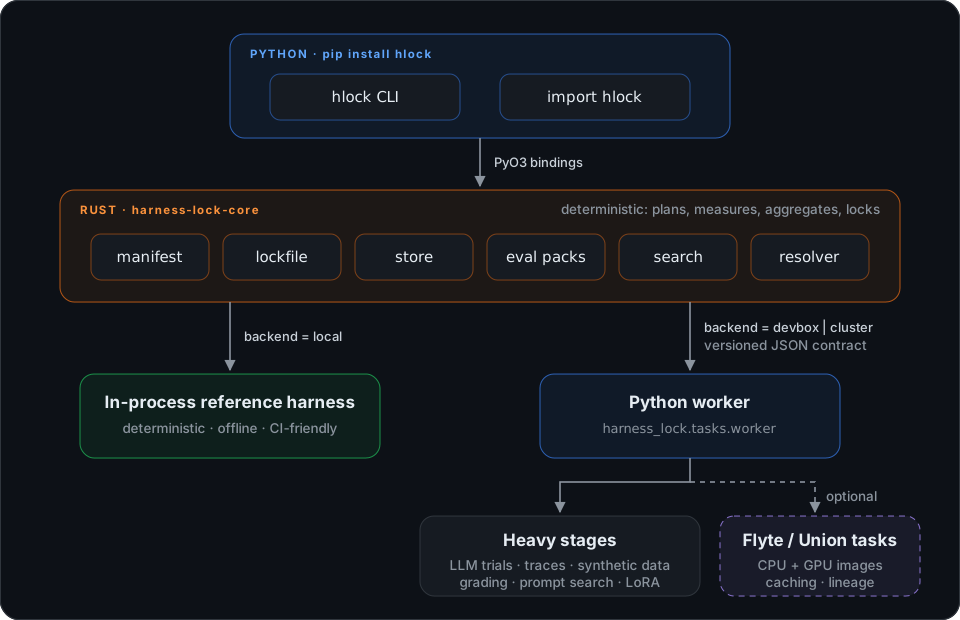
A Rust core does all the deterministic work. Anything that needs the Python ML ecosystem or a GPU runs in a Python worker, which can lift each piece of work to a Flyte task on a cluster.
| Path | What lives there |
|---|---|
crates/harness-lock-core |
The core library (pure Rust): manifests, lockfiles, search planning, trial bookkeeping, evidence, lock construction. It orchestrates and aggregates, and never does heavy compute itself. |
crates/harness-lock-py |
PyO3 bindings, compiled into hlock._hlock and shipped only inside the wheel. |
crates/hlock, crates/harness-lock |
Thin crates that re-export the core (harness-lock is the alias). |
hlock/ |
The Python package: the hlock CLI and the heavy-work worker (tasks/worker.py). |
harness_lock/ |
A shim that re-exports hlock, so import harness_lock works. |
packaging/harness-lock |
The harness-lock PyPI alias, which pins the matching hlock release. |
docs/ |
The documentation site (Zensical), published to GitHub Pages. |
Backends
| Backend | Where trials run | Use it for |
|---|---|---|
local (default) |
in-process Rust reference harness | trying it out, CI, deterministic tests |
devbox |
Python worker on this machine | real LLM calls, your own traces, flyte local |
cluster |
Python worker that lifts each stage to Flyte/Union | GPUs, fan-out, durable caching, shared results |
hlock tune --backend devbox --depth probe --max-trials 10
# real LLM calls: export HL_LLM_BASE_URL=http://… HL_LLM_MODEL=qwen-32b [HL_LLM_API_KEY=…]
hlock tune --backend cluster --depth ft --data user:./runs   # LoRA on a GPU worker
See Backends for setup and
the HL_* environment variables.
Related projects
hlock builds on, and borrows from, a lot of good work. Package managers install agent config, dotfile managers and Nix reproduce it, eval frameworks measure it, and optimizers generate it. hlock isn't trying to replace any of them; it has different devex goals:
- speed: one command pins the setup you already have
- quick portability: the whole stack, from harness version and models to MCP servers, skills and config, in one lock you can rehydrate anywhere
- tunability: eval packs, the resolver and the tuner measure your stack against your own tasks
- let agents do the busy work: some packaging and syncing work that users need to do around hlock can be further automated with a meta agent.
| If you want to… | Reach for | Where hlock fits |
|---|---|---|
| Install skills, instructions and MCP servers from git into many agents, with org policy | APM | hlock reads apm.yml, resolves apm: packages by the same rules, and exports apm.lock.yaml; it also pins the rest of the stack and measures whether a package helps |
| Keep one set of rules in sync across many agents | rulesync, Ruler | They translate config; hlock locks it, with digests and drift checks |
| Add skills from the open ecosystem | npx skills |
hlock pin records them with the rest of your setup |
| Carry your dotfiles to every machine | chezmoi, yadm | hlock knows what a harness's files mean: versions, models, secrets, drift |
| Reproduce a toolchain bit for bit | Nix, mise, Dev Containers | Nix pins inputs; a resolved harness.lock also records how well the stack did |
| Run agent evals and benchmarks at scale | Harbor, Inspect, promptfoo | They measure the variants you list; hlock searches, selects, and locks the winner |
| Write better prompts and programs | DSPy, GEPA | They generate candidates; hlock picks among stacks and makes the pick reproducible |
The comparison page goes through each one, including "why not just dotfiles / chezmoi / Nix / APM?".
Development
Development uses uv and a Rust toolchain.
uv sync                            # create .venv, build the Rust extension, install dev tools
uv run pytest                      # Python bindings, CLI, worker
uv run ruff check harness_lock hlock tests
cargo test -p harness-lock-core    # Rust core + integration tests

uv run --group docs zensical serve # docs at http://localhost:8000
uv run rebuilds the extension automatically when Rust sources change.
Want to help? See the contributing guide. Releases are cut from tags. See RELEASING.md.
Status
What works today: pin, check, sync, and launch for the
supported harnesses, declared dependencies
(add, remove, outdated, APM packages and apm.lock.yaml export), audit and trust
(hidden-Unicode scanning, executable approval, hlock-policy.toml, SARIF, CycloneDX and SPDX
SBOMs), localize, manifest and
lockfile schema v1, a content-addressed store, eval packs (hlock evals) with graders, the
reference provider and harness, grid search with Pareto selection, upgrade
(plan/apply/rollback), tune across the local, devbox, and cluster backends, and the
meta harness. The design specs describe the full design,
much of which is still on the roadmap.
License
1 maintainer

Metadata
1 maintainer
Release files for hlock 0.5.0
For a detailed explanation of source distributions (sdists) and built distributions (wheels), please see the package formats documentation.
Source distribution (sdist)
| File | Size | Uploaded | Provenance | |
|---|---|---|---|---|
| hlock-0.5.0.tar.gz | 516.9 kB | With provenance | Details |
Built distributions (wheels)
| File | Reset | |||
|---|---|---|---|---|
| hlock-0.5.0-cp39-abi3-win_amd64.whl | CPython 3.9 | abi3 | Windows x86-64 | Details |
| hlock-0.5.0-cp39-abi3-manylinux_2_17_x86_64.manylinux2014_x86_64.whl | CPython 3.9 | abi3 | Linux glibc 2.17+ x86-64 | Details |
| hlock-0.5.0-cp39-abi3-manylinux_2_17_aarch64.manylinux2014_aarch64.whl | CPython 3.9 | abi3 | Linux glibc 2.17+ ARM64 | Details |
| hlock-0.5.0-cp39-abi3-macosx_11_0_arm64.whl | CPython 3.9 | abi3 | macOS 11.0+ ARM64 | Details |
| hlock-0.5.0-cp39-abi3-macosx_10_12_x86_64.whl | CPython 3.9 | abi3 | macOS 10.12+ x86-64 | Details |
Total release size: 25.6 MB
Release files / hlock-0.5.0.tar.gz
| Download URL | hlock-0.5.0.tar.gz |
|---|---|
| Size | 516.9 kB |
| Tags | Source |
|
SHA-256 checksum How to use checksums |
a4026c24e854fd5ee92a6b7d4a1370e6b570e8b22c441da23fa9e34b891b0dbd
|
|
BLAKE2b-256 checksum How to use checksums |
11723ab0f99575d21a726df4d4a5cc5a6fe04a483a84af21c9a0dce689147fe2
|
| Upload date | |
|
Uploaded using Trusted Publishing? What is trusted publishing? |
Yes |
| Uploaded via |
twine/7.0.0 CPython/3.13.16
|
Provenance
Provenance describes where a file came from. On PyPI, provenance is shared via attestations, which provide a verifiable record of the build or publishing details. View details, limitations and caveats.


PyPI Publish Attestation
PyPI verified that this artifact, at this checksum, originated from the publisher listed below.
Signed by GitHub Actions, verified by PyPI on Oct 21, 2026.
Transparency logRelease files / hlock-0.5.0-cp39-abi3-win_amd64.whl
| Download URL | hlock-0.5.0-cp39-abi3-win_amd64.whl |
|---|---|
| Size | 5.0 MB |
| Tags | CPython 3.9 Windows x86-64 abi3 |
|
SHA-256 checksum How to use checksums |
f2e612e748bfc6a3e4ea62b074295855764c8a8cd9d6632f92a359b7d56155bb
|
|
BLAKE2b-256 checksum How to use checksums |
a123e2d4b39e1ffe50d43de8184af11989512415aa8831158cd2f74ec491da42
|
| Upload date | |
|
Uploaded using Trusted Publishing? What is trusted publishing? |
Yes |
| Uploaded via |
twine/7.0.0 CPython/3.13.16
|
Provenance
Provenance describes where a file came from. On PyPI, provenance is shared via attestations, which provide a verifiable record of the build or publishing details. View details, limitations and caveats.
PyPI Publish Attestation
PyPI verified that this artifact, at this checksum, originated from the publisher listed below.
Signed by GitHub Actions, verified by PyPI on Oct 21, 2026.
Transparency logRelease files / hlock-0.5.0-cp39-abi3-manylinux_2_17_x86_64.manylinux2014_x86_64.whl
| Download URL | hlock-0.5.0-cp39-abi3-manylinux_2_17_x86_64.manylinux2014_x86_64.whl |
|---|---|
| Size | 5.2 MB |
| Tags | CPython 3.9 Linux glibc 2.17+ x86-64 abi3 |
|
SHA-256 checksum How to use checksums |
a9d9b0493252821be043edfa76d1bd03213168636ce8a4490e6b42accb830341
|
|
BLAKE2b-256 checksum How to use checksums |
8c8ebf61cfb753f01c312f782e51fc200d2cf77f40c7197b70eb0c0e7fe01e79
|
| Upload date | |
|
Uploaded using Trusted Publishing? What is trusted publishing? |
Yes |
| Uploaded via |
twine/7.0.0 CPython/3.13.16
|
Provenance
Provenance describes where a file came from. On PyPI, provenance is shared via attestations, which provide a verifiable record of the build or publishing details. View details, limitations and caveats.
PyPI Publish Attestation
PyPI verified that this artifact, at this checksum, originated from the publisher listed below.
Signed by GitHub Actions, verified by PyPI on Oct 21, 2026.
Transparency logRelease files / hlock-0.5.0-cp39-abi3-manylinux_2_17_aarch64.manylinux2014_aarch64.whl
| Download URL | hlock-0.5.0-cp39-abi3-manylinux_2_17_aarch64.manylinux2014_aarch64.whl |
|---|---|
| Size | 5.2 MB |
| Tags | CPython 3.9 Linux glibc 2.17+ ARM64 abi3 |
|
SHA-256 checksum How to use checksums |
4904660f4002caa76d3eb9f151e0335bd093df4f7c6dbfe48a406a6eea338e6a
|
|
BLAKE2b-256 checksum How to use checksums |
23bf53b00b74b2c2eee4311622efb7199b137963245b57f69161ac5d27a5a1ac
|
| Upload date | |
|
Uploaded using Trusted Publishing? What is trusted publishing? |
Yes |
| Uploaded via |
twine/7.0.0 CPython/3.13.16
|
Provenance
Provenance describes where a file came from. On PyPI, provenance is shared via attestations, which provide a verifiable record of the build or publishing details. View details, limitations and caveats.
PyPI Publish Attestation
PyPI verified that this artifact, at this checksum, originated from the publisher listed below.
Signed by GitHub Actions, verified by PyPI on Oct 21, 2026.
Transparency logRelease files / hlock-0.5.0-cp39-abi3-macosx_11_0_arm64.whl
| Download URL | hlock-0.5.0-cp39-abi3-macosx_11_0_arm64.whl |
|---|---|
| Size | 4.7 MB |
| Tags | CPython 3.9 abi3 macOS 11.0+ ARM64 |
|
SHA-256 checksum How to use checksums |
2e749e66a33a35b69d71d66b2688fb7fa87d627586d5c201c649ca149a67136f
|
|
BLAKE2b-256 checksum How to use checksums |
2f69146fc3e45c2af91ec0fdcaac39b6d4a0af0b37c672e6013699558d09daee
|
| Upload date | |
|
Uploaded using Trusted Publishing? What is trusted publishing? |
Yes |
| Uploaded via |
twine/7.0.0 CPython/3.13.16
|
Provenance
Provenance describes where a file came from. On PyPI, provenance is shared via attestations, which provide a verifiable record of the build or publishing details. View details, limitations and caveats.
PyPI Publish Attestation
PyPI verified that this artifact, at this checksum, originated from the publisher listed below.
Signed by GitHub Actions, verified by PyPI on Oct 21, 2026.
Transparency logRelease files / hlock-0.5.0-cp39-abi3-macosx_10_12_x86_64.whl
| Download URL | hlock-0.5.0-cp39-abi3-macosx_10_12_x86_64.whl |
|---|---|
| Size | 5.0 MB |
| Tags | CPython 3.9 abi3 macOS 10.12+ x86-64 |
|
SHA-256 checksum How to use checksums |
040393e8b18cdeb2fcc887610eab13a4d39f6216d2fb2172b5b55508ef6032eb
|
|
BLAKE2b-256 checksum How to use checksums |
ee88bb0523081f84faab7292e38c9a46e78283f279ba8374270de90da7ccd0cd
|
| Upload date | |
|
Uploaded using Trusted Publishing? What is trusted publishing? |
Yes |
| Uploaded via |
twine/7.0.0 CPython/3.13.16
|
Provenance
Provenance describes where a file came from. On PyPI, provenance is shared via attestations, which provide a verifiable record of the build or publishing details. View details, limitations and caveats.
PyPI Publish Attestation
PyPI verified that this artifact, at this checksum, originated from the publisher listed below.
Signed by GitHub Actions, verified by PyPI on Oct 21, 2026.
Transparency logSecurity for hlock 0.5.0
Provenance
Provenance describes where a file came from. On PyPI, provenance is shared via attestations, which provide a verifiable record of the build or publishing details. View details, limitations and caveats.
Full provenance
All 6 files in this release have been uploaded with provenance metadata.
Attestation for hlock-0.5.0.tar.gz
PyPI Publish Attestation
PyPI verified that this artifact, at this checksum, originated from the publisher listed below.
Signed by GitHub Actions, verified by PyPI on Oct 21, 2026.
Transparency logA note on package security
PyPI is a repository for distributing packages, not a service for auditing them. While third-party security researchers and our staff do their best to detect and remove malicious packages, PyPI cannot guarantee the quality, security or suitability of any given package.
To learn more about protecting yourself from malicious actors, visit our package security documentation.














