
Control a Hanmatek HM310T bench power supply over Modbus RTU

Project description
Hanmatek Modbus Power Supply Python Library
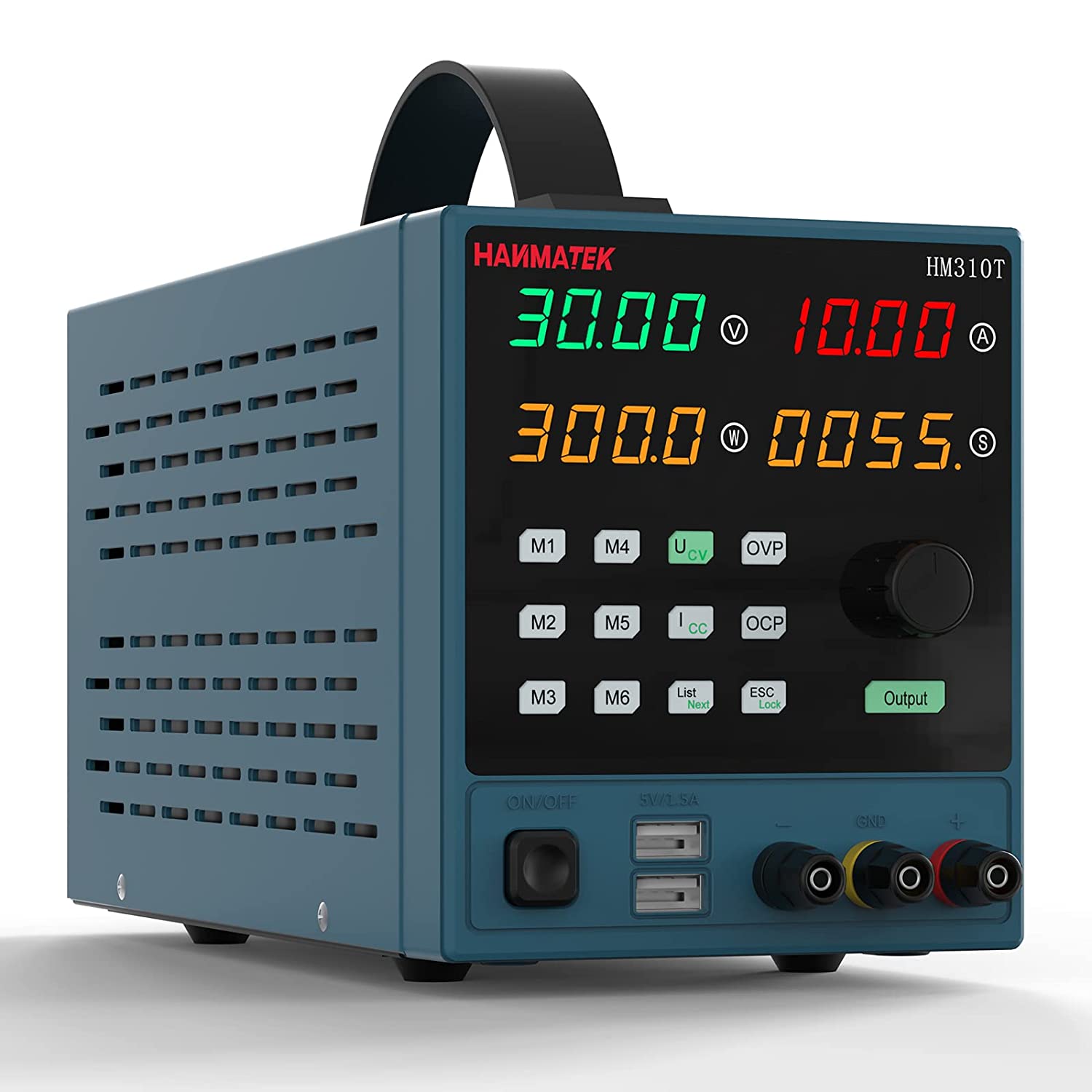
This repository contains a Python library to interact with the Hanmatek HM310T power supply over the Modbus interface.
Learn how this is accomplished for interacting with similar devices below in #further reading.
This library is the packaged continuation of an earlier prototype,
joeyda3rd/modbus-power-supply. That repository remains as the original proof of concept; active development happens here.

⚠️ Safety Warning
The Hanmatek HM310T power supply is a device that can produce potentially dangerous levels of voltage and current. Always follow safety guidelines when working with electricity. Ensure your device is properly grounded and do not work on live circuits.
This software is provided "as is", without warranty of any kind, express or implied. Incorrect use of this software could lead to damage to your power supply or other equipment, or personal injury. Use this software responsibly and at your own risk.
⚠️ Use At Your Own Risk
By using this software, you agree that the authors and maintainers of this software are not liable for any damage to equipment, or any personal injury, that may occur through normal or abnormal use of this software. Always double-check your work and never leave a powered device unattended.
⚠️ AI-Assisted Code
Portions of this library were written with AI assistance and reviewed by multiple AI models and by human developers. That review does not guarantee correctness. Read the code and validate its behavior against your own hardware before relying on it — especially given the safety considerations above.
Requirements
- Python 3.10 or higher
- PyModbus 3.2.2 or newer, < 3.10 (3.2.2 was used for development; 3.10 renamed the
slave=keyword todevice_id=) - pyserial
- A Hanmatek HM310T power supply connected to a PC by USB
- May work with other Hanmatek or Modbus enabled power supplies, requires you to reverse engineer the unit. See further reading below for technical details and register values. Note that this library verifies it is talking to a genuine HM310T at connect time (registers
0x0003and0x0005) and refuses other models.
Installation
pip install hm310t
Or from source:
git clone https://github.com/joeyda3rd/hm310t.git
cd hm310t
pip install .
Usage
The API is property-based: setpoints and protection limits are plain attributes you read and assign; live readings and status come from small methods that return typed values.
from hm310t import PowerSupply

# port, baudrate=9600, slave=1, voltage_limit=30.0, current_limit=10.0
with PowerSupply(port="/dev/ttyUSB0") as psu:
    # Set protection trip points first, while the output is still off.
    psu.ovp = 6.0    # over-voltage protection, volts
    psu.ocp = 2.0    # over-current protection, amps
    psu.opp = 20.0   # over-power protection, watts

    # Setpoints the output will regulate to.
    psu.voltage = 5.0
    psu.current = 1.0
    print(f"Setpoint: {psu.voltage} V, {psu.current} A")

    # CAUTION: this energizes the terminals.
    psu.output_enabled = True
    print(f"Output enabled: {psu.output_enabled}")

    # One atomic read of the live output (reads ~0 with no load attached).
    m = psu.read_measurement()
    print(f"Measured: {m.voltage} V, {m.current} A, {m.power} W")

    # Protection status is a typed struct with a .tripped convenience flag.
    status = psu.read_protection_status()
    print(f"Tripped: {status.tripped}  ({status})")

    # Always disable the output when you are done -- closing does NOT do it.
    psu.output_enabled = False
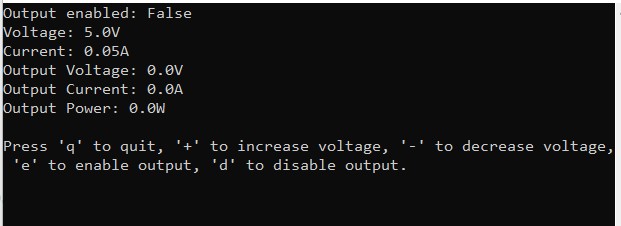
Runnable examples live in examples/: basic_usage.py (the script above, hardened) and tui_dashboard.py, a small curses dashboard.
API
Setpoints and protection limits are read/write properties (float unless noted):
| Property | Range | Description |
|---|---|---|
voltage |
0 – voltage_limit |
Output voltage setpoint (V) |
current |
0 – current_limit |
Output current setpoint (A) |
ovp |
0 – 30 | Over-voltage protection trip point (V) |
ocp |
0 – 10 | Over-current protection trip point (A) |
opp |
0 – 300 | Over-power protection trip point (W) |
output_enabled |
bool |
Output on/off. Assigning anything but a real bool raises TypeError |
comm_address |
1 – 250 (int) |
Modbus slave address; setting it retargets the connection |
voltage_limit, current_limit |
read-only | Software ceilings set in the constructor |
Methods:
| Method | Returns |
|---|---|
read_measurement() |
Measurement(voltage, current, power) — one atomic read of the live output |
read_protection_status() |
ProtectionStatus(is_ovp, is_ocp, is_opp, is_otp, is_scp) with a .tripped property |
read_raw_register(address) |
int — escape hatch to read any holding register directly |
close() |
Closes the serial connection (see "Known limitations") |
PowerSupply is a context manager (with PowerSupply(...) as psu:). Out-of-range setpoints raise OutOfRangeError; communication failures raise PowerSupplyCommunicationError; a non-HM310T device raises IncompatibleDeviceError. All derive from HM310TError.
Known limitations
- A clean close does not disable the output.
close()— and a normal exit from thewithblock — only closes the serial connection; the supply keeps sourcing at its setpoints. Leaving the output running is a legitimate bench workflow, so a clean close never forces it off. (Exception: if thewithblock exits because of an error,__exit__disables the output as a fail-safe.) Assignoutput_enabled = Falseexplicitly when you want it off. - HM310T only. The connect-time identity check (registers
0x0003= 3010 and0x0005= 0x0233) rejects other models in the family (e.g. the HM305), whose ratings or decimal scaling differ. - Multi-register writes use FC16. OPP and the 32-bit reads/writes use Modbus function code 16 (write-multiple-registers). The OEM doc claims only FC03/FC06 are supported, but FC16 is verified working on the real unit; a firmware that rejects it will raise rather than silently misbehave.
- Protection-status bits are not hardware-verified.
read_protection_status()decodes the OVP/OCP/OPP/OTP/SCP bits per the OEM doc and the original driver, but confirming each bit would require deliberately tripping each protection, which the suite does not do. Treat.trippedas advisory, not a safety interlock. - Not thread-safe. A
PowerSupplydrives a single serial handle with no internal locking; do not share one instance across threads without providing your own mutex.
Contributing
Contributions are welcome! Please open an issue if you encounter a bug or have a feature request. If you want to contribute code, please open a pull request.
License
This library is licensed under the MIT license.
Further Reading
When reverse engineering a power supply with a modbus interface, either over serial or other communication protocol, it's going to be essential to know the register addresses for the various I/O and the function code. In this case, we got lucky and the OEM provided that documentation.
It's possible to learn these by using a script to brute force read and write (and read) each address from 1 to 9999 (see tools/scan_registers.py in code) and/or sniffing the unencrypted traffic of OEM software. It's important to understand the Modbus protocol register addressing.
In the Modbus protocol, there are four types of data that can be accessed, each with its own address space:
- Coils (also known as Discrete Outputs): Addresses 00001 to 09999
- Discrete Inputs: Addresses 10001 to 19999
- Input Registers: Addresses 30001 to 39999
- Holding Registers: Addresses 40001 to 49999
Each of these address spaces can contain up to 10,000 addresses, for a total of 40,000 addresses. However, not all devices will use all of these addresses. The actual number of addresses used will depend on the specific device and its configuration.
It's also worth noting that in the Modbus protocol, addresses are often represented in a zero-based format. For example, the first holding register is often referred to as register 40001 in documentation, but in the actual Modbus messages, it would be referred to as holding register 0.
In our case the entirety of the registers we accessed were in the holding registers space. The use of holding registers is common in Modbus devices, including power supplies, because holding registers can be read from and written to, making them versatile for various types of data. However, it's not guaranteed that every Modbus power supply will only use holding registers.
The specific Modbus registers used, and their purpose, can vary widely between different devices and manufacturers. Some devices might use input registers to provide read-only data, or coils and discrete inputs for binary data.
The best source of information about which registers are used by a particular device is the device's Modbus map or register map, which is usually provided in the device's documentation or manual. This map will list all the Modbus addresses used by the device, along with a description of the data stored at each address.
It's important to know what programming protocol and communication protocol are being used with your device as there are others besides Modbus or serial.
Documentation provided by the OEM (This was included on a CD provided by OEM)
The registers will accept read (03) and write (06) instructions.
Registers from documentation
| Number | Function | Type | Decimal Places Capacity | Read/Write | Register Address |
|---|---|---|---|---|---|
| 0 | Output On/Off | Boolean | 0 | r,w | 0x0001 |
| 1 | Protect Status | Struct | 0 | r | 0x0002 |
| 2 | Specification | unsigned short | 0 | r | 0x0003 |
| 3 | Tail Classification | hexadecimal | 0 | r | 0x0004 |
| 4 | Decimal Point Values | hexadecimal | 0 | r | 0x0005 |
| 5 | Voltage Display Value | unsigned short | 2 | r | 0x0010 |
| 6 | Current Display Value | unsigned short | 3 | r | 0x0011 |
| 7 | Power Display Value | 2 integers? | 3 | r | 0x0012,0x0013 |
| 9 | Set Voltage | unsigned short | 2 | r,w | 0x0030 |
| 10 | Set Current | unsigned short | 3 | r,w | 0x0031 |
| 12 | Set OVP | unsigned short | 2 | r,w | 0x0020 |
| 13 | Set OCP | unsigned short | 2 | r,w | 0x0021 |
| 14 | Set OPP | unsigned short? | 2 | r,w | 0x0022,0x0023 |
| 15 | Set Comm Address | byte (1-250) | 0 | r,w | 0x9999 |
Notes
#1 See bit field below from documentation.
#3 no idea
#4 when it's reading 0x0233 that equals voltage has 2 decimal places, current 3, power 3
#7, #14 Two 16 bit registers are used to make one 32 bit value.
#14 type (range as it's called in docs) says 0-65535 (unsigned short) but I question that since it's a combination of two registers like #7
#15 docs say the range is 1-250, not sure of the best type to use for that, although not using a type in python.
// protection status bit

union _ST
{
  struct
  {
    uint8_t isOVP:1;//Over voltage protection
    uint8_t isOCP:1;//Over current protection
    uint8_t isOPP:1;//Over power protection
    uint8_t isOTP:1;//Over tempreture protection
    uint8_t isSCP:1;//short-circuit protection
  }OP;
  uint8_t Dat;
}
Some previous work on the topic
http://www.roedan.com/controlling-a-cheap-usb-power-supply/
https://bitbucket.org/roedan/powersupply/src/master/
http://nightflyerfireworks.com/home/fun-with-cheap-programable-power-supplies
Release history Release notifications | RSS feed


Download files
Download the file for your platform. If you're not sure which to choose, learn more about installing packages.
Source Distribution
Built Distribution
Filter files by name, interpreter, ABI, and platform.
If you're not sure about the file name format, learn more about wheel file names.
Copy a direct link to the current filters
File details
Details for the file hm310t-0.1.0.tar.gz.
File metadata
- Download URL: hm310t-0.1.0.tar.gz
- Upload date:
- Size: 26.3 kB
- Tags: Source
- Uploaded using Trusted Publishing? No
- Uploaded via: twine/6.1.0 CPython/3.10.12
File hashes
| Algorithm | Hash digest | |
|---|---|---|
| SHA256 |
ce975ec3cc1d580bd40c44e18ae71d04e5458a43efef8683a91cc23d2f414456
|
|
| MD5 |
c790821dffe271c09e06c94145bebbf8
|
|
| BLAKE2b-256 |
e4bf38cefd24c3bdce3af9050c306ccdf48328af1803c59cd702e9b655836ee9
|
File details
Details for the file hm310t-0.1.0-py3-none-any.whl.
File metadata
- Download URL: hm310t-0.1.0-py3-none-any.whl
- Upload date:
- Size: 14.6 kB
- Tags: Python 3
- Uploaded using Trusted Publishing? No
- Uploaded via: twine/6.1.0 CPython/3.10.12
File hashes
| Algorithm | Hash digest | |
|---|---|---|
| SHA256 |
61b9bb2856945d6237b422686d97dbddbad9582f2b90c785fce9f71bcbdb6e33
|
|
| MD5 |
d84cad22a2f58d014245860f0f71abee
|
|
| BLAKE2b-256 |
7bc95bb2e99153a35653347d80302b136a7125ff47f27d7a3132780cab5605ec
|






