
hold-your-shell
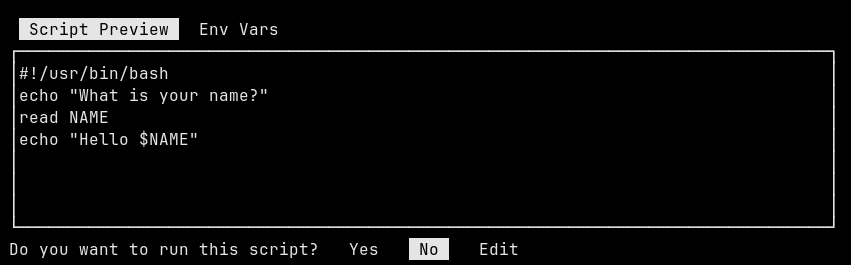
hold-your-shell is a command line program (TUI) that previews shell
scripts (or any shebang script) in a pager, and asks the user to
confirm execution.
This single file program is written for Python 3.x and only uses the stdlib.
Install
Pip install:
pip install hold-your-shell
Manual install:
HY_BIN=~/.local/bin/hold-your-shell
mkdir -p $(dirname ${HY_BIN})

wget -O ${HY_BIN} https://raw.githubusercontent.com/EnigmaCurry/hold-your-shell/refs/heads/master/hold_your_shell/hold_your_shell.py

chmod +x ${HY_BIN}
Usage
- Pipe any script to the stdin of
hold-your-shell. - The script will be previewed on the first tab shown:
Script Preview. - Press TAB to cycle through the other tabs, including
Env Vars. - Use the up, down, PgUp, PgDown,
j, orkkeys to scroll the text. - Use the left, right,
h, orlkeys to select the action and pressEnterto confirm.- Choose
Yesto run the script. - Choose
Noto cancel and quit (default). - Choose
Editto open the script in your preferred$EDITOR, allowing you to customize it before running it.
- Choose
Examples
Read from stdin
echo "whoami" | hold-your-shell
echo -e '#!/bin/python\nprint("Hello from Python!")' | hold-your-shell
cat <<'EOF' | hold-your-shell
echo "What is your name?"
read NAME
echo "Hello $NAME"
EOF
curl https://get.docker.com/ | hold-your-shell
Read from file
cat <<EOF > test.txt
#!/bin/env python
print("Hello from Python!")
EOF

hold-your-shell --consume test.txt
--consume will delete the input file immediately after it reads
it.
Linger
echo whoami | hold-your-shell --linger
--linger will have the program remain running after completion of
the script until a key is pressed.
Development
See DEVELOPMENT.md
1 maintainer

Metadata
1 maintainer
Release files for hold-your-shell 0.1.6
For a detailed explanation of source distributions (sdists) and built distributions (wheels), please see the package formats documentation.
Source distribution (sdist)
| File | Size | Uploaded | |
|---|---|---|---|
| hold_your_shell-0.1.6.tar.gz | 5.3 kB | Details |
Built distribution (wheel)
| File | Interpreter | ABI | Platform | Reset |
|---|---|---|---|---|
| hold_your_shell-0.1.6-py3-none-any.whl | Python 3 | none | any | Details |
Total release size: 11.4 kB
Release files / hold_your_shell-0.1.6.tar.gz
| Download URL | hold_your_shell-0.1.6.tar.gz |
|---|---|
| Size | 5.3 kB |
| Tags | Source |
|
SHA-256 checksum How to use checksums |
2d9efe1a28d48af27aaa9d65e21c76ac7fcbef79136bd9d72c22d6257c661d46
|
|
BLAKE2b-256 checksum How to use checksums |
e538da0679daa55db849deeb641bcb28bfd59f680b5645705a36757cd1c62166
|
| Upload date | |
|
Uploaded using Trusted Publishing? What is trusted publishing? |
Yes |
| Uploaded via |
twine/6.1.0 CPython/3.12.9
|
Provenance
Provenance describes where a file came from. On PyPI, provenance is shared via attestations, which provide a verifiable record of the build or publishing details. View details, limitations and caveats.


PyPI Publish Attestation
PyPI verified that this artifact, at this checksum, originated from the publisher listed below.
Signed by GitHub Actions, verified by PyPI on May 28, 2025.
Transparency logRelease files / hold_your_shell-0.1.6-py3-none-any.whl
| Download URL | hold_your_shell-0.1.6-py3-none-any.whl |
|---|---|
| Size | 6.1 kB |
| Tags | Python 3 |
|
SHA-256 checksum How to use checksums |
353c412bbfd893bac21f6323b5f5b227a2b823788c84b93f27fb6d45a7664cc1
|
|
BLAKE2b-256 checksum How to use checksums |
7471966ad115970577b140bfc6b167d832dcea6a6474206f1c57e481df2a66b5
|
| Upload date | |
|
Uploaded using Trusted Publishing? What is trusted publishing? |
Yes |
| Uploaded via |
twine/6.1.0 CPython/3.12.9
|
Provenance
Provenance describes where a file came from. On PyPI, provenance is shared via attestations, which provide a verifiable record of the build or publishing details. View details, limitations and caveats.
PyPI Publish Attestation
PyPI verified that this artifact, at this checksum, originated from the publisher listed below.
Signed by GitHub Actions, verified by PyPI on May 28, 2025.
Transparency log













