
Preview and confirm scripts before executing them.
Verified details
These details have been verified by PyPIProject links
GitHub Statistics
Maintainers

Project description
hold-your-shell
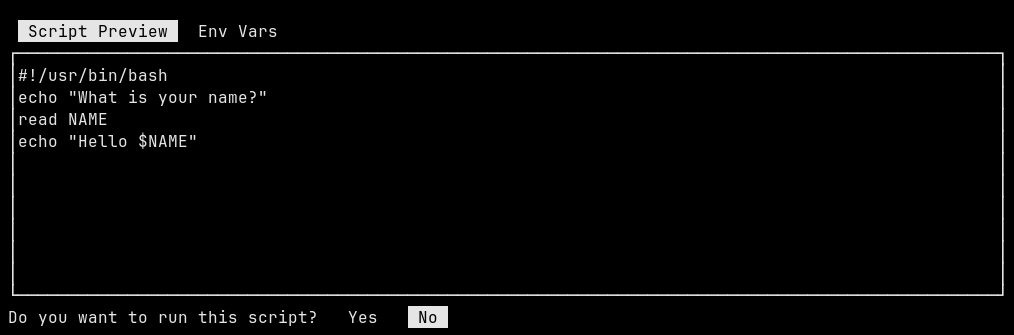
hold-your-shell is a command line program (TUI) that previews shell
scripts (or any shebang script) in a pager, and asks the user to
confirm execution.
This single file program is written for Python 3.x and only uses the stdlib.
Install
Pip install:
pip install hold-your-shell
Manual install:
HY_BIN=~/.local/bin/hold-your-shell
mkdir -p $(dirname ${HY_BIN})

wget -O ${HY_BIN} https://raw.githubusercontent.com/EnigmaCurry/hold-your-shell/refs/heads/master/hold_your_shell/hold_your_shell.py

chmod +x ${HY_BIN}
Usage
- Pipe any script to the stdin of
hold-your-shell. - The script will be previewed on the first tab shown:
Script Preview. - Press TAB to cycle through the other tabs, including
Env Vars. - Use the up and down arrow keys (or
jandk) to scroll the text. - After reviewing the script and env vars, choose whether or not you
you want to run the script. Using the left or right arrows, select
YesorNo. Press Enter to confirm your selection.
Examples
Read from stdin
echo "whoami" | hold-your-shell
echo -e '#!/bin/python\nprint("Hello from Python!")' | hold-your-shell
cat <<'EOF' | hold-your-shell
echo "What is your name?"
read NAME
echo "Hello $NAME"
EOF
curl https://get.docker.com/ | hold-your-shell
Read from file
cat <<EOF > test.txt
#!/bin/env python
print("Hello from Python!")
EOF

hold-your-shell --consume test.txt
--consume will delete the input file immediately after it reads
it.
Linger
echo whoami | hold-your-shell --linger
--linger will have the program remain running after completion of
the script until a key is pressed.
Development
See DEVELOPMENT.md
Project details
Verified details
These details have been verified by PyPIProject links
GitHub Statistics
Maintainers


Download files
Download the file for your platform. If you're not sure which to choose, learn more about installing packages.
Source Distribution
Built Distribution
Filter files by name, interpreter, ABI, and platform.
If you're not sure about the file name format, learn more about wheel file names.
Copy a direct link to the current filters
File details
Details for the file hold_your_shell-0.1.4.tar.gz.
File metadata
- Download URL: hold_your_shell-0.1.4.tar.gz
- Upload date:
- Size: 4.9 kB
- Tags: Source
- Uploaded using Trusted Publishing? Yes
- Uploaded via: twine/6.1.0 CPython/3.12.9
File hashes
| Algorithm | Hash digest | |
|---|---|---|
| SHA256 |
856e799930385d6cd10af0abe420997b10748a938630e6b8af8977bd0d3bf2e5
|
|
| MD5 |
395f515523939d4d745871d2896e0dee
|
|
| BLAKE2b-256 |
c1b704ae4c61a3ed23dbd0b223dc34009865f104b7044844ee8f35a33727bd3d
|
Provenance
The following attestation bundles were made for hold_your_shell-0.1.4.tar.gz:
Publisher:
publish.yml on EnigmaCurry/hold-your-shell
-
Statement:
-
Statement type:
https://in-toto.io/Statement/v1 -
Predicate type:
https://docs.pypi.org/attestations/publish/v1 -
Subject name:
hold_your_shell-0.1.4.tar.gz -
Subject digest:
856e799930385d6cd10af0abe420997b10748a938630e6b8af8977bd0d3bf2e5 - Sigstore transparency entry: 221516190
- Sigstore integration time:
-
Permalink:
EnigmaCurry/hold-your-shell@6476aba887773b517fa73de70a160a1c4d6e5cf3 -
Branch / Tag:
refs/tags/v0.1.4 - Owner: https://github.com/EnigmaCurry
-
Access:
public
-
Token Issuer:
https://token.actions.githubusercontent.com -
Runner Environment:
github-hosted -
Publication workflow:
publish.yml@6476aba887773b517fa73de70a160a1c4d6e5cf3 -
Trigger Event:
push
-
Statement type:
File details
Details for the file hold_your_shell-0.1.4-py3-none-any.whl.
File metadata
- Download URL: hold_your_shell-0.1.4-py3-none-any.whl
- Upload date:
- Size: 5.6 kB
- Tags: Python 3
- Uploaded using Trusted Publishing? Yes
- Uploaded via: twine/6.1.0 CPython/3.12.9
File hashes
| Algorithm | Hash digest | |
|---|---|---|
| SHA256 |
ed30e903a127d8c5e4d702f70155408deb04b8422b9471fb49076ec5aa19f1a4
|
|
| MD5 |
b36c1334897b0209e1eff166c6a84b9c
|
|
| BLAKE2b-256 |
2beb0485efb0f0f05885cd59878e35f224d6d3e80f5824611275e7ddddd3f5f5
|
Provenance
The following attestation bundles were made for hold_your_shell-0.1.4-py3-none-any.whl:
Publisher:
publish.yml on EnigmaCurry/hold-your-shell
-
Statement:
-
Statement type:
https://in-toto.io/Statement/v1 -
Predicate type:
https://docs.pypi.org/attestations/publish/v1 -
Subject name:
hold_your_shell-0.1.4-py3-none-any.whl -
Subject digest:
ed30e903a127d8c5e4d702f70155408deb04b8422b9471fb49076ec5aa19f1a4 - Sigstore transparency entry: 221516194
- Sigstore integration time:
-
Permalink:
EnigmaCurry/hold-your-shell@6476aba887773b517fa73de70a160a1c4d6e5cf3 -
Branch / Tag:
refs/tags/v0.1.4 - Owner: https://github.com/EnigmaCurry
-
Access:
public
-
Token Issuer:
https://token.actions.githubusercontent.com -
Runner Environment:
github-hosted -
Publication workflow:
publish.yml@6476aba887773b517fa73de70a160a1c4d6e5cf3 -
Trigger Event:
push
-
Statement type:






