
No project description provided


Project description
AI Agent for Cloud Troubleshooting and Alert Investigation
HolmesGPT is an AI agent for investigating problems in your cloud, finding the root cause, and suggesting remediations. It has dozens of built-in integrations for cloud providers, observability tools, and on-call systems.
HolmesGPT has been submitted to the CNCF as a sandbox project (view status). You can learn more about HolmesGPT's maintainers and adopters here.
How it Works |
Installation |
LLM Providers |
YouTube Demo |


How it Works
HolmesGPT connects AI models with live observability data and organizational knowledge. It uses an agentic loop to analyze data from multiple sources and identify possible root causes.
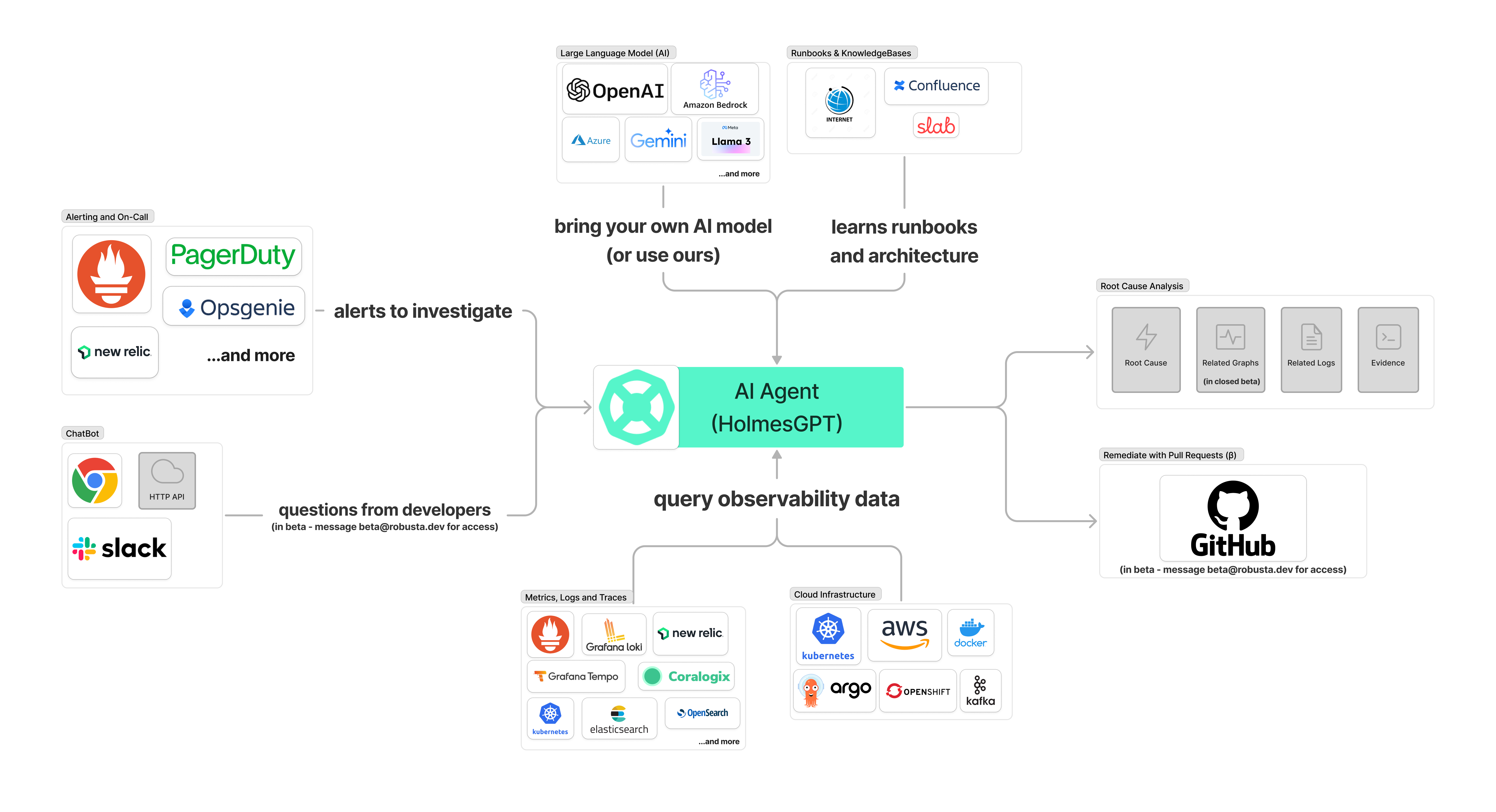
🔗 Data Sources
HolmesGPT integrates with popular observability and cloud platforms. The following data sources ("toolsets") are built-in. Add your own.
| Data Source | Status | Notes |
|---|---|---|
 ArgoCD ArgoCD |
✅ | Get status, history and manifests and more of apps, projects and clusters |
 AWS RDS AWS RDS |
✅ | Fetch events, instances, slow query logs and more |
 Confluence Confluence |
✅ | Private runbooks and documentation |
 Coralogix Logs Coralogix Logs |
✅ | Retrieve logs for any resource |
 Datetime Datetime |
✅ | Date and time-related operations |
 Docker Docker |
✅ | Get images, logs, events, history and more |
 GitHub GitHub |
🟡 Beta | Remediate alerts by opening pull requests with fixes |
 DataDog DataDog |
🟡 Beta | Fetches log data from datadog |
 Grafana Loki Grafana Loki |
✅ | Query logs for Kubernetes resources or any query |
 Grafana Tempo Grafana Tempo |
✅ | Fetch trace info, debug issues like high latency in application. |
 Helm Helm |
✅ | Release status, chart metadata, and values |
 Internet Internet |
✅ | Public runbooks, community docs etc |
 Kafka Kafka |
✅ | Fetch metadata, list consumers and topics or find lagging consumer groups |
 Kubernetes Kubernetes |
✅ | Pod logs, K8s events, and resource status (kubectl describe) |
 NewRelic NewRelic |
🟡 Beta | Investigate alerts, query tracing data |
 OpenSearch OpenSearch |
✅ | Query health, shard, and settings related info of one or more clusters |
 Prometheus Prometheus |
✅ | Investigate alerts, query metrics and generate PromQL queries |
 RabbitMQ RabbitMQ |
✅ | Info about partitions, memory/disk alerts to troubleshoot split-brain scenarios and more |
 Robusta Robusta |
✅ | Multi-cluster monitoring, historical change data, user-configured runbooks, PromQL graphs and more |
 Slab Slab |
✅ | Team knowledge base and runbooks on demand |
🚀 End-to-End Automation
HolmesGPT can fetch alerts/tickets to investigate from external systems, then write the analysis back to the source or Slack.
| Integration | Status | Notes |
|---|---|---|
| Slack | 🟡 Beta | Demo. Tag HolmesGPT bot in any Slack message |
| Prometheus/AlertManager | ✅ | Robusta SaaS or HolmesGPT CLI |
| PagerDuty | ✅ | HolmesGPT CLI only |
| OpsGenie | ✅ | HolmesGPT CLI only |
| Jira | ✅ | HolmesGPT CLI only |
| GitHub | ✅ | HolmesGPT CLI only |
Installation

Read the installation documentation to learn how to install HolmesGPT.
Supported LLM Providers

Read the LLM Providers documentation to learn how to set up your LLM API key.
Using HolmesGPT
- In the Robusta SaaS: Go to platform.robusta.dev and use Holmes from your browser
- With HolmesGPT CLI: setup an LLM API key and ask Holmes a question 👇
holmes ask "what pods are unhealthy and why?"
You can also provide files as context:
holmes ask "summarize the key points in this document" -f ./mydocument.txt
You can also load the prompt from a file using the --prompt-file option:
holmes ask --prompt-file ~/long-prompt.txt

Enter interactive mode to ask follow-up questions:
```bash
holmes ask "what pods are unhealthy and why?" --interactive
# or
holmes ask "what pods are unhealthy and why?" -i
Also supported:
HolmesGPT CLI: investigate Prometheus alerts
Pull alerts from AlertManager and investigate them with HolmesGPT:
holmes investigate alertmanager --alertmanager-url http://localhost:9093
# if on Mac OS and using the Holmes Docker image👇
#  holmes investigate alertmanager --alertmanager-url http://docker.for.mac.localhost:9093
To investigate alerts in your browser, sign up for a free trial of Robusta SaaS.
Optional: port-forward to AlertManager before running the command mentioned above (if running Prometheus inside Kubernetes)
kubectl port-forward alertmanager-robusta-kube-prometheus-st-alertmanager-0 9093:9093 &
HolmesGPT CLI: investigate PagerDuty and OpsGenie alerts
holmes investigate opsgenie --opsgenie-api-key <OPSGENIE_API_KEY>
holmes investigate pagerduty --pagerduty-api-key <PAGERDUTY_API_KEY>
# to write the analysis back to the incident as a comment
holmes investigate pagerduty --pagerduty-api-key <PAGERDUTY_API_KEY> --update
For more details, run holmes investigate <source> --help
Customizing HolmesGPT
HolmesGPT can investigate many issues out of the box, with no customization or training. Optionally, you can extend Holmes to improve results:
Custom Data Sources: Add data sources (toolsets) to improve investigations
- If using Robusta SaaS: See here
- If using the CLI: Use
-tflag with custom toolset files or add to~/.holmes/config.yaml
Custom Runbooks: Give HolmesGPT instructions for known alerts:
- If using Robusta SaaS: Use the Robusta UI to add runbooks
- If using the CLI: Use
-rflag with custom runbook files or add to~/.holmes/config.yaml
You can save common settings and API Keys in a config file to avoid passing them from the CLI each time:
Reading settings from a config file
You can save common settings and API keys in config file for re-use. Place the config file in ~/.holmes/config.yaml` or pass it using the --config
You can view an example config file with all available settings here.
🔐 Data Privacy
By design, HolmesGPT has read-only access and respects RBAC permissions. It is safe to run in production environments.
We do not train HolmesGPT on your data. Data sent to Robusta SaaS is private to your account.
For extra privacy, bring an API key for your own AI model.
Evals
Because HolmesGPT relies on LLMs, it relies on a suite of pytest based evaluations to ensure the prompt and HolmesGPT's default set of tools work as expected with LLMs.
- Introduction to HolmesGPT's evals.
- Write your own evals.
- Use Braintrust to view analyze results (optional).
License
Distributed under the MIT License. See LICENSE.txt for more information.
Support
If you have any questions, feel free to message us on robustacommunity.slack.com
How to Contribute
Please read our CONTRIBUTING.md for guidelines and instructions.
For help, contact us on Slack or ask DeepWiki AI your questions.
Release history Release notifications | RSS feed


Download files
Download the file for your platform. If you're not sure which to choose, learn more about installing packages.
Source Distribution
Built Distribution
Filter files by name, interpreter, ABI, and platform.
If you're not sure about the file name format, learn more about wheel file names.
Copy a direct link to the current filters
File details
Details for the file holmesgpt-0.12.4.tar.gz.
File metadata
- Download URL: holmesgpt-0.12.4.tar.gz
- Upload date:
- Size: 233.9 kB
- Tags: Source
- Uploaded using Trusted Publishing? No
- Uploaded via: poetry/1.4.0 CPython/3.11.13 Linux/6.11.0-1018-azure
File hashes
| Algorithm | Hash digest | |
|---|---|---|
| SHA256 |
06bd547a07529162118a45539386707dab9f16c37ac2e57e96e23159b94db9f4
|
|
| MD5 |
6760eea687363dad161dd680bd78ba98
|
|
| BLAKE2b-256 |
cf557cf1f64442f6489c6b2443aafe245a7873affe355cd2eb8884690f4bd357
|
File details
Details for the file holmesgpt-0.12.4-py3-none-any.whl.
File metadata
- Download URL: holmesgpt-0.12.4-py3-none-any.whl
- Upload date:
- Size: 323.0 kB
- Tags: Python 3
- Uploaded using Trusted Publishing? No
- Uploaded via: poetry/1.4.0 CPython/3.11.13 Linux/6.11.0-1018-azure
File hashes
| Algorithm | Hash digest | |
|---|---|---|
| SHA256 |
645f3f762e04d1cba6fe5d25e5d980ff6f2f1b2b358e056eea0765cfef87e00f
|
|
| MD5 |
4964e494fcecb5b8256cd8c8228900e1
|
|
| BLAKE2b-256 |
12ca83e26803993a26f01b2dfa46f16f99a9a71b3071dc189c20e91e680d695d
|






