
No project description provided


Project description
HolmesGPT — The CNCF SRE Agent
Installation |
Docs |

Open-source AI agent for investigating production incidents and finding root causes. Works with any stack — Kubernetes, VMs, cloud providers, databases, and SaaS platforms. We are a Cloud Native Computing Foundation sandbox project. Originally created by Robusta.Dev, with major contributions from Microsoft.
New: Operator Mode — Find Problems 24/7 in the Background
Most AI agents are great at troubleshooting problems, but still need a human to notice something is wrong and trigger an investigation. Operator mode fixes that — HolmesGPT runs in the background 24/7, spots problems before your customers notice, and messages you in Slack with the fix. Connect the GitHub integration and it can even open PRs to fix what it finds.
While the operator itself runs in Kubernetes, health checks can query any data source Holmes is connected to — VMs, cloud services, databases, SaaS platforms, and more.
- Deployment verification — Deploy a health check alongside your app to verify the new version is healthy
- Scheduled health checks — Continuously monitor services and catch regressions automatically
Features
- Petabyte-scale data: Server-side filtering, JSON tree traversal, and tool output transformers keep large payloads out of context windows
- Memory-safe execution: Per-tool memory limits, streaming large results to disk, and automatic output budgeting prevent OOM kills when querying large observability datasets
- Deep integrations: Prometheus, Grafana, Datadog, Kubernetes, and many more—plus any REST API
- Bidirectional alert integrations: Fetch alerts from AlertManager, PagerDuty, OpsGenie, or Jira—and write findings back
- Any LLM provider: OpenAI, Anthropic, Azure, Bedrock, Gemini, and more
- No Kubernetes required: Works with any infrastructure — VMs, bare metal, cloud services, or containers
How it Works
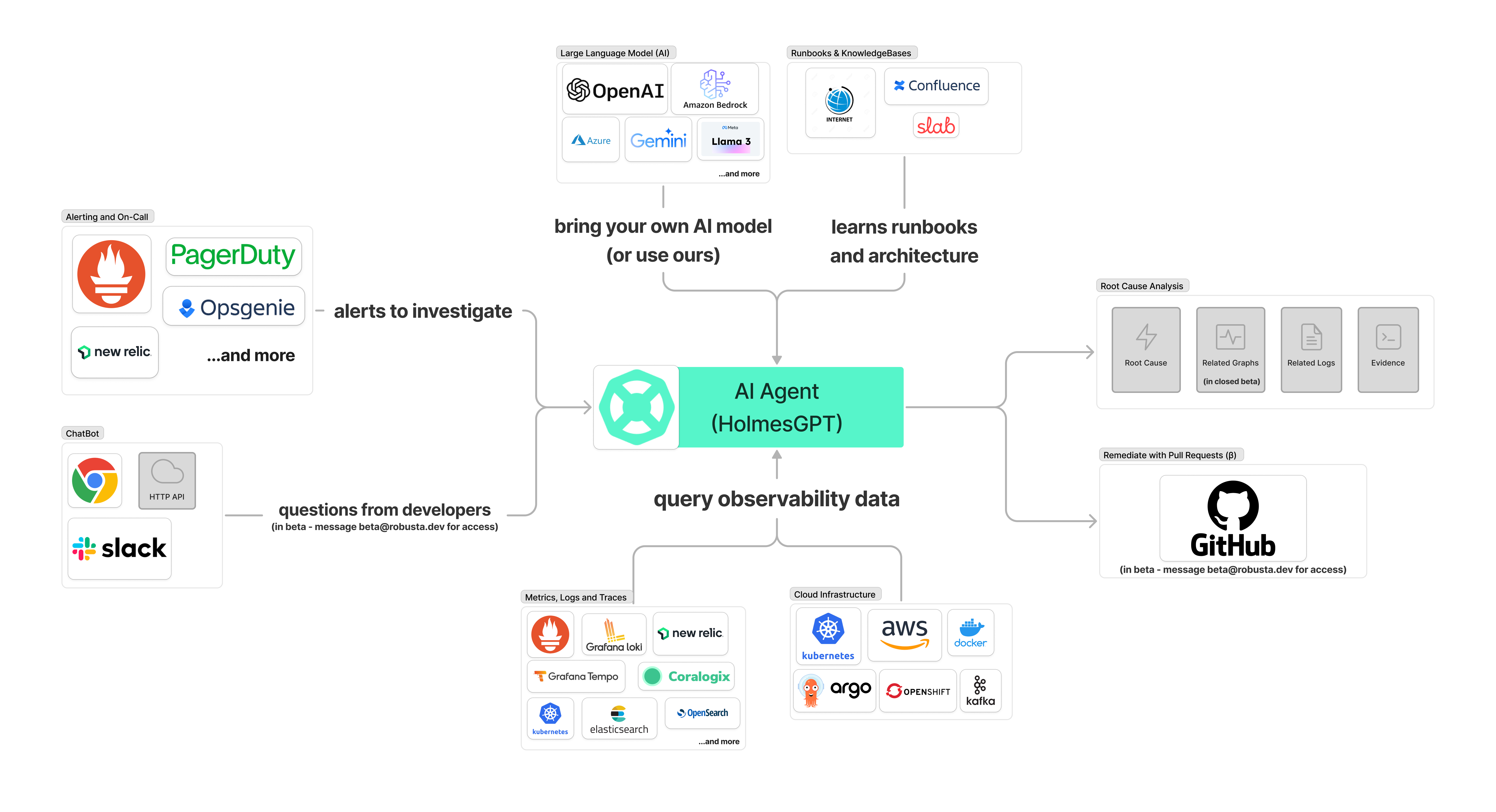
HolmesGPT uses an agentic loop to query live observability data from multiple sources and identify root causes.

🔗 Data Sources
HolmesGPT integrates with popular observability and cloud platforms. The following data sources ("toolsets") are built-in. Add your own.
| Data Source | Notes |
|---|---|
 AKS AKS |
Azure Kubernetes Service cluster and node health diagnostics |
 ArgoCD ArgoCD |
Get status, history and manifests and more of apps, projects and clusters |
 AWS AWS |
RDS events, instances, slow query logs, and more (MCP) |
 Azure Azure |
Azure resources and diagnostics (MCP) |
| Azure SQL |
Database health, performance, connections, and slow queries |
 Confluence Confluence |
Private runbooks and documentation |
| Confluence (MCP) |
Private runbooks and documentation (MCP) |
 Coralogix Coralogix |
Retrieve logs for any resource |
 Datadog Datadog |
Query logs, metrics, and traces |
 Docker Docker |
Get images, logs, events, history and more |
 Elasticsearch / OpenSearch Elasticsearch / OpenSearch |
Query logs, cluster health, shard and index diagnostics |
 GCP GCP |
Google Cloud Platform resources (MCP) |
 GitHub GitHub |
Repositories, issues, and pull requests (MCP) |
 Jenkins (MCP) Jenkins (MCP) |
Build status, pipeline logs, and job history (MCP) |
 Grafana Grafana |
Query and analyze dashboard configurations and panels |
 Helm Helm |
Release status, chart metadata, and values |
 Internet Internet |
Public runbooks, community docs, etc. |
 Kafka Kafka |
Fetch metadata, list consumers and topics or find lagging consumer groups |
 Kubernetes Kubernetes |
Pod logs, K8s events, and resource status (kubectl describe) |
| Kubernetes Remediation (MCP) |
Apply fixes like scaling, rollbacks, and resource edits (MCP) |
 Loki Loki |
Query logs for Kubernetes resources or any query |
 MariaDB MariaDB |
MariaDB database queries and diagnostics (MCP) |
| MongoDB |
Query data, diagnose performance, inspect schemas, find slow operations |
| MongoDB Atlas |
Cluster health, slow queries, and performance diagnostics |
 NewRelic NewRelic |
Investigate alerts, query tracing data |
 OpenShift OpenShift |
Projects, routes, builds, security context constraints, and deployment configs |
 Prefect (MCP) Prefect (MCP) |
Workflow orchestration monitoring, flow runs, and worker health (MCP) |
 Prometheus Prometheus |
Investigate alerts, query metrics and generate PromQL queries |
 RabbitMQ RabbitMQ |
Partitions, memory/disk alerts, troubleshoot split-brain scenarios and more |
 Robusta Robusta |
Multi-cluster monitoring, historical change data, runbooks, PromQL graphs and more |
 ServiceNow ServiceNow |
Query tables and incident records |
 Sentry Sentry |
Error tracking, issues, and performance monitoring (MCP) |
 Slab Slab |
Team knowledge base and runbooks on demand |
| Splunk | Log search and analysis (MCP) |
| SQL Databases |
PostgreSQL, MySQL, ClickHouse, MariaDB, SQL Server, SQLite |
 Tempo Tempo |
Fetch trace info, debug issues like high latency in application |
 Zabbix Zabbix |
Monitor hosts, problems, events, triggers, and historical metrics |
See the full list of built-in toolsets for additional integrations including Cilium, KubeVela, Notion, and more.
🚀 End-to-End Automation
HolmesGPT can fetch alerts/tickets to investigate from external systems, then write the analysis back to the source or Slack.
| Integration | Status | Notes |
|---|---|---|
| Slack | ✅ | Demo. Available via Robusta |
| Microsoft Teams | ✅ | Available via Robusta |
| Prometheus/AlertManager | ✅ | Robusta or HolmesGPT CLI |
| PagerDuty | ✅ | HolmesGPT CLI only |
| OpsGenie | ✅ | HolmesGPT CLI only |
| Jira | ✅ | HolmesGPT CLI only |
| GitHub | ✅ | HolmesGPT CLI only |
Installation

Read the installation documentation to learn how to install HolmesGPT.
Supported LLM Providers

Read the LLM Providers documentation to learn how to set up your LLM API key.
Using HolmesGPT
See the walkthrough documentation for usage guides, including:
- Interactive mode for asking questions and follow-ups
- Investigating Prometheus alerts
- CI/CD troubleshooting
🔐 Data Privacy
By design, HolmesGPT has read-only access and respects RBAC permissions. It is safe to run in production environments.
License
Distributed under the Apache 2.0 License. See LICENSE for more information.
Community
Join our community to discuss the HolmesGPT roadmap and share feedback:
Support
If you have any questions, feel free to message us on HolmesGPT Slack Channel
How to Contribute
Please read our CONTRIBUTING.md for guidelines and instructions.
For help, contact us on Slack or ask DeepWiki AI your questions.
Please make sure to follow the CNCF code of conduct - details here.


Release history Release notifications | RSS feed


Download files
Download the file for your platform. If you're not sure which to choose, learn more about installing packages.
Source Distribution
Built Distribution
Filter files by name, interpreter, ABI, and platform.
If you're not sure about the file name format, learn more about wheel file names.
Copy a direct link to the current filters
File details
Details for the file holmesgpt-0.24.4.tar.gz.
File metadata
- Download URL: holmesgpt-0.24.4.tar.gz
- Upload date:
- Size: 485.1 kB
- Tags: Source
- Uploaded using Trusted Publishing? No
- Uploaded via: poetry/1.4.0 CPython/3.11.15 Linux/6.17.0-1010-azure
File hashes
| Algorithm | Hash digest | |
|---|---|---|
| SHA256 |
0af92ffc29e023bc67eb1b4343c80a15d5ecbea1f2e4e333fab5d2e52177dc49
|
|
| MD5 |
7cb77bb8f23ea518c1a7325838e6c3b4
|
|
| BLAKE2b-256 |
6f16000cca1b463efdd2ceec5a8cacabdc23ab935ca0688f0f0b2eec4991aea5
|
File details
Details for the file holmesgpt-0.24.4-py3-none-any.whl.
File metadata
- Download URL: holmesgpt-0.24.4-py3-none-any.whl
- Upload date:
- Size: 594.0 kB
- Tags: Python 3
- Uploaded using Trusted Publishing? No
- Uploaded via: poetry/1.4.0 CPython/3.11.15 Linux/6.17.0-1010-azure
File hashes
| Algorithm | Hash digest | |
|---|---|---|
| SHA256 |
d8c01e9c3baf9e83beeb78ee8bb81fa6d3bdcb800e0f48fe06e3b4fb9b614e75
|
|
| MD5 |
9fbaeb668beafebc49e381534b8536ef
|
|
| BLAKE2b-256 |
495588e035905729cc3320151b86ac8da59b904db4126a300ae01c662646c728
|






