
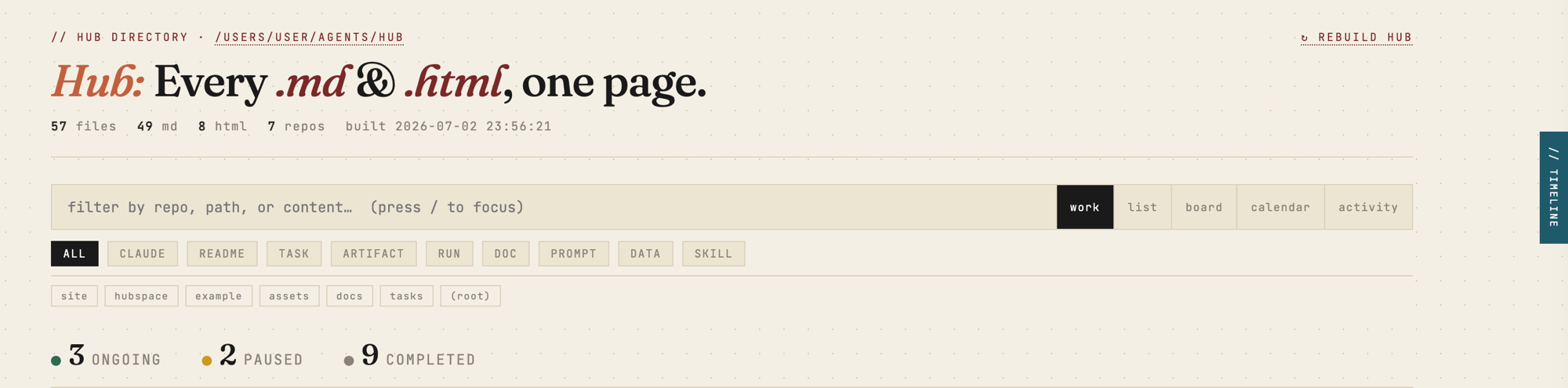




Point it at a folder — every task, decision, run, and diagram becomes one searchable, traceable page. The manifest records what you decided, what the agent decided, what it found, and the plan; lineage makes that record navigable, so nothing your agent makes floats free. Most AI-dev tools market the generation — Hub keeps the record of why.
Under the hood: Hub scans a directory tree, indexes every document into SQLite with full-text search and task lineage, and serves a fast local browser at http://localhost:8787. No npm. No framework. No runtime dependencies — pure stdlib Python (3.11+); nothing leaves your machine.
Two ways in:
- Package (
hubspaces) — Hub, standalone.pip install, point at any folder. - Plugin (
hub) — batteries-included for Claude Code: producer skills and the full engine bundled in, working offline the moment you install it. See the plugin.
Install
pipx install hubspaces       # isolated, recommended
# or
pip install hubspaces
From a clone (no publish needed):
git clone https://github.com/auth-02/hub && cd hub
pipx install .
This puts the hub command on your PATH: hub builds the index, and hub serve serves it and watches for changes.
Run
cd ~/my-project        # any folder you want to browse
hub serve              # serves http://localhost:8787 and rebuilds on change
Then open http://localhost:8787. That's it — Hub indexes the current directory by default.
Want to see it before pointing it at your own files? hub serve --demo builds and serves a bundled example repo.
hub serve --demo
See it in action
The fastest way to see Hub is to run it — the bundled demo shows the real, current UI in one command, no install required:
uvx --from hubspaces hub serve --demo # demo hub on http://localhost:8787
What you'll see:
- Index — grouped by repo, filtered by kind, sorted by recency; every task manifest carries a status badge you click to cycle
ongoing → completed → paused. - Split-pane preview — click any row for a live render with a
// tracepanel linking related runs, artifacts, and the parent task. - Timeline (
Ctrl+T) — a daily work summary: what have I worked on today / yesterday / this week, with git commits, runs, and artifacts inline. - Document pages — every
.md/.htmlopens in a clean reading view with a// tracebar; HTML artifacts get the hub's own CSS injected.
Features
- Lineage trace — every run, artifact, prompt, and diagram traces back to the task and the decision that produced it. Click any row for a live preview with a
// tracepanel; nothing your agent makes floats free. - Diagrams in place — create Excalidraw diagrams in the UI, offline. Task diagrams are first-class lineage nodes, badged
DRAW. - Full-text search — filter by repo, path, title, and body simultaneously. Implicit AND,
repo:nameprefix supported. - Kind chips — one-click filters for TASK, RUN, ARTIFACT, DRAW, CLAUDE, README, DOC, PROMPT, DATA, SKILL. Stack with repo chips and search.
- Task status badges — every task manifest shows a clickable status pill. Cycles
ongoing → completed → paused. Persisted — survives DB resets, scan-root changes, and git branch switches. - Hub Timeline — drawer (
Ctrl+T) with a synthesised daily summary grouped by today / yesterday / this week, pulling from the activity log +git logacross all repos. - Activity view — a main view listing recent file events across the scan root: what changed, which task, how long ago.
- Auto-rebuild — file watcher triggers a rebuild within ~3 s of any change in the scan root.
- Keyboard-first — navigate the full list without a mouse.
Configuration
Everything is optional. Drop a hub.toml in the folder you run Hub from (or run hub init to scaffold one):
[hub]
scan_root    = "."                      # directory to index (default: CWD)
port         = 8787                      # local server port
exclude_dirs = ["vendor", "fixtures"]   # extra dirs to skip (added to built-ins)
default_view = "board"                   # work | list | board | calendar | activity
Environment variables override the file:
| Var | Default | Purpose |
|---|---|---|
HUB_SCAN_ROOT |
(current directory) | Directory to scan |
HUB_SERVER_PORT |
8787 |
Server port |
HUB_OUTPUT |
~/.local/state/hub/build/docs-index.html |
Generated HTML path |
HUB_DB |
~/.local/state/hub/hub.db |
SQLite database |
HUB_DEBUG |
off | 1 enables logging to ~/.local/state/hub/hub.log |
Scan-root priority: --root flag → HUB_SCAN_ROOT → hub.toml → .scan_root sidecar → current directory.
You can also change it live: click the scan-root path in the header → edit → Save & Rebuild.
Task structure
Hub understands this layout and builds a lineage graph automatically:
{repo}/tasks/{slug}/
    ├── manifest.md        ← TASK  (links to all below)
    ├── runs/YYYY-MM-DD/   ← RUN   (↑ back-link to manifest)
    ├── artifacts/         ← ARTIFACT
    └── prompts/           ← PROMPT
hub new task <slug> scaffolds a valid task for you.
Agent plugin (optional)
Hub is the viewer. If you drive work with Claude Code, the companion
hub plugin is a self-sufficient producer + viewer: it bundles four
producer skills — /hub:manifest, /hub:stacked, /hub:kagaz, /hub:dak —
that create the tasks/<slug>/manifest.md structure above as you work, plus a
/hub:serve command that builds and serves the dashboard. So the board, trace,
and timeline fill themselves in.
/plugin marketplace add auth-02/hub
/plugin install hub@hub
Fully opt-in — Hub needs no plugin and no agent to deliver the full index/search/preview/trace experience.
Search
| Query | Finds |
|---|---|
session tokens |
files whose title or body contains both words |
repo:tasks manifest |
manifests in the tasks repo |
repo:docs architecture |
docs matching "architecture" |
Keyboard shortcuts
| Key | Action | Key | Action | |
|---|---|---|---|---|
/ |
Focus search | j / ↓ |
Next file | |
Ctrl+T |
Toggle timeline drawer | k / ↑ |
Previous file | |
Enter |
Open in new tab | Esc |
Close preview / drawer |
Keep it running (macOS)
Two launchd agents start Hub at login — the server (+ watcher) and a periodic rebuild:
bash scripts/setup-launchd.sh
# custom scan root:
HUB_SCAN_ROOT=~/work bash scripts/setup-launchd.sh
Reload after upgrading:
launchctl kickstart -k gui/$(id -u)/com.user.hub-server
launchctl kickstart -k gui/$(id -u)/com.user.hub
Roadmap
Direction, not commitment. Everything below feeds or exposes the lineage graph — the one asset the whole product sits on:
- Comments — notes on a manifest or artifact the agent can read and close the loop on; human ↔ agent, in one place.
- Sharing — one-click publish of an asset, or a whole task with its full lineage, to a review link.
- Hub Spec — the producer contract, published and versioned: emit this structure and any agent or tool works with Hub.
- Agent retrieval (MCP) — a surface so coding agents find the right task and its context themselves.
Arc: close the loop in place → share it out → make the contract open → let agents query it themselves.
Development
git clone https://github.com/auth-02/hub && cd hub
make build-ui                       # build the web UI once (needs Node + npm)
python3 -m hubspace.cli.hub serve   # run from source
python3 tests/run_tests.py          # stdlib unittest (no Node needed)
Layout: code is the hubspace/ package; all generated/writable state (index, DB, log)
lives under ~/.local/state/hub/, never the package directory.
Web UI (hubspace/ui/)
The runtime is stdlib-only Python with no runtime JS dependencies. The browser
UI's source (hub.js/hub.css and the doc-page stylesheets) lives in hubspace/ui/
and is built with Vite into hubspace/static/, which ships in the wheel.
- Build once / on change:
make build-ui(orcd hubspace/ui && npm run devto rebuild on save). - The built outputs in
hubspace/static/are git-ignored — the source of truth ishubspace/ui/. A fresh clone has nostatic/hub.jsuntil you runmake build-ui, so the page looks unstyled until then. hubspace/ui/never ships in the wheel; only its built output does. CI runsmake build-uibeforepython -m build, so published wheels always carry a fresh UI.- Installing from PyPI (
pip install hubspaces) needs no Node — the built UI is bundled.
1 maintainer

Download files
Download the file for your platform. If you're not sure which to choose, learn more about installing packages.
Source Distribution
Built Distribution
Filter files by name, interpreter, ABI, and platform.
If you're not sure about the file name format, learn more about wheel file names.
Copy a direct link to the current filters
File details
Details for the file hubspaces-0.3.0.tar.gz.
File metadata
- Download URL: hubspaces-0.3.0.tar.gz
- Upload date:
- Size: 5.0 MB
- Tags: Source
- Uploaded using Trusted Publishing? Yes
- Uploaded via:
twine/6.1.0 CPython/3.13.14
File hashes
| Algorithm | Hash digest | |
|---|---|---|
| SHA256 |
d686ac3d337cb0ad1d006bdbb5523208ca03069b6b09bfa6e280921892b15252
|
|
| MD5 |
f7fca683d33230d185c6c54d30176d9d
|
|
| BLAKE2b-256 |
ff732035e583eb714fc0ec578947d9ad90dafa4001d9764bc5ccaefd4276f0ef
|
Provenance
The following attestation bundles were made for hubspaces-0.3.0.tar.gz:
Publisher:
publish.yml on auth-02/hub
-
Statement:
-
Statement type:
https://in-toto.io/Statement/v1 -
Predicate type:
https://docs.pypi.org/attestations/publish/v1 -
Subject name:
hubspaces-0.3.0.tar.gz -
Subject digest:
d686ac3d337cb0ad1d006bdbb5523208ca03069b6b09bfa6e280921892b15252 - Sigstore transparency entry: 2207165457
- Sigstore integration time:
-
Permalink:
auth-02/hub@a54e4ba2c1f7e3a03d90cef8025c470340a1c50d -
Branch / Tag:
refs/tags/v0.3.0 - Owner: https://github.com/auth-02
-
Access:
public
-
Token Issuer:
https://token.actions.githubusercontent.com -
Runner Environment:
github-hosted -
Publication workflow:
publish.yml@a54e4ba2c1f7e3a03d90cef8025c470340a1c50d -
Trigger Event:
release
-
Statement type:
File details
Details for the file hubspaces-0.3.0-py3-none-any.whl.
File metadata
- Download URL: hubspaces-0.3.0-py3-none-any.whl
- Upload date:
- Size: 2.0 MB
- Tags: Python 3
- Uploaded using Trusted Publishing? Yes
- Uploaded via:
twine/6.1.0 CPython/3.13.14
File hashes
| Algorithm | Hash digest | |
|---|---|---|
| SHA256 |
9cc84c4dffe56fb55efede87ccaf05a5adc006929c4a900417acb2de775cc1ec
|
|
| MD5 |
28dea35fe92295e5df3fc98d1e32795e
|
|
| BLAKE2b-256 |
aef4fc3bf069b6f3a5f2b4aba8eac2bc92e02fc919c0769318e3762a46830475
|
Provenance
The following attestation bundles were made for hubspaces-0.3.0-py3-none-any.whl:
Publisher:
publish.yml on auth-02/hub
-
Statement:
-
Statement type:
https://in-toto.io/Statement/v1 -
Predicate type:
https://docs.pypi.org/attestations/publish/v1 -
Subject name:
hubspaces-0.3.0-py3-none-any.whl -
Subject digest:
9cc84c4dffe56fb55efede87ccaf05a5adc006929c4a900417acb2de775cc1ec - Sigstore transparency entry: 2207165494
- Sigstore integration time:
-
Permalink:
auth-02/hub@a54e4ba2c1f7e3a03d90cef8025c470340a1c50d -
Branch / Tag:
refs/tags/v0.3.0 - Owner: https://github.com/auth-02
-
Access:
public
-
Token Issuer:
https://token.actions.githubusercontent.com -
Runner Environment:
github-hosted -
Publication workflow:
publish.yml@a54e4ba2c1f7e3a03d90cef8025c470340a1c50d -
Trigger Event:
release
-
Statement type:














