

One brain for your internal agents.
Provide context once. Reuse it across workflows, chat, and the AI tools your team already uses.
Documentation · Quickstart · Website · Contribute


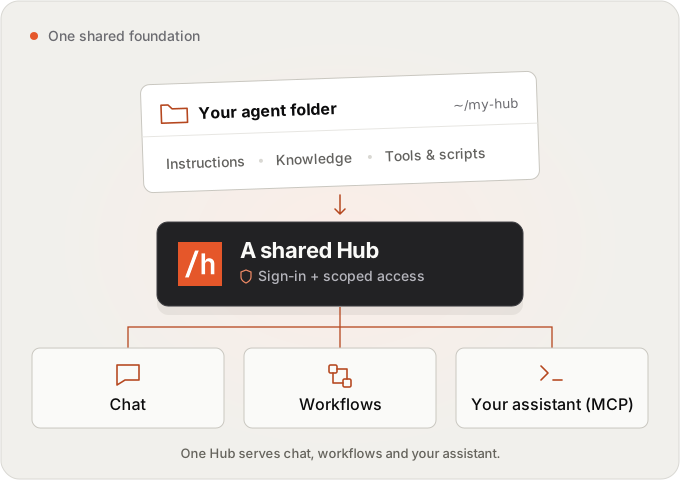
Hubzoid is an open-source, self-hostable platform for internal AI agents. Keep your team's knowledge, instructions, skills, and tools in a versionable folder. Use that shared Hub through chat, repeatable workflows, or your own assistant through MCP.
Start with a useful agent on your laptop. Give it the context and capabilities it needs, then share it with your team using accounts and scoped permissions.
Start a hub
Use Python 3.11 or 3.12. With uv:
uv venv --python 3.12
source .venv/bin/activate
uv pip install hubzoid
hubzoid init my-hub
hubzoid run my-hub
Or with pip:
python3.12 -m venv .venv
source .venv/bin/activate
pip install hubzoid
hubzoid init my-hub
hubzoid run my-hub
hubzoid init scaffolds an operations assistant for Kestrel & Oak, a
fictional home-goods shop, with policy files, a stock export, a stock_check
tool and three suggested prompts. It uses a signed-in Claude Code or Codex CLI
when it finds one. Otherwise, in a terminal, it offers to save an OpenRouter,
Anthropic or OpenAI key in my-hub/.env. See
providers.
--template minimal gives the small 1.0 starter instead.
hubzoid run serves the Hubzoid web app, file downloads and MCP on one port,
prints one ready line with the address (http://127.0.0.1:3080 by
default) and opens it in your browser. Pick a suggested prompt, such as "What should we reorder today, and
what could run out first?" Edit my-hub/AGENTS.md to make the hub yours.
If Hubzoid gave your team a useful agent, a ⭐ on GitHub helps others find it.
Sign-in is off by default (local mode): you are the hub's owner and the port stays on your machine. The ready line also prints a command to connect Claude Code to the hub's tools and knowledge:
claude mcp add --transport http <hub name> http://127.0.0.1:3080/mcp
Run /mcp in Claude Code and approve the connection in your browser (OAuth).
See hosted MCP.
Workflows on Python 3.12: the workflow engine (DBOS, which runs markdown
schedules and code workflows) needs SQLite 3.42 or newer, or PostgreSQL.
Check with the same Python the hub uses:
python -c "import sqlite3; print(sqlite3.sqlite_version)".
hubzoid doctor reports it as deps.sqlite. Python 3.11 is not affected.
This branch's changes may be ahead of the package published on PyPI; source installation tests the checked-out revision.
Turn on sign-in for a team
Before anyone else can reach the hub, turn sign-in on and create the first administrator:
# in my-hub/.env
HUBZOID_AUTH=true
HUBZOID_PUBLIC_URL=https://hub.example.com   # the address people open

hubzoid admin create you@example.com my-hub --owner
hubzoid admin create prints a one-time sign-in link. Open it, set a
password, and add teammates in the Admin Console (People → Add user), which
gives you a link to share with each of them. People can also sign in with
Google, Microsoft or a standard OpenID Connect provider. Without sign-in,
hubzoid run refuses to listen on a network address. See
authentication
and deployment.
Upgrading from 1.0
Hubzoid 1.1 replaces Open WebUI with its own web app and accounts. A 1.0.x
deployment with sign-in on does not start until its accounts and chats are
moved with hubzoid migrate openwebui (dry run first, then a backup), or until
you keep Open WebUI as the chat app with pip install "hubzoid[openwebui]"
and HUBZOID_UI=openwebui. Hosted MCP clients now connect with OAuth instead
of Open WebUI API keys. Read
upgrading
before you start.
One hub, three ways to work
| Experience | Use it for | Start here |
|---|---|---|
| Chat | Ask questions and take authorized actions using the hub's context, in the web app or other channels | Sign-in and accounts, Slack, other channels |
| Workflows | Run scheduled reports and checks, inspect their steps, and save the results | Markdown tasks, Python workflows, reports and email |
| Your assistant through MCP | Bring hub tools, knowledge, and skills into a supported personal assistant | Connect an MCP client |
Business data can stay in its source systems, connected through tools or MCP. Shared context does not mean shared credentials: conversation history, workflow state, and permissions remain distinct. Each integration has its own setup.
A hub is a folder
my-hub/
├── AGENTS.md        Main agent instructions
├── knowledge/       Reference material
├── skills/          Reusable instructions, loaded when needed
├── agents/          Specialist agent definitions
├── tools_local/     Python tool factories
├── restricted/      Tools that require explicit permissions
├── connectors/      External MCP connections
├── schedule/        Markdown tasks
├── workflows/       Python workflows and steps
└── evals/           Behavioural checks
Only AGENTS.md is required for the hub structure. Runtime credentials and configuration still need to be set. Start small and add files when they become useful. Author a hub →
Start with a useful job
| Example | What it does | Try it |
|---|---|---|
| AskHub | Answer team questions from shared knowledge | Company Q&A template |
| Daily Reports | Prepare a recurring briefing from business inputs | Morning briefing template |
| Watchtower | Check bundled metrics against thresholds and explain exceptions | hubzoid init watchtower --template watchtower |
Examples use sample data and placeholder integrations where stated. Read the example's instructions before connecting real systems or enabling schedules. Browse all templates →
Share it with your team
- Connect existing systems. Add Python tools and MCP connections. Keep credentials separate from agent-readable files. Each person can also connect their own accounts (for example their own Jira or Gmail) to remote MCP servers your administrators register. See MCP connectors.
- Control who can do what. Grant agent access and restricted capabilities to people in the Console. Hubzoid checks permissions before a restricted tool runs.
- See what happened. Inspect workflow runs, steps, usage, and activity. Model cost estimates are guidance; your provider's bill is authoritative.
- Choose your runtime. Use OpenAI Agents, Claude Agent SDK, or local Codex. Provider and channel capabilities vary. See providers.
- Run it yourself. Deploy one hub, or use
hubzoid gatewayto serve several hubs behind one web app, where one sign-in covers every agent a person may use. See deployment.
The web app at / is where people chat: conversations with history,
search, archive and rename, replies that stream with their tool steps and
reasoning, stop, edit and resend, regenerate with branches, attachments
(picker, drag and drop, paste), code and tables, download links for files the
agent makes, and read-only share links for signed-in colleagues. It has an
account page, a connections page, light and dark themes, and works on a phone.
Conversations are stored by Hubzoid in its operational database.
The Admin Console at /portal/ manages people, agent access,
personal connectors and activity, and shows workflow runs and usage, with the
same accounts. Administrators open it from Admin Console in the web app's
account menu. For adding teammates, sign-in providers and permissions, see
administration.
Try a worked example
# Guided chat tour
hubzoid init guided-hub --template demo
For a small Python workflow:
hubzoid new workflow first-check my-hub
hubzoid schedule run my-hub first_check
The scaffold runs on demand and needs no model or external service. Add a schedule only when you want unattended execution. The Console inspects runs; CLI commands operate them.
Documentation
The website documentation is the reading and discovery surface. The guides in this checkout describe this revision and remain available when working offline or reviewing a change.
| Task | Guide in this repository |
|---|---|
| Install and get a first useful reply | Quickstart |
| Choose models and credentials | Providers |
| Build tools, knowledge, and skills | Hub authoring |
| Set up people and capabilities | Administration, access management |
| Automate and inspect work | Markdown tasks, Python workflows |
| Connect an assistant | MCP server |
| Deploy, upgrade, and recover | Deployment, upgrading, backup |
| Test behaviour and observe calls | Evals, observability |
Contribute
Read CONTRIBUTING.md and the product direction. Propose non-trivial changes as text in proposals/ before large implementations. Keep integration and maintenance costs low; preserve the hub-folder contract and runtime neutrality.
pip install -e '.[dev]'
pytest
Real-provider tests are separate and skip without credentials. Changes to the
web app or the Console also need their build and browser checks (portal/).
Pull requests and pushes to main run the fast checks. The full validation
runs when a GitHub release is published. See
contributing and publishing a release.
License and help
Hubzoid product code, including team controls, is Apache-2.0 licensed. Dependencies, optional services, fonts, and brand assets retain their own terms. See LICENSE and LICENSING.md.
Need help building or operating your team's agent? Implementation assistance uses the same open-source product.
1 maintainer

Metadata
1 maintainer
Release files for hubzoid 1.1.1
For a detailed explanation of source distributions (sdists) and built distributions (wheels), please see the package formats documentation.
Source distribution (sdist)
| File | Size | Uploaded | |
|---|---|---|---|
| hubzoid-1.1.1.tar.gz | 2.7 MB | Details |
Built distribution (wheel)
| File | Interpreter | ABI | Platform | Reset |
|---|---|---|---|---|
| hubzoid-1.1.1-py3-none-any.whl | Python 3 | none | any | Details |
Total release size: 4.9 MB
Release files / hubzoid-1.1.1.tar.gz
| Download URL | hubzoid-1.1.1.tar.gz |
|---|---|
| Size | 2.7 MB |
| Tags | Source |
|
SHA-256 checksum How to use checksums |
39714008c01bccb03e196950251652b54ba3881b6cf33e95007d9edcb5397ebf
|
|
BLAKE2b-256 checksum How to use checksums |
cbb63ef75680ad4341b503e402986b20a05e4055ef713be98b8e9160bde76862
|
| Upload date | |
|
Uploaded using Trusted Publishing? What is trusted publishing? |
Yes |
| Uploaded via |
twine/7.0.0 CPython/3.13.14
|
Provenance
Provenance describes where a file came from. On PyPI, provenance is shared via attestations, which provide a verifiable record of the build or publishing details. View details, limitations and caveats.


PyPI Publish Attestation
PyPI verified that this artifact, at this checksum, originated from the publisher listed below.
Signed by GitHub Actions, verified by PyPI on Oct 3, 2026.
Transparency logRelease files / hubzoid-1.1.1-py3-none-any.whl
| Download URL | hubzoid-1.1.1-py3-none-any.whl |
|---|---|
| Size | 2.3 MB |
| Tags | Python 3 |
|
SHA-256 checksum How to use checksums |
a0adff1d77ac574b9bf1faa475055124c1f14fe1713c559eafdbbf190ca011fc
|
|
BLAKE2b-256 checksum How to use checksums |
a637e6ff9eaa69fd8328fad1cfba7f6d838bdfb362be33173db87b93b7f6e781
|
| Upload date | |
|
Uploaded using Trusted Publishing? What is trusted publishing? |
Yes |
| Uploaded via |
twine/7.0.0 CPython/3.13.14
|
Provenance
Provenance describes where a file came from. On PyPI, provenance is shared via attestations, which provide a verifiable record of the build or publishing details. View details, limitations and caveats.
PyPI Publish Attestation
PyPI verified that this artifact, at this checksum, originated from the publisher listed below.
Signed by GitHub Actions, verified by PyPI on Oct 3, 2026.
Transparency log













