

One brain for your internal agents.
Your knowledge. Your way of working. Useful across your assistants and your team.
Documentation · Quickstart · Website · Contribute


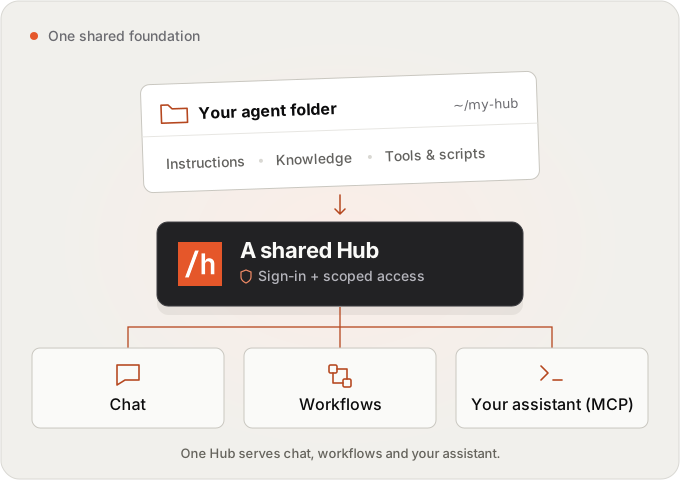
Hubzoid turns a folder of your knowledge, rules and tools into an agent you can use yourself and share with your team. Ask it questions in chat, run repeatable workflows, or connect your own assistant through MCP.
Start with one useful job: a stock check, a policy answer, or a weekly report. Keep the context and rules in files you can read, edit and version. Add teammates with access to the agents and capabilities they need.
Get your first useful result
Use Claude Code or Codex with the setup prompt below, or run these commands yourself.
Use Python 3.11 or 3.12 in a virtual environment:
python3.12 -m venv .venv
source .venv/bin/activate
pip install hubzoid
hubzoid init my-hub
hubzoid run my-hub
The web app opens at http://127.0.0.1:3080. Ask:
What should we reorder, and what could run out first?
The starter is an operations assistant for a fictional home-goods shop. It
uses a stock export and saved policies to explain what needs attention. You can
inspect the numbers and rules in my-hub/.
init detects a signed-in Claude Code or Codex CLI. Otherwise it offers to save
a model API key in the Hub's private .env. Chat needs model authentication;
provider charges or subscription limits apply. Choose a runtime →
Prefer to set up with Claude Code or Codex?
Paste this into your coding assistant:
Help me set up a local Hubzoid agent using the current quickstart:
https://github.com/hubzoid/hubzoid/blob/main/docs/quickstart.md

Use a new folder and a Python 3.11 or 3.12 virtual environment.
Help me choose an available runtime without pasting secrets into chat.
Run the operations sample and show me one result from its stock data.
Then help me adapt it to one task using material I choose.
Show me proposed file changes before replacing sample content.
Your coding assistant helps author the Hub. Its setup conversation is not shared Hub knowledge. Authoring, runtime selection and MCP access are separate.
Local mode is private to your machine. Turn on sign-in before sharing access. For Windows, uv, troubleshooting and source installation, see the quickstart.
Python 3.12 workflows need SQLite 3.42+ or PostgreSQL. hubzoid doctor my-hub
checks the environment. This checkout targets 1.3.1; until it is published,
pip install hubzoid installs the earlier release. Use the
source-install steps
to try this revision. 1.3.0 will not be released.
Make it work your way
Try a correction you can verify:
- Ask the sample: “A customer opened a blender 40 days ago and wants to return it. What can we offer?” Its saved change-of-mind policy is 30 days.
- Ask Claude Code or Codex to change the change-of-mind window to 45 days
in
my-hub/knowledge/returns-policy.md, keep the faulty-item rules unchanged, and show you the diff. Or edit the file yourself. - Restart the Hub and ask again. The answer should apply the saved 45-day window and the policy's other conditions.
Then replace the fictional policies and stock export with your own material. Only explicit Hub content is shared; a correction in chat alone does not become shared knowledge or automatic memory. Learn to author a Hub →
One Hub, three ways to use it
| You want to… | Use… |
|---|---|
| Ask about your work and get a useful answer | Chat, with your Hub's knowledge and permitted tools |
| Repeat a report or check, with saved inputs and results | Workflows, on demand or on a schedule |
| Bring the same capabilities into your own assistant | MCP, with your own access |
In 1.3.1, offered reports can run from chat and have personal schedules. My workspace → Schedules & reports shows available reports, recent results and your schedules. Edit inputs and timing, pause or stop. Schedules need the Hub running; email notices are off by default. Reports, permissions and sharing →
For Claude Code, use the connection command printed by hubzoid run, then open
/mcp in Claude Code and approve the connection. Other clients have their own
setup. Connect your assistant →
Pick a starting point
| Sample | What you can try | Create it |
|---|---|---|
| Operations | Stock decisions, supplier delays and customer returns from sample data and policies | hubzoid init my-hub |
| Watchtower | A personal service report, an explicit rule correction and repeat runs; also a model-assisted incident check | hubzoid init my-watchtower --template watchtower |
| Guided tour | Explore Hub tools, knowledge and skills | hubzoid init my-tour --template demo |
| GitZoid | Review fictional pull requests against saved rules, then connect your own repos | hubzoid init my-gitzoid --template gitzoid |
Each sample includes instructions. Watchtower's
Service snapshot walkthrough
uses a model-free report; chat still uses your configured runtime.
GitZoid starts in preview mode with fictional data; reviews still use your
configured model. Its setup guide
covers GitHub access, existing PRs, publishing and costs.
For a small starting folder, use --template minimal.
Share with your team
Turn on sign-in and set the public address in my-hub/.env, then create your
first administrator:
HUBZOID_AUTH=true
HUBZOID_PUBLIC_URL=https://hub.example.com
hubzoid admin create you@example.com my-hub --owner
Open the one-time sign-in link, set a password, and add teammates through Admin Console → People. Grant access to the agents and capabilities they need. Shared knowledge does not mean shared credentials or access to another person's private results.
For a public deployment, configure HTTPS and persistent storage, then restart. Team setup · Deployment · Backup and restore
Choose your interface
| Interface | Install and select |
|---|---|
| Hubzoid web app — default | pip install hubzoid includes chat and Console. No separate UI package or Node installation is needed. |
| Open WebUI — optional compatibility mode | pip install 'hubzoid[openwebui]', then set HUBZOID_UI=openwebui in the Hub's .env. It adds a larger dependency set. |
The default app is built with assistant-ui and bundled with Hubzoid. When upgrading an existing deployment, read the upgrade guide first, especially if moving from Open WebUI.
Go further
| Next step | Guide |
|---|---|
| Add knowledge, skills, tools or specialist agents | Hub authoring |
| Connect business systems | MCP connectors |
| Write repeatable work | Python workflows, Markdown tasks |
| Check answer quality and inspect runs | Evals, observability |
| Use Slack or other channels | Slack, other channels |
All guides · Website documentation · Release notes
Hubzoid is Apache-2.0, including team controls. Dependencies and brand assets retain their own terms. Licensing. To contribute, start with the contributing guide. Need help with your company's agent? Build with us uses the same open-source product.
1 maintainer

Metadata
1 maintainer
Release files for hubzoid 1.3.1
For a detailed explanation of source distributions (sdists) and built distributions (wheels), please see the package formats documentation.
Source distribution (sdist)
| File | Size | Uploaded | |
|---|---|---|---|
| hubzoid-1.3.1.tar.gz | 3.0 MB | Details |
Built distribution (wheel)
| File | Interpreter | ABI | Platform | Reset |
|---|---|---|---|---|
| hubzoid-1.3.1-py3-none-any.whl | Python 3 | none | any | Details |
Total release size: 5.5 MB
Release files / hubzoid-1.3.1.tar.gz
| Download URL | hubzoid-1.3.1.tar.gz |
|---|---|
| Size | 3.0 MB |
| Tags | Source |
|
SHA-256 checksum How to use checksums |
80464558989f0885ba6688b69039e6f2a5ee86dce5087bd068ffe4046f51a112
|
|
BLAKE2b-256 checksum How to use checksums |
99003b8a3e4242118bcec985ed37cf582bbb23be993f3616a3074d2b6b5521e2
|
| Upload date | |
|
Uploaded using Trusted Publishing? What is trusted publishing? |
Yes |
| Uploaded via |
twine/7.0.0 CPython/3.13.14
|
Provenance
Provenance describes where a file came from. On PyPI, provenance is shared via attestations, which provide a verifiable record of the build or publishing details. View details, limitations and caveats.


PyPI Publish Attestation
PyPI verified that this artifact, at this checksum, originated from the publisher listed below.
Signed by GitHub Actions, verified by PyPI on Oct 13, 2026.
Transparency logRelease files / hubzoid-1.3.1-py3-none-any.whl
| Download URL | hubzoid-1.3.1-py3-none-any.whl |
|---|---|
| Size | 2.6 MB |
| Tags | Python 3 |
|
SHA-256 checksum How to use checksums |
3736c80a84e3f221e43239f9618c41157a19caa35d84e7632aea2d32870ca870
|
|
BLAKE2b-256 checksum How to use checksums |
2bc3321d379ad6ac95f5782cbcde465d96fc1656b26c6bba3741305809b92f12
|
| Upload date | |
|
Uploaded using Trusted Publishing? What is trusted publishing? |
Yes |
| Uploaded via |
twine/7.0.0 CPython/3.13.14
|
Provenance
Provenance describes where a file came from. On PyPI, provenance is shared via attestations, which provide a verifiable record of the build or publishing details. View details, limitations and caveats.
PyPI Publish Attestation
PyPI verified that this artifact, at this checksum, originated from the publisher listed below.
Signed by GitHub Actions, verified by PyPI on Oct 13, 2026.
Transparency log













