
Hugmunn
Huginn and Muninn are Odin’s two ravens in Norse mythology. Their names mean “thought” and “memory”: they travel through the world and return to tell Odin what they have seen. Hugmunn takes its name from the pair.










Hugmunn is a desktop application and Python library for working with language models. It connects to local models through llama.cpp and to cloud models through the Anthropic and OpenAI APIs.
You can chat, attach instruction packs, let a model read files or run tools, and return to saved conversations. The desktop application and Python API use the same model clients and tool policies. Local model weights and llama-server are separate downloads; they are not included in the Python package or desktop installers.
Install
Install from PyPI with Python 3.10 or newer in a separate environment:
python -m venv .venv
source .venv/bin/activate          # Windows: .venv\Scripts\activate
python -m pip install hugmunn
hugmunn
Or install directly from GitHub:
python -m pip install "hugmunn @ git+https://github.com/EinarOlafsson/hugmunn.git"
hugmunn
python -m hugmunn also launches the application. hugmunn --version prints the
installed version without opening a window. For development, install a checkout
with python -m pip install -e ..
Download desktop packages from
GitHub Releases: a
Linux .deb, Windows setup .exe, or macOS .dmg. These bundle Python and Qt.
See the installer guide
for installation, portable bundles, and platform requirements.
First conversation
- Launch
hugmunnand choose a provider in the Model tab. - For a local model, choose a registry entry and download its weights. If you already have them, use hugmunn → Find my models…. Use hugmunn → Set up llama-server… to select an existing runtime or install one.
- For a cloud model, sign in through Accounts, then select a model from your account’s list. This requires an API key; a chat subscription alone does not provide API access.
- Enter a message and send it with Ctrl+Enter.
Local models need enough RAM, GPU memory, and disk space for their weights and context. The model picker shows estimated requirements. Start with a model that fits your machine; cloud models do not need a local GPU.
The Run tab selects a working directory, enables tools, and controls approval behavior. With the default Ask before changing anything setting, read tools run directly and writes or shell commands ask for approval. Higher autonomy levels permit more actions without asking. This policy is not an operating-system sandbox.
Cloud requests send prompts and tool results to the selected provider. Local inference stays on the local server, but web tools and downloads still use the network when requested.
Desktop controls
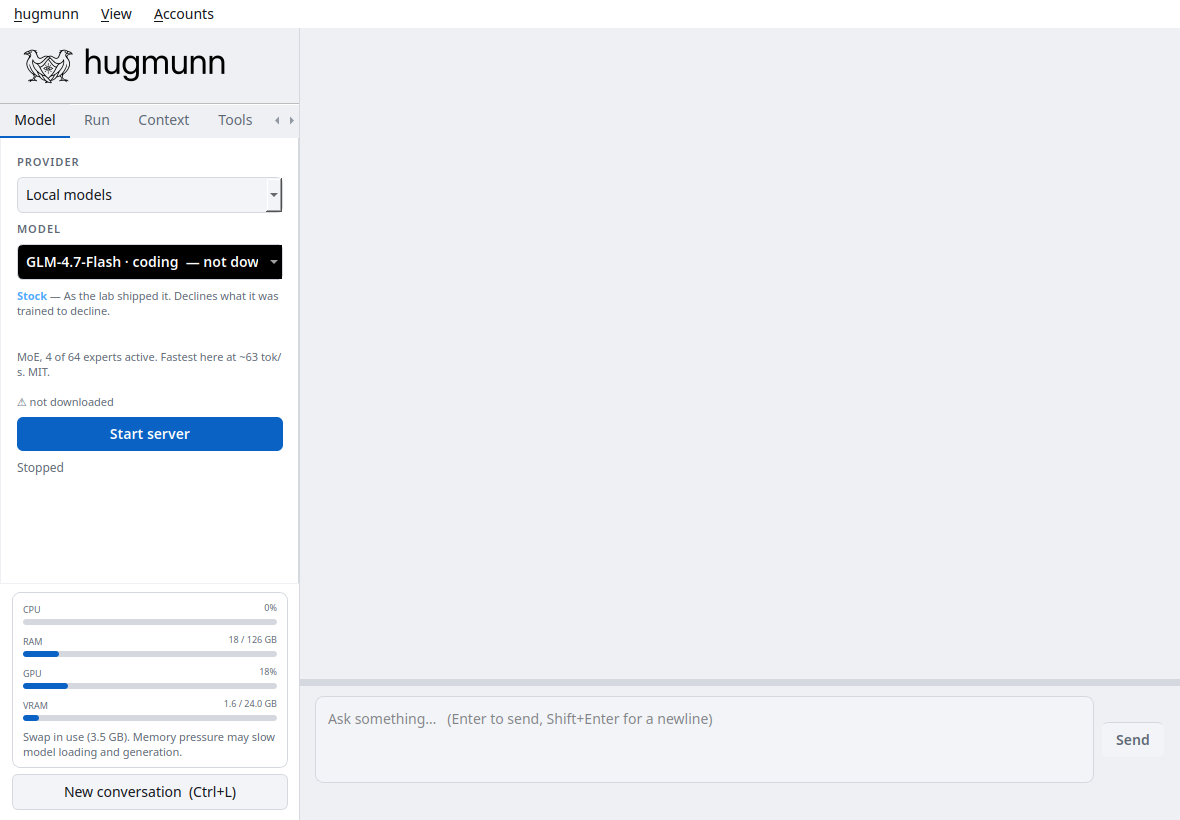
| Control | What it changes |
|---|---|
| Model | Provider, model, downloads, and server status |
| Run | Working directory, tools, effort, persistence, and autonomy |
| Context | Reasoning options, context size, and overflow handling |
| Tools | Instruction packs, custom tools, and prompt presets |
| Sessions | Saved conversations and their desktop settings |
| System | System prompt |
| View menu | Light, dark, system, and other colour themes |
Effort controls instructions and supported provider reasoning settings. Persistence sets the tool-round budget. Autonomy decides which tool calls need approval. These are separate settings.
Conversations are saved as you work. Ctrl+L starts a new one. Type /help
for commands, or /remote to open the same conversation in a browser through a
local, token-protected page. See the
desktop guide
for details.
Python API
Discover the models known to the installation:
import hugmunn

for model in hugmunn.models("local"):
    print(model.key, model.label, model.size_gb, model.downloaded)
After downloading a model and setting up llama-server, use its registry key:
import hugmunn

with hugmunn.agent("code-glm") as chat:
    print(chat.ask("Explain Python context managers with an example."))
    chat.save("conversation.json")
Stream a response with access to a limited set of read tools:
import hugmunn

with hugmunn.agent(
    "code-glm",
    workdir="/path/to/project",
    tools=["list_directory", "read_file", "search_text"],
) as chat:
    for event in chat.run("Read the README and describe this project."):
        if event.kind == "content":
            print(event.text, end="", flush=True)
        elif event.kind == "error":
            raise hugmunn.HugmunnError(event.text)
Tools are disabled by default in the Python API. When enabled, calls requiring
approval raise ApprovalRequired unless you supply an approve callback.
An agent closes the local server it started when its context exits; an already
running server is left running. Library conversations are saved explicitly with
save().
The API guide
covers cloud models, approval callbacks, streaming, cancellation, and sessions.
The reference
is generated from the public docstrings. Runnable examples are in
examples/.
Configuration and documentation
Settings and sessions normally live in ~/.config/hugmunn/; model weights
default to ~/.claude/models/. Override these with HUGMUNN_CONFIG_DIR and
HUGMUNN_MODELS_ROOT. Set LLAMA_SERVER to use an existing runtime.
| Guide | Contents |
|---|---|
| Installation | pip, environments, model setup, troubleshooting |
| Desktop | Controls, tools, sessions, remote access |
| Python API | Examples and behavior |
| Configuration | Paths, credentials, skills, custom tools |
| Installers | Native builds and release preparation |
| Contributing | Development, tests, documentation builds |
Hugmunn’s themes and packaging take inspiration from spacr, my microscopy analysis project. The applications are installed separately.
Development
python -m pip install -e ".[dev,docs,build]"
QT_QPA_PLATFORM=offscreen python -m pytest
python -m sphinx -W --keep-going -b html docs docs/_build/html
python -m build
python -m twine check dist/*.whl dist/*.tar.gz
Tests use fake model clients and offscreen Qt windows; they do not require model downloads or paid API calls. See CHANGELOG.md for changes.
License
Hugmunn’s source and raven artwork are distributed under the MIT license. Model weights, llama.cpp, Qt, and other dependencies have their own licenses.
1 maintainer

Metadata
1 maintainer
Release files for hugmunn 0.0.0.6
For a detailed explanation of source distributions (sdists) and built distributions (wheels), please see the package formats documentation.
Source distribution (sdist)
| File | Size | Uploaded | Provenance | Actions |
|---|---|---|---|---|
| hugmunn-0.0.0.6.tar.gz | 1.8 MB | With provenance | Details for hugmunn-0.0.0.6.tar.gz |
Built distribution (wheel)
| File | Interpreter | ABI | Platform | Actions Reset |
|---|---|---|---|---|
| hugmunn-0.0.0.6-py3-none-any.whl | Python 3 | none | any | Details for hugmunn-0.0.0.6-py3-none-any.whl |
Total release size: 3.4 MB
Release files / hugmunn-0.0.0.6.tar.gz
| Download URL | hugmunn-0.0.0.6.tar.gz |
|---|---|
| Size | 1.8 MB |
| Tags | Source |
|
SHA-256 checksum How to use checksums |
fd9cc4815fdfcceee371be958502cf6dea228a06116b514866e62dcd0c483a10
|
|
BLAKE2b-256 checksum How to use checksums |
d73e567d28e26b797ad78812c8e2a6e21677f2a720b8a659d77c4748e1c26b75
|
| Upload date | |
|
Uploaded using Trusted Publishing? What is trusted publishing? |
Yes |
| Uploaded via |
twine/7.0.0 CPython/3.13.14
|
Provenance
Provenance describes where a file came from. On PyPI, provenance is shared via attestations, which provide a verifiable record of the build or publishing details. View details, limitations and caveats.


PyPI Publish Attestation
PyPI verified that this artifact, at this checksum, originated from the publisher listed below.
Signed by GitHub Actions, verified by PyPI on Sep 23, 2026.
Transparency logRelease files / hugmunn-0.0.0.6-py3-none-any.whl
| Download URL | hugmunn-0.0.0.6-py3-none-any.whl |
|---|---|
| Size | 1.6 MB |
| Tags | Python 3 |
|
SHA-256 checksum How to use checksums |
bf9fd2af333e7d6949544b029c3b444e3e4daf5ea8c1b273017f5063417d6305
|
|
BLAKE2b-256 checksum How to use checksums |
df4623b5c067a1f06eb95f72302f214d557687ad656051ea8cbd75a75d6eadc3
|
| Upload date | |
|
Uploaded using Trusted Publishing? What is trusted publishing? |
Yes |
| Uploaded via |
twine/7.0.0 CPython/3.13.14
|
Provenance
Provenance describes where a file came from. On PyPI, provenance is shared via attestations, which provide a verifiable record of the build or publishing details. View details, limitations and caveats.
PyPI Publish Attestation
PyPI verified that this artifact, at this checksum, originated from the publisher listed below.
Signed by GitHub Actions, verified by PyPI on Sep 23, 2026.
Transparency logSecurity for hugmunn 0.0.0.6
Provenance
Provenance describes where a file came from. On PyPI, provenance is shared via attestations, which provide a verifiable record of the build or publishing details. View details, limitations and caveats.
Full provenance
All 2 files in this release have been uploaded with provenance metadata.
Attestation for hugmunn-0.0.0.6.tar.gz
PyPI Publish Attestation
PyPI verified that this artifact, at this checksum, originated from the publisher listed below.
Signed by GitHub Actions, verified by PyPI on Sep 23, 2026.
Transparency logA note on package security
PyPI is a repository for distributing packages, not a service for auditing them. While third-party security researchers and our staff do their best to detect and remove malicious packages, PyPI cannot guarantee the quality, security or suitability of any given package.
To learn more about protecting yourself from malicious actors, visit our package security documentation.














