
hugo-writer



A local, browser-based writing tool for Hugo sites — in the
spirit of grip: run one command in your site folder and write in the browser.
uvx hugo-writer /path/to/hugo-site
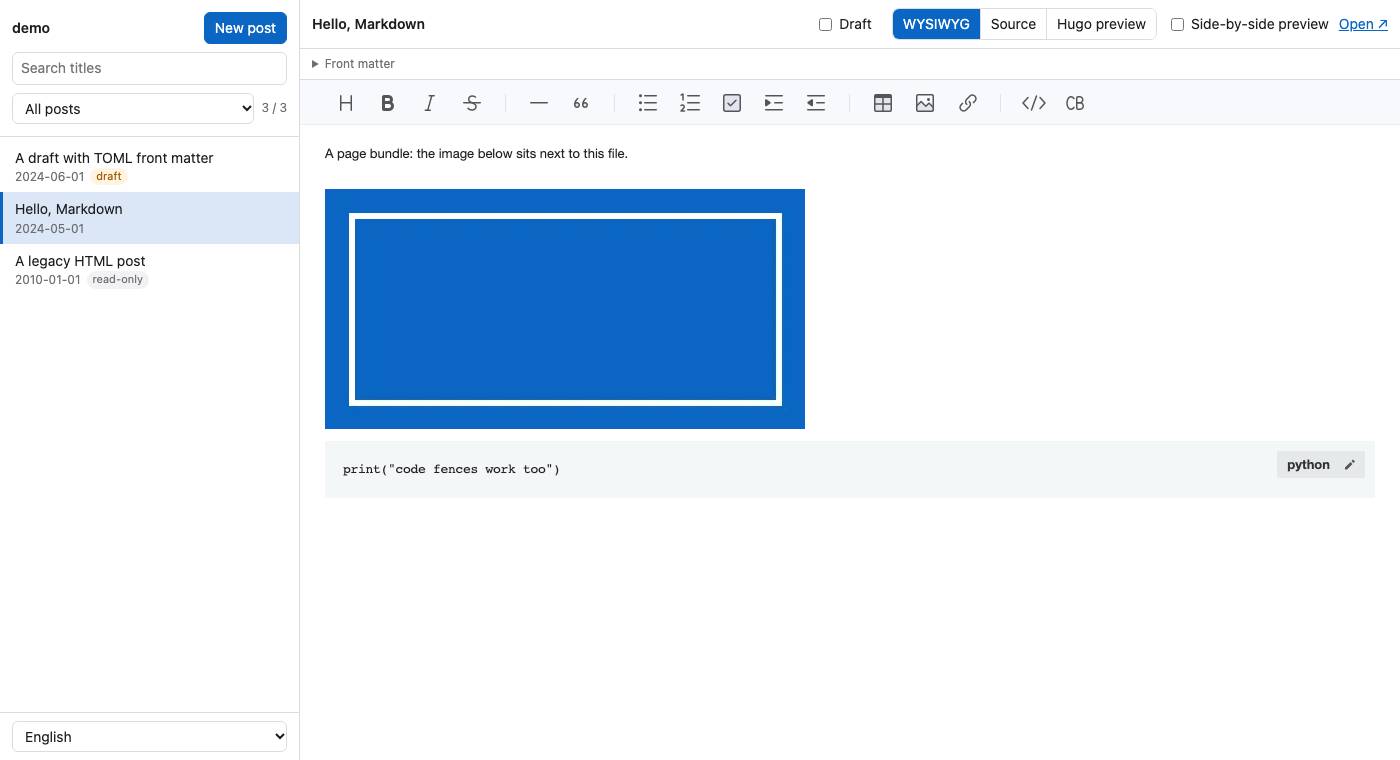
It lists every post of the site, edits Markdown in three views (WYSIWYG, source, and the real Hugo-rendered page), resizes images you drop or paste, and saves straight to your content folder. No server to host, no account, no database — just your files.
Features
| # | Feature | How |
|---|---|---|
| 1 | Post list with search and draft / published filters | hugo list all, so every front matter format (YAML, TOML, JSON) is read by Hugo itself |
| 2 | Three views: WYSIWYG, Source, Hugo preview | TOAST UI Editor (bundled, works offline), a plain source editor, and a private hugo server |
| 3 | Side-by-side preview while you write | the preview reloads on every save |
| 4 | Markdown throughout: code fences, tables, lists, links | posts stay plain .md files |
| 5 | Drafts | new posts start as drafts; one checkbox flips draft in the front matter |
| 6 | Drop or paste images (screenshots too) | scaled to 1024 px wide, re-encoded as WebP, EXIF (GPS) stripped, saved next to the post |
| 7 | Autosave | a second after you stop typing, or ⌘S / Ctrl+S |
| 8 | English and Traditional Chinese UI | follows the browser language; switch at the bottom left |
Only Markdown posts are editable. Other content files (HTML, Org, …) are listed and shown read-only, so a migrated archive can sit next to new posts safely. Markdown posts that carry HTML blocks (embeds, tables, scripts) open in the source view, with a note, because a WYSIWYG editor can't keep that HTML intact.
Install
Run it without installing (needs uv):
uvx hugo-writer /path/to/hugo-site
Or install it as a command:
uv tool install hugo-writer
hugo-writer /path/to/hugo-site
Hugo itself must be installed and on your PATH (or pass --hugo /path/to/hugo).
Usage
1. Start the editor
hugo-writer [SITE] [--port 8765] [--hugo hugo] [--no-preview] [--no-browser]
SITE defaults to the current directory. hugo-writer starts a private hugo server
(drafts and future posts included, rendered in memory, on its own port — it does not
interfere with a hugo server you already run), then opens the editor at
http://127.0.0.1:8765/. Both listen on 127.0.0.1 only. Ctrl+C stops both.
| Option | Meaning |
|---|---|
--port |
editor port; the next free one is used if it is taken |
--hugo |
the hugo executable to use |
--no-preview |
don't start hugo server (no Hugo preview view) |
--no-browser |
don't open the browser |
2. Write
- New post asks for a title and a slug and creates a draft page bundle.
- WYSIWYG edits the formatted text; the front matter (YAML, TOML or JSON) sits in a collapsible box above it.
- Source shows the whole file, front matter included.
- Hugo preview shows the page exactly as your theme renders it. Tick Side-by-side preview to keep it next to the WYSIWYG or source view.
- Untick Draft when the post is ready; your next
hugobuild publishes it.
3. Images
Drop or paste an image into either editing view. It is scaled down to
image_max_width, re-encoded (WebP by default), stripped of EXIF, and saved:
content/posts/2026/10/my-slug/index.md
content/posts/2026/10/my-slug/screenshot.webp ← 
Posts that are not page bundles get static/images/<post path>/ instead.
If your posts use a url that ends in .html (for example /2026/10/my-slug.html),
Hugo publishes the bundle's images under /2026/10/my-slug/. Turn on Hugo's embedded
image render hook (Hugo 0.148+) so  points there:
[markup.goldmark.renderHooks.image]
  useEmbedded = 'fallback'
4. Settings
Optional, in .hugo-writer.toml at the site root:
section = "posts"                      # content/<section>/ for new posts
path = "{year}/{month}/{slug}"         # bundle folder under the section
url = "/{year}/{month}/{slug}.html"    # front matter `url` for new posts; omit to use Hugo's permalinks
image_max_width = 1024
image_format = "webp"                  # or "jpeg", "png"
image_quality = 82
{year}, {month}, {day} and {slug} are filled in when the post is created.
Development
git clone https://github.com/changyy/py-hugo-writer.git
cd py-hugo-writer
uv sync                                    # creates .venv with the dev dependencies
uv run hugo-writer examples/demo-site      # try it on the bundled demo site
uv run pytest
examples/demo-site is a small theme-free Hugo site with a page
bundle, a draft, YAML / TOML / JSON front matter and a read-only HTML post. The tests
copy it to a temporary folder and run against it, so it is never modified.
Tests use whichever Hugo the HUGO variable points to (default: hugo on PATH), which
makes it easy to check other Hugo releases; tests that need Hugo are skipped when it is
missing. CI runs the suite against several Hugo versions.
HUGO=/path/to/hugo-0.148.2/hugo uv run pytest
Project layout
py-hugo-writer/
  pyproject.toml
  README.md               ← you are here
  CHANGELOG.md
  src/hugo_writer/
    cli.py                command line, starts everything
    site.py               the Hugo site: list (via hugo), read, write, create, drafts
    images.py             resize / re-encode / strip EXIF
    preview.py            the private `hugo server`
    server.py             local HTTP server and JSON API
    static/index.html     the editor (single page)
    static/vendor/        TOAST UI Editor 3.2.2
  examples/demo-site/     sample Hugo site for trying it out and for tests
  tests/
Requirements
- Python 3.11+ (uv installs it for you if needed)
- Hugo on
PATH - Pillow ≥ 10 (installed automatically)
License
MIT © Yuan-Yi Chang. Bundles TOAST UI Editor 3.2.2 (MIT © NHN Cloud Corp.) in
src/hugo_writer/static/vendor/.
1 maintainer

Metadata
1 maintainer
Release files for hugo-writer 1.20261017.1084122
For a detailed explanation of source distributions (sdists) and built distributions (wheels), please see the package formats documentation.
Source distribution (sdist)
| File | Size | Uploaded | |
|---|---|---|---|
| hugo_writer-1.20261017.1084122.tar.gz | 360.7 kB | Details |
Built distribution (wheel)
| File | Interpreter | ABI | Platform | Reset |
|---|---|---|---|---|
| hugo_writer-1.20261017.1084122-py3-none-any.whl | Python 3 | none | any | Details |
Total release size: 657.9 kB
Release files / hugo_writer-1.20261017.1084122.tar.gz
| Download URL | hugo_writer-1.20261017.1084122.tar.gz |
|---|---|
| Size | 360.7 kB |
| Tags | Source |
|
SHA-256 checksum How to use checksums |
1a345d7f0c493af3b55bed72487ea27f4363c109176ef23043239ae53b6936e3
|
|
BLAKE2b-256 checksum How to use checksums |
77b5a315fe147205c90976b6cf199d1efa8d68ef66ca9236de2bedb7cdb2a17b
|
| Upload date | |
|
Uploaded using Trusted Publishing? What is trusted publishing? |
Yes |
| Uploaded via |
twine/7.0.0 CPython/3.13.14
|
Provenance
Provenance describes where a file came from. On PyPI, provenance is shared via attestations, which provide a verifiable record of the build or publishing details. View details, limitations and caveats.


PyPI Publish Attestation
PyPI verified that this artifact, at this checksum, originated from the publisher listed below.
Signed by GitHub Actions, verified by PyPI on Oct 17, 2026.
Transparency logRelease files / hugo_writer-1.20261017.1084122-py3-none-any.whl
| Download URL | hugo_writer-1.20261017.1084122-py3-none-any.whl |
|---|---|
| Size | 297.3 kB |
| Tags | Python 3 |
|
SHA-256 checksum How to use checksums |
68283012796a5c99a81483f55e36ca65e3bcaa7660ccee379ff355ce932d979f
|
|
BLAKE2b-256 checksum How to use checksums |
fabecb30e9638abfb338892894c36b0fa05e548ac63c7cca323cbdf9a9a34060
|
| Upload date | |
|
Uploaded using Trusted Publishing? What is trusted publishing? |
Yes |
| Uploaded via |
twine/7.0.0 CPython/3.13.14
|
Provenance
Provenance describes where a file came from. On PyPI, provenance is shared via attestations, which provide a verifiable record of the build or publishing details. View details, limitations and caveats.
PyPI Publish Attestation
PyPI verified that this artifact, at this checksum, originated from the publisher listed below.
Signed by GitHub Actions, verified by PyPI on Oct 17, 2026.
Transparency log













