
A multi-user, multi-agent collaboration platform


Project description
Hybrid Groups



Overview
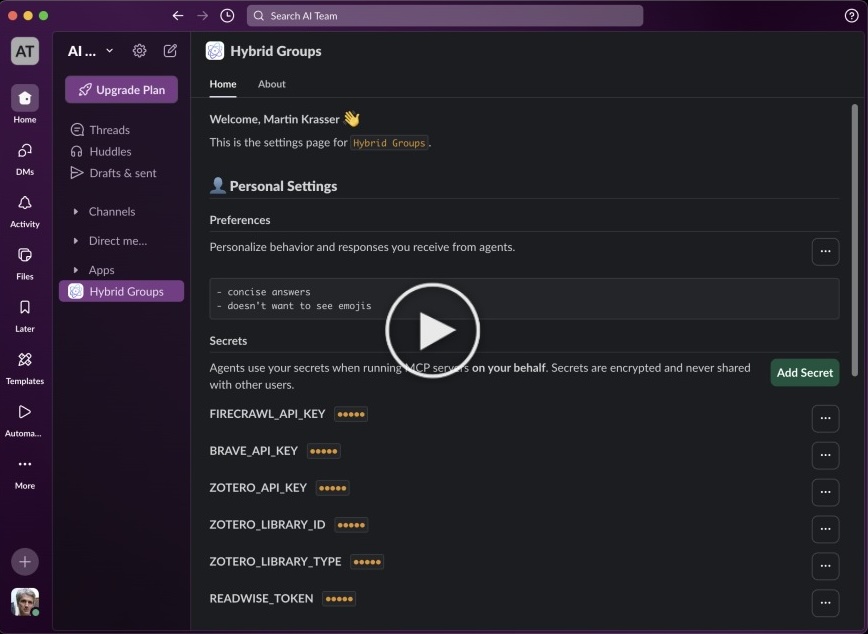
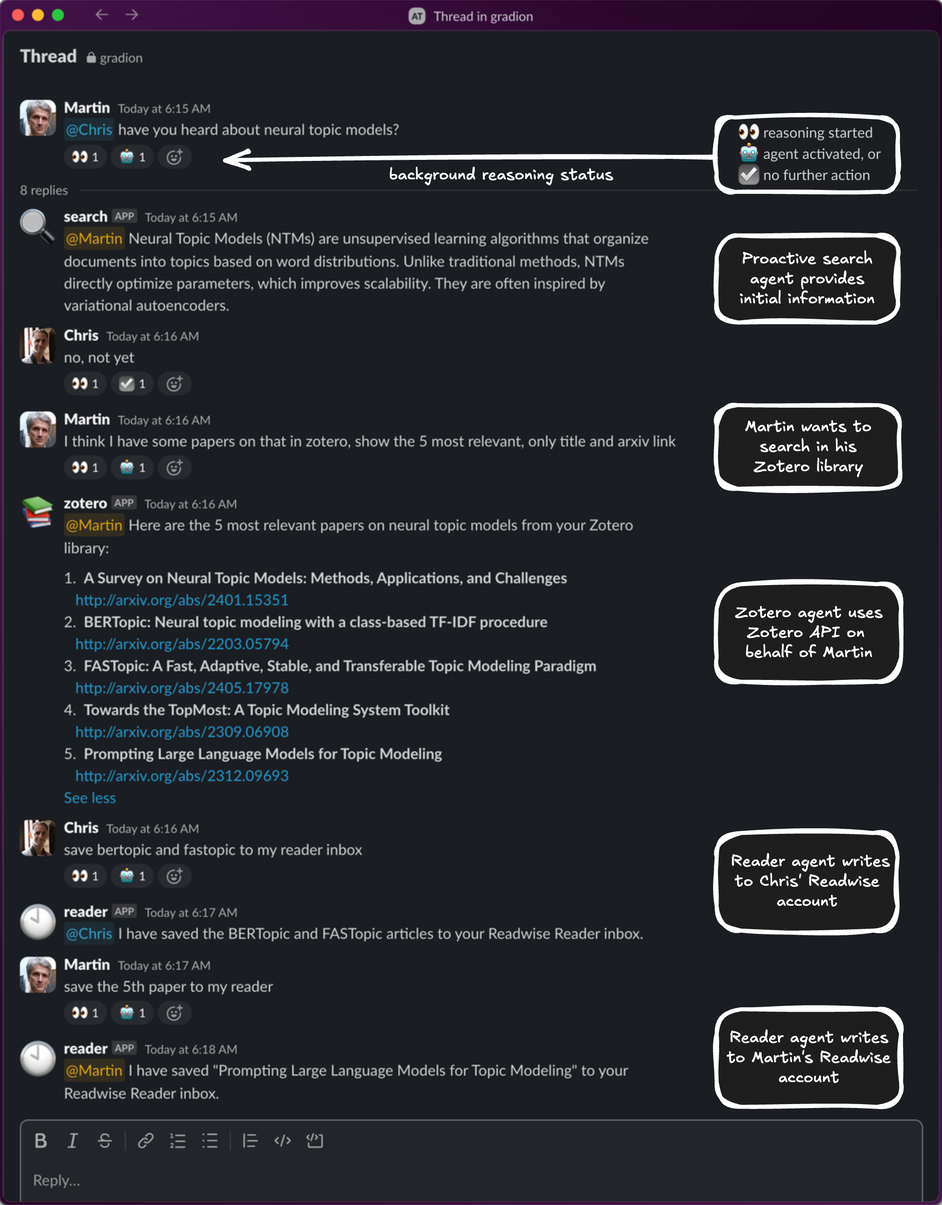
Hybrid Groups is a multi-user, multi-agent collaboration platform that enables users to interact with both agents and other users in group chats on Slack and GitHub. Agents act and respond according to each user's identity, preferences and privileges, enabling secure access to a user's private resources while collaborating in a team.
 |
 |
 |
Quickstart
[!NOTE] The full quickstart guide is here.
-
Configure the app type to install and run,
slackorgithub:export APP_TYPE=slack # or "github"
-
Setup the app (prints the setup URL to follow in the output) - only required once per app:
docker run --rm -it \
    -v "$(pwd)/.data-docker":/app/.data \
    -p 8801:8801 \
    ghcr.io/gradion-ai/hybrid-groups:latest \
    setup $APP_TYPE
Important: when running the container on a remote host, supply the hostname or IP address via the
--hostparameter. After setting up the Slack app, add it to any Slack channels you want it to be active in. You can do this from the channel's menu underOpen channel details->Integrations->Add apps. -
Run the server:
docker run --rm -it \
    -v "$(pwd)/.data-docker":/app/.data \
    ghcr.io/gradion-ai/hybrid-groups:latest \
    server $APP_TYPE
To enable user channels in Slack, append the
--user-channel slackoption. -
Verify that your installation works. For example, activate the
weatheragent via background reasoning by enteringhow's the weather in vienna?
in the channel where the Slack app was added
or in the description of a new GitHub issue:
For directly mentioning the
weatheragent in Slack, use@weatherat the beginning of a message, in GitHub use@hybrid-groups/weather(and replacehybrid-groupswith the GitHub app name you've chosen).


Release history Release notifications | RSS feed


Download files
Download the file for your platform. If you're not sure which to choose, learn more about installing packages.
Source Distribution
Built Distribution
Filter files by name, interpreter, ABI, and platform.
If you're not sure about the file name format, learn more about wheel file names.
Copy a direct link to the current filters
File details
Details for the file hybrid_groups-0.0.5.tar.gz.
File metadata
- Download URL: hybrid_groups-0.0.5.tar.gz
- Upload date:
- Size: 4.7 MB
- Tags: Source
- Uploaded using Trusted Publishing? Yes
- Uploaded via: twine/6.1.0 CPython/3.12.9
File hashes
| Algorithm | Hash digest | |
|---|---|---|
| SHA256 |
f5b1b8ae3d88d173b64d875f909ae708ba6851a6443bfc0e9bf92af68700fa73
|
|
| MD5 |
99c0e339d4921d5c5c2420a12dadf11c
|
|
| BLAKE2b-256 |
eefdc700b1e38f336ff3685b23da77c1a2aadea4a9fab4e0486e6d1df7f0cc4d
|
Provenance
The following attestation bundles were made for hybrid_groups-0.0.5.tar.gz:
Publisher:
release.yml on gradion-ai/hybrid-groups
-
Statement:
-
Statement type:
https://in-toto.io/Statement/v1 -
Predicate type:
https://docs.pypi.org/attestations/publish/v1 -
Subject name:
hybrid_groups-0.0.5.tar.gz -
Subject digest:
f5b1b8ae3d88d173b64d875f909ae708ba6851a6443bfc0e9bf92af68700fa73 - Sigstore transparency entry: 315011139
- Sigstore integration time:
-
Permalink:
gradion-ai/hybrid-groups@af3996a90e5017d0fbc296543efe3cb467200b7e -
Branch / Tag:
refs/tags/0.0.5 - Owner: https://github.com/gradion-ai
-
Access:
public
-
Token Issuer:
https://token.actions.githubusercontent.com -
Runner Environment:
github-hosted -
Publication workflow:
release.yml@af3996a90e5017d0fbc296543efe3cb467200b7e -
Trigger Event:
push
-
Statement type:
File details
Details for the file hybrid_groups-0.0.5-py3-none-any.whl.
File metadata
- Download URL: hybrid_groups-0.0.5-py3-none-any.whl
- Upload date:
- Size: 4.7 MB
- Tags: Python 3
- Uploaded using Trusted Publishing? Yes
- Uploaded via: twine/6.1.0 CPython/3.12.9
File hashes
| Algorithm | Hash digest | |
|---|---|---|
| SHA256 |
d35091db796163ac1676982341157e2373e19f00b3457db925c9291fa953defe
|
|
| MD5 |
bbda65e75bfe0b8c58e063c517cd9b42
|
|
| BLAKE2b-256 |
90bb63de1eeb3a7bae2e5bc577e58b1a4e8872687a328c3e12c331d5a9bec92a
|
Provenance
The following attestation bundles were made for hybrid_groups-0.0.5-py3-none-any.whl:
Publisher:
release.yml on gradion-ai/hybrid-groups
-
Statement:
-
Statement type:
https://in-toto.io/Statement/v1 -
Predicate type:
https://docs.pypi.org/attestations/publish/v1 -
Subject name:
hybrid_groups-0.0.5-py3-none-any.whl -
Subject digest:
d35091db796163ac1676982341157e2373e19f00b3457db925c9291fa953defe - Sigstore transparency entry: 315011145
- Sigstore integration time:
-
Permalink:
gradion-ai/hybrid-groups@af3996a90e5017d0fbc296543efe3cb467200b7e -
Branch / Tag:
refs/tags/0.0.5 - Owner: https://github.com/gradion-ai
-
Access:
public
-
Token Issuer:
https://token.actions.githubusercontent.com -
Runner Environment:
github-hosted -
Publication workflow:
release.yml@af3996a90e5017d0fbc296543efe3cb467200b7e -
Trigger Event:
push
-
Statement type:






