
A full pipeline AutoML tool integrated various GBM models

Project description



We Are Hiring!
Dear folks, we are offering challenging opportunities located in Beijing for both professionals and students who are keen on AutoML/NAS. Come be a part of DataCanvas! Please send your CV to yangjian@zetyun.com. (Application deadline: TBD.)
What is HyperGBM
HyperGBM is a full pipeline automated machine learning (AutoML) toolkit designed for tabular data. It covers the complete end-to-end ML processing stages, consisting of data cleaning, preprocessing, feature generation and selection, model selection and hyperparameter optimization.
Overview
HyperGBM optimizes the end-to-end ML processing stages within one search space, which differs from most existing AutoML approaches that only tackle partial stages, for instance, hyperparameter optimazation. This full pipeline optimization process is very similar to a sequential decision process (SDP). Therefore, HyperGBM utilizes reinforcement learning, Monte Carlo Tree Search, evolution algorithm combined with a meta-learner to efficiently solve the pipeline optimization problem.
HyperGBM, as indicated in the name, involves several gradient boosting tree models (GBM), namely, XGBoost, LightGBM and Catboost. What's more, it could access the Hypernets, a general automated machine learning framework, and introduce its advanced characteristics in data cleaning, feature engineering and model ensemble. Additionally, the search space representation and search algorithm inside Hyper GBM are also supported by Hypernets.
Installation
Conda
Install HyperGBM with conda from the channel conda-forge:
conda install -c conda-forge hypergbm
On the Windows system, recommend install pyarrow(required by hypernets) 4.0 or earlier version with HyperGBM:
conda install -c conda-forge hypergbm "pyarrow<=4.0"
Pip
Install HyperGBM with different pip options:
- Typical installation:
pip install hypergbm
- To run HyperGBM in JupyterLab/Jupyter notebook, install with command:
pip install hypergbm[notebook]
- To support experiment visualization base on web, install with command:
pip install hypergbm[board]
- To run HyperGBM in distributed Dask cluster, install with command:
pip install hypergbm[dask]
- To support dataset with simplified Chinese in feature generation,
- Install
jiebapackage before running HyperGBM. - OR install with command:
- Install
pip install hypergbm[zhcn]
- Install all above with one command:
pip install hypergbm[all]
Examples
- Use HyperGBM with Python
Users can quickly create and run an experiment with make_experiment, which only needs one required input parameter train_data. The example shown below is using the blood dataset as train_data from hypernet.tabular. If the target column of the dataset is not y, it needs to be manually set through the argument target.
An example codes:
from hypergbm import make_experiment
from hypernets.tabular.datasets import dsutils

train_data = dsutils.load_blood()
experiment = make_experiment(train_data, target='Class')
estimator = experiment.run()
print(estimator)
This training experiment returns a pipeline with two default steps, data_clean and estimator. In particular, the estimator returns a final model which consists of various models. The outputs:
Pipeline(steps=[('data_clean',
                 DataCleanStep(...),
                ('estimator',
                 GreedyEnsemble(...)])
To see more examples, please read Quick Start and Examples.
- Use HyperGBM with Command line tools
Hypergbm also supports command line tools to perform model training, evaluation and prediction. The following codes enable the user to view command line help:
hypergbm -h

usage: hypergbm [-h] [--log-level LOG_LEVEL] [-error] [-warn] [-info] [-debug]
                [--verbose VERBOSE] [-v] [--enable-gpu ENABLE_GPU] [-gpu]
                [--enable-dask ENABLE_DASK] [-dask] [--overload OVERLOAD]
                {train,evaluate,predict} ...
The example of training a model for dataset blood.csv is shown below:
hypergbm train --train-file=blood.csv --target=Class --model-file=model.pkl
For more details, please read Quick Start.
GPU Acceleration
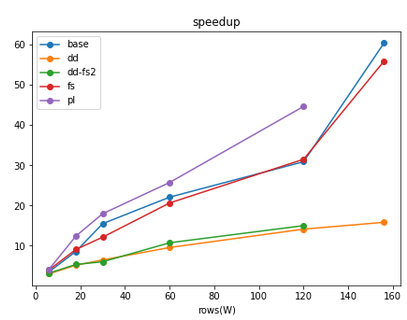
Hypergbm supports full pipeline GPU acceleration, including all steps from data processing to model training. In our experiments, we got a 50x performance improvement! Most importantly, the model trained on GPU could be deployed to the environment without GPU hardware and software (e.g.,CUDA and cuML), which greatly reduces the cost of model deployment.
HyperGBM related projects
- Hypernets: A general automated machine learning (AutoML) framework.
- HyperGBM: A full pipeline AutoML tool integrated various GBM models.
- HyperDT/DeepTables: An AutoDL tool for tabular data.
- HyperTS: A full pipeline AutoML&AutoDL tool for time series datasets.
- HyperKeras: An AutoDL tool for Neural Architecture Search and Hyperparameter Optimization on Tensorflow and Keras.
- HyperBoard: A visualization tool for Hypernets.
- Cooka: Lightweight interactive AutoML system.

Documents
DataCanvas
HyperGBM is an open source project created by DataCanvas.
Release history Release notifications | RSS feed


Download files
Download the file for your platform. If you're not sure which to choose, learn more about installing packages.
Source Distribution
Built Distribution
Filter files by name, interpreter, ABI, and platform.
If you're not sure about the file name format, learn more about wheel file names.
Copy a direct link to the current filters
File details
Details for the file hypergbm-0.2.5.7.tar.gz.
File metadata
- Download URL: hypergbm-0.2.5.7.tar.gz
- Upload date:
- Size: 3.1 MB
- Tags: Source
- Uploaded using Trusted Publishing? No
- Uploaded via: twine/3.7.1 importlib_metadata/4.8.2 pkginfo/1.8.2 requests/2.27.1 requests-toolbelt/0.9.1 tqdm/4.62.3 CPython/3.7.11
File hashes
| Algorithm | Hash digest | |
|---|---|---|
| SHA256 |
e2e4f0c68ce57b0fdde3602d62c5efcf68b15dc94322fd263d2b7f8bfbf82efb
|
|
| MD5 |
68835297a776271145202b066360c46a
|
|
| BLAKE2b-256 |
3fd8ea31b4a724d0fe24a33a7eedf44eb937218be85a2421e96cb12bed4842d0
|
File details
Details for the file hypergbm-0.2.5.7-py3-none-any.whl.
File metadata
- Download URL: hypergbm-0.2.5.7-py3-none-any.whl
- Upload date:
- Size: 3.1 MB
- Tags: Python 3
- Uploaded using Trusted Publishing? No
- Uploaded via: twine/3.7.1 importlib_metadata/4.8.2 pkginfo/1.8.2 requests/2.27.1 requests-toolbelt/0.9.1 tqdm/4.62.3 CPython/3.7.11
File hashes
| Algorithm | Hash digest | |
|---|---|---|
| SHA256 |
6e5b2e672d6f6931cf9c3308587ef8202c3e3c51f6ea36986caf6cfe3a902551
|
|
| MD5 |
df31ab6e6401904be21c27f354bc5c93
|
|
| BLAKE2b-256 |
f9133d1dad922619e1bb5401220bc666b59b8d5503647d9647c600f7762a138b
|






