
Computer use for Hyprland: semantic desktop state over IPC plus vision and native Wayland input, in one MCP server
Verified details
These details have been verified by PyPIProject links
GitHub Statistics
Maintainers

Project description
hypruse
Computer use for Hyprland. An MCP server that gives AI agents native hands on your Wayland desktop: workspaces, windows, mouse, keyboard, screenshots.
No ydotool daemon. No root. No portals. No X11.
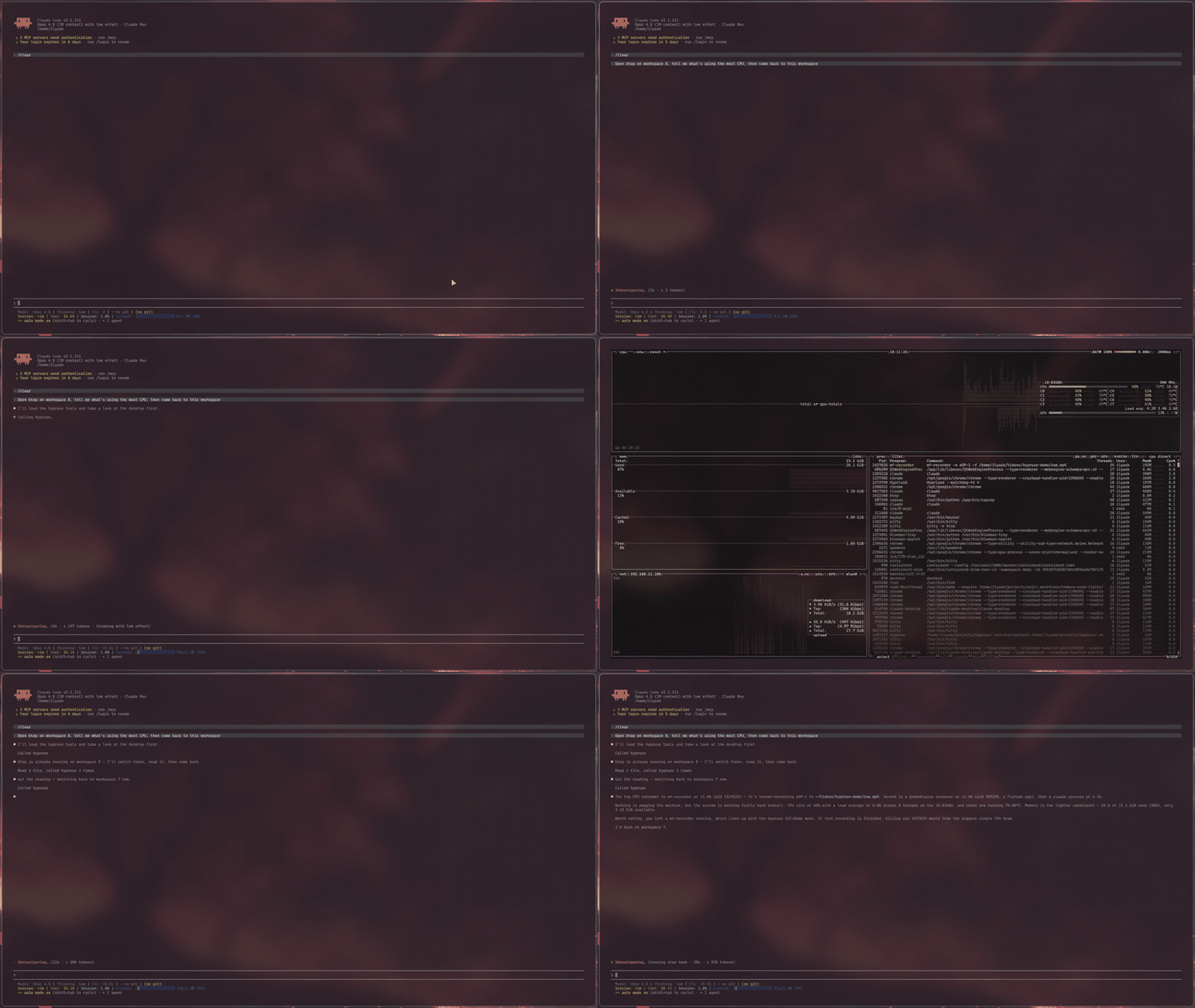
Why
Computer use exists on macOS and Windows. On Linux there is effectively nothing: the Claude Desktop Linux beta explicitly ships without screen control, Anthropic's reference implementation is an X11 container, and the existing Wayland attempts lean on setuid uinput hacks or GNOME-only portals.
Meanwhile Hyprland already exposes everything an agent needs, better than any accessibility bridge: a complete IPC surface for state and window management, and first-class Wayland protocols for input. hypruse just wires them to MCP:
- Semantic first.
desktopreturns the real window/workspace tree (addresses, classes, titles, geometry) in one call. The agent switches workspaces and focuses windows the way you do (instantly, over IPC), not by squinting at pixels. - Vision when it matters. Screenshots of a monitor, an exact window crop, or a zoomed region, with the geometry/scale metadata to map any pixel back to a clickable coordinate.
- Native input. Clicks and scrolls are spoken directly over the Wayland wire (
zwlr_virtual_pointer_v1); typing goes throughwtype's virtual keyboard with a proper XKB keymap, unicode-safe on any layout.
How it works
agent (Claude Code, or any MCP client)
   │ stdio
   ▼
hypruse
   ├── hyprctl -j ········▶ desktop state: monitors, workspaces, windows
   ├── hyprctl dispatch ··▶ focus / move / close / launch / movecursor
   ├── grim ··············▶ screenshots: monitor, window crop, region
   ├── wtype ·············▶ keyboard (zwp_virtual_keyboard_v1, real XKB keymap)
   └── raw Wayland wire ··▶ click & scroll (zwlr_virtual_pointer_v1)
Design decisions:
- No ydotool / uinput. That path needs a daemon, udev rules or root, and types US scancodes that break on other layouts. hypruse is just another Wayland client of your compositor, same standing as
wlrctl. - No portals.
xdg-desktop-portal-hyprlanddoes not implement the RemoteDesktop portal (InputCapture is capture, not injection), so anything built on libei/portals silently degrades on Hyprland. hypruse doesn't try. - Cursor positioning via
hyprctl dispatch movecursor(global logical coordinates, exact on any monitor layout), with only button/axis events on the virtual pointer, sidestepping the known multi-monitor bugs of absolute virtual-pointer motion (hyprwm/Hyprland#6749).
Tools
| tool | what it does |
|---|---|
desktop |
One-call semantic snapshot: monitors, workspaces, windows (address/class/title/geometry), active window, cursor |
screenshot |
Focused monitor, exact window crop by address, or x,y,WxH region; returns image + coordinate-mapping metadata |
pointer |
move / click / drag / scroll in global coordinates |
keyboard |
Type literal text (unicode-safe) or press combos: ctrl+shift+t, super+enter, F5 |
hypr |
Switch workspace, focus/move/close windows, fullscreen, floating (pure IPC, milliseconds) |
launch |
Start an app (optionally silent on another workspace), block on its actual openwindow event, return its address; detects single-instance apps (browsers) whose window ignores exec rules and moves it to the requested workspace |
binds |
The user's own keybinds, decoded (SUPER+Q, action, description) so the agent can drive the desktop through its owner's shortcuts instead of clicking |
wait_for |
Block on real compositor events (window open/close, workspace change, title change) with a match filter and timeout; replaces sleep-and-hope in multi-step automations |
Install
Requirements: Hyprland, grim, wtype (most Hyprland setups already have both), and uv.
Arch Linux, from the AUR:
yay -S hypruse # or hypruse-git for main
Then let it set itself up and verify the environment:
hypruse init     # detects your MCP clients, registers (asks first), runs doctor
hypruse doctor   # just the diagnostics
Manual registration, Claude Code:
claude mcp add -s user hypruse -- uvx hypruse
From a source checkout:
claude mcp add -s user hypruse -- uv run --directory /path/to/hypruse hypruse
Any other MCP client: run uvx hypruse as a stdio server.
Read-only mode: set HYPRUSE_READONLY=1 in the server config to expose only the observation tools (desktop, screenshot, binds, wait_for). The agent can see and narrate but cannot click, type, or launch. A good first week.
Claude Desktop (Linux beta)
The Linux beta ships without Anthropic's first-party computer use, but stdio MCP servers work in chat, which makes hypruse the workaround. In ~/.config/Claude/claude_desktop_config.json:
{
  "mcpServers": {
    "hypruse": {
      "command": "uvx",
      "args": ["hypruse"],
      "env": { "HYPRUSE_SCREENSHOT_MODE": "image" }
    }
  }
}
Two Desktop-specific notes: use image mode (Desktop renders inline MCP images and has no file-read tool), and the app must run natively inside your Hyprland session so the server inherits WAYLAND_DISPLAY/HYPRLAND_INSTANCE_SIGNATURE; from a VM or container it cannot reach your compositor. If your Desktop install bypasses tool-approval prompts, treat the Waybar indicator + panic keybind as mandatory, not optional.
Security model
Read this section before installing. hypruse hands an agent your mouse, your keyboard, your screen contents, and an app launcher. The layers that keep that sane:
- Approval: MCP clients gate tool calls. In Claude Code, allowlist the read-only tools (
desktop,screenshot) and leavepointer/keyboard/hypr/launchon ask-first until you trust a workflow. - Visibility: the server maintains an activity beacon (
$XDG_RUNTIME_DIR/hypruse/state.json); the shipped Waybar module is invisible when idle and shows a robot indicator while an agent has hands on your desktop. - Interruption: click the indicator, or bind a panic key:
bind = SUPER SHIFT, BackSpace, exec, pkill -f hypruse. Killing it mid-action is safe: button press/release pairs never span tool calls, so it cannot die holding a button. - The seat is shared. There is one cursor and one keyboard focus, and Hyprland's focus-follows-mouse means a cursor move alone can retarget keystrokes. Don't type while an agent is driving; watch the indicator.
- Scope: stdio only (no network listener), no clipboard access, nothing persisted except the beacon. A screenshot sees everything visible: treat an agent session like screen sharing.
Performance
Measured on a live session (Hyprland 0.55, 1080p, 20 windows): desktop
~30 ms, workspace/window dispatch ~10-20 ms, screenshots ~0.5 s. If tool
calls feel slow, it is almost certainly the MCP approval prompt in
front of each call, not the server. Allowlist the tools you trust and the
latency disappears. Claude Code (.claude/settings.json):
{
  "permissions": {
    "allow": [
      "mcp__hypruse__desktop",
      "mcp__hypruse__screenshot",
      "mcp__hypruse__hypr"
      // add pointer/keyboard/launch once you trust your workflows
    ]
  }
}
Coordinates
Everything speaks Hyprland's global logical coordinates, the space hyprctl cursorpos and window at use. Screenshots are pixel-space; each capture returns geometry and scale so global = origin + pixel / scale. On scale 1.0 monitors (most setups) image pixels are global coordinates.
In image mode, captures automatically fit the host's result-size limit (Claude Desktop caps tool results at 1 MB): format degrades before resolution (native PNG, then full-res JPEG, then stepped downscale) because full-res JPEG reads UI text better than half-res PNG. The applied scale is folded into the returned metadata, so coordinate mapping stays exact; tune with HYPRUSE_MAX_IMAGE_BYTES, or pass scale for a deliberate zoom-out.
By default the screenshot tool writes a PNG under $XDG_RUNTIME_DIR/hypruse/ and returns its path; MCP hosts with a file reader (Claude Code's Read) render it natively. This default exists because some hosts (including Claude Code 2.1.x) serialize inline MCP image blocks to base64 text the model cannot see. HYPRUSE_SCREENSHOT_MODE=image switches to inline image content blocks for hosts that render them correctly.
Development
uv sync --group dev
uv run pytest            # unit tests, no compositor needed
uv run pytest -m e2e --override-ini addopts=   # live seat-safe checks
uv run python scripts/e2e_input.py             # supervised: takes the seat ~10s
The input e2e is deliberately manual: it borrows your cursor and keyboard, counts down, proves click/scroll/type delivery by reading the target terminal's screen back over kitty remote control, and restores your focus.
Roadmap
- Click-by-text via OCR (Tesseract): click labels instead of estimated pixels, in any app
- Headless-Hyprland end-to-end tests in CI
- sway / niri support: the wire client already speaks the wlr protocols; what remains is an IPC layer alongside
hyprctl.py(contributions welcome) - AT-SPI element tree: click by accessible name, read GTK/Qt UIs without vision
- Clipboard integration, wait-for-stable capture, discrete-axis scroll
- Multi-monitor and fractional-scaling hardening
Related projects
| project | approach | on Hyprland |
|---|---|---|
| computer-use-linux | AT-SPI + portals, ydotool fallback | GNOME-first; the RemoteDesktop portal it prefers is not implemented by xdg-desktop-portal-hyprland |
| hyprmcp | hyprctl wrapper | window management only; no screenshots or input |
| wayland-mcp | evemu input, VLM analysis | requires elevated setup for input; no Hyprland semantics |
| Anthropic computer-use-demo | X11 + xdotool in Docker | a sandboxed reference environment rather than a live desktop |
License
Project details
Verified details
These details have been verified by PyPIProject links
GitHub Statistics
Maintainers
Release history Release notifications | RSS feed


Download files
Download the file for your platform. If you're not sure which to choose, learn more about installing packages.
Source Distribution
Built Distribution
Filter files by name, interpreter, ABI, and platform.
If you're not sure about the file name format, learn more about wheel file names.
Copy a direct link to the current filters
File details
Details for the file hypruse-0.2.0.tar.gz.
File metadata
- Download URL: hypruse-0.2.0.tar.gz
- Upload date:
- Size: 2.7 MB
- Tags: Source
- Uploaded using Trusted Publishing? Yes
- Uploaded via: twine/6.1.0 CPython/3.13.12
File hashes
| Algorithm | Hash digest | |
|---|---|---|
| SHA256 |
6de4f2c1e8e384ac87f5b71bcd2f26219c40292589c97c1ce9ff2c943582872e
|
|
| MD5 |
d6236b5bfe7fab581b1721bc7fa91dea
|
|
| BLAKE2b-256 |
5bedbb5c34b9b2a94a3f0d23d69578b3b085f592d03a0bff758c8ab07fcfe5ee
|
Provenance
The following attestation bundles were made for hypruse-0.2.0.tar.gz:
Publisher:
release.yml on IlyasKhallouki/hypruse
-
Statement:
-
Statement type:
https://in-toto.io/Statement/v1 -
Predicate type:
https://docs.pypi.org/attestations/publish/v1 -
Subject name:
hypruse-0.2.0.tar.gz -
Subject digest:
6de4f2c1e8e384ac87f5b71bcd2f26219c40292589c97c1ce9ff2c943582872e - Sigstore transparency entry: 2187067675
- Sigstore integration time:
-
Permalink:
IlyasKhallouki/hypruse@da6444e41d75e60248a117bab52109ad41468579 -
Branch / Tag:
refs/tags/v0.2.0 - Owner: https://github.com/IlyasKhallouki
-
Access:
public
-
Token Issuer:
https://token.actions.githubusercontent.com -
Runner Environment:
github-hosted -
Publication workflow:
release.yml@da6444e41d75e60248a117bab52109ad41468579 -
Trigger Event:
push
-
Statement type:
File details
Details for the file hypruse-0.2.0-py3-none-any.whl.
File metadata
- Download URL: hypruse-0.2.0-py3-none-any.whl
- Upload date:
- Size: 31.2 kB
- Tags: Python 3
- Uploaded using Trusted Publishing? Yes
- Uploaded via: twine/6.1.0 CPython/3.13.12
File hashes
| Algorithm | Hash digest | |
|---|---|---|
| SHA256 |
79683f514045d328d16a9ada32caff741de756fa0dfcc4618a1e08c990da9766
|
|
| MD5 |
7efb20521a1e7d17ea2e4284d80193a5
|
|
| BLAKE2b-256 |
705e7b7502999af8e8512e8bb6028ac472c24b9a5a6384e6668a9ccff5c6007f
|
Provenance
The following attestation bundles were made for hypruse-0.2.0-py3-none-any.whl:
Publisher:
release.yml on IlyasKhallouki/hypruse
-
Statement:
-
Statement type:
https://in-toto.io/Statement/v1 -
Predicate type:
https://docs.pypi.org/attestations/publish/v1 -
Subject name:
hypruse-0.2.0-py3-none-any.whl -
Subject digest:
79683f514045d328d16a9ada32caff741de756fa0dfcc4618a1e08c990da9766 - Sigstore transparency entry: 2187067682
- Sigstore integration time:
-
Permalink:
IlyasKhallouki/hypruse@da6444e41d75e60248a117bab52109ad41468579 -
Branch / Tag:
refs/tags/v0.2.0 - Owner: https://github.com/IlyasKhallouki
-
Access:
public
-
Token Issuer:
https://token.actions.githubusercontent.com -
Runner Environment:
github-hosted -
Publication workflow:
release.yml@da6444e41d75e60248a117bab52109ad41468579 -
Trigger Event:
push
-
Statement type:






