
A simple USB to I2C adapter that works.

Project description
A Simple USB to I2C Adapter that works.
The I2C Adapter allows python programs to connect to I2C/QUIIC/STEMMA-QT devices using off the shelf low cost boards such the Raspberry Pico or SparkFun Pro Micro - RP2040. The I2C adapter appears on the computer as a serial port (no device installation required) and acts as a USB to I2C bridge, and this Python package provides an easy to use API to interact with it using high level commands.
For example, the schematic below shows the wiring for the oled_demo.py example which drive an I2C OLED display using an I2C Adapter and the luma.oled python package.
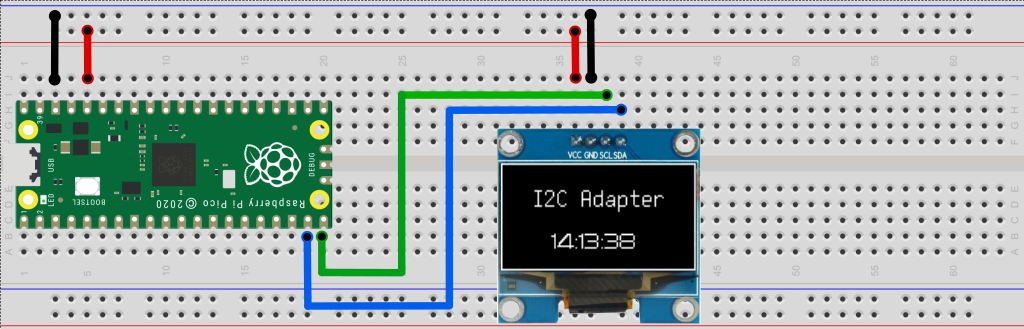
Highlights
- Provides USB to I2C-master bridge.
- Supports Windows/Mac/Linux.
- Uses low cost low cost off-the-shelf boards as adapters.
- Does not require driver installation (it appears on the computer as standard a serial port).
- Comes with an easy to use Python API.
- Easy to modify/extend and to adapt to new hardware.
- Permissive open source license. Comercial use OK, sharing and attribution not required.
Python API Example
Package installation
pip install i2c-adapter --upgrade
In the example below, we use an I2C Adapter that appears as serial port "COM7" to access an I2C device at address 0x08. First we write a single byte 0x00 and then read 20 bytes. Upon completion, the 'data' variable contains a bytearray with 20 bytes.
from i2c_adapter import I2cAdapter

i2c = I2cAdapter(port="COM7")
i2c_addr = 0x08
assert i2c.write(i2c_addr, bytearray([0]))
data = i2c.read(i2c_addr,  20)
print(data)
In the example below we scan the I2C bus address range 0x00 to 0x7f and look for devices that response to an empty write.
from i2c_adapter import I2cAdapter

i2c = I2cAdapter(port="COM18")
print(f"Scanning I2C bus 0x00 to 0x7f:")
for adr in range(0, 127):
    if i2c.write(adr, bytearray([0]), silent=True):
      print(f"  - Device at 0x{adr:02x}")
Documentation
Full documentation is available at https://i2c-adapter.readthedocs.io/
Release history Release notifications | RSS feed


Download files
Download the file for your platform. If you're not sure which to choose, learn more about installing packages.
Source Distribution
Built Distribution
Filter files by name, interpreter, ABI, and platform.
If you're not sure about the file name format, learn more about wheel file names.
Copy a direct link to the current filters
File details
Details for the file i2c_adapter-0.2.20.tar.gz.
File metadata
- Download URL: i2c_adapter-0.2.20.tar.gz
- Upload date:
- Size: 7.9 kB
- Tags: Source
- Uploaded using Trusted Publishing? No
- Uploaded via: twine/4.0.2 CPython/3.12.0
File hashes
| Algorithm | Hash digest | |
|---|---|---|
| SHA256 |
649166a6e47d9a9c0535ede6f3334854c2f1325e579f0d9e6d9fc699c02cb796
|
|
| MD5 |
e9abe42d749b3ee10bb78d01e8ee30ab
|
|
| BLAKE2b-256 |
a37291ad4d9cc38f55b60828d4949a3704e49b03e572e35544eab987461ce267
|
File details
Details for the file i2c_adapter-0.2.20-py3-none-any.whl.
File metadata
- Download URL: i2c_adapter-0.2.20-py3-none-any.whl
- Upload date:
- Size: 8.5 kB
- Tags: Python 3
- Uploaded using Trusted Publishing? No
- Uploaded via: twine/4.0.2 CPython/3.12.0
File hashes
| Algorithm | Hash digest | |
|---|---|---|
| SHA256 |
c7191c1c4b7019e102dcd60b71c4e1b746b8052307fb599824c28ef1a5a7904a
|
|
| MD5 |
f1101636d40872264be435c1e3a97715
|
|
| BLAKE2b-256 |
f1013d88ae9241118872a69b2752a314ff23dc24c5c21b0609d653786a10cd16
|






