
A Simple USB to I2C Adapter
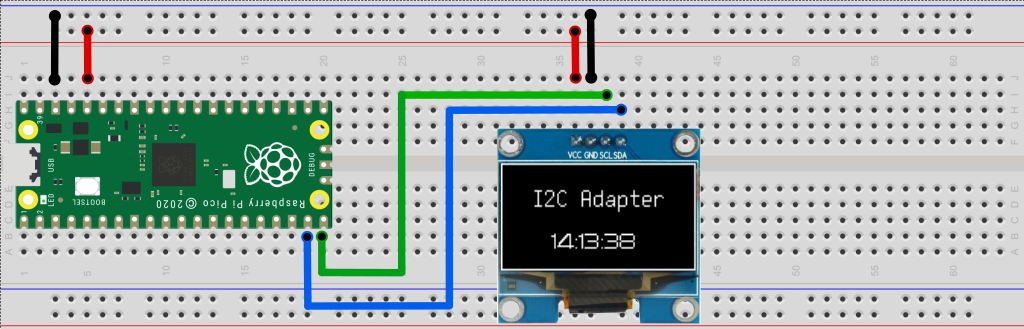
The I2C Adapter allows python programs to connect to I2C/QUIIC/STEMMA-QT devices using off the shelf low cost boards such the Raspberry Pico or SparkFun Pro Micro - RP2040. The I2C adapter appears on the computer as a serial port (no device installation required) and acts as a USB to I2C bridge, and this Python package provides an easy to use API to interact with it using high level commands.
This adapter is used for example by the GreenPak driver to program Renesas GreenPak SPLD devices.
Highlights
- Provides USB to I2C-master bridge.
- Supports Windows/Mac/Linux.
- Uses low cost low cost off-the-shelf boards as adapters.
- Does not require driver installation (it appears on the computer as standard a serial port).
- Comes with an easy to use Python API.
- Easy to modify/extend and to adapt to new hardware.
- Permissive open source license. Comercial use OK, sharing and attribution not required.
Python API Example
Package installation
pip install i2c-adapter --upgrade
In the example below, we use an I2C Adapter that appears as serial port "COM7" to access an I2C device at address 0x08. First we write a single byte 0x00 and then read 20 bytes. Upon completion, the 'data' variable contains a bytearray with 20 bytes.
from i2c_adapter import I2cAdapter

i2c = i2c.I2cAdapter(port="COM7")
i2c_addr = 0x08
assert i2c.write(i2c_addr, bytearray([0]))
data = i2c.read(i2c_addr,  20)
print(data)
LED Status
| I2C Adapter state | Raspberry Pi LED state |
|---|---|
| Idle, waiting for a command. | A short blink every two seconds. |
| Performing a command. | On. |
| Firmware flashing mode. | Off |
Connecting your I2C Adapter
IMPORTANT
**Do not to exceed the maximal voltage of your board. If needed, use a bidirectional I2C level shifter such as https://www.adafruit.com/product/5649#technical-details.
Flash your board with the corresponding firmware from https://github.com/zapta/i2c_adapter/tree/main/firmware/release and connect according to the table below:
| Board | SDA | SCL | Internal Pullups | Max Voltage |
|---|---|---|---|---|
| Raspberry Pico | GP4 | GP5 | No | 3.3V |
| Sparkfun Pro Micro RP2040 | Qwicc SDA | Qwicc SCL | 2.2K | 3.3V |
| Adafruit KB2040 | Qwicc SDA | Qwicc SCL | No | 3.3V |
| Adafruit QT Py RP2040 | Qwicc SDA | Qwicc SCL | No | 3.3V |
The wire protocol
See comments in the firmware source code.
For firmware developers
We use Visual Code Studion with the Platformio plug in to develope the firmware. Once you install both, clone this repository https://github.com/zapta/i2c_adapter on your machine and use the Menu | File | Open Folder option to open the firmware/platformio directory in the repository. Platformio take a few minutes do configure your environment and you will be able to edit/compile/upload code. Building firmware releases is done by running the Python script build_envs.py.
1 maintainer

Metadata
1 maintainer
Release files for i2c-adapter 0.2.3
For a detailed explanation of source distributions (sdists) and built distributions (wheels), please see the package formats documentation.
Source distribution (sdist)
| File | Size | Uploaded | Provenance | Actions |
|---|---|---|---|---|
| i2c_adapter-0.2.3.tar.gz | 7.0 kB | Without provenance | Details for i2c_adapter-0.2.3.tar.gz |
Built distribution (wheel)
| File | Interpreter | ABI | Platform | Actions Reset |
|---|---|---|---|---|
| i2c_adapter-0.2.3-py3-none-any.whl | Python 3 | none | any | Details for i2c_adapter-0.2.3-py3-none-any.whl |
Total release size: 14.5 kB
Release files / i2c_adapter-0.2.3.tar.gz
| Download URL | i2c_adapter-0.2.3.tar.gz |
|---|---|
| Size | 7.0 kB |
| Tags | Source |
|
SHA-256 checksum How to use checksums |
34bf2c036266ce3208750c348c3557637f9528b1ed398a976c3411baf8b82286
|
|
BLAKE2b-256 checksum How to use checksums |
4bdaa6923f92c56148a8d38c3c415ab7e7652e90eff6a501c9fdfd62473e7ebb
|
| Upload date | |
|
Uploaded using Trusted Publishing? What is trusted publishing? |
No |
| Uploaded via |
twine/4.0.2 CPython/3.12.1
|
Release files / i2c_adapter-0.2.3-py3-none-any.whl
| Download URL | i2c_adapter-0.2.3-py3-none-any.whl |
|---|---|
| Size | 7.5 kB |
| Tags | Python 3 |
|
SHA-256 checksum How to use checksums |
0bbb5a785c6314325eadbd4116d1c8f231fc779f599b4a0700760ceb6b4aaff8
|
|
BLAKE2b-256 checksum How to use checksums |
4baeee78d90fce0bf9f323854cb92080a2b8d1edeb7357dcb2f5b1fbd25b5a41
|
| Upload date | |
|
Uploaded using Trusted Publishing? What is trusted publishing? |
No |
| Uploaded via |
twine/4.0.2 CPython/3.12.1
|
Security for i2c-adapter 0.2.3
Provenance
Provenance describes where a file came from. On PyPI, provenance is shared via attestations, which provide a verifiable record of the build or publishing details. View details, limitations and caveats.
No provenance found
None of the files in this release were uploaded with provenance metadata.
A note on package security
PyPI is a repository for distributing packages, not a service for auditing them. While third-party security researchers and our staff do their best to detect and remove malicious packages, PyPI cannot guarantee the quality, security or suitability of any given package.
To learn more about protecting yourself from malicious actors, visit our package security documentation.














