
ICA Lens
ICA Lens interprets language-model activations with Independent Component Analysis. It is substantially more compute-efficient to fit than an SAE dictionary and supports base and instruction-tuned language models.
Documentation · 中文文档 · Paper · Model collection
Get started
pip install icalens
Load a published Lens and analyze text:
from icalens import ICALens

lens = ICALens.from_pretrained("sida/icalens-gpt2-small-pile10k")
result = lens.analyze("She deposited the check at the bank.", layer=6)
result
Browse the ICA Lens model collection for other published lenses.
In Jupyter or Colab, the final result expression displays an interactive
token-level analysis:
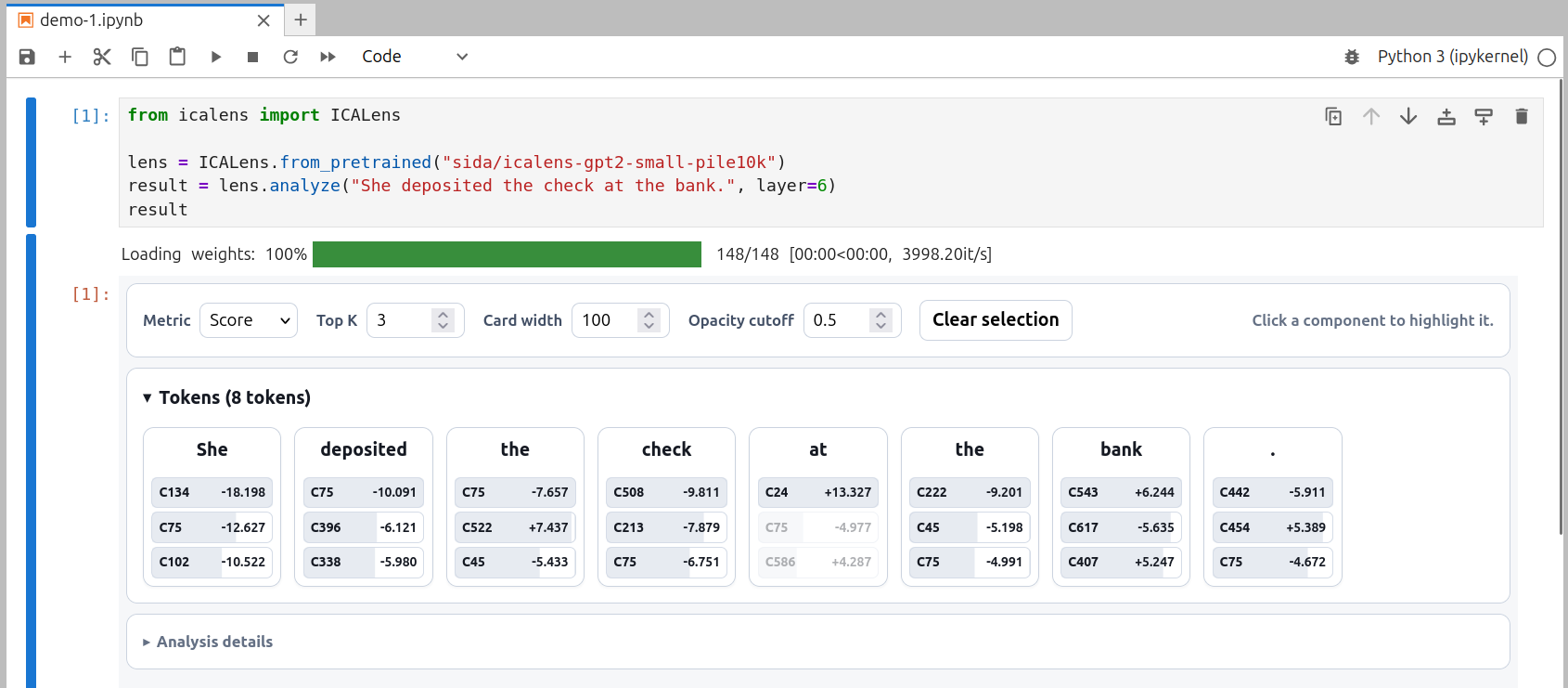
Use signed ICA scores or switch the explorer to per-token component energy. Save the same view as a standalone HTML file with:
result.to_html("analysis.html")
The first analysis loads the language model and requested Lens layer. Later
calls on the same lens reuse the model in memory. device="auto" uses CUDA
when available and otherwise uses the CPU.
Analyze conversations
Instruction-tuned models accept completed conversations using the standard
{role, content} format:
lens = ICALens.from_pretrained("sida/icalens-qwen3.5-2b-ultrachat-1m")
result = lens.analyze(
    [
        {"role": "user", "content": "What is the most interesting science?"},
        {"role": "assistant", "content": "Physics."},
    ],
    layer=16,
)
result
Chat templates are applied automatically, and template tokens and message turns are grouped in the interactive result.
Steering
Generate normally, add an ICA-score offset at the current position, or clamp a signed ICA coordinate:
messages = [{
    "role": "user",
    "content": "If you had to pick one, what is the most interesting science? Be brief.",
}]

baseline = lens.generate(messages, max_new_tokens=16)
steered = lens.generate(
    messages,
    layer=5,
    steer=(188, -12.0),
    max_new_tokens=16,
)
Additive steering defaults to the current position at each generation step.
Use steering_scope="all-positions" to edit the entire prompt during prefill as
well. Absolute clamp=(component, target_score) interventions remain available.
Component labels, signs, and suitable targets must be established empirically for the exact Lens and layer. See the steering tutorial for the reproducible inspection and calibration workflow.
Fit a Lens
Run a small GPT-2/Pile-10k example with the installed CLI:
icalens fit text \
  --model openai-community/gpt2 \
  --dataset NeelNanda/pile-10k \
  --layers 6 \
  --token-budget 1000 \
  --max-iter 20 \
  --output icalens-output/gpt2-demo
Fit an instruction-tuned model from UltraChat conversations:
icalens fit chat \
  --model Qwen/Qwen3.5-2B \
  --dataset HuggingFaceH4/ultrachat_200k \
  --layers 12 \
  --token-budget 100000 \
  --output icalens-output/qwen-demo
ICA Lens includes a PyTorch FastICA implementation and does not depend on SciPy or scikit-learn. Blockwise fitting and layer-at-a-time capture support larger token collections while bounding memory use.
Profile every fitted layer
After fitting, profile the components against a representative corpus:
icalens profile \
  --lens icalens-output/gpt2-demo \
  --layers all \
  --dataset NeelNanda/pile-10k \
  --split train \
  --max-tokens 10000
Profiles add sign statistics, top-score examples, Logit Lens tokens, and optional R-lens readouts to the existing Lens directory. They help label and inspect components without changing the fitted directions.
Publish to Hugging Face
Authenticate with hf auth login, set HF_TOKEN, or add a .env file in the
current directory containing a write-enabled token:
HF_TOKEN=hf_...
Then publish the saved Lens as a Hugging Face model repository:
icalens publish \
  --lens icalens-output/gpt2-demo \
  username/icalens-gpt2-demo
The artifact records the analyzed model, activation site, fitted layers, preprocessing, component profiles, and fitting and profiling provenance. Individual layer and profile files are downloaded lazily when a published Lens is used.
Learn more
The documentation covers:
- Getting started
- Text and chat
- Component profiles
- Scores and energy
- Steering
- Reconstruction
- Fitting and publishing
- Python API
Authors
Citation
@article{liu2026icalens,
  title={ICA Lens: Interpreting Language Models Without Training Another Dictionary},
  author={Liu, Sida and Han, Feijiang},
  journal={arXiv preprint arXiv:2606.11722},
  year={2026}
}
1 maintainer

Metadata
1 maintainer
Release files for icalens 0.4.0
For a detailed explanation of source distributions (sdists) and built distributions (wheels), please see the package formats documentation.
Source distribution (sdist)
| File | Size | Uploaded | |
|---|---|---|---|
| icalens-0.4.0.tar.gz | 33.8 MB | Details |
Built distribution (wheel)
| File | Interpreter | ABI | Platform | Reset |
|---|---|---|---|---|
| icalens-0.4.0-py3-none-any.whl | Python 3 | none | any | Details |
Total release size: 34.0 MB
Release files / icalens-0.4.0.tar.gz
| Download URL | icalens-0.4.0.tar.gz |
|---|---|
| Size | 33.8 MB |
| Tags | Source |
|
SHA-256 checksum How to use checksums |
a78b29fad5b23e1e9bf18ef4c9ad00b706192485d503b5dfc9c75d3a8015b408
|
|
BLAKE2b-256 checksum How to use checksums |
60c4c6fff0d581357ab70db7faf84c0acb14bcbfe05d2ef7ea76035c329e1afa
|
| Upload date | |
|
Uploaded using Trusted Publishing? What is trusted publishing? |
Yes |
| Uploaded via |
twine/7.0.0 CPython/3.13.14
|
Provenance
Provenance describes where a file came from. On PyPI, provenance is shared via attestations, which provide a verifiable record of the build or publishing details. View details, limitations and caveats.


PyPI Publish Attestation
PyPI verified that this artifact, at this checksum, originated from the publisher listed below.
Signed by GitHub Actions, verified by PyPI on Sep 29, 2026.
Transparency logRelease files / icalens-0.4.0-py3-none-any.whl
| Download URL | icalens-0.4.0-py3-none-any.whl |
|---|---|
| Size | 240.9 kB |
| Tags | Python 3 |
|
SHA-256 checksum How to use checksums |
69b020bc8c127f60c2b322effd615f34d74a390dab6f0c05c3990d44f228e376
|
|
BLAKE2b-256 checksum How to use checksums |
0ff5cea410698831a48cd3c5b2361d944299878a01a4bb8ff62870578d34852e
|
| Upload date | |
|
Uploaded using Trusted Publishing? What is trusted publishing? |
Yes |
| Uploaded via |
twine/7.0.0 CPython/3.13.14
|
Provenance
Provenance describes where a file came from. On PyPI, provenance is shared via attestations, which provide a verifiable record of the build or publishing details. View details, limitations and caveats.
PyPI Publish Attestation
PyPI verified that this artifact, at this checksum, originated from the publisher listed below.
Signed by GitHub Actions, verified by PyPI on Sep 29, 2026.
Transparency log













