
Chrome controller for Humans, base on Chrome Devtools Protocol(CDP) and python3.7+. Read more: https://github.com/ClericPy/ichrome.

Project description
ichrome 




Chrome controller for Humans, base on Chrome Devtools Protocol(CDP) and python3.7+.
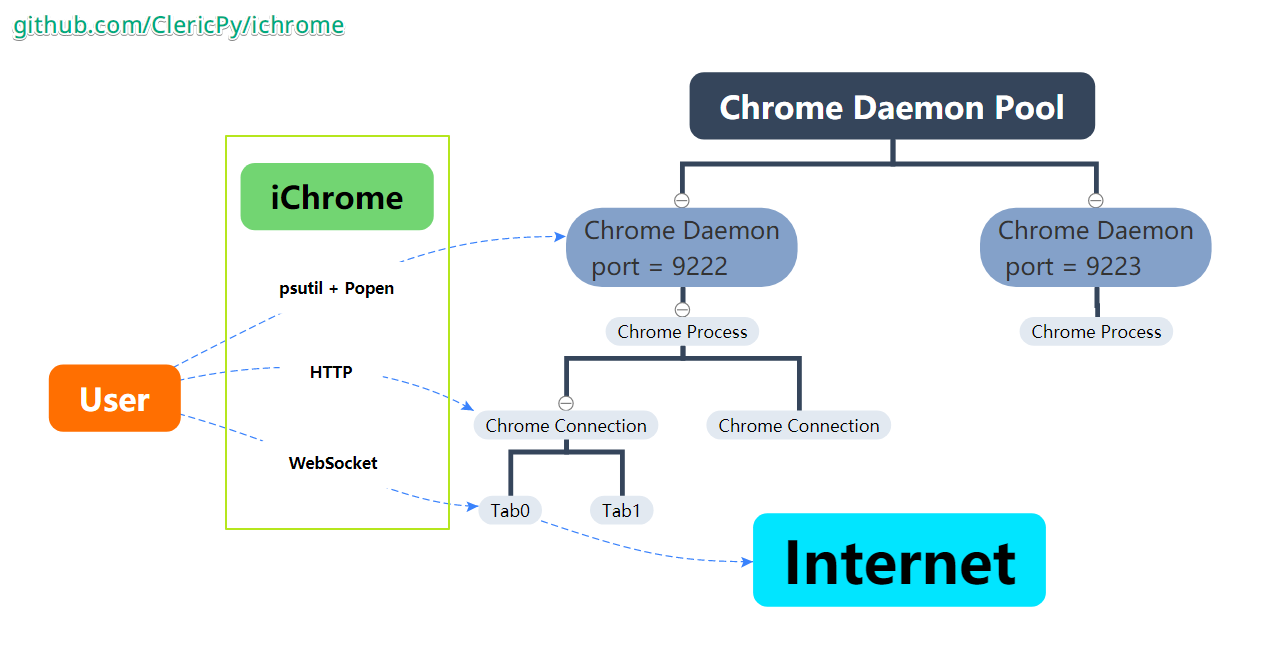
If you encounter any problems, please let me know through issues, some of them will be a good opinion for the enhancement of ichrome.
Why?
- Pyppeteer is awesome, but I don't need so much
- spelling of pyppeteer is confused
- event-driven programming is not always advisable.
- Selenium is slow
- webdrivers often come with memory leak.
- In desperate need of a stable toolkit to communicate with Chrome browser (or other Blink-based browsers like Chromium)
- fast http & websocket connections (based on aiohttp) for asyncio environment
- ichrome.debugger is a sync tool and depends on the
ichrome.async_utils- a choice for debugging interactively.
- Playwright Python comes too late
- https://github.com/microsoft/playwright-python
- This library may be a good choice for both
syncandasyncusage
Features
As we known,
Javascriptis the first-class citizen of the Chrome world, so learn to use it withichromefrequently.
- A process daemon of Chrome instances
- auto-restart
- command-line usage support
asyncenvironment compatible
- Connect to an existing Chrome
- Operations on Tabs under stable
websocket- Package very commonly used functions
ChromeEngineas the progress pool- support HTTP
apirouter with FastAPI
- support HTTP
Install
Install from PyPI
pip install ichrome -U
Uninstall & Clear the user data folder
    $ python3 -m ichrome --clean
    $ pip uninstall ichrome
Download & unzip the latest version of Chromium browser
python3 -m ichrome --install="/home/root/chrome_bin"
WARNING:
- install the missing packages yourself
- use
ldd chrome | grep noton linux to check and install them, or view the link: Checking out and building Chromium on Linux
- use
- add
--no-sandboxto extra_configs to avoidNo usable sandboxerrors, unless you really needsandbox: Chromium: "Running without the SUID sandbox!" error - Ask Ubuntu
Have a Try?
Interactive Debugging (REPL Mode)
There are two ways to enter the REPL mode
python3 -m ichrome -t- or run
await tab.repl()in your code
λ python3 -m ichrome -t
>>> await tab.goto('https://github.com/ClericPy')
True
>>> title = await tab.title
>>> title
'ClericPy (ClericPy) · GitHub'
>>> await tab.click('.pinned-item-list-item-content [href="/ClericPy/ichrome"]')
Tag(a)
>>> await tab.wait_loading(2)
True
>>> await tab.wait_loading(2)
False
>>> await tab.js('document.body.innerHTML="Updated"')
{'type': 'string', 'value': 'Updated'}
>>> await tab.history_back()
True
>>> await tab.set_html('hello world')
{'id': 21, 'result': {}}
>>> await tab.set_ua('no UA')
{'id': 22, 'result': {}}
>>> await tab.goto('http://httpbin.org/user-agent')
True
>>> await tab.html
'<html><head></head><body><pre style="word-wrap: break-word; white-space: pre-wrap;">{\n  "user-agent": "no UA"\n}\n</pre></body></html>'
Quick Start
-
Start a new chrome daemon process with headless=False
python -m ichrome- Then connect to an exist chrome instance
async with AsyncChrome() as cd:
or launching the chrome daemon in code may be a better choice
async with AsyncChromeDaemon() as cd: async with cd.connect_tab() as tab: -
Operations on the tabs: new tab, wait loading, run javascript, get html, close tab
-
Close the browser GRACEFULLY instead of killing process
from ichrome import AsyncChromeDaemon
import asyncio


async def main():
    async with AsyncChromeDaemon(headless=0, disable_image=False) as cd:
        # [index] 0: current activate tab, 1: tab 1, None: new tab, $URL: new tab for url
        async with cd.connect_tab(index=0, auto_close=True) as tab:
            # tab: AsyncTab
            await tab.alert(
                'Now using the default tab and goto the url, click to continue.'
            )
            print(await tab.goto('https://github.com/ClericPy/ichrome',
                                 timeout=5))
            # wait tag appeared
            await tab.wait_tag('[data-content="Issues"]', max_wait_time=5)
            await tab.alert(
                'Here the Issues tag appeared, I will click that button.')
            # click the issues tag
            await tab.click('[data-content="Issues"]')
            await tab.wait_tag('#js-issues-search')
            await tab.alert('Now will input some text and search the issues.')
            await tab.mouse_click_element_rect('#js-issues-search')
            await tab.keyboard_send(string='chromium')
            await tab.js(
                r'''document.querySelector('[role="search"]').submit()''')
            await tab.wait_loading(5)
            await asyncio.sleep(2)
            await tab.alert('demo finished.')

            # start REPL mode
            # await tab.repl()

            # no need to close tab for auto_close=True
            # await tab.close()

        # # close browser gracefully
        # await cd.close_browser()
        print('clearing the user data cache.')
        await cd.clear_user_data_dir()


if __name__ == "__main__":
    asyncio.run(main())
Listen to the network traffic
import asyncio

from ichrome import AsyncChromeDaemon


async def main():
    async with AsyncChromeDaemon() as cd:
        async with cd.connect_tab(index=0) as tab:

            def filter_function(r):
                try:
                    url = r['params']['response']['url']
                    return url == 'http://httpbin.org/get'
                except KeyError:
                    pass

            async with tab.wait_response_context(
                    filter_function=filter_function,
                    timeout=5,
            ) as r:
                await tab.goto('http://httpbin.org/get')
                result = await r
                if result:
                    print(result['data'])
                assert 'User-Agent' in result['data']


if __name__ == "__main__":
    asyncio.run(main())
Example Code: examples_async.py & Classic Use Cases
AsyncChrome feature list
-
server
return
f"http://{self.host}:{self.port}", such ashttp://127.0.0.1:9222 -
version
version info from
/json/versionformat like:{'Browser': 'Chrome/77.0.3865.90', 'Protocol-Version': '1.3', 'User-Agent': 'Mozilla/5.0 (Windows NT 10.0; Win64; x64) AppleWebKit/537.36 (KHTML, like Gecko) Chrome/77.0.3865.90 Safari/537.36', 'V8-Version': '7.7.299.11', 'WebKit-Version': '537.36 (@58c425ba843df2918d9d4b409331972646c393dd)', 'webSocketDebuggerUrl': 'ws://127.0.0.1:9222/devtools/browser/b5fbd149-959b-4603-b209-cfd26d66bdc1'} -
connect/check/okcheck alive
-
get_tabs/tabs/get_tab/get_tabsget the
AsyncTabinstance from/json. -
new_tab/activate_tab/close_tab/close_tabsoperating tabs.
-
close_browserfind the activated tab and send
Browser.closemessage, close the connected chrome browser gracefully.await chrome.close_browser()
-
killforce kill the chrome process with self.port.
await chrome.kill()
-
connect_tabsconnect websockets for multiple tabs in one
withcontext, and disconnect before exiting.tab0: AsyncTab = (await chrome.tabs)[0] tab1: AsyncTab = await chrome.new_tab() async with chrome.connect_tabs([tab0, tab1]): assert (await tab0.current_url) == 'about:blank' assert (await tab1.current_url) == 'about:blank'
-
connect_tabThe easiest way to get a connected tab. get an existing tab
async with chrome.connect_tab(0) as tab:
    print(await tab.current_title)
get a new tab and auto close it
async with chrome.connect_tab(None, True) as tab:
    print(await tab.current_title)
get a new tab with given url and auto close it
async with chrome.connect_tab('http://python.org', True) as tab:
    print(await tab.current_title)
AsyncTab feature list
-
set_url/goto/reloadnavigate to a new url(return bool for whether load finished), or send
Page.reloadmessage. -
wait_eventlistening the events with given name, and separate from other same-name events with filter_function, finally run the callback_function with result.
-
wait_page_loading/wait_loadingwait for
Page.loadEventFiredevent, or stop loading while timeout. Different fromwait_loading_finished. -
wait_response/wait_requestfilt the
Network.responseReceived/Network.requestWillBeSentevent byfilter_function, return therequest_dictwhich can be used byget_response/get_response_body/get_request_post_data. WARNING: requestWillBeSent event fired do not mean the response is ready, should await tab.wait_request_loading(request_dict) or await tab.get_response(request_dict, wait_loading=True) -
wait_request_loading/wait_loading_finishedsometimes event got
request_dictwithwait_response, but the ajax request is still fetching, which need to wait theNetwork.loadingFinishedevent. -
activate/activate_tabactivate tab with websocket / http message.
-
close/close_tabclose tab with websocket / http message.
-
add_js_onloadPage.addScriptToEvaluateOnNewDocument, which means this javascript code will be run before page loaded. -
clear_browser_cache/clear_browser_cookiesNetwork.clearBrowserCacheandNetwork.clearBrowserCookies -
querySelectorAllget the tag instance, which contains the
tagName, innerHTML, outerHTML, textContent, attributesattrs. -
clickclick the element queried by given css selector.
-
refresh_tab_infoto refresh the init attrs:
url,title. -
current_html/current_title/current_urlget the current html / title / url with
tab.js. or using therefresh_tab_infomethod and init attrs. -
crashPage.crash -
get_cookies/get_all_cookies/delete_cookies/set_cookiesome page cookies operations.
-
set_headers/set_uaNetwork.setExtraHTTPHeadersandNetwork.setUserAgentOverride, used to update headers dynamically. -
close_browsersend
Browser.closemessage to close the chrome browser gracefully. -
get_bounding_client_rect/get_element_clipget_element_clipis alias name for the other, these two method is to get the rect of element which queried by css element. -
screenshot/screenshot_elementget the screenshot base64 encoded image data.
screenshot_elementshould be given a css selector to locate the element. -
get_page_size/get_screen_sizesize of current window or the whole screen.
-
get_responseget the response body with the given request dict.
-
jsrun the given js code, return the raw response from sending
Runtime.evaluatemessage. -
inject_js_urlinject some js url, like
<script src="xxx/static/js/jquery.min.js"></script>do. -
get_value&get_variablerun the given js variable or expression, and return the result.
await tab.get_value('document.title')
await tab.get_value("document.querySelector('title').innerText")
-
keyboard_senddispath key event with
Input.dispatchKeyEvent -
mouse_clickdispath click event on given position
-
mouse_dragdispath drag event on given position, and return the target x, y.
durationarg is to slow down the move speed. -
mouse_drag_reldispath drag event on given offset, and return the target x, y.
-
mouse_drag_reldrag with offsets continuously.
await tab.set_url('https://draw.yunser.com/')
walker = await tab.mouse_drag_rel_chain(320, 145).move(50, 0, 0.2).move(
    0, 50, 0.2).move(-50, 0, 0.2).move(0, -50, 0.2)
await walker.move(50 * 1.414, 50 * 1.414, 0.2)
-
mouse_press/mouse_release/mouse_move/mouse_move_rel/mouse_move_rel_chainsimilar to the drag features. These mouse features is only dispatched events, not the real mouse action.
-
history_back/history_forward/goto_history_relative/reset_historyback / forward history
Command Line Usage (Daemon Mode)
Be used for launching a chrome daemon process. The unhandled args will be treated as chrome raw args and appended to extra_config list.
Shutdown Chrome process with the given port
λ python3 -m ichrome -s 9222
2018-11-27 23:01:59 DEBUG [ichrome] base.py(329): kill chrome.exe --remote-debugging-port=9222
2018-11-27 23:02:00 DEBUG [ichrome] base.py(329): kill chrome.exe --remote-debugging-port=9222
Launch a Chrome daemon process
λ python3 -m ichrome -p 9222 --start_url "http://bing.com" --disable_image
2018-11-27 23:03:57 INFO  [ichrome] __main__.py(69): ChromeDaemon cmd args: {'daemon': True, 'block': True, 'chrome_path': '', 'host': 'localhost', 'port': 9222, 'headless': False, 'user_agent': '', 'proxy': '', 'user_data_dir': None, 'disable_image': True, 'start_url': 'http://bing.com', 'extra_config': '', 'max_deaths': 1, 'timeout': 2}
Crawl the given URL, output the HTML DOM
λ python3 -m ichrome --crawl --headless --timeout=2 http://api.ipify.org/
<html><head></head><body><pre style="word-wrap: break-word; white-space: pre-wrap;">38.143.68.66</pre></body></html>
To use default user dir (ignore ichrome user-dir settings)
ensure the existing Chromes get closed
λ python -m ichrome -U null
Details:
$ python3 -m ichrome --help
usage:
    All the unknown args will be appended to extra_config as chrome original args.
    Maybe you can have a try by typing: `python3 -m ichrome --try`

Demo:
    > python -m ichrome -H 127.0.0.1 -p 9222 --window-size=1212,1212 --incognito
    > ChromeDaemon cmd args: port=9222, {'chrome_path': '', 'host': '127.0.0.1', 'headless': False, 'user_agent': '', 'proxy': '', 'user_data_dir': WindowsPath('C:/Users/root/ichrome_user_data'), 'disable_image': False, 'start_url': 'about:blank', 'extra_config': ['--window-size=1212,1212', '--incognito'], 'max_deaths': 1, 'timeout':1, 'proc_check_interval': 5, 'debug': False}

    > python -m ichrome
    > ChromeDaemon cmd args: port=9222, {'chrome_path': '', 'host': '127.0.0.1', 'headless': False, 'user_agent': '', 'proxy': '', 'user_data_dir': WindowsPath('C:/Users/root/ichrome_user_data'), 'disable_image': False, 'start_url': 'about:blank', 'extra_config': [], 'max_deaths': 1, 'timeout': 1, 'proc_check_interval': 5, 'debug': False}

Other operations:
    1. kill local chrome process with given port:
        python -m ichrome -s 9222
        python -m ichrome -k 9222
    2. clear user_data_dir path (remove the folder and files):
        python -m ichrome --clear
        python -m ichrome --clean
        python -m ichrome -C -p 9222
    3. show ChromeDaemon.__doc__:
        python -m ichrome --doc
    4. crawl the URL, output the HTML DOM:
        python -m ichrome --crawl --headless --timeout=2 http://myip.ipip.net/

optional arguments:
  -h, --help            show this help message and exit
  -v, -V, --version     ichrome version info
  -c CONFIG, --config CONFIG
                        load config dict from JSON file of given path
  -cp CHROME_PATH, --chrome-path CHROME_PATH, --chrome_path CHROME_PATH
                        chrome executable file path, default to null for
                        automatic searching
  -H HOST, --host HOST  --remote-debugging-address, default to 127.0.0.1
  -p PORT, --port PORT  --remote-debugging-port, default to 9222
  --headless            --headless and --hide-scrollbars, default to False
  -s SHUTDOWN, -k SHUTDOWN, --shutdown SHUTDOWN
                        shutdown the given port, only for local running chrome
  -A USER_AGENT, --user-agent USER_AGENT, --user_agent USER_AGENT
                        --user-agent, default to Chrome PC: Mozilla/5.0
                        (Linux; Android 6.0; Nexus 5 Build/MRA58N)
                        AppleWebKit/537.36 (KHTML, like Gecko)
                        Chrome/83.0.4103.106 Mobile Safari/537.36
  -x PROXY, --proxy PROXY
                        --proxy-server, default to None
  -U USER_DATA_DIR, --user-data-dir USER_DATA_DIR, --user_data_dir USER_DATA_DIR
                        user_data_dir to save user data, default to
                        ~/ichrome_user_data
  --disable-image, --disable_image
                        disable image for loading performance, default to
                        False
  -url START_URL, --start-url START_URL, --start_url START_URL
                        start url while launching chrome, default to
                        about:blank
  --max-deaths MAX_DEATHS, --max_deaths MAX_DEATHS
                        restart times. default to 1 for without auto-restart
  --timeout TIMEOUT     timeout to connect the remote server, default to 1 for
                        localhost
  -w WORKERS, --workers WORKERS
                        the number of worker processes, default to 1
  --proc-check-interval PROC_CHECK_INTERVAL, --proc_check_interval PROC_CHECK_INTERVAL
                        check chrome process alive every interval seconds
  --crawl               crawl the given URL, output the HTML DOM
  -C, --clear, --clear  clean user_data_dir
  --doc                 show ChromeDaemon.__doc__
  --debug               set logger level to DEBUG
  -K, --killall         killall chrome launched local with --remote-debugging-
                        port
  -t, --try, --demo, --repl
                        Have a try for ichrome with repl mode.
What's More?
As we known, Chrome browsers (including various webdriver versions) will have the following problems in a long-running scene:
- memory leak
- missing websocket connections
- infinitely growing cache
- other unpredictable problems...
So you may need a more stable process pool with ChromeEngine(HTTP usage & normal usage):
Show more
ChromeEngine HTTP usage
Server
pip install -U ichrome[web]
import os

import uvicorn
from fastapi import FastAPI

from ichrome import AsyncTab
from ichrome.routers.fastapi_routes import ChromeAPIRouter

app = FastAPI()
# reset max_msg_size and window size for a large size screenshot
AsyncTab._DEFAULT_WS_KWARGS['max_msg_size'] = 10 * 1024**2
app.include_router(ChromeAPIRouter(workers_amount=os.cpu_count(),
                                   headless=True,
                                   extra_config=['--window-size=1920,1080']),
                   prefix='/chrome')

uvicorn.run(app)

# view url with your browser
# http://127.0.0.1:8000/chrome/screenshot?url=http://bing.com
# http://127.0.0.1:8000/chrome/download?url=http://bing.com
Client
from torequests import tPool
from inspect import getsource
req = tPool()


async def tab_callback(self, tab, data, timeout):
    await tab.set_url(data['url'], timeout=timeout)
    return (await tab.querySelector('h1')).text


r = req.post('http://127.0.0.1:8000/chrome/do',
             json={
                 'data': {
                     'url': 'http://httpbin.org/html'
                 },
                 'tab_callback': getsource(tab_callback),
                 'timeout': 10
             })
print(r.text)
# "Herman Melville - Moby-Dick"
ChromeEngine normal usage
Connect tab and do something
import asyncio

from ichrome.pool import ChromeEngine


def test_chrome_engine_connect_tab():

    async def _test_chrome_engine_connect_tab():

        async with ChromeEngine(port=9234, headless=True,
                                disable_image=True) as ce:
            async with ce.connect_tab(port=9234) as tab:
                await tab.goto('http://pypi.org')
                print(await tab.title)

    asyncio.get_event_loop().run_until_complete(
        _test_chrome_engine_connect_tab())


if __name__ == "__main__":
    test_chrome_engine_connect_tab()
# INFO  2020-10-13 22:18:53 [ichrome] pool.py(464): [enqueue](0) ChromeTask(<9234>, PENDING, id=1, tab=None), timeout=None, data=<ichrome.pool._TabWorker object at 0x000002232841D9A0>
# INFO  2020-10-13 22:18:55 [ichrome] pool.py(172): [online] ChromeWorker(<9234>, 0/5, 0 todos) is online.
# INFO  2020-10-13 22:18:55 [ichrome] pool.py(200): ChromeWorker(<9234>, 0/5, 0 todos) get a new task ChromeTask(<9234>, PENDING, id=1, tab=None).
# PyPI · The Python Package Index
# INFO  2020-10-13 22:18:57 [ichrome] pool.py(182): [offline] ChromeWorker(<9234>, 0/5, 0 todos) is offline.
# INFO  2020-10-13 22:18:57 [ichrome] pool.py(241): [finished](0) ChromeTask(<9234>, PENDING, id=1, tab=None)
Batch Tasks
import asyncio
from inspect import getsource

from ichrome.pool import ChromeEngine


async def tab_callback(self, tab, url, timeout):
    await tab.set_url(url, timeout=5)
    return await tab.title


def test_pool():

    async def _test_pool():
        async with ChromeEngine(max_concurrent_tabs=5,
                                headless=True,
                                disable_image=True) as ce:
            tasks = [
                asyncio.ensure_future(
                    ce.do('http://bing.com', tab_callback, timeout=10))
                for _ in range(3)
            ] + [
                asyncio.ensure_future(
                    ce.do(
                        'http://bing.com', getsource(tab_callback), timeout=10))
                for _ in range(3)
            ]
            for task in tasks:
                result = await task
                print(result)
                assert result

    # asyncio.run will raise aiohttp issue: https://github.com/aio-libs/aiohttp/issues/4324
    asyncio.get_event_loop().run_until_complete(_test_pool())


if __name__ == "__main__":
    test_pool()
TODO
-
Concurrent support. (gevent, threading, asyncio) - Add auto_restart while crash.
-
Auto remove the zombie tabs with a lifebook. - Add some useful examples.
- Coroutine support (for asyncio).
- Standard test cases.
- Stable Chrome Process Pool.
- HTTP apis server console with FastAPI.
- Complete the document.
Release history Release notifications | RSS feed


Download files
Download the file for your platform. If you're not sure which to choose, learn more about installing packages.
Source Distributions
Built Distribution
Filter files by name, interpreter, ABI, and platform.
If you're not sure about the file name format, learn more about wheel file names.
Copy a direct link to the current filters
File details
Details for the file ichrome-2.8.4-py3-none-any.whl.
File metadata
- Download URL: ichrome-2.8.4-py3-none-any.whl
- Upload date:
- Size: 65.6 kB
- Tags: Python 3
- Uploaded using Trusted Publishing? No
- Uploaded via: twine/3.4.1 importlib_metadata/4.0.1 pkginfo/1.7.0 requests/2.25.1 requests-toolbelt/0.9.1 tqdm/4.60.0 CPython/3.8.10
File hashes
| Algorithm | Hash digest | |
|---|---|---|
| SHA256 |
3e511b1994050a0a902778dc49c36f293d2c7fa37457913bb984afa18edfae47
|
|
| MD5 |
10b2344647f4fa369fb53eb146736955
|
|
| BLAKE2b-256 |
7eb4783bbbcd53c80d8f2f4d97988fd1c535df370e5257806024edf45d955662
|






