
Create interactive visualizations of model architectures for display in Jupyter notebooks

Project description
IDLMAV
Interactive deep learning model architecture visualization (IDLMAV) is a tool that creates interactive visualizations of model architectures for display in Jupyter notebooks.
- It does not require a successful forward pass: it can also visualize partial models
- It produces three outputs to allow a trade-off between portability and interactivity
Use cases
- Incrementally designing a model and viewing activations, parameter counts and FLOPS "so far" before the whole model has been defined
- Documenting a model in a notebook and generating the architecture in such a way that it is viewable without a running kernel, e.g. in nbviewer (example) or nbsanity (example)
- Visualizing 3rd party models after importing them into a notebook
- Finding hotspots (parameters or FLOPS) in a model for optimization purposes
Static HTML examples
These have limited interactivity and synchronization between panels compared to the interactive widgets (see below), but they provide good examples of how models are visualized.
| Model | Basic | Verbose | Basic, scrolling | Verbose, scrolling |
|---|---|---|---|---|
| ResNet18 | View | View | View | View |
| ResNet34 | View | View | View | View |
| ConvNeXt small | View | View | View | View |
| ViT B/16 | View | View | View | View |
| HR-Net W18 | View | View | View | View |
| YOLOv11 Nano | View | View | View | View |
| BLIP vision model | View | View | View | View |
| Whisper-tiny | View | View | View | View |
| BERT mini | View | View | View | View |
| ModernBERT base | View | View | View | View |
Installation
Using Plotly 5
Since version 6, plotly are basing their go.FigureWidget object on anywidget. The interactive widgets in idlmav are based on go.FigureWidget. idlmav has not yet been tested extensively with plotly version 6 and/or anywidget. Use the installation steps below to use idlmav with plotly 5
pip install torch torchvision torchaudio --index-url https://download.pytorch.org/whl/cu118
pip install "plotly>=5,<6"
pip install idlmav
Using Plotly 6
To use the latest version of plotly, anywidget must be installed separately.
pip install torch torchvision torchaudio --index-url https://download.pytorch.org/whl/cu118
pip install anywidget
pip install idlmav
Usage examples
Preparation
Run these steps before running
import torch, torchvision
from idlmav import MAV
model = torchvision.models.resnet18()
x = torch.randn(16,3,160,160)
mav = MAV(model, x, device='cpu')
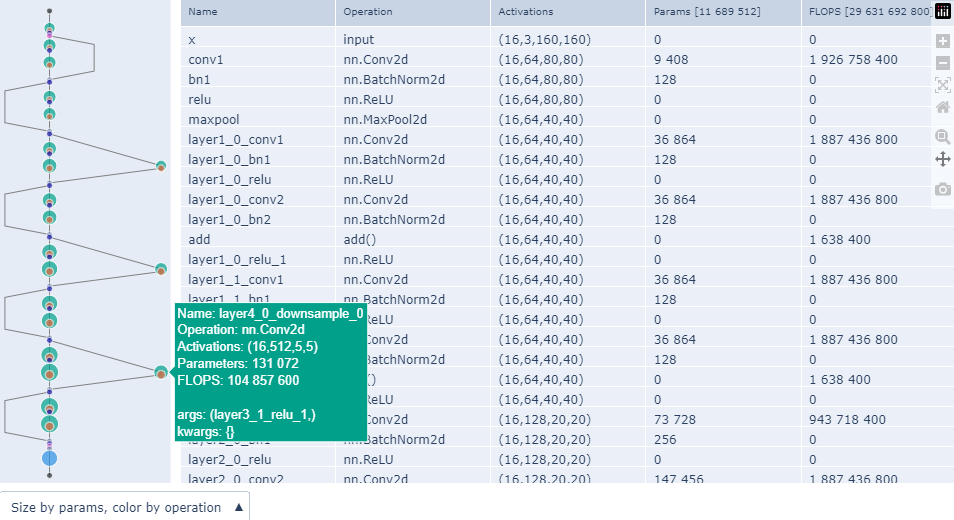
Portable figure
- Based on plotly.graph_objects.Figure
- No dependency on
ipywidgetsorplotly.graph_objects.FigureWidgetfor portability reasons - Displays correctly without the need of a running backend/kernel, e.g. in nbviewer (example) or nbsanity (example)
- Interactions limited to hover, pan and zoom, slider and dropdown menu provided by Plotly
- No synchronization between graph and table
mav.show_figure()
Interactive widget
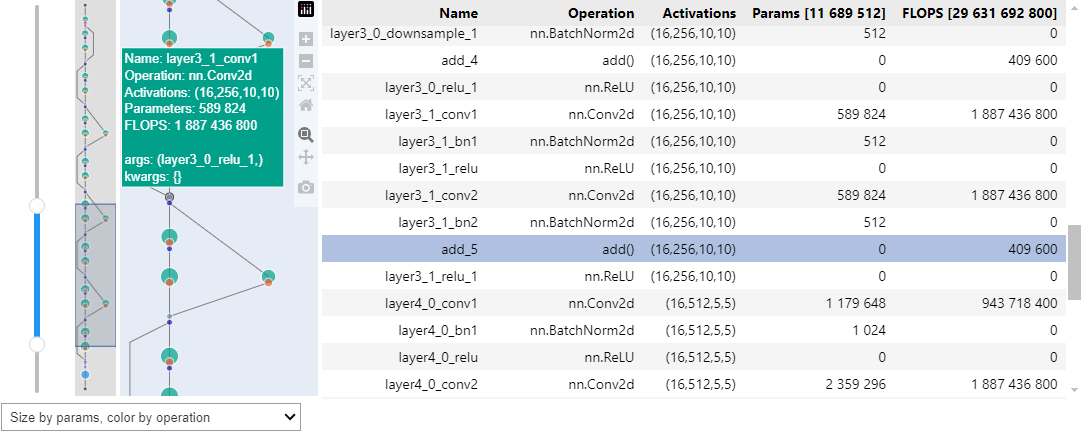
- Based on ipywidgets and plotly.graph_objects.FigureWidget
- Synchronizaton between slider, overview panel, main graph and table
- Includes responsiveness of other components to plotly's built-in pan and zoom actions
- Clicking a node in the main graph highlights it in the table
- Limited portability expected to fluctuate over time on different environments
mav.show_widget(add_slider=True, add_overview=True)
HTML export
- Most portable option
- Exports the same portable figure shown above to a standalone HTML file
- The
export_for_offline_useparameter specifies how to include the plotly dependency in the exported HTMLFalse(default): The exported HTML is small, but requires a working internet connection to display correctlyTrue: The exported HTML is around 4MB in size and displays correctly without a working internet connection
mav.export_static_html('resnet18.html', export_for_offline_use=False)
Specifying colors
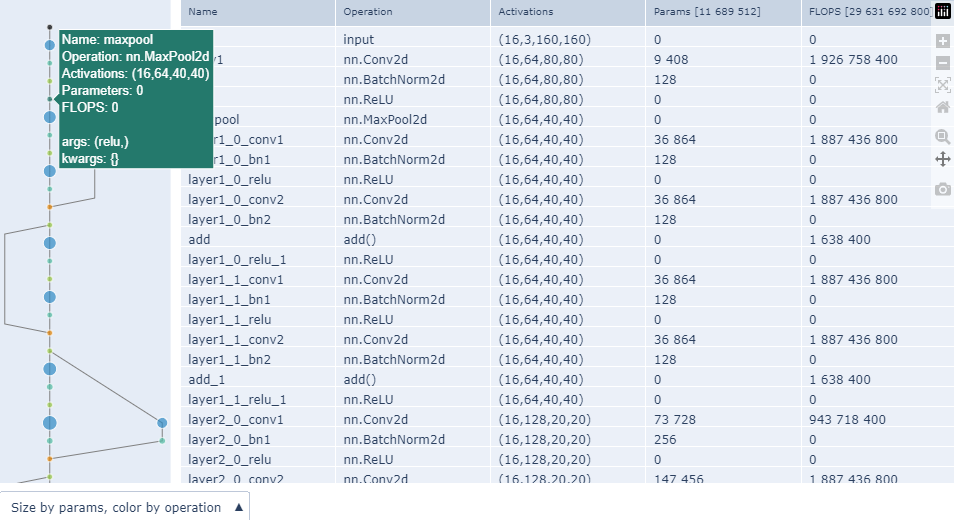
- Palettes from plotly discrete color sequences can be specified by name
- User-defined palettes can be specified as a list of
'#RRGGBB'formatted strings - The key to
fixed_color_mapmay be a string in the Operation column or a category as listed here
mav.show_figure(
    palette='Vivid',
    avoid_palette_idxs=set([10]),
    fixed_color_map={'Convolution':7, 'add()':0, 'nn.MaxPool2d':5}
)
Adding and removing panels
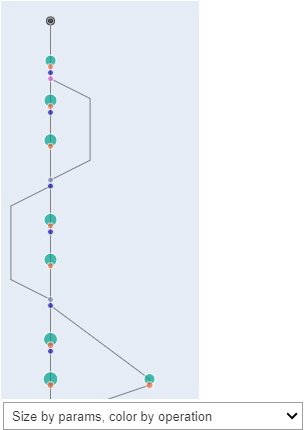
- This could help with portability or user experience on some environments, e.g.
- On Colab the slider gets more in the way rather than adding value
- Wide models are sometimes easier to navigate without the table
- The custom JS used for table synchronization may not be supported everywhere
mav.show_widget(add_overview=False, add_slider=False, add_table=False)
Modifying merging behaviour
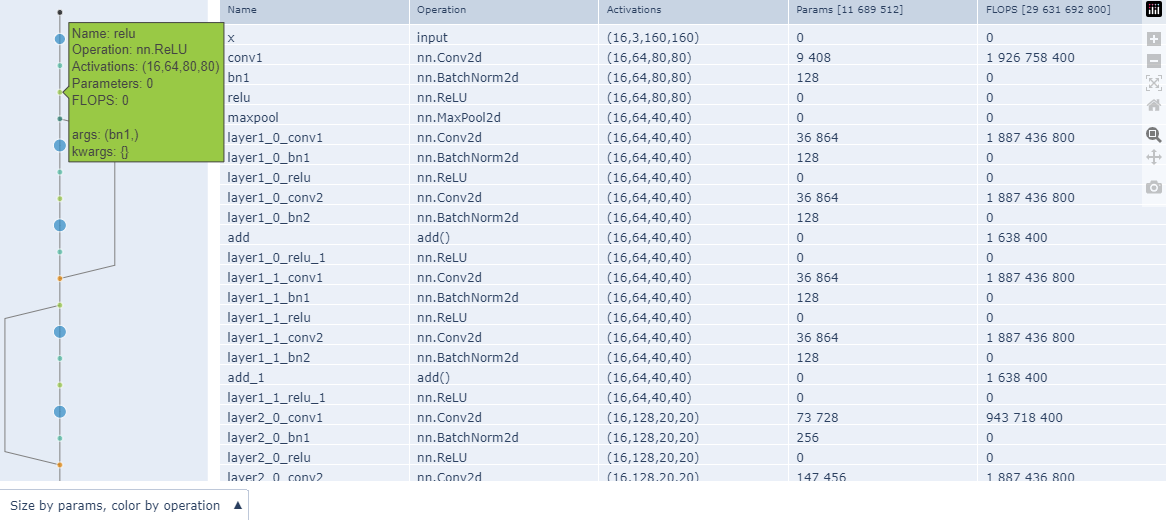
merge_threshold<0does not perform any mergingmerge_threshold==0only merges nodes that have zero parametersmerge_thresholdbetween 0 and 1 sorts nodes from the smallest to the largest by number of parameters and merges from the smallest node until just before the combined parameter count of merged nodes exceed the specified fraction of the total parameter count- The following nodes are never merged:
- Input and output nodes to the entire network
- Nodes with multiple input connections
- Nodes for which the input node has multiple output connections
- The default
merge_thresholdvalue normally results in nodes without parameters as well as normalization modules being merged
mav = MAV(model, x, device='cpu', merge_threshold=-1)
mav.show_figure(
    palette='Vivid',
    avoid_palette_idxs=set([10]),
    fixed_color_map={'Convolution':7, 'add()':0, 'nn.MaxPool2d':5}
)
Calling internal components directly
- For users that wish to replace or augment one or more components
- A typical example would be replacing or subclassing the renderer to work on a specific environment
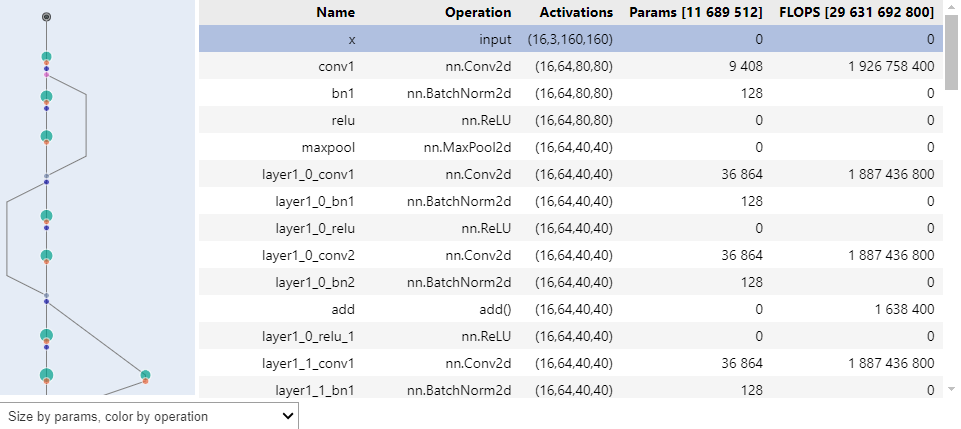
from idlmav import MavTracer, merge_graph_nodes, layout_graph_nodes, color_graph_nodes, WidgetRenderer
from IPython.display import display

tracer = MavTracer(model, x, device='cpu')
merge_graph_nodes(tracer.g)
layout_graph_nodes(tracer.g)
color_graph_nodes(tracer.g)
renderer = WidgetRenderer(tracer.g)
display(renderer.render())
Reducing notebook file size
- On some environments, plotly will include the entire plotly library (~ 4MB) in the notebook DOM for portable figures (
go.Figure) - This is not the case for interactive widgets (
go.FigureWidget) where the plotly library is served from the backend - Using a custom plotly renderer can also avoid this for
go.Figure, importing plotly via a CDN instead - Custom plotly renderers are made available in
idlmavvia a context manager:from idlmav import plotly_renderer with plotly_renderer('notebook_connected'): mav.show_figure()
- Available custom plotly renderers may be listed as follows:
import plotly.io as pio
list(pio.renderers)
- It is best to experiment with different renderers for your environment. From personal experience, the following may be good starting points:
notebook_connectedorvscodewith Plotly 5 on VSCodevscodewith Plotly 6 on VSCodeiframewith Plotly 5 on Kaggle
Features
- Works on incomplete models and models without a successful forward pass
- Can provide a portable figure with basic interactivity that does not require a running kernel
- Can provide an interactive widget with synchronization between panels and limited portability
- Customizable color palette and node or category color mappings
- Customizable node merging behaviour
- Interactions (portable figure)
- Hover over modules to see activation sizes, number of parameters and FLOPS
- Pan and zoom provided by Plotly (not synchronized)
- Scrollable table (not synchronized)
- Horizontal slider provided by Plotly (not synchronized)
- Overview window showing full model (only synchronized to slider)
- Dropdown menu to select node coloring and sizing criteria
- Interactions (interactive widget)
- Hover over modules to see activation sizes, number of parameters and FLOPS
- Synchronized scrolling between table and graph
- Clicking on a module highlights that module in the table
- Clickable overview window showing full model
- Range slider from ipywidgets with synchronized pan and zoom functionality
- Table and sliders synchronize with Plotly's built-in pan and zoom functionality
- Dropdown menu to select node coloring and sizing criteria
Limitations
- Inherited limitations of symbolic tracing from torch.fx
- Models with dynamic control flow can only be traced using
torch.compile - Models containing non-torch functions can only be traced using
torch.compileand only up to the non-torch function
- Models with dynamic control flow can only be traced using
- Inherited from
torch.compile- In models parsed with
torch.compile, classes are flattened into functions and learnable parameters are passed as additional inputs
- In models parsed with
- Inherited from ipywidgets:
- Interactive widgets require a running kernel to dynamically create DOM elements
- Inherited from plotly
- Portable figures can only support a horizontal slider
- On portable figures, overview panels synchronize only to the slider, not to Plotly built-in pan & zoom controls
- Environment-specific limitations
- Kaggle recently (Dec 2024) seemed to have trouble displaying
go.FigureWidget, so only the portable figure is available there
- Kaggle recently (Dec 2024) seemed to have trouble displaying
Planned updates
- Make the primary direction (down/right/up/left) configurable
- Allow the user to specify a latent node at which the graph changes direction (e.g. for autoencoder / UNet architectures)
Contributing
Reports of any issues encountered as most welcome! Please provide reproducible example code and a brief description of your environment to simplify the process of reproducing the issue and verifying fixes
Please also make issues easy to categorize by being specific about the category they belong to:
- An error occurred during parsing, layout or MAV object instantiation
- The parsing, layout or MAV object instantiation step took forever to execute
- An error occurred during rendering
- The rendered graph is a poor / inaccurate representation of the model
Any contributions are also welcome and contributions in the following categories will be especially appreciated!
- Custom renderers to improve the user experience on different platforms / environments
- Unit tests
The development environment is described in setup_vscode_wsl.ipynb
- This should be easy to get going in native Linux as well, just skipping the WSL parts
- The build is described in and executed from build_steps.ipynb
- Unit tests still need to be developed. At the moment, the following notebooks are used for manual / visual testing:
License
This repository is released under the MIT license. See LICENSE for additional details.
Release history Release notifications | RSS feed


Download files
Download the file for your platform. If you're not sure which to choose, learn more about installing packages.
Source Distribution
Built Distribution
Filter files by name, interpreter, ABI, and platform.
If you're not sure about the file name format, learn more about wheel file names.
Copy a direct link to the current filters
File details
Details for the file idlmav-1.1.0.tar.gz.
File metadata
- Download URL: idlmav-1.1.0.tar.gz
- Upload date:
- Size: 51.9 kB
- Tags: Source
- Uploaded using Trusted Publishing? No
- Uploaded via: twine/6.1.0 CPython/3.10.12
File hashes
| Algorithm | Hash digest | |
|---|---|---|
| SHA256 |
22579b6326bb568f985220098a40baddb64b9bd00b43575da13167423d864748
|
|
| MD5 |
4159c45fbf0936851b9b6af89294c1a6
|
|
| BLAKE2b-256 |
2c648e3aa63fd8bcf431a5c6bb90010ea43a233ce78a2bb358af8dbf8c8a2e29
|
File details
Details for the file idlmav-1.1.0-py3-none-any.whl.
File metadata
- Download URL: idlmav-1.1.0-py3-none-any.whl
- Upload date:
- Size: 55.6 kB
- Tags: Python 3
- Uploaded using Trusted Publishing? No
- Uploaded via: twine/6.1.0 CPython/3.10.12
File hashes
| Algorithm | Hash digest | |
|---|---|---|
| SHA256 |
1e75047868ae4403ff7c0097dbcb13fdc50c16fe7a834a5da234d7f3f202ae31
|
|
| MD5 |
83341f87abd215026cfb31f762f923b6
|
|
| BLAKE2b-256 |
afb6b00fcca3a8861270506269272386687576c79a79ef3c635ceafa718a80ba
|






