
IDSLab



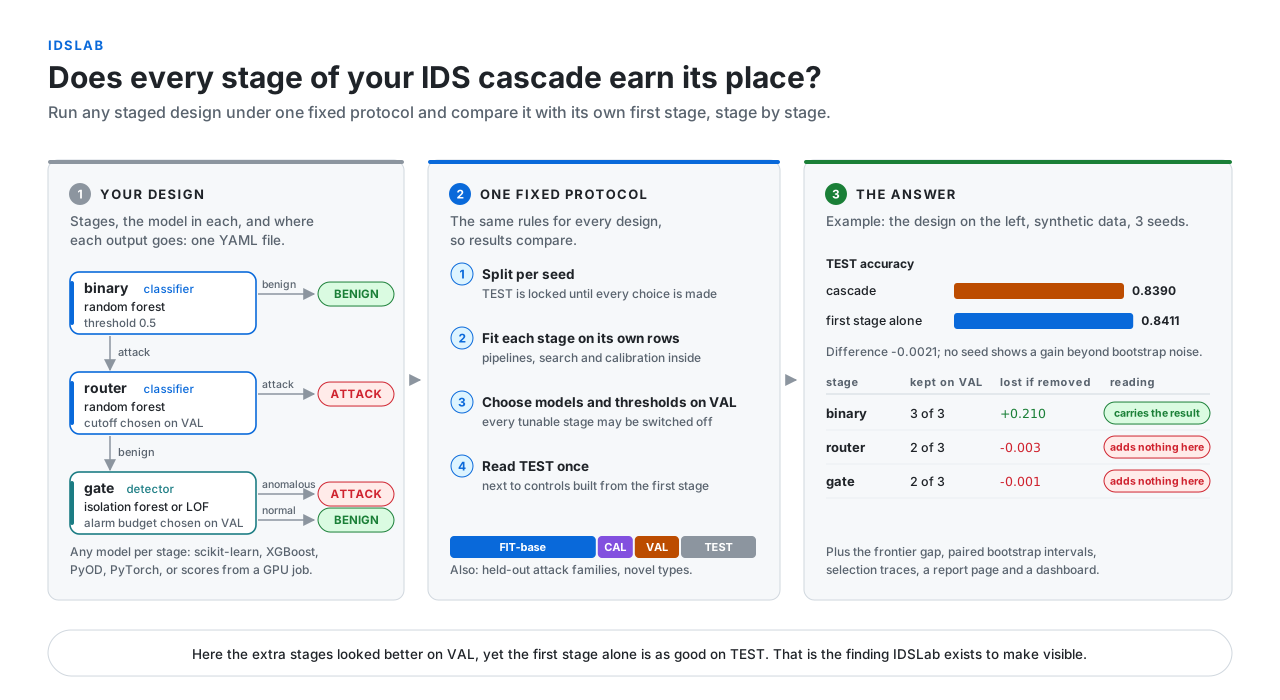
IDSLab tests staged (cascade) network intrusion detection systems. You describe a design in one YAML file: which stages it has, which model sits in each, and where each stage sends the flows it judges. IDSLab fits it, makes every choice on validation data, and then tells you on untouched test data whether the design is better than its own first stage alone, and what each stage adds.
Why a cascade needs this
A staged IDS splits detection into steps. A first classifier sees every flow; later stages (a second classifier, an anomaly detector, a type classifier) re-check the flows it sends them, to catch attacks it missed or clear its false alarms. Many published designs report a gain over a single model, and the gain is easy to overstate:
- thresholds or stages are chosen while looking at the test set;
- the cascade is compared with a different single model, not with its own first stage tuned as carefully;
- the same gain could come from moving the first stage's threshold, no extra stage needed;
- nobody checks what each stage contributes, so a stage that does nothing stays in the design.
IDSLab rules these out for any design you can describe, with the same protocol every time, so two designs (or two papers) compare on equal terms.
What a run does
1. You describe the design. Stages, models, decisions and routes:
name: r1-router-gate
dataset: {train: data/train.parquet, test: data/test.parquet, label: label, type: attack_cat}
entry: binary
stages:
  binary:                        # sees every flow
    kind: classifier
    pipeline: [{class: idslab.prep.Encode, params: {categorical: [proto, service]}}]
    candidates: [{class: sklearn.ensemble.RandomForestClassifier}]
    decision: {threshold: 0.5, off: benign}
    routes: {attack: router, benign: BENIGN}
  router:                        # keeps confident attacks, sends the rest to the gate
    kind: classifier
    pipeline: [{class: idslab.prep.Encode, params: {categorical: [proto, service]}}]
    candidates: [{class: sklearn.ensemble.RandomForestClassifier}]
    decision: {grid: [0.5, 0.6, 0.7, 0.8, 0.9], off: attack}
    routes: {attack: ATTACK, benign: gate}
  gate:                          # anomaly detector trained on benign flows only
    kind: detector
    fit_on: benign
    pipeline: [{class: idslab.prep.Encode, params: {categorical: [proto, service]}}]
    candidates: [{class: sklearn.ensemble.IsolationForest}]
    decision: {budget: [0.01, 0.02, 0.05], off: normal}
    routes: {anomalous: ATTACK, normal: BENIGN}
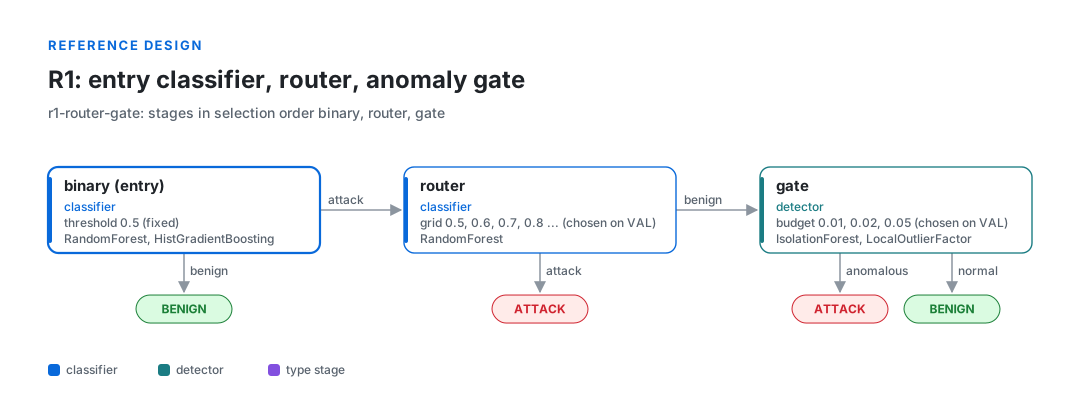
Any acyclic graph works: stages can re-check, clear alarms, name attack types, or feed their scores to later stages. Any model can sit in a stage: scikit-learn, XGBoost, LightGBM, PyOD, PyTorch, your own class, or scores from a model trained elsewhere.
2. It splits the data per seed and locks TEST away.
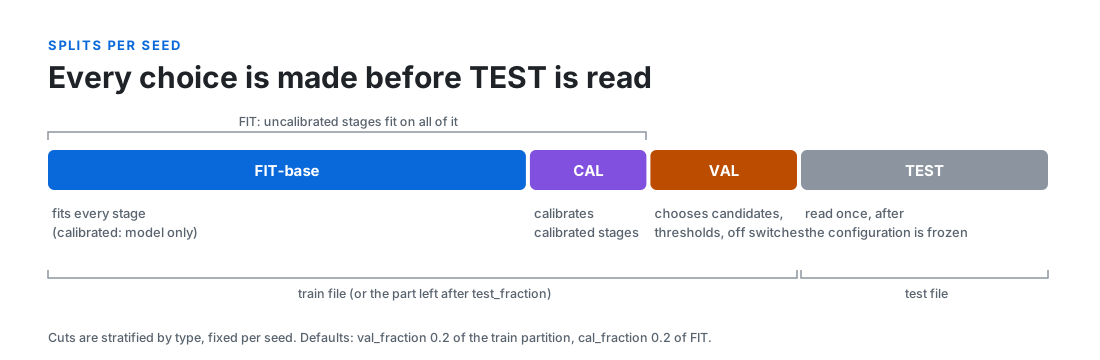
3. It makes every choice on VAL, one stage at a time: which candidate model, which threshold, and whether the stage stays on at all. Switching a stage off is always an option, and ties go to off.
4. It reads TEST once, for the frozen cascade and for controls built from the same fitted first stage, over several seeds.
What you learn
Every report answers three questions. The figures below are one seed of the design above on the
synthetic example data (idslab example).
Does the cascade beat its first stage alone? Here VAL said the extra stages help; TEST says they cost 0.005. The report gives the difference with paired bootstrap intervals and the spread over seeds.
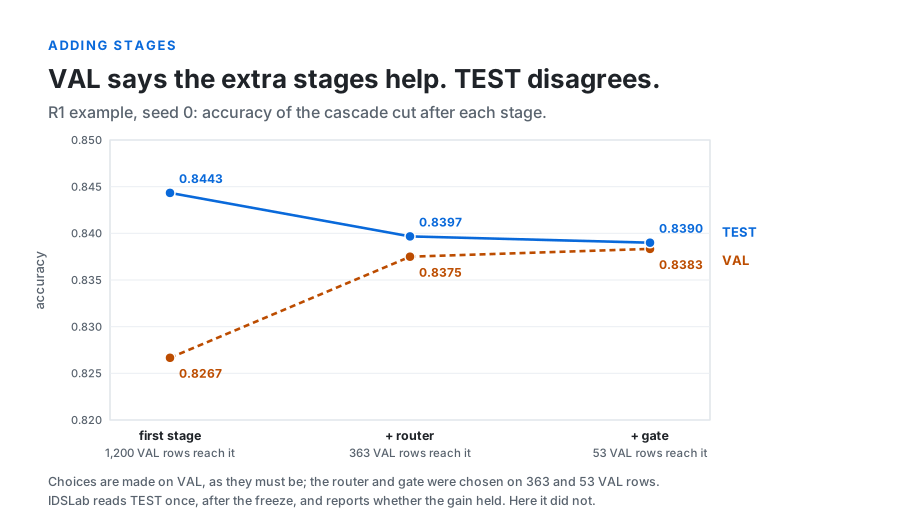
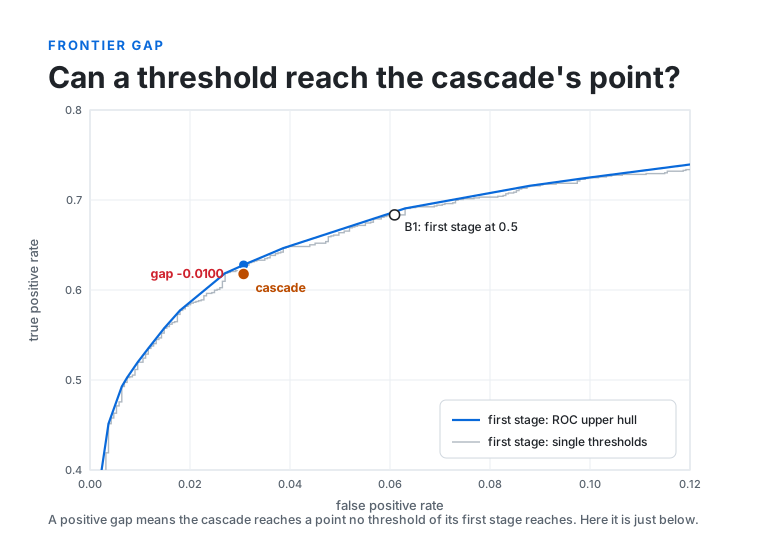
Could a threshold do the same? The frontier gap compares the cascade's detection rate with the best the first stage reaches at the same false alarm rate by moving its threshold. A positive gap means the stages reach a point no threshold can; here the cascade sits just below the first stage's curve.
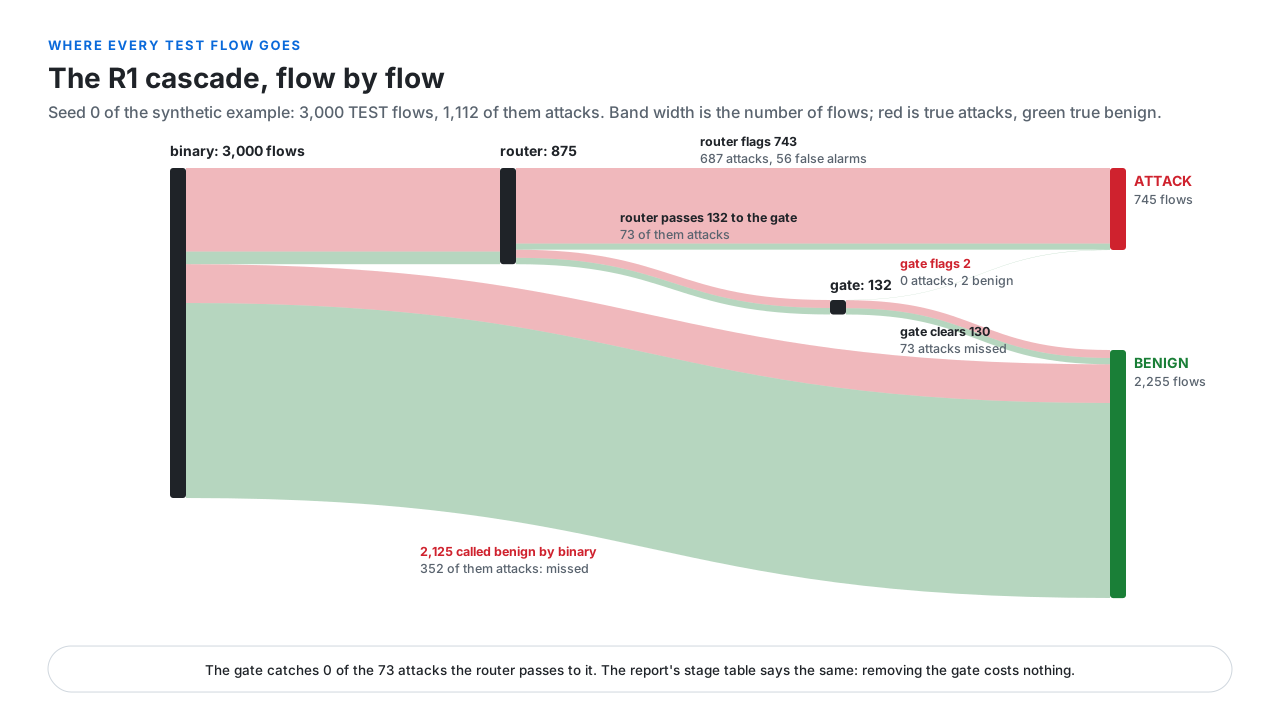
What does each stage do? Every flow's path is recorded. Here the router passes 73 attacks to the gate, and the gate catches none of them; switching the gate off costs nothing, and the report's stage table says so.
The same run also gives the configuration chosen in every seed, the full selection trace, recall on attack families held out of training, and per-type results when the design names attack types.
Quickstart
IDSLab is on PyPI and needs Python 3.10 or newer. Make a folder for it, open a terminal there, and run the lines below. INSTALL.md has step-by-step guides for Windows, macOS and GNU/Linux.
GNU/Linux and macOS
python3 -m venv .venv && .venv/bin/pip install idslab
.venv/bin/idslab example demo                                  # creates demo/: data and three designs
.venv/bin/idslab run demo/r1_router_gate.yaml --out demo/runs  # fit, choose on VAL, report on TEST
.venv/bin/idslab dashboard --workspace demo --open             # optional web UI
Windows (PowerShell): the programs are in .venv\Scripts, and PowerShell needs the leading .\
py -3.12 -m venv .venv; .\.venv\Scripts\pip install idslab
.\.venv\Scripts\idslab example demo                      # creates the demo folder the dashboard opens
.\.venv\Scripts\idslab run demo\r1_router_gate.yaml --out demo\runs
.\.venv\Scripts\idslab dashboard --workspace demo --open   # keep the window open; Ctrl+C stops it
The result is demo/runs/r1-router-gate/report.html, or the same in the dashboard:
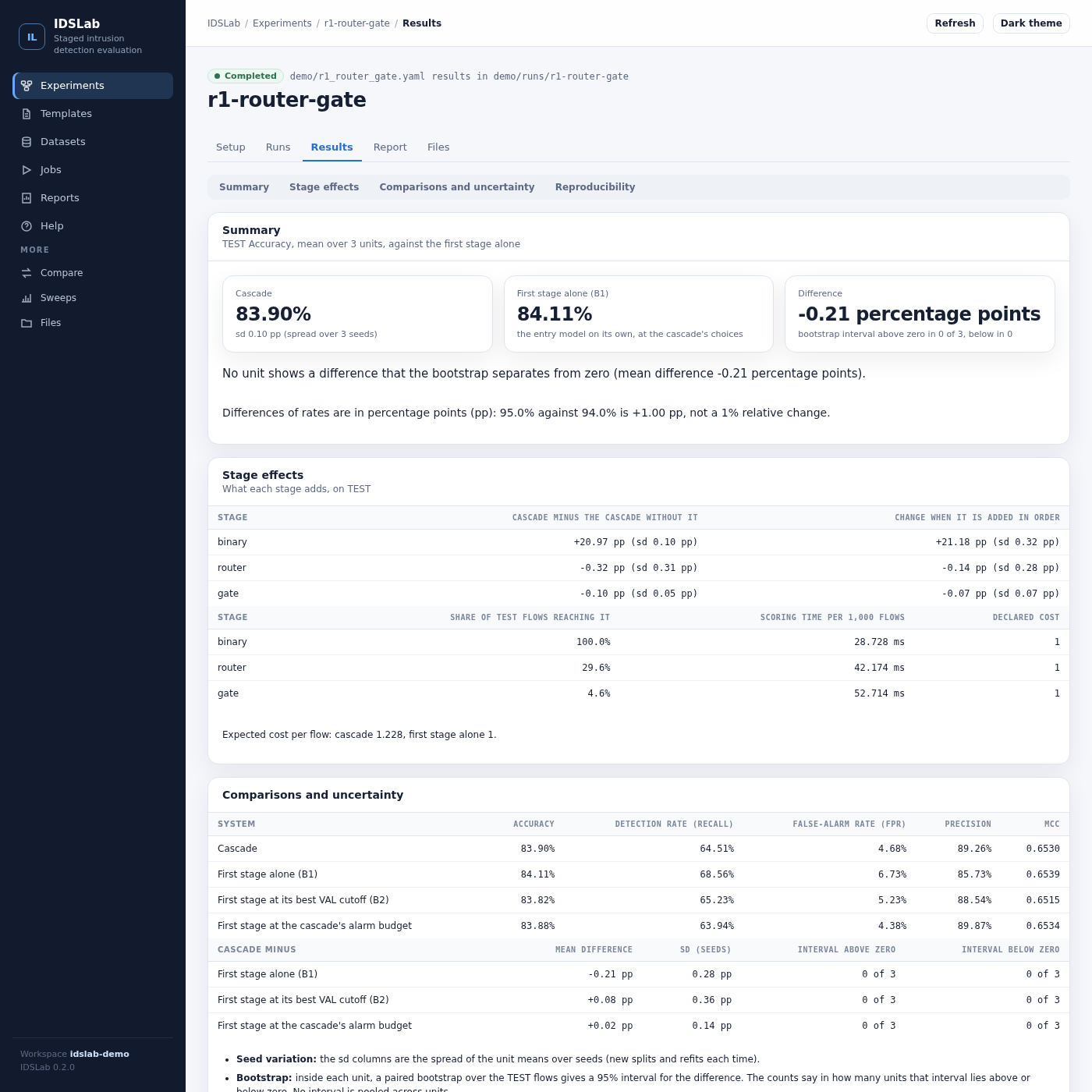
Step-by-step Windows setup, optional model libraries and troubleshooting: INSTALL.md.
Documentation
| Guide | What it covers |
|---|---|
| Getting started | a first run on the synthetic data, reading the report, moving to your own data |
| Example designs | the three reference cascades with diagrams, a custom model adapter, an outside score job |
| Config reference | every key of a config file, with defaults |
| Protocol and controls | splits, greedy selection on VAL, the controls and what each reported number means |
| Models in stages | score contracts, pipelines and search, PyTorch, your own adapter, scores from models trained elsewhere |
| Outputs | the report pages and every file a run writes |
| Comparing designs and sweeps | two designs on the same flows, paired per seed; one base config with many variants |
| Command line | validate, run, report, export-splits, example, compare, sweep, dashboard |
| Dashboard | the local web UI: pages, jobs, security (source reference) |
| Architecture | what happens during a run, the modules, and where to extend |
| Known limitations | what the numbers do and do not show |
| Design notes | the reasoning behind each protocol rule |
| Install guide | platform setup, extras, tests and checks |
| Changelog | what changed in each version |
| Project site | the project's overview page |
Versions
Every release, with its notes, is on the Releases page and in the changelog; the PyPI badge above shows the newest. The main steps so far:
v0.3.0: the dashboard redesigned around experiments: a guided setup (data, cascade, evaluation, review and run) sharing one draft with the YAML view, templates, datasets, jobs with real progress, a results page that reads the cascade against the first stage with the per-unit bootstrap, and reports. Clear messages for a missing workspace folder. Results are unchanged; runs from 0.2.0 rerun once.v0.2.0: visual pipeline builder; cost objectives and stage cost;greedy_fixedselection; plugins;idslab comparewith paired per-seed differences andidslab sweep; fixes for chained score dependencies and external-score freshness. Runs from 0.1.0 rerun.v0.1.0: first public release. Any acyclic cascade of classifier, type and detector stages; greedy selection on VAL with an off option; first-stage controls, frontier gap and paired bootstrap; held-out family and natural novelty modes; external scores with provenance checks; Markdown, JSON and HTML reports; the web dashboard.
Citing
If you use IDSLab in published work, please cite the version you used. Every release is archived on Zenodo with its own DOI: 10.5281/zenodo.23435536 opens the latest release, and its list of versions leads to each one's DOI and a ready-made citation. CITATION.cff holds the author and that DOI, and GitHub shows them under "Cite this repository".
License
AGPL-3.0-or-later. See LICENSE.
1 maintainer

Metadata
1 maintainer
Release files for idslab 0.3.1
For a detailed explanation of source distributions (sdists) and built distributions (wheels), please see the package formats documentation.
Source distribution (sdist)
| File | Size | Uploaded | |
|---|---|---|---|
| idslab-0.3.1.tar.gz | 1.0 MB | Details |
Built distribution (wheel)
| File | Interpreter | ABI | Platform | Reset |
|---|---|---|---|---|
| idslab-0.3.1-py3-none-any.whl | Python 3 | none | any | Details |
Total release size: 1.2 MB
Release files / idslab-0.3.1.tar.gz
| Download URL | idslab-0.3.1.tar.gz |
|---|---|
| Size | 1.0 MB |
| Tags | Source |
|
SHA-256 checksum How to use checksums |
92a12af6d1f85da6faa89a4054bbb60821742ca4ae1457ed2a7a07b51be2bb2f
|
|
BLAKE2b-256 checksum How to use checksums |
0db39625d25b325314fb65064f7dda6bfba47776918b4a8aa787b6fd13f08281
|
| Upload date | |
|
Uploaded using Trusted Publishing? What is trusted publishing? |
Yes |
| Uploaded via |
twine/7.0.0 CPython/3.13.14
|
Provenance
Provenance describes where a file came from. On PyPI, provenance is shared via attestations, which provide a verifiable record of the build or publishing details. View details, limitations and caveats.


PyPI Publish Attestation
PyPI verified that this artifact, at this checksum, originated from the publisher listed below.
Signed by GitHub Actions, verified by PyPI on Oct 17, 2026.
Transparency logRelease files / idslab-0.3.1-py3-none-any.whl
| Download URL | idslab-0.3.1-py3-none-any.whl |
|---|---|
| Size | 214.8 kB |
| Tags | Python 3 |
|
SHA-256 checksum How to use checksums |
b65cea8626680c1908150eca760643eb8304cbb6a8f96b4e6506ab44479620fe
|
|
BLAKE2b-256 checksum How to use checksums |
5880a5fbf041e7a18bd11c87c98a78a356a5bc5800f8768e147dc4d85b9c6ccb
|
| Upload date | |
|
Uploaded using Trusted Publishing? What is trusted publishing? |
Yes |
| Uploaded via |
twine/7.0.0 CPython/3.13.14
|
Provenance
Provenance describes where a file came from. On PyPI, provenance is shared via attestations, which provide a verifiable record of the build or publishing details. View details, limitations and caveats.
PyPI Publish Attestation
PyPI verified that this artifact, at this checksum, originated from the publisher listed below.
Signed by GitHub Actions, verified by PyPI on Oct 17, 2026.
Transparency log













